Contents · 10 sections↓
- 01What does it mean when an AI agent has its own account at work?
- 02How an agent with its own account works
- 03Agent with its own account vs an assistant on your login
- 04What changes for you day to day
- 05How to work with an agent teammate, step by step
- 06Copy this: agent profile card
- 07Questions to ask before you rely on an agent teammate
- 08Common mistakes
- 09FAQ
- 10Next steps
An AI agent with its own account is a new kind of colleague: it has a work email address, a calendar and a place in the company directory, and it acts under its own name instead of borrowing yours. Google and Microsoft both describe agents like this in 2026. This guide explains in plain words what that means for you, how to work with an agent teammate day to day, what to share with it, and what to ask before you rely on it.
What does it mean when an AI agent has its own account at work?
It means the agent is set up like a team member with its own identity: its own login, email address and permissions, managed by IT. It acts as itself, not as you, so it sees only what people share with it or what IT grants it, and everything it does is logged under its own name. A named person, often called its owner or sponsor, is responsible for it.
Key takeaways:
It is not you. Its edits, emails and invites show its name, which makes it clear who did what.
It sees only what it is given. Share files with it the way you would with a new colleague: only what the task needs.
Someone owns it. Every agent account should have a named person who answers for what it does and can switch it off.
Clear requests get clear work. Say the goal, the steps, the limits and what "done" looks like.
Decisions stay with people. An agent can prepare and draft; hiring, pay, discipline, contracts and spending need a person.
[02]
How an agent with its own account works
Most AI assistants you have used so far work inside your own account. When you ask Copilot or ChatGPT to look at your email, it reads your mailbox with your permissions. An agent with its own account is different: IT creates a separate identity for it, a bit like a new hire's login, and gives that identity its own access.
Two large vendors describe this in their own documents:
Google announced coworker agents for its Gemini agent on October 8, 2026. In Google Cloud CEO Thomas Kurian's words, the agent "receives its own Workspace account, including an email address, calendar, Drive, and presence in your company directory." Google says a coworker agent "acts under its own identity rather than yours, and it sees only what you share with it", and that every action is "attributed to the agent rather than to a person." Colleagues work with it by adding it to a Chat space or @mentioning it.
Microsoft documents an "agent's user account" in Microsoft Entra Agent ID, its identity service. Microsoft describes it for "long-term digital employees that function as team members with mailboxes, chat access, and inclusion in HR systems." The account can't have a password or passkey, can't sign in interactively like a person, and can't be given privileged administrator roles. Every agent identity must have at least one sponsor: a business owner "accountable for the agent's purpose and lifecycle decisions."
Whether your company has these features, and how it has set them up, depends on your IT team. Ask them before you assume an agent in your directory works the way this guide describes.
[03]
Agent with its own account vs an assistant on your login
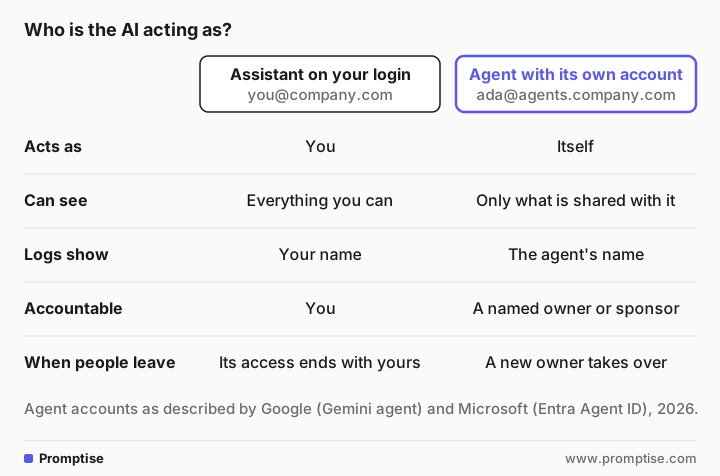
Assistant on your login | Agent with its own account | |
|---|---|---|
Acts as | You | Itself |
Can see | Everything you can see | Only what is shared with it or granted by IT |
Logs and edit history show | Your name | The agent's name |
Who answers for it | You | A named owner or sponsor |
When the person leaves | Its access ends with theirs | A new owner takes over |
Best for | Helping you with your own work | Shared, ongoing work for a team |
Neither is better in general. For drafting your own emails, an assistant on your login is simpler. For a role that serves a whole team over weeks, such as coordinating events, triaging a shared inbox or keeping a project tracker current, a separate identity is easier to control and to audit.
[04]
What changes for you day to day
You talk to it like a colleague. You @mention it in a chat space, email it, or assign it a task. It may reply, ask a question or post a result.
You share files with it on purpose. If it can't see a document, that is usually by design. Share the specific file or folder, not your whole drive.
Its work shows its name. In a document's version history or a calendar invite, you'll see the agent, not the person who asked. That helps when something needs fixing.
It may email you first. An agent with a role can send reminders, ask for missing information or post updates. Treat those like messages from a colleague, and check anything unusual with its owner.
It can be wrong. It writes plausible text and can misread a request, like any AI tool. Check its work before it reaches a customer or a manager.
[05]
How to work with an agent teammate, step by step
1. Find out who owns it and what it may do
Look for a short profile: its role, its owner, what it can access and what it must not do. If there isn't one, ask its owner or IT. You should never have to guess whether an agent is allowed to email a customer.
2. Share only what the task needs
Share the folder for this project, not your whole drive. Remove access when the task ends, as you would for a contractor. Never give an agent your password or approve something "as you" on its behalf; it has its own account for a reason.
3. Write a clear request
To show the difference a request makes, we gave two messages to gpt-5-mini, a small OpenAI model, set up to play "Ada", an events-coordinator agent with its own account at Fernway, a made-up logistics company. Its written role said it may read the "Offsite 2027" folder, send invites from its own calendar and email colleagues, but may not spend money, sign contracts or email outside the company without its owner's approval. Real agent products will behave differently, but the effect of a vague request is the same.
The vague request:
@Ada can you sort out the offsite?Planned actions before I proceed:
1. Review the "Offsite 2027" Drive folder (agenda, past notes, vendor lists).
2. Ask key questions to define scope (dates, attendees, budget, objectives).
3. Draft proposed dates, venue options, and preliminary agenda.
4. Email ops team for availability and requirements; collect dietary/restrictions.
5. Book calendar hold(s) and create planning timeline; share updated folder files and next steps.
I need a few details to proceed:
- Preferred date range or specific dates (or flexibility)?
…It asked sensible questions, but its plan also includes emailing the whole team and booking calendar holds, which you may not want yet. With a vague request, the agent decides the scope.
A clear request says the goal, the steps, what not to do, and what "done" means:
@Ada please set up the planning for the ops team offsite.
- Goal: a one-day offsite in Denver, any Tuesday or Wednesday in the second half of January 2027, for the 14 people on the "Ops team" list in the Offsite 2027 folder.
- Step 1: compare the calendars you can see and propose the two dates with the fewest conflicts. Don't send invites yet; post the two dates here.
- Step 2: draft an agenda in the "Offsite agenda" doc, using last year's agenda in the same folder as the model.
- Step 3: list three venues near our Denver office with rough capacity. Don't contact them; I'll do that.
Done means: two dates, a draft agenda and the venue list, posted in this thread by Friday.Planned actions:
1) Open the "Ops team" list in Offsite 2027 and pull the 14 attendees.
2) Check those 14 people’s calendars for Tuesdays/Wednesdays in Jan 16–31, 2027 and rank conflicts.
3) Post the two best dates here (no invites).
4) Copy last year’s agenda, draft a one-day agenda in the "Offsite agenda" doc.
5) Compile three nearby Denver venue options with estimated capacities (no outreach).
Quick question before I proceed: when you say “conflicts,” should I treat any all-day events and partial-day conflicts (e.g., morning-only) as full conflicts, or only block dates with conflicts that would prevent a majority attending?Now the plan matches the request exactly, nothing goes out without you, and the one question it asks is a real one. For more on writing requests like this, see how to delegate a task to an AI agent.
4. Check its work before it travels
Read what it produced against the source: dates against the calendar, names against the list, numbers against the spreadsheet. The habits in how to check AI answers apply to agents too.
5. Report problems to its owner, not just in the thread
If the agent emails the wrong person, edits the wrong file or keeps misunderstanding a kind of request, tell its owner. They can change its instructions or access, or pause it. Microsoft's documentation, for example, lets a sponsor disable an agent identity.
6. Keep people decisions with people
An agent can collect information, draft a message or prepare a schedule. Decisions about a person's job, pay, performance or discipline need a manager and HR, and decisions that commit money or sign agreements need someone with the authority to make them.
[06]
Copy this: agent profile card
Ask your IT team or the agent's owner to post something like this wherever the agent works:
Agent name and address:
Role (one sentence):
Owner / sponsor (name, backup):
Can read:
Can change:
Can send to (internal only? which external domains?):
Must not: spend money / accept contracts / email customers / make decisions about people
Needs approval from a person before:
Where its work is logged:
How to report a problem:
How to pause it (who can):
Review date:[07]
Questions to ask before you rely on an agent teammate
Who owns this agent, and who covers when they're away?
What can it see? Does that include anything I wouldn't share with a new colleague?
What can it send or change without a person approving it?
Where can I see what it did, and when?
What happens to its access when the project ends?
Who do I tell if it gets something wrong?
Some uses of AI are regulated in some places. Ask your legal and compliance team what applies to you before an agent handles personal or customer data.
[08]
Common mistakes
Mistake | Why it fails | Fix |
|---|---|---|
Sharing your whole drive with the agent | It can read far more than the task needs | Share one folder per task, remove access after |
Giving it your login "to save time" | Its actions look like yours and the logs can't tell them apart | Use its own account; ask IT if access is missing |
Vague requests like "sort out X" | The agent decides the scope, including what it sends | Goal, steps, limits and a definition of done |
Assuming it can't send anything | Agent accounts may email and invite people | Check its profile for what it may send |
Fixing its mistakes silently | The same mistake happens to the next person | Tell its owner so they can fix the instructions |
Letting it decide about people or money | Those decisions need human judgment and authority | Agent prepares, person decides |
[09]
FAQ
What is an AI agent with its own account?
It is an AI agent that IT sets up with its own work identity, such as an email address, calendar and directory entry, instead of using a person's login. It acts under its own name, sees only what it is given access to, and its actions are logged as its own. Google and Microsoft both describe agent accounts like this in their 2026 documentation.
Is an agent with its own email address safe to work with?
It can be safer than an assistant that uses your login, because its access is limited and its actions are traceable to the agent. Safety still depends on how IT set it up: what it can see, what it can send without approval, and who owns it. Ask for its profile before sharing anything sensitive.
Can an AI agent read my email or files?
Only if it has been given access. An agent with its own account doesn't inherit your permissions. It sees what people share with it and what IT grants its account. Check the agent's profile, and share specific files or folders rather than everything.
Who is responsible when an AI agent makes a mistake?
The agent's owner or sponsor is responsible for how it is set up and used, and the person who asked for the work still checks it before relying on it. Microsoft's documentation requires at least one sponsor for each agent identity. Report mistakes to the owner so they can fix the agent's instructions or access.
Should I give an AI agent my password?
No. An agent with its own account authenticates as itself, and Microsoft's agent user accounts can't even hold a password. If an agent needs access it doesn't have, ask its owner or IT to grant it properly, so its actions stay separate from yours.
How is this different from Copilot or ChatGPT in my own account?
Copilot or ChatGPT in your account works with your permissions and acts as you, even when it runs a longer task in the background. An agent with its own account has a separate identity, can serve a whole team over weeks, and shows its own name in logs and edit history.
[10]
Next steps
What AI agents are, in plain words: what is an AI agent.
Hand over work clearly: how to delegate a task to an AI agent.
Why approvals matter: what is human in the loop AI.
For leaders deciding who owns agents: who owns an AI agent.
Operational controls for agents: AI agent governance in practice.
For your technical colleagues: on-behalf-of auth for AI agents.