Contents · 9 sections↓
The AI adoption gap at work is easy to see in any team: one colleague saves hours a week with AI, another tried it twice and gave up. New 2026 surveys from Gallup and PwC show the gap is real, and that it follows role, training and habit more than talent. This guide explains in plain words why some teammates get more from AI, and gives you a four-week plan to catch up, plus what team leads can do to close the gap without forcing anyone.
Why do some teammates get more from AI than others?
Some teammates get more from AI because they use it often, on tasks it is good at, with enough context and a habit of checking the result. People who use AI daily or weekly are about twice as likely to say it speeds up their work as people who use it less often. The gap mostly comes from access, practice, task fit and support, which means anyone can close it with a few weeks of deliberate practice.
Key takeaways:
The gap is about frequency, not talent. In Gallup's 2026 survey, 79% of regular users said AI helps them complete tasks faster, against 38% of people who use it less often.
Role and training shape it. Managers and college graduates use AI more, and access to training is shrinking, according to PwC.
Strong users pick their tasks. They use AI for drafts, summaries and first passes, and keep it away from the judgment calls.
They feed it context and check its work. Both habits can be learned in a few weeks.
Team leads can close the gap with shared prompts, paired practice and time to learn, not with usage targets.
[02]
What the 2026 numbers show
Three large surveys from 2026 point the same way.
Gallup (published October 6, 2026; 15,482 US employees surveyed January 26 to March 24, 2026) found that 28% of employees use AI in their job at least weekly, and 54% have never used it in their role. Use is uneven: 40% of college graduates are regular users against 17% of those without a degree, and 37% of managers against 25% of individual contributors. Some jobs barely touch it; in retail sales, manufacturing production and healthcare support, 70% to more than 80% never use AI in their role.
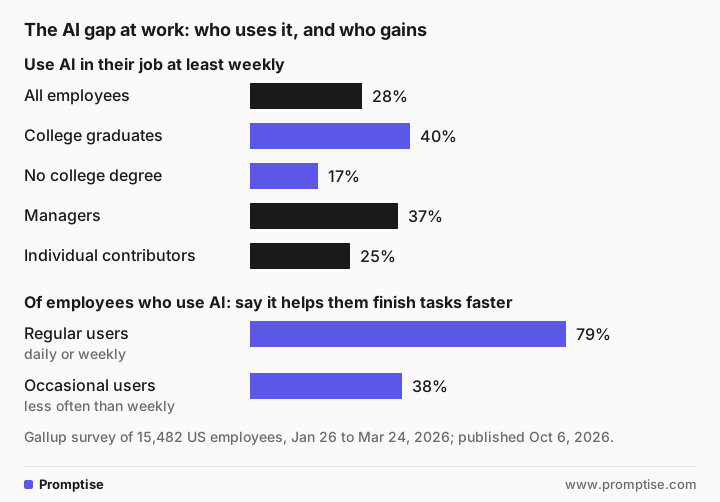
The benefits split the same way. Among people who use AI, regular users were far more likely than occasional users to say it helps them complete tasks faster (79% vs. 38%) and produce higher-quality work (59% vs. 26%).
PwC's Global Workforce Hopes and Fears Survey 2026 (published September 29, 2026; 49,364 workers in 48 countries and regions, surveyed in May and June 2026) found daily use of generative AI rose from 14% to 22% in a year. At the same time, only 51% said they can access the learning and development resources they need, down from 59%. PwC describes 56% of workers as an "engine room" that is not far along the AI learning curve.
Glean's Work AI Index, a survey of 6,000 office workers in the US, UK and Australia run from December 2025 to January 2026 by an AI vendor, compared people who report the biggest gains with the rest. The high achievers were more likely to say they write effective prompts (86% vs. 49%), know when not to use AI (89% vs. 68%), and had caught and fixed an AI error in the past month (79% vs. 64%). Treat a vendor's survey with some caution; its pattern matches the independent ones.
An older survey adds one useful detail. BCG's AI at Work 2025 study (June 26, 2025; more than 10,600 workers in 11 countries) found that people who received at least five hours of AI training were significantly more likely to become regular users, and only 36% felt adequately trained.
None of these surveys prove that AI makes any one person faster. They show who uses it, and what those people report.
[03]
The five gaps behind uneven results
When two people in the same team get very different results, it usually comes down to one of these:
Gap | What the strong user does | What the stuck user does |
|---|---|---|
Task fit | Uses AI for drafts, summaries, first passes and reformatting | Tries it on a judgment call, gets a bland answer, gives up |
Practice | Uses it a little every day | Tries it once a month and starts over each time |
Context | Pastes the facts, the audience and an example | Types one line and hopes |
Checking | Reads every number and name against the source | Trusts it fully, or not at all |
Access and support | Has an approved tool, time to try it, someone to ask | Doesn't know what's allowed, so avoids it |
Notice that only one row, access and support, is outside your control. The rest are habits.
[04]
How to catch up: a four-week plan
This plan takes about 20 minutes a day. Use the AI tool your company has approved; if you're not sure which one, ask IT first. The prompts below work in ChatGPT, Claude, Gemini and Copilot, though each words its answers differently.
Week 1: find the right tasks
The most common first prompt is too broad to help:
How can I use AI in my job?I can give much more specific, practical ideas if I know your job (role, industry, seniority). Below is a compact, actionable guide you can apply to most roles plus examples and quick next steps.
1) Quick decision: where AI helps most
- Repetitive/administrative tasks: automate with scripts, macros, RPA (e.g., invoices, scheduling).
…
3) Tools to try (start here)
- General assistants: ChatGPT, Google Bard, Microsoft Copilot
…That answer came from gpt-5-mini, a small OpenAI model. It ran to about 600 words of generic advice, covering roles from software engineer to healthcare professional, and it named Google Bard, which Google renamed Gemini in 2024. Nothing in it is about your week.
Instead, list your real weekly tasks with the time each takes, and ask for an honest rating:
I'm an operations coordinator at a 300-person logistics company. I'm new to AI tools and want to find where they actually help me. Here are the tasks I do every week, with rough time spent:

1. Weekly carrier performance summary for my manager, from a spreadsheet export (2 hours)
2. Answering the same 10-15 questions from drivers and warehouse staff by email (3 hours)
3. Writing up notes from two vendor calls (1 hour)
4. Checking invoices from carriers against our rate sheet (3 hours)
5. Building the next week's dock schedule (2 hours)

For each task, tell me:
- whether a chat AI tool can help, and how much (a lot, some, or not really)
- one prompt I can try this week, written so I can copy it
- what I must check in the AI's answer before I use it

Be honest about tasks where AI won't help much. Keep each task under 80 words.2) Repeated driver/warehouse questions by email
…
- Prompt to try (copy/paste): "Here are 12 common questions and our standard answers (paste). Create short email templates (2–3 sentences) for each, plus a single-page FAQ for intranet. Keep tone friendly and concise."
- What to check: Ensure factual correctness (hours, locations, process steps), required safety/legal phrasing, and that contact/escalation info is accurate.
…
4) Checking invoices vs rate sheet
…
- What to check: Confirm arithmetic, contract exceptions, agreed accessorials, and that AI handled currency/units and any manual approvals correctly.
…
5) Building next week's dock schedule
…
- What to check: Verify feasibility with real arrival windows, driver ETA flexibility, staff breaks/certifications, and any safety/loading constraints.The model rated the summary and the repeated emails as tasks where AI helps "a lot", and the call notes, invoice checks and dock schedule as "some". That matches what strong users report: AI is best at turning material you already have into a first draft. Pick the two "a lot" tasks for the rest of the month. For the invoice check, the warning about arithmetic matters: chat tools still make math slips, so a spreadsheet formula is often the better tool.
Week 2: give it context every time
Use the prompt structure from AI prompts for work: the task, the facts, the audience, the format, and the rules. Paste a past example you were happy with and say "match this format". If you catch yourself re-typing the same background every day, save it once; reusable context for AI at work shows how in each tool.
Week 3: check like a pro
Before you use any output, compare every number, name and date with the source, and ask the tool to list anything it assumed. The five-step method in how to check AI answers takes about two minutes. If fixing the output takes longer than doing the task yourself, that is a signal, not a failure; botsitting explains how to spot it.
Week 4: make it a habit and share it
Keep the two or three prompts that worked in a shared document, with a note on what to check. Show one to a colleague. Writing down what works is how you stop starting over each time.
[05]
For team leads: closing the gap without forcing it
The surveys suggest support matters as much as the tool. Practical steps:
Make access clear. Say which tool is approved, for which data, in one short page. People avoid what they're unsure about.
Give time to learn. BCG linked at least five hours of training to regular use. An hour a week for a month is a reasonable start.
Pair people. Put a regular user with a beginner on one real task for 30 minutes. It works better than a slide deck.
Run a 15-minute show-and-tell each week: one prompt, one result, one thing that went wrong.
Keep a shared prompt library for the team's repeated tasks, with an owner.
Don't rate people on AI use. Usage counts say nothing about the quality of anyone's work. Decisions about people, such as reviews, pay or promotion, stay with managers and HR, based on the work itself.
Remember who isn't at a desk. Gallup's numbers show front-line roles use AI far less. Ask those teams what would actually help before assuming it is a chat tool.
For a full rollout plan, see how to roll out AI to your team.
[06]
Copy this: four-week catch-up tracker
My approved AI tool:
Who I can ask for help:

Week 1: my tasks (with hours per week)
- Task / hours / AI can help: a lot, some, not really
Two tasks I'll practice on:

Week 2: context I paste every time
- Facts:
- Audience:
- Format or past example:
- Rules (what it must not invent):

Week 3: what I check before using output
- Numbers against:
- Names and dates against:
- Time to fix vs time to do it myself:

Week 4: prompts that worked (saved in):
Colleague I showed one to:
Next task to try:[07]
Common mistakes
Mistake | Why it fails | Fix |
|---|---|---|
Asking "how can I use AI?" | You get generic advice about other people's jobs | List your tasks with hours and ask for honest ratings |
Starting with your hardest, most judgment-heavy task | AI gives a bland answer and you give up | Start with drafts, summaries and reformatting |
Trying it once a month | Nothing sticks, every attempt starts from zero | 20 minutes a day for four weeks |
Trusting the first answer | Errors reach your manager or a customer | Check every number and name against the source |
Using a personal account for company data | It may break your company's rules | Use the approved tool; see is it safe to use ChatGPT at work |
Leads setting usage targets | People log in to hit the number, not to do better work | Share prompts, pair people, give time to learn |
[08]
FAQ
Why do some people get more out of AI than others?
They use it more often, on tasks it handles well, with more context and a habit of checking its output. Gallup's 2026 survey found 79% of regular AI users say it helps them complete tasks faster, against 38% of less frequent users. Training and access also differ by role, so part of the gap comes from support, not skill.
Is the AI adoption gap about age or education?
Partly education and role, less clearly age. Gallup found 40% of US college graduates use AI at work at least weekly against 17% of those without a degree, and 37% of managers against 25% of individual contributors. Much of that follows the type of work: desk jobs with lots of writing and data use AI more than front-line jobs.
How long does it take to get good at using AI at work?
Most people see real gains within a few weeks of daily practice on the right tasks. BCG's 2025 survey found that workers with at least five hours of AI training were significantly more likely to become regular users. Twenty minutes a day for four weeks is a reasonable target.
What tasks should I try AI on first?
Start with tasks where you already have the material and need a first draft: summaries of notes or spreadsheets, replies to repeated questions, reformatting, and outlines. Avoid starting with decisions about people, numbers you can't check, or work that depends on judgment you can't put into words.
My company hasn't approved an AI tool. What should I do?
Ask IT or your manager which tool, if any, is approved and for which data. Don't paste company information into a personal account while you wait. You can still practice the habits in this guide with public, non-sensitive material.
How can a manager help a team that is falling behind on AI?
Make the approved tool and its rules clear, give people protected time to learn, pair beginners with regular users on real tasks, and keep a shared library of prompts that work. Don't rank people by usage. Judge the work, not the tool.
[09]
Next steps
Write prompts that work: AI prompts for work.
Learn to check output quickly: how to check AI answers.
Know when to skip AI: when not to use AI at work.
Spot rework that eats your gains: botsitting.
Plan a team rollout: how to roll out AI to your team.
Measure whether it pays off: how to measure the ROI of AI.