Contents · 12 sections↓
- 01How do you stop re-explaining your job to AI?
- 02Why re-explaining costs so much time
- 03What is reusable context?
- 04Where each AI tool keeps reusable context
- 05A real example: the same request, with and without saved instructions
- 06How to write custom instructions for work
- 07How to use AI memory without relying on it
- 08What to keep out of reusable context
- 09Templates you can copy
- 10Common mistakes
- 11FAQ
- 12Next steps
AI custom instructions let you tell ChatGPT, Claude, Gemini or Copilot about your job once, so you stop retyping the same background in every chat. Together with projects, saved assistants and memory, they give the AI reusable context: who you are, who you write for, and the rules it should follow. This guide explains the three layers of reusable context, where each tool keeps them as of October 2026, how to write instructions that work, and what to keep out.
How do you stop re-explaining your job to AI?
Save the parts that don't change. Put facts about you and your style in the tool's custom instructions, which apply to every chat. Put the background for a recurring job, such as a client, a product or a process, in a project or saved assistant with its own instructions and files. Then your message only needs today's task and today's facts. Check what the tool's memory has saved, but don't rely on memory for rules.
Key takeaways:
Three layers: about you (every chat), this area of work (a project), this task (your message).
Write instructions as facts and rules, not as a biography. Short, concrete lines work best.
Test them on three real tasks before you trust them, and review them monthly.
Memory is the tool's notes, not yours. Look at what it saved and correct it.
Keep secrets and personal data out of anything saved, unless your company has approved it.
[02]
Why re-explaining costs so much time
Every new chat starts with an AI that knows nothing about you. So you explain your role, your customers, your tone and your rules again, or you skip it and fix the generic answer afterward. In Glean's Work AI Index 2026, a survey of 6,000 office workers in the US, UK and Australia run from December 2025 to January 2026, feeding AI context was the single largest part of what Glean calls botsitting: about 2.3 hours a week, by the workers' own estimates. The guide botsitting covers the rest of that time.
Most of that context is the same every time. That's the part you can save.
[03]
What is reusable context?
Reusable context is background you write once and the AI uses automatically. It comes in three layers:
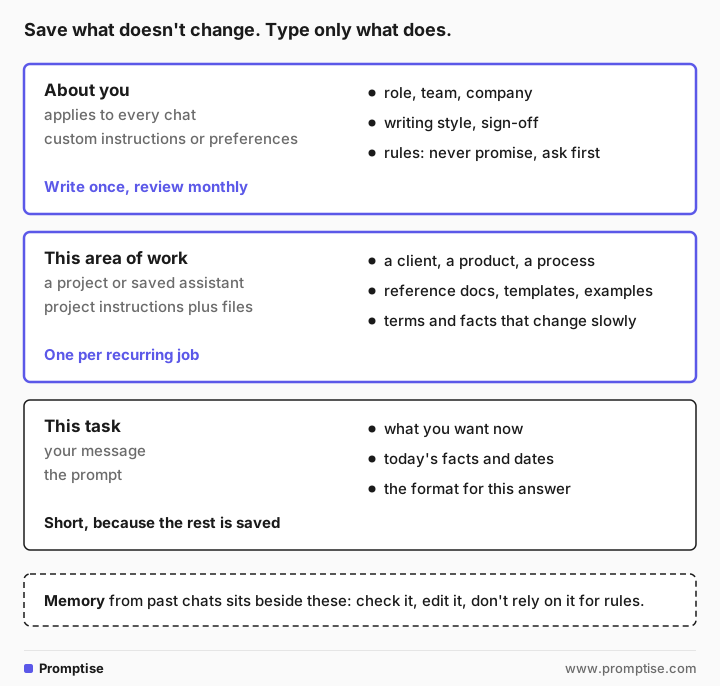
About you. Your role, team and company, how you like answers written, and rules that always apply. This goes in custom instructions (each tool names them differently).
This area of work. The background for one recurring job: a client account, a product launch, the monthly report. This goes in a project or a saved assistant, with its own instructions and reference files.
This task. What you want right now, with today's facts. This is your message, and it can be short because the rest is saved.
Beside these sits memory: details the tool saves from your chats, either because you asked it to remember them or because it decided they were useful. Memory helps, but you didn't write it, so check it.
[04]
Where each AI tool keeps reusable context
These features change often. This table reflects each vendor's help pages on October 22, 2026. Work accounts may differ, because company admins can turn features on or off.
ChatGPT | Claude | Gemini | Microsoft 365 Copilot | |
|---|---|---|---|---|
About you | Custom instructions: Settings, Personalization | Instructions for Claude: Settings, General | Your instructions for Gemini: Settings & help, Personal context | Custom instructions: Settings, Personalization |
One area of work | Projects, with project instructions and files | Projects, with project instructions and knowledge | Gems, with instructions and files | Notebooks with instructions; agents made in Agent Builder |
Memory | Saved memories and chat history, under Personalization, Memory | Memory, under Settings, Memory; each project has its own | Past chats, personal accounts only | Saved memories, on by default |
Chat without memory | Temporary chat | Incognito chat | Temporary chat | Temporary chat |
Details worth knowing, each from the vendor's own help pages:
ChatGPT custom instructions hold up to 1,500 characters on Free and Go plans and 5,000 on paid plans (OpenAI). Project instructions override your general ones inside that project, and a project can hold 5 to 40 files depending on the plan (OpenAI). OpenAI is retiring custom GPTs on December 11, 2026 and moving them to plugins; personal accounts can no longer create new ones (OpenAI).
Microsoft 365 Copilot saves memories by default, and turning memory off doesn't delete what's already saved (Microsoft). Agents built in Agent Builder take up to 8,000 characters of instructions, and Microsoft warns that anyone with access to an agent also has access to the information in its files (Microsoft Learn).
[05]
A real example: the same request, with and without saved instructions
These answers come from OpenAI's gpt-5-mini, a small model. To stand in for custom instructions, we sent the instructions below to the model through OpenAI's API as standing instructions, alongside the request. Your tool will word things differently. The company, Fernway, and the people are made up.
The request:
Draft a reply to this customer email:

"Hi, something came up and we can't do the training session on Tuesday. Can we move it to later in the week? Thanks, Leo (Harbor Grill Group)"
Without any saved context:
Hi Leo —

No problem — we can reschedule. What day/time later this week would work best for you and your team? I'm available Wednesday and Thursday afternoons, and Friday morning, but I can be flexible if those don't suit you.
…
Thanks — looking forward to it,
[Your Name]
The AI invented your availability, including a Friday you don't offer, and left your name blank. Now the same request with these custom instructions saved:
About me: I'm Maya Chen, customer success manager at Fernway, a company that makes scheduling software for restaurants. I look after 40 restaurant groups in the US Midwest.

How I work: Customers book onboarding and training sessions with me. Sessions are 45 minutes on Zoom, Tuesday to Thursday, 10 a.m. to 4 p.m. Central Time. Customers can rebook themselves at fernway.example/book.

How to write for me: Plain, warm, short. Under 120 words for emails. American English. No exclamation marks. Sign off with "Best, Maya". Use the customer's first name.

Rules: Never promise discounts, refunds, or new features. If something needs a decision I can't make, say I'll check with the team and reply within one business day. If you are missing a fact, ask me instead of guessing.Hi Leo,
No problem — we can move the session to later this week. Our onboarding sessions run Tuesday–Thursday, 10 a.m.–4 p.m. CT and are 45 minutes on Zoom. You can rebook any available slot at fernway.example/book, or tell me a preferred day and time window and I'll schedule it for you.
Would you like me to pick a specific time, or will you book directly?
Best, MayaThe facts are yours, the booking link is there, and the sign-off is right. It still isn't perfect: it calls a training session an onboarding session. That's the kind of gap you fix by adding one line to the instructions, not by editing every email.
[06]
How to write custom instructions for work
Let the AI interview you
Blank boxes are hard to fill. Ask the AI to tell you what it needs:
I want to write custom instructions so you stop asking me the same background questions at work. Interview me: ask me up to eight short questions, one list, about my role, my audience, my recurring tasks, my writing style and anything you should never do. Don't write the instructions yet.1. What is your job title and main responsibilities?
2. Who is your primary audience (role, expertise level, and goals)?
3. What are the top recurring tasks or workflows I should help with?
4. Which outputs do you produce most often (emails, reports, slide decks, code, designs, etc.)?
5. What tone and writing style do you prefer (formal, concise, friendly, technical, etc.)?
6. What formatting or structure do you want regularly (headings, bullet lists, executive summary, length limits)?
7. What assumptions or shortcuts am I allowed to make without checking with you?
8. What must I never do or say (privacy, confidentiality, forbidden actions, or tones)?Answer in short notes, then ask it to turn your answers into custom instructions under 1,500 characters, so they fit every plan.
Use four short sections
Use the structure from the example: about me, how I work, how to write for me, rules. Write facts ("Sessions are 45 minutes on Zoom") rather than wishes ("be helpful"). Each line should change an answer; if it wouldn't, cut it.
Test on three real tasks
Run three tasks you do every week. Look for anything the AI still guesses, and add a line for it. Glean's survey found that 60% of workers rerun the same prompt in another tool when the first answer is poor; a tested set of instructions in one tool is usually the better fix.
Add a project for each recurring job
For work you return to, such as one client or one monthly report, create a project (or a Gem, notebook or agent, depending on your tool). Add:
instructions specific to that job, such as the client's preferences or the report's structure;
reference files: a style guide, a template, two good past examples, a glossary;
nothing that changes daily. Paste today's numbers in your message instead.
Name projects after the job ("Harbor Grill account", "Monthly ops report"), not after a date. If you lead a team, a shared project with tested instructions and templates is one of the quickest wins when you roll out AI to your team, as long as the files in it are approved for everyone who can see them.
Review monthly
Roles, products and rules change. Put a reminder in your calendar to read your instructions and memory once a month and delete what's out of date.
[07]
How to use AI memory without relying on it
Memory is useful for small, stable facts: your name, your team, the tools you use. It is not a good place for rules, for three reasons. You don't fully control what it saves. It can be wrong or out of date; OpenAI, Google and Microsoft all tell you how to correct remembered details. And in many work accounts, it may be switched off by your company.
Practical habits:
Look at it. Each tool has a page that lists saved memories. Delete anything wrong, old or sensitive. Answers built on a wrong memory need the same checks as any other; see how to check AI answers.
Use a temporary or incognito chat for one-off questions you don't want remembered.
Keep rules in instructions, where you wrote them and can see them.
Delete properly. In ChatGPT, deleting a chat doesn't delete a memory saved from it; delete the memory too (OpenAI).
[08]
What to keep out of reusable context
Anything you save is used again and again, so mistakes repeat too. Keep these out:
Passwords, access keys and account numbers. Never.
Customer or employee personal data, unless your company has approved that tool for it. The guide is it safe to use ChatGPT at work? explains what each vendor keeps.
Confidential files in shared projects or agents. Anyone you share them with can see what's inside.
Facts that change often, such as prices, stock levels or this week's priorities. Saved context that's out of date produces confident, wrong answers.
[09]
Templates you can copy
Custom instructions (about you):
About me: [role] at [company], which [what the company does]. I work with [who: customers, team, region].

How I work: [recurring tasks]. [Tools and links people use]. [Hours, time zone, key limits].

How to write for me: [tone]. [Length limits]. [Language and spelling]. [Sign-off]. [Formatting you like or don't].

Rules: Never [promise, share, decide] … If a decision is needed, [what to say]. If a fact is missing, ask me instead of guessing.
Project instructions (one area of work):
This project is for: [the client, product or process].
Background: [three to five facts that stay true for months].
Use these files: [style guide] for tone, [template] for structure, [examples] for length.
Terms: [words to use and words to avoid].
Always check with me before: [anything about price, dates, commitments].[10]
Common mistakes
Mistake | Why it fails | Fix |
|---|---|---|
Writing a long biography | The AI weighs every line; the important ones get lost | Short facts and rules, four sections |
Vague wishes like "be concise" | Means something different every time | Give a number: "under 120 words" |
Never testing the instructions | Gaps stay hidden until a client sees them | Run three real tasks and fix what's guessed |
Trusting memory for rules | It may not save them, or may be switched off | Put rules in instructions |
Putting this week's facts in a project | They go stale and get repeated confidently | Paste changing facts in your message |
Sharing a project with sensitive files | Everyone with access can see them | Share only approved, non-sensitive material |
[11]
FAQ
What are custom instructions in ChatGPT, Claude and Gemini?
Custom instructions are standing directions that the AI applies to your chats, such as your role, your audience, your writing style and rules to follow. ChatGPT calls them custom instructions, Claude calls them Instructions for Claude, Gemini calls them your instructions for Gemini, and Microsoft 365 Copilot calls them custom instructions. You find them in each tool's personalization settings.
What's the difference between custom instructions, projects and memory?
Custom instructions apply to every chat and describe you. A project applies to one area of work and holds its own instructions and reference files. Memory is what the tool saves from your chats, sometimes on its own. You write the first two; you should check the third.
How long should custom instructions be?
As short as they can be while still changing the answers. ChatGPT allows 1,500 characters on Free and Go plans and 5,000 on paid plans, so aiming for under 1,500 keeps them portable. Four short sections, about you, how you work, how to write and rules, usually fit.
Is it safe to save work information in AI memory?
Save only what you'd be comfortable seeing in any future answer, and only in a tool your company has approved for that kind of information. Keep passwords, account numbers and personal data about customers or colleagues out. Check and clean saved memories regularly.
Why does the AI ignore my custom instructions?
Usually because an instruction is vague, conflicts with another one, or is buried in a long block. Project instructions also override your general instructions inside that project in ChatGPT. Make each rule specific, put the most important ones first, and test with a real task.
What happens to custom GPTs and Gems?
OpenAI plans to retire custom GPTs on December 11, 2026 and move them to plugins, and Google is moving Gems to skills between November 2026 and mid-2027, depending on the account type. Both vendors describe how existing ones move over. Keep a copy of your instructions in a document so you can rebuild them anywhere.
[12]
Next steps
Write better prompts for the task layer: AI prompts for work.
Brief the AI like a new colleague: how to brief an LLM.
Cut the rest of the fixing time: botsitting.
Know what you may save and paste: is it safe to use ChatGPT at work?.
Understand why AI gets facts wrong when context is missing: grounding LLM answers.
Hand bigger jobs to an agent: how to delegate a task to an AI agent at work.