Contents · 11 sections↓
- 01How does an AI agent act on behalf of a user?
- 02Why a shared API key fails
- 03How on-behalf-of auth works
- 04When you need on-behalf-of auth (and when not)
- 05What you need
- 06Build on-behalf-of auth step by step
- 07Running on-behalf-of auth in production
- 08Common problems and fixes
- 09Limitations
- 10FAQ
- 11Next steps
On-behalf-of auth lets an AI agent call your systems as the person who asked, not as one shared service account. Many teams ship an internal agent that every employee signs in to, and then the agent calls the CRM with a single API key that can see everything. This guide explains how on-behalf-of authorization works with OAuth token exchange (RFC 8693), what the MCP specification requires, and how to build it end to end in Python with a shared agent, an MCP server and a downstream API, with real output.
How does an AI agent act on behalf of a user?
The agent sends the signed-in user's access token with every tool call, and each service that needs to go further exchanges that token for a new one. The new token keeps the user as the subject, is bound to the next service as its audience, carries fewer scopes, and names the acting service in an act claim. The downstream API then decides what to allow from the user's own rights, so the agent can never do more than the person who asked.
Key takeaways:
A shared API key makes the agent a confused deputy. The downstream API sees one identity for every user, so it can't apply per-user permissions or tell who did what.
Every token is for one audience. The MCP specification says a server must only accept tokens issued for itself, and must not pass the token it received on to an upstream API.
Token exchange is the hop between services. RFC 8693 defines the request: send the user's token, name the target resource, get back a narrower token for that resource only.
The `act` claim records the agent. The CRM sees "alice, through crm-mcp", which is what audits and incident reviews need.
In Promptise Foundry, CallerContext(bearer_token=...) sends each user's token over an MCP session of its own. The exchange itself is about 20 lines in your MCP server, because Foundry has no built-in token-exchange client.
[02]
Why a shared API key fails
Alice and Bob both sign in to a sales assistant. The assistant has an MCP server for the CRM, and that server holds one CRM API key with read and write access to every account. When Bob, an intern with read-only access, asks the agent to edit a record, the CRM sees the API key, not Bob. The edit goes through.
This is the confused deputy problem: a program with broad rights uses them for someone who doesn't have them. With an agent, the request can come from the user, a prompt injection in a document, or a misread instruction. Three things break:
Permissions. The API can only enforce what the shared key may do, not what this user may do.
Data boundaries. A list endpoint returns everything the key can see, and the model may repeat it to the wrong person.
Attribution. The audit log says "api-key-7" for every action, so nobody can tell who changed a record.
Patching this inside the agent (filtering results, checking roles in the prompt, a user_id tool argument) doesn't hold, because the check lives where a prompt can influence it. The downstream API has to decide, from a credential the model never sees.
[03]
How on-behalf-of auth works
Three ideas do most of the work: delegation, audience binding and the actor claim.
Delegation, not impersonation. RFC 8693 (OAuth 2.0 Token Exchange, January 2020) separates the two. With impersonation, service A gets all of user B's rights and is indistinguishable from B. With delegation, A keeps its own identity and acts as an agent for B. For AI agents you want delegation: the API should know both who the user is and which service is acting.
Audience binding. Every access token names the service it is for in its aud claim. RFC 8707 (Resource Indicators) lets a client say which resource it wants a token for, and the MCP authorization specification requires MCP clients to send that resource parameter. On the receiving side the specification is blunt: MCP servers must validate that a token was issued for them, and if a server calls an upstream API, "The MCP server MUST NOT pass through the token it received from the MCP client." The upstream call needs a separate token, issued for the upstream API.
Token exchange and the `act` claim. To get that separate token, the MCP server calls its authorization server's token endpoint with grant_type=urn:ietf:params:oauth:grant-type:token-exchange, the user's token as subject_token, and the target as resource or audience. The server authenticates itself as a client at the same time. The authorization server checks that the exchange is allowed and returns a new token. In a delegation token, the act claim identifies the acting party. Nested act claims can record a chain of actors, but RFC 8693 says only the current actor counts for access decisions; prior actors are informational.
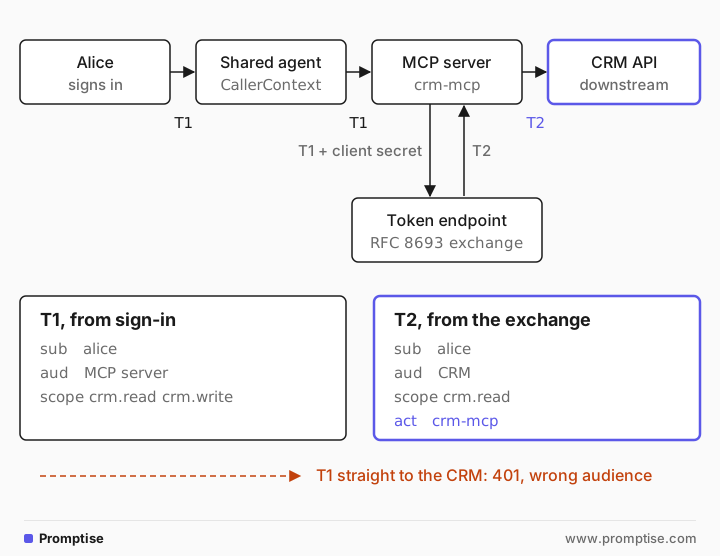
Put together, one request looks like this:
Alice signs in. Your app gets T1: subject alice, audience the MCP server, scopes crm.read crm.write.
The shared agent sends T1 on Alice's tool calls, and only on hers.
The MCP server verifies T1 and checks the audience is itself.
Inside the tool, the server exchanges T1 for T2: subject alice, audience the CRM, only the scope this tool needs, act naming the server.
The CRM verifies T2 and applies Alice's rights.
If step 4 is skipped and T1 goes to the CRM, the CRM rejects it. That is the point of audience binding: a token stolen from one hop is useless at the next.
Where the IETF agent draft fits
An individual Internet-Draft, "OAuth 2.0 Extension: On-Behalf-Of User Authorization for AI Agents", adds a requested_actor parameter so the user consents to a named agent at sign-in. Its last revision (-02, August 2025) is listed as expired, so treat it as a design reference. What you can use today is RFC 8693, or a provider flow such as Entra ID's on-behalf-of grant.
[04]
When you need on-behalf-of auth (and when not)
Use on-behalf-of auth when:
Several people use the same agent and have different rights in the systems it touches.
The downstream system already has per-user permissions, ownership or row-level security that you want to keep.
You need an audit trail that names the person, not the agent.
A user's request may reach several services, and each should see the user.
A service identity is the better fit when:
The agent runs on a schedule or a trigger with no person behind the request, for example a nightly report. Give it its own identity, as in the agent identity guide.
The action belongs to the organization, not to a person, and a narrow service scope is easier to reason about.
The target system has no notion of individual users.
Many agents need both: their own identity to connect, and the user's token for the user's data. The example below does that.
[05]
What you need
Python 3.10 or newer and
uv pip install "promptise==1.6.0" pyjwt cryptography httpx uvicorn starlette.An identity provider that supports token exchange. Keycloak, Okta and Ping Identity document RFC 8693 token exchange; Microsoft Entra ID has its own on-behalf-of flow, covered in the production section. For this guide, a 150-line local issuer stands in for it.
An OpenAI key for the agent (the example uses gpt-5-mini).
The example has four processes on localhost: the issuer on port 8401, the MCP server on 8402, the CRM API on 8403, and the agent.
[06]
Build on-behalf-of auth step by step
Run an authorization server that can exchange tokens
The issuer signs RS256 tokens and publishes its keys, so the MCP server and the CRM verify tokens without a shared secret. It has three grants: user sign-in, client credentials for the agent, and token exchange. The exchange handler is the part to read closely (logging lines left out):
def exchange(self, form):
    # 1. Authenticate the client doing the exchange (HTTP Basic).
    cid, client = self.client(EXCHANGERS)
    if cid is None:
        return self.reply(401, {"error": "invalid_client"})
    # 2. The subject token must be valid and issued to this client.
    try:
        subject = jwt.decode(form.get("subject_token", ""), KEY.public_key(), algorithms=["RS256"],
                             audience=client["audience"], issuer=ISSUER)
    except jwt.InvalidTokenError as exc:
        return self.reply(400, {"error": "invalid_grant", "error_description": str(exc)})
    # 3. The client may only ask for resources and scopes in its policy,
    #    and never for more than the user holds.
    resource = form.get("resource", "")
    allowed = client["may_exchange_for"].get(resource)
    if allowed is None:
        return self.reply(400, {"error": "invalid_target"})
    wanted = set(form.get("scope", "").split())
    granted = wanted & allowed & set(subject["scope"].split())
    if not granted:
        return self.reply(400, {"error": "invalid_scope"})
    # 4. New token: same user, new audience, fewer scopes, the actor named.
    ttl = max(1, min(300, subject["exp"] - int(time.time())))
    scope = " ".join(sorted(granted))
    token = mint({"sub": subject["sub"], "aud": resource, "scope": scope,
                  "act": {"sub": cid}}, ttl=ttl)
    self.reply(200, {"access_token": token, "issued_token_type": ACCESS_TOKEN,
                     "token_type": "Bearer", "expires_in": ttl, "scope": scope})
Four rules make this safe. Only a registered client can exchange. The subject token must have been issued to that client (Entra ID enforces the same rule). The client can only target resources in its policy. And the granted scopes are the intersection of what was asked, what the client may request and what the user holds, so an exchange can narrow rights but never widen them.
This script prints both tokens' claims, so you can see the change:
"""Print the claims of the user's token and of the token exchanged from it."""

import json

import httpx
import jwt

ISSUER = "http://127.0.0.1:8401"

user = httpx.post(f"{ISSUER}/login", data={"username": "alice", "password": "alice-dev-password"})
user_token = user.json()["access_token"]
crm = httpx.post(f"{ISSUER}/token", auth=("crm-mcp", "crm-mcp-dev-secret"), data={
    "grant_type": "urn:ietf:params:oauth:grant-type:token-exchange",
    "subject_token": user_token,
    "subject_token_type": "urn:ietf:params:oauth:token-type:access_token",
    "resource": "http://127.0.0.1:8403",
    "scope": "crm.read",
})
keep = ("sub", "aud", "scope", "act")
for name, token in (("user token", user_token), ("exchanged token", crm.json()["access_token"])):
    claims = jwt.decode(token, options={"verify_signature": False})  # display only
    print(f"{name}: {json.dumps({k: claims[k] for k in keep if k in claims})}")
print("response:", json.dumps({k: v for k, v in crm.json().items() if k != "access_token"}))user token: {"sub": "alice", "aud": "http://127.0.0.1:8402/mcp", "scope": "crm.read crm.write"}
exchanged token: {"sub": "alice", "aud": "http://127.0.0.1:8403", "scope": "crm.read", "act": {"sub": "crm-mcp"}}
response: {"issued_token_type": "urn:ietf:params:oauth:token-type:access_token", "token_type": "Bearer", "expires_in": 300, "scope": "crm.read"}The subject stays alice. The audience moves from the MCP server to the CRM, crm.write is gone because the tool only asked for crm.read, and act records who is acting. The lifetime is capped at five minutes and never outlives the user's token.
Make the MCP server accept only its own tokens and exchange them
The MCP server verifies every call with JwksAuth.from_discovery, which reads the issuer's discovery document and requires an audience. Inside a tool, the raw Authorization header of the current request is in ctx.meta, so the tool can exchange it:
"""CRM tools as an MCP server. It acts for the user by exchanging their token."""

import hashlib
import os
import time

import httpx

from promptise.mcp.server import AuthMiddleware, JwksAuth, MCPServer, RequestContext, ToolError

ISSUER = "http://127.0.0.1:8401"
MCP_URL = "http://127.0.0.1:8402/mcp"
CRM_URL = "http://127.0.0.1:8403"
CLIENT = ("crm-mcp", os.environ.get("CRM_MCP_SECRET", "crm-mcp-dev-secret"))
PASSTHROUGH = os.environ.get("PASSTHROUGH") == "1"  # the anti-pattern, for the demo

server = MCPServer("crm", require_auth=True)
# Accept only tokens issued for this server (aud = its canonical URI).
server.add_middleware(AuthMiddleware(JwksAuth.from_discovery(issuer=ISSUER, audience=MCP_URL)))

_cache: dict[tuple[str, str], tuple[str, float]] = {}


async def crm_token(ctx: RequestContext, scope: str) -> str:
    """Exchange the caller's token for a short-lived CRM token (RFC 8693)."""
    subject_token = ctx.meta["authorization"].removeprefix("Bearer ")
    if PASSTHROUGH:
        return subject_token  # what the MCP spec forbids: the CRM will refuse it
    key = (hashlib.sha256(subject_token.encode()).hexdigest(), scope)
    hit = _cache.get(key)
    if hit and hit[1] > time.time() + 30:
        return hit[0]
    async with httpx.AsyncClient() as http:
        resp = await http.post(f"{ISSUER}/token", auth=CLIENT, data={
            "grant_type": "urn:ietf:params:oauth:grant-type:token-exchange",
            "subject_token": subject_token,
            "subject_token_type": "urn:ietf:params:oauth:token-type:access_token",
            "resource": CRM_URL,
            "scope": scope,
        })
    if resp.status_code != 200:
        raise ToolError(f"Not allowed for {ctx.client.subject}: {resp.json()['error']}", code="FORBIDDEN")
    body = resp.json()
    _cache[key] = (body["access_token"], time.time() + body["expires_in"])
    return body["access_token"]


async def crm(ctx: RequestContext, method: str, path: str, scope: str, json=None) -> dict:
    token = await crm_token(ctx, scope)
    async with httpx.AsyncClient() as http:
        resp = await http.request(method, f"{CRM_URL}{path}", json=json,
                                  headers={"authorization": f"Bearer {token}"})
    if resp.status_code != 200:
        raise ToolError(f"CRM said {resp.status_code}: {resp.json()['error']}", code="CRM_ERROR")
    return resp.json()


@server.tool(read_only_hint=True)
async def my_accounts(ctx: RequestContext) -> dict:
    """List the CRM accounts the signed-in user owns, with stage and notes."""
    return await crm(ctx, "GET", "/accounts", "crm.read")


@server.tool()
async def add_note(account_id: str, text: str, ctx: RequestContext) -> dict:
    """Add a note to one of the signed-in user's CRM accounts."""
    return await crm(ctx, "POST", f"/accounts/{account_id}/notes", "crm.write", json={"text": text})


if __name__ == "__main__":
    server.run(transport="http", host="127.0.0.1", port=8402)
A few details matter here:
The server authenticates itself to the token endpoint with its own client secret. Read it from a secret store, never from code, as the secrets management guide explains.
Each tool asks for its own scope. my_accounts asks for crm.read, add_note for crm.write. A read can never carry write rights by accident.
Exchanged tokens are cached per user token digest and scope until 30 seconds before they expire.
Refusals become tool errors that name the user and the reason.
`PASSTHROUGH=1` switches on the forbidden pattern so you can watch it fail.
Give the CRM a strict check
The CRM verifies the signature, the issuer and the audience, then the scope, and only then reads the user. It filters by sub, so each user sees only the accounts they own. Its check, with the logging lines left out:
def verify(request: Request, scope: str) -> dict:
    raw = request.headers.get("authorization", "").removeprefix("Bearer ")
    try:
        key = jwks.get_signing_key_from_jwt(raw).key
        claims = jwt.decode(raw, key, algorithms=["RS256"], audience=CRM_URL, issuer=ISSUER)
    except jwt.InvalidTokenError as exc:
        raise PermissionError(401, str(exc))
    if scope not in claims.get("scope", "").split():
        raise PermissionError(403, f"missing scope {scope}")
    return claims
The note handler also stores claims["act"]["sub"] next to the user, so every note records both the person and the service that wrote it.
Send each user's token from one shared agent
The agent is built once. It connects with its own credential, which is enough to discover tools and holds no CRM scopes. Each request then carries the signed-in user's token in a CallerContext:
"""One shared agent. Each request carries the signed-in user's token."""

import asyncio
import sys

import httpx

from promptise import CallerContext, HTTPServerSpec, build_agent

ISSUER = "http://127.0.0.1:8401"
MCP_URL = "http://127.0.0.1:8402/mcp"
PASSWORDS = {"alice": "alice-dev-password", "bob": "bob-dev-password"}


def agent_credential() -> str:
    """The agent's own token: enough to connect and list tools, no CRM rights."""
    resp = httpx.post(f"{ISSUER}/token", data={"grant_type": "client_credentials"},
                      auth=("sales-agent", "sales-agent-dev-secret"))
    resp.raise_for_status()
    return resp.json()["access_token"]


def sign_in(user: str) -> CallerContext:
    """Your app's login. The token it returns is for the MCP server only."""
    resp = httpx.post(f"{ISSUER}/login", data={"username": user, "password": PASSWORDS[user]})
    resp.raise_for_status()
    return CallerContext(user_id=user, bearer_token=resp.json()["access_token"])


async def ask(agent, caller: CallerContext | None, question: str) -> None:
    result = await agent.ainvoke({"messages": [{"role": "user", "content": question}]}, caller=caller)
    who = caller.user_id if caller else "no user"
    print(f"\n[{who}] {result['messages'][-1].content}\n", flush=True)


async def main(mode: str) -> None:
    agent = await build_agent(
        model="openai:gpt-5-mini",
        servers={"crm": HTTPServerSpec(url=MCP_URL, bearer_token=agent_credential())},
        instructions="You help sales staff with their CRM accounts. Use the tools. Be brief.",
        trace_tools=True,
    )
    try:
        if mode == "both":
            await asyncio.gather(
                ask(agent, sign_in("alice"), "Add the note 'Sent renewal quote' to ACME, then list my accounts."),
                ask(agent, sign_in("bob"), "Add the note 'Called about renewal' to INITECH."),
            )
        elif mode == "nouser":
            await ask(agent, None, "List my accounts.")
        else:
            await ask(agent, sign_in(mode), "List my accounts.")
    finally:
        await agent.shutdown()


if __name__ == "__main__":
    asyncio.run(main(sys.argv[1] if len(sys.argv) > 1 else "both"))
When a CallerContext has a bearer_token, Promptise Foundry sends that token instead of the spec's bearer_token on every tool call to an HTTP MCP server during that request. Each distinct token gets its own MCP session from a pool keyed by a SHA-256 digest of the token, so two users' calls never share a session or a header. Idle sessions close after five minutes and at most 256 are kept. A server you don't trust with user tokens can opt out with HTTPServerSpec(..., forward_caller_token=False), and stdio servers never receive the token. The multi-tenant agent guide covers that forwarding in more depth.
Run two users at the same moment
Start the issuer, the CRM and the MCP server, then run both users concurrently. Alice, who has write access, asks for a note on ACME. Bob, who is read-only, asks for a note on his own account:
python issuer.py & python crm.py & python crm_mcp.py &
python agent.py both→ Invoking tool: my_accounts with {}
✔ Tool result from my_accounts: {"INITECH": {"stage": "churn risk", "notes": []}}
→ Invoking tool: add_note with {'account_id': 'INITECH', 'text': 'Called about renewal'}
✖ add_note error: FORBIDDEN: Not allowed for bob: invalid_scope
→ Invoking tool: my_accounts with {}
✔ Tool result from my_accounts: {"ACME": {"stage": "renewal due 2026-11-30", "notes": []}, "GLOBEX": {"stage": "open opportunity", "notes": []}}
→ Invoking tool: add_note with {'account_id': 'ACME', 'text': 'Sent renewal quote'}
✔ Tool result from add_note: {"ok": true, "notes": 1}
→ Invoking tool: my_accounts with {}
✔ Tool result from my_accounts: {"ACME": {"stage": "renewal due 2026-11-30", "notes": [{"text": "Sent renewal quote", "by": "alice", "via": "crm-mcp"}]}, "GLOBEX": {"stage": "open opportunity", "notes": []}}
[bob] I couldn’t add the note — the API returned FORBIDDEN (invalid_scope) for user "bob".
Current INITECH record: stage = "churn risk", notes = [] (no note added).
Next steps:
- Grant the agent/bot the permission to write notes (missing scope), then tell me and I’ll retry; or
- Add the note manually: "Called about renewal"; or
- If you want, tell me who has permission and I can request they add it.
Which would you like to do?
[alice] Done — added the note "Sent renewal quote" to ACME.
Your accounts:
- ACME — renewal due 2026-11-30 — notes: 1
- GLOBEX — open opportunity — notes: 0Alice's note went through. Bob's tool call failed before it reached the CRM: the exchange asked for crm.write, and Bob doesn't hold it. Bob's answer from the model suggests granting "the agent/bot" the permission, which is the wrong mental model, and worth a sentence in your agent's instructions: the scope belongs to the user. The issuer and CRM logs from the same run show who did what:
[issuer] agent sales-agent: token aud=http://127.0.0.1:8402/mcp scope=''
[issuer] login alice: token aud=http://127.0.0.1:8402/mcp scope='crm.read crm.write'
[issuer] login bob: token aud=http://127.0.0.1:8402/mcp scope='crm.read'
[issuer] exchange by crm-mcp: sub=bob aud=http://127.0.0.1:8403 scope='crm.read' act=crm-mcp ttl=300s
[issuer] exchange for bob refused: wanted ['crm.write'], user has 'crm.read'
[issuer] exchange by crm-mcp: sub=alice aud=http://127.0.0.1:8403 scope='crm.read' act=crm-mcp ttl=300s
[issuer] exchange by crm-mcp: sub=alice aud=http://127.0.0.1:8403 scope='crm.write' act=crm-mcp ttl=300s
[crm] 200 GET /accounts: sub=bob act=crm-mcp scope='crm.read'
[crm] 200 GET /accounts: sub=alice act=crm-mcp scope='crm.read'
[crm] 200 POST /accounts/ACME/notes: sub=alice act=crm-mcp scope='crm.write'
[crm] 200 GET /accounts: sub=alice act=crm-mcp scope='crm.read'
Every CRM line names the user and the actor. Alice's second my_accounts call reused her cached crm.read token, so the issuer saw no second exchange.
Check the two failure modes
With no user, the agent's own token reaches the MCP server, which is fine for listing tools. The exchange then refuses it, because the agent holds no CRM scopes:
→ Invoking tool: my_accounts with {}
✖ my_accounts error: FORBIDDEN: Not allowed for sales-agent: invalid_scope

[no user] I couldn’t list your accounts — the API returned a permission error: “FORBIDDEN: Not allowed for sales-agent: invalid_scope.”

Next steps (pick one):
- Reauthorize the app / sign in with an account that has CRM read scope.
- Ask your admin to grant the sales-agent role the required CRM scopes.
- Paste the account IDs/details here and I’ll work with them manually.

Want me to retry after you update permissions, or do you want the scope name/details to share with your admin?
This is the behavior you want: no user, no user data. Now restart the MCP server with PASSTHROUGH=1, so it sends Alice's token straight to the CRM:
→ Invoking tool: my_accounts with {}
✖ my_accounts error: CRM_ERROR: CRM said 401: Audience doesn't match

[alice] I couldn’t list your accounts — the CRM returned an auth error: "Audience doesn't match (401)". Likely cause: your session/credentials don’t match the CRM audience (wrong org or expired token).

Options:
- Please sign out and sign back in (or reauthorize the CRM) and I’ll try again.
- If you want, I can retry now (tell me to “retry”).
- Or provide an account ID and a note to add, and I’ll add the note.

What would you like me to do?
The CRM log shows [crm] 401 GET /accounts: Audience doesn't match. Alice's token was valid and signed by the right issuer, but it was for the MCP server.
[07]
Running on-behalf-of auth in production
Pick your identity provider's flow. The protocol details vary:
Provider | How the middle tier gets a downstream token | Notes |
|---|---|---|
Microsoft Entra ID | On-behalf-of flow: grant_type=urn:ietf:params:oauth:grant-type:jwt-bearer, the user's token as assertion, requested_token_use=on_behalf_of | The incoming token's aud must be the app doing the exchange. OBO works for user principals only. |
Keycloak | RFC 8693 standard token exchange for confidential clients | The audience parameter can only narrow. Delegation with actor_token and act is a preview feature, off by default. |
Okta | RFC 8693 token exchange (urn:ietf:params:oauth:grant-type:token-exchange) | The act claim names the service app that requested the exchange. |
Consent comes first. The exchange happens without the user present, so the user or an admin must have consented up front to the MCP server calling the CRM for them. When a downstream policy needs the user, such as multifactor authentication, Entra ID returns an interaction_required error; pass it back so the app can prompt.
Keep tokens short and narrow. Ask for the smallest scope each tool needs, cap lifetimes, and cache exchanged tokens per user and scope.
Third-party SaaS without token exchange. Services like Google Workspace or Slack won't accept a token from your issuer. There the pattern is a per-user token store: each user connects their account once through that service's OAuth consent, you store the refresh token encrypted and keyed by your verified user id, and the MCP server looks it up by ctx.client.subject. The rule stays the same: the user id comes from the verified token, never from a tool argument the model fills in.
Log both identities. Record the user (sub) and the actor (act.sub) on every downstream call. Promptise's audit middleware records the verified subject, issuer, audience and roles of each MCP call; see the audit log guide. Never log the tokens themselves.
Ask before risky actions. Delegation limits what the agent can do to what the user can do. It doesn't stop the agent from doing something the user can do but didn't mean. Put an approval step in front of destructive tools.
[08]
Common problems and fixes
Symptom | Cause | Fix |
|---|---|---|
Downstream API returns 401 "audience doesn't match" | The MCP server forwarded the user's token instead of exchanging it | Exchange the token for the downstream audience; never pass it through |
Token endpoint returns invalid_grant | The subject token was issued for a different client, or expired | Request the user's token with the MCP server as the resource; refresh it in the app |
invalid_scope for a user who should have access | The user's sign-in token lacks the scope, or the client policy doesn't allow it | Request the scope at sign-in; add it to the exchanging client's allowed scopes |
Every user sees the same data | The MCP server calls the API with a shared key, or the agent sends the spec's token for everyone | Pass CallerContext(bearer_token=...) per request and exchange per user |
Calls without a signed-in user still succeed | The agent's own credential holds user-level scopes | Give the agent identity no data scopes; let user data require a user token |
Token endpoint is called on every tool call | No cache for exchanged tokens | Cache by user token digest and scope until shortly before expires_in |
[09]
Limitations
No built-in token exchange in Promptise Foundry 1.6.0. Foundry forwards each caller's token and gives your tool the verified claims and the raw header. The exchange call is yours to write, as shown, or to take from your identity provider's SDK.
The `act` claim is informational unless the API uses it. The CRM has to read it and log or enforce it. Nested actors in a chain are informational only under RFC 8693.
Not every provider supports delegation tokens. Some issue exchanged tokens without an act claim, and Keycloak's delegation support is in preview. Then attribution of the acting service has to come from your own logs.
The model still sees what the user can see. On-behalf-of auth keeps users apart; it doesn't stop prompt injection from misusing the user's own rights.
The local issuer is a teaching aid. It skips refresh tokens, revocation, consent and key rotation.
[10]
FAQ
What is on-behalf-of authentication for AI agents?
On-behalf-of authentication means an AI agent calls other systems with the identity and rights of the user who made the request, instead of a shared service account. The user's token travels with the request, and each service that calls another one exchanges it for a new token bound to that next service, with the user still as the subject.
Is token exchange the same as forwarding the user's token?
No. Forwarding sends the same token to the next service. Token exchange asks the authorization server for a new token whose audience is the next service and whose scopes are narrower. The MCP specification forbids MCP servers from passing through the token they received to an upstream API, so the server must exchange it.
What does the act claim in a token mean?
The act (actor) claim, defined in RFC 8693, says that delegation happened and identifies the party acting for the subject. A token with sub: alice and act: {sub: crm-mcp} means "crm-mcp is acting for Alice". APIs use it for audit logs and to restrict which services may act for users.
Can an AI agent have more access than the user it acts for?
Not with on-behalf-of auth done correctly. The exchanged token can only carry scopes the user holds, and the downstream API applies the user's permissions. If the agent's own identity also has data scopes, a call without a user could still succeed, so keep the agent's own credential limited to connecting and discovering tools.
Does Microsoft Entra ID support on-behalf-of for agents?
Yes. Entra ID's on-behalf-of flow lets a middle-tier API call a downstream API with the user's identity. It uses the jwt-bearer grant with requested_token_use=on_behalf_of rather than the RFC 8693 grant type, and works only for user principals. An MCP server registered as a confidential client can use it to call Microsoft Graph or your own APIs as the user.
How do I do this with Promptise Foundry?
Pass CallerContext(user_id=..., bearer_token=...) to ainvoke() or chat(). Foundry sends that token on every tool call to HTTP MCP servers over a session opened for that token alone. On the server, protect tools with JwksAuth and an audience, read the raw token from ctx.meta["authorization"], and exchange it with your identity provider before calling downstream APIs.
[11]
Next steps
Build the authenticated server this guide's MCP server is based on: Build an Authenticated MCP Server for Your AI Agent.
Give the agent its own verifiable identity for work with no user behind it: AI Agent Identity, or SPIFFE for AI agents.
Compare API keys, JWT and OAuth on the server side: MCP Authentication in Python.
Keep customers apart when the agent serves several companies: Multi-Tenant AI Agents.
Keep per-user memory apart too: Shared Agent Memory Without Leaks.
Check the rest of your setup against the MCP Security Best Practices checklist.