Contents · 11 sections↓
Who owns an AI agent? As agents move from chat windows to work that runs on its own, with their own accounts, access and budgets, every company needs a clear answer. Without one, agents keep running after their creator leaves, nobody knows who may switch them off, and access grows without review. This guide explains the roles an agent needs, gives a copyable RACI chart, shows who can stop an agent, and lists what to write down for each one.
Who is responsible for an AI agent?
Each AI agent should have one named business owner who is accountable for it: why it exists, what it may access and spend, and whether it keeps running. A technical owner builds and runs it, security and IT set the guardrails, the owners of the systems it touches approve its access, and an on-call operator can pause it at any time. This is operational ownership: who decides and who acts. It is not a statement about legal liability.
Key takeaways:
One accountable person per agent. A team can share the work, but one named person answers for the agent.
Separate business and technical ownership. The person who knows why the agent exists is rarely the one who configures it.
Anyone on call can pause; only the owners restart. Stopping must be fast and need no approval.
Ownership must survive people leaving. Name a backup, and review owners every quarter.
Write it down. A one-page record per agent turns ownership from a habit into a fact.
[02]
Why agent ownership matters now
Until recently most AI at work was a chat window: a person asked, read the answer and decided. Ownership was obvious, because the person was in charge of every step. Agents change that. They act on their own, often on a schedule or a trigger, and the major platforms now give them identities of their own:
Microsoft Entra Agent ID requires at least one "sponsor" for every agent identity, defined as the business representative "accountable for the agent's purpose and lifecycle decisions", separate from the technical "owner" who handles setup and credentials (Microsoft Learn).
Google's Gemini agent for work gives "every agent... its own identity", writes every action to an audit trail "attributed to the agent rather than to a person", and pauses a project's agent when its spending cap is reached (Google Cloud, October 8, 2026).
Microsoft Copilot Studio documents how to reassign "orphaned agents", which happen "when the original owner of an agent leaves the organization or changes roles" (Microsoft Learn).
Microsoft's security team summed up the principle on October 19, 2026: "we must separate the supply of intelligence from the authority over it" (Microsoft Security blog). The model supplies the intelligence. People in named roles hold the authority.
[03]
The roles every agent needs
Role | What they own | Usually |
|---|---|---|
Business owner | Why the agent exists, what it may do and spend, whether it keeps running | The manager of the team the agent works for |
Technical owner | Building, configuring, monitoring and fixing it | A developer or platform engineer |
Security and IT | Identity, permissions, logging, company-wide limits | Security or IT operations |
Data owner | Approving the agent's access to their system or data | Whoever already approves access for people, such as the CRM or finance system owner |
On-call operator | Watching alerts and pausing the agent when something looks wrong | The team's existing on-call rotation |
Two more groups matter. Reviewers approve individual actions the agent proposes, when a human must say yes first; see what is human-in-the-loop AI. Users work with the agent's output and should know who to tell when it misbehaves.
Small companies can combine roles. One person can be business and technical owner of a small internal agent. The point is not more people; it is that every role has a name.
[04]
A RACI chart for an AI agent
RACI is a common way to assign roles for each decision: Responsible (does the work), Accountable (owns the outcome; exactly one per row), Consulted (gives input first) and Informed (is told). Here is a starting point for one agent:
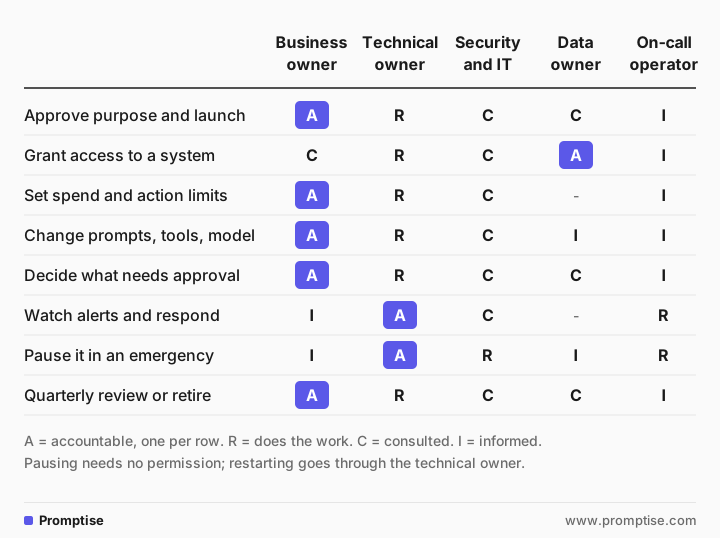
Decision | Business owner | Technical owner | Security and IT | Data owner | On-call |
|---|---|---|---|---|---|
Approve purpose and launch | A | R | C | C | I |
Grant access to a system | C | R | C | A | I |
Set spend and action limits | A | R | C | | I | |
Change prompts, tools or model | A | R | C | I | I |
Decide which actions need human approval | A | R | C | C | I |
Watch alerts and respond | I | A | C | | R | |
Pause it in an emergency | I | A | R | I | R |
Quarterly review or retire | A | R | C | C | I |
Adjust it to your organization, but keep two rules: one A per row, and nobody needs permission to pause.
[05]
Who can stop an AI agent?
The most important line in any agent's ownership record is who can stop it, and how.
Pausing is open. The on-call operator, security and the technical owner can pause the agent without asking anyone. A pause that waits for a meeting is not a pause.
Restarting is controlled. Only the technical owner restarts it, after the business owner agrees the cause is understood.
The method is written down and tested. A button, a command or a setting, plus what happens to work in progress. Test it before launch and once a quarter.
Automatic stops count too. Spending caps and action limits that pause the agent on their own, like the per-project caps Google describes, back up the people.
Your developers can build these controls in; see AI agent cost control with budgets and escalating to a human when limits hit.
[06]
What to write down for each agent
Keep a one-page record for every agent, in the same place as your other system records. Copy this list:
Name and purpose, in one sentence.
Business owner and backup business owner.
Technical owner and backup technical owner.
Systems and data it can reach, with the data owner who approved each.
Actions it can take on its own, and actions that need a person's approval.
Spending limit and action limits (for example, at most 50 emails a day).
How to pause it, and who is on call.
Where its activity log is kept, and for how long.
Launch date, last review date and next review date.
When to retire it: the condition under which it is no longer needed.
This record also feeds your company-wide list of agents. If you don't have one yet, start with an AI agent inventory.
[07]
When owners change
Agents outlive projects and job changes. Plan for it:
Name backups from day one. Okta recommends assigning at least two owners to an AI agent "to ensure that it always has an owner."
Hook into leaver and mover processes. When someone changes role or leaves, HR or IT checks whether they own any agents, the same way they check other system access.
Find orphans every quarter. Ask IT for a list of agents whose owner has left, changed team, or not reviewed the agent on time.
Pause before you reassign. An agent with no owner should be paused until a new owner accepts it.
Retire on purpose. When an agent's job is done, remove its access, keep its logs as your records rules require, and delete it.
[08]
How to put ownership in place, step by step
List your agents. Include those built by teams on their own with low-code tools; they are the most likely to be unowned.
Assign the five roles for each agent, with backups.
Fill in the one-page record for each agent.
Remove access no one can justify. If the business owner cannot explain why the agent needs a system, remove the access.
Test the pause for each agent, and fix any that cannot be stopped quickly.
Set a review rhythm. Quarterly for most agents; monthly for agents that move money, contact customers or change records.
Make it a launch rule. No new agent goes live without a named business owner and a completed record.
[09]
Common mistakes
Mistake | Why it fails | Fix |
|---|---|---|
"The AI team owns all agents" | They know the tech, not why each agent exists | Business owner from the team the agent serves |
Two accountable owners | Each assumes the other decided | Exactly one A per decision |
Owner is the person who built it, forever | Builders move on and the agent is orphaned | Named backups and leaver checks |
Pausing needs approval | Damage continues while people meet | Anyone on call can pause |
Agent uses its creator's personal access | It inherits far more than it needs, and breaks when they leave | Give it its own identity with only the access it needs |
No review date | Access and spending grow unnoticed | Quarterly review with a next date on the record |
[10]
FAQ
Who is responsible when an AI agent makes a mistake?
Operationally, the agent's business owner is accountable for finding out what happened, fixing it and preventing a repeat, with the technical owner doing the work. Whether anyone carries legal liability is a separate question; ask your legal team about that.
What is an AI agent sponsor?
In Microsoft Entra Agent ID, a sponsor is the business representative accountable for an agent's purpose and lifecycle decisions, such as access reviews and whether to keep it. Every agent identity needs at least one. It matches the "business owner" role in this guide.
Should IT own all AI agents?
No. IT and security should own the platform, identities, permissions and logging. Each agent should be owned by the business team it works for, because they know why it exists and whether it is still needed.
Can an AI agent have more than one owner?
It can have several people in owner roles, such as a business owner, a technical owner and backups. For each decision, though, exactly one person should be accountable, so nobody assumes someone else decided.
What happens to an AI agent when its owner leaves?
Without a plan, it keeps running with nobody responsible, which Microsoft calls an orphaned agent. Name backup owners from the start, check agent ownership in your leaver process, and pause any agent without an owner until someone accepts it.
Who should be able to turn off an AI agent?
The on-call operator, security and the technical owner should all be able to pause it at any time without asking. Restarting should go through the technical owner, after the cause is understood.
[11]
Next steps
Set the wider rules: AI agent governance in practice and enterprise AI agent architecture.
Find every agent first: AI agent inventory.
Give agents their own identity: AI agent identity and authentication.
Keep a record of what agents do: AI agent audit logging.
Keep people in charge of key actions: what is human-in-the-loop AI.