Contents · 10 sections↓
- 01How do you delegate a task to an AI agent at work?
- 02What is an AI agent, and how is it different from a chat?
- 03Which tasks should you delegate to an AI agent?
- 04The six-part delegation brief
- 05A real example: a brief and the agent's plan
- 06Set three checkpoints
- 07A delegation brief you can copy
- 08Common mistakes
- 09FAQ
- 10Next steps
To delegate a task to an AI agent at work, you hand it a goal instead of a question, and the agent works through the steps on its own: searching, reading, clicking through websites, drafting. That makes the brief and the stopping points more important than in a normal chat. This guide shows what an agent is in plain words, which tasks to hand over first, a six-part brief you can copy, a real example of an agent's plan, and three checkpoints that keep you in control.
How do you delegate a task to an AI agent at work?
Write a short brief with six parts: the goal, the context, the sources to use, what "done" looks like, the limits, and the checkpoints. Ask the agent to show its plan before it starts, to stop before anything that can't be undone, such as sending, buying, submitting or deleting, and then review the result against your "done" list. Start with low-risk, repetitive research and drafting tasks.
Key takeaways:
Delegate outcomes, not clicks. Say what done looks like and let the agent work out the steps.
Limits are part of the task. Write down what the agent must not do, not just what it should do.
Three checkpoints: approve the plan, approve final steps, review the result.
Start small and boring. Research, comparison and first drafts are good first tasks.
You stay responsible for what the agent does in your name.
[02]
What is an AI agent, and how is it different from a chat?
In a chat, you ask and the AI answers once. An AI agent takes a goal, makes a plan, and takes several steps on its own to reach it: it may search the web, open pages, read files, fill in forms or draft messages, checking its progress as it goes. The guide what is an AI agent? explains the idea in more depth.
Several work tools now include agents. As of October 22, 2026, each vendor's own pages describe, among others:
ChatGPT Work, OpenAI's tool for longer, multi-step tasks, which can use a cloud browser on public and signed-in websites. OpenAI's help pages say the earlier ChatGPT agent is no longer available.
Gemini Agent in the Gemini app, for Google AI Pro and Ultra subscribers on personal accounts, and the Gemini agent for work that Google announced on October 8, 2026. Google says the work version writes every action to an audit trail and is in preview for financial services and legal.
Claude Cowork, Anthropic's agent for multi-step work on paid plans, which can open sites, read pages, click, type and fill in forms.
Researcher with computer use in Microsoft 365 Copilot, which admins turn on for chosen users, and agents built in Copilot Studio that can operate websites and apps.
Features, plans and availability change often, and your company decides which of these you may use. The method below works in any of them.
[03]
Which tasks should you delegate to an AI agent?
Good first tasks are frequent, take several steps, use information the agent can reach, and are easy to check. Poor first tasks are rare, need your judgment at every step, or can't be undone.
Good first tasks | Keep for yourself (or approve each step) |
|---|---|
Research and compare options: venues, vendors, tools | Choosing a vendor or signing anything |
Collect information from several websites into a table | Logging in to banking or admin systems |
Draft replies, summaries and reports for you to review | Sending messages in your name without review |
Pull figures from reports you can check | Payments, purchases and refunds |
Prepare a meeting brief from public pages and shared files | Decisions about people: hiring, pay, performance |
Decisions about people's jobs, pay, credit, health or legal matters should not be left to an agent. A person decides, with HR or legal involved. The guide when not to use AI at work has a six-question test for the gray areas.
[04]
The six-part delegation brief
A good brief reads like the note you'd leave for a capable new colleague who doesn't know your company yet. The guide how to brief an LLM explains why this works.
Goal. One sentence: what you want at the end.
Context. The facts the agent can't know: who it's for, numbers, dates, requirements, budget.
Sources. Where to look, and where not to. "Venues' own websites only" stops it from copying a list from an old blog post.
Done looks like. The exact output: a table with named columns, a recommendation with reasons, a draft under a word limit.
Limits. What it must not do: contact anyone, fill in forms, buy, book, sign up, delete. And what to do instead of guessing.
Checkpoints. When to stop and wait for you.
[05]
A real example: a brief and the agent's plan
Here is a brief for a common errand. The answer below comes from OpenAI's gpt-5-mini, a small model without a browser, so it shows only the first checkpoint: the plan. An agent tool would continue after you approve. The answer will differ by tool.
Goal: Shortlist three venues for our team offsite and draft an inquiry email to the best one.

Context:
- 25 people, one day, a weekday in the second half of March 2027.
- Austin, Texas, within 20 minutes' drive of downtown.
- Need: one room for 25 with a screen, a breakout space, lunch for 25 with vegetarian options, step-free access.
- Budget: up to $4,000 for room and lunch together.

Sources: venues' own websites only. Note the page you got each fact from.

Done looks like: a table with name, address, capacity, price or "price on request", what's included, and the link; your pick with two reasons; a draft inquiry email under 120 words.

Limits: Don't contact any venue, fill in any form, book anything or sign up for anything. Don't send the email. If a price isn't published, write "price on request" instead of estimating.

Checkpoint: Before you start, reply only with your plan in at most five steps and any questions you need answered. Wait for my OK.Plan (up to five steps)
1) Confirm any clarifications from you.
2) Search venues' own websites for suitable Austin venues within 20 minutes of downtown that list capacities, accessibility, AV, breakout options, catering/lunch info and pricing (or mark price on request).
3) Shortlist three venues that match needs (25 people, screen, breakout, step-free access, lunch with vegetarian options, budget ≤ $4,000 or price on request).
4) Produce a table with name, address, capacity, price or "price on request", what's included, and the webpage source for each fact.
5) Select the top pick with two reasons and draft a ≤120-word inquiry email to that venue.
Questions
1) Do you want a specific date (weekday) in the second half of March 2027, or should I search availability for any weekday in that range (March 16–31, 2027)?
2) Any additional requirements (time window, preferred start/end times, number or size of breakout rooms, AV specifics like microphone or video conferencing, budget firm to $4,000 including tax/gratuity)?
…
Reply OK with answers and I'll proceed.This is what a useful first checkpoint looks like. The plan repeats your limits back to you, and the questions catch two things the brief left open: the time window, and whether the $4,000 includes tax and tip. Answering them takes a minute and saves a second run. If the plan had said "fill in each venue's contact form", you would catch that here, before anything happened.
[06]
Set three checkpoints
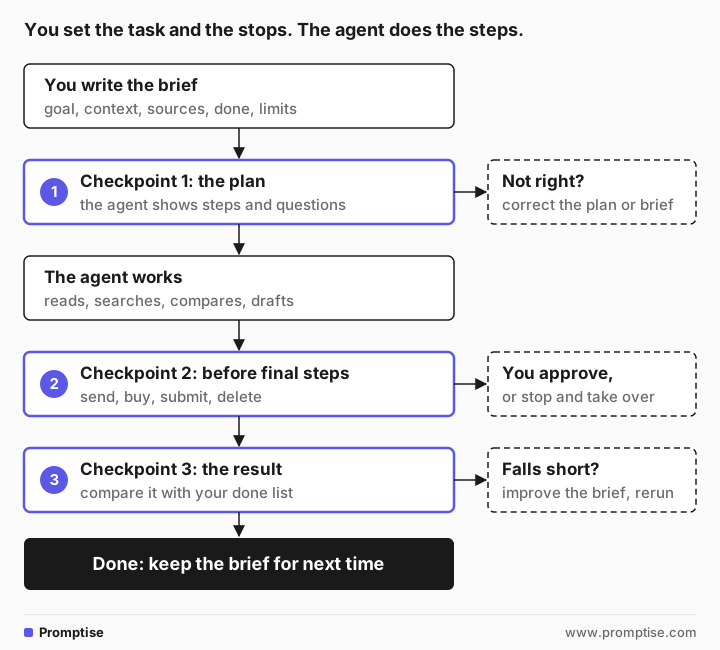
Checkpoint 1: approve the plan
Ask for the plan and questions before any work starts, as in the example. Check that it uses the sources you named, respects every limit, and ends with the output you asked for.
Checkpoint 2: approve final steps
Anything that can't be taken back needs your OK: sending a message, submitting a form, booking, buying, deleting, changing a setting. Write this into the brief, and also use the tool's own settings. Vendors describe several such controls on their help pages:
OpenAI says ChatGPT's cloud browser asks in the chat before actions that could be hard to reverse or create a financial, legal or account commitment, and that each website starts on "Always ask".
Google says Gemini Agent confirms before sending communications, changing your data, making purchases and submitting web forms.
Anthropic says Claude Cowork has three modes: Manual, where you approve each action; Auto, where Claude reviews each action for safety and keeps going; and Skip, which checks nothing and is only for tasks you fully trust.
Pick the setting that asks most often until you trust the task. OpenAI and Google both say their safeguards don't remove every risk, so the line in your brief still matters.
Checkpoint 3: review the result
Compare the output with your "done" list, line by line:
Is every requested column, reason and draft there?
Does each fact have a source, and does the source say what the agent claims? Open a few.
Did it stay inside the limits? Check the tool's activity log or history if it has one.
Is anything guessed? Look for round numbers, missing links and vague wording.
The guide how to check AI answers has a five-step routine for the facts.
If the result falls short, don't just fix it by hand. Ask what was missing from the brief, add it, and keep the improved brief. The second time you delegate the same kind of task, it will need fewer corrections.
[07]
A delegation brief you can copy
Goal: [what you want at the end, in one sentence]

Context:
- [who it's for and why]
- [facts, numbers, dates, requirements]
- [budget or other limits on the result]

Sources: [where to look]. Don't use [sources to avoid]. Note the page you got each fact from.

Done looks like: [exact output: table columns, recommendation with reasons, draft with word limit].

Limits: Don't [send, submit, book, buy, sign up, delete, contact anyone]. If something is missing or unclear, [ask me / write "unknown"] instead of guessing.

Checkpoints:
1. Before you start, show me your plan in at most five steps and your questions. Wait for my OK.
2. Before any step that sends, submits, buys or deletes anything, stop and ask me.
3. When you finish, list what you did, the sources you used, and anything you weren't sure about.
Save briefs that work. With a few saved briefs, your team can share them as templates; see AI custom instructions for work for where to keep reusable context in each tool.
[08]
Common mistakes
Mistake | Why it fails | Fix |
|---|---|---|
Giving a goal with no limits | Agents try to finish the job, which can include forms and messages | List what it must not do |
No "done looks like" | You get a different format every time, and can't tell if it's finished | Name the exact output |
Skipping the plan checkpoint | Wrong approaches show up only at the end | Ask for the plan and questions first |
Letting it act on banking, admin or HR systems | Mistakes there are costly or can't be undone | Keep those for yourself, or approve each step |
Trusting the summary without opening sources | Agents can misread pages or mix up results | Spot-check sources against the claims |
Fixing the output instead of the brief | The same gaps come back next time | Improve and save the brief |
[09]
FAQ
What is the difference between an AI agent and a chatbot?
A chatbot answers each message once. An AI agent takes a goal and works through several steps on its own, such as searching, reading pages, filling in forms or drafting messages, until it reaches the goal or needs your input. That's why agents need limits and checkpoints that chats don't.
What tasks can I delegate to an AI agent at work?
Start with research and comparison, collecting information into tables, preparing meeting briefs, and drafting replies or reports for your review. These are useful, easy to check and low-risk. Keep payments, signing, sending in your name and decisions about people for yourself, or approve every step.
How do I write instructions for an AI agent?
Use six parts: goal, context, sources, what done looks like, limits and checkpoints. Write it like a note for a new colleague who doesn't know your company: specific facts, the exact output you want, and what not to do. Ask the agent to show its plan and questions before it starts.
How do I stop an AI agent from doing something I didn't want?
Write the limits into the brief, choose the tool's most cautious approval setting, and ask the agent to stop before any step that sends, submits, buys or deletes. Most agent tools also let you pause or take over. If your company's admins have set rules for agents, those apply too.
Who is responsible for what an AI agent does at work?
You are, for what you asked it to do and what you approved, within your company's rules. Google's help page for Gemini in Chrome says this directly: you're responsible for Gemini's actions during a task. Treat an agent like a new assistant whose work you check before it goes out.
Can AI agents use my logged-in accounts?
Some can. Browser agents that run in your own browser can usually reach sites you're signed in to, and cloud browsers may ask you to sign in for them. Use only accounts your company allows, and keep agents away from banking, admin and HR systems unless your company has set that up. See browser AI agents at work.
[10]
Next steps
Understand agents in plain words: what is an AI agent? and, for managers, AI agents explained for business leaders.
Decide what agents may do in a browser: browser AI agents at work.
Learn why people approve key steps: what is human-in-the-loop AI?.
Write clearer briefs: how to brief an LLM and AI prompts for work.
Check what comes back: how to check AI answers.