Contents · 8 sections↓
Prompt engineering is the practice of writing the instructions, context and examples you give a large language model so it returns what you actually need. This guide is for anyone who uses a model at work, from pasting meeting notes into a chat window to calling an API from code. It explains what a prompt is made of, shows one real prompt before and after, and maps the beginner path: one short guide per technique.
What is prompt engineering?
Prompt engineering is writing and testing model inputs until the output is useful, correct and in the shape you need. A prompt is more than a question. It can hold a task, background material, rules, examples and an output format. The model has only that text to go on, so anything you leave out, it guesses.
Key takeaways:
The model fills gaps with averages. Leave out the audience, length or format and you get a generic answer.
Five parts cover most prompts: task, context, constraints, examples and output format.
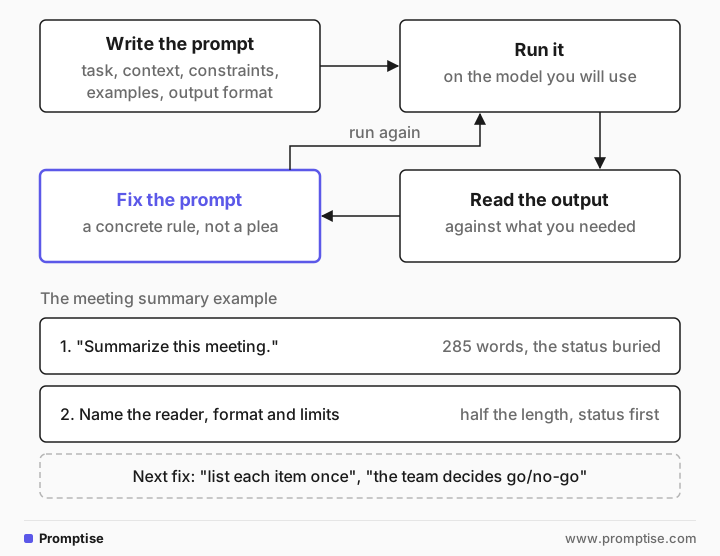
It is an iterative loop. Write, run, read the output, fix the prompt, run again.
It still matters with reasoning models. They think harder, but they can't guess facts or preferences you never gave them.
[02]
How a prompt works
A language model predicts text that is likely to come next, given everything in its input. Chat models are trained further to follow instructions, but the principle holds: the output is shaped by the words in front of it. Change the words and you change the output.
So a prompt works like a brief to a capable contractor who has never met you. They know a lot in general. They know nothing about your team, your customer or your deadline unless you write it down.
Most good prompts contain some of these five parts, a simple prompt engineering framework:
Part | What it does | Example |
|---|---|---|
Task | The one thing you want done | "Summarize the meeting for my manager" |
Context | Facts the model can't know | The notes, the product spec, the policy |
Constraints | Limits and rules | "Under 120 words. Only facts from the notes." |
Examples | Show the pattern instead of describing it | Two release notes written in house style |
Output format | The shape you can use directly | "Owner: task (due date)" or a JSON schema |
Researchers have cataloged dozens of named prompting techniques; The Prompt Report (Schulhoff et al., 2024) is a good survey. You don't need most of them to start. The parts above do most of the work.
[03]
A real example: summarizing a meeting
Here is a common task: turn messy meeting notes into something a manager can read. The notes cover an Apple Pay launch, a refund bug, a design decision and a staging database problem.
The weak prompt:
Summarize this meeting.

<meeting notes pasted here>
The model's output (trimmed):
Meeting: Weekly sync — Checkout team
Date: Tue 14 Oct
Attendees: Priya (PM), Marco (backend), Lena (design), Tom (QA)

Summary
- Main priority: Apple Pay launch targeted for Marketing’s Nov 3 campaign.
- Current blocker: Apple Pay refunds failing in staging (likely webhook signature issue).
- Backend status: Marco reports backend work complete except refunds. He expects a fix by Friday.
…
Action items
- Marco: Fix Apple Pay refunds (likely webhook signature) — target: Friday.
…
Risks
- If refund fix is delayed, Nov 3 launch is at risk.
It isn't wrong. It is 285 words, written for nobody in particular, and the one thing a manager wants (is the launch on track?) is buried in the middle. The better prompt names the reader, the format and the limits:
Summarize the meeting notes below for my manager, who wasn't there and has 30 seconds to read it.

Format:
- Status: one sentence on whether the Nov 3 Apple Pay launch is on track.
- Decisions: bullets, only things that were actually decided.
- Action items: one line each as "Owner: task (due date)". Use only dates stated in the notes.
- Open risks: bullets.

Keep it under 120 words. Do not add anything that is not in the notes.

<notes>
…meeting notes…
</notes>
The output:
Status: On track only if Apple Pay refunds are fixed and verified — go/no-go set for the 23rd.

Decisions:
- Do not block launch on button placement; Lena will pick one by Thursday and revisit after launch.
- Priya will put the deprecated PayPal SDK on the Q1 roadmap.
- Priya will ask platform to stop staging DB resets.

Action items:
- Marco: fix Apple Pay refunds webhook signature (Friday).
- Tom: complete regression testing if fix lands (Wednesday the 22nd).
- Lena: choose button placement (Thursday).
- Priya: ask platform to stop staging DB resets (14 Oct).
- Priya: decide go/no-go for Nov 3 Apple Pay launch (23rd).

Open risks:
- Apple Pay refunds currently fail in staging.
- Staging DB resets causing lost test data.
- Deprecated PayPal SDK (end of year).
Half the length, and the status comes first. It still isn't perfect: "ask platform" is listed under both decisions and action items, and the go/no-go is a team decision, not Priya's alone. That is normal. Read the output, then tighten the prompt ("list each item once", "the team decides go/no-go") and run it again. Results vary by model, so test on the one you use.
[04]
When prompting is enough (and when it isn't)
Prompting is the cheapest fix, so try it first. It is the right tool when the model can do the task and just needs to know what you want.
Reach for something else when:
The model lacks the facts. Paste them in or retrieve them (grounding, RAG). No prompt makes the model know your refund policy.
You need exact math or live data. Give the model a tool, such as a calculator, code runner or search.
You need the same style across thousands of outputs and examples don't hold it. Consider fine-tuning.
Mistakes are costly. Add checks after the model: schema validation, quote checks, human review.
[05]
The beginner path
Each guide below covers one technique with a real task and real output. Read them in order or jump to the problem you have.
Guide | What you'll learn |
|---|---|
Where standing rules go and where the task goes | |
Ask, role, constraints and format, on a product description | |
Give the model the facts and stop it guessing | |
Reliable JSON from an email | |
Why models invent things and quick checks that catch it | |
Teach a house style by example | |
When personas help and when they don't | |
Get multi-step tasks right |
The full sequence, including evaluation and summarization, is the Introduction to Prompt Engineering learning path.
[06]
Common mistakes
Mistake | Why it fails | Fix |
|---|---|---|
One-line prompts for real tasks | The model fills every gap with a generic default | Name the reader, purpose, length and format |
Asking for facts the model can't have | It answers anyway, confidently | Paste the source and say "only from the text" |
Describing a format in prose | The shape drifts between runs | Show the exact format, or use structured outputs |
Fixing a prompt by adding "please be accurate" | Vague pleas change little | Add a concrete rule or a check |
Judging a prompt on one run | Outputs vary run to run | Run it on several real inputs before you rely on it |
[07]
Frequently asked questions
What are the basic prompt engineering techniques?
The basics are clear instructions with a role and constraints, grounding the model in source text, a few examples of the output you want, a fixed output format, and step-by-step reasoning for multi-step tasks. Each one fixes a different gap: an unclear goal, missing facts, a drifting style, unusable output or skipped steps. The beginner path above has one guide per technique.
Is prompt engineering still useful with newer models?
Yes, but the emphasis shifts. Newer models need fewer tricks such as "think step by step", because many reason on their own. They still need what only you know: the audience, the facts, the rules and the format. Most prompt work today is supplying that context clearly.
What is the difference between prompt engineering and context engineering?
Prompt engineering is about the wording of instructions. Context engineering is about everything the model sees: retrieved documents, tool results, conversation history and memory, and how much of it fits. In agent systems the second dominates. See context engineering for AI agents.
Do I need to learn to code?
No. Everything in the beginner path works in a chat window. Code helps when you want to run a prompt on many inputs, validate the output or put it in a product.
How do I know if my prompt is good?
Run it on 5 to 10 real inputs, including awkward ones, and check each output against what you needed. If you change the prompt, rerun the same inputs. The beginner eval loops guide shows a simple way to do this.
Does the same prompt work on every model?
Often, but not exactly. Models differ in how literally they follow formats and how much they write. Test on the model you will use, and retest when you switch.
[08]
Next steps
Start the path with system vs user prompts.
Write your first structured prompt with how to write clear prompts.
Stop invented answers with grounding.
Check your prompts systematically with beginner eval loops.
Go further with the Introduction to Prompt Engineering learning path.