Contents · 11 sections↓
- 01How do you write a brief for a long-running AI task?
- 02Why long AI tasks go off track
- 03When you need a long-task brief (and when you don't)
- 04The parts of a long-task brief
- 05A real example: weak brief vs long-task brief
- 06Resuming after a stop: the log is the memory
- 07Step by step: run a long task
- 08Copy this: long-task brief template
- 09Common mistakes
- 10FAQ
- 11Next steps
Long-running AI tasks, the kind an agent works on for hours while you do something else, need a different brief from a quick chat. The agent may pause, restart in a fresh session that remembers nothing, or decide it's finished halfway through. This guide shows how to write a brief that survives all of that: a fixed done list, milestones, a progress log the agent keeps, stop rules and a handoff note, with real prompts and output you can copy.
How do you write a brief for a long-running AI task?
Write it like instructions for a colleague who will work alone for a day and might be replaced halfway through. Give a goal and a done list that never change, split the work into milestones done one at a time, tell the agent to keep a written progress log, set stop rules for time, money and doubt, and ask for a short handoff note whenever it stops. The log is what lets the work continue after a pause or a fresh start.
Key takeaways:
Short tasks need a good prompt; long tasks need a plan that survives a restart. Agents can start a new session with no memory of the last one.
The done list is the anchor. It stops the agent from growing the scope or calling the job finished early.
One milestone at a time. Agents that try to do everything at once run out of room and leave half-finished work.
The progress log must hold the full state. "List posted" is useless to a fresh session; the list itself is not.
Stop rules and check-ins keep you in charge of anything costly, slow or uncertain.
[02]
Why long AI tasks go off track
AI tools now run tasks for hours. Google says work given to its Gemini agent "that takes hours or days keeps running after you close your laptop." OpenAI says ChatGPT Work's cloud browser can keep working after you close your computer and pauses when it needs your input. Anthropic's Claude Cowork runs cloud sessions that continue when the desktop app is closed.
Long runs fail in a few predictable ways. Anthropic's engineers described them in a November 2025 post on long-running agents: work happens in separate sessions, and "each new session begins with no memory of what came before." They saw agents try to do the whole job in one go and run out of room, and agents in later sessions "declare the job done" when only part of it was. Their fix was simple and works outside software too: a written progress file, a list of what "done" means, one piece of work at a time, and leaving things tidy before each stop.
In everyday terms, a long task goes wrong when:
The scope drifts. Without a fixed done list, the agent adds things you didn't ask for.
Memory runs out. The conversation gets too long, the tool summarizes or restarts it, and details are lost.
It stops early. It sees progress and reports success.
It gets stuck quietly. A website needs a sign-up or a fact can't be found, and it either loops or guesses.
Nobody can pick it up. When it stops, there's no record of what's verified and what's next.
[03]
When you need a long-task brief (and when you don't)
Use a long-task brief | A normal prompt is enough |
|---|---|
The task takes the agent more than about 30 minutes | You'll get the answer in one reply |
It has several stages that depend on each other | It's one step: draft, summarize, rewrite |
You won't be watching | You'll read the answer straight away |
It might pause, wait for you or restart | It finishes in one go |
Several people may pick it up | Only you will use it |
For the basic parts of any delegation brief (goal, context, sources, limits and three checkpoints), start with how to delegate a task to an AI agent. This guide adds what a task needs to last for hours.
[04]
The parts of a long-task brief
Goal. One or two sentences: what you need and why.
Done means. A checklist of what must be true at the end. The agent restates it before starting and checks it before saying it's finished.
Context and sources. The facts it can't know, and where it may and may not look.
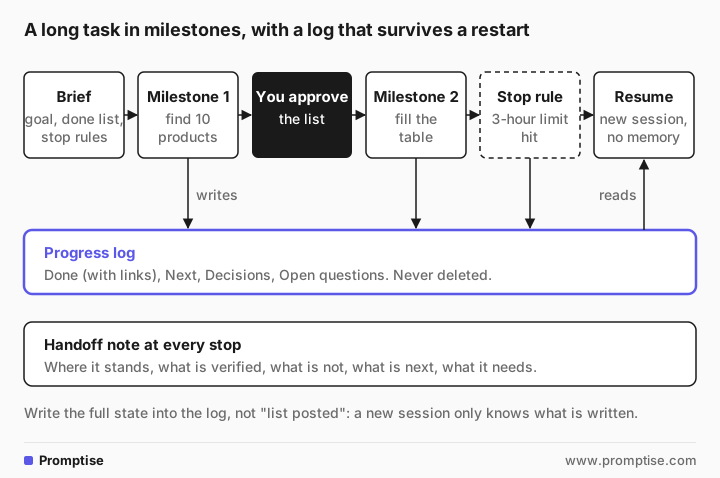
Milestones. Three to five stages, done in order, each finished before the next starts. Put a check-in with you after the first one.
Progress log. A named document the agent updates after each milestone and before every stop: done (with links), next, decisions, open questions. It never deletes old entries.
Stop rules. When to stop and ask: sign-ups, payments, contacting anyone, a time limit, facts it can't find.
Handoff note. A few lines at every stop: where things stand, what's verified, what isn't, what's next, what it needs.
[05]
A real example: weak brief vs long-task brief
The answers below come from gpt-5-mini, a small OpenAI model, asked to plan the work before starting. Fernway, a 40-truck delivery company, and its people are made up. Agent tools such as ChatGPT Work, the Gemini agent and Claude Cowork will word things differently, but the pattern holds.
The weak brief
Research route planning software for our trucking fleet and write a report. Before you start, show me your plan.2) Deliverables
- Executive summary with top recommendations
- Detailed vendor comparison matrix (features, pricing, integrations, scalability, hardware)
…
- Total cost of ownership (TCO) and ROI estimates (license, implementation, training, hardware, recurring fees)
- Implementation roadmap and timeline (pilot → rollout) and risk/mitigation
…
3) Scope and constraints
- Focus on SaaS and on-prem options relevant to medium-to-large trucking fleets (you can specify fleet size; default: 50–500 trucks)
…
7) Research methodology & sources
…
- User reviews (G2, Capterra)
…
Total: ~7–10 business days after plan approval and receipt of requested dataThe plan is thorough and almost none of it is what Fernway needs. It invented a default fleet size larger than the real one, added cost-of-ownership estimates, a rollout roadmap and a slide deck, planned to use review sites, and budgeted up to ten business days. Hand that to an agent and let it run, and you get hours of work on the wrong job.
The long-task brief
GOAL
Help Fernway, a logistics company with 40 delivery trucks in Colorado and Utah, pick route-planning software. I need a shortlist of 3 products I can take to demos.

DONE MEANS (all must be true)
- A table of 10 route-planning products: name, starting price (or "not public"), fleet size it targets, integrations with Samsara and QuickBooks (yes/no/unknown), and the source link for each fact.
- A shortlist of 3 with two reasons each and one risk each.
- A list of questions to ask in each demo.

CONTEXT
- 40 trucks, about 600 stops a day, mostly B2B deliveries.
- We use Samsara for telematics and QuickBooks Online for invoicing.
- Budget is not decided; don't filter on price.

SOURCES
Vendors' own websites and help pages. No review sites, no blog lists.

MILESTONES (do one at a time, finish it before starting the next)
1. Find 10 candidate products. Stop and post the list for my approval.
2. Fill the table, one product at a time.
3. Pick the shortlist.
4. Write the demo questions.

PROGRESS LOG
Keep a document called "route-software-progress". After each milestone, and before you stop for any reason, add an entry:
- Done: what is finished, with links
- Next: the exact next step
- Decisions: anything you decided and why
- Open questions: anything you need from me
Never delete earlier entries.

STOP RULES
- Stop and ask if a source needs a sign-up, a payment or a sales call.
- Never contact a vendor or fill in a form.
- If you can't find a fact after two tries, write "unknown" and move on.
- If you have worked 3 hours without finishing, stop, write a progress-log entry and a handoff note.

HANDOFF NOTE (when you finish or stop)
Five lines max: where things stand, what's verified, what's not, what's next, what you need from me.

Before you start any work: restate the DONE MEANS list as a checklist, show your plan for milestone 1 only, and write the first progress-log entry.Checklist (DONE MEANS)
- [ ] A table of 10 route-planning products: name, starting price (or "not public"), fleet size it targets, integrations with Samsara and QuickBooks (yes/no/unknown), and the source link for each fact.
- [ ] A shortlist of 3 with two reasons each and one risk each.
- [ ] A list of questions to ask in each demo.
…
First progress-log entry (route-software-progress)
- Done: Created initial project plan and milestone 1 plan; assembled an initial candidate list (below). No vendor pages checked yet.
- Next: Wait for your approval of the 10-product candidate list; after approval I will visit each vendor site to collect price, target fleet size, integrations with Samsara and QuickBooks, and source links.
- Decisions: I will use only vendor-owned web pages and help/docs pages as sources. If a fact requires signing up, payment, or a sales call, I will stop and flag it.
- Open questions: Do you want me to include in-house products (e.g., Samsara Routes) or only third-party route planners? Any vendors you already prefer or want excluded?
…Same model, same task. Now it plans only the first milestone, waits for approval, and asks a useful question. Note the honest line "No vendor pages checked yet": its first list came from memory, which is exactly why the brief puts your check-in after milestone 1.
[06]
Resuming after a stop: the log is the memory
Here is what a fresh session sees. We gave the model the brief plus a progress log with three entries: the list was approved with one swap, six table rows were filled, and the agent stopped at the 3-hour limit with a question that was later answered. The first entry said only "Candidate list of 10 posted. Approved by Maria at 10:40 with one change: swap Onfleet for Samsara Routes."
You are resuming a long task in a new session. You remember nothing except the brief and the progress log below.
…
Write: (1) a two-sentence summary of where the task stands, (2) the exact next three steps, (3) anything from the earlier entries you must not redo. Do not start the work yet.2) Exact next three steps (do these in order):
1. Complete the table rows for the remaining four vendors (Descartes Route Planner, Verizon Connect Route Optimization, Trimble (formerly TMW or McLeod’s route product as appropriate), and Project44 or other remaining candidate from the approved list) using only vendor sites/help pages, marking pricing "not public" where the vendor requires a sales call.
…The fresh session invented three of the remaining four products. The approved list existed, but only in an earlier chat; the log said "posted" without saying what was on it. We changed one line of the first entry to include the full list, and ran it again:
Next three steps (exact):
1. Fill table row 7 for Descartes Route Planner: find starting price (mark "not public" per Maria), fleet-size target, Samsara and QuickBooks integration status, and source links.
2. Fill table rows 8–10 for Omnitracs Roadnet, ORTEC Routing & Dispatch, and PTV Route Optimizer with the same fields and source links.
3. After completing all 10 rows, add a new progress-log entry recording completion of the table rows and the next milestone (shortlist selection).
…
That is the most important rule for long tasks: the log must contain the state itself, not pointers to where it was mentioned. Lists, decisions and answers to questions go into the log in full.
[07]
Step by step: run a long task
Write the brief with the seven parts above. Save it; you'll reuse it.
Ask for a restated done list and a plan for milestone 1 only before any work starts. Fix misunderstandings now.
Choose the tool's most careful setting while you learn: ask before each new website, ask before actions. In Claude Cowork that's Manual mode; in ChatGPT's cloud browser, Always ask for website access.
Approve milestone 1 yourself. Check names, sources and scope against the done list.
Let it run, and check the progress log at set times, for example at lunch and at the end of the day, rather than watching every step.
Answer open questions in the log or thread, in full sentences the next session can use.
Review against the done list when it says it's finished. Tick each line yourself. If something's missing, point to the line.
Keep the brief and the log as a template for the next long task.
Spending limits help too. Google says its Gemini agent pauses a project when a spending cap is reached; if your tool has a usage or budget limit, set it before a long run.
[08]
Copy this: long-task brief template
GOAL
[What you need and why, in 1-2 sentences.]

DONE MEANS (all must be true)
- [Deliverable 1, with exact fields or format]
- [Deliverable 2]
- [Deliverable 3]

CONTEXT
- [Facts it can't know: numbers, systems, constraints]

SOURCES
[Where to look. Where not to look.]

MILESTONES (one at a time; finish each before the next)
1. [First stage]. Stop and post the result for my approval.
2. [Second stage]
3. [Third stage]

PROGRESS LOG
Keep a document called "[name]". After each milestone and before any stop, add:
- Done: what is finished, with links, and the full lists or tables, not "posted"
- Next: the exact next step
- Decisions: what you decided and why
- Open questions: what you need from me
Never delete earlier entries.

STOP RULES
- Stop and ask before any sign-up, payment, purchase, message to anyone, or form.
- If a fact can't be found after two tries, write "unknown" and move on.
- If you've worked [X] hours without finishing, stop and write a log entry and a handoff note.

HANDOFF NOTE (at every stop, 5 lines max)
Where things stand / what's verified / what's not / what's next / what you need from me.

Before starting: restate DONE MEANS as a checklist, show the plan for milestone 1 only, and write the first log entry.[09]
Common mistakes
Mistake | Why it fails | Fix |
|---|---|---|
One-line brief for an hours-long task | The agent defines the scope, often far bigger than yours | Goal plus a done list it must restate |
All stages at once | The agent runs out of room and leaves gaps | Milestones, one at a time |
Log entries that point elsewhere ("list posted") | A new session can't see the earlier chat | Put lists, decisions and answers in the log itself |
No time or stuck rule | It loops or guesses when blocked | "Two tries, then unknown"; a time limit |
Trusting "done" | Agents can declare victory early | Tick the done list yourself |
Watching every step | You lose the time you meant to save | Check the log at set times |
[10]
FAQ
How do I give instructions for a long-running AI agent task?
Write a brief with a goal, a done checklist, context, allowed sources, milestones done one at a time, a progress log the agent updates after each milestone, stop rules, and a handoff note for every stop. Ask the agent to restate the done list and plan only the first milestone before it starts.
Why does my AI agent lose track during long tasks?
Long tasks outgrow what the model can hold at once, so tools summarize or restart the conversation, and details get lost. A new session may begin with no memory of the last one. A written progress log that contains the full state of the work is what lets it pick up correctly.
What should an AI agent's progress log include?
What's done, with links and the full lists or tables; the exact next step; decisions and why; and open questions. Add an entry after every milestone and before any stop, and never delete old entries. Write it so a person or a fresh session could continue from the log alone.
How long can AI agents work on a task by themselves?
Vendors now describe tasks that run for hours or days: Google says Gemini agent work can continue for hours or days after you close your laptop, and OpenAI and Anthropic offer cloud tasks that keep running. How long a task can usefully run depends on the brief, the tool's limits and how often it needs your approval.
How do I stop an AI agent from saying it's done too early?
Give it a "done means" checklist with concrete deliverables, ask it to restate the list before starting, and ask it to check each line before reporting completion. Then check the list yourself.
What is a handoff note for an AI task?
A few lines the agent writes whenever it stops: where the task stands, what's verified, what isn't, what's next and what it needs from you. It lets you, a colleague or a new session continue without rereading everything.
[11]
Next steps
The basics of any delegation brief: how to delegate a task to an AI agent.
Why a model needs context you take for granted: how to brief an LLM.
Check what the agent hands back: how to check AI answers.
When the agent should ask you first: what is human in the loop AI.
For your technical colleagues: context compaction for AI agents and durable AI agents and crash recovery.