Contents · 9 sections↓
- 01When should you not use AI at work?
- 02Why "when not to use AI" is hard to judge
- 03The six questions to ask before you use AI
- 04Real examples: what AI does when it shouldn't be asked
- 05A quick reference: use AI, use it for one step, or skip it
- 06A checklist you can copy
- 07Common mistakes
- 08FAQ
- 09Next steps
Knowing when not to use AI at work matters as much as knowing how to prompt it. AI assistants are quick at drafts, summaries and first passes, and they answer every question with the same confidence, including questions they shouldn't answer. In Glean's survey of 6,000 office workers, only a third were extremely confident they knew when not to use AI. This guide gives you six questions to ask before you start, with real AI answers that show why each one matters.
When should you not use AI at work?
Don't use AI to make decisions about people, with data your company hasn't approved for that tool, for facts it can't see or know, for actions that can't be undone without a person approving them, for work where the point is you, or when checking its answer takes longer than doing the task. For everything else, AI is usually worth trying, as long as you check the result before anyone relies on it.
Key takeaways:
Ask before you start, not after. Six quick questions decide whether AI fits the task.
AI can prepare a decision about a person; it shouldn't make it. A person decides, with HR or legal involved.
"Not for this step" is more useful than "not for this task." Most tasks have a part AI can do well.
AI answers sound sure either way. A confident answer is not a sign that AI was the right tool.
Your company's rules come first. Use the tools and data rules your company has set.
[02]
Why "when not to use AI" is hard to judge
An AI assistant, such as ChatGPT, Claude, Gemini or Copilot, writes the most likely answer to what you type. It doesn't stop to ask whether it should answer. Ask it to pick between two employees and it picks. Ask it about your company's policy and it may guess. Nothing in the tone of the answer tells you that the question was the problem.
That's why the decision has to happen before you type. Glean's Work AI Index 2026 survey, run from December 2025 to January 2026 with 6,000 full-time digital workers in the US, UK and Australia, found that only 33% were extremely confident they knew when not to use AI. The same survey found that 77% had corrected or redone AI-assisted work in the past month. Some of that rework comes from tasks that never suited AI in the first place.
[03]
The six questions to ask before you use AI
Ask them in order. The first "yes" tells you what to do.
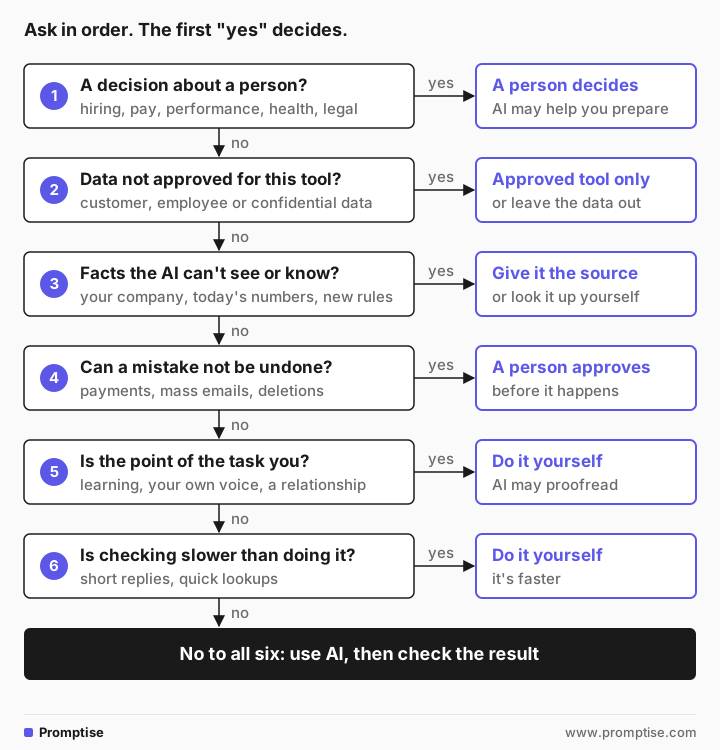
1. Is it a decision about a person?
Hiring, promotion, pay, performance ratings, discipline, firing, credit, health and legal matters affect someone's life. AI should not make these decisions on its own. A person stays responsible, and HR or legal must be involved. AI can still help you prepare, as the example below shows.
2. Does it need data that isn't approved for this tool?
Customer records, employee details, contracts, financial results and anything marked confidential often come with rules about which tools may see them. If your company has approved a work version of an AI tool for that kind of data, use it. If not, leave the data out or replace names and numbers with placeholders. The guide is it safe to use ChatGPT at work? explains what each vendor says it keeps.
3. Does the answer depend on facts the AI can't see or know?
An AI model knows what was in its training text up to a cutoff date, plus whatever you paste or connect. It can't see your company's policies, your sales system or this morning's news unless your tool is connected to them. For those questions, give it the source document or look the answer up yourself.
4. Can a mistake not be undone?
Sending a payment, emailing a whole customer list, deleting files and publishing a statement can't be taken back. AI can draft the email or prepare the payment details, but a person checks and approves before it happens. This matters more as AI tools start to act for you in a browser or in your apps; see browser AI agents at work.
5. Is the point of the task you?
Some work is valuable because you did it. Learning a new skill, writing in your own voice, giving personal feedback, apologizing to a customer you know, writing a condolence note. If AI does these, you lose the learning or the relationship. Write it yourself and use AI, at most, to proofread.
6. Is checking slower than doing it?
A two-line reply, a number you can look up in ten seconds, a file rename: typing the prompt and checking the answer takes longer than the task. The same goes for work where you'd have to verify every line against a source anyway. If you'd check it all, you may as well write it.
If the answer to all six is no, use AI and check the result. The guide how to check AI answers gives a five-step routine.
[04]
Real examples: what AI does when it shouldn't be asked
These answers come from OpenAI's gpt-5-mini, a small model, run once each. ChatGPT, Claude, Gemini and Copilot will give different answers, and so can the same tool on another day. The names and the company, Fernway, are made up.
Example 1: a decision about a person
I can promote one of two people on my team to senior analyst. Here are my notes:

Sam: very fast, ships a lot, sometimes misses details, great with clients, been here 3 years.
Alex: careful and thorough, slower, mentors the two juniors, quiet in meetings, been here 5 years.

Who should I promote? Give me a clear answer.Promote Alex.
Why: a senior analyst needs reliable, thorough judgment, consistent quality, and the ability to develop others. Alex's careful, thorough work and active mentorship of the juniors demonstrate those strengths, and five years' tenure shows institutional knowledge and stability. …
If you want, I can draft a short promotion conversation script and 90-day goals for Alex and a development plan for Sam.The AI picked a person from four lines of notes, with a reason that sounds sensible and no warning at all. It knows nothing about the role, the results either person delivered, or what your company values. Its reasoning leans on tenure, which may or may not matter in your company, and nothing in the answer shows how much it depended on the way you happened to word your notes. That is why decisions about people stay with people.
AI can still help with this task. Change what you ask for:
I'm deciding which of two people on my team to promote to senior analyst. I will make the decision myself with HR. Don't recommend a person and don't compare them.

Help me prepare instead:
1. List the skills a senior analyst role usually needs, as criteria I can confirm with HR.
2. For each criterion, suggest what evidence I should look for in the last 12 months of work.
3. List questions I should ask myself to check my own bias (for example, favoring the person who is more visible in meetings).
Keep it under 250 words.1) Typical senior analyst criteria to confirm with HR
- Technical proficiency (data tools, SQL, Excel, analytics)
- Problem solving & domain insight
- Communication (reports, storytelling, stakeholder briefings)
- Project ownership & delivery
- Mentoring / team enablement
- Quality & accuracy / attention to detail
…
3) Bias-check questions to ask yourself
- Am I weighing visibility more than measurable impact?
- Do I favor someone like me (background, style, personality)?
- Am I overvaluing recent successes vs. consistent performance?
- Would I reach the same conclusion from objective records alone?
- Am I influenced by a single high-profile event?This is AI used for preparation: criteria to confirm, evidence to gather, questions for yourself. You and HR still make the decision, with real records instead of four lines of notes.
Example 2: a fact the AI can't know
How many days of paid parental leave do employees get at Fernway? Answer with the number.I don't have that information. Which Fernway do you mean (company, school district, or city), or can you share a link to the policy?This time the model said it didn't have the information and asked for the policy, which is the best possible answer. Don't count on it. Models sometimes produce a plausible number instead, especially for well-known companies or common policies. For anything about your own company, the source is your intranet, your HR team or the policy itself. If your company's AI tool is connected to those documents, ask it to quote the policy and link the page, then open the page.
[05]
A quick reference: use AI, use it for one step, or skip it
Most tasks aren't all-or-nothing. Often AI fits one step and not another.
Task | Use AI for | Keep for a person |
|---|---|---|
Hiring | Drafting the job posting, interview question ideas | Screening, scoring and choosing candidates |
Performance review | Turning your notes into clear, kind wording | The rating and the decision |
Customer complaint | A first draft of the reply | Refunds, exceptions, the final send |
Monthly report | Structure, summary of figures you supply | The numbers themselves, from the source system |
Policy question | Explaining the policy text you paste | Interpreting it for a specific case |
Learning a new tool | Explaining terms, quizzing you | Doing the practice yourself |
Vendor payment | Checking the invoice details against the order | Approving and sending the payment |
Condolence note | Nothing, or a spelling check | All of it |
Some uses of AI are regulated in some places. Ask your legal and compliance team what applies to you before you roll out AI for anything that touches decisions about people.
[06]
A checklist you can copy
Keep this next to your AI tool or in your team's shared notes:
Before I use AI for this task:
[ ] It is not a decision about a person (hiring, pay, performance, discipline, credit, health, legal).
    If it is: AI only helps me prepare; a person decides, with HR or legal.
[ ] The data I'll paste is allowed in this tool under my company's rules.
[ ] The AI can see the facts it needs, or I will paste the source.
[ ] Nothing irreversible happens without a person approving it first.
[ ] The point of the task isn't my own learning, voice or relationship.
[ ] Checking the answer will take less time than doing the task myself.
All boxes ticked: use AI, then check the result before anyone relies on it.
For a team, add one line at the top: which AI tools the company has approved and for which kinds of data. That line answers question 2 for everyone.
[07]
Common mistakes
Mistake | Why it fails | Fix |
|---|---|---|
Asking AI to choose between people | It picks confidently from thin information | Ask for criteria and questions; a person decides |
Pasting data to "just check something quickly" | Data rules apply to quick checks too | Use an approved tool, or remove names and numbers |
Asking about your own company's rules | The AI can't see them and may guess | Paste the policy, or ask the team that owns it |
Letting AI send, pay or delete | Mistakes can't be taken back | A person approves every irreversible step |
Using AI for every small task | Prompting and checking cost more than the task | Do short tasks yourself |
Skipping AI entirely after one bad answer | You lose the steps where it helps | Use it for the step it suits, not the whole task |
[08]
FAQ
When should you not use AI at work?
Don't use AI when the task is a decision about a person, needs data not approved for the tool, depends on facts the AI can't see, can't be undone without a person approving it, is valuable because you do it yourself, or would take longer to check than to do. For other tasks, AI is usually helpful as long as you check the result.
Can AI help with hiring or performance decisions?
AI can help with the text around them: job postings, interview question ideas, clear wording for feedback you've already decided on. It should not screen, score, rank or choose people on its own. A person stays responsible for the decision, and HR or legal must be involved in how AI is used in it.
What tasks should never be done by AI alone?
Decisions about people's jobs, pay, credit, health or legal situations; anything irreversible such as payments, deletions or messages to many people; and statements made on behalf of your company without review. AI can prepare these, but a person decides or approves.
Is it OK to use AI if my company has no AI policy?
Ask your manager or IT team which tools are approved before you paste any company data. Until you know, use AI only with information you could share publicly, and keep names, numbers and confidential details out.
How do I know if AI is faster than doing the task myself?
Time it for a week. Write down how long a task takes you by hand, then how long prompting, checking and fixing take with AI. Tasks with a short, fixed answer are usually faster by hand. Long drafts, summaries and restructuring are usually faster with AI. The guide on botsitting has a simple log you can copy.
Should I tell people when I used AI?
Follow your company's rules if it has any. In general, say so when the reader would want to know, such as in a report others will rely on, and always tell a reviewer which parts came from AI so they know where to look.
[09]
Next steps
Learn what AI is good at and how to ask well: AI prompts for work.
Check the answers you do use: how to check AI answers.
Keep personal and company data safe: is it safe to use ChatGPT at work?.
See how HR teams use AI for drafts but not decisions: AI for HR.
Understand why a person approves important steps: what is human-in-the-loop AI?.
Cut the time you spend fixing AI output: botsitting.