Contents · 7 sections↓
Are shared ChatGPT links public? On a personal account, yes: anyone who has the link can read the conversation, and they can forward it. Claude and Gemini public links work the same way, while work accounts usually limit links to your organization. This short guide shows what a share link exposes in each major AI tool, according to each vendor's own help pages, and how to check a chat before you share it and delete links you no longer need.
Are shared AI chat links public?
Usually, yes, unless you share from a work account. A share link from a personal ChatGPT, Claude or Gemini account can be opened by anyone who has the link, with no invitation needed. Links created in ChatGPT Business or Enterprise, Claude Team or Enterprise, or Microsoft Copilot with a work account open only for people in your organization. In every tool, the person who receives a link can pass it on.
Key takeaways:
"Anyone with the link" means anyone. The link is the only lock, and links get forwarded, pasted into tickets and posted in chat channels.
Most links are snapshots. Messages you add after sharing stay private, except ChatGPT workspace links, which can include later messages.
Files and images may travel with the chat. ChatGPT and Gemini can include uploaded images or files; Claude leaves attached files out.
Deleting the link stops new views, not copies. Anyone who already continued or saved the chat keeps their copy.
Check before you share. Names, prices, health details and internal links are the usual leaks.
[02]
What a share link exposes, tool by tool
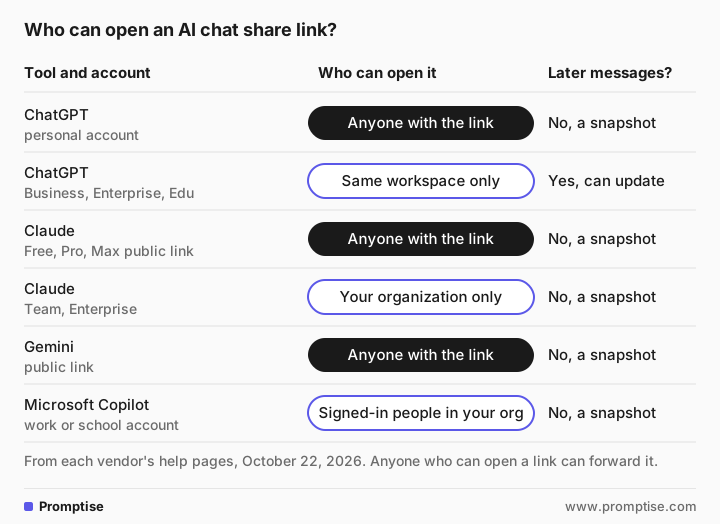
Tool | Who can open it | What's included | How to delete links |
|---|---|---|---|
ChatGPT, personal account | Anyone with the link | The conversation as of sharing; uploaded files and supported images can appear | Settings > Data controls > Shared links > Manage |
ChatGPT Business, Enterprise, Edu | Members of the same workspace | Can include messages added after sharing | Same; Enterprise and Edu admins can turn sharing off |
Claude, Free, Pro, Max (public link) | Anyone with the link | Messages and artifacts up to sharing; attached files are not included | Share menu, or Settings > Privacy > Shared chats > Manage |
Claude, Team and Enterprise | People in your organization | Same snapshot rules | Same |
Claude, invite by email | Only the invited email address | A snapshot; invitees can't reply or continue | Share dialog: remove the person, or Turn off |
Gemini (public link) | Anyone with the link; they can reshare it and continue the chat | Canvas documents, generated images and videos; uploaded images are viewable and downloadable | Settings & help > Your public links |
Microsoft Copilot | Work or school: people in your organization who sign in. Personal: anyone you send it to who signs in with a Microsoft account | A snapshot; referenced files open only for people who already have access | Settings > Data controls > Shared links |
A few details that matter:
Names. OpenAI says ChatGPT share links are anonymous by default but older sharing experiences may show the creator's name. Google says it doesn't add your name or account to a Gemini link. Any name you typed into the chat is visible either way.
Search engines. OpenAI says shared pages are "not intended for search-engine indexing, but this does not make a link private." Anthropic adds a "noindex" instruction to Claude's public links and publishes no directory of them, but notes that a link posted on a public site can be found there, and that archive services may keep copies.
Expiry. ChatGPT links have no configurable expiry date. Gemini links stay live as long as the chat is in your Gemini Apps Activity. Delete links when you no longer need them.
Work accounts and admins. Google Workspace turns Gemini public links off by default, and admins can enable them. If an admin later turns sharing off, links already created keep working until the conversation is deleted. Enterprise ChatGPT and Microsoft 365 admins can also turn sharing off.
[03]
Before you share: a two-minute check
Read the whole chat, top to bottom, as a stranger would. Or ask the AI to do a first pass. This prompt works in any of the tools; the answer below is from gpt-5-mini, a small OpenAI model, and the chat is made up.
I want to share the chat below with a colleague using a share link. Assume anyone who gets the link can read it.

List everything in this chat that a stranger could learn about people, customers, money or our company. Answer as a table: Item | Type | Remove, replace or keep. Then, in two sentences, tell me whether to share this chat at all or start a clean chat instead. Use colons, not dashes.

--- chat ---
Me: Help me write a reply to Harlow Foods. Their buyer, Dana Whitfield, wants a 12% discount on the 2027 contract. Our floor is 7%, but our CFO said we can go to 9% if they sign by Dec 15.
AI: Here's a draft that offers 6% with a path to 8% for a signed renewal by December 15...
Me: Make it firmer. Also mention that our Ogden site is short-staffed because Jorge is on medical leave until January, so we can't take their extra volume until Q2.
AI: Understood. Here's a firmer version...
Me: Here's our internal pricing sheet: https://drive.fernway.example/pricing-2027-internal
--- end ---Item | Type | Remove, replace or keep
Harlow Foods | Customer name | Replace
Dana Whitfield | Named contact / buyer (person + role) | Replace
…
Our floor is 7% | Internal pricing floor / money | Replace
CFO said we can go to 9% if they sign by Dec 15 | Internal approval limit, conditional concession, and exact deadline | Remove or replace (redact the approval and the exact deadline)
…
Jorge is on medical leave until January | Named employee + health/leave (sensitive personal data) | Remove
…
Internal pricing sheet URL: https://drive.fernway.example/pricing-2027-internal | Internal document link (reveals company domain, file path and sensitive doc) | Remove
…
Recommendation: Do not share this chat as-is; start a clean chat instead.That is the right call. Once a chat holds a pricing floor, a colleague's health details and an internal link, redacting it line by line is slower and riskier than starting a new chat with only what the colleague needs. Use the AI's list as a starting point, not a guarantee: it can miss things, so read the chat yourself too.
Also look for what you can't see in the text: images and files you uploaded, a pasted spreadsheet, and anything in the AI's answers that repeats your inputs.
[04]
Safer ways to share an AI chat
Share the result, not the chat. Copy the final draft into an email or document. Your colleague rarely needs the back-and-forth.
Start a clean chat with only the facts you're happy to share, then share that.
Use your work account, so the link stays inside your organization.
Invite by email where the tool allows it. Claude's invite option only opens for the address you enter.
Delete the link when the colleague has seen it.
Never share chats that contain passwords, account numbers, health information, or personal details about employees or customers. OpenAI's own help page lists health information, financial details, passwords and account numbers as things not to include.
For what not to paste into an AI tool in the first place, see is it safe to use ChatGPT at work.
[05]
Common mistakes
Mistake | Why it fails | Fix |
|---|---|---|
Sharing from a personal account | Anyone with the link can read it | Share from the work account, or share the result instead |
Assuming later messages stay private everywhere | ChatGPT workspace links can include them | Read the sharing notice before you keep chatting |
Forgetting uploaded files | Images and files can appear in ChatGPT and Gemini shares | Check attachments before sharing |
Deleting the chat and assuming copies are gone | Recipients who continued or saved it keep their copy | Share less in the first place |
Never cleaning up | Old links stay live | Review your shared links list monthly |
[06]
FAQ
Are shared ChatGPT links public?
Links shared from a personal ChatGPT account can be viewed by anyone who has the link, and OpenAI notes that anyone who can access a link can forward it. Links created in a ChatGPT Business, Enterprise or Edu workspace open only for members of that workspace.
Can people see my name on a shared AI chat?
Usually not from the link itself: OpenAI says ChatGPT links are anonymous by default, though some older sharing experiences may show the creator's name, and Google says it doesn't add your name to Gemini links. Any name, email or detail you typed into the chat is visible to whoever opens it.
If I delete a shared link, is the chat gone?
Deleting the link stops new views. It doesn't delete your original conversation, and it doesn't remove copies that recipients already saved or continued in their own accounts. Delete the original chat too if you no longer need it.
Do shared AI chats show up in Google search?
The vendors say their share pages aren't meant to be indexed: Anthropic adds a noindex instruction to Claude's public links, and OpenAI says ChatGPT share pages aren't intended for indexing. But a link posted on a public website can be found there, and archive services may keep copies. Treat any public link as findable.
Are files I uploaded included when I share a chat?
It depends on the tool. ChatGPT can include uploaded files and supported images in a shared conversation. Gemini makes uploaded images viewable and downloadable. Claude doesn't include attached files in the shared snapshot. Check before you share.
How do I see all the chats I've shared?
In ChatGPT, go to Settings > Data controls > Shared links > Manage. In Claude, Settings > Privacy > Shared chats > Manage. In Gemini, Settings & help > Your public links. In Microsoft Copilot, Settings > Data controls > Shared links.
[07]
Next steps
Know what not to paste: is it safe to use ChatGPT at work.
Personal data in AI tools, for your technical colleagues: PII redaction for LLM apps.
Why secrets don't belong in prompts: secrets in prompts.
Write prompts that need less back-and-forth: AI prompts for work.
Reuse context safely instead of pasting it every time: reusable context for AI at work.