Contents · 13 sections↓
- 01What is the best LiteLLM alternative?
- 02Is LiteLLM safe to use after the 1.107.0 compromise?
- 03What does an LLM gateway do?
- 04How do LLM gateways compare?
- 05The LiteLLM alternatives, one by one
- 06How do you migrate from LiteLLM to another gateway?
- 07Do you need an LLM gateway at all?
- 08Where does Promptise fit?
- 09Running a gateway in production
- 10Common problems when switching gateways
- 11Limitations
- 12Frequently asked questions
- 13Next steps
LiteLLM alternatives are getting a lot of attention after LiteLLM's second release-pipeline compromise of 2026: version 1.107.0 shipped a credential stealer on PyPI and Docker on October 21. This guide compares the main LLM gateways you can use instead, self-hosted and managed, using each project's own docs, licenses and releases. It also covers how to switch without rewriting your app, what any gateway needs in production, and when you may not need a gateway at all.
What is the best LiteLLM alternative?
There is no single best one. Pick by what you use LiteLLM for today. Most gateways speak the OpenAI API format, so for most apps switching means changing a base URL, a key and the model names.
If you need | Look at | Why |
|---|---|---|
A self-hosted proxy with virtual keys and budgets, in one binary | Bifrost | Go, Apache-2.0, virtual keys, budgets, fallbacks, and a LiteLLM migration tool |
A small, MIT-licensed gateway you can run anywhere, including edge workers | Portkey AI Gateway | TypeScript, retries, fallbacks, load balancing, guardrails |
A Kubernetes-native gateway run by a platform team | Agent Router (formerly Envoy AI Gateway) | Built on Envoy Gateway, Apache-2.0, credentials and quotas in one place |
LLM traffic in an API platform you already run | Kong AI Gateway | AI plugins on Kong; fallback and load balancing are Enterprise |
No gateway to operate, one bill for many models | OpenRouter, Cloudflare AI Gateway, Vercel AI Gateway | Managed; they hold the keys or route your own |
One agent service with a fallback model | No gateway: fallback in your code | Fewer moving parts, no extra service holding every key |
The widest provider list and a Python SDK | Stay on LiteLLM, pinned | It is still the broadest option; install it with pins and hashes |
Most of the work is in keys and config, not code. Clients keep the OpenAI SDK and point it at a new URL.
Every gateway is a high-value target. It holds all provider keys and sees every prompt. That is true of the alternatives too.
Check open-source versus paid features. Bifrost, Portkey and Kong keep some features in enterprise or hosted editions.
You may not need a gateway. One service calling two providers can fail over in code.
[02]
Is LiteLLM safe to use after the 1.107.0 compromise?
LiteLLM's own incident post (last updated October 21, 2026, 20:30 UTC) says the following, and nothing here goes beyond it:
What was affected. litellm==1.107.0 on PyPI, live from 11:39 to 13:23 UTC on October 21, and the Docker tags v1.107.0, latest, main-latest and main-stable, which pointed at a compromised image until 14:20 UTC. The build contained malware that steals credentials and loads remote-code execution tools.
What was not. The post says all earlier versions are safe, the GitHub source tag does not contain the malicious files, and the private enterprise registry was not affected. It recommends pinning to 1.106.2 or another explicit version published before the incident.
How it happened, as currently understood. The attacker held three developers' GitHub CLI credentials, used one owner token to disable branch protection, and ran the release workflow against a lookalike repository. LiteLLM says Claude Code can embed a user's GitHub CLI OAuth token in a response body in some situations, and where response bodies are logged, those tokens may appear in LiteLLM logs. It believes the attacker got tokens through an internet-exposed internal LiteLLM deployment. The investigation was still open.
This was the second compromise of the year. In March, versions 1.82.7 and 1.82.8 were published to PyPI with a credential stealer; LiteLLM's March post traces it to the Trivy dependency in its CI. LiteLLM also published a separate March 18 incident report: a custom guardrail that returned the full request could write plaintext Authorization headers into spend logs and OpenTelemetry traces (fixed in 1.82.3).
So is it safe? A pinned version installed with hashes from before the incident is the same code it was. The real lesson applies to every gateway on this page: any package that holds all your provider keys must be installed with pins, hashes and a cooldown, run with as little access as possible, and kept away from logging secrets. If you ran 1.107.0, follow LiteLLM's steps and then rotate and audit your keys. For install hygiene, see dependency cooldowns and pins with uv.
[03]
What does an LLM gateway do?
An LLM gateway (also called an LLM proxy or AI gateway) is a service between your apps and the model providers. Your apps send OpenAI-format requests to one endpoint with a gateway key. The gateway holds the real provider keys and forwards each request to the right provider.
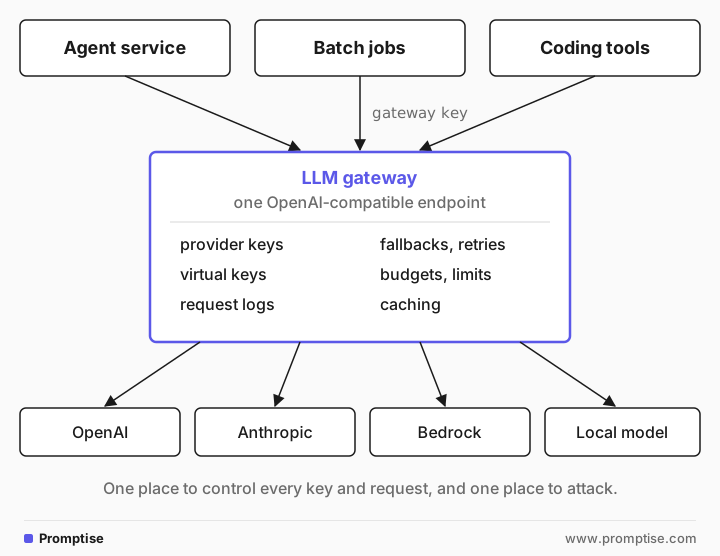
What you typically get:
One API for many providers. Clients use the OpenAI format; the gateway translates for Anthropic, Bedrock, Gemini and others.
Key management. Teams get virtual keys with their own limits. Provider keys stay in one place.
Spend control. Budgets and rate limits per key, team or model.
Reliability. Retries, fallbacks to another model or provider, load balancing across keys.
Logs and metrics. One record of every request, its cost and its latency.
LiteLLM covers both sides: a Python SDK you import, and a proxy server you deploy. The alternatives below are mostly proxies. If you only used the LiteLLM SDK inside one app, read the section on whether you need a gateway at all, further down, first.
[04]
How do LLM gateways compare?
Versions and licenses as of 2026-10-22, read from each project's GitHub repository, docs and pricing pages. "Enterprise" means a paid edition. Provider counts are left out because each project counts differently.
Gateway | Run it | License | Latest release | Fallbacks | Virtual keys and budgets | MCP |
|---|---|---|---|---|---|---|
LiteLLM | Self-hosted proxy, Python SDK, or LiteLLM Cloud | MIT, except an enterprise/ folder | 1.106.2 (2026-10-21) | Yes | Yes (SSO under the commercial license) | MCP Gateway |
Bifrost | Self-hosted binary, Docker, Helm | Apache-2.0 | transports v2.3.2 (2026-10-20) | Yes | Yes | Yes; "MCP gateway" listed with enterprise features |
Portkey AI Gateway | Self-hosted (npx, Docker, Workers) or hosted | MIT | 1.15.2 (2026-01-12); 2.0 pre-release branch | Yes, plus retries and load balancing | Virtual keys; governance in enterprise | MCP Gateway (docs) |
Agent Router (ex Envoy AI Gateway) | Kubernetes with Envoy Gateway, or aigw run locally | Apache-2.0 | v1.2.0 (2026-10-07) | Failover | Credentials, quotas, usage attribution | Yes, MCP servers |
Kong AI Gateway | Kong Gateway with AI plugins, or Konnect | Apache-2.0 open-source core | 3.9.4 open source (2026-10-12) | Enterprise (AI Proxy Advanced) | Token and cost limits are Enterprise | Not covered here |
OpenRouter | Managed only | Proprietary service | n/a | Provider fallback | Credits; BYOK | n/a |
Cloudflare AI Gateway | Managed (Cloudflare) | Proprietary service | n/a | Retries and model fallback | Rate limits; Unified Billing | n/a |
Vercel AI Gateway | Managed (Vercel) | Proprietary service | n/a | Provider order and model fallbacks | Budgets, BYOK | n/a |
Two projects that often appear in older lists need a note. TensorZero's GitHub repository has been archived since June 2026. Helicone's standalone Rust gateway repository is GPL-3.0 and has had no commits since November 2025; Helicone's main product is observability.
[05]
The LiteLLM alternatives, one by one
Bifrost
Bifrost is an open-source gateway from Maxim AI, written in Go and licensed Apache-2.0. You run it with npx -y @maximhq/bifrost or docker run -p 8080:8080 maximhq/bifrost, and clients call http://localhost:8080/v1/chat/completions with model names like openai/gpt-4o-mini. The README lists fallbacks, load balancing across keys, virtual keys with team and customer budgets, semantic caching, MCP tools, Prometheus metrics and tracing.
Choose it when you want the closest swap for the LiteLLM proxy. Its docs have a LiteLLM migration guide with a CLI (npx @maximhq/bifrost-migration-cli, dry run first) that copies models, keys, teams, users and virtual keys from a running LiteLLM proxy. Virtual key values are not copied; Bifrost issues new ones.
Watch out for the enterprise line. The README says enterprise deployments add adaptive load balancing, clustering, guardrails and the MCP gateway. Its speed figures are the vendor's own benchmarks. Bifrost's quickstart itself says to pin a version in production instead of running the unversioned command.
Portkey AI Gateway
Portkey's gateway is MIT-licensed TypeScript. npx @portkey-ai/gateway starts it on http://localhost:8787/v1, and it also runs in Docker, Node or Cloudflare Workers. The open-source gateway has fallbacks, retries with exponential backoff, load balancing, timeouts, conditional routing, guardrails and virtual keys.
Choose it when you want a light, permissive gateway that can run at the edge, or you plan to use Portkey's hosted product later.
Watch out for what is hosted-only: the README marks semantic caching and some other features as "available in hosted and enterprise versions". The last tagged release is 1.15.2 from January 2026, and the README announces a 2.0 release that merges Portkey's enterprise gateway into open source, available as a pre-release branch.
Agent Router (formerly Envoy AI Gateway)
Envoy AI Gateway was renamed Agent Router and moved to the Agentic AI Foundation. The README says the code, maintainers, Apache-2.0 license, CRDs, aigw CLI and container images are unchanged, and old links redirect. It runs on Envoy and Envoy Gateway in Kubernetes, with a two-tier pattern: one gateway for auth, routing and global rate limits, and one in front of self-hosted model servers. Locally, OPENAI_API_KEY=... aigw run serves http://localhost:1975/v1.
Choose it when a platform team already runs Kubernetes and Envoy, and wants provider credentials, quotas and failover enforced at the network layer, including for self-hosted models and MCP servers.
Watch out for the operating model. It is infrastructure, configured with Kubernetes resources, not a single binary for a small team.
Kong AI Gateway
Kong's open-source repository includes AI plugins: ai-proxy, ai-prompt-guard, ai-prompt-decorator, ai-prompt-template and request and response transformers. The AI Proxy Advanced plugin, which adds load balancing, retries, fallback across providers and semantic routing, is "only available as part of our AI Gateway Enterprise offering", and so is token and cost-based AI rate limiting.
Choose it when Kong already fronts your APIs and you want LLM traffic under the same auth, logging and policies.
Watch out for the split. The open-source plugins give you a proxy; most gateway features that LiteLLM users rely on are in the paid edition.
Managed gateways: OpenRouter, Cloudflare and Vercel
Managed gateways remove the service you would otherwise patch and secure. The trade-off is that a third party sees your traffic and, unless you bring your own keys, bills you for it.
[OpenRouter](https://openrouter.ai/pricing) passes through provider prices with no markup on inference and charges a fee when you buy credits: 5.5% on Standard and 8% on Business. Bring-your-own-key use is free up to $25,000 of list-price inference a month, then 5%. Its FAQ says prompts and completions are not logged by default and that it falls back to the next provider when one returns an error.
[Cloudflare AI Gateway](https://developers.cloudflare.com/ai-gateway/reference/pricing/) is on all Cloudflare plans. Analytics, caching and rate limiting are free. It adds retries, model fallback and logging; Unified Billing charges a 5% fee on credits, and inference is passed through at no markup.
[Vercel AI Gateway](https://vercel.com/docs/ai-gateway/pricing) charges no markup or platform fee on tokens, including with your own keys, and has budgets per team, project, key or member. Some features, such as team-wide zero data retention, provider allowlists and trace drains, cost extra.
If you are leaving LiteLLM for security reasons, ask the same questions of a managed gateway that you would ask of your own: where your keys are stored, what is logged, and for how long.
[06]
How do you migrate from LiteLLM to another gateway?
Most migrations take five steps. Run the new gateway next to LiteLLM until the numbers match.
1. Pin what you run today. Before anything else, stop unpinned installs and floating Docker tags. Pin the Python package to an exact version with hashes, and the image by digest:
# Python: exact version, installed only from a lockfile with hashes
uv add "litellm==1.106.2"
uv sync --locked

# Docker: a digest, never latest or main-stable
docker pull ghcr.io/berriai/litellm@sha256:<digest-you-verified>
2. List what you actually use. Model aliases, fallbacks, virtual keys, budgets, callbacks to logging tools, guardrails and MCP tools. Many teams find they use three of these.
3. Configure the new gateway with the same models and keys. Bifrost's migration CLI does this from a running LiteLLM proxy; for other gateways you translate the config by hand.
4. Point one client at it. With the OpenAI SDK the change is the base URL, the key and sometimes the model name. This is the pattern from the gateways' docs; the port and model format differ per gateway:
from openai import OpenAI

# LiteLLM proxy:  base_url="http://localhost:4000"
# Bifrost:        base_url="http://localhost:8080/v1", model="openai/gpt-4o-mini"
# Portkey:        base_url="http://localhost:8787/v1"
# Agent Router:   base_url="http://localhost:1975/v1"
client = OpenAI(base_url="http://localhost:8080/v1", api_key="<gateway key>")
reply = client.chat.completions.create(
    model="openai/gpt-4o-mini",
    messages=[{"role": "user", "content": "ping"}],
)
5. Cut over and clean up. Move clients one at a time, compare error rates and spend for a few days, then shut LiteLLM down. Finally, rotate every provider key LiteLLM held, because its database and logs had them.
[07]
Do you need an LLM gateway at all?
Often not. A gateway earns its place when several apps or teams share provider keys, or when you need one budget and one log for all LLM traffic. If you run one or two services, a gateway adds a network hop and a service that holds every key and must be patched, watched and secured.
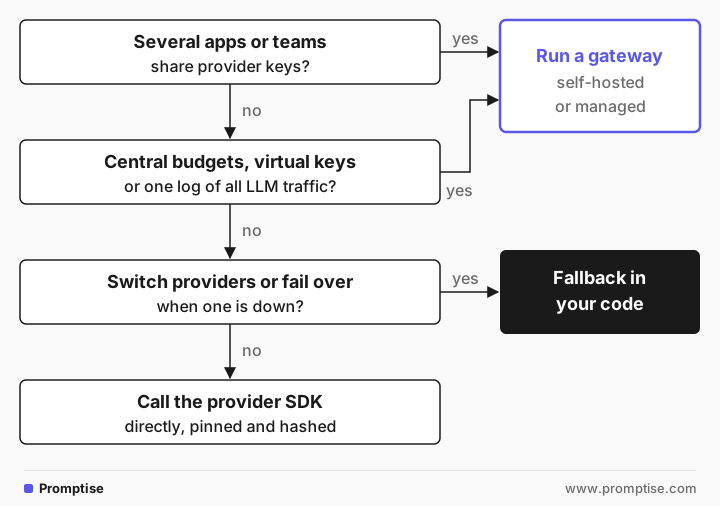
Many teams adopted the LiteLLM SDK for one feature: calling several providers through one interface with a fallback. Agent frameworks usually do that already.
[08]
Where does Promptise fit?
Promptise Foundry is an agent framework, not a gateway, so it is not a contender in the table above. It is relevant here in two ways.
Without a gateway. Foundry takes a model string such as "openai:gpt-5-mini" or "anthropic:..." for 19 providers, reading each provider's key from the environment or a .env file. A FallbackChain tries models in order, with a timeout per model and a circuit breaker per model, so one agent can fail over between providers with no extra service. In this example the first model name does not exist, so the call fails over:
"""Model fallback without a gateway: two providers, one agent.

The first model name does not exist, so every call fails over to the second.
In production the chain would hold two real providers, e.g.
["openai:gpt-5-mini", "anthropic:claude-sonnet-4-5"].
"""
import asyncio

from promptise import FallbackChain, build_agent, tool


@tool
async def get_order_status(order_id: str) -> str:
    """Look up the shipping status of an order.

    Args:
        order_id: The order ID, for example "A-1001".
    """
    return f"Order {order_id}: shipped on 2026-10-20, arrives 2026-10-23."


def on_fallback(failed: str, next_model: str, error: Exception) -> None:
    print(f"fallback: {failed} failed ({type(error).__name__}), trying {next_model}")


async def main() -> None:
    chain = FallbackChain(
        ["openai:gpt-no-such-model", "openai:gpt-5-mini"],
        timeout_per_model=30,  # seconds per attempt
        on_fallback=on_fallback,
    )
    agent = await build_agent(model=chain, extra_tools=[get_order_status])
    reply = await agent.chat("Where is order A-1001?", session_id="demo")
    print("answer:", reply)
    print("served by:", chain.model_name)
    await agent.shutdown()


asyncio.run(main())FallbackChain: openai:gpt-no-such-model failed (OpenAIModelNotFoundError: Error code: 404 - {'error': {'message': 'The model `gpt-no-such-model` does not exist or you do not ), trying next
FallbackChain: openai:gpt-no-such-model failed (OpenAIModelNotFoundError: Error code: 404 - {'error': {'message': 'The model `gpt-no-such-model` does not exist or you do not ), trying next
fallback: openai:gpt-no-such-model failed (OpenAIModelNotFoundError), trying openai:gpt-5-mini
fallback: openai:gpt-no-such-model failed (OpenAIModelNotFoundError), trying openai:gpt-5-mini
answer: Order A-1001 was shipped on 2026-10-20 and is scheduled to arrive on 2026-10-23.
served by: openai:gpt-5-miniThe fallback fired twice because the agent called the model twice: once to call the tool and once to answer. After three failures in a row, the circuit breaker skips the broken model for 60 seconds by default. Each answer records the model that wrote it in response_metadata["fallback_model"].
With a gateway. If you do run one, Foundry talks to it like any OpenAI-compatible endpoint. Only the endpoint and the key change:
"""Send an agent's model calls through an OpenAI-compatible gateway.

GATEWAY_URL is your gateway's /v1 URL (LiteLLM proxy, Bifrost, Portkey,
Agent Router...). It defaults to OpenAI's own API so the script runs as is.
GATEWAY_KEY is the key the gateway gives you, not a provider key.
"""
import asyncio
import os

from promptise import Model, build_agent

model = Model(
    "gpt-5-mini",
    provider="openai",  # any OpenAI-compatible endpoint
    endpoint=os.environ.get("GATEWAY_URL", "https://api.openai.com/v1"),
    api_key=os.environ.get("GATEWAY_KEY") or os.environ["OPENAI_API_KEY"],
)


async def main() -> None:
    agent = await build_agent(model=model)
    print(repr(model))  # repr() never shows the key
    print(await agent.chat("Reply with one word: ready?", session_id="gw"))
    await agent.shutdown()


asyncio.run(main())Model(model='gpt-5-mini', provider='openai', deployment=None, endpoint='https://api.openai.com/v1', api_version=None, region=None, project=None, temperature=None, max_tokens=None, timeout=None, native=False)
ReadyHere is how the two approaches compare:
A gateway (LiteLLM, Bifrost, Portkey...) | Fallback in Promptise Foundry | |
|---|---|---|
Shared by many apps and teams | Yes | No, per service |
Virtual keys, team budgets, one spend dashboard | Yes | No; per-agent budgets only |
Provider keys | In the gateway | In each service's environment |
Extra service to run and secure | Yes | No |
Fallback across providers | Yes | Yes, FallbackChain |
Works for non-agent code (batch jobs, other languages) | Yes | No, Python agents only |
A gateway is the better choice for an organization with many consumers of LLMs. In-code fallback is the simpler choice for one agent service. For the provider side, see using OpenRouter with an AI agent and model fallback and semantic caching.
[09]
Running a gateway in production
Both 2026 LiteLLM incidents point at the same weak spots, and they apply to whichever gateway you choose.
Install from pins, never from latest. Lock Python packages with hashes and pull images by digest. A cooldown of a few days before new releases reach production gives the community time to spot a bad release.
Don't log bodies with secrets. Request and response logging is where the March header leak and the October token exposure both surfaced. Log metadata by default, and redact credentials from anything you keep. See stop secrets leaking into LLM logs.
Keep it off the internet. Put the admin UI and the proxy behind your network or an identity-aware proxy.
Give it as little as possible. Separate provider keys per environment, short-lived cloud roles, and no unrelated secrets in its environment.
Plan the rotation. Know how to rotate every provider key the gateway holds in under an hour. See AI agent secrets management.
[10]
Common problems when switching gateways
Symptom | Cause | Fix |
|---|---|---|
| The new gateway names models differently (openai/gpt-4o-mini vs gpt-4o-mini) | Map aliases in the gateway config, or update model names in clients |
Requests work, spend dashboard is empty | Virtual keys not migrated; clients still use provider keys | Issue gateway keys and remove provider keys from clients |
Fallback never triggers | Fallbacks configured per model group, not on the model you call | Attach the fallback rule to the alias clients actually use |
Streaming breaks for one provider | The gateway's translation for that provider lacks a feature | Test streaming and tool calls per provider before the cut-over |
Old LiteLLM keys still work | The old proxy is still running somewhere | Shut it down, then rotate every provider key it held |
Tool calls fail through the gateway | Tool schema translation differs between gateways | Test your agent's tool calls end to end, not just a chat request |
[11]
Limitations
Gateway features change monthly. The table reflects each project's docs on 2026-10-22; check them again before you decide.
This guide does not benchmark latency or throughput. The figures projects publish are their own.
Open-source versus paid lines move, as Portkey's planned 2.0 merge shows. Read the license and the edition table, not only the README.
An in-code fallback does not give you org-wide budgets or one audit log. If you need those, you need a gateway.
[12]
Frequently asked questions
What is the best open-source LiteLLM alternative?
For a self-hosted proxy with virtual keys and budgets, Bifrost (Go, Apache-2.0) is the closest replacement and has a LiteLLM migration tool. Portkey's MIT-licensed gateway is lighter and runs at the edge. Agent Router, formerly Envoy AI Gateway, suits Kubernetes platform teams.
Is LiteLLM safe to use now?
LiteLLM says all versions before 1.107.0 are safe and recommends pinning to 1.106.2 or another explicit earlier version. A pinned, hash-checked install of a known version is as safe as it was before. If you installed 1.107.0 or ran the affected Docker tags on October 21, 2026, treat the host as compromised and follow LiteLLM's incident steps.
What is a good self-hosted LLM proxy?
Bifrost, Portkey AI Gateway, Agent Router and LiteLLM itself are all self-hosted and open source. Kong's open-source AI plugins also work as a proxy, but fallback and token limits are in Kong's Enterprise edition.
OpenRouter vs LiteLLM: which should I use?
OpenRouter is a managed service: no proxy to run, one bill, and a fee on credit purchases. LiteLLM is software you run yourself, so you keep keys and logs in your own infrastructure but you also patch and secure it. Pick OpenRouter if operating a proxy is the bigger risk for your team.
Do I need LiteLLM to use several LLM providers in one app?
No. Agent frameworks and provider SDKs can call several providers directly. In Promptise Foundry, a model string per provider and a FallbackChain give you failover without a gateway.
LiteLLM vs Promptise: are they alternatives?
Not really. LiteLLM is a gateway and SDK for calling models. Promptise Foundry is a framework for building agents. Foundry can call providers directly with fallback, which covers what many single-service teams used LiteLLM for, or it can send its model calls through LiteLLM or any other OpenAI-compatible gateway.
[13]