Contents · 15 sections↓
- 01How do you calibrate an LLM classifier's confidence?
- 02What is calibration, and why do LLM confidence scores need it?
- 03When to calibrate (and when not)
- 04What you need
- 05Step 1: Build a labeled set
- 06Step 2: Score every example with each method
- 07Step 3: Measure accuracy, Brier score and ECE
- 08Step 4: Read the reliability table
- 09Step 5: Recalibrate with Platt scaling or isotonic regression
- 10Step 6: Choose a threshold for a target precision
- 11Running calibration in production
- 12Common problems and fixes
- 13Limitations
- 14FAQ
- 15Next steps
LLM confidence calibration means checking whether a classifier's confidence matches how often it is right, and correcting it when it doesn't. If your agent acts on "90% sure", that number has to mean 9 out of 10 on your data. This guide shows how to measure calibration on a small labeled set, compare four ways of getting a confidence score from an LLM, fix the scores with Platt scaling or isotonic regression, and pick a safe threshold, with runnable Python code and real output.
How do you calibrate an LLM classifier's confidence?
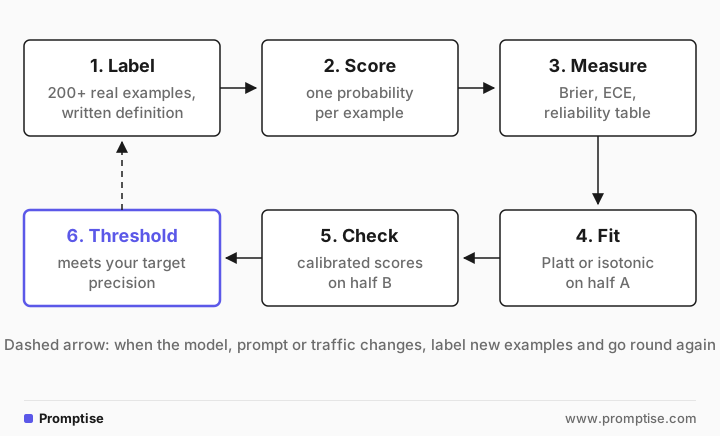
Label a few hundred real examples, score each one with your classifier, and compare the predicted probabilities with what actually happened: a Brier score, an expected calibration error (ECE) and a reliability table. Then fit a small calibrator (Platt scaling or isotonic regression) on half of the labeled set, check it on the other half, and choose the threshold that meets the precision you need.
from sklearn.calibration import calibration_curve
observed, predicted = calibration_curve(labels, scores, n_bins=5)
# predicted 0.06 -> observed 0.31: "6% likely" was true 31% of the time
Key takeaways:
Accuracy and calibration are different. A classifier can be right 78% of the time and still say "95% sure" about its mistakes.
Where the confidence comes from matters more than the fix. Stated confidence, sampling agreement, token log probabilities and decision models behave very differently on the same data.
Calibrators fix the numbers, not the ranking. Platt scaling or isotonic regression can make scores honest, but they can't make a weak signal separate right from wrong.
Small sets give noisy numbers. Report an interval, keep a held-out half, and treat each result as a starting point.
Pick thresholds by the cost of a mistake. "At least 97% of auto-approved items correct" is a decision you can defend; "0.8 felt right" is not.
[02]
What is calibration, and why do LLM confidence scores need it?
A classifier is calibrated when its probabilities match outcome frequencies: of all the items it scores at 0.8, about 80% should be positive. Three measures describe this:
Reliability table (or diagram). Group predictions into probability bins and compare each bin's average prediction with the share that turned out positive. A calibrated model sits on the diagonal.
Brier score. The mean squared difference between the predicted probability and the label (0 or 1). Lower is better. It mixes calibration with discrimination (how well scores separate the classes), so a lower Brier score doesn't prove better calibration on its own.
Expected calibration error (ECE). The average gap between confidence and accuracy across bins, weighted by how many items fall in each bin. It is easy to read but depends on the number of bins and gets noisy with small sets.
LLMs give you no probability by default. You have to get one out of them, and every method has a bias. Research on chat models found that confidence they state in words carries some signal but tends to be overconfident (Xiong et al., ICLR 2024), and that stated confidence can sometimes be better calibrated than token probabilities (Tian et al., 2023). Neither finding tells you how your model behaves on your task, which is why you measure.
Four ways to get a confidence score from an LLM
Method | How | Needs | Watch out for |
|---|---|---|---|
Stated confidence | Ask for an answer plus "confidence 0-100" | any chat model | clusters on round numbers (95, 5); often overconfident |
Sampling agreement | Ask n times, use the share of "yes" | a model with sampling randomness | only n+1 possible values; n times the output tokens |
Token log probabilities | Read P("yes") from the first output token | an API that returns logprobs | not every model allows it; one-token answers only |
Decision model | Ask a typed yes/no question | a decision-model API | a separate service; probabilities still need checking |
Not every model exposes log probabilities. Requesting them from gpt-5-mini returned 403 You are not allowed to request logprobs from this model, so this guide reads them from gpt-4.1-mini instead. Decision models are covered in decision models for AI agents.
[03]
When to calibrate (and when not)
Calibrate when:
Code acts on the score. Auto-approve, auto-send, auto-route or skip review above a threshold.
You combine scores. Expected cost, ranking a queue, or merging signals from several classifiers all assume the probabilities mean what they say.
You change the model or prompt. A new model version can shift every score, even if accuracy stays the same.
Skip it when:
A person reads every output anyway. Then confidence only sorts the queue, and ranking quality matters more than calibration.
You have fewer than about 100 labeled examples. Collect more first; the measurement will be mostly noise.
The task is deterministic. If a rule or a calculation can decide, use it and drop the classifier.
[04]
What you need
Python 3.10 or later with scikit-learn, pandas, numpy and openai (
uv pip install scikit-learn pandas numpy openai).An OPENAI_API_KEY to score examples. The whole example (200 items, four methods) costs a few cents.
A written label definition. Labels without one are the most common source of fake "model errors".
[05]
Step 1: Build a labeled set
The running example is a reply checker: before a support agent sends a reply, a classifier answers "is every factual claim in the reply supported by the policy?". The policy is ten short lines:
"""The policy every support reply must stick to."""
POLICY = """Returns: within 14 days of delivery, unused and in the original packaging.
Refunds: to the original payment method, 5 to 10 business days after we receive the return.
Not returnable: opened software and gift cards.
Shipping: standard shipping is free on orders over $50, otherwise $4.90.
Express shipping: $9.90, arrives in 1 to 2 business days.
Warranty: 2 years on electronics, covers manufacturing defects, not accidental damage.
Store credit: valid for 12 months.
Price drops: within 7 days of purchase, we refund the difference on request.
Cancellation: free until the order ships.
Support hours: Monday to Friday, 9:00 to 17:00 CET."""
In a real project, people label a sample of real replies. Here a short script (make_labeled.py) builds 200 replies from the policy, so the labels are exact by construction. For each of the ten policy lines it holds three sentences the policy supports, such as "You have two weeks from the day it arrived to send it back", and three it doesn't, such as "You can return it within 14 days of purchase" (the policy says delivery). Each reply picks two or three facts. Even-numbered replies use only supported sentences and are labeled 1; odd-numbered replies swap exactly one sentence for an unsupported one and are labeled 0. A fixed random seed makes the set reproducible.
200 replies, 100 grounded
1 Happy to help. Once the order ships, it can no longer be cancelled for free. Price drops in the first 7 days after purchase are refunded on request. Our team is available Monday to Friday, 9:00 to 17:00 CET.
0 Thanks for reaching out. Support works weekdays from 8:00 to 20:00 CET. Opened software is not returnable, sorry. The refund goes back to your original payment method.
1 Thanks for reaching out. Price drops in the first 7 days after purchase are refunded on request. Gift cards can't be returned. You can return it within 14 days of delivery.
0 Happy to help. Orders under $50 pay $4.90 for standard shipping. Returns are accepted for 14 days after delivery, even if you have used it.
Two rules for your own labeled set. First, sample real traffic, including the boring cases, so the class balance matches production. Second, write the label definition down before labeling, and have two people label a shared slice to see where they disagree.
[06]
Step 2: Score every example with each method
One script asks the same question four ways and stores the probability that the reply is grounded. Running all four on the same examples is what makes the comparison fair.
"""Score every labeled reply with four confidence signals and save them to scores.csv."""
import asyncio
import csv
import json
import math

from openai import AsyncOpenAI

from policy import POLICY

client = AsyncOpenAI()
limit = asyncio.Semaphore(8)

QUESTION = "Is every factual claim in the reply supported by the policy?"


async def stated(text: str) -> float:
    """gpt-5-mini answers and states its confidence (0-100)."""
    r = await client.chat.completions.create(
        model="gpt-5-mini", reasoning_effort="minimal",
        response_format={"type": "json_object"},
        messages=[{"role": "user", "content":
                   f'{QUESTION}\n"""{text}"""\nReply as JSON: '
                   '{"answer": "yes" or "no", "confidence": 0-100}'}])
    out = json.loads(r.choices[0].message.content)
    conf = float(out["confidence"]) / 100
    return conf if out["answer"] == "yes" else 1 - conf


async def sampled(text: str, n: int = 5) -> float:
    """Ask gpt-5-mini n times (one request, n choices); return the share of 'yes'."""
    r = await client.chat.completions.create(
        model="gpt-5-mini", reasoning_effort="minimal", n=n,
        messages=[{"role": "user", "content":
                   f'{QUESTION}\n"""{text}"""\nAnswer yes or no only.'}])
    return sum(c.message.content.strip().lower().startswith("yes") for c in r.choices) / n


async def logprob(text: str) -> float:
    """gpt-4.1-mini answers in one token; read P(yes) from the token log probabilities."""
    r = await client.chat.completions.create(
        model="gpt-4.1-mini", max_tokens=1, temperature=0, logprobs=True, top_logprobs=10,
        messages=[{"role": "user", "content":
                   f'{QUESTION}\n"""{text}"""\nAnswer yes or no only.'}])
    mass = {"yes": 0.0, "no": 0.0}
    for t in r.choices[0].logprobs.content[0].top_logprobs:
        word = t.token.strip().lower()
        if word in mass:
            mass[word] += math.exp(t.logprob)
    return mass["yes"] / (mass["yes"] + mass["no"])


async def decision(text: str) -> float:
    """A decision model returns P(yes) directly."""
    r = await client.decisions.create(
        model="gpt-6-luna", input=text,
        questions=[{"type": "predicate", "name": "grounded", "instructions": QUESTION}])
    return r.answers[0].probability


METHODS = {"stated": stated, "sampled": sampled, "logprob": logprob, "decision": decision}


async def score(row: dict) -> dict:
    state = f"Policy:\n{POLICY}\n\nReply:\n{row['text']}"
    async with limit:
        values = await asyncio.gather(*(fn(state) for fn in METHODS.values()))
    return {"label": row["label"], "text": row["text"], **dict(zip(METHODS, values))}


async def main():
    rows = list(csv.DictReader(open("labeled.csv")))
    scored = await asyncio.gather(*(score(row) for row in rows))
    with open("scores.csv", "w", newline="") as f:
        writer = csv.DictWriter(f, fieldnames=["label", "text", *METHODS])
        writer.writeheader()
        writer.writerows(scored)
    print(f"scored {len(scored)} replies with {len(METHODS)} methods")
    for row in scored[:4]:
        print(row["label"], " ".join(f"{m}={row[m]:.2f}" for m in METHODS), "|", row["text"][:50])


asyncio.run(main())scored 200 replies with 4 methods
1 stated=0.95 sampled=0.80 logprob=1.00 decision=1.00 | Happy to help. Once the order ships, it can no lon
0 stated=0.05 sampled=0.00 logprob=0.00 decision=0.00 | Thanks for reaching out. Support works weekdays fr
1 stated=0.02 sampled=1.00 logprob=1.00 decision=0.80 | Thanks for reaching out. Price drops in the first
0 stated=0.05 sampled=0.00 logprob=0.00 decision=0.00 | Happy to help. Orders under $50 pay $4.90 for stanThe third row shows why one method is not enough: stated confidence put a grounded reply at 0.02, while sampling, log probabilities and the decision model all said it was grounded. Store the raw scores (here scores.csv); every later step reuses them without calling a model again.
[07]
Step 3: Measure accuracy, Brier score and ECE
"""Accuracy, Brier score and expected calibration error (ECE) for each signal."""
import numpy as np
import pandas as pd
from sklearn.metrics import brier_score_loss

METHODS = ["stated", "sampled", "logprob", "decision"]


def ece(y, p, bins=10):
    """Average gap between confidence and accuracy, weighted by bin size."""
    conf = np.where(p >= 0.5, p, 1 - p)            # confidence in the predicted label
    correct = (p >= 0.5) == (y == 1)
    edges = np.linspace(0.5, 1.0, bins + 1)
    idx = np.clip(np.digitize(conf, edges[1:-1]), 0, bins - 1)
    return sum(abs(correct[idx == b].mean() - conf[idx == b].mean()) * (idx == b).mean()
               for b in range(bins) if (idx == b).any())


def brier_interval(y, p, rounds=1000, seed=0):
    """95% bootstrap interval: how much the Brier score moves with a different sample."""
    rng = np.random.default_rng(seed)
    picks = rng.integers(0, len(y), (rounds, len(y)))
    scores = [brier_score_loss(y[i], p[i]) for i in picks]
    return np.percentile(scores, [2.5, 97.5])


def report(df, methods=METHODS):
    y = df["label"].to_numpy()
    print(f"{'method':9} {'accuracy':>8} {'brier':>6} {'95% interval':>14} {'ece':>6}  distinct values")
    for m in methods:
        p = df[m].to_numpy()
        acc = ((p >= 0.5) == (y == 1)).mean()
        lo, hi = brier_interval(y, p)
        print(f"{m:9} {acc:8.2f} {brier_score_loss(y, p):6.3f} {f'{lo:.3f}-{hi:.3f}':>14} "
              f"{ece(y, p):6.3f}  {len(np.unique(p.round(2)))}")


if __name__ == "__main__":
    df = pd.read_csv("scores.csv")
    print(f"{len(df)} labeled replies, {df['label'].sum()} grounded\n")
report(df)200 labeled replies, 100 grounded
method accuracy brier 95% interval ece distinct values
stated 0.78 0.194 0.147-0.244 0.167 21
sampled 0.82 0.160 0.111-0.208 0.147 6
logprob 0.93 0.072 0.039-0.107 0.074 6
decision 0.94 0.052 0.027-0.080 0.055 32The ece function takes each prediction's confidence in the label it picked (0.9 for a "yes" at 0.9, also 0.9 for a "no" at 0.1), splits those confidences into ten bands from 0.5 to 1.0, and adds up the gap between average confidence and actual accuracy in each band, weighted by how many predictions fall in it. The bootstrap interval resamples the 200 rows a thousand times to show how much the Brier score would move with a different sample of the same size.
How to read this:
Accuracy alone hides the problem. Stated confidence was right 78% of the time, but its ECE of 0.167 says its confidence was off by about 17 points on average.
The interval matters. With 200 examples, the Brier score for stated confidence could plausibly be anywhere from 0.147 to 0.244. Differences inside overlapping intervals are not findings.
Distinct values limit what a threshold can do. Sampling with n=5 can only output six values (0, 0.2, ... 1), and here log probabilities produced only six distinct rounded values, so you can't set a threshold between them.
These numbers are for this task and this run. A different task, prompt or model version gives different results; that is the reason to run this on your own data.
[08]
Step 4: Read the reliability table
Averages hide where a classifier goes wrong. The reliability table shows it per band of predicted probability:
"""Reliability table: in each band of predicted P(grounded), how often was it grounded?"""
import pandas as pd
from sklearn.calibration import calibration_curve

df = pd.read_csv("scores.csv")
for method in ["stated", "decision"]:
    observed, predicted = calibration_curve(df["label"], df[method], n_bins=5)
    counts = pd.cut(df[method], [0, .2, .4, .6, .8, 1.0], include_lowest=True).value_counts(sort=False)
    counts = counts[counts > 0]
    print(f"{method}: predicted -> observed (replies)")
    for p, o, n in zip(predicted, observed, counts):
        print(f"  {p:4.2f} -> {o:4.2f}  ({n})")

# Where every method disagrees with the label, check the label before the model.
methods = ["stated", "sampled", "logprob", "decision"]
votes = (df[methods] >= 0.5).sum(axis=1)
suspect = df[((df["label"] == 1) & (votes == 0)) | ((df["label"] == 0) & (votes == 4))]
print(f"\n{len(suspect)} replies where all four methods disagree with the label, e.g.:")
for text in suspect["text"].head(2):
print(f" {text}")stated: predicted -> observed (replies)
0.06 -> 0.31 (144)
0.95 -> 1.00 (56)
decision: predicted -> observed (replies)
0.01 -> 0.07 (108)
0.26 -> 1.00 (4)
0.58 -> 1.00 (2)
0.71 -> 1.00 (3)
0.98 -> 1.00 (83)
9 replies where all four methods disagree with the label, e.g.:
Happy to help. Ask us within a week of buying and we refund any price drop. Unopened software can be returned like any other item. Standard shipping is free because your order is over $50.
Thanks for reaching out. Orders under $50 pay $4.90 for standard shipping. Unopened software can be returned like any other item.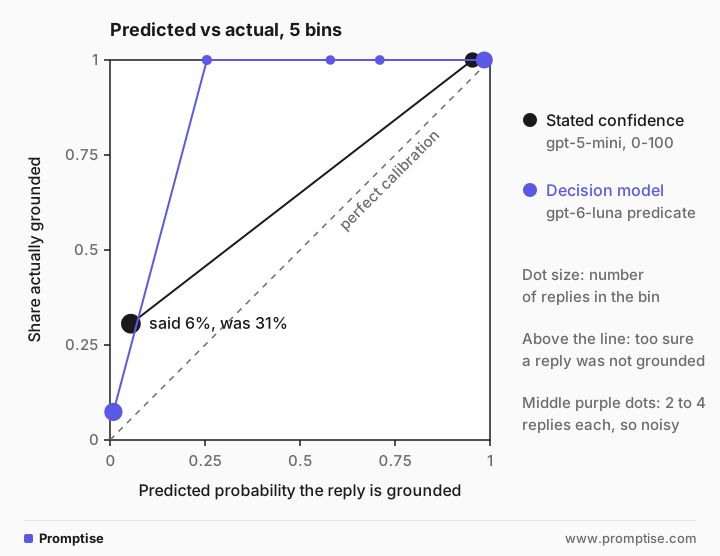
Stated confidence used only two bands. When it said "about 6% likely grounded", 31% of those 144 replies were in fact grounded: it was far too sure that replies were wrong. The decision model spread its scores more and stayed closer to the diagonal at both ends; its middle bands hold only 2 to 4 replies each, too few to judge.
The last lines are the most useful output of the whole exercise. In 9 replies, all four methods disagreed with the label, and 8 of those 9 contain "Unopened software can be returned like any other item". The policy only implies that sentence; it never states it. Whether that counts as "supported" is a question for the label definition, not the model. Fix the definition, relabel, and re-score before tuning anything else. Some of every method's measured error here is really label noise.
[09]
Step 5: Recalibrate with Platt scaling or isotonic regression
A calibrator is a small model that maps raw scores to better probabilities. Two standard choices, both in scikit-learn:
Platt scaling (sigmoid): fits a logistic curve to the scores. Two parameters, so it works with little data and keeps the ranking.
Isotonic regression: fits any non-decreasing step function. More flexible, but it can overfit; scikit-learn's guide says it is generally as good as or better than sigmoid with more than about 1,000 samples.
Fit on one half of the labeled set and evaluate on the other half. Fitting and testing on the same examples always looks better than it is.
"""Fit a calibrator on one half of the labeled set, check it on the other half."""
import numpy as np
import pandas as pd
from sklearn.isotonic import IsotonicRegression
from sklearn.linear_model import LogisticRegression
from sklearn.metrics import brier_score_loss
from sklearn.model_selection import train_test_split

from measure import METHODS, ece

df = pd.read_csv("scores.csv")
fit, test = train_test_split(df, test_size=0.5, stratify=df["label"], random_state=0)


def logit(p):
    p = np.clip(p, 0.01, 0.99)
    return np.log(p / (1 - p)).reshape(-1, 1)


if __name__ == "__main__":
    print(f"fit on {len(fit)}, test on {len(test)}\n")
    print(f"{'method':9} {'raw':>13} {'platt':>13} {'isotonic':>13}   (brier / ece on the test half)")
    for m in METHODS:
        platt = LogisticRegression().fit(logit(fit[m].to_numpy()), fit["label"])
        iso = IsotonicRegression(out_of_bounds="clip").fit(fit[m], fit["label"])
        y = test["label"].to_numpy()
        versions = {
            "raw": test[m].to_numpy(),
            "platt": platt.predict_proba(logit(test[m].to_numpy()))[:, 1],
            "isotonic": iso.predict(test[m]),
        }
        cells = [f"{brier_score_loss(y, p):.3f} / {ece(y, p):.3f}" for p in versions.values()]
print(f"{m:9} " + " ".join(f"{c:>13}" for c in cells))fit on 100, test on 100
method raw platt isotonic (brier / ece on the test half)
stated 0.149 / 0.118 0.118 / 0.105 0.114 / 0.065
sampled 0.147 / 0.150 0.118 / 0.021 0.119 / 0.026
logprob 0.050 / 0.050 0.047 / 0.052 0.070 / 0.065
decision 0.035 / 0.042 0.018 / 0.056 0.012 / 0.036On the test half, Platt scaling cut sampling's ECE from 0.150 to 0.021 and isotonic regression cut stated confidence's ECE from 0.118 to 0.065. For the log-probability scores, isotonic regression made things worse (Brier 0.050 to 0.070): with 100 fitting examples and few distinct values, it overfit. Note what recalibration can't do: stated confidence still separates grounded from ungrounded replies poorly, so its Brier score stays far above the other methods. A calibrator makes a score honest; it doesn't make it informative.
If your classifier is a scikit-learn model, CalibratedClassifierCV does the same with cross-validation, and FrozenEstimator lets you calibrate an already-trained model. With scores from an API, fitting LogisticRegression or IsotonicRegression on the scores directly, as above, is simpler.
[10]
Step 6: Choose a threshold for a target precision
The point of calibration is a decision rule. Here the rule is "send a reply without review when P(grounded) is high enough that at least 97% of auto-sent replies are grounded". Choose the threshold on the fit half, then check it on the test half:
"""Pick the auto-send threshold on the fit half; check it on the test half."""
import numpy as np
from sklearn.linear_model import LogisticRegression

from recalibrate import fit, logit, test

TARGET = 0.97  # of the replies sent without review, at least 97% must be grounded


def choose(p, y, target=TARGET):
    """Lowest threshold whose auto-sent replies meet the target precision."""
    for t in np.arange(0.50, 1.00, 0.01):
        sent = p >= t
        if sent.sum() >= 10 and y[sent].mean() >= target:
            return round(float(t), 2)
    return None  # never confident enough: every reply goes to a person


print(f"\ntarget: {TARGET:.0%} of auto-sent replies grounded")
for m in ["stated", "sampled", "logprob", "decision"]:
    platt = LogisticRegression().fit(logit(fit[m].to_numpy()), fit["label"])
    p_fit = platt.predict_proba(logit(fit[m].to_numpy()))[:, 1]
    t = choose(p_fit, fit["label"].to_numpy())
    if t is None:
        print(f"{m:9} no threshold reaches the target")
        continue
    p = platt.predict_proba(logit(test[m].to_numpy()))[:, 1]
    sent = p >= t
    y = test["label"].to_numpy()
    print(f"{m:9} threshold {t:.2f}: sent {sent.sum():3} of {len(y)} without review, "
          f"{(y[sent] == 0).sum()} of them not grounded; {(~sent).sum()} to a person")
target: 97% of auto-sent replies grounded
stated    threshold 0.51: sent  36 of 100 without review, 0 of them not grounded; 64 to a person
sampled   threshold 0.50: sent  37 of 100 without review, 1 of them not grounded; 63 to a person
logprob   threshold 0.50: sent  45 of 100 without review, 0 of them not grounded; 55 to a person
decision  threshold 0.50: sent  49 of 100 without review, 0 of them not grounded; 51 to a person
Every method reached the target on the test half, but they differ in coverage: how much work they take off people. With stated confidence, 36 of 100 replies went out without review; with the decision model, 49 of the 50 grounded replies did, and the other 51 went to a person. The sampling method let one ungrounded reply through. Coverage at a fixed precision is usually the comparison that matters for an agent, because it translates directly into review hours.
Which confidence signal should you use?
Use the cheapest signal that reaches your target with enough coverage on your labeled set. As a starting order:
A decision model when you have access to one and the question is a fixed yes/no, choice or score. It returns a probability per call with no parsing.
Token log probabilities when your model exposes them and the answer fits in one token. They cost nothing extra on top of the call you already make.
Sampling agreement when you can't get either, and only with enough samples to give you room for a threshold. Five samples give six possible values; ten give eleven.
Stated confidence as a last resort, for sorting a review queue rather than for automatic actions. Prompting for evidence and quotes first, as in self-check fields, makes it more useful.
Whatever you choose, keep the comparison: score a new candidate on the same labeled set and compare coverage at your target precision before you switch.
Using the threshold in an agent
Put the calibrated threshold where the agent acts. In Promptise Foundry, a decision or classifier function plugs into AutoApprovalClassifier as its llm_classifier, which returns "allow" above your threshold and "escalate" below it, so a person sees only the uncertain cases. The decision models guide has a runnable gate, and human-in-the-loop approval covers the review side. Store the calibrator's parameters next to the threshold, and version both with the prompt.
[11]
Running calibration in production
Sample size. 200 examples give a rough picture; 500 to 1,000 give stable thresholds. For rare positive classes, label more positives on purpose and reweight.
Recalibrate on every change. A new model version, a prompt edit or a change in question wording can shift scores. Re-run Steps 2 to 6 before switching, and keep the old calibrator until the new one passes.
Watch the class balance. If the share of positives in production drifts from your labeled set, calibrated probabilities drift too. Track the predicted positive rate daily.
Segment when traffic differs. Calibration can be good overall and poor for one language, product or customer tier. Check the reliability table per segment that matters.
Log scores and outcomes. Every reviewed item is a new label for free. Sample them monthly and repeat the measurement.
Count the cost. Sampling multiplies output tokens by n; stated confidence and log probabilities cost one call; decision-model APIs bill input tokens only. A more expensive signal is not automatically a better one, as the sampling results above show.
[12]
Common problems and fixes
Symptom | Cause | Fix |
|---|---|---|
ECE looks great but mistakes still slip through | Bins dominated by easy items | Check the reliability table and the confident mistakes, not only ECE |
Threshold can't be set between two values | Too few distinct scores (sampling, rounded stated confidence) | Use a finer signal (log probabilities, decision model) or more samples |
Calibrated scores look perfect, then fail in production | Calibrator fit and tested on the same data | Keep a held-out half, or use cross-validation |
Isotonic regression makes the Brier score worse | Overfitting on a small set | Use Platt scaling below about 1,000 examples |
All methods "wrong" on the same items | Label definition is unclear | Audit those items, fix the definition, relabel |
| The model doesn't expose log probabilities | Use another model for logprobs, or another method |
Probabilities shift after an upgrade | New model version | Re-run the labeled set and refit the calibrator |
[13]
Limitations
Small labeled sets are noisy. Intervals on 200 examples are wide; don't rank methods on small differences.
Calibration is task-specific. A calibrator fit on reply checking says nothing about ticket routing.
It can't fix discrimination. If the scores don't separate the classes, no calibrator will.
Labels can be wrong. Measured error includes label noise, as Step 4 showed.
The example uses synthetic replies. They make the labels exact, but real replies are messier. Use your own traffic before trusting any threshold.
[14]
FAQ
What is LLM confidence calibration?
LLM confidence calibration is making an LLM classifier's confidence match how often it is right. You measure it on labeled examples with a reliability table, a Brier score and an expected calibration error, and you correct it with a calibrator such as Platt scaling or isotonic regression.
Can I trust an LLM's stated confidence score?
Not without measuring it. Stated confidence often clusters on a few round values and can be overconfident on mistakes. In this guide's example, replies scored about 6% likely to be grounded were grounded 31% of the time. Measure it on labeled data, and prefer a finer signal if you need to set thresholds.
Are token log probabilities a good confidence score for classification?
For one-token answers such as yes/no or a label, log probabilities are a cheap and often useful signal, and they gave one of the lower Brier scores in this example. Not every model exposes them, and they still need checking on labeled data, because a softmax probability is not automatically calibrated.
How many labeled examples do I need to calibrate a classifier?
At least 100 to see anything, 200 to 500 for a usable threshold, and around 1,000 or more before isotonic regression is a safe choice over Platt scaling. Hold out half for testing, and report an interval rather than a single number.
What is the difference between Brier score and ECE?
The Brier score is the mean squared error between probabilities and outcomes, so it rewards both calibration and good separation of the classes. ECE measures only the gap between confidence and accuracy across bins. Report both, plus a reliability table.
Do decision models need calibration?
Yes. Decision models return probabilities directly, and in this example they were close to calibrated at both ends, but vendors' calibration claims are about their test sets, not your task. Run the same labeled-set check before you let code act on the scores.
[15]
Next steps
Put calibrated scores to work: decision models for AI agents.
Compare decision-model APIs: Jev vs Clef vs OpenAI Decisions API compared.
Improve stated confidence with better prompts: LLM confidence scores and self-check fields.
Another uncertainty signal: uncertainty-aware prompting with semantic entropy.
Build evaluations into your workflow: how to evaluate AI agents and AI agent evals in CI.
Route uncertain cases to people: human-in-the-loop approval for AI agents.