Contents · 15 sections↓
- 01What reasoning effort should an AI agent use?
- 02What is reasoning effort?
- 03How do the providers set reasoning effort?
- 04When does high reasoning effort hurt an agent?
- 05When should you raise reasoning effort?
- 06What you need
- 07Step 1: Give the agent a realistic task
- 08Step 2: Run the same task at each effort level
- 09Step 3: Escalate effort only when a check fails
- 10Step 4: Set effort per role, not per application
- 11Running reasoning effort in production
- 12Common problems and fixes
- 13Limitations
- 14FAQ
- 15Next steps
Reasoning effort is the setting that tells a reasoning model how much to think before it answers: low, medium, high and, on some models, xhigh or max. For a chat reply, a higher level costs a few extra seconds. For an AI agent, the model reasons on every turn of its loop, so the setting multiplies across the whole run. This guide explains how reasoning effort works at each major provider, when "high" hurts an agent, how to choose a level, and how to measure it on your own task with runnable code.
What reasoning effort should an AI agent use?
Start at the provider's default or one level lower, and raise it only where your own evaluations show a gain. Most agent turns are routine: read a tool result, pick the next tool, fill in arguments. They don't need deep reasoning, and every reasoning token is billed as output on every turn. Keep higher effort for the steps that need it (planning, hard judgment calls) or use it as a retry when a cheap check on the answer fails.
Effort applies per model call, and an agent makes many calls. The cost of a higher level grows with the length of the loop.
Higher effort isn't reliably better. In a public coding benchmark this month, xhigh cost 2.1 to 4.2 times as much as medium and scored lower on two of three models.
Lower effort can mean more turns. In this guide's example, minimal took three model calls where every other level took two. Each extra turn resends the conversation, so the savings shrink.
Defaults differ by model and change between versions. Set effort explicitly so a model upgrade doesn't change your costs.
Measure on your task: correctness, model calls, tool calls, tokens, cost and time per level.
[02]
What is reasoning effort?
Reasoning models write hidden reasoning tokens before the visible answer. The effort setting steers how many. Three things about those tokens matter for agents:
You pay for them as output tokens, usually the most expensive token type, even though you don't see them. OpenAI reports them in the usage object as reasoning_tokens under output_tokens_details.
They take time. Reasoning happens before the first visible token, so latency grows with effort.
They count against limits. OpenAI counts reasoning tokens against the context window. Anthropic counts thinking toward max_tokens, which is a hard cap on thinking plus the reply.
Effort isn't a precise budget. Anthropic's docs call it "a behavioral signal, not a strict token budget": the model still thinks on hard problems at low effort, just less. And it affects more than thinking. Anthropic's effort parameter shapes all output, including tool calls: lower effort tends to make fewer, combined tool calls, and higher effort may make more calls and explain its plan first.
[03]
How do the providers set reasoning effort?
Provider | Parameter | Levels | Default |
|---|---|---|---|
OpenAI | reasoning.effort (Responses API), reasoning_effort (Chat Completions) | none, minimal, low, medium, high, xhigh, max, a subset per model | Model-dependent; medium on GPT-6 Sol, GPT-6.1 Sol and GPT-6 Luna |
Anthropic | output_config.effort | low, medium, high, xhigh, max, per model | high on most models; medium on Claude Opus 5.5 and Haiku 5.5 |
Google Gemini | thinking_level in generation_config (Interactions API) | minimal, low, medium, high, a subset per model | Model-dependent: minimal, medium or high |
Sources: the OpenAI reasoning guide, Anthropic's effort docs and Google's thinking docs, all read on October 22, 2026. Check the model page before you rely on a level: gpt-5-mini, for example, accepts minimal, low, medium and high and rejects none and xhigh with a 400 error.
Two details catch people out. First, defaults move: Claude Opus 5.5 defaults to medium where Opus 5 defaulted to high, so a request that omits effort runs one level lower after the upgrade. Second, on Anthropic models, changing the top-level effort between requests invalidates the prompt cache. Newer Claude models offer a per-message effort change (beta) that keeps the cache.
[04]
When does high reasoning effort hurt an agent?
Higher effort helps on genuinely hard steps. It hurts in five ways that show up in agents more than in chat:
Cost multiplies with the loop. A ten-turn agent pays for reasoning ten times. Reasoning on a turn that only reads a tool result and calls the next tool is mostly waste.
Latency compounds. Every turn waits for its reasoning. A support agent that takes 20 seconds instead of 5 feels broken to a user, even if the answer is the same.
Limits get hit. Long reasoning can exhaust max_tokens or fill the context window in long runs. The visible answer is cut off, or the run fails, after you've paid for the thinking.
Overthinking. Anthropic's guidance for Claude Opus 4.7 says max "can lead to overthinking" on some structured-output or less intelligence-sensitive tasks. A model that reasons at length about a simple step can talk itself out of the obvious action, add steps nobody asked for, or produce more code than the task needs.
No reliable quality gain. The SlopCodeBench October 2026 update ran frontier models on multi-checkpoint coding tasks at medium and xhigh. xhigh cost 2.11 to 4.22 times as much in the three complete pairs, and strict passes rose only for one model; Opus 5.5 scored 28 at medium and 25 at xhigh. The author is careful: each setting ran once, so this doesn't prove more reasoning hurts coding. It shows that higher effort wasn't a reliable way to buy more passes. The same write-up found Opus 5.5 at xhigh wrote noticeably cleaner code by its linters, so "worse" depends on what you measure.
The fix isn't to always use low effort. It's to stop treating effort as a global quality dial and set it per step, per task, based on measurement.
[05]
When should you raise reasoning effort?
Raise effort when:
The step is a real decision: planning a multi-step task, choosing between designs, judging whether an action is safe.
Errors are expensive and slow answers are acceptable: a migration plan, a security review, a financial calculation that isn't checked downstream.
Your evaluations show a gain at the higher level that is larger than run-to-run noise.
A cheap check failed at the lower level, as a retry.
Keep effort low when the agent mostly routes, looks things up or formats results, when users wait for the answer, or when another step (a validator, a test suite, a person) checks the output anyway.
[06]
What you need
Python 3.10 or later and Promptise Foundry 1.6.0.
An OpenAI API key. The example uses gpt-5-mini; all runs in this guide together cost about one cent.
uv venv && uv pip install "promptise==1.6.0"To set effort, pass a Foundry Model to build_agent and put the provider's own parameter in extra, which Foundry passes through unchanged: Model("openai:gpt-5-mini", extra={"reasoning_effort": "low"}) for OpenAI, or Model("anthropic:<model>", extra={"effort": "medium"}) for Claude, which sets output_config.effort. For a plain model call outside an agent, resolve_model("openai:gpt-5-mini", reasoning_effort="low") does the same.
[07]
Step 1: Give the agent a realistic task
The task is a small support case with two tools: look up an order, read the refund policy. It has one trap: the customer used a 10% coupon, and the policy refunds "the amount paid, including shipping". The correct refund is 189.00 minus 10%, plus 12.00 shipping: 182.10.
"""Two tools for a refund question: an order lookup and the refund policy."""
from promptise import ToolError, tool

ORDERS = {
    "A-1042": {"item": "Halyard room thermostat", "item_price": 189.00, "coupon": "10% off the item",
               "shipping": 12.00, "delivered": "2026-09-20", "status": "delivered"},
}
POLICY = {
    "damaged": "Items that arrive damaged can be returned within 14 days of delivery for a full "
               "refund of the amount paid, including shipping.",
    "change of mind": "Unwanted items can be returned within 30 days of delivery. Shipping is not refunded.",
}


@tool
def get_order(order_id: str) -> dict:
    """Look up an order: item, price, coupon, shipping cost and delivery date.

    Args:
        order_id: The order ID, for example "A-1042".
    """
    if order_id not in ORDERS:
        raise ToolError(f"No order {order_id}.")
    return ORDERS[order_id]


@tool
def get_refund_policy(reason: str) -> str:
    """Get the refund policy for a return reason.

    Args:
        reason: "damaged" or "change of mind".
    """
return POLICY.get(reason.lower(), f"No policy for {reason!r}. Use 'damaged' or 'change of mind'.")[08]
Step 2: Run the same task at each effort level
The script builds the same agent four times, changing only reasoning_effort, and runs it once per level. For each run it records model calls, tool calls, input, output and reasoning tokens from the messages' usage data, the cost at gpt-5-mini's list price ($0.25 per million input tokens, $2.00 per million output tokens), the wall-clock time and whether the refund is right.
"""Run the same agent task once at each reasoning effort level and compare cost and outcome."""
import asyncio
import re
import time

from promptise import Model, build_agent
from support_tools import get_order, get_refund_policy

QUESTION = ("Today is 2026-10-02. My order A-1042 arrived damaged. Can I get a refund, and how "
            "much exactly? End with: REFUND: <amount in dollars>")
EXPECTED = "182.10"  # 189.00 minus the 10% coupon, plus 12.00 shipping
PRICE_IN, PRICE_OUT = 0.25, 2.00  # gpt-5-mini, USD per 1M tokens (reasoning is billed as output)


async def run(effort: str) -> dict:
    agent = await build_agent(
        model=Model("openai:gpt-5-mini", extra={"reasoning_effort": effort}),
        instructions="You are a support agent. Use the tools; never guess order details.",
        extra_tools=[get_order, get_refund_policy],
    )
    start = time.perf_counter()
    try:
        result = await agent.ainvoke({"messages": [{"role": "user", "content": QUESTION}]})
    finally:
        await agent.shutdown()
    seconds = time.perf_counter() - start
    calls = [m for m in result["messages"] if m.type == "ai"]
    usage = [m.usage_metadata or {} for m in calls]
    tin = sum(u.get("input_tokens", 0) for u in usage)
    tout = sum(u.get("output_tokens", 0) for u in usage)
    reasoning = sum((u.get("output_token_details") or {}).get("reasoning", 0) for u in usage)
    tools = sum(len(m.tool_calls) for m in calls)
    answer = re.search(r"REFUND:\s*\$?([\d.,]+)", result["messages"][-1].content)
    amount = answer.group(1).replace(",", "").rstrip(".") if answer else "none"
    return {"effort": effort, "llm": len(calls), "tools": tools, "in": tin, "out": tout,
            "reasoning": reasoning, "usd": (tin * PRICE_IN + tout * PRICE_OUT) / 1e6,
            "seconds": seconds, "refund": amount, "ok": amount in (EXPECTED, EXPECTED.rstrip("0"))}


async def main() -> None:
    print(f"{'effort':8} {'LLM':>3} {'tools':>5} {'in':>6} {'out':>5} {'reason':>6} {'cost $':>8} {'sec':>5}  refund")
    for effort in ["minimal", "low", "medium", "high"]:
        r = await run(effort)
        print(f"{r['effort']:8} {r['llm']:>3} {r['tools']:>5} {r['in']:>6} {r['out']:>5} {r['reasoning']:>6} "
              f"{r['usd']:>8.5f} {r['seconds']:>5.1f}  {r['refund']} {'correct' if r['ok'] else 'WRONG'}")


asyncio.run(main())
One run of each level:
effort   LLM tools     in   out reason   cost $   sec  refund
minimal    3     2    966   248      0  0.00074   4.3  182.10 correct
low        2     2    639   572    384  0.00130   6.7  182.10 correct
medium     2     2    639   864    640  0.00189   9.1  182.10 correct
high       2     2    639  2083   1792  0.00433  20.0  182.10 correct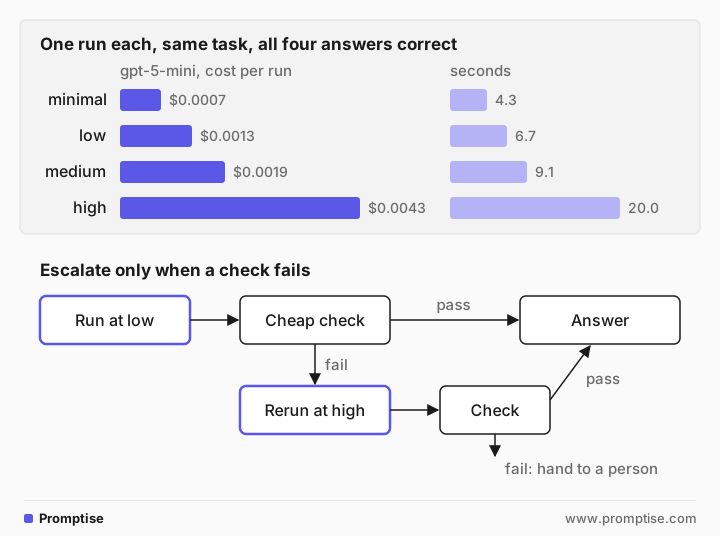
How to read it:
All four levels got the right answer. On this task, extra reasoning bought nothing.
`high` spent 1,792 reasoning tokens against 384 at low and none at minimal. That made it about three times as expensive as low and nearly six times as expensive as minimal, and three to four times as slow.
`minimal` took an extra turn. With no reasoning, the model made three calls instead of two and resent the conversation on the extra turn. Here it was still the cheapest; on a longer task with a bigger context, extra turns can cost more than the reasoning they save. In an earlier run of the same script, minimal took four turns and cost more than low.
This is one run per level, an illustration and not a benchmark. Run-to-run variation is large for agents. Before you pick a level for production, run each candidate 10 to 20 times on a set of real tasks and compare success rates, not single answers.
[09]
Step 3: Escalate effort only when a check fails
The pattern that gets most of both worlds: run at low effort, apply a cheap check to the answer, and rerun at high effort only when the check fails. If the high-effort answer fails too, hand the case to a person rather than trying again.
"""Start at low effort; rerun at high only when the answer fails a cheap check."""
import asyncio
import re

from promptise import Model, build_agent
from support_tools import ORDERS, get_order, get_refund_policy

QUESTION = ("Today is 2026-10-02. My order A-1042 arrived damaged. Can I get a refund, and how "
            "much exactly? End with: REFUND: <amount in dollars>")


def check(answer: str, order: dict) -> str | None:
    """Return a problem, or None. Checks the shape of the answer, not its reasoning."""
    match = re.search(r"REFUND:\s*\$?([\d.,]+)", answer)
    if not match:
        return "no REFUND line"
    if float(match.group(1).replace(",", "").rstrip(".")) > order["item_price"] + order["shipping"]:
        return "refund is more than the order cost"
    return None


async def answer(question: str, order_id: str) -> str:
    for effort in ["low", "high"]:
        agent = await build_agent(
            model=Model("openai:gpt-5-mini", extra={"reasoning_effort": effort}),
            instructions="You are a support agent. Use the tools; never guess order details.",
            extra_tools=[get_order, get_refund_policy],
        )
        try:
            result = await agent.ainvoke({"messages": [{"role": "user", "content": question}]})
        finally:
            await agent.shutdown()
        text = result["messages"][-1].content
        problem = check(text, ORDERS[order_id])
        print(f"effort={effort}: {problem or 'passed the check'}")
        if problem is None:
            return text
    return "I couldn't work this out reliably. A person will follow up."


print(asyncio.run(answer(QUESTION, "A-1042")).splitlines()[-1])effort=low: passed the check
REFUND: $182.10The check is deliberately simple: is there a refund line, and is the amount no more than the order cost? It can't prove the answer right. It catches answers that are malformed or clearly impossible, which are the cases where more reasoning is most likely to help. Better checks come from your domain: a total that must match a database, a test suite that must pass, a JSON schema, an approval from a reviewer.
[10]
Step 4: Set effort per role, not per application
In multi-agent or plan-and-execute setups, give each role its own level. A planner that breaks a task into steps or a reviewer that judges a risky action benefits from higher effort and runs once. Executors that call tools and format results run many times and rarely need it. In Promptise, each agent you build takes its own model, so a planner on Model("openai:gpt-5-mini", extra={"reasoning_effort": "high"}) and executors on "low" is just two build_agent calls. Plan-and-execute agents and multi-agent systems show how to wire them together.
The same thinking applies to model choice. A smaller model at higher effort and a larger model at lower effort can land at similar quality for very different prices. LLM routing covers choosing between them per request.
[11]
Running reasoning effort in production
Set effort explicitly for every agent and pin the model version. Defaults change between model versions and providers.
Log effort with every run, together with tokens, reasoning tokens, tool calls and time, so you can compare levels on real traffic. AI agent cost tracking shows how to record tokens and cost per run.
Put a budget on the run, not only on the call. Foundry's max_agent_iterations caps turns and max_invocation_time caps seconds; AI agent cost control covers spend limits.
Leave room for reasoning in max_tokens. For its Opus models at xhigh and max, Anthropic suggests starting at 64k. A truncated answer after a long think is the most expensive failure.
Keep effort constant within cached conversations on providers where changing it invalidates the cache, or use per-message effort where offered.
Re-run your comparison after model upgrades. Anthropic notes that Claude Sonnet 5.5's levels are recalibrated, so the same level doesn't mean the same amount of thinking as on Sonnet 5.
[12]
Common problems and fixes
Symptom | Cause | Fix |
|---|---|---|
| The model doesn't support that level | Check the model page; gpt-5-mini supports minimal to high |
Costs jumped after a model upgrade | The new model has a different default effort | Set effort explicitly |
Empty or cut-off answers at high effort | Reasoning used up max_tokens | Raise max_tokens or lower effort |
The agent is slow but answers are fine | Effort is higher than the task needs | Lower effort for routine roles; measure again |
Low effort takes more turns than medium | Less planning, one action per turn | Try low instead of minimal, or instruct the agent to fetch what it needs together |
Prompt cache hit rate dropped | Effort changed between requests | Keep it constant per conversation, or use per-message effort |
No difference between levels in your tests | One run per level hides variation | Run each level 10 to 20 times on a task set |
[13]
Limitations
The example is one task and one run per level. It shows how to measure, not which level is best for you.
Effort levels aren't comparable across providers or models. high on one model is not high on another, and providers recalibrate levels between versions.
Reasoning tokens are hidden, so you can see how much a model thought but not whether the thinking was useful.
Cheap checks catch malformed answers, not subtly wrong ones. Escalation only helps where a check can tell good from bad.
Prices change. Recompute costs from current price lists when you compare.
[14]
FAQ
What does reasoning effort do?
It controls how many hidden reasoning tokens a reasoning model generates before its answer. Higher levels let the model think longer, which can improve hard answers and always costs more output tokens and time. Lower levels are faster and cheaper, with some loss on hard problems.
Is xhigh or max effort worth it?
Sometimes, for long, hard tasks where your own evaluations show a gain. In the October 2026 SlopCodeBench update, xhigh cost 2.1 to 4.2 times as much as medium and scored fewer strict passes on two of three models. Test before you pay for it.
Which reasoning effort is best for agents?
Start at the default or one level lower for most agent roles, because effort applies to every turn of the loop. Raise it for planning and judgment steps, or as a retry when a check fails, and confirm the gain with repeated runs on your own tasks.
Does higher reasoning effort make more tool calls?
It can. Anthropic's docs say higher effort may make more tool calls and explain its plan, while lower effort tends to combine operations. In this guide's example, the lowest setting made the most model calls, because it planned less and needed an extra turn.
How do I set reasoning effort in Promptise Foundry?
Pass a Model with the provider's parameter in extra to build_agent, for example model=Model("openai:gpt-5-mini", extra={"reasoning_effort": "low"}), or extra={"effort": "medium"} on an Anthropic model. Foundry passes extra to the provider unchanged.
Are reasoning tokens billed?
Yes. OpenAI bills reasoning tokens as output tokens and reports them as reasoning_tokens in the usage data. Google bills thinking tokens with output tokens, and Anthropic counts thinking toward max_tokens. You pay for them even though you don't see them.
[15]
Next steps
Best LLM for AI agents covers choosing the model before you tune its effort.
How to evaluate AI agents shows how to build the task set and repeated runs this guide recommends.
AI agent reasoning patterns compares agent loop designs, which change how many turns effort applies to.
Chain-of-thought prompting explains the prompting technique that reasoning models now do internally.