Contents · 9 sections↓
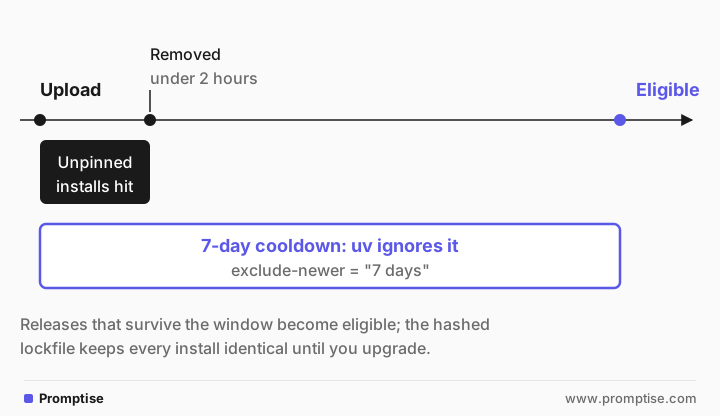
A uv dependency cooldown makes your Python project ignore package releases newer than a set age, such as seven days. Both poisoned LiteLLM releases of 2026 were removed from PyPI within hours, so a cooldown would have kept them out of the lockfile. This post shows how to set one with uv's exclude-newer, how to install only from a hashed lockfile, how to let an urgent fix through, and what a cooldown does not protect against. It matters most for AI projects, whose packages ship often and run next to your provider keys.
How do you add a dependency cooldown with uv?
Add exclude-newer = "7 days" under [tool.uv] in pyproject.toml. uv then ignores every file uploaded to the index in the last seven days when it resolves dependencies, and records the cutoff in uv.lock. Pair it with installs that only use the lockfile (uv sync --locked in CI and Docker), which also checks every file's hash. Use exclude-newer-package to let one urgent fix through early.
Durations need uv 0.9.17 or later (released December 2025). Older versions only take a fixed date.
The window moves only when you re-resolve. uv lock keeps the stored cutoff; uv lock --upgrade moves it forward.
The lockfile is the pin. It records the exact version and sha256 hash of every file, and uv sync refuses a file whose hash doesn't match.
A cooldown doesn't cover Docker images or Git dependencies. Pin images by digest.
[02]
Why do AI projects need a cooldown now?
On October 21, 2026, litellm==1.107.0 was published to PyPI with malware that steals credentials. LiteLLM's incident post says it was live from 11:39 to 13:23 UTC, and that affected users were those who installed an unpinned LiteLLM in that window. It recommends pinning to 1.106.2 or another explicit version. In March, versions 1.82.7 and 1.82.8 were pulled after a similar compromise.
Both times, a seven-day cooldown would have made the bad version invisible to uv until long after it was gone. AI stacks are exposed in particular ways:
Fast release cycles. Model SDKs, agent frameworks and gateways ship several times a week, so "latest" changes constantly.
Keys in reach. These packages run in processes that hold provider keys, cloud roles and database passwords.
Deep dependency trees. One
uv add litellm openaiin this example resolved 60 packages.
[03]
Step 1: Set the cooldown before you add packages
Put the cooldown in pyproject.toml with required-version, so an older uv fails loudly instead of ignoring the duration:
[project]
name = "agent-app"
version = "0.1.0"
description = "Add your description here"
readme = "README.md"
requires-python = ">=3.12"
dependencies = [
    "litellm>=1.105.1",
    "openai>=2.54.0",
]

[tool.uv]
required-version = ">=0.9.17"
exclude-newer = "7 days"
exclude-newer-package = { openai = "1 day" }
Then add packages as usual:
$ uv add litellm openai
Resolved 60 packages in 59ms
$ uv tree --depth 1
agent-app v0.1.0
├── litellm v1.105.1
└── openai v2.54.0
$ grep -A2 "\[options\]" uv.lock
[options]
exclude-newer = "2026-10-15T18:39:02.138741Z"
exclude-newer-span = "P7D"
uv picked litellm 1.105.1, not 1.106.2, because 1.106.2 was uploaded less than seven days ago. The lockfile stores both the resolved cutoff (exclude-newer) and the duration it came from (exclude-newer-span).
How the window moves, from uv's resolution docs: uv compares the cutoff against each file's upload time, not the release date. It does not update the lockfile when the clock moves on. A new resolution, such as uv lock --upgrade or uv add, computes a new cutoff from the current time. So a weekly uv lock --upgrade moves you to versions that are at least seven days old.
To set a cooldown for every project on your machine, put the same exclude-newer line in your user-level uv.toml. The UV_EXCLUDE_NEWER environment variable works for one command.
[04]
Step 2: Install only from the lockfile
A cooldown protects resolution. Your deploys need a second rule: never resolve at install time. Use uv sync --locked in CI and Docker. It fails if uv.lock doesn't match pyproject.toml, instead of quietly re-resolving:
$ uv sync --locked
Resolved 60 packages in 41ms
The lockfile at `uv.lock` needs to be updated, but `--locked` was provided. To update the lockfile, run `uv lock`.
exit code: 1
--frozen skips that check and installs exactly what is in uv.lock. Use --locked in CI, where a stale lockfile should fail the build.
Every file in uv.lock has a sha256 hash, and uv checks it on download. To test that, one wheel hash in uv.lock was changed by hand:
$ uv sync --frozen --reinstall-package distro   # after changing one wheel hash in uv.lock
  × Failed to download `distro==1.9.0`
  ╰─▶ Hash mismatch for `distro==1.9.0`

      Expected:
        sha256:0000000000000000000000000000000000000000000000000000000000000000

      Computed:
        sha256:7bffd925d65168f85027d8da9af6bddab658135b840670a223589bc0c8ef02b2
If some machines install with pip, export the lockfile with hashes:
$ uv export --format requirements-txt --no-dev -o requirements.txt
$ grep -A3 "^litellm" requirements.txt
litellm==1.105.1 \
    --hash=sha256:3253da7d4967e367fb7e4e404b598a26037c45ba6d67a79356a81d3f8b9f9f3a \
    --hash=sha256:633886584ffb6421485349376f2c1666d4854fecc3ab8b1cdb24537817d4e1cc \
    --hash=sha256:beb5044645144308b39560049c0f68875ad7de07e681ad0b73e2bc6c3705ba61 \
$ grep -c "sha256:" requirements.txt
1407
Then install with pip install --require-hashes -r requirements.txt. pip also has its own cooldown since 26.0: --uploaded-prior-to, which accepts a duration such as P7D since pip 26.1 (pip changelog).
A Dockerfile line that follows these rules:
RUN uv sync --locked --no-devFor images you pull rather than build, pin by digest (image@sha256:...), not by tag. LiteLLM's compromised Docker tags included latest and main-stable, and a cooldown on Python packages does nothing for them.
[05]
Step 3: Let an urgent fix through
Sometimes you need a release that is newer than the window, such as a security fix. Override the cooldown for that one package and upgrade only it:
$ uv lock --upgrade-package openai
Resolved 60 packages in 190ms
$ grep -A6 "\[options\]" uv.lock
[options]
exclude-newer = "2026-10-15T18:39:24.35606Z"
exclude-newer-span = "P7D"

[options.exclude-newer-package]
openai = { timestamp = "2026-10-21T18:39:24.356067Z", span = "P1D" }
The lockfile records the override with its own cutoff, so the exception is visible in code review. Set a package to false to exempt it entirely. Remove the override once the fix is older than your global window.
[06]
Common problems
Symptom | Cause | Fix |
|---|---|---|
No solution found after adding the cooldown | pyproject.toml has a lower bound (>=1.106.2) newer than the window; uv add writes one for the current latest | Lower the bound, or add the cooldown before adding packages |
The duration is ignored or rejected | uv older than 0.9.17 | Set required-version = ">=0.9.17" and upgrade uv |
Versions never move forward | The lockfile keeps its cutoff until you re-resolve | Run uv lock --upgrade on a schedule |
CI installs differ from local | CI runs uv pip install or uv sync without --locked | Use uv sync --locked everywhere |
A Git dependency still updates | exclude-newer applies only to registry packages | Pin Git dependencies to a commit |
A private index package is missing | The index doesn't report upload times | Set exclude-newer = false for that index or package |
Here is the first problem as uv reports it:
$ uv add "litellm>=1.106.2"
  × No solution found when resolving dependencies for split (markers:
  │ python_full_version >= '3.14'):
  ╰─▶ Because only litellm<1.106.2 is available and your project depends on
      litellm>=1.106.2, we can conclude that your project's requirements are
      unsatisfiable.

      hint: While the active Python version is 3.12, the resolution failed for
      other Python versions supported by your project. Consider limiting your
uv doesn't say that the newer version was excluded by the cooldown. Its docs say this is deliberate: excluded files are treated as if they don't exist.
[07]
What a cooldown doesn't do
It doesn't find malware. It gives others time to find it. A compromise that goes unnoticed for longer than your window still gets in.
It delays good fixes too. That is the trade-off, and why per-package overrides exist.
It doesn't protect what is already installed. If a bad version is already in your lockfile or environment, you need the incident steps, then rotate and audit your keys.
It doesn't cover images, Git dependencies or tools installed some other way, such as pipx or a global pip install.
[08]
Frequently asked questions
What is a good cooldown length for Python dependencies?
There is no standard. Seven days gives others a week to spot a bad release; some projects choose three or four days to stay closer to current. Any window longer than a few hours would have blocked both compromised LiteLLM releases of 2026.
Does uv exclude-newer pin my dependencies?
No. It limits which versions uv may choose. The pin is uv.lock, which records exact versions and file hashes. Use both: the cooldown when you resolve, the lockfile when you install.
How do I get a security fix that is newer than my cooldown?
Add the package to exclude-newer-package with a shorter duration or false, then run uv lock --upgrade-package <name>. Remove the override later.
Does a cooldown protect Docker images?
No. exclude-newer only applies to packages from a Python index. Pull images by digest and update the digest on purpose.
Can I use a dependency cooldown with pip?
Yes. pip 26.0 added --uploaded-prior-to, and pip 26.1 lets it take a duration such as P7D. Combine it with --require-hashes and a requirements file that has hashes.
[09]