Contents · 14 sections↓
- 01How do you stop secrets leaking into LLM logs and traces?
- 02How do secrets end up in LLM logs and traces?
- 03What does Promptise Foundry redact by default?
- 04When to redact, and when not to record at all
- 05What you need
- 06Step 1: Build a tool that leaks
- 07Step 2: See where secrets go with default settings
- 08Step 3: Redact tool results with a guardrail
- 09Step 4: Close the gaps in traces and your own log lines
- 10Running it in production
- 11Common problems and fixes
- 12Limitations
- 13Frequently asked questions
- 14Next steps
Secrets leak into LLM logs and traces more often through tool results than through prompts. An agent runs a CLI, reads a config file or calls an API, the output contains a token, and request logging, tracing and the conversation store all keep a copy. This guide shows where API keys and tokens end up, what to redact and where, and how to do it in Python with Promptise Foundry 1.6.0, including the token formats the built-in redaction misses.
How do you stop secrets leaking into LLM logs and traces?
Redact in two layers. First, scan every tool result for credentials and replace them before the model reads the result, so the secret never reaches the provider, the conversation history or anything downstream. Second, put a sanitizer on everything you record (traces, exports and your own log lines) to catch what the first layer missed, such as secrets in tool arguments or error messages. Then test both layers with fake keys in every format your tools can return.
Tool results are the main path. They hold raw CLI output, HTTP responses and file contents, and agents pass them on verbatim.
A secret the model sees is everywhere. It is sent to the provider and kept in every store that saves the conversation.
Trace redaction alone is too late. It cleans the trace, but the model and the history already have the value.
Pattern lists have gaps. In Foundry 1.6.0 the trace sanitizer misses GitHub CLI tokens (gho_), and the guardrail misses opaque bearer tokens. Add rules for your formats.
Not recording is safer than redacting. Turn off tool input and output recording when traces leave your trust boundary.
[02]
How do secrets end up in LLM logs and traces?
An agent's text moves through more places than a normal request handler. A secret can enter at several points:
Tool results. A shell tool prints environment variables, an HTTP tool returns response headers, a file tool reads .env. The agent passes the whole result to the model.
Tool arguments. The model copies a token from one tool result into the next call's arguments, for example a curl command with an Authorization header.
User messages. People paste keys into chat, often while asking for help with an error.
Error messages. Exceptions from HTTP clients and database drivers can include URLs with passwords or request details.
Proxy and gateway logs. A gateway that logs request and response bodies keeps every prompt and every tool result that passes through it.
LiteLLM's incident post of October 21, 2026 is a recent example of the last path. LiteLLM says that in specific situations Claude Code embeds a user's GitHub CLI OAuth token in a response body, and where response bodies are logged, those tokens may appear in LiteLLM logs. It believes the attacker obtained developer GitHub tokens from an internal LiteLLM deployment. In March, LiteLLM had reported a separate issue in which a custom guardrail could write plaintext Authorization headers into spend logs and OpenTelemetry traces. Neither needed an exotic attack: secrets were in text that a logging feature saved.
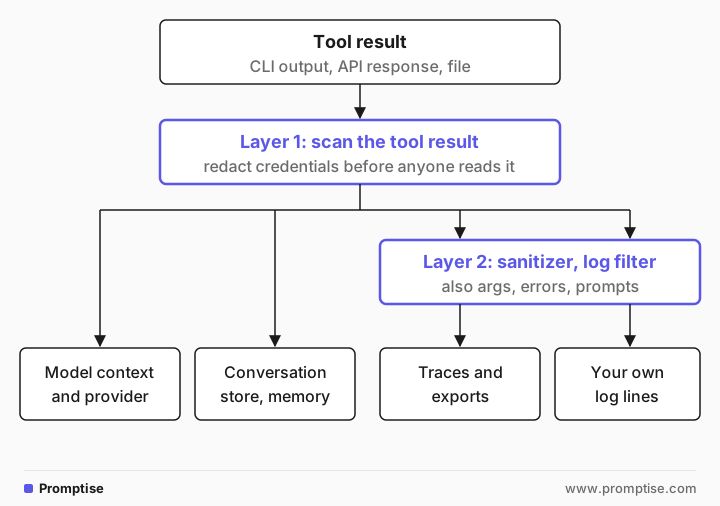
The order matters. Once a secret is in the model's context, cleaning the trace does not take it back from the provider or from the stored conversation. Redact as early as you can, and keep a second layer at the point where text is written down.
[03]
What does Promptise Foundry redact by default?
Foundry has two separate redaction features. They use different pattern lists, and only one is on by default.
Layer | On by default | Where it runs | What it catches |
|---|---|---|---|
Trace sanitizer (ObservabilityConfig.redact_sensitive) | Yes, when observability is on | Every recorded event: tool arguments, tool result previews, errors, prompt text | sk- keys (OpenAI, Anthropic), AWS access key IDs, classic GitHub tokens (ghp_), Bearer tokens, passwords in URLs, card numbers, US SSNs, emails |
Guardrail credential detector (CredentialDetector) | No; tool results only with scan_tool_results=True | Tool results before the model, and the agent's output | 96 patterns in about 60 groups (cloud, Git hosts, payment, messaging, databases, JWTs, private keys), adapted from gitleaks and trufflehog |
Three things to know about these defaults:
The trace sanitizer cleans the record, not the run. The model and result["messages"] still hold the raw tool result.
Tool results are not scanned unless you ask. PromptiseSecurityScanner scans tool results only with scan_tool_results=True. On user input, credential findings are warnings unless you set redact_input=True.
Recording is on by default. record_tool_io=True stores tool arguments and the first 2,000 characters of each result. Prompt and response text is recorded only at the FULL level.
[04]
When to redact, and when not to record at all
Redaction is pattern matching. It catches formats it knows and misses the rest, such as a random 32-character password in a config file. Use the stronger control where you can:
Situation | Do this |
|---|---|
Traces are sent to a third-party service | record_tool_io=False, keep prompts off, and redact anyway |
You debug locally and need real arguments | Keep recording on, with redaction, and keep traces on your machine |
A tool can return credentials by design (secret managers, env dumps) | Don't give the agent that tool; give it a narrower one |
Tools return text from systems you don't control | Scan tool results (layer 1) and sanitize traces (layer 2) |
Logs go to a shared logging platform | Log metadata (tool name, status, latency), not bodies |
The best fix is upstream: an agent that never has a token cannot leak it. Foundry's MCP server specs pass bearer_token, headers and env to tool servers without showing them to the model; see AI agent secrets management.
[05]
What you need
Python 3.10 or later and promptise==1.6.0.
An OpenAI API key in OPENAI_API_KEY. The examples use openai:gpt-5-mini, and each run costs well under a cent.
About 20 minutes.
uv venv && uv pip install "promptise==1.6.0"[06]
Step 1: Build a tool that leaks
To test redaction, reproduce a leak with values you control. This tool returns the kind of debug output a deploy CLI prints, with five fake secrets in real formats: an OpenAI project key, an AWS access key ID, a GitHub CLI OAuth token, a database URL with a password and an opaque bearer token.
"""A tool whose output contains secrets, the way real CLI and API tools leak them.

Every value below is fake, but each has the real format: an OpenAI project key,
an AWS access key ID, a GitHub CLI OAuth token (gho_), a database URL with a
password, and an opaque bearer token in an Authorization header.
"""
from promptise import tool

FAKE_OUTPUT = """\
deploy: api-prod is healthy (3/3 pods), last release v2.14.1
debug env:
  OPENAI_API_KEY=sk-proj-FAKEfakeFAKEfakeFAKE12T3BlbkFJFAKEfakeFAKEfakeFAKE34
  AWS_ACCESS_KEY_ID=AKIAFAKE1234567890AB
  GH_TOKEN=gho_FAKEaaaabbbbccccddddeeeeffffgggg1234
  DATABASE_URL=postgres://app:FakePassw0rd@db.internal:5432/app
request: Authorization: Bearer 7f3cFAKE9a1e5b2d4f6a8c0e1b3d5f7a
"""

SECRETS = {
    "openai key": "sk-proj-FAKE",
    "aws key": "AKIAFAKE",
    "github cli token": "gho_FAKE",
    "db password": "FakePassw0rd",
    "bearer token": "7f3cFAKE",
}


@tool
async def deploy_status(service: str) -> str:
    """Get the deploy status of a service, with the CLI's debug output.

    Args:
        service: The service name, for example "api-prod".
    """
    return FAKE_OUTPUT


def leaks(text: str) -> list[str]:
    """Which of the fake secrets appear in text."""
    return [name for name, marker in SECRETS.items() if marker in text]
leaks() reports which fake secrets appear in a piece of text. The tests below use it on the messages the model received and on the trace log file.
[07]
Step 2: See where secrets go with default settings
A small helper runs the agent once, then checks two places: the tool message the model received and the JSON log file written by the structured log transporter.
"""Run the agent once and report where the fake secrets ended up."""
import json
from pathlib import Path

from leaky_tool import leaks

QUESTION = "Is api-prod healthy? Reply with healthy or unhealthy and the pod count, nothing else."


async def run_and_report(agent, log: Path) -> None:
    result = await agent.ainvoke({"messages": [{"role": "user", "content": QUESTION}]})
    await agent.shutdown()  # flushes the log transporter

    tool_msg = next(m for m in result["messages"] if m.type == "tool")
    traced = [json.loads(line) for line in log.read_text().splitlines()]
    preview = next(e for e in traced if e["event_type"] == "tool.result")
    print("answer:", result["messages"][-1].content)
    print("\ntool result as traced:")
    print(preview["metadata"]["result_preview"])
    print("secrets the model saw:   ", leaks(str(tool_msg.content)))
    print("secrets in the log file: ", leaks(log.read_text()))
The first agent uses defaults: observability on, with redact_sensitive=True, and no guardrails.
"""Where do secrets from a tool result end up, with default settings?"""
import asyncio
from pathlib import Path

from promptise import build_agent
from promptise.observability_config import ObservabilityConfig, TransporterType

from common import run_and_report
from leaky_tool import deploy_status

LOG = Path("out/trace-default.log")


async def main() -> None:
    LOG.unlink(missing_ok=True)
    agent = await build_agent(
        model="openai:gpt-5-mini",
        extra_tools=[deploy_status],
        observe=ObservabilityConfig(  # redact_sensitive=True is the default
            transporters=[TransporterType.STRUCTURED_LOG],
            log_file=str(LOG),
        ),
    )
    await run_and_report(agent, LOG)


asyncio.run(main())answer: healthy 3/3
tool result as traced:
deploy: api-prod is healthy (3/3 pods), last release v2.14.1
debug env:
OPENAI_API_KEY=[API_KEY]
AWS_ACCESS_KEY_ID=[AWS_KEY]
GH_TOKEN=gho_FAKEaaaabbbbccccddddeeeeffffgggg1234
DATABASE_URL=postgres://[REDACTED]@db.internal:5432/app
request: Authorization: Bearer [REDACTED]
secrets the model saw: ['openai key', 'aws key', 'github cli token', 'db password', 'bearer token']
secrets in the log file: ['github cli token']Two results matter here:
The model saw all five secrets. They went to the provider and sit in the returned messages, which a conversation store would save.
The trace caught four of five. The OpenAI key, AWS key, database password and bearer token were replaced. The GitHub CLI token (gho_...) was written to the log file in plain text, because the trace sanitizer only knows the classic ghp_ format. That is the token type in LiteLLM's October report.
[08]
Step 3: Redact tool results with a guardrail
Layer 1 scans each tool result before the model reads it. Use PromptiseSecurityScanner with only CredentialDetector: it is pure regex, so nothing is downloaded and it adds little latency. scan_tool_results=True makes build_agent wrap every tool.
"""Redact credentials from tool results before the model, traces or logs see them."""
import asyncio
import sys
from pathlib import Path

from promptise import build_agent
from promptise.guardrails import CredentialDetector, CustomRule, PromptiseSecurityScanner
from promptise.observability_config import ObservabilityConfig, TransporterType

from common import run_and_report
from leaky_tool import deploy_status

LOG = Path("out/trace-guarded.log")

# The value after "Authorization: Bearer" (opaque tokens, not only JWTs).
BEARER_VALUE = CustomRule(
    name="bearer_value",
    pattern=r"(?i)\bbearer\s+[A-Za-z0-9\-._~+/]{16,}=*",
    description="Bearer token value",
)


async def main() -> None:
    LOG.unlink(missing_ok=True)
    guard = PromptiseSecurityScanner(
        detectors=[CredentialDetector()],  # 96 regex patterns, no model download
        custom_rules=[] if "--no-custom" in sys.argv else [BEARER_VALUE],
        scan_tool_results=True,  # scan every tool result before the model reads it
    )
    agent = await build_agent(
        model="openai:gpt-5-mini",
        extra_tools=[deploy_status],
        guardrails=guard,
        observe=ObservabilityConfig(
            transporters=[TransporterType.STRUCTURED_LOG],
            log_file=str(LOG),
        ),
    )
    await run_and_report(agent, LOG)


asyncio.run(main())
First, without the custom rule:
answer: healthy 3/3

tool result as traced:
deploy: api-prod is healthy (3/3 pods), last release v2.14.1
debug env:
  OPENAI_API_KEY=[OPENAI_API_KEY]
  AWS_ACCESS_KEY_ID=[AWS_ACCESS_KEY]
  GH_TOKEN=[GITHUB_OAUTH]
  DATABASE_URL=[POSTGRES_CONNECTION]
request: [BEARER_TOKEN] 7f3cFAKE9a1e5b2d4f6a8c0e1b3d5f7a

secrets the model saw:    ['bearer token']
secrets in the log file:  ['bearer token']
The detector caught the OpenAI key, the AWS key, the GitHub token and the whole database URL, and the model never saw them. But the bearer token survived. Its pattern matches Authorization: Bearer and stops at the space, so it replaced the header name and left the token. Worse, the trace sanitizer, which caught this token in step 2, no longer sees the word Bearer after the first redaction, so the token reached the log file too. JWT bearer tokens are caught by a separate JWT pattern; opaque tokens like this one are not.
This is why you test with your own formats. The fix is one CustomRule that matches the value after Bearer:
answer: healthy 3

tool result as traced:
deploy: api-prod is healthy (3/3 pods), last release v2.14.1
debug env:
  OPENAI_API_KEY=[OPENAI_API_KEY]
  AWS_ACCESS_KEY_ID=[AWS_ACCESS_KEY]
  GH_TOKEN=[GITHUB_OAUTH]
  DATABASE_URL=[POSTGRES_CONNECTION]
request: [BEARER_VALUE]

secrets the model saw:    []
secrets in the log file:  []
Now nothing reaches the model, the returned messages or the log. Because the guardrail rewrites the tool result itself, the trace records the redacted text, and so would a conversation store or memory.
How the guardrail behaves:
Redaction keeps the result useful. The model still sees "healthy (3/3 pods)" and answers correctly.
Overlapping matches are merged. The header and the custom rule matched the same span, so it was replaced once.
A `BLOCK` action withholds the whole result. Set CredentialDetector(action=Action.BLOCK) (Action is in promptise.guardrails) for tools that should never return credentials. The model then gets a short notice instead of the result.
[09]
Step 4: Close the gaps in traces and your own log lines
Layer 2 covers what layer 1 does not see: tool arguments, error messages, prompts recorded at the FULL level, and your application's own log lines. One scrub() function serves both. It starts from Foundry's redact_sensitive and adds the formats it lacks.
"""One redaction function for traces and log lines.

Starts from Promptise's built-in trace sanitizer and adds token formats it
does not cover. Extend EXTRA with the formats your own tools can return.
"""
import logging
import re
from typing import Any

from promptise.observability import redact_sensitive

EXTRA = [
    # GitHub OAuth, user-to-server, server-to-server and refresh tokens
    (re.compile(r"\bgh[oprsu]_[A-Za-z0-9]{36,}\b"), "[GITHUB_TOKEN]"),
    (re.compile(r"\bgithub_pat_[A-Za-z0-9_]{50,}\b"), "[GITHUB_TOKEN]"),
    # Slack bot and user tokens
    (re.compile(r"\bxox[abprs]-[A-Za-z0-9-]{10,}"), "[SLACK_TOKEN]"),
]


def scrub(text: str) -> str:
    text = redact_sensitive({"t": text})["t"]  # sk-, AKIA, ghp_, Bearer, URL passwords, PII
    for pattern, label in EXTRA:
        text = pattern.sub(label, text)
    return text


def _walk(value: Any) -> Any:
    if isinstance(value, str):
        return scrub(value)
    if isinstance(value, dict):
        return {k: v if k in {"run_id", "entry_id", "parent_id"} else _walk(v) for k, v in value.items()}
    if isinstance(value, (list, tuple)):
        return type(value)(_walk(v) for v in value)
    return value


def sanitize(metadata: dict[str, Any]) -> dict[str, Any]:
    """Sanitizer for ObservabilityCollector: every recorded event passes through it."""
    return _walk(metadata)


class RedactingFilter(logging.Filter):
    """Scrub every record that reaches a handler, including library loggers."""

    def filter(self, record: logging.LogRecord) -> bool:
        record.msg = scrub(record.getMessage())
        record.args = None
        return True
To use it for traces, pass your own ObservabilityCollector with sanitizer=sanitize; it replaces the default sanitizer. For log lines, add RedactingFilter to the handler. A filter on a handler sees every record that reaches it, including records from library loggers, while a filter on one logger only sees that logger's own records.
"""Close the gaps: a stricter trace sanitizer and a redacting log handler."""
import asyncio
import logging
from pathlib import Path

from promptise import build_agent
from promptise.observability import ObservabilityCollector
from promptise.observability_config import ObservabilityConfig, TransporterType

from common import run_and_report
from leaky_tool import FAKE_OUTPUT, deploy_status
from redaction import RedactingFilter, sanitize

LOG = Path("out/trace-sanitized.log")

# Your own log lines: put the filter on the handler, not on one logger.
handler = logging.StreamHandler()
handler.addFilter(RedactingFilter())
logging.basicConfig(level=logging.INFO, handlers=[handler], format="%(name)s: %(message)s")
log = logging.getLogger("deploy-bot")


async def main() -> None:
    LOG.unlink(missing_ok=True)
    log.info("raw tool output: %s", FAKE_OUTPUT.splitlines()[4])  # the GH_TOKEN line

    agent = await build_agent(
        model="openai:gpt-5-mini",
        extra_tools=[deploy_status],
        observer=ObservabilityCollector(sanitizer=sanitize),  # replaces the default
        observe=ObservabilityConfig(
            transporters=[TransporterType.STRUCTURED_LOG],
            log_file=str(LOG),
        ),
    )
    await run_and_report(agent, LOG)


asyncio.run(main())
This run turns guardrails off to show layer 2 alone:
deploy-bot: raw tool output:   GH_TOKEN=[GITHUB_TOKEN]
httpx: HTTP Request: POST https://api.openai.com/v1/chat/completions "HTTP/1.1 200 OK"
httpx: HTTP Request: POST https://api.openai.com/v1/chat/completions "HTTP/1.1 200 OK"
answer: healthy 3/3

tool result as traced:
deploy: api-prod is healthy (3/3 pods), last release v2.14.1
debug env:
  OPENAI_API_KEY=[API_KEY]
  AWS_ACCESS_KEY_ID=[AWS_KEY]
  GH_TOKEN=[GITHUB_TOKEN]
  DATABASE_URL=postgres://[REDACTED]@db.internal:5432/app
request: Authorization: Bearer [REDACTED]

secrets the model saw:    ['openai key', 'aws key', 'github cli token', 'db password', 'bearer token']
secrets in the log file:  []
The log line and the trace are clean, and the GitHub token is now caught. The model still saw every secret, because layer 2 runs only when text is written down. Use both layers together in production.
[10]
Running it in production
Use both layers. Layer 1 keeps secrets away from the provider and stored history. Layer 2 catches what reaches records through other paths.
Keep one pattern list. Put your extra patterns in one module and use it in the guardrail (CustomRule), the trace sanitizer and the log filter. When a new token format shows up, you add it once.
Test redaction in CI. Keep a fixture of fake secrets in every format your tools can return, run it through scrub() and through the guardrail, and fail the build if any value survives. Formats change, and providers add new key prefixes.
Limit what you record. For traces sent to a hosted backend, set record_tool_io=False. Events then keep the tool name, latency, status and result length. Set retention on log storage; a secret in a log kept for 30 days is less of a problem than one kept for years.
Restrict who can read traces. Treat trace storage like production data. LiteLLM's March report lists least-privilege access to spend logs and telemetry backends as a fix.
Other tracing backends work the same way. If you export to a hosted tracer, use its client-side hook as well: LangSmith has create_anonymizer and create_secret_anonymizer passed as Client(anonymizer=...) (docs), and Langfuse takes a mask function on the client (docs). For a comparison of tracing tools, see best AI agent observability tools.
When a secret does leak, rotate it. Redaction does not undo a leak. If a real key reached a log, a trace or a provider, revoke it and follow leaked LLM API key: rotate and audit in 30 minutes.
[11]
Common problems and fixes
Symptom | Cause | Fix |
|---|---|---|
Trace shows [API_KEY] but the model answer quotes the key | Only the trace sanitizer is on | Add scan_tool_results=True with a CredentialDetector |
A gho_, github_pat_ or Slack token appears in trace logs | Not in the trace sanitizer's pattern list | Pass a collector with your own sanitizer, as in step 4 |
Authorization: Bearer is redacted but the token after it is not | The guardrail's bearer pattern stops at the scheme word | Add a CustomRule for the value after Bearer |
A real-looking OpenAI key is not redacted by the guardrail | The OpenAI pattern requires the T3BlbkFJ marker that real keys contain | Test with real formats; add a rule for custom key formats |
Emails and IDs show up as [EMAIL] and debugging is hard | The trace sanitizer also redacts common PII | Debug locally with redact_sensitive=False, never in shared traces |
Your log filter misses lines from a library | The filter is attached to one logger | Attach it to the handler |
A secret is still in last month's logs | Redaction only applies to new records | Rotate the secret, then purge or expire the old logs |
[12]
Limitations
Regex redaction only finds known formats. Random passwords, internal tokens and secrets split across lines get through. Not recording is the only complete fix.
Redaction can over-match: long hex strings and IDs can look like tokens. Check that redacted traces are still useful.
Layer 1 covers tool results and agent output. It does not change what your own code sends to tools as arguments.
The behavior shown is Promptise Foundry 1.6.0. Pattern lists change between versions, so rerun your fixture tests when you upgrade.
[13]
Frequently asked questions
How do I redact API keys from LLM logs?
Scan text for known key formats and replace matches before anything is written. In Promptise Foundry, the trace sanitizer does this for every recorded event by default, and a logging filter does it for your own log lines. Test with fake keys in each format, because no pattern list covers everything.
Do LLM providers see secrets in tool results?
Yes. A tool result becomes part of the next request to the model, so any secret in it is sent to the provider and kept in the conversation history. Redact tool results before the model reads them, not only in your logs.
What is the difference between redacting traces and redacting tool results?
Redacting traces cleans the record of what happened. Redacting tool results changes what the model sees. Only the second keeps a secret away from the provider and stored conversations, and only the first catches secrets in tool arguments and errors. Use both.
Should I log prompts and responses in production?
Log metadata by default: model, token counts, latency, tool names and status. Record full text only where you need it for debugging, keep it inside your trust boundary, redact it, and set a retention period.
Does Promptise Foundry redact secrets by default?
Partly. When observability is on, every recorded event is sanitized for common key formats, bearer tokens, URL passwords and PII. Tool results are scanned before the model reads them only when you add a guardrail scanner with scan_tool_results=True.
What should I do if a key already leaked into my logs?
Revoke and rotate the key first, then check the provider's usage for activity you don't recognize, then remove or expire the logs. Redacting future logs does not make an exposed key safe.
[14]