Contents · 8 sections↓
A leaked LLM API key costs money fast: anyone who has it can run models on your account until you revoke it. This checklist works for OpenAI, Anthropic, Google Gemini, Azure OpenAI, Amazon Bedrock and any other provider. In 30 minutes you revoke and replace the key, check what it was used for, find where it leaked, and make the next leak smaller. Each step links to the provider's own docs.
What should you do if your LLM API key leaks?
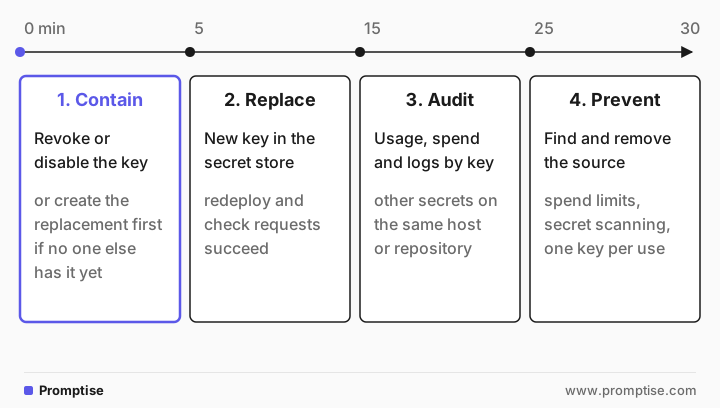
Revoke or disable the key in the provider's console right away, and create a new one. Put the new key in your secret store, redeploy, and confirm requests work. Then check usage and spend for that key, look for other secrets that leaked from the same place, and remove the source: a commit, a log, a client bundle or a chat. Rotating the key is the fix; deleting the commit or the log line is not.
Revoke first when in doubt. A short outage costs less than a key in the wrong hands.
Deleting the leak doesn't un-leak the key. Git history, forks, caches and log archives keep copies.
Check spend per key, not only the account total, so you can see what the leaked key did.
Assume neighbors leaked too. A .env file or a log rarely holds one secret.
Make keys small: one key per app and environment, with spend limits and expiry.
[02]
Minutes 0 to 5: contain the key
Decide one thing first: revoke now, or replace first?
Revoke now if the key is public (a public repository, a paste, a public website, a shared chat), if you see usage you don't recognize, or if you are not sure. Your app will fail until the new key is deployed. That is acceptable.
Replace first only if the key was exposed somewhere private and short-lived, such as an internal log with restricted access, and you can deploy the new key within minutes. Create the new key, deploy it, then revoke the old one.
Where to do it, from each provider's docs:
Provider | Revoke or disable | Docs |
|---|---|---|
OpenAI | API keys page in the platform; rotate by creating a replacement, updating apps, then revoking the old key | |
Anthropic | Claude Console, API keys page, "Delete API key" | |
Google Gemini | Create a new key in AI Studio, then disable the leaked key in the Google Cloud console | |
Azure OpenAI | Regenerate the leaked key on the resource's Keys and Endpoint page; each resource has two keys so you can swap | |
Amazon Bedrock | Long-term API key: deactivate, reset or delete. Short-term key: invalidate the session or deny bedrock:CallWithBearerToken |
If the key was pushed to a public GitHub repository, the provider may already know. GitHub's secret scanning partner program reports keys from partners such as OpenAI, Anthropic, Groq, xAI, OpenRouter and Hugging Face directly to the provider. Anthropic says it automatically deactivates an exposed key reported this way and emails the owner. Don't wait for that; revoke it yourself.
Behind an LLM gateway, rotate the provider key there and every exposed virtual key.
[03]
Minutes 5 to 15: replace the key everywhere
A rotation fails when one copy of the old key is forgotten. List every place the key lived:
Secret manager or vault, CI/CD secrets, deployment platform variables
.env files on servers and laptops
Agents, MCP servers and tools that call the model
Gateways, proxies and notebooks
Teammates' local setups
Update them, redeploy, and confirm in your logs that requests succeed. On Azure, use the two-key swap from Microsoft's docs. For agents built with Promptise Foundry, keys come from the environment or a .env file by default; see AI agent secrets management for scoped, expiring credentials.
[04]
Minutes 15 to 25: audit what happened
Answer three questions: was the key used, what did it cost, and what else leaked with it?
Was it used? Check usage for that key, not just the account:
OpenAI shows per-key usage on the Usage page when usage tracking is on for the key. Keys created before December 20, 2023 are not tracked by default.
Anthropic points to its Logs and Usage pages in the Console.
Google suggests reviewing billing logs and API usage for unauthorized activity.
Bedrock API calls are logged in AWS CloudTrail.
Look for unusual hours, models you don't use and token spikes. Note when the first unknown request happened.
What did it cost? Compare spend before and after the leak. For abuse, contact the provider's support with the key's ID (not the key) and the time window.
What else leaked? Whatever exposed this key probably exposed more. If it was a .env file, every variable in it. If it was a log, every secret that process could log. If it was a compromised machine or package, everything that machine could reach: cloud credentials, database passwords, SSH keys, Git tokens. Rotate those too. LiteLLM's response to its October 2026 compromise is a good example of how wide that list can get: the instance role, every provider key in the proxy database, master and virtual keys, the database password and any secret in the environment of any process on the host.
[05]
Minutes 25 to 30: find the source and make the next leak smaller
Find the source. Search for the key's first characters, not the whole key, so you don't paste the full secret into another tool:
# Every commit, on every branch, that added or removed this string
git log --all -S "sk-proj-AbC1" --oneline

# Scan the whole history and other folders with gitleaks (from its README)
gitleaks git -v .
gitleaks dir -v ./logs ./dist
Common sources for LLM keys:
Committed .env files or notebooks with outputs
Keys in frontend code or mobile apps, where anyone can read them
Logs, traces and gateway request logs that store headers or tool results; see stop secrets leaking into LLM logs and traces
Prompts and chats: a key pasted into an assistant, or a system prompt with a key in it; see secrets in prompts
A compromised dependency that read environment variables; see cooldowns and pins with uv
Rewriting Git history is cleanup, not containment: forks and clones keep the key. The rotation is what protects you.
Make the next leak smaller. These are the settings that limit damage, from the providers' docs:
One key per app and environment. OpenAI recommends separate staging and production projects. Anthropic recommends separate keys for development, testing and production so you can disable one use case.
Spend limits. OpenAI's hard spend limit stops traffic at the monthly cap; spend alerts only notify. Anthropic lets you set spend limits and workspace rate limits on some account types.
Expiry. OpenAI recommends an expiration date on project keys and lets admins enforce a maximum lifetime. AWS recommends short-term Bedrock keys for production.
Secret scanning and push protection. On GitHub, push protection (when it is on for the repository) blocks commits that contain supported key types, including OpenAI keys and, since October 13, 2026, Anthropic service and user API keys by default.
[06]
Common mistakes
Mistake | Why it fails | Fix |
|---|---|---|
Deleting the commit instead of rotating | Forks, clones and caches keep the key | Revoke the key first, clean history later |
Rotating one key from a leaked .env | The other secrets in the file are still exposed | Rotate every secret in the leaked file or log |
Waiting for the provider to revoke it | Automatic revocation covers some providers and public repos only | Revoke it yourself |
Checking only the account total | Normal traffic hides the abuse | Check usage per key and per project |
One shared key for every app | You can't revoke it without taking everything down | One key per app and environment |
Pasting the full key into a search tool or chat | Creates another copy | Search by the first few characters |
[07]
Frequently asked questions
How do I know if my OpenAI API key was used by someone else?
Check per-key usage on OpenAI's Usage page, which shows usage for keys that have usage tracking on. Look for models, times and volumes you don't recognize. If you see abuse, revoke the key and contact OpenAI support with the key's ID and the time window.
Is deleting the GitHub commit enough after a key leak?
No. The key stays in Git history, and in every fork, clone and cache made before you deleted it. Revoke and replace the key first. Rewriting history is cleanup, not a fix.
Does GitHub revoke leaked API keys automatically?
GitHub doesn't revoke keys. For partner providers, it reports keys found in public repositories to the provider, and some providers, such as Anthropic, say they deactivate the reported key. Revoke it yourself either way.
How often should I rotate LLM API keys?
Rotate immediately on any suspected leak and whenever someone with access leaves. For routine rotation, use the expiry options your provider offers, such as expiring OpenAI project keys or short-term Bedrock keys, so rotation becomes part of normal operation.
[08]