Contents · 10 sections↓
- 01What is botsitting, and how do you spend less time fixing AI output?
- 02What the research says about AI rework
- 03Why does AI output need so much fixing?
- 04A real example: the same email, twice
- 05Six habits that cut botsitting
- 06When fixing AI output is worth it, and when it isn't
- 07Templates you can copy
- 08Common mistakes
- 09FAQ
- 10Next steps
Botsitting is the time you spend making AI output usable: explaining the background, checking the draft, rewording the prompt and fixing what came back. A large survey from early 2026 put it at more than six hours a week for the average office worker who uses AI. This guide explains where that time goes, why AI output needs so much fixing, and six habits that cut it, with real prompts and answers you can copy for ChatGPT, Claude, Gemini or Copilot.
What is botsitting, and how do you spend less time fixing AI output?
Botsitting is the unplanned work of making AI usable: feeding it context, supervising its output and fixing its mistakes. The term comes from Glean's Work AI Index 2026, where workers reported about 6.4 hours a week of it. You spend less time fixing AI output by moving the effort to the start: give the facts once, ask for questions before the draft, ask for output you can check quickly, and fix your instructions instead of the draft.
Key takeaways:
Most fixing is caused by missing context. If the AI has to guess your facts, you pay for the guess in edits.
Front-load the effort. Two minutes on a brief saves ten minutes of rewriting.
Fix the instructions, not the output. A corrected draft helps once; a corrected brief helps every time.
Check smarter, not less. Ask for output with sources, assumptions and gaps marked, so checking takes seconds.
Know when to stop. If a task needs a third rewrite, do it yourself or change the approach.
[02]
What the research says about AI rework
Glean, a workplace AI company, surveyed 6,000 full-time digital workers in the US, the UK and Australia between December 2025 and January 2026 for its Work AI Index 2026. Glean defines botsitting as "the largely unrecognized, unbudgeted, and untracked labor of making AI usable." The report found:
Workers spent about 6.4 hours a week botsitting, about 37% of the time they spent with AI.
77% had corrected or redone AI-assisted work in the past month, and 30% did so at least weekly.
60% had run the same prompt in more than one tool because the first answer wasn't good enough.
53% said critical information they need for their job isn't available to their AI tools.
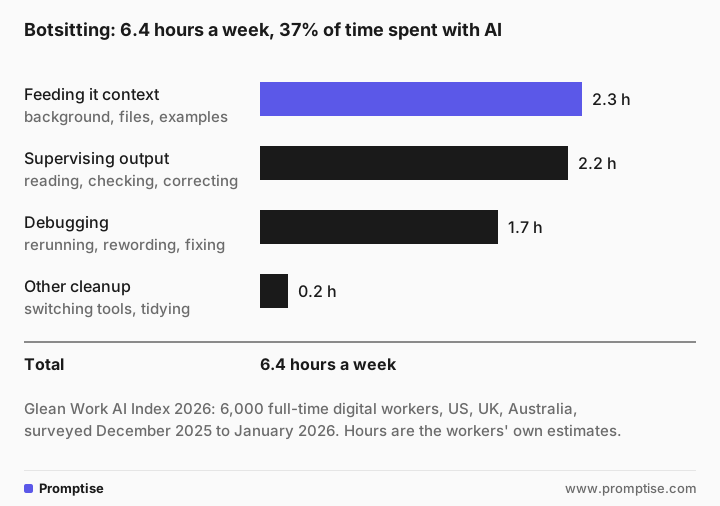
Two cautions. The hours are the workers' own estimates, and Glean's sample leans toward people who use AI a lot, so treat the numbers as a sign of where time goes, not as a measurement of your team. And AI use is far from universal: Gallup's American Job Quality Study, surveyed January 26 to March 24, 2026 and published October 6, 2026, found 28% of US employees use AI at work daily or weekly, and 54% never do.
Still, the shape of the result matches everyday experience. The biggest slice of botsitting is not fixing errors. It is explaining things the AI didn't know.
[03]
Why does AI output need so much fixing?
An AI assistant writes the most likely text for the words you give it. When your request is short, the most likely text is generic: a template with blanks, a polite apology, numbers that sound plausible. Five causes explain most rework:
Cause | What you see | What actually went wrong |
|---|---|---|
Missing facts | Placeholders like [date], or invented details | The AI didn't have your facts, so it guessed or left gaps |
Unclear goal | A long, polished answer to the wrong question | You knew what "good" looked like; the AI didn't |
No example | The wrong tone, length or format | You described the style instead of showing it |
Checking at the end | You reread everything line by line | The output wasn't built to be checked |
Wrong task for AI | Rewrite after rewrite | The task needed your judgment or data the AI can't see |
The first three are context problems, and they are the cheapest to fix. The fourth is a format problem. The fifth is a decision problem, and the fix is to not use AI for that step. The guide when not to use AI at work covers that decision.
[04]
A real example: the same email, twice
Here is a request most people would type. The answers below come from OpenAI's gpt-5-mini, a small model. ChatGPT, Claude, Gemini and Copilot will word things differently, but the pattern is the same.
Write an email to our client about the project delay.Subject: Update on [Project Name] — Revised Timeline and Next Steps
Hi [Client Name],
I'm writing to let you know that, due to [brief reason — e.g., an unforeseen technical issue / recent supply/resource delay / scope clarification], we will not meet the original delivery date for [Project Name]. I'm sorry for the impact this may have and for any inconvenience caused.
Here's the current situation and our plan:
- What happened: [One-line explanation of the cause].
- Impact: We now expect to deliver the project by [new estimated delivery date].
…
Again, I apologize for the delay and appreciate your patience. …The answer ran to about 200 words, with 13 blanks in square brackets and two apologies. Filling it in, cutting it down and making it sound like you is the botsitting.
Now the same task with the facts given up front:
Task: Write an email to a client about a project delay.

Context:
- I'm Priya, project lead at Fernway, a small software agency.
- Client: Dana Ruiz, operations manager at Hollis Foods. Friendly, busy, reads email on her phone.
- Project: their new staff scheduling app.
- The facts: user testing found that shift swaps fail when two managers approve at the same time. Fixing and retesting takes two more weeks. Launch moves from May 4 to May 18. Everything else is on track. No extra cost to Hollis.
- What we need from Dana: confirm by Friday that May 18 works for her store managers' training.

Format: under 150 words, plain and direct, no apologies longer than one sentence, subject line first.

Before you write: if any fact you need is missing, don't invent it. Put it in a list called "Missing" after the email.Subject: Schedule change — launch moved to May 18
Hi Dana —
Quick update on the staff-scheduling app: user testing revealed a bug where shift swaps can fail if two managers approve simultaneously. We need two weeks to fix and retest, so the launch will move from May 4 to May 18. Everything else is on track, and there will be no additional cost to Hollis.
Sorry for the shift in timing. Please confirm by Friday whether May 18 works for your store managers' training so we can lock the schedule.
Thanks —
Priya
Project Lead, Fernway
Missing:
NoneThis one is ready after a quick read. Checking is fast too: every fact in the email is in your prompt, so you only need to compare the dates and the ask. The prompt took a couple of minutes to write. The rewrite it replaced would have taken longer, and you would have done it again next time.
[05]
Six habits that cut botsitting
1. Write the brief once, then reuse it
Feeding context is the largest slice of botsitting, and most of it is repeated: your role, your team, your customers, your style rules. Write that down once and keep it where the AI can use it every time: custom instructions, a project or a saved assistant. The guide AI custom instructions for work shows how in each tool. For the task itself, use the structure above: task, context, facts, format.
2. Ask for questions before the draft
When you're not sure what the AI needs, let it tell you. This prompt costs one extra message and often saves a full rewrite:
I need to write an email to our client about the project delay. Before you write anything, ask me the questions you need answered to get it right the first time. At most five questions, most important first. Don't write the email yet.1) What is the primary reason for the delay (e.g., resource shortage, technical issue, third-party dependency, scope change, client cause)?
2) What is the new expected delivery date or timeline for the affected milestones?
3) How does the delay affect scope, features, budget, or other deliverables …?
4) What mitigation steps have you already taken or will take …?
5) What tone and level of formality do you prefer for the email …?Answer in a few words each and ask for the draft. You get the same result as the long prompt above without having to think of every fact yourself.
3. Show an example instead of describing the style
"Friendly but professional" means something different to everyone. Paste a past email, report or summary you liked and write "match the tone, length and structure of this example." One good example removes more rewrites than a paragraph of adjectives.
4. Ask for output you can check in seconds
Supervising output is the second largest slice. Make the output easier to check:
After the draft, list:
- every fact you used that was not in my message,
- every assumption you made,
- anything you left out because you weren't sure.
For summaries, ask the AI to quote the line each point comes from. Then you check the quotes, not the whole text. The guide how to check AI answers has the full routine.
5. Fix the instructions, not the output
When a draft is wrong, the tempting move is to fix it by hand. Do that once if you're in a hurry, but also ask: what was missing from my request? Add that line to your brief or your saved instructions. Hand edits fix one email. A better brief fixes the next fifty.
A simple rule for rewrites: one rewrite to correct, a second to refine, and if you need a third, stop. Either the AI lacks information you haven't given it, or the task needs your judgment.
6. Stop tool-hopping
Running the same prompt through three tools feels productive, but it triples the reading and the checking. If one tool's answer is poor, the cause is usually the prompt, not the tool. Improve the prompt in the tool your company has approved. Use a second tool only for a real reason, such as a feature the first one lacks.
[06]
When fixing AI output is worth it, and when it isn't
Botsitting is not all waste. Checking AI output is part of using it responsibly, and Glean's own write-up makes that point. The goal is to spend the checking time where it matters and stop paying for avoidable rework.
Worth the fixing time | Not worth it |
|---|---|
A first draft of something you'd write anyway | A two-line reply you could type faster |
A summary of a long document, with quotes to check | A task where the AI can't see the data it needs |
A reusable template you'll use many times | A one-off that needs your judgment on every line |
Turning rough notes into a clean structure | Decisions about people, money or legal matters |
A quick test: write down how long the task takes you without AI. If prompting plus checking plus fixing regularly takes longer, change the approach or drop AI for that task. AI should not make hiring, performance, pay, credit, health or legal decisions about people on its own; keep a person responsible, and involve HR or legal.
[07]
Templates you can copy
A reusable task brief. Fill it in, then save the parts that don't change as custom instructions:
Task: [what you want, in one sentence]

Context:
- Who I am: [role, team, company]
- Who it's for: [reader, what they care about, how they'll read it]
- The facts: [dates, numbers, names, decisions]
- What I need them to do: [the ask, with a deadline]

Format: [length, structure, tone]. Match this example: [paste one]

Rules: Don't invent facts. If something is missing, list it under "Missing" after the answer. List any assumptions you made.
A one-week botsitting log. Track five tasks for a week to see where AI helps and where it doesn't:
Task | Minutes without AI (estimate) | Minutes prompting | Minutes checking and fixing | Keep using AI? | What to add to my briefAfter a week, the pattern is usually clear: a few tasks where AI saves real time, and one or two where the fixing eats the gain. Share the log with your team. Teams that compare notes find the missing context faster than individuals do, and a lead can turn the best briefs into shared templates, as part of rolling out AI to your team.
[08]
Common mistakes
Mistake | Why it fails | Fix |
|---|---|---|
One-line prompts for important work | The AI fills gaps with generic text and guesses | Give task, context, facts and format |
Fixing the draft by hand every time | The same gaps come back next time | Add the missing line to your saved brief |
Rerunning the prompt in other tools | Triples the reading and checking | Improve the prompt in one approved tool |
Reading every line to check | Slow, and errors still slip through | Ask for assumptions, gaps and quotes |
Shipping AI work you can't explain | Mistakes reach customers and colleagues | Only send what you've checked and could defend |
Using AI for every task | Some tasks are faster or safer by hand | Track net time and drop AI where it loses |
[09]
FAQ
What does botsitting mean?
Botsitting is the time workers spend making AI output usable: giving the AI context, checking and correcting its answers, and rerunning or rewording prompts. Glean introduced the term in its Work AI Index 2026, based on a survey of 6,000 digital workers in the US, UK and Australia, who estimated it at about 6.4 hours a week.
Why does AI create more work for me?
Usually because it doesn't have the facts or the standard you have in your head. A short request gets a generic answer, which you then fill in, cut down and correct. Giving the AI your facts, an example and the format up front moves that work to the start, where it takes less time and can be reused.
How much time do people spend fixing AI output?
In Glean's survey, run from December 2025 to January 2026, workers estimated 6.4 hours a week of botsitting, and 77% said they had corrected or redone AI-assisted work in the past month. These are self-reported estimates from a sample that uses AI more than average, so your team's number may differ. A one-week log gives you your own figure.
Is it bad to edit AI output?
No. Checking and editing are part of using AI responsibly, especially for anything others will rely on. The problem is avoidable rework: fixing the same gaps every time. Keep the checking, and remove the repeat fixing by improving your brief and saved instructions.
Should I try another AI tool if the answer is bad?
Usually not first. A poor answer is most often caused by a vague request, and another tool will guess differently but not better. Improve the prompt in the tool your company has approved. Switch only for a concrete reason, such as a feature or a type of file the first tool can't handle.
When should I stop using AI for a task?
When prompting, checking and fixing take longer than doing the task yourself, or when you need a third rewrite to get it right. Also skip AI for decisions about people, money or legal matters, and for work that depends on information the AI can't see.
[10]
Next steps
Write prompts that need fewer fixes: AI prompts for work.
Give the AI the context a new colleague would need: how to brief an LLM.
Save your context once: AI custom instructions for work.
Check output faster: how to check AI answers and LLM hallucinations and quick checks.
Decide which tasks to keep for yourself: when not to use AI at work.
Measure whether AI is saving your team time: how to measure the ROI of AI.