LLM output validation means checking what a model returns before your code, your database or your users act on it. Model output can be malformed, made up, internally inconsistent, or carry an attacker's payload from an injected document. This guide is for developers who use model output for more than display: extraction, routing, generated queries, rendered answers. It walks through four checks (schema, grounding, consistency and safe handling) with runnable code and real output, and shows when to retry, escalate or accept.
How do you validate LLM output?
Treat model output like input from an untrusted user. First parse it against a strict schema, so wrong types and missing fields fail loudly. Then check that copied values actually appear in the source (grounding) and that the numbers and facts agree with each other (consistency). Finally, encode or sanitize the output for where it is going: HTML, SQL, a shell, a link. Decide in code what happens on each failure: retry, send to a person, or accept with a flag.
A valid schema is the start, not the end. Well-formed JSON can still hold invented or wrong values.
Grounding catches invention. If a value should come from the source, check that it does.
Consistency catches errors the model copied or made. Totals, dates and references can be checked in code.
Output is an attack path. Rendered links, generated SQL and shell commands need the same care as user input.
Every failure needs a decision rule, written down in code, not left to the model.
[02]
What can go wrong with LLM output?
Two kinds of things. The output can be wrong: the wrong shape, an invented value, a number that doesn't add up. The OWASP Top 10 for LLM applications calls the business side of this misinformation (LLM09:2025): systems that rely on false output. Or the output can be dangerous: text that becomes code when you use it. OWASP lists improper output handling (LLM05:2025) as its own risk, with examples such as model output passed to a shell or eval, generated SQL run without parameters, Markdown or JavaScript rendered in a browser, and file paths built from output.
Dangerous output often starts as prompt injection. An attacker can't run code on your server directly, but they can plant text that makes the model write a link, a query or a command, and then your code runs it. Output validation is where that chain gets cut.
[03]
How LLM output validation works
Run the checks in order. Each one is cheaper and more certain than the next, so failures surface early.
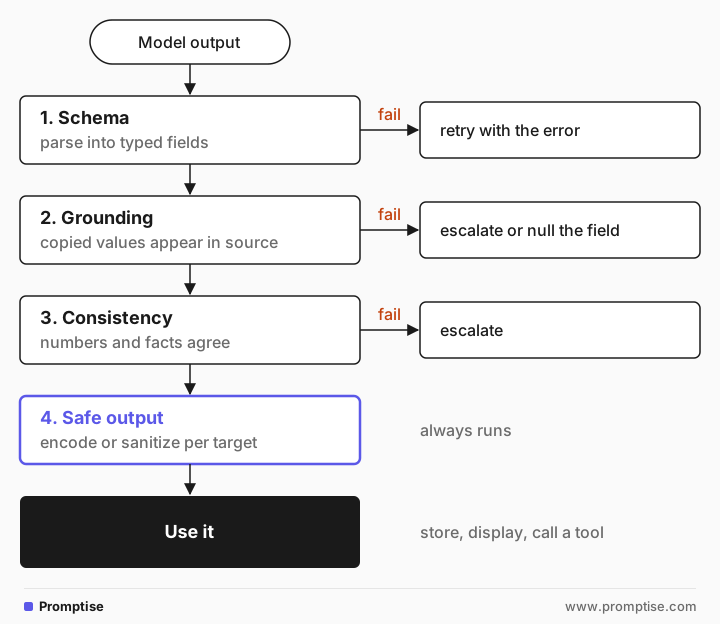
The first three ask "is it correct?". The fourth asks "is it safe to use, even if it is correct?", and it runs on every output.
[04]
Worked example: verify an invoice extraction
An accounts-payable tool asks the model to extract an invoice into JSON. Here is the source:
INVOICE 2026-0917
From: Northwind Supplies, 14 Harbor Rd, Leeds
Bill to: Velo Bikes Ltd
Date: 12 September 2026

2 x Chain lube 500 ml      @ 8.50   = 17.00
4 x Brake pads (disc)      @ 12.25  = 49.00
1 x Workshop stand         @ 139.00 = 139.00

Subtotal 215.00
VAT 20%   43.00
Total due 258.00 GBP, payable within 30 days.
Look closely: the line items add up to 205.00, but the supplier billed a subtotal of 215.00. The prompt asked for invoice number, supplier, date, PO number, currency, line items, subtotal, VAT and total. The model's answer, trimmed:
{
  "invoice_number": "2026-0917",
  "supplier": "Northwind Supplies, 14 Harbor Rd, Leeds",
  "date": "2026-09-12",
  "po_number": null,
  "currency": "GBP",
  "line_items": [
    {"description": "Chain lube 500 ml", "quantity": 2, "unit_price": 8.5, "line_total": 17.0},
    …
  ],
  "subtotal": 215.0,
  "vat": 43.0,
  "total": 258.0
}
The extraction is faithful. It even returned null for the PO number instead of inventing one. And it would still overpay the supplier, because the model copied the wrong subtotal without comment. That is the gap output validation fills: the model did what it was asked, and the result is still unsafe to act on.
The verifier
from datetime import date
from pydantic import BaseModel, ValidationError, condecimal

Money = condecimal(ge=0, max_digits=10, decimal_places=2)

class LineItem(BaseModel):
    description: str
    quantity: int
    unit_price: Money
    line_total: Money

class Invoice(BaseModel):
    invoice_number: str
    supplier: str
    date: date
    po_number: str | None
    currency: str
    line_items: list[LineItem]
    subtotal: Money
    vat: Money
    total: Money

def verify(raw: str, source: str) -> list[str]:
    # 1. Schema: is it the shape and type we expect?
    try:
        inv = Invoice.model_validate_json(raw)
    except ValidationError as e:
        return [f"schema: {err['loc']} {err['msg']}" for err in e.errors()]
    problems = []
    # 2. Grounding: do the copied values appear in the source?
    for field in ("invoice_number", "supplier"):
        if getattr(inv, field) not in source:
            problems.append(f"grounding: {field} {getattr(inv, field)!r} not in source")
    if inv.po_number and inv.po_number not in source:
        problems.append(f"grounding: po_number {inv.po_number!r} not in source")
    # 3. Consistency: do the numbers add up?
    for item in inv.line_items:
        if item.quantity * item.unit_price != item.line_total:
            problems.append(f"math: {item.description}: {item.quantity} x {item.unit_price} != {item.line_total}")
    lines = sum(i.line_total for i in inv.line_items)
    if lines != inv.subtotal:
        problems.append(f"math: line items sum to {lines}, subtotal says {inv.subtotal}")
    if inv.subtotal + inv.vat != inv.total:
        problems.append(f"math: subtotal + vat = {inv.subtotal + inv.vat}, total says {inv.total}")
    return problems
condecimal parses money as Decimal, so 2 x 8.50 == 17.00 is exact; floats would produce rounding mismatches.
On the real extraction above:
math: line items sum to 205, subtotal says 215To show the other two checks, here are two outputs edited by hand to contain failures models commonly produce, checked against a correct copy of the invoice. One has an invented PO number. The other has a date in the wrong format and a quantity written as a word:
--- invented PO number
grounding: po_number 'PO-88412' not in source
--- wrong date format, quantity as text
schema: ('date',) Input should be a valid date or datetime, invalid character in year
schema: ('line_items', 0, 'quantity') Input should be a valid integer, unable to parse string as an integer
Each check catches a different failure, and none of them needs another model call.
Grounding beyond exact matches
Exact substring checks work for IDs, names and numbers copied from a source. For summaries and answers, where the model rephrases, you need a looser test: check that each claim is supported by a cited passage, ask a second model call to verify claims against the source, or sample several answers and compare them. The guides on hallucination checks and verification loops cover those techniques. They cost more and are less certain, so use exact checks wherever the data allows.
[05]
Worked example: strip links that leak data
A support assistant renders its replies as Markdown. A poisoned help-center article (indirect prompt injection) tells the model to include an image. Here is a reply after such an attack:
Your order 5512 ships Friday. Track it [here](https://velo.example/track/5512).

More help: [refund form](https://velo.example.attacker.example/refund)The image is the dangerous part. When the user's browser renders it, it requests the URL, and the query string sends the order number and email address to the attacker without a click. The second link is a phishing page on a lookalike host. Validate every link and image against an allowlist before rendering:
import re
from urllib.parse import urlparse

ALLOWED_HOSTS = {"velo.example", "docs.velo.example"}
LINK = re.compile(r"(!?)\[([^\]]*)\]\(([^)\s]+)[^)]*\)")

def allowed(url: str) -> bool:
    p = urlparse(url)
    return p.scheme == "https" and p.hostname in ALLOWED_HOSTS

def safe_markdown(text: str) -> str:
    def repl(m):
        bang, label, url = m.groups()
        if allowed(url):
            return m.group(0)
        return "" if bang else f"{label} (link removed)"
return LINK.sub(repl, text)Your order 5512 ships Friday. Track it [here](https://velo.example/track/5512).
More help: refund form (link removed)The check compares the parsed hostname exactly, so velo.example.attacker.example fails even though it contains the allowed name. A substring or endswith("velo.example") check would let it through. In production, also set a Content Security Policy that limits where images can load from, so a missed case still can't reach the attacker's server. If you render HTML, sanitize it with a maintained library rather than regex.
[06]
Safe handling for each destination
Output goes to | Risk | What to do |
|---|---|---|
A web page | XSS, tracking images, phishing links | Escape HTML; allowlist link and image hosts; strict CSP |
A database query | SQL injection, destructive queries | Have the model return parameters, not SQL; use prepared statements; read-only credentials |
A shell or eval | Remote code execution | Don't. Map output to a fixed set of commands, or run code in a sandbox |
A file path | Path traversal | Resolve the path and check it stays under a base directory |
An outbound request | Data exfiltration, SSRF | Allowlist hosts; never put private data in model-chosen URLs |
An email or message | Phishing in your brand's name | Template the message; insert model text as escaped content |
The pattern is the same everywhere: the model chooses values, your code builds the command. See AI agent code execution sandboxes for the case where running generated code is the point.
[07]
When to retry, escalate or accept
Write the rule for each failure type before you ship:
Schema errors: retry. Send the validation error back to the model ("date must be YYYY-MM-DD") and try once or twice. Format errors usually fix themselves on a retry. If they don't, stop and escalate.
Grounding errors: don't retry blindly. A model that invented a value once may invent a different one. Set the field to null and flag it, or send the item to a person.
Consistency errors involving money, health or legal effect: escalate. As the invoice shows, the error may be in the source, not the model. A person needs to look.
Low-stakes output: accept with a flag. A product description that fails a soft check can be shown with a note, or held back for review, depending on the cost of a mistake.
If you build prompts with Promptise Foundry, the checks that need only the output (schema and math) can run as an output guard, so every call is checked before it returns. Run the grounding check where you have both the output and the source.
from promptise.prompts import prompt
from promptise.prompts.guards import guard, output_validator, GuardError

def check_invoice(output: str) -> str:
    # Passing the output as its own source turns the grounding check off here.
    problems = verify(output, source=output)
    if problems:
        raise GuardError("; ".join(problems), guard_name="invoice_verifier")
    return output

@prompt(model="openai:gpt-5-mini")
@guard(output_validator(check_invoice))
async def extract_invoice(invoice: str) -> str:
    """Extract the invoice as JSON: invoice_number, supplier, date (YYYY-MM-DD), po_number,
currency, line_items, subtotal, vat, total.

{invoice}"""[08]
When to validate output (and when not to)
Validate whenever output is stored, acted on, or rendered somewhere that interprets it. Extraction, classification, routing, generated queries, tool arguments and rendered chat replies all qualify. Light validation is enough for drafts a person edits before use, or brainstorming output nobody acts on. The safe-handling step is the exception: if output is rendered as HTML or Markdown, sanitize it every time, whatever it is for.
[09]
Common mistakes
Mistake | Why it fails | Fix |
|---|---|---|
Trusting JSON because it parsed | Valid shape, invented or wrong values | Add grounding and consistency checks |
Asking the model "are you sure?" as the check | The same model tends to confirm its own answer | Check in code, or verify against the source |
Using floats for money | 0.1 + 0.2 style errors trigger false alarms | Decimal types, as in condecimal |
Rendering Markdown from the model as is | Images and links can leak data or phish users | Allowlist hosts by exact hostname; CSP |
Running generated SQL or shell commands | Injection becomes code execution | Model returns parameters; code builds the command |
Retrying every failure | Retries invent new wrong values and cost money | Retry format errors only; escalate the rest |
[10]
Frequently asked questions
What is improper output handling in LLMs?
It is OWASP's name (LLM05:2025) for using model output without validating or encoding it, so it becomes code in another system. Examples include generated SQL run directly, model text rendered as HTML with scripts, and Markdown images that send data to an attacker's server. The fix is to treat output as untrusted and encode it for its destination.
How do you detect hallucinations in LLM output?
For data copied from a source, check that each value appears in the source. For rephrased answers, check each claim against cited passages, ask a separate verification call, or sample several answers and look for disagreement. No method is perfect, so combine them with decision rules for what happens when a check fails.
Is structured output enough to validate an LLM response?
No. Structured output, such as JSON mode or a response schema, guarantees the shape, not the content. The invoice example parsed perfectly and still held a wrong subtotal. Schema validation is the first step, followed by grounding, consistency and safe handling.
Should I use a second LLM to check the first?
It can help for checks that need understanding, such as whether a summary is supported by a source. Use it after cheap code checks, give it the source and a narrow question, and remember it can be wrong or be fooled by the same injected content. Never make it the only check for high-stakes output.
How do I stop an LLM from leaking data through links?
Allowlist the hosts that links and images may point to, compare parsed hostnames exactly, and remove everything else before rendering. Add a Content Security Policy as a backstop. Don't let the model build URLs that contain private data.
[11]
Next steps
Structured outputs without tears: get reliable JSON in the first place.
Hallucination basics and quick checks: spot invented facts.
Verification loops: model-based checks such as CoVe and SelfCheckGPT.
LLM input validation: the checks before the model.
What is prompt injection?: where dangerous output often starts.
LLM security risks: the full attack surface.