Prevention fails sometimes. A new jailbreak gets past the input filter, a poisoned document reaches the context, or one user's script burns a month of tokens in an hour. LLM security monitoring is how you find out within minutes instead of from a customer. This guide is for engineers running LLM features or agents in production. It covers which security events to log, the signals that point to an attack, detection rules you can run on those logs (with runnable code), and how to alert without drowning your team.
How do you monitor an LLM application for attacks?
Log one structured event per model call and per tool call, with the user, the request id, token counts and the result of every security check. Then run detection rules over those events: bursts of blocked inputs from one user, a blocked output right after blocked inputs, a canary string from your system prompt appearing in an answer, token counts far above normal, and repeated denied tool calls. Send only the high-confidence rules to a pager and review the rest daily.
Your guardrails already produce the best signals. Log every block, redaction and denial, not just the requests that pass.
Attacks look like repetition. One person probing tries many variants in a short time.
A canary string in the system prompt turns prompt leakage into a yes-or-no check.
Baselines beat fixed thresholds for token and cost spikes. Use the median and spread of your own traffic.
Page on few things. A rule that fires every day gets ignored.
[02]
Audit logs, monitoring and observability: what's the difference?
Purpose | Question it answers | Typical store | |
|---|---|---|---|
Audit log | Evidence of who did what, kept unchanged | "Which user caused this refund, and who approved it?" | Append-only or tamper-evident store, long retention |
Security monitoring | Detecting attacks and abuse as they happen | "Is someone probing us right now?" | Log pipeline or SIEM with alert rules |
Observability | Debugging and performance | "Why was this request slow, and what did it cost?" | Tracing and metrics backend |
They can share one event stream. The difference is what you do with it. This guide is about the middle column. For tamper-evident audit logs, see AI agent audit logging. For traces, tokens and cost, see AI agent observability.
[03]
What to log for LLM security
Log a structured event for every model call, tool call and security decision. Use the same request id across all events for one user request.
{
  "ts": "2026-10-18T09:30:12Z",
  "request_id": "req_7f3a",
  "user": "u77",
  "tenant": "acme",
  "feature": "support-chat",
  "event": "llm_call",
  "model": "gpt-5-mini-2025-08-07",
  "input_tokens": 900,
  "output_tokens": 120,
  "input_blocked": true,
  "input_block_reason": "injection",
  "output_blocked": false,
  "tools_called": ["get_order"],
  "tools_denied": 0,
  "retrieved_chunks": ["hr-policy-12"],
  "canary_in_output": false
}
Field | Why you need it |
|---|---|
request_id, user, tenant | Group a burst by attacker; pull one conversation out of busy logs |
feature, model | Baselines differ per feature; a model change can shift behavior |
input_tokens, output_tokens | Spot resource abuse (unbounded consumption in the OWASP list) |
input_blocked, output_blocked and reasons | Your guardrails' decisions are the strongest attack signal you have |
tools_called, tools_denied | Agents under injection try tools they shouldn't |
retrieved_chunks | Trace a bad answer back to the document that caused it |
canary_in_output | Detect system prompt leakage with no false positives |
What not to log. Raw prompts and outputs often contain personal data and secrets. Log them only where you need them for investigation, redact them first, restrict who can read them and set a retention period. Many teams log hashes or truncated text by default and full text for flagged requests only. If you trace with OpenTelemetry, the GenAI semantic conventions define standard attribute names for model, token and tool data, and treat message content as opt-in.
A canary string is a random token you put in the system prompt, such as CANARY-4f9c2e, that has no other use. If it ever appears in an output, the model leaked its instructions. Check every output for it and set canary_in_output. OWASP lists system prompt leakage as its own risk. The canary tells you it happened; it doesn't make the leak harmless, so keep secrets out of prompts anyway.
[04]
Which signals point to an attack?
Signal | What it may mean | Rule |
|---|---|---|
Several blocked inputs from one user in minutes | Someone is trying jailbreak variants | 3+ input blocks per user in 10 minutes |
A blocked output shortly after blocked inputs | One variant got past the input filter and the model produced something bad | Output block within 15 minutes of input blocks, same user |
Canary string in an output | System prompt leaked | Any occurrence; page |
Input tokens far above normal | Context stuffing, a runaway loop, or cost abuse | Robust z-score above a threshold, per feature |
Repeated denied tool calls | An agent is following injected instructions, or a user is pushing it to | 3+ denials per session |
Output links or contacts outside your domains | Injected content reached the answer | Any occurrence, from your output check |
Retrieval of low-trust chunks rising | A poisoned document is ranking well | Share of user-generated chunks per feature, compared with last week |
Cost per user far above their history | Stolen API key or account abuse | Daily cost per user against their own baseline |
[05]
Build the detection rules
The rules below run over a file of JSON events, one per line. In production you would run the same logic as scheduled queries in your log platform or SIEM, over a sliding window. A sample day of events with four planted incidents is enough to test them.
"""Detection rules over LLM security events. Run every few minutes over a sliding window."""
import json, statistics, sys
from collections import defaultdict

events = [json.loads(line) for line in open(sys.argv[1])]
alerts = []

# Rule 1: one user trips the input guardrail 3+ times in 10 minutes
by_user = defaultdict(list)
for e in events:
    by_user[e["user"]].append(e)
for user, evs in by_user.items():
    blocked = [e["ts"] for e in evs if e["input_blocked"]]
    for i in range(len(blocked) - 2):
        if blocked[i + 2] - blocked[i] <= 600:
            alerts.append(("medium", user, f"{len(blocked)} blocked inputs within 10 min (probing)"))
            break

# Rule 2: a blocked output soon after blocked inputs: an attempt may have got past the input filter
for user, evs in by_user.items():
    for e in evs:
        if e["output_blocked"] and any(p["input_blocked"] and 0 < e["ts"] - p["ts"] <= 900 for p in evs):
            alerts.append(("high", user, "output blocked within 15 min of blocked inputs"))
            break

# Rule 3: input tokens far above the normal range (robust z-score with median and MAD)
toks = [e["input_tokens"] for e in events]
med = statistics.median(toks)
mad = statistics.median(abs(t - med) for t in toks) or 1
for e in events:
    z = (e["input_tokens"] - med) / (1.4826 * mad)
    if z > 10:
        alerts.append(("medium", e["user"], f"input_tokens={e['input_tokens']} (median {med:.0f}, z={z:.0f})"))

# Rule 4: the canary string from the system prompt appeared in an answer: always page
for e in events:
    if e.get("canary_in_output"):
        alerts.append(("critical", e["user"], "system-prompt canary in model output"))

# Rule 5: repeated denied tool calls in one session
for user, evs in by_user.items():
    denied = sum(e["tools_denied"] for e in evs)
    if denied >= 3:
        alerts.append(("high", user, f"{denied} tool calls denied by policy"))

order = {"critical": 0, "high": 1, "medium": 2}
print(f"{len(events)} events, {len(alerts)} alerts")
for sev, user, msg in sorted(alerts, key=lambda a: order[a[0]]):
print(f"{sev:<9}{user:<5}{msg}")412 events, 5 alerts
critical u31 system-prompt canary in model output
high u77 output blocked within 15 min of blocked inputs
high u40 4 tool calls denied by policy
medium u77 5 blocked inputs within 10 min (probing)
medium u12 input_tokens=118000 (median 774, z=382)Each planted incident raised an alert, and none of the 400 normal calls did. Some details matter:
Rule 3 uses the median and the median absolute deviation (MAD), not the mean and standard deviation. One 118,000-token request would drag the mean up and hide itself. The factor 1.4826 scales MAD to match a standard deviation for normally distributed data. Compute the baseline per feature, because a summarizer and a chat feature have very different normal sizes.
Rules 1 and 2 group by user. Group by API key, IP range or tenant as well, since attackers rotate accounts.
Rule 2 is the interesting one. Input blocks alone mean your filter is working. An output block right after them means something got through the first layer.
[06]
Alert without drowning your team
Most monitoring fails because of noise, not missing rules. Three habits keep it useful.
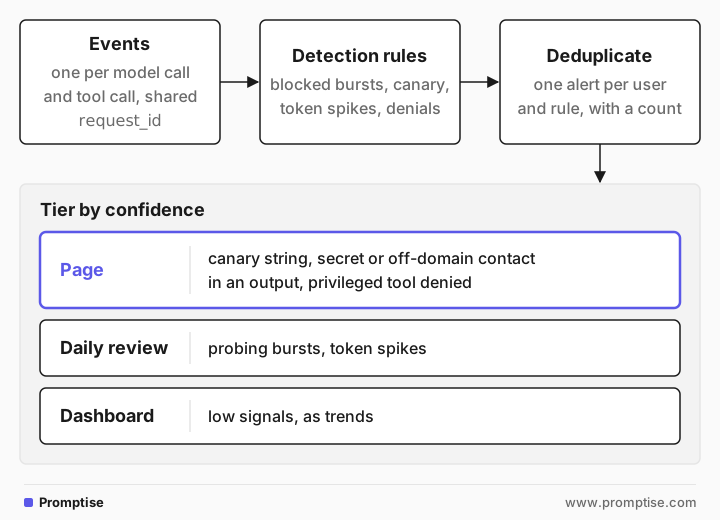
Tier by confidence. Page only on signals that are almost never benign: the canary string, an output that contains a secret or an off-domain contact, an agent action denied by policy for a privileged tool. Send medium signals, such as probing bursts and token spikes, to a channel someone reviews daily. Keep low signals as dashboard trends.
Deduplicate. One attacker trying 200 variants should produce one alert with a count, not 200 alerts. Group by user and rule within a time window.
Tune on a schedule. Each week, look at which alerts led to action. Raise thresholds on rules that never do, and add rules for incidents you found another way. When you add a feature or change the model, recompute baselines, since token counts and refusal rates shift. Known false positives, such as a security-training page that always trips the injection detector, go on an allowlist with an owner and an expiry date.
[07]
When an alert fires
Write the first steps down before you need them:
Find the request. Pull every event with the request id and, for a probing burst, every request from that user in the window.
Decide if anything got out. Check the output check results, tool calls and retrieved chunks. A blocked output that never reached the user is a near miss. A canary in a delivered answer is an incident.
Contain. Block the user or key, pull the poisoned document from the index, or disable the tool. Rotating a credential the agent uses stops its tool calls immediately.
Fix and add a test. Turn the attack prompt into a regression test so it can't come back unnoticed (see red-teaming your own system).
If you build agents with Promptise Foundry, its observability layer emits one event per model and tool call to structured logs, Prometheus or OpenTelemetry, and redacts sensitive values by default. Point the rules above at that stream. See the observability docs.
[08]
Common mistakes
Mistake | Why it fails | Fix |
|---|---|---|
Logging only successful requests | Blocks and denials are the attack signal | Log every guardrail decision with its reason |
No request id across events | You can't connect an input block to the output that followed | Generate one id per user request and pass it everywhere |
Fixed token thresholds for every feature | Normal size varies by feature; you get noise or misses | Baseline per feature with median and MAD |
Paging on every block | The team mutes the channel within a week | Page on high-confidence signals only; batch the rest |
Full prompts in logs with no redaction | The logs become a second copy of user data and secrets | Redact, restrict access, set retention |
No canary in the system prompt | Prompt leakage goes unnoticed | Add a random canary and check outputs for it |
[09]
Frequently asked questions
What should I log for LLM security?
One structured event per model call and tool call with a shared request id, the user and tenant, the feature and model, token counts, every guardrail decision with its reason, tool calls and denials, and retrieved document ids. Store prompt and output text redacted, or only for flagged requests.
How do I detect prompt injection attempts in production?
Look for repetition and escalation. A user who triggers the input filter several times in a few minutes is probing. A blocked output after blocked inputs suggests a variant got through. Agents that suddenly try tools the task doesn't need, or answers that contain unfamiliar links, point to indirect injection.
What is a canary token in a system prompt?
It is a random string placed in the system prompt that never appears anywhere else. If it shows up in a model output, the model revealed its instructions. Checking outputs for it gives a reliable leak alert. It only detects leaks, so don't put real secrets in prompts.
How do I avoid alert fatigue?
Page only on signals that are almost never benign, deduplicate bursts into one alert, review medium alerts daily instead of paging, and retire or retune rules that never lead to action. Recompute baselines after model or feature changes.
How long should I keep LLM logs?
Long enough to investigate incidents, and no longer than you need them. Security teams often keep detailed events for weeks and summaries for longer. Write the period down and apply it to every copy, including backups and your SIEM. Some uses of AI are regulated in some places; ask your legal and compliance team what applies to you.
[10]
Next steps
Make the log tamper-evident: AI agent audit logging.
Trace calls, tokens and cost: AI agent observability.
Monitor the tool servers too: MCP server monitoring.
Produce the guardrail signals: AI agent guardrails in Python.
Find what to detect before attackers do: Red-teaming your own LLM system.
Put it in your launch review: LLM security checklist for production.