An LLM application is built from parts you didn't write: a model or a model API, model weights and tokenizers, Python packages, datasets, prompt templates, MCP servers and plugins. LLM supply chain security is the practice of knowing exactly which of those parts you run, where each came from, and that none has changed without your approval. This guide is a defensive checklist for engineering teams: what to inventory, what to pin and verify, and which controls stop a bad component from reaching production.
What is LLM supply chain security?
It is the set of controls that make every external component of an LLM application known, pinned, verified and replaceable: model providers and versions, weights, packages, data, tools and plugins. OWASP lists it as LLM03 in its 2025 Top 10 for LLM applications, because a single unvetted component can change how the whole system behaves.
Inventory first. You can't protect components you haven't listed. Keep a bill of materials that includes models and datasets, not just packages.
Pin everything. Exact model versions, package hashes, dataset snapshots and tool versions. Nothing floats.
Verify before loading. Check hashes and signatures, and only load model formats that can't run code.
Limit what a component can reach. A plugin or MCP server gets only the permissions its job needs.
Plan the exit. Every provider and model needs a tested fallback or replacement path.
[02]
What's in an LLM supply chain?
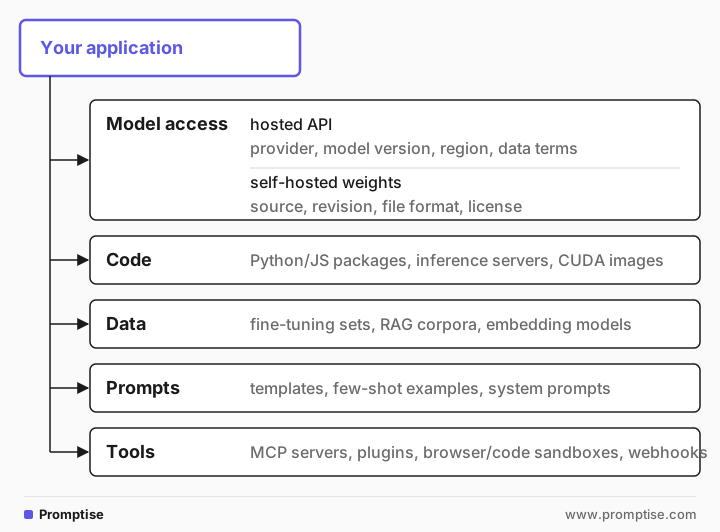
Each line is a dependency with an owner you don't control. The OWASP entry for supply chain risk covers vulnerable or outdated components, models of unclear origin, unclear licensing, tampered fine-tunes and adapters, and on-device model risks. The common thread is that an unexpected change in a dependency changes your system's behavior, often silently. See the OWASP LLM03:2025 Supply Chain entry.
[03]
When does this matter most?
Situation | Priority |
|---|---|
You only call a hosted model API with no tools | Low to medium: pin the model version, review data terms, keep packages patched |
You download open-weight models or adapters | High: verify source, revision, format and hashes |
You fine-tune or run RAG on third-party data | High: data provenance decides what the model learns and retrieves |
Your agent uses third-party MCP servers or plugins | High: a tool runs with your agent's permissions |
You're in a regulated domain | High: auditors will ask for the inventory and the change history |
[04]
Step 1: Keep an inventory that includes models and data
A software bill of materials (SBOM) lists packages. For LLM systems, extend it to everything in the diagram above. CycloneDX supports ML-BOMs for models, datasets and their provenance. Whatever format you choose, record for each component:
What: name, exact version or revision, file hashes.
Where from: provider or repository, the URL or commit, who approved it.
Terms: license and, for APIs, data-retention and training-use terms.
Owner: the person who reviews updates and answers incidents for it.
Keep the inventory in the repository next to the code, so a change to a model or tool shows up in code review like any other change.
[05]
Step 2: Pin versions and verify hashes
Floating versions are how unreviewed changes arrive. Pin all of them:
Model APIs: use a dated model snapshot, not an alias that moves (for example a model id with a date or version rather than "latest"). Read the provider's deprecation schedule and plan migrations.
Packages: commit a lock file and install with hash checking. pip supports --require-hashes, and uv installs exactly what uv.lock records.
Model files: pin the repository revision (a commit hash, not a branch name) and the SHA-256 of every file you load.
Containers: pin base images by digest, not by tag.
Then verify before anything is loaded. This script checks a directory of model and data files against a pinned manifest and refuses anything unknown, changed, or in a format that can run code:
"""Check model and data files against a pinned manifest before loading them.

The manifest lists every artifact the app may load: its path, its SHA-256 and
where it came from. Anything missing from the manifest, changed since it was
pinned, or in a format that can run code when loaded is refused.
"""

import hashlib
import json
import sys
from pathlib import Path

SAFE_FORMATS = {".safetensors", ".gguf", ".json", ".txt", ".parquet"}


def sha256(path: Path) -> str:
    h = hashlib.sha256()
    with path.open("rb") as f:
        for chunk in iter(lambda: f.read(1 << 20), b""):
            h.update(chunk)
    return h.hexdigest()


def verify(root: Path, manifest_path: Path) -> list[str]:
    manifest = json.loads(manifest_path.read_text())
    pinned = {a["path"]: a for a in manifest["artifacts"]}
    problems = []
    for file in sorted(p for p in root.rglob("*") if p.is_file()):
        rel = file.relative_to(root).as_posix()
        entry = pinned.get(rel)
        if entry is None:
            problems.append(f"{rel}: not in the manifest")
            continue
        if file.suffix not in SAFE_FORMATS:
            problems.append(f"{rel}: format {file.suffix} can run code when loaded")
        if sha256(file) != entry["sha256"]:
            problems.append(f"{rel}: hash differs from the pinned value (source: {entry['source']})")
    for rel in pinned:
        if not (root / rel).exists():
            problems.append(f"{rel}: pinned but missing")
    return problems


if __name__ == "__main__":
    root, manifest = Path(sys.argv[1]), Path(sys.argv[2])
    problems = verify(root, manifest)
    for p in problems:
        print("REFUSED", p)
    print("OK: all artifacts match the manifest" if not problems else f"{len(problems)} problem(s)")
    sys.exit(1 if problems else 0)
The manifest records each file's path, hash and source:
{
  "artifacts": [
    {
      "path": "models/model.safetensors",
      "sha256": "6a49f964de8dcb80eb3d9e2bb55a043ad54db9ffc24701ee34ed2235a09be055",
      "source": "hf:acme/support-model@3f2c1a9"
    },
    {
      "path": "models/tokenizer.json",
      "sha256": "68fd065f1b17cd8b0391126f0321002c79bb930fc3cc324ea617a6f717b7995b",
      "source": "hf:acme/support-model@3f2c1a9"
    }
  ]
}
On the pinned files, the check passes:
$ python verify_artifacts.py demo manifest.json
OK: all artifacts match the manifest
After someone swaps the weights and adds an unlisted file, it refuses to load them:
$ python verify_artifacts.py demo manifest.json
REFUSED models/extra_head.bin: not in the manifest
REFUSED models/model.safetensors: hash differs from the pinned value (source: hf:acme/support-model@3f2c1a9)
2 problem(s)
Run this check in CI and again at startup, so a changed file fails the deploy instead of reaching production.
[06]
Step 3: Load only formats that can't run code
Some model formats are data. Others are serialized Python objects, and loading them can execute code. The Hugging Face Hub documents the risks of pickle-based files.
Prefer [safetensors](https://huggingface.co/docs/safetensors/index) (or GGUF for local inference). They store tensors only.
With PyTorch, keep torch.load(..., weights_only=True), which recent versions use by default. Never set weights_only=False on a file you didn't produce yourself.
Avoid `trust_remote_code=True` for models from sources you haven't reviewed. It runs code shipped with the model.
Convert once, in isolation. If a model only exists in a pickle format, convert it to safetensors in a sandboxed job with no credentials or network, review the result, then pin the converted file.
[07]
Step 4: Check provenance and signatures
A hash proves a file didn't change after you pinned it. It doesn't prove the file was right when you pinned it. For that you need provenance:
Prefer official sources: the model creator's own organization on a hub, or the provider's API. Be wary of re-uploads, "uncensored" variants and adapters from unknown accounts.
Use signatures where they exist. The OpenSSF model-transparency project signs and verifies model files with Sigstore. Verify signatures in the same step as hashes.
Apply build provenance to your own artifacts. SLSA levels describe how to show where a build came from; use them for fine-tuned models and images you publish internally.
Record approvals. Who approved a model or dataset, when, and after which review, belongs in the inventory.
[08]
Step 5: Control data provenance
Data is part of the supply chain. Fine-tuning data shapes what the model does; RAG data decides what it repeats as fact.
Snapshot and hash datasets you train or evaluate on, exactly like model files.
Know where RAG content comes from and who can edit it. A wiki that anyone can change is an input anyone can influence. Label sources in retrieved context and keep write access narrow (see RAG security).
Re-run your evals after every data change. A behavior change you didn't expect after a data update is the signal to investigate.
[09]
Step 6: Treat tools, plugins and MCP servers as dependencies
An MCP server or plugin runs with the permissions you give your agent, so choosing one is a supply chain decision.
Pin the version and review updates like code changes. Read the tool descriptions the server exposes, since the model reads them too.
Grant least privilege. Scope tokens to the tool's job, and require approval for actions you can't undo. The MCP security best practices and our MCP security checklist cover this in detail.
Prefer servers you can audit (open source, or built by you), and run third-party ones in a container with no access beyond what they need.
[10]
Step 7: Monitor, patch and plan the exit
Watch for updates and advisories. Tools like Dependabot open pull requests for vulnerable or outdated packages. Assign an owner to review them; don't auto-merge model or tool updates.
Track provider changes: model deprecations, changed data terms, new regions. Subscribe to each provider's changelog.
Keep a tested fallback for every model API: a second provider or a self-hosted model that passes the same evals. Practice the switch before you need it.
Follow a secure development framework. NIST's Secure Software Development Framework gives a vendor-neutral baseline for the practices above.
[11]
Common mistakes
Mistake | Why it fails | Fix |
|---|---|---|
Using a "latest" model alias | The model changes under you without review | Pin a dated model version; migrate deliberately |
Pinning a branch, not a commit | The branch can be updated after review | Pin the revision hash and file hashes |
trust_remote_code=True by default | Runs code from the model repository | Only for reviewed sources, in isolation |
An SBOM that lists only packages | Models, data and tools go unreviewed | Use an ML-BOM that covers models, data and tools |
Auto-merging all dependency updates | A changed model or tool ships untested | Auto-merge only patch updates that pass evals |
One provider, no fallback | An outage or deprecation stops the product | A tested second path that passes the same evals |
[12]
How Promptise helps
In Promptise Foundry, an agent's MCP servers are declared in code (transport, URL or command, and credentials), so the "tools" branch of the inventory is visible and reviewable in pull requests. Risky tools can require human approval with an ApprovalPolicy, and MCP servers built with Promptise can write a tamper-evident audit log of every call.
[13]
FAQ
What is the OWASP LLM supply chain risk?
LLM03 in the OWASP Top 10 for LLM Applications (2025). It covers risks from third-party components of an LLM system: vulnerable packages, models of unclear origin or license, tampered fine-tunes and adapters, and outdated or deprecated models.
Are hosted model APIs a supply chain risk?
Yes, but a different one. You can't inspect the weights, so the risks are behavior changes when a model version changes, data-handling terms, availability and deprecations. Pin dated versions, review data terms, and keep a tested fallback.
Is safetensors safe to load?
Safetensors stores only tensor data and metadata, so loading it doesn't execute code the way pickle-based formats can. You still need to verify the source and hash, because a safe format can hold weights that behave badly.
What is an ML-BOM?
A machine-learning bill of materials: an SBOM extended to models, datasets and their provenance. CycloneDX supports it, so one inventory can cover packages, models and data.
How often should I review the supply chain?
On every change to a model, dataset, tool or dependency, through code review, plus a scheduled review (for example quarterly) of providers, licenses and data terms.
[14]
Next steps
Learn the full risk landscape in LLM security risks: the OWASP Top 10.
Turn this into release gates with the LLM security checklist for production.
Secure the tools your agent depends on with MCP security best practices.
Catch behavior changes after an update with AI agent evals in CI.
Detect problems in production with LLM security monitoring.