A multi-agent system splits one job between several AI agents: a coordinator that talks to the user, and specialists that each own one area and its tools. It's the pattern behind most "AI agents talking to each other" demos, and it's easy to build badly. In this guide you'll build a real one in Python: a support coordinator that delegates to a billing specialist and a help center specialist, each with its own MCP server. You'll watch the delegation calls happen, see the coordinator split a question the wrong way and fix it, and measure what the team costs against a single agent with the same tools. Every snippet ran against Promptise Foundry 1.3.1 with gpt-5-mini, and every output is what it printed.
How do you build a multi-agent system in Python?
Build each specialist as an ordinary agent with its own tools. Then build a coordinator and hand it the specialists through cross_agents. With Promptise Foundry, each specialist becomes a tool named ask_agent_<name> that the coordinator's model can call like any other:
import asyncio
import sys

from promptise import build_agent
from promptise.config import StdioServerSpec
from promptise.cross_agent import CrossAgent


async def main():
    # A specialist is an ordinary agent with its own tools.
    billing = await build_agent(
        model="openai:gpt-5-mini",
        servers={"billing": StdioServerSpec(command=sys.executable, args=["billing_server.py"])},
        instructions="You are the billing specialist. Answer from your tools only.",
    )
    # The coordinator gets the specialist as a tool.
    coordinator = await build_agent(
        model="openai:gpt-5-mini",
        servers={},
        instructions="You are a support coordinator. Ask the billing specialist about accounts.",
        cross_agents={
            "billing": CrossAgent(agent=billing, description="Looks up one customer's account."),
        },
    )
    try:
        print("Tools:", coordinator.tool_names)
        result = await coordinator.ainvoke(
            {"messages": [{"role": "user", "content": "What plan is customer acme on?"}]}
        )
        print(result["messages"][-1].content)
    finally:
        await coordinator.shutdown()
        await billing.shutdown()


asyncio.run(main())Tools: ['ask_agent_billing']
Customer "acme" is on the Team plan.
Details I can confirm right now:
- Plan name: Team
- Seats: 12
- Price per seat (USD): $15.00
- Next renewal date: 2026-11-01
…The coordinator has no billing tools. It asked the billing specialist, which looked the account up and answered in its own words. That's the whole mechanism. The rest of this guide builds a two-specialist team properly and puts honest numbers on it. The short version: in our runs the team gave correct answers, and it needed two to three times as many model calls as one agent with the same tools.
[02]
How a coordinator and its specialists work together
Each specialist is a complete agent: its own instructions, its own MCP servers, its own reasoning loop. The coordinator only sees one tool per specialist. When it calls that tool, Promptise runs the specialist from start to finish and returns its final reply as the tool result.
Rendering diagram…
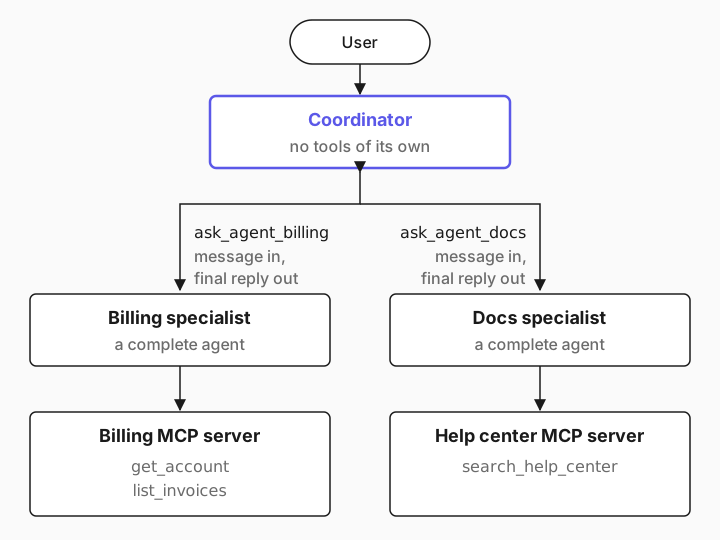
cross_agents adds one tool per specialist to the coordinator, and a second kind if you ask for it:
Tool | The coordinator's model passes | It gets back |
|---|---|---|
ask_agent_<name>, one per specialist | message, and optionally context | The specialist's final reply, as text |
broadcast_to_agents, only with include_broadcast=True | message, and optionally peers and context | Each specialist's reply, keyed by name |
A few facts from the source that shape how you design a team:
A specialist starts fresh every time. It receives the message as a user message, plus context as a system message if the coordinator sends one. It never sees the user's original words or the earlier conversation, only what the coordinator chose to write.
Only the final reply comes back. The specialist's tool calls and intermediate steps stay inside it. The coordinator works from prose.
Delegation runs in-process. The specialists are Python objects in the same program as the coordinator. To put one on another machine, see the section on delegating across processes below.
[03]
What you need
Python 3.10 or newer.
Promptise Foundry 1.3.1 or newer from PyPI. Nothing else is needed for this guide.
An API key for a model provider. This guide uses OpenAI's gpt-5-mini; other providers work by changing the model string, as listed in Models & Providers.
pip install "promptise>=1.3.1"
export OPENAI_API_KEY="sk-..."[04]
Build a support team with two specialists, step by step
The team answers questions about customer accounts. Billing knows each customer's plan, seats and invoices. The help center knows how the product works and what each plan includes and costs. Some questions need one of them, some need both.
Give each specialist its own MCP server
Each specialist owns one MCP server. Splitting the tools this way is the main reason to build a team at all: the help center specialist can't read invoices, and the coordinator can't call anything directly.
from promptise.mcp.server import MCPServer

server = MCPServer("billing")

# A stand-in for your billing system.
ACCOUNTS = {
    "acme": {"plan": "Team", "seats": 12, "price_per_seat": 15.00, "renews": "2026-11-01"},
    "globex": {"plan": "Starter", "seats": 3, "price_per_seat": 8.00, "renews": "2026-10-20"},
}
INVOICES = {
    "acme": [
        {"invoice_id": "INV-2041", "date": "2026-10-01", "amount": 180.00, "status": "paid"},
        {"invoice_id": "INV-1987", "date": "2026-09-01", "amount": 165.00, "status": "paid"},
    ],
    "globex": [
        {"invoice_id": "INV-2044", "date": "2026-10-01", "amount": 24.00, "status": "overdue"},
    ],
}


@server.tool()
async def get_account(customer_id: str) -> dict:
    """Get a customer's plan, number of seats, price per seat in USD and renewal date.

    Args:
        customer_id: The customer's ID, for example "acme".
    """
    account = ACCOUNTS.get(customer_id.strip().lower())
    if account is None:
        return {"error": f"No customer with ID {customer_id}."}
    return {"customer_id": customer_id.strip().lower(), **account}


@server.tool()
async def list_invoices(customer_id: str) -> list[dict]:
    """List a customer's invoices, newest first, with amount in USD and status.

    Args:
        customer_id: The customer's ID, for example "acme".
    """
    return INVOICES.get(customer_id.strip().lower(), [])


if __name__ == "__main__":
server.run()from promptise.mcp.server import MCPServer
server = MCPServer("docs")
# A stand-in for your help center or knowledge base.
ARTICLES = [
{
"title": "Adding seats",
"text": "Admins add seats under Settings > Billing > Seats. New seats are billed "
"immediately, prorated to the end of the current billing period.",
},
{
"title": "Changing your plan",
"text": "Upgrades take effect immediately and are prorated. Downgrades take effect "
"at the next renewal date. Plans: Starter (8 USD per seat, up to 5 seats), "
"Team (15 USD per seat), Business (25 USD per seat, includes SSO).",
},
{
"title": "Overdue invoices",
"text": "If an invoice is more than 14 days overdue, the workspace becomes read-only "
"until it is paid. Pay under Settings > Billing > Invoices.",
},
{
"title": "Single sign-on (SSO)",
"text": "SAML SSO is available on the Business plan. Set it up under Settings > Security.",
},
]
@server.tool()
async def search_help_center(query: str) -> list[dict]:
"""Search the help center and return matching articles with their full text.
Args:
query: A few keywords, for example "seats" or "SSO".
"""
words = [w for w in query.lower().split() if len(w) > 2]
return [a for a in ARTICLES if any(w in (a["title"] + " " + a["text"]).lower() for w in words)]
if __name__ == "__main__":
server.run()Notice where the Business plan's price lives: in the help center, not in billing. That detail matters in a moment. If MCP servers are new to you, How to Connect MCP Servers to Your AI Agent in Python explains these files line by line.
Build the specialists
A specialist is a normal build_agent call. Keep its instructions narrow, and ask for short answers: everything it writes becomes input the coordinator has to read and pay for.
    billing = await build_agent(
        model="openai:gpt-5-mini",
        servers={"billing": StdioServerSpec(command=sys.executable, args=["billing_server.py"])},
        instructions=(
            "You are the billing specialist. Answer in a few short lines, with facts "
            "from your tools only. Say so if your tools have no answer."
        ),
    )
    docs = await build_agent(
        model="openai:gpt-5-mini",
        servers={"docs": StdioServerSpec(command=sys.executable, args=["docs_server.py"])},
        instructions=(
            "You are the help center specialist. Answer in a few short lines, from help "
            "center articles only, and name the article you used."
        ),
    )
Each specialist can use a different model, a different system prompt, or its own guardrails and approval rules. They're independent agents that happen to be called by another agent.
Build the coordinator
The coordinator gets no servers, only its two colleagues. The description on each CrossAgent becomes part of that tool's description, so it's the main thing the model reads when it decides whom to ask:
    coordinator = await build_agent(
        model="openai:gpt-5-mini",
        servers={},
        instructions=(
            "You are a customer support coordinator. You can't see customer data or the "
            "help center yourself, so delegate. Ask the billing specialist about one "
            "customer's account. Ask the docs specialist how the product works, and what "
            "each plan includes and costs. Ask only the specialists the question needs, "
            "with short, specific questions. When it needs both, ask both in the same "
            "step, then combine their answers into one short reply. Don't offer actions "
            "nobody on the team can take."
        ),
        cross_agents={
            "billing": CrossAgent(
                agent=billing,
                description=(
                    "Looks up one customer's account: their plan, seats, what they pay "
                    "today, and their invoices. Doesn't know other plans' prices."
                ),
            ),
            "docs": CrossAgent(
                agent=docs,
                description=(
                    "Answers from the help center: how-to steps, billing policies, and "
                    "what every plan includes and costs per seat."
                ),
            ),
        },
    )
Each description says what the specialist knows and, for billing, what it doesn't. That last sentence wasn't in the first version, and the section after the run shows why it's there.
"Ask both in the same step" is there for speed. When the model asks for two tools in one turn, Promptise runs them in parallel, so the two specialists work at the same time.
Trace who asked whom
trace_tools=True prints the coordinator's ask_agent_* calls, one line for each delegation and one for its reply. But a specialist's own tool calls only appear if it has trace_tools on as well, and nothing is counted. LangChain callbacks give you the whole picture: the callbacks you pass to the coordinator's ainvoke also receive every event from the specialists it calls. This small handler uses that to print each delegation, and to count model calls and tokens per agent:
from collections import Counter

from langchain_core.callbacks import BaseCallbackHandler


class TeamTrace(BaseCallbackHandler):
    """Print who asked whom, and count model calls and tokens per agent."""

    def __init__(self, coordinator: str = "coordinator"):
        self.coordinator = coordinator
        self.agent_of_run: dict = {}  # tool run id -> the agent that run belongs to
        self.calls: Counter = Counter()
        self.tokens: Counter = Counter()

    def _agent(self, parent_run_id) -> str:
        return self.agent_of_run.get(parent_run_id, self.coordinator)

    def on_tool_start(self, serialized, input_str, *, run_id, parent_run_id=None, inputs=None, **kwargs):
        name = serialized.get("name", "?")
        caller = self._agent(parent_run_id)
        indent = "" if caller == self.coordinator else "    "
        if name.startswith("ask_agent_"):
            peer = name.removeprefix("ask_agent_")
            self.agent_of_run[run_id] = peer
            print(f"{caller} -> {peer}: {inputs or input_str}")
        else:
            self.agent_of_run[run_id] = caller
            print(f"{indent}{caller} calls {name} {inputs or input_str}")

    def on_tool_end(self, output, *, run_id, parent_run_id=None, **kwargs):
        agent = self.agent_of_run.get(run_id)
        caller = self._agent(parent_run_id)
        if agent != caller:  # a specialist just answered the agent that asked it
            text = str(getattr(output, "content", output))
            print(f"{agent} -> {caller}: {text[:300]}{' …' if len(text) > 300 else ''}")

    def on_llm_end(self, response, *, parent_run_id=None, **kwargs):
        agent = self._agent(parent_run_id)
        usage = response.generations[0][0].message.usage_metadata or {}
        self.calls[agent] += 1
        self.tokens[agent] += usage.get("total_tokens", 0)

    def summary(self) -> str:
        rows = [f"{a}: {self.calls[a]} model calls, {self.tokens[a]:,} tokens" for a in self.calls]
        total = f"total: {sum(self.calls.values())} model calls, {sum(self.tokens.values()):,} tokens"
        return "\n".join(rows + [total])
The trick is the run ID. A specialist's model calls and tool calls arrive with the ask_agent_* call that started them as their parent, so the handler can tell whose work each event is.
Ask a question that needs one specialist
The script passes the handler with config={"callbacks": [trace]} on each question. The complete file is at the end of this section.
python support_team.pyCoordinator tools: ['ask_agent_billing', 'ask_agent_docs']
=== Does customer globex have any unpaid invoices?
coordinator -> billing: {'message': "Please look up customer 'globex' and tell me: 1) What plan they're on and number of seats, 2) Whether they have any unpaid invoices, and if so list invoices (amount, due date, invoice ID), 3) What they are currently paying (billing cycle, last payment). Keep it brief."}
billing calls get_account {'customer_id': 'globex'}
billing calls list_invoices {'customer_id': 'globex'}
billing -> coordinator: - Plan & seats: Starter plan — 3 seats (from tools).
- Unpaid invoices: Yes — INV-2044: $24.00, date 2026-10-01 (status: overdue).
- Current charges: $8.00/seat → $24.00 total; renewal 2026-10-20. Billing cycle and last payment not provided by the tools.
>>> Customer "globex" — quick summary:
- Plan & seats: Starter plan, 3 seats.
- Unpaid invoices: Yes — INV-2044 for $24.00, due 2026-10-01 (overdue).
- Current charges: $8.00 per seat → $24.00 total; next renewal 2026-10-20.
Would you like me to send a past-due reminder or provide payment options?
--- 8.5s
coordinator: 2 model calls, 1,373 tokens
billing: 2 model calls, 1,630 tokens
total: 4 model calls, 3,003 tokensThe coordinator asked only billing, in a sentence of its own making. Billing called both of its tools and answered. Then the coordinator rewrote that answer for the user. Four model calls in total: two to decide and reply, two inside the specialist.
Ask a question that needs both
Pricing SSO for acme needs their seat count from billing and the Business plan's price from the help center. The same run went on to the second question:
=== Customer acme wants SSO. What would their monthly bill be, and how do they set it up?
coordinator -> billing: {'message': "Lookup customer account 'acme' and tell me: current plan name, number of seats, what they pay per month today (including taxes/discounts), any active add-ons (e.g., SSO or enterprise features), and latest invoice dates. Also note if SSO is already enabled on the account."}
coordinator -> docs: {'message': 'Explain how SSO (SAML/SCIM) works for our product and list which plans include SSO or offer it as an add-on. For each plan that can support SSO, state the per-seat price (monthly) and whether SSO has an extra fixed fee. Provide concise step-by-step setup instructions for enabling SSO (what info the customer/IT must provide and what admin actions are required). Also note any prerequisites or delays (e.g., verification by support).'}
    billing calls get_account {'customer_id': 'acme'}
    billing calls list_invoices {'customer_id': 'acme'}
    docs calls search_help_center {'query': 'SSO SAML SCIM plans pricing per-seat monthly add-on setup instructions verification support prerequisites'}
billing -> coordinator: - Plan: Team (renewal: 2026-11-01).
- Seats: 12.
- Current monthly charge: $180.00 (12 × $15.00). Latest invoice INV-2041 on 2026-10-01 for $180.00 (paid) — previous INV-1987 on 2026-09-01 for $165.00 (paid).
…
docs -> coordinator: Summary (from help center)

- Which plans include SSO: SAML SSO is available on the Business plan only. (Article: "Single sign-on (SSO)")
- Per‑seat monthly pricing: Starter $8/seat (up to 5 seats), Team $15/seat, Business $25/seat — Business includes SSO. (Article: "Changing your plan")
- Extra fix …
…
>>> Short answer

- Current account: Acme is on Team, 12 seats, paying $180/month today (12 × $15). Billing shows no add‑on data and cannot confirm an active SSO add‑on — on Team SSO is not included.
- To get SSO: SSO is included on the Business plan only (no extra fixed SSO fee listed). Business is $25/seat/month, so for 12 seats the monthly charge would be 12 × $25 = $300 — an increase of $120/month over the current $180.
- Billing notes: plan upgrades take effect immediately and are prorated (the first bill may show prorated charges); downgrades take effect at renewal.
…
How to set up SSO (high level)
- Upgrade to Business.
- Admins enable SAML SSO in the product under Settings > Security.
- Typical items IT will need to provide/configure: IdP SAML metadata (SSO URL / ACS, Entity ID/Issuer), x.509 certificate, and user identifier mapping (usually email). The help articles don’t list SCIM or exact IdP attribute details or verification steps, so plan to share IdP metadata with support if you need help.
- If you want, we can connect you to our support/billing team to start the upgrade and get any missing SAML details verified. Do you want me to request that from billing/support now?
--- 20.1s
coordinator: 2 model calls, 3,684 tokens
billing: 2 model calls, 1,810 tokens
docs: 2 model calls, 1,877 tokens
total: 6 model calls, 7,371 tokens
Both delegations went out in the same step, before either specialist called a tool, because the two ran at the same time. The coordinator combined the two answers into the right number, 300 USD a month.
Look closely at the setup part. The help center only says that SSO comes with the Business plan and lives under Settings > Security. The IdP metadata, certificate and user mapping in the reply come from the models' general knowledge, not from your data, although the reply admits the articles don't list them. Every agent in the chain rewrites what it was told, and every rewrite is a chance to add something that isn't in your data. And despite "Don't offer actions nobody on the team can take", both replies ended by offering one. Instruct the coordinator to pass on only what the specialists said if that matters for your use, and read the replies for instructions it ignored.
The complete team
import asyncio
import sys
import time

from promptise import build_agent
from promptise.config import StdioServerSpec
from promptise.cross_agent import CrossAgent

from team_trace import TeamTrace

QUESTIONS = [
    "Does customer globex have any unpaid invoices?",
    "Customer acme wants SSO. What would their monthly bill be, and how do they set it up?",
]


async def main():
    # Two specialists, each with its own MCP server and its own instructions.
    billing = await build_agent(
        model="openai:gpt-5-mini",
        servers={"billing": StdioServerSpec(command=sys.executable, args=["billing_server.py"])},
        instructions=(
            "You are the billing specialist. Answer in a few short lines, with facts "
            "from your tools only. Say so if your tools have no answer."
        ),
    )
    docs = await build_agent(
        model="openai:gpt-5-mini",
        servers={"docs": StdioServerSpec(command=sys.executable, args=["docs_server.py"])},
        instructions=(
            "You are the help center specialist. Answer in a few short lines, from help "
            "center articles only, and name the article you used."
        ),
    )

    # The coordinator has no tools of its own, only its two colleagues.
    coordinator = await build_agent(
        model="openai:gpt-5-mini",
        servers={},
        instructions=(
            "You are a customer support coordinator. You can't see customer data or the "
            "help center yourself, so delegate. Ask the billing specialist about one "
            "customer's account. Ask the docs specialist how the product works, and what "
            "each plan includes and costs. Ask only the specialists the question needs, "
            "with short, specific questions. When it needs both, ask both in the same "
            "step, then combine their answers into one short reply. Don't offer actions "
            "nobody on the team can take."
        ),
        cross_agents={
            "billing": CrossAgent(
                agent=billing,
                description=(
                    "Looks up one customer's account: their plan, seats, what they pay "
                    "today, and their invoices. Doesn't know other plans' prices."
                ),
            ),
            "docs": CrossAgent(
                agent=docs,
                description=(
                    "Answers from the help center: how-to steps, billing policies, and "
                    "what every plan includes and costs per seat."
                ),
            ),
        },
    )

    try:
        print("Coordinator tools:", coordinator.tool_names)
        for question in QUESTIONS:
            print(f"\n=== {question}")
            trace = TeamTrace()
            started = time.monotonic()
            result = await coordinator.ainvoke(
                {"messages": [{"role": "user", "content": question}]},
                config={"callbacks": [trace]},
            )
            print(">>>", result["messages"][-1].content)
            print(f"--- {time.monotonic() - started:.1f}s")
            print(trace.summary())
    finally:
        await coordinator.shutdown()
        await billing.shutdown()
        await docs.shutdown()


asyncio.run(main())
Shut the coordinator down first, then the specialists. Each shutdown() closes that agent's MCP connections and stops its stdio servers.
[05]
When the coordinator splits the question wrong
The first version of this team had vaguer descriptions. Billing was "Looks up a customer's plan, seats, prices and invoices", docs was "Answers how-to and policy questions from the help center", and the instructions said the same. Here's that version on the SSO question:
coordinator -> billing: {'message': 'Customer identifier: acme. Please provide: 1) Current plan name, number of seats, and per-seat price. 2) Any existing discounts or credits affecting monthly bill. 3) Whether SSO is an add-on that changes monthly price or a feature included in their plan; if an add-on, list cost (monthly/setup/prorated). 4) The expected monthly bill if SSO is enabled today (include current charges + SSO cost + any proration). 5) Any upcoming invoices or billing actions we should know. 6) Billing contact email on file and any required billing steps to enable SSO billing (e.g., purchase order, invoice). Please include currency and timezone for billing.'}
coordinator -> docs: {'message': 'Provide clear how-to and policy guidance for enabling Single Sign-On for a customer. Include: 1) Which plans/support tiers include SSO (e.g., Enterprise only) and any policy that only org admins can enable it. 2) Supported protocols (SAML, OIDC) and common IdPs (Okta, Azure AD, Google Workspace). 3) Prerequisites (metadata from IdP, verified domain, admin roles). 4) Step-by-step instructions an org admin would follow in the admin console to enable SSO, upload IdP metadata, test, and enforce SSO. 5) Related features: SCIM provisioning, Just-in-time provisioning, auto-linking users, disabling password login. 6) Common troubleshooting tips and risks (lockout, fallback recovery methods). 7) Any required lead time or support involvement for activation. Keep it concise and suitable to send to the customer acme.'}
…
billing -> coordinator: 1) Plan: Team; seats: 12; price/seat: $15.00 USD; renewal: 2026-11-01. (From account data.)

2) Discounts/credits: no information in tools.

3) SSO as add-on or included: no information in tools (no SSO pricing or feature data).

…
>>> Summary of where things stand for Acme

Billing snapshot (from account data)
- Current plan: Team
- Seats: 12 at $15.00 USD/seat
- Current monthly total: 12 × $15 = $180.00 USD
- Recent invoices: INV-2041 (2026-10-01) $180 USD (paid); INV-1987 (2026-09-01) $165 USD (paid)
…
The help center had the Business price all along. The coordinator asked billing for the price because the description said billing knew "prices", and asked docs which plans include SSO, which protocols it supports and how to set it up. Billing honestly said it didn't know, and the price fell between the two. The coordinator split the question before it knew where each fact lived, and nothing in the team corrected that.
The fix was to say where each fact lives: billing knows "what they pay today" and "doesn't know other plans' prices"; docs knows "what every plan includes and costs per seat". A broader docs description can pull the help center into questions it has nothing to add to, so the final version also says "Ask only the specialists the question needs." Routing in a team is prompt engineering, and each change can move it both ways. Re-run your real questions after every change to a description.
[06]
Should you use multiple agents? What it costs
To find out, the same two questions went to the team and to one agent connected to both MCP servers, three times each. The single agent is the same build_agent call with both servers:
async def build_single():
    agent = await build_agent(
        model="openai:gpt-5-mini",
        servers={"billing": BILLING, "docs": DOCS},
        instructions=(
            "You are a customer support assistant. Use the billing tools for a customer's "
            "plan, seats, prices and invoices, and the help center for how the product "
            "works and what each plan includes and costs. Answer in one short reply."
        ),
    )
return agent, [agent]team | one specialist | median: 4 calls, 3,084 tokens, 10.3s
…
team | both specialists | 6 calls | 7,797 tokens | 23.0s | asked ['billing', 'docs'] | correct True
team | both specialists | 6 calls | 6,802 tokens | 18.6s | asked ['billing', 'docs'] | correct True
team | both specialists | 6 calls | 5,824 tokens | 15.5s | asked ['billing', 'docs'] | correct True
team | both specialists | median: 6 calls, 6,802 tokens, 18.6s
…
single agent | one specialist | median: 2 calls, 1,005 tokens, 2.2s
…
single agent | both specialists | median: 2 calls, 1,985 tokens, 5.5sQuestion | Design | Model calls | Tokens | Time |
|---|---|---|---|---|
Unpaid invoices (one specialist) | Team | 4 | 3,084 | 10.3 s |
Unpaid invoices (one specialist) | Single agent | 2 | 1,005 | 2.2 s |
SSO price (both specialists) | Team | 6 | 6,802 | 18.6 s |
SSO price (both specialists) | Single agent | 2 | 1,985 | 5.5 s |
Medians of three runs each, with gpt-5-mini. All twelve answers were correct. For this job the team cost about three to three and a half times the tokens and took three and a half to four and a half times as long, and bought nothing in return. The single agent asked for all the tools it needed in one step, read the raw data itself, and answered. The team paid for a coordinator turn to plan, a full agent run per specialist, prose written by each specialist, and a coordinator turn to read and rewrite that prose.
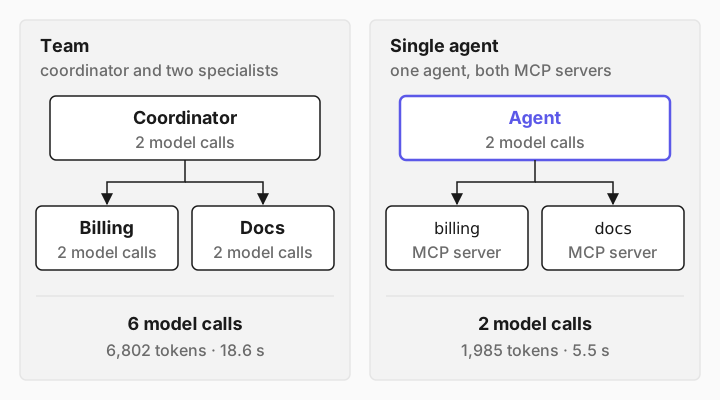
So start with one agent and more tools. Reach for a team when one of these is true:
The tools need different access. Each specialist holds only its own server's credentials, and the coordinator can't call any tool directly. Here the coordinator's whole toolset is ['ask_agent_billing', 'ask_agent_docs'].
One agent would have too many tools. A specialist with five tools chooses better than a generalist with eighty.
The jobs need different models or rules. A cheap model for lookups, a stronger one for analysis, or approval and guardrails on one specialist only.
Different teams own the parts. A billing team can ship and test its specialist without touching the coordinator, and several coordinators can share it.
If none of those apply, a team is extra latency and a second place for answers to go wrong.
[07]
Timeouts, failures and loops
Set the timeouts yourself
The model can't choose a timeout for a delegation, and there's none unless you set one: per specialist with CrossAgent(timeout=...), or for all of them with build_agent(delegation_timeout=...). When it runs out, the tool returns a string instead of raising:
1. ask with CrossAgent(timeout=1): 'Timed out waiting for peer agent reply.' 1.0s
1b. broadcast with CrossAgent(timeout=1): {'slow': 'Timed out'} 1.0s
To bound a specialist wherever it's called from, set max_invocation_time on the specialist itself. When it runs out, the coordinator receives the error as its tool result and can tell the user:
    billing = await build_agent(
        model="openai:gpt-5-mini",
        servers={"billing": StdioServerSpec(command=sys.executable, args=["billing_server.py"])},
        instructions="You are the billing specialist.",
        max_invocation_time=1,  # far too short, on purpose
)3. coordinator's tool result: Error: TimeoutError: Agent invocation exceeded 1s timeout
3. coordinator replied: I tried to look up “acme” in the billing system but the billing lookup timed out. I don’t have a current plan record to report.
…Any exception inside a specialist reaches the coordinator the same way, as a tool result that starts with Error:. Setting max_invocation_time on the coordinator caps the whole team, specialists included. With a specialist that never answered and a 15-second cap:
4. coordinator raised: TimeoutError Agent invocation exceeded 15s timeout after 15.0sDelegation depth is limited
You rarely build a delegation loop by accident, because CrossAgent takes an agent that already exists, so the graph you build in Python can only point backwards. But you can wire one up, for example with a proxy so an agent can reach itself. Since 1.3.0, Promptise stops it: a delegation deeper than max_delegation_depth (3 by default), or back into an agent that is already working on the request, raises DelegationError, which the model sees as the tool's error. Here's an agent told never to answer itself and always to ask its colleague, which is itself, with a callback printing every tool result:
  tool error: DelegationError Delegation to 'self' refused: 'self' is already working on this request (self → self), so the call would loop. Answer with the information you already have.
  tool result: 4. 2 + 2 equals 4.
>>> 4
4 model calls, 6.5s
The question was "What is 2 + 2?". The second call into the agent was refused, that inner run answered from what it had, and the whole run took four model calls. A chain of five agents, each told to ask the next, stopped at the fourth hop with Delegation to 'next' refused: it would be delegation level 4 (next → next → next → next), over max_delegation_depth=3. Answer with the information you already have. Keep the delegation graph a tree anyway, and set max_invocation_time on the top agent as a backstop. If you define agents in .superagent files, the loader also catches circular file references: each cross_agents entry there is a CrossAgentConfig with a file and a description, and two files that refer to each other fail to load with Circular cross-agent reference detected.
Turn on the broadcast tool if you want it
broadcast_to_agents sends the same message to every specialist. That suits "ask everyone for a second opinion", not a team where each specialist has a different job. Since 1.3.0, build_agent leaves it out unless you ask for it, and it takes context like the ask tools:
        cross_agents={"billing": CrossAgent(agent=billing, description="Looks up one customer's account.")},
include_broadcast=True,Coordinator tools: ['ask_agent_billing', 'broadcast_to_agents']make_cross_agent_tools, the function behind cross_agents, still includes the broadcast tool unless you pass include_broadcast=False.
[08]
Delegate to an agent in another process
cross_agents only takes agents in the same Python process. Promptise's older network server, which served agents to each other over HTTP, has been removed. To run a specialist on another machine, or let another team own it, put it behind an MCP server: one tool that takes a question and returns the specialist's answer.
import sys

from promptise import build_agent
from promptise.config import StdioServerSpec
from promptise.mcp.server import MCPServer

server = MCPServer("billing-team")
specialist = {}


@server.on_startup
async def start_specialist():
    specialist["agent"] = await build_agent(
        model="openai:gpt-5-mini",
        servers={"billing": StdioServerSpec(command=sys.executable, args=["billing_server.py"])},
        instructions=(
            "You are the billing specialist. Answer in a few short lines, with facts "
            "from your tools only. Say so if your tools have no answer."
        ),
    )


@server.on_shutdown
async def stop_specialist():
    await specialist["agent"].shutdown()


@server.tool()
async def ask_billing_specialist(question: str) -> str:
    """Ask the billing specialist about one customer's account: their plan, seats,
    what they pay today, and their invoices. It doesn't know other plans' prices.

    Args:
        question: One short, specific question that names the customer.
    """
    result = await specialist["agent"].ainvoke({"messages": [{"role": "user", "content": question}]})
    return result["messages"][-1].content


if __name__ == "__main__":
    server.run(transport="http", host="127.0.0.1", port=8260)
The specialist is built once when the server starts and shut down when it stops. The coordinator connects to it like any MCP server, and can mix it with in-process specialists:
    coordinator = await build_agent(
        model="openai:gpt-5-mini",
        # The billing specialist runs in another process, behind an MCP server.
        servers={"billing_team": HTTPServerSpec(url="http://127.0.0.1:8260/mcp")},
        instructions=(
            "You are a customer support coordinator. Delegate: ask the billing specialist "
            "about one customer's account, and the docs specialist how the product works "
            "and what each plan includes and costs. When a question needs both, ask both "
            "in the same step, then combine their answers into one short reply."
        ),
        cross_agents={
            "docs": CrossAgent(
                agent=docs,
                description=(
                    "Answers from the help center: how-to steps, billing policies, and "
                    "what every plan includes and costs per seat."
                ),
            ),
        },
    )
It printed:
Coordinator tools: ['ask_billing_specialist', 'ask_agent_docs']
coordinator calls ask_billing_specialist {'question': "For customer 'acme': what is their current plan name, number of seats, what they pay today (monthly charge), billing cycle, and recent invoices (dates and amounts)? Include any discounts or add-on charges currently applied."}
coordinator -> docs: {'message': "Which plans include SSO? Is SSO an included feature or an add-on, and what is the cost (per seat or per account) if it's an add-on? Provide per-seat monthly prices for each plan (Free, Basic, Pro, Business, Enterprise) and any account-level fees relevant to SSO. Customer 'acme' wants SSO — need concise pricing and whether they must upgrade to a specific plan.", 'context': 'Customer: acme — determine monthly bill impact if they get SSO.'}
    docs calls search_help_center {'query': 'SSO plans included add-on cost per seat per account Free Basic Pro Business Enterprise SSO pricing which plans include SSO is SSO add-on help center'}
…
>>> Summary for acme:

- Current account: Team plan, 12 seats at $15/seat = $180/month (invoiced monthly).
- SSO: SAML SSO is only available on the Business plan and is included with Business (no additional per-seat or account SSO fee listed).
- Business price: $25/seat/month → 12 × $25 = $300/month.
…
coordinator: 2 model calls, 2,639 tokens
docs: 2 model calls, 1,908 tokens
total: 4 model calls, 4,547 tokens
The remote specialist's model calls don't appear in the count: they happen in the server's process, so the coordinator's callbacks never see them. Count them on the server if you need the full cost. Before you expose a specialist like this on a network, require an API key or a token, as Authentication & Security shows. A specialist behind a tool acts on whatever question it's sent, within the limits of its own tools.
[09]
Honest limits
These are true of Promptise Foundry 1.3.1:
Delegation is in-process only. Use an MCP server, as above, to reach a specialist elsewhere.
Some older examples don't run. The Multi-Agent Coordination page passes URL strings to cross_agents and calls agent.ask_peer() and agent.broadcast(). None of that exists in Promptise 1.3; a URL string fails with
AttributeError: 'str' object has no attribute 'timeout'. Use CrossAgent as in this guide.There's no delegation timeout by default. Set CrossAgent(timeout=...) or delegation_timeout, and max_invocation_time on each specialist and on the coordinator, for limits you control.
Delegation stops at three levels. That's max_delegation_depth's default; raise it if your team is deeper.
Specialists see only the coordinator's message. No conversation history, no user identity in the text. Put what a specialist needs into the message or context.
`trace_tools` counts nothing. It shows each delegation and its reply, and a specialist's own tool calls only when that specialist has it on too. Use a callback handler like TeamTrace, or Promptise's observability.
[10]
Frequently asked questions
When should you use a multi-agent system instead of a single agent?
When the parts need different access, different models, or different owners, or when one agent would face too many tools to choose well. Otherwise use one agent with more tools. In this guide's measurements, the single agent answered the same questions correctly with about a third of the tokens, in a quarter to a third of the time.
What is multi-agent orchestration?
Deciding which agent does which part of a job and combining the results. This guide uses the most common pattern, a coordinator (also called a supervisor) that delegates to specialists through tool calls. Promptise also supports agents that react to each other's events through the Agent Runtime, which suits long-running pipelines better than a request and reply.
How do AI agents talk to each other?
In this pattern, through tool calls. The coordinator's model writes a message, the specialist runs and replies in text, and that text comes back as the tool's result. They don't share memory or conversation history, so everything a specialist needs has to be in the message.
Do I need CrewAI or LangGraph to build a multi-agent system in Python?
No. A specialist is an agent and delegation is a tool call, so any agent framework with tool calling can do it. With Promptise Foundry it's the cross_agents argument of build_agent, and each specialist keeps everything an agent has: MCP servers, approval, guardrails and memory.
Can the specialists use different models?
Yes. Each specialist is its own build_agent call with its own model string, so a lookup specialist can run on a small, cheap model while the coordinator uses a stronger one.
[11]
Where to go next
Cross-Agent Delegation: CrossAgent, the generated tools and their arguments.
Cross-Agent API reference: make_cross_agent_tools and its options.
SuperAgent files: define agents and their cross_agents in YAML.
Building Agents: every build_agent option, including max_invocation_time.
Agent Runtime: long-running agents with triggers and events.
How to Connect MCP Servers to Your AI Agent in Python: the agent and server basics this guide builds on.
OpenAPI to MCP: Turn Any REST API into an MCP Server: give a specialist your existing API as tools.