An agent harness is everything around a language model that turns it into an agent: the loop that calls it, the tools it can use, what it sees on each turn, the limits that stop it, and the checks on its answer. Two products on the same model can behave very differently, and the harness is usually why. This guide explains what an agent harness is, what each part does and when you need it, and then builds one part at a time with Promptise Foundry.
How do you build an agent harness?
Start with a loop: call the model, run the tool calls it asks for, send the results back, and repeat until it answers. Then add parts in this order: tools with clear results, context management so long runs stay readable, hard limits on tokens and rounds, a guard that refuses repeated calls, and a verification step for answers that can be checked. Each part solves one failure. Add the ones your task needs and leave out the rest.
The loop and the tools do most of the work. Without them a model can only guess.
Limits are not optional. A token budget and a round limit are what stop a bad run from becoming a large bill.
Context management matters on long runs, when the transcript grows past what the model handles well.
Loop guards and verification are targeted parts. They help when the model repeats itself or makes checkable mistakes, and cost tokens otherwise.
A framework is not a harness. It is the library you build the harness with, including every default you keep.
[02]
What is an agent harness?
A model on its own takes text and returns text. To act, something has to run it in a loop, execute the tool calls it asks for, feed the results back, and decide when to stop. That something is the harness. It has five parts:
The loop. Call the model, run its tool calls, repeat until it answers, with a cap on rounds. A round is one model call plus the tool calls it made, which can run in parallel.
Tools. The functions the model may call, their descriptions, and the shape of their results. A tool result that says what to do next prevents many failures before they start.
Context management. What the model sees on each turn. That can be the whole transcript, or a compacted view once the transcript grows long.
Controls. Token budgets, round limits, loop detection and approval gates that stop or redirect a run.
Verification. A step that checks the answer before it leaves the harness. It can be a second model call or a check in code.
How an agent harness works
            task
             │
             ▼
   ┌─────────────────────┐   context: full transcript, or a
   │  model call          │◀─ compacted view after N tool results
   └─────────────────────┘
       │ tool calls    │ answer
       ▼               ▼
   ┌───────────┐   ┌──────────────────┐
   │ pre-tool  │   │ verification     │── fix ──▶ back to the model
   │ checks    │   │ (model or code)  │
   │ (guard,   │   └──────────────────┘
   │ approval) │            │ ok
   └───────────┘            ▼
       │ allowed         answer
       ▼
   tools run, results go back to the model
       │
   after every round: token budget and round limit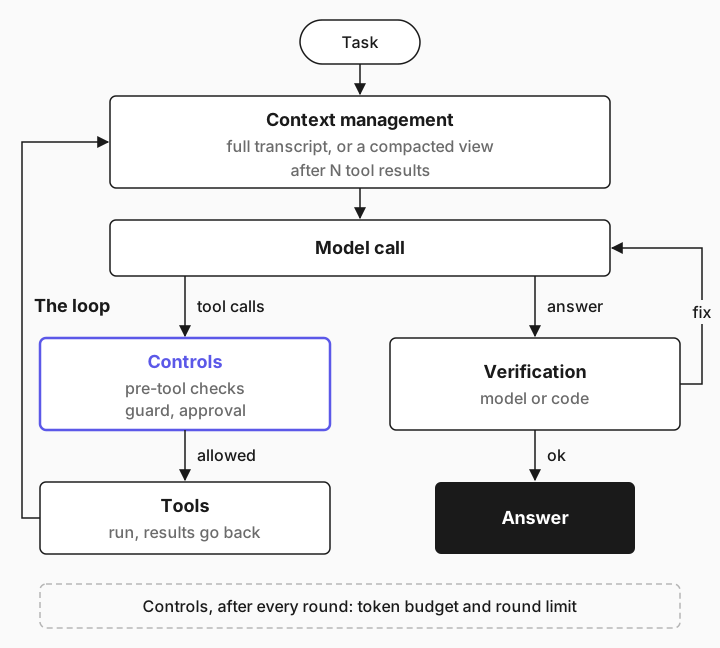
Agent harness vs agent framework
A framework is a library you build a harness with. LangGraph, Pydantic AI, the OpenAI Agents SDK and Promptise Foundry are frameworks. The harness is what you assemble from one of them, including the defaults you never changed: the round limit, how tool errors come back, whether the context is compacted. Two teams on the same framework and model can ship very different harnesses.
Context engineering vs harness engineering
Context engineering decides what goes into the model's context on each call. Harness engineering covers that and everything else: the loop, the tools, the controls and the checks. Context engineering is one part of harness engineering. Context engineering for AI agents covers it in depth.
[03]
When to build your own agent harness (and when not to)
Most agents don't need a hand-built harness. A framework's default agent already has a loop, tools and some limits. Build your own, or extend the default, when the task asks for something the default doesn't give you.
Situation | What to do |
|---|---|
A chat assistant with a few tools | Use the framework's default agent and set its limits |
A long batch job with dozens of tool calls | Add context management and a token budget |
An unattended agent that may poll or retry | Add a loop guard and a tool-call cap |
Answers you can check, such as totals or lists | Add verification, in code if you can |
A multi-step plan with different roles | Build a graph with several nodes |
Every part has a cost. Compaction can hide details the model needed. A verification step adds a model call to every run. A loop guard can refuse a call that would have worked. Add a part when you have seen the failure it prevents, or when the cost of that failure is high, as it is for unattended agents.
[04]
What you need
Python 3.10 or later and Promptise Foundry 1.4.1 or later.
An OpenAI API key in OPENAI_API_KEY. The examples use openai:gpt-5-mini. A full run of the example uses about 50,000 tokens, a few cents at most.
About 20 minutes.
pip install "promptise>=1.4.1"The example uses Promptise's graph engine (PromptGraphEngine) directly, so each part of the harness is a visible line of code. build_agent() builds the same engine for you with defaults, as the section after the steps shows.
[05]
Step 1: Write the tools
The harness needs a task that is hard enough to show what each part does. This one is a nightly inventory audit: page through 30 SKUs, read each stock record (about 2,400 characters, mostly warehouse log), and check purchase orders for the SKUs below their reorder point. Two SKUs have a purchasing system that always says "syncing, try again", which is a trap for an agent that polls.
"""A fake inventory API with 30 SKUs, exposed as LangChain tools.

The right answer: REORDER SKU-03, SKU-08, SKU-15, SKU-22, SKU-30; UNKNOWN SKU-12, SKU-28.
"""
import random

from langchain_core.tools import tool

_rng = random.Random(42)
LOG_LINE = ("{d} cycle count in aisle {a}: {n} units scanned, label check ok, "
            "pallet {p} rotated, humidity {h}% within range. ")
SKUS = {}
for i in range(1, 31):
    sku = f"SKU-{i:02d}"
    reorder_point = _rng.choice([20, 30, 40, 50])
    SKUS[sku] = {"sku": sku, "name": f"Part {i:02d}", "reorder_point": reorder_point,
                 "on_hand": reorder_point + _rng.randint(1, 60)}
# Ten SKUs are below their reorder point.
LOW = ["SKU-03", "SKU-07", "SKU-08", "SKU-12", "SKU-15", "SKU-19", "SKU-22", "SKU-26", "SKU-28", "SKU-30"]
for sku in LOW:
    SKUS[sku]["on_hand"] = SKUS[sku]["reorder_point"] - _rng.randint(1, 15)
OPEN_PO = {"SKU-07": "PO-7781", "SKU-19": "PO-7790", "SKU-26": "PO-7802"}
SYNCING = {"SKU-12", "SKU-28"}  # the purchasing system never answers for these
CALLS = []  # (tool, args) of every call that ran


def _log(sku):
    r = random.Random(sku)
    return "".join(LOG_LINE.format(d=f"2026-09-{day:02d}", a=r.randint(1, 40), n=r.randint(10, 99),
                                   p=r.randint(100, 999), h=r.randint(30, 60)) for day in range(1, 21))


@tool
def list_skus(page: int = 1) -> dict:
    """List SKUs in the warehouse, 10 per page. Call again with next_page until it is null."""
    CALLS.append(("list_skus", page))
    ids = sorted(SKUS)[(page - 1) * 10:page * 10]
    return {"skus": ids, "next_page": page + 1 if page < 3 else None}


@tool
def get_stock(sku: str) -> dict:
    """Stock record for one SKU: on_hand, reorder_point and the warehouse log."""
    CALLS.append(("get_stock", sku))
    if sku not in SKUS:
        return {"error": f"unknown SKU {sku}"}
    return {**SKUS[sku], "warehouse_log": _log(sku)}


@tool
def get_open_po(sku: str) -> dict:
    """Open purchase order for a SKU, if any."""
    CALLS.append(("get_open_po", sku))
    if sku in SYNCING:
        return {"status": "syncing", "message": "Purchasing system is syncing. Try again."}
    return {"sku": sku, "open_po": OPEN_PO.get(sku)}


TOOLS = [list_skus, get_stock, get_open_po]
The correct answer lists five SKUs to reorder and two as unknown. The tools are plain LangChain tools, so the example tests the harness rather than a server. In production they would usually come from an MCP server. Connect MCP servers to an AI agent shows that path.
[06]
Step 2: Build the loop
The loop is a PromptNode with tools. It calls the model, runs the tool calls the model asks for, appends the results, and runs again until the model answers or the node has used max_iterations rounds. A PromptGraph holds the node, and a PromptGraphEngine runs the graph with a model:
from langchain.chat_models import init_chat_model
from promptise.engine import PromptGraph, PromptGraphEngine, PromptNode

work = PromptNode("work", instructions=SYSTEM, tools=TOOLS, context_scope="auto",
                  max_iterations=60, default_next="__end__")
graph = PromptGraph(name="inventory-harness")
graph.add_node(work)
graph.set_entry("work")
engine = PromptGraphEngine(graph=graph, model=init_chat_model("openai:gpt-5-mini"),
                           max_node_iterations=60, max_iterations=70)
result = await engine.ainvoke({"messages": [{"role": "user", "content": TASK}]})
run.py from the complete example runs the audit with the parts you name and prints what the run used. With the loop alone:
REORDER: SKU-03, SKU-08, SKU-15, SKU-22, SKU-30
UNKNOWN: SKU-12, SKU-28
--
model calls: 5 (work work work work work)
tool calls: 63 (63 distinct)  tokens: 28,458
The answer is right. The model made 63 tool calls in five model calls, because it asked for many calls per round and the engine ran them in parallel. That is why a round limit counts rounds, not tool calls.
Two numbers matter here. max_iterations on the node caps its rounds, and the engine's max_node_iterations is a ceiling for every node. A model that calls one tool per round would need more than 40 rounds for this task. Promptise's default ReAct agent allows 15 rounds, which suits a chat assistant but not a 30-record batch job. When a run hits a round limit in the middle of a tool loop, the engine raises GraphIterationLimitError instead of returning a half-finished answer. See engine limits in the docs.
[07]
Step 3: Add context management
Every round re-sends the whole transcript. On a long run that means the model rereads every old result each turn, which costs tokens and buries the facts it needs. Context compaction replaces the transcript with a shorter view once the run has enough tool results:
from promptise.engine import ContextCompaction

engine = PromptGraphEngine(
    graph=graph, model=model,
    compaction=ContextCompaction(enabled=True, reuse_results=["list_skus", "get_stock"]),
    max_node_iterations=60, max_iterations=70,
)
With context_scope="auto" on the node, compaction starts after 6 tool results (after_tool_results). The model then sees the task, its latest exchange, and a ledger of earlier results, deduplicated, with long results cut to keep_result_chars (2,000 by default). A result the model fetched more than once is kept in full. No model call writes a summary, so compaction adds no cost of its own. The context lifecycle docs show the exact layout.
reuse_results lists tools whose results can't change during a run, such as a lookup by ID. A repeated call to one of them is answered from the earlier result instead of running the tool again. Never list a status check, such as get_open_po here, because polling it is how the agent learns that something changed.
REORDER: SKU-03, SKU-08, SKU-15, SKU-22, SKU-30
UNKNOWN: SKU-12, SKU-28
--
model calls: 5 (work work work work work)
tool calls: 63 (63 distinct)  tokens: 28,355
Same answer, about the same tokens. At this size the transcript stays near 25,000 tokens, so there is little to compact. Compaction pays off when a run has many rounds and large results, where the full transcript would grow with every turn. Test it on your own task: some models re-fetch records once they see only an excerpt. If you see repeated calls to the same tool with the same arguments, raise keep_result_chars, add the tool to reuse_results, or turn compaction off for that agent.
[08]
Step 4: Add hard limits
The limits are what make a harness safe to run unattended. A round limit stops a model that never answers. A token budget stops a run that answers slowly but expensively. Promptise's BudgetHook counts the tokens of each run and ends the run once it goes over:
from promptise.engine import BudgetHook

engine = PromptGraphEngine(graph=graph, model=model, compaction=compaction,
                           hooks=[BudgetHook(max_tokens=300_000)],
                           max_node_iterations=60, max_iterations=70)
To see what happens when it fires, run the audit with a budget far too small for the task:
GraphBudgetExceededError: Graph 'inventory-harness' failed at node 'work': Token budget exceeded: 3134/3000 tokens; BudgetHook stopped the run before the model gave an answer, after a call to get_stock whose result the model never saw
--
model calls: 4 (work work work work)
tool calls: 33 (33 distinct)  tokens: 3,134
Three details show up in that output:
The hook checks after each round. The run went over at 3,134 tokens, not at 3,000, and the 33 tool calls the model asked for in that round had already run. A token budget caps tokens, not side effects. To cap what tools do, refuse calls before they run, as AI agent cost control shows.
A stop before the answer raises. GraphBudgetExceededError names the tools whose results the model never saw, so the caller knows there is no answer. If the model answers on the round that crosses the budget, you get the answer instead.
The budget is per run. One hook on one engine caps every run separately, including concurrent ones.
Size the budget from real runs: take the largest healthy run and add a margin. Here a full run uses about 50,000 tokens, so 300,000 leaves room without letting a runaway run drain the account.
[09]
Step 5: Add a loop guard
A model that keeps polling a status that never changes will use its whole round limit. A loop guard spots the repeat and refuses the call, so the model gets a turn to answer with what it has. In Promptise it is an engine hook: pre_tool runs before every tool call, and a hook that raises blocks the call. The model gets the message as the tool result.
from promptise.runtime import HealthConfig, HealthMonitor


class LoopGuard:
    async def pre_node(self, node, state):
        state.context.setdefault("monitor", HealthMonitor(
            HealthConfig(enabled=True, stuck_threshold=3, cooldown=0), process_id="inventory"))
        return state

    async def pre_tool(self, tool_name, args, state):
        anomaly = await state.context["monitor"].record_tool_call(tool_name, args)
        if anomaly is not None:
            raise RuntimeError(f"{anomaly.description}. The result will not change in this run: "
                               "stop calling it and report what you could not get.")
        return args
HealthMonitor flags the same tool with the same arguments three times in a row, and repeating sequences of calls. The monitor lives in state.context, which belongs to one run, so concurrent runs don't share it. cooldown=0 matters: the default of 300 seconds reports an anomaly once, which suits alerts but not a guard that has to refuse every repeat.
gpt-5-mini polled each syncing SKU once in the runs above, so the guard had nothing to do. To see it fire, test it with a scripted model that polls four times. It needs no API key:
"""Test the loop guard without an API key: a scripted model polls one SKU four times, then answers."""
import asyncio

from langchain_core.language_models.fake_chat_models import GenericFakeChatModel
from langchain_core.messages import AIMessage, ToolMessage

from harness import TASK, build_harness


class ScriptedModel(GenericFakeChatModel):
    def bind_tools(self, tools, **kwargs):
        return self


def script():
    for i in range(4):
        yield AIMessage(content="", tool_calls=[{"name": "get_open_po", "args": {"sku": "SKU-12"}, "id": f"c{i}"}])
    yield AIMessage(content="REORDER: none checked\nUNKNOWN: SKU-12")


async def main():
    engine = build_harness(ScriptedModel(messages=script()), parts=["loop", "guard"])
    result = await engine.ainvoke({"messages": [{"role": "user", "content": TASK}]})
    for m in result["messages"]:
        if isinstance(m, ToolMessage):
            print("tool result:", str(m.content)[:150])
    print("answer:", result["messages"][-1].content.replace("\n", " | "))


asyncio.run(main())tool result: {"status": "syncing", "message": "Purchasing system is syncing. Try again."}
tool result: {"status": "syncing", "message": "Purchasing system is syncing. Try again."}
tool result: Error: Agent stuck: tool 'get_open_po' called 3 times consecutively with identical arguments. The result will not change in this run: stop calling it
tool result: Error: Agent stuck: tool 'get_open_po' called 3 times consecutively with identical arguments. The result will not change in this run: stop calling it
answer: REORDER: none checked | UNKNOWN: SKU-12The first two polls ran, the third and fourth were refused, and the model saw the refusal as the tool result. The guard compares exact arguments, so a model that changes its arguments on every call slips past it. Pair it with a tool-call cap. AI agent stuck in a loop builds both.
[10]
Step 6: Add a verification step
Verification checks the answer before it leaves the harness. Here it is a second node: after work answers, check reviews the draft against the tool results, may call tools again for a missing fact, and repeats the final lines.
work = PromptNode("work", instructions=SYSTEM, tools=TOOLS, context_scope="auto",
                  max_iterations=60, default_next="check")
graph.add_node(work)
graph.add_node(PromptNode("check", instructions=CHECK, tools=TOOLS, context_scope="auto",
                          max_iterations=6, default_next="__end__"))
The full harness, with all five parts:
REORDER: SKU-03, SKU-08, SKU-15, SKU-22, SKU-30
UNKNOWN: SKU-12, SKU-28
--
model calls: 6 (work work work work work check)
tool calls: 63 (63 distinct)  tokens: 52,089
The check node ran once and confirmed the answer. It added one model call and roughly doubled the tokens, because it reads the whole run again. That is the trade-off with a model-based check: it catches mistakes a second look can find, and it costs a model call on every run, including the many where nothing was wrong. When the answer can be checked in code, such as comparing the REORDER list with the stock records, do that instead. It is cheaper, faster and deterministic.
[11]
The complete example
The project has four files. inventory.py is the tools from step 1, harness.py builds the harness with the parts you choose, run.py runs the audit and prints the stats, and guard_check.py tests the loop guard without a model.
agent-harness/
├── inventory.py      # 30 SKUs, three tools (step 1)
├── harness.py        # loop, context, limits, loop guard, verification (steps 2-6)
├── run.py            # run the audit with some parts and print what it used
└── guard_check.py # test the loop guard with a scripted model"""An agent harness on Promptise's graph engine: loop, context, limits, loop guard, verification."""
from langchain.chat_models import init_chat_model
from promptise.engine import BudgetHook, ContextCompaction, PromptGraph, PromptGraphEngine, PromptNode
from promptise.runtime import HealthConfig, HealthMonitor
from inventory import TOOLS
SYSTEM = "You are an inventory agent running as a nightly batch job. Work autonomously; never ask questions."
TASK = ("Find every SKU that is below its reorder point (on_hand < reorder_point) and has no "
"open purchase order. Check all SKUs. End with two lines:\n"
"REORDER: <comma-separated SKUs>\nUNKNOWN: <SKUs whose purchase-order status you could not get>")
CHECK = ("Check the draft answer above before it is sent. For every SKU in REORDER and UNKNOWN, confirm "
"it against the tool results (call a tool again if a fact is missing), confirm no SKU below its "
"reorder point was skipped, fix any mistake, and repeat the final REORDER and UNKNOWN lines.")
class LoopGuard:
"""Part 4: refuses a tool call when the run repeats the same call three times in a row."""
async def pre_node(self, node, state):
# One monitor per run, kept in the run's own state, so concurrent runs don't share it.
# cooldown=0 reports every repeat, not only the first one.
state.context.setdefault("monitor", HealthMonitor(
HealthConfig(enabled=True, stuck_threshold=3, cooldown=0), process_id="inventory"))
return state
async def pre_tool(self, tool_name, args, state):
anomaly = await state.context["monitor"].record_tool_call(tool_name, args)
if anomaly is not None: # raising blocks the call; the model gets the message as the result
raise RuntimeError(f"{anomaly.description}. The result will not change in this run: "
"stop calling it and report what you could not get.")
return args
def build_harness(model="openai:gpt-5-mini", *, parts=("loop", "context", "limits", "guard", "verify"),
max_tokens=300_000, max_rounds=60):
"""Build the harness with the parts you name. "loop" is always on."""
# Part 1: the loop. A PromptNode with tools calls the model, runs the tool calls it asks for,
# feeds the results back and repeats until the model answers or max_iterations rounds are used.
verify = "verify" in parts
work = PromptNode("work", instructions=SYSTEM, tools=TOOLS, context_scope="auto",
max_iterations=max_rounds, default_next="check" if verify else "__end__")
graph = PromptGraph(name="inventory-harness")
graph.add_node(work)
# Part 5: verification. A second node checks the draft against the tool results.
if verify:
graph.add_node(PromptNode("check", instructions=CHECK, tools=TOOLS, context_scope="auto",
max_iterations=6, default_next="__end__"))
graph.set_entry("work")
hooks = []
if "limits" in parts: # Part 3: end a runaway run at max_tokens instead of draining the account
hooks.append(BudgetHook(max_tokens=max_tokens))
if "guard" in parts:
hooks.append(LoopGuard())
return PromptGraphEngine(
graph=graph,
model=init_chat_model(model) if isinstance(model, str) else model,
# Part 2: context. After 6 tool results, "auto" nodes send the model a compacted view:
# the task, the latest exchange and a ledger of earlier results. reuse_results answers a
# repeated lookup from the ledger instead of running the tool again.
compaction=ContextCompaction(enabled="context" in parts,
reuse_results=["list_skus", "get_stock"]),
hooks=hooks,
max_node_iterations=max_rounds, # rounds one node may use in a run
max_iterations=max_rounds + 10, # node executions in the whole run
)
async def audit(engine) -> str:
result = await engine.ainvoke({"messages": [{"role": "user", "content": TASK}]})
return result["messages"][-1].content
if __name__ == "__main__":
import asyncio
print(asyncio.run(audit(build_harness())))"""Run the audit with some harness parts and print the answer plus what the run used."""
import argparse
import asyncio
from inventory import CALLS
from harness import audit, build_harness
p = argparse.ArgumentParser()
p.add_argument("--parts", default="loop,context,limits,guard,verify")
p.add_argument("--max-tokens", type=int, default=300_000)
a = p.parse_args()
async def main():
engine = build_harness(parts=a.parts.split(","), max_tokens=a.max_tokens)
try:
print(await audit(engine))
except Exception as exc: # GraphBudgetExceededError, GraphIterationLimitError, ...
print(f"{type(exc).__name__}: {exc}")
r = engine.last_report
print(f"--\nmodel calls: {len(r.nodes_visited)} ({' '.join(r.nodes_visited)})")
print(f"tool calls: {len(CALLS)} ({len(set(CALLS))} distinct) tokens: {r.total_tokens:,}")
asyncio.run(main())pip install "promptise>=1.4.1"
export OPENAI_API_KEY=sk-...
python run.py --parts loop # step 2
python run.py --parts loop,context # step 3
python run.py --parts loop,context,limits --max-tokens 3000 # step 4, the budget fires
python guard_check.py # step 5, no API key needed
python run.py # step 6, all parts[12]
What does build_agent() already include?
build_agent() assembles a harness like this one with defaults, so most agents start at step 3 without writing a graph:
A ReAct node with tools from MCP servers or extra_tools=, and a 15-round loop.
Context compaction on, with context_scope="auto" after 6 tool results. Pass context_compaction=False or a ContextCompaction(...) to change it.
max_agent_iterations=25 for the whole run and an optional max_invocation_time in seconds.
Opt-in controls: approval= for human approval of chosen tools, guardrails= for input, output and tool-result scanning, and model fallback.
agent_pattern= for other graphs, such as "verify" for a built-in self-check, or your own PromptGraph.
Engine hooks are not a build_agent() argument, but the agent passes agent.hooks through to its engine, so you can add the loop guard and the budget to a default agent:
from promptise import build_agent
from promptise.engine import BudgetHook

agent = await build_agent(model="openai:gpt-5-mini", servers=servers, instructions=SYSTEM)
agent.hooks.append(BudgetHook(max_tokens=300_000))
agent.hooks.append(LoopGuard())
How to build an AI agent in Python walks through build_agent() end to end.
[13]
Running an agent harness in production
Treat tool results as untrusted input
Every tool result goes into the model's context, so a tool that reads email, web pages or tickets can carry instructions from an attacker. Put approval gates on the tools that send, pay or delete, and give the agent only the tools its task needs. AI agent prompt injection shows the layers.
Budget per day, not only per run
BudgetHook caps one run. A scheduler that starts the same job every minute needs limits per day, and tools that cost money need a budget that refuses calls before they run. The Promptise runtime's Autonomy Budget does both. See the budget docs.
Record every round
When a harness misbehaves, you need to see what the model saw and what each tool returned. Turn on observability (build_agent(observe=True)) to record every model call and tool call with tokens and latency. AI agent observability covers the setup.
Test the harness, not only the model
Scripted models, like the one in step 5, test guards, limits and error paths without an API key, so they belong in CI. For the model's behavior, keep a small set of real tasks with known answers and rerun it when you change the model, the prompt or a harness part. How to evaluate AI agents shows how.
Plan for crashes
A batch job that runs for minutes will sometimes be killed mid-run. The harness should be able to resume without repeating side effects. Durable AI agents covers journals, resume and idempotency keys.
[14]
Common problems and fixes
Symptom | Cause | Fix |
|---|---|---|
GraphIterationLimitError on a long batch task | The model calls one tool per round and hits the 15-round default | Raise the node's max_iterations and the engine's max_node_iterations for that agent |
The token budget fires, but paid tool calls still ran | BudgetHook checks after each round, so that round's tool calls already ran | Refuse calls before they run with a tool budget or an approval gate |
The model re-fetches records it already read | It sees only an excerpt in the compacted view | Raise keep_result_chars, list the tool in reuse_results, or turn compaction off |
The loop guard blocks the third repeat, then lets later ones through | HealthMonitor default cooldown=300 reports an anomaly once | Use cooldown=0 in a guard |
A second run on the same engine is refused at once | One monitor shared across runs | Create the monitor per run in pre_node, in state.context |
A model-based check rewrites a correct answer | The check prompt invites changes | Tell it to repeat the answer when nothing is wrong, or check in code |
Tokens per run vary a lot between identical runs | The model batches tool calls into fewer or more rounds | Budget from the largest healthy run, not the average |
[15]
Limitations
The harness doesn't make the model smarter. It gives the model tools, context and limits. A model that misreads a stock record will still misread it, and a model-based check may miss the same mistake.
`BudgetHook` is a token budget, not a spend control. It checks after each round and estimates dollars at one flat rate. For tool fees and daily limits, use the runtime's budget.
The loop guard matches exact repeats. Reworded calls look like progress to it.
Compaction is a trade-off. It saves tokens on long runs, but the model sees excerpts, and some models re-fetch what was cut. Test it per model.
Hooks on `build_agent()` go through `agent.hooks`. It works, but it is not a constructor argument. When you need full control, build the PromptGraphEngine yourself, as this guide does.
[16]
Frequently asked questions
What is an agent harness in simple terms?
An agent harness is the code around a language model that lets it act: the loop that calls it, the tools it uses, what it sees on each turn, the limits that stop it, and any checks on its answer. The model decides what to do next. The harness runs it, enforces the limits and returns the result.
Is an agent harness the same as an agent framework?
No. A framework is a library, such as LangGraph, Pydantic AI or Promptise Foundry. An agent harness is the specific assembly you run, including every default you kept, such as the round limit and how context is managed. Two teams on the same framework and model can have very different harnesses and very different results.
What is the difference between context engineering and harness engineering?
Context engineering decides what goes into the model's context on each call: the prompt, the tool results, memory and compaction. Harness engineering covers that plus the loop, the tools, the controls and the verification. Context engineering is one part of building an agent harness.
Which parts of an agent harness matter most?
The loop and good tools come first, because without them the model can only guess. Hard limits come next, because they bound what any failure can cost. Context management, loop guards and verification help with specific failures: long transcripts, repeated calls and checkable mistakes. Add them when you see those failures or when the cost of one is high.
How do I stop an agent from looping forever?
Use three limits: a cap on rounds per node, a token budget per run, and a guard that refuses repeated identical calls. The first two always end a run. The guard ends a specific kind of loop earlier, with a message the model can act on, so the run still returns an answer. Tool results that say whether retrying helps prevent many loops in the first place.
Should I add a verification step to my agent?
Add one when the answer can be wrong in ways a second look can catch, and when the check costs less than the mistake. A model-based check adds a model call to every run. A check in code, such as comparing the answer with the tool results, is cheaper and deterministic, so use it wherever the answer has a checkable shape.
[17]
Next steps
Build a default agent first: how to build an AI agent in Python.
Decide what the model sees: context engineering for AI agents.
Stop repeated tool calls: AI agent stuck in a loop.
Cap spend per run and per day: AI agent cost control.
Choose a reasoning graph: AI agent reasoning patterns.
Reference: engine limits, engine hooks and the context lifecycle in the Promptise docs.