An AI agent stuck in a loop keeps calling tools without getting closer to an answer. It polls a job that never finishes, bounces between two lookups that point at each other, or rephrases a search that keeps coming back empty. Nothing crashes. The run burns tokens until a limit ends it, often with no answer at all. This guide explains why agent loops happen and how to detect and stop them with a loop guard, a tool-call cap and better tool results, then implements each fix with Promptise Foundry.
How do you stop an AI agent stuck in a loop?
Use three layers. First, write tool results that tell the agent what to do next, such as "checking again won't change this; the link is emailed when it's ready". Second, check every tool call before it runs and refuse the one that repeats an identical call, so the agent gets a turn to answer with what it has. Third, set a hard cap on tool calls per run, because loops whose arguments change every time look like progress to any repeat detector. Refusing a call is better than ending the run: the agent still answers.
Most loops start in the tool result. A bare "pending" or an empty list gives the model no reason to stop.
A loop guard catches identical calls. It checks each call before it runs, so a refused call never executes.
A tool-call cap catches everything else, including searches the model keeps rewording.
The default limit is not a fix. It ends the run with an error and no answer.
[02]
Why do AI agents get stuck in loops?
A tool-calling agent runs a loop by design: the model asks for a tool, reads the result, and decides whether to call another tool or answer. It gets stuck when no tool result ever gives it a reason to stop. Three patterns cover most cases:
Identical calls. The agent calls the same tool with the same arguments again and again. The classic case is polling: "the export is pending", so it checks again.
Ping-pong. Two tools send the agent to each other. get_account says "not found, try find_account", and find_account says "several matches, use get_account". The agent often starts guessing new arguments, such as other spellings of an email address.
No-op results. Every call succeeds and returns nothing useful, such as an empty search. The agent keeps rewording, so no two calls look the same.
The system prompt matters as much as the tools. A prompt for an assistant that can ask the user ("help the user") lets the model stop and ask. A prompt for an autonomous agent ("nobody is watching, keep working until the task is done") tells it to keep going, and it will, as long as its tools let it. Agents that run on schedules, webhooks or queues get the second kind of prompt.
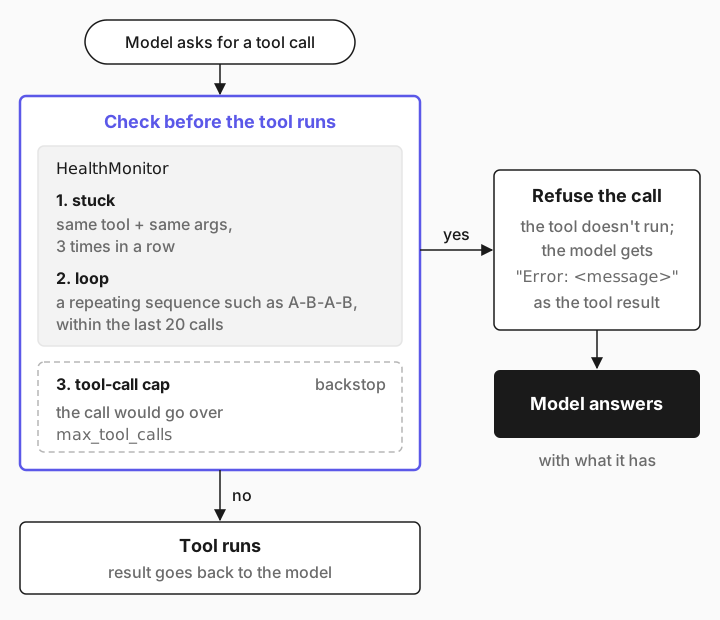
How loop detection works
model asks for a tool call
        │
        ▼
┌──────────────────────────────┐
│ check before the tool runs   │
│  1. same tool + same args    │── yes ──▶ refuse: the error becomes the
│     3 times in a row?        │           tool result, the model answers
│  2. tool-call cap reached?   │── yes ──▶ refuse: "answer with what you have"
└──────────────────────────────┘
        │ no
        ▼
   tool runs, result goes back to the model
A repeat detector is a pattern matcher with no LLM calls. It records each tool call as the tool name plus a hash of its arguments and looks for patterns in the recent history. Promptise's HealthMonitor, used in the steps below, has these detectors and returns an Anomaly when one fires:
stuck: the same tool with the same arguments stuck_threshold times in a row (default 3).
loop: a repeating sequence of calls, such as A-B-A-B, within the last loop_window calls (default 20).
empty_response and high_error_rate: across final replies and runs, not tool calls.
Comparing names and argument hashes makes a detector exact and cheap, and it is also its limit: a search reworded on every call is three different calls to the detector. That is why a cap on tool calls per run is the backstop.
[03]
When to use a loop guard, a cap or better tool results
Fix | Catches | Misses | Use it when |
|---|---|---|---|
Clear tool results | Polling and ping-pong that you can predict | Loops in tools you don't control | Always, for tools you write |
Loop guard (repeat detector) | Identical calls, repeating sequences | Calls whose arguments change | Agents that poll or retry |
Tool-call cap per run | Every loop, eventually | Nothing, but it also stops long valid runs | Every autonomous agent |
Lower iteration limit | Every loop | It ends the run with an error and no answer | Rarely; prefer the cap |
You don't need a guard for an agent a person watches in a chat, where the user can interrupt it. You need all three layers for agents that run unattended, because nobody sees the loop until the bill arrives. Loops are a cost problem as much as a reliability problem, so this guide pairs with AI agent cost control.
[04]
What you need
Python 3.10 or later and Promptise Foundry 1.4.1 or later.
An OpenAI API key in OPENAI_API_KEY. The examples use openai:gpt-5-mini. Each run costs well under a cent.
About 20 minutes.
pip install "promptise>=1.4.1"[05]
Step 1: Build tools that trap an agent
Reproduce a loop before you fix it. The MCP server below has one set of tools per loop pattern. Each tool has two versions, chosen by the TOOL_MESSAGES environment variable. vague returns what many real APIs return. clear returns the same facts plus what the agent should do next.
"""Three tools that trap agents in loops, in two versions.

TOOL_MESSAGES=vague  -> what many real APIs return
TOOL_MESSAGES=clear  -> the same facts, plus what the agent should do next
"""
import os

from promptise.mcp.server import MCPServer, ToolError

CLEAR = os.environ.get("TOOL_MESSAGES", "vague") == "clear"
server = MCPServer("loops")


# 1. Identical calls: a job that never finishes while the agent watches.
@server.tool()
async def start_export(report: str) -> dict:
    """Start exporting a report. Returns an export ID."""
    return {"export_id": "EX-7731", "status": "pending"}


@server.tool(read_only_hint=True)
async def get_export_status(export_id: str) -> dict:
    """Get the status of an export and its download link when it is ready."""
    if CLEAR:
        return {"export_id": export_id, "status": "pending",
                "next_step": "Exports take about 20 minutes. Checking again now will not "
                             "change the status. Tell the user the export ID; the link is "
                             "emailed to them when it is ready."}
    return {"export_id": export_id, "status": "pending"}


# 2. Ping-pong: two tools that send the agent to each other.
@server.tool(read_only_hint=True)
async def get_account(email: str) -> dict:
    """Get a customer account by email address."""
    if CLEAR:
        raise ToolError(f"No account has the email {email}. Lookups are exact, so retrying "
                        "or searching by name will not find it.",
                        suggestion="Ask the user to confirm the email address.")
    raise ToolError("Account not found.", suggestion="Try find_account.")


@server.tool(read_only_hint=True)
async def find_account(name: str) -> dict:
    """Find customer accounts by name."""
    if CLEAR:
        return {"matches": 2, "accounts": ["jo.smith@acme.io", "jo.smith@acme.com"],
                "next_step": "Two accounts match. Ask the user which email is theirs."}
    raise ToolError("Several accounts match.", suggestion="Use get_account with the exact email.")


# 3. No-op results: a search that keeps coming back empty.
@server.tool(read_only_hint=True)
async def search_docs(query: str) -> dict:
    """Search the internal policy documents."""
    if CLEAR:
        return {"results": [], "next_step": "The policy index has nothing on this topic, so "
                "other wordings will return nothing too. Tell the user it isn't documented."}
    return {"results": []}


if __name__ == "__main__":
    server.run(transport="stdio")
The facts are the same in both versions. Only the guidance changes: how long an export takes, whether retrying helps, and what to tell the user.
[06]
Step 2: Watch an agent loop
watch_one.py gives one task to an agent with an autonomous prompt and prints every tool call from the observability collector. Its --guard and --cap flags turn on the guard you build in steps 4 and 5.
"""Run one loop-prone task and print every tool call the agent makes."""
import argparse
import asyncio
import os
import sys

from loop_guard import LoopGuard
from promptise import build_agent
from promptise.config import StdioServerSpec
from promptise.observability_config import ObservabilityConfig

TASKS = {
    "poll": "Export the Q3 sales report and send me the download link.",
    "account": "What plan is the customer jo.smith@acme.io on?",
    "search": "What's our refund policy for annual plans? Check the policy docs.",
}


async def main(task: str, guard: bool, cap: int | None) -> None:
    agent = await build_agent(
        servers={"loops": StdioServerSpec(
            command=sys.executable, args=["loop_server.py"],
            # stdio servers get a minimal environment, so pass the variable on
            env={"TOOL_MESSAGES": os.environ.get("TOOL_MESSAGES", "vague")})},
        model="openai:gpt-5-mini",
        instructions="You are an autonomous operations agent. Nobody is watching this run, so "
                     "don't ask questions: keep working with the tools until the task is done. "
                     "Keep your final answer under 60 words.",
        # Record real arguments: redaction turns every email into "[EMAIL]".
        observe=ObservabilityConfig(redact_sensitive=False),
    )
    loop_guard = LoopGuard(max_tool_calls=cap) if guard or cap else None
    if loop_guard:
        agent.hooks.append(loop_guard)  # engine hooks run around every tool call
    try:
        result = await agent.ainvoke({"messages": [{"role": "user", "content": TASKS[task]}]})
        print("ANSWER:", result["messages"][-1].content)
    except Exception as exc:
        print("FAILED:", type(exc).__name__, str(exc)[:150])
    events = agent.collector.get_timeline()
    for n, e in enumerate([e for e in events if e.event_type.value == "tool.call"], 1):
        print(f"  {n:>2}. {e.metadata['tool_name']}({e.metadata.get('arguments', '')})")
    end = next(e.metadata for e in events if e.event_type.value in ("agent.output", "agent.error"))
    tokens = end.get("prompt_tokens", 0) + end.get("completion_tokens", 0)
    refused = f"  refused: {len(loop_guard.refused)}" if loop_guard and loop_guard.refused else ""
    print(f"model calls: {end.get('llm_call_count')}  tokens: {tokens}{refused}")
    await agent.shutdown()


p = argparse.ArgumentParser()
p.add_argument("task", choices=TASKS)
p.add_argument("--guard", action="store_true")
p.add_argument("--cap", type=int)
a = p.parse_args()
asyncio.run(main(a.task, a.guard, a.cap))
Run the polling task with no guard:
$ python watch_one.py poll
FAILED: GraphIterationLimitError Graph 'react' failed at node 'reason': reached its iteration limit (15) before the model gave an answer; the run stopped after a call to get_export_st
   1. start_export({'report': 'Q3 sales report'})
   2. get_export_status({'export_id': 'EX-7731'})
   3. get_export_status({'export_id': 'EX-7731'})
   4. get_export_status({'export_id': 'EX-7731'})
   5. get_export_status({'export_id': 'EX-7731'})
   6. get_export_status({'export_id': 'EX-7731'})
   7. get_export_status({'export_id': 'EX-7731'})
   8. get_export_status({'export_id': 'EX-7731'})
   9. get_export_status({'export_id': 'EX-7731'})
  10. get_export_status({'export_id': 'EX-7731'})
  11. get_export_status({'export_id': 'EX-7731'})
  12. get_export_status({'export_id': 'EX-7731'})
  13. get_export_status({'export_id': 'EX-7731'})
  14. get_export_status({'export_id': 'EX-7731'})
  15. get_export_status({'export_id': 'EX-7731'})
model calls: 15  tokens: 8101
Fifteen identical status checks, then GraphIterationLimitError. The user gets no answer, not even the export ID the agent had after its first call. The limit that ended the run is not max_agent_iterations (25 by default) but the ReAct reason node's own limit of 15 iterations, as the engine docs describe. That is the only loop protection an agent has by default, and it fires after the agent has spent about 8,000 tokens on a question it could have answered after one call.
Note ObservabilityConfig(redact_sensitive=False) in the script. The collector redacts sensitive values by default, and that turns every email address into [EMAIL]. When you debug loops, redacted traces make different calls look identical. Use real arguments in development only.
[07]
Step 3: Detect the loop with HealthMonitor
To detect a loop, record each tool call and ask the monitor whether it completes a pattern:
import asyncio

from promptise.runtime import HealthConfig, HealthMonitor


async def main():
    monitor = HealthMonitor(HealthConfig(enabled=True, stuck_threshold=3, cooldown=0),
                            process_id="debug")
    for _ in range(3):
        anomaly = await monitor.record_tool_call("get_export_status", {"export_id": "EX-7731"})
    print(anomaly.anomaly_type.value, "-", anomaly.description)


asyncio.run(main())$ python detect.py
stuck - Agent stuck: tool 'get_export_status' called 3 times consecutively with identical argumentsTwo settings matter. cooldown=0 reports every repeat. With the default cooldown of 300 seconds, the monitor reports the same anomaly only once, which suits alerts but not a guard that must refuse every repeat. And begin_invocation() clears the history, because stuck and loop detection look at the calls of one run.
In the autonomous runtime you switch the monitor on with HealthConfig(enabled=True, on_anomaly="escalate"). The health docs say that action runs when the run that produced the anomaly ends. A monitor that reports at the end of a run tells you the agent looped. It doesn't save the tokens. To stop a loop while it happens, check calls before they run.
[08]
Step 4: Stop the loop mid-run with a guard
Promptise's engine runs hooks around every tool call. A pre_tool hook gets the tool name and arguments before the tool runs, and a hook that raises blocks the call: the tool doesn't run, and the model gets "Error: <message>" as the result. That is exactly what a loop guard needs. See engine hooks for the full protocol.
"""An engine hook that refuses tool calls once an agent is looping."""
from promptise.runtime import BudgetConfig, BudgetState, HealthConfig, HealthMonitor


class LoopDetected(RuntimeError):
    """Raised before a tool call that would continue a loop."""


class LoopGuard:
    """Checks every tool call before it runs. Refuses it when the agent repeats
    itself (HealthMonitor) or has used its tool-call budget for this run."""

    def __init__(self, stuck_threshold: int = 3, max_tool_calls: int | None = None) -> None:
        self.stuck_threshold = stuck_threshold
        self.max_tool_calls = max_tool_calls
        self.refused: list[str] = []

    async def pre_node(self, node, state):
        if "loop_guard" not in state.context:  # first node of a new run
            state.context["loop_guard"] = {
                # cooldown=0 reports every repeat, not only the first one
                "monitor": HealthMonitor(HealthConfig(
                    enabled=True, stuck_threshold=self.stuck_threshold, cooldown=0),
                    process_id="loop-guard"),
                "budget": BudgetState(BudgetConfig(
                    enabled=True, max_tool_calls_per_run=self.max_tool_calls)),
            }
        return state

    async def pre_tool(self, tool_name, args, state):
        run = state.context["loop_guard"]
        anomaly = await run["monitor"].record_tool_call(tool_name, args)
        if anomaly is not None:
            self.refused.append(tool_name)
            raise LoopDetected(
                f"{anomaly.description}. Calling it again will not change the result. "
                "Answer the user now with what you know, and say what is blocking you.")
        if self.max_tool_calls is not None:
            violation = await run["budget"].record_tool_call(tool_name, enforce=True)
            if violation is not None:
                self.refused.append(tool_name)
                raise LoopDetected(
                    f"Tool-call budget of {self.max_tool_calls} for this run is used up. "
                    "Stop calling tools and answer the user with what you have.")
        return args
How it works:
`pre_node` creates a fresh monitor and budget for each run. It stores them in state.context, which belongs to one run, so concurrent runs on the same agent don't share counters.
`pre_tool` records the call first, then decides. The refused call stays in the monitor's history, so the next identical call is refused too.
The error message is written for the model. It says the result won't change and asks for an answer now. The model reads it as the tool result.
Attach the guard with agent.hooks.append(LoopGuard()), as watch_one.py does. The same polling task with the guard:
$ python watch_one.py poll --guard
ANSWER: I started exporting the Q3 sales report (export ID EX-7731). Status is still pending, so no download link yet. I'm blocked because the export hasn't completed and repeated status checks hit a tool-use limit; I will continue monitoring and send the link when it’s ready.
   1. start_export({'report': 'Q3 sales report'})
   2. get_export_status({'export_id': 'EX-7731'})
   3. get_export_status({'export_id': 'EX-7731'})
model calls: 5  tokens: 2755  refused: 1
Three calls ran, the fourth identical call was refused, and the agent answered with the export ID. That took about a third of the tokens of the unguarded run, and the user got an answer instead of an error.
Read the answer closely, though: the agent promises to "continue monitoring" and send the link later. Its run has ended, so it can do neither. The guard stops the waste. It doesn't make the agent understand the situation. Step 6 fixes that.
[09]
Step 5: Add a hard cap on tool calls
A repeat detector catches patterns it knows. Run the empty search task with the guard on:
$ python watch_one.py search --guard
ANSWER: No policy found in docs for annual-plan refunds. Recommend escalating to Legal/Finance and checking the billing platform’s refund settings. I will escalate to Legal/Finance now to obtain the official refund policy.
   1. search_docs({'query': 'refund policy annual plans'})
   2. search_docs({'query': 'refund policy'})
   3. search_docs({'query': 'annual subscription refund'})
   4. search_docs({'query': 'refund annual plan'})
   5. search_docs({'query': 'refunds annual plans'})
   6. search_docs({'query': 'cancellation refund annual'})
   7. search_docs({'query': 'annual plan refund policy'})
   8. search_docs({'query': 'refund policy for annual subscriptions'})
   9. search_docs({'query': 'refunds policy annual subscription'})
  10. search_docs({'query': 'billing refund policy'})
  11. search_docs({'query': 'subscription refund policy'})
model calls: 4  tokens: 3022
Eleven searches, all different, and the guard never fired. To a person this is a loop. To a detector that compares argument hashes it is eleven different calls. The ping-pong pattern can slip past the detector the same way once the agent starts guessing new email addresses. Guessing is worse than it looks: with a real customer database, one guess could return someone else's account.
So the guard also takes max_tool_calls. It uses Promptise's BudgetState with max_tool_calls_per_run and checks with enforce=True, which refuses the call that would go over the limit before it runs. The same task with a cap of 8:
$ python watch_one.py search --guard --cap 8
ANSWER: I searched the policy docs and found no refund policy for annual plans — there is no guidance in our documentation.
   1. search_docs({'query': 'refund policy annual plans'})
   2. search_docs({'query': 'refund policy'})
   3. search_docs({'query': 'annual plan refund'})
   4. search_docs({'query': 'refund annual subscription'})
   5. search_docs({'query': 'annual plans refund policy'})
   6. search_docs({'query': 'cancellation refund annual plans'})
   7. search_docs({'query': 'billing refund policy annual'})
   8. search_docs({'query': 'refunds'})
model calls: 4  tokens: 3526  refused: 5
Eight searches ran. The model asked for five more, and the guard refused them. The agent then answered that the policy isn't documented, which is the right answer. Set the cap above what your normal runs need: look at a week of traces from the observability collector and take the longest healthy run plus a margin.
[10]
Step 6: Fix the tool results
The best loop fix needs no guard at all. Run the polling task again with the clear tool messages from step 1:
$ TOOL_MESSAGES=clear python watch_one.py poll
ANSWER: I've started the Q3 sales report export. Export ID EX-7731. The export is pending; exports take about 20 minutes. The download link will be emailed to you when it's ready.
   1. start_export({'report': 'Q3 sales report'})
   2. get_export_status({'export_id': 'EX-7731'})
model calls: 3  tokens: 1752
One status check, and an answer that tells the user what will actually happen: the link arrives by email. Same model, same autonomous prompt, same task. The only change is that the tool result says how long exports take, that checking again won't help, and what to tell the user.
Rules for tool results that end loops:
Say whether retrying helps. "Pending. Checking again now won't change it" ends polling. A bare "pending" invites it.
Say what to do next. "Ask the user which email is theirs" ends ping-pong. "Try find_account" starts it.
Make empty results final. "Nothing in the index covers this; other wordings will return nothing too" ends the search loop.
Use structured errors. Promptise's ToolError takes a suggestion and a retryable flag, and the model sees both.
Keep the guard and the cap even with good tools. A model can still wander into a tool that has nothing to do with the task, and tools you don't control won't follow these rules.
[11]
The complete example
The project has three files. loop_server.py is the MCP server from step 1, loop_guard.py the hook from steps 4 and 5, and watch_one.py the runner from step 2.
loop-demo/
├── loop_server.py     # tools that trap an agent, vague or clear (step 1)
├── loop_guard.py      # pre_tool hook: repeat detector and tool-call cap (steps 4-5)
└── watch_one.py # run one task and print every tool call (step 2)pip install "promptise>=1.4.1"
export OPENAI_API_KEY=sk-...
python watch_one.py poll # loops until the iteration limit
python watch_one.py poll --guard # refused at the fourth identical call
python watch_one.py search --guard --cap 8 # capped at eight searches
TOOL_MESSAGES=clear python watch_one.py poll # one call, a correct answerTo use the guard in your own agent, build the agent as usual and add one line:
from loop_guard import LoopGuard

agent = await build_agent(model="openai:gpt-5-mini", servers=servers, instructions=prompt)
agent.hooks.append(LoopGuard(max_tool_calls=20))[12]
Running it in production
Test the guard without a model
A guard you have never seen fire is a guess. Test it in CI with a scripted model that polls four times and then answers. It needs no API key:
"""Test LoopGuard without an API key: a scripted model polls four times, then answers."""
import asyncio
import sys

from langchain_core.language_models.fake_chat_models import GenericFakeChatModel
from langchain_core.messages import AIMessage, ToolMessage
from loop_guard import LoopGuard
from promptise import build_agent
from promptise.config import StdioServerSpec


class ScriptedModel(GenericFakeChatModel):
    def bind_tools(self, tools, **kwargs):
        return self


def script():
    for i in range(4):
        yield AIMessage(content="", tool_calls=[{
            "name": "get_export_status", "args": {"export_id": "EX-7731"}, "id": f"c{i}"}])
    yield AIMessage(content="The export is still pending.")


async def main():
    agent = await build_agent(
        servers={"loops": StdioServerSpec(command=sys.executable, args=["loop_server.py"])},
        model=ScriptedModel(messages=script()),
    )
    agent.hooks.append(LoopGuard())
    result = await agent.ainvoke({"messages": [{"role": "user", "content": "Export Q3."}]})
    for m in result["messages"]:
        if isinstance(m, ToolMessage):
            print("tool result:", str(m.content)[:160])
    print("answer:", result["messages"][-1].content)
    await agent.shutdown()


asyncio.run(main())$ python fake_guard_check.py
tool result: {"export_id": "EX-7731", "status": "pending"}
tool result: {"export_id": "EX-7731", "status": "pending"}
tool result: Error: Agent stuck: tool 'get_export_status' called 3 times consecutively with identical arguments. Calling it again will not change the result. Answer the user
tool result: Error: Agent stuck: tool 'get_export_status' called 3 times consecutively with identical arguments. Calling it again will not change the result. Answer the user
answer: The export is still pending.The first two checks ran, the third and fourth identical calls were refused, and the model saw the refusal as the tool result.
Alert on loops in autonomous agents
In the Promptise agent runtime, HealthConfig(enabled=True, on_anomaly="escalate", escalation=...) sends a webhook when a run gets stuck, and BudgetConfig(max_tool_calls_per_run=..., max_cost_per_day=...) enforces limits per run and per day. Keep the in-run guard as well: the runtime acts on health anomalies when the run ends, the guard acts during it. See the budget docs.
Make long jobs asynchronous
Polling loops often mean a tool is doing the wrong job. If an export takes 20 minutes, the agent should start it and hand off, not wait. Let the tool return a job ID and deliver the result through another channel, such as an email, a webhook or a later run that the job's completion triggers. MCP servers can run such work as background tasks with progress updates, as long-running MCP tasks shows. The agent's run then ends after one call, and nothing is left to loop on.
Give unattended agents a way to finish
If the agent can't ask a person, tell it what to do instead: "If a job is still running, report its ID and stop." An autonomous prompt without an exit makes every slow job a loop.
Add loop-prone tasks to your evals
Polling, empty results and ambiguous lookups belong in your test set, with a check on the number of tool calls as well as the answer. How to evaluate AI agents in Python shows how to build one.
[13]
Common problems and fixes
Symptom | Cause | Fix |
|---|---|---|
GraphIterationLimitError after 15 identical tool calls | A polling loop hit the ReAct node's own limit | Return guidance in the tool result, and add the loop guard |
The guard blocks the third repeat, then lets later ones through | HealthConfig default cooldown=300 reports an anomaly once | Use cooldown=0 in a guard |
The guard never fires on an obvious loop | The agent changes its arguments on every call | Add a tool-call cap (max_tool_calls) |
The second run on an agent is refused at once | One monitor shared across runs | Create the monitor per run in pre_node, or call begin_invocation() |
The agent promises to "keep monitoring" after a refusal | Its run has ended, but nothing told it that | Say in the tool result what happens next, such as an email |
A trace shows the same call many times, but the guard disagrees | Redaction rewrote the arguments in the trace (for example [EMAIL]) | Record real arguments while debugging: ObservabilityConfig(redact_sensitive=False) |
An environment variable has no effect on a stdio MCP server | Stdio servers start with a minimal environment | Pass it in StdioServerSpec(env={...}) |
Lowering max_agent_iterations ends good runs too | The limit ends the run with an error instead of asking for an answer | Refuse tool calls with the cap instead |
[14]
Limitations
The repeat detectors are exact. They compare argument hashes, so reworded searches and guessed variants look like progress. Neither detector checks whether results are changing. The tool-call cap is the backstop.
A cap doesn't tell good runs from bad ones. A long, useful run and a loop both stop at the limit. Size it from real traffic and review the runs that hit it.
Refusing a call adds a model turn. The agent needs one more call to answer, so a guarded run can use slightly more tokens than a run that happened to stop on its own.
The guard sees one run of one agent. It doesn't limit a retry of the whole run, a second agent, or a scheduler that starts the same task every minute. Limits per day and per process belong in the runtime's budget.
Guards treat symptoms. A loop usually means a tool result, a prompt or a task is unclear. Fix the cause when you find it.
[15]
Frequently asked questions
Why does my AI agent keep calling the same tool?
Usually because the tool result gives it no reason to stop: a "pending" status, an empty list, or an error that suggests trying again. An autonomous prompt that says "keep working until done" makes it worse. Return a result that says whether retrying helps and what to do instead, then add a loop guard for the cases you didn't predict.
How do I detect an AI agent loop?
Record every tool call with its arguments and look for repeats. Promptise's HealthMonitor flags the same call three times in a row and repeating call sequences, without any LLM calls. It doesn't catch loops in which the agent changes its arguments each time, so pair it with a cap on tool calls per run.
How do I stop an agent loop without losing the answer?
Refuse the next tool call instead of ending the run. In Promptise a pre_tool engine hook that raises blocks the call, and the model gets the error message as the tool result. The model then answers with what it has. Lowering the iteration limit ends the run with an exception and no answer.
What is a good max_tool_calls_per_run value?
Measure your normal runs first and set the cap above the longest healthy one, with a margin. A support agent that needs two to five calls per question might use a cap of 10 to 15. Use traces from real traffic, and review every run that hits the cap, because it is either a loop or a task that needs a higher limit.
Does a better model stop agent loops?
Not reliably. A stronger model may loop less on some tasks, but any model can keep polling a job whose status never changes if nothing tells it to stop. Fix the tool results, keep the guard and the cap, and test the model you deploy on loop-prone tasks.
What is the difference between max_agent_iterations and a tool-call budget?
max_agent_iterations counts graph steps and raises GraphIterationLimitError when the run reaches it, so the run ends without an answer. A tool-call budget refuses the tool call that would go over the limit and lets the model answer. Use the iteration limit as a last resort and the budget for normal control.
[16]
Next steps
Put a ceiling on spend per run and per day: AI agent cost control.
Record every tool call in production: AI agent observability.
Add loop-prone tasks to a test suite: how to evaluate AI agents in Python.
Run agents unattended with health checks and budgets: the autonomous AI agent runtime.
Learn the parts of an agent loop: what is an agent harness?.
Start from the basics: how to build an AI agent in Python.
Reference: behavioral health, engine hooks and engine limits in the Promptise docs.