A long agent run fills its context window one tool result at a time. Ten log files later, every model call carries all ten, you pay for them again on every step, and the agent's grip on the original question gets looser. Context engineering for AI agents is the work of deciding what the model sees on each step: what stays, what gets trimmed or summarized, and what it fetches only when it needs it. In this guide you'll build an agent that investigates an incident across ten service logs, meter the tokens of every model call, and compare Promptise Foundry's automatic compaction, its ContextEngine and a full transcript with real numbers, then fix what goes wrong. Every snippet ran against Promptise Foundry 1.3.2 with gpt-5-mini, and every output is what it printed.
How do you manage the context window of an AI agent?
Keep three kinds of content apart. Rules and facts the agent needs on every step go in the system prompt. Bulk data stays behind tools that return only what the step needs, such as a summary instead of a whole file, with a second tool to drill into details. And the run itself needs a way to stay bounded as tool results pile up. With Promptise Foundry the first two are yours to write, and the third is built in:
    agent = await build_agent(
        model="openai:gpt-5-mini",
        servers={"logs": StdioServerSpec(command=sys.executable, args=["lean_server.py"])},
        instructions=INSTRUCTIONS,
    )
    meter = TokenMeter(watch="the number of ERROR lines per service")
    try:
        result = await agent.ainvoke(
            {"messages": [{"role": "user", "content": QUESTION}]},
            config={"callbacks": [meter]},
        )
On the incident below, this setup read all ten logs and answered every part of the question correctly in three runs out of three, with 15,832 to 17,796 input tokens per run. The agent that read the raw files with nothing trimmed also got it right every time, for 313,783 tokens per run, about twenty times as many. The default setup, which compacts automatically, kept the question in view but never finished: once older logs were cut short, it kept reading them again until it ran out of steps, and the run ended with an error instead of an answer. The rest of this guide shows each of those runs and why they behaved the way they did.
[02]
How context works in a long agent run
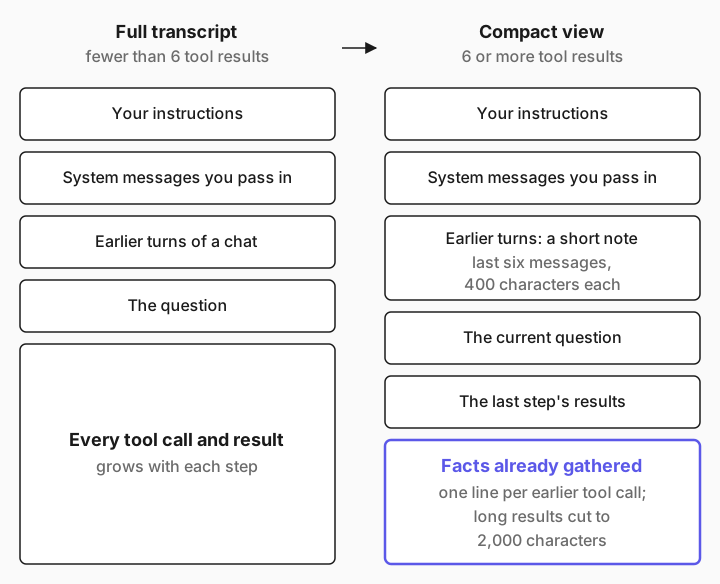
Every step of a tool loop is one model call. Without any management, each call sends the instructions, the question, and every tool call and result so far, so the input grows with each step. Promptise Foundry has two mechanisms that change what gets sent:
Rendering diagram…
Compaction inside the tool loop. The default agent pattern, ReAct, runs its loop with context_scope="auto". Until there are six tool results, the model sees the full transcript. From then on it sees a compact view: your instructions and any system messages you passed, the current question, its most recent step, and a "facts already gathered" ledger with one line per earlier tool call. Results longer than 2,000 characters are cut to an excerpt that tells the model how to get the full result again. Compaction only changes what the model sees: a call it repeats runs the tool again. agent_pattern="managed" uses that compact view from the first step, and build_agent(context_compaction=...) turns it off or moves the threshold. The Context Lifecycle guide and the Context scope reference describe both.
The ContextEngine, before the loop. build_agent(context_engine=...) assembles the instructions, chat history and memory into a token budget, and trims the least important parts first. It assembles once per call to the agent, before any tool runs. Since 1.3.0, what its budget leaves after the instructions and tool definitions also caps the compacted tool loop. The Context Engine docs list its layers.
What survives compaction matters more than how much it saves. This is what the model receives before and after the switch, from Promptise's source and the runs below:
In the prompt | Before compaction | After compaction, in 1.2.1 | After compaction, since 1.3.0 |
|---|---|---|---|
Your instructions | Yes | Yes | Yes |
The question, passed as a dict | Yes | No | Yes |
The question, passed as a HumanMessage | Yes | Yes, but only the first one in the input | Yes, the latest one |
System messages you pass in | Yes | No | Yes |
Earlier turns of a chat | Yes | No, except the first user message | A short note: the last six messages, 400 characters each |
Tool results | Every call and result | The last step's results, plus every result again in the ledger | The last step's results; older ones once each in the ledger, cut to 2,000 characters |
A tool call the model repeats | Runs the tool | Gets the earlier result; the tool doesn't run | Runs the tool since 1.3.2 (1.3.0 and 1.3.1 returned the earlier result); reuse is opt-in |
[03]
What you need
Python 3.10 or newer.
Promptise Foundry 1.3.2 or newer from PyPI. tiktoken, which the ContextEngine uses to count tokens exactly for OpenAI models, comes with it.
An OpenAI API key. This guide uses gpt-5-mini; other providers work by changing the model string, as listed in Models & Providers.
pip install "promptise>=1.3.2"
export OPENAI_API_KEY="sk-..."[04]
Investigate an incident across ten logs, step by step
The job: an incident hit checkout between 14:00 and 14:30. The agent reads the logs of ten services and reports the ERROR count per service, the total, the first ERROR, and the root cause. A small script, make_logs.py, wrote the logs (140 normal lines per service plus the incident) and printed the right answer, so every run can be checked against it:
files: 10 | bytes: 140724
ERROR lines per service: {'gateway': 4, 'inventory': 7, 'orders': 5, 'payments': 2}
total ERROR lines: 18
first ERROR: inventory 14:07:41.204Give the agent the logs as a tool
The tools live in a small MCP server. read_log returns a whole file, the way a first version of a tool usually does:
from pathlib import Path

from promptise.mcp.server import MCPServer

server = MCPServer("logs")
LOG_DIR = Path(__file__).parent / "logs"


def services() -> list[str]:
    return sorted(p.stem for p in LOG_DIR.glob("*.log"))


@server.tool()
async def list_logs() -> list[str]:
    """List the services that have a log file for the incident window."""
    return services()


@server.tool()
async def read_log(service: str) -> str:
    """Return the full log file of one service, every line.

    Args:
        service: A service name from list_logs, for example "orders".
    """
    if service not in services():
        return f"No log for service {service!r}. Call list_logs for valid names."
    return (LOG_DIR / f"{service}.log").read_text()


if __name__ == "__main__":
    server.run()
How big is one result? The ContextEngine's token counter answers that without calling a model:
"""How big is each tool result? Count before you send it."""
from pathlib import Path

from promptise import ContextEngine

engine = ContextEngine(model="openai:gpt-5-mini")
for path in sorted(Path("logs").glob("*.log"))[:3]:
print(f"{path.name:<16} {engine.count_tokens(path.read_text()):>6,} tokens")auth.log 5,517 tokens
billing.log 5,526 tokens
gateway.log 5,669 tokensAbout 5,500 tokens per file, 55,000 for all ten. If MCP servers are new to you, How to Connect MCP Servers to Your AI Agent in Python explains this file line by line.
Meter every model call
You can't manage what you don't measure. This LangChain callback records, for each model call, how many messages went in, whether the compaction ledger was among them, whether a phrase you choose was still visible, and the token usage the provider reported:
"""Record what the model saw and what it cost, one row per model call."""

from langchain_core.callbacks import AsyncCallbackHandler

LEDGER_MARKER = "Facts already gathered"


class TokenMeter(AsyncCallbackHandler):
    def __init__(self, watch: str | None = None):
        self.watch = watch  # a phrase to look for in what the model sees
        self.calls: list[dict] = []

    async def on_chat_model_start(self, serialized, messages, **kwargs):
        sent = messages[0]
        text = "\n".join(str(m.content) for m in sent)
        self.calls.append(
            {
                "messages": len(sent),
                "tool_results": sum(1 for m in sent if m.type == "tool"),
                "ledger": LEDGER_MARKER in text,
                "watch_seen": bool(self.watch) and self.watch in text,
            }
        )

    async def on_llm_end(self, response, **kwargs):
        message = response.generations[0][0].message
        usage = message.usage_metadata or {}
        self.calls[-1].update(
            input=usage.get("input_tokens", 0),
            cached=(usage.get("input_token_details") or {}).get("cache_read", 0),
            output=usage.get("output_tokens", 0),
            wants=", ".join(
                tc["name"] + "".join(f" {v}" for v in tc["args"].values()) for tc in message.tool_calls
            )
            or "final answer",
        )
The file also has a table() method that prints one row per call and a total, priced at OpenAI's list price for gpt-5-mini: $0.25 per million input tokens, $0.025 per million cached input tokens and $2.00 per million output tokens. You pass the meter to any run with config={"callbacks": [meter]}. For tracing in production, Promptise's own observability records tokens per call too; the meter is here because it also shows what the model was sent.
Run the long investigation with the default agent
The script asks the question, watches for the phrase "the number of ERROR lines per service" from it, and can build the agent four ways. The instructions ask for one service per step, so the run is long enough to watch it grow:
"""Investigate an incident across ten service logs, and meter every model call.

    python investigate.py            # the default agent
    python investigate.py managed    # agent_pattern="managed"
    python investigate.py full       # no compaction: the whole transcript every call
    python investigate.py engine     # the default agent with a ContextEngine
    python investigate.py default lean_server.py   # the same agent with smaller tool results
"""

import asyncio
import sys

from promptise import ContextEngine, build_agent
from promptise.config import StdioServerSpec
from promptise.engine import GraphIterationLimitError

from meter import TokenMeter

INSTRUCTIONS = (
    "You are an SRE assistant. Answer from the logs only. "
    "Work through the logs one service at a time: call one tool for one service, "
    "look at the result, then go to the next. Never ask about two services in one step."
)
QUESTION = (
    "We had an incident on 2026-10-09 between 14:00 and 14:30. Read every service log. "
    "Then tell me: (1) the number of ERROR lines per service, (2) the total, "
    "(3) which service logged the first ERROR and its exact timestamp, "
    "and (4) the root cause in one sentence."
)
SERVER_FILE = sys.argv[2] if len(sys.argv) > 2 else "logs_server.py"
SERVER = StdioServerSpec(command=sys.executable, args=[SERVER_FILE])


async def main(mode: str) -> None:
    options = {
        "full": {"context_compaction": False},
        "engine": {"context_engine": ContextEngine(model="openai:gpt-5-mini")},
        "managed": {"agent_pattern": "managed"},
    }.get(mode, {})

    agent = await build_agent(
        model="openai:gpt-5-mini", servers={"logs": SERVER}, instructions=INSTRUCTIONS, **options
    )
    meter = TokenMeter(watch="the number of ERROR lines per service")
    try:
        result = await agent.ainvoke(
            {"messages": [{"role": "user", "content": QUESTION}]},
            config={"callbacks": [meter]},
        )
        answer = result["messages"][-1].content
    except GraphIterationLimitError as exc:
        # The run hit its step limit before the model answered.
        answer = f"no answer: {exc}"
    finally:
        await agent.shutdown()
    print(meter.table())
    print("\n>>>", answer)


asyncio.run(main(sys.argv[1] if len(sys.argv) > 1 else "default"))python investigate.pyNode 'reason' reached its iteration limit (15) in graph 'react' — not running it again
Stuck node 'reason' — forcing graph end
Graph 'react' at node 'reason': reached its iteration limit (15) before the model gave an answer; the run stopped after a call to read_log whose result the model never saw
call msgs tool msgs ledger input cached output next
1 2 0 no 333 0 83 list_logs [watch: seen]
2 4 1 no 387 0 87 read_log auth [watch: seen]
3 6 2 no 5,932 5,760 17 read_log billing [watch: seen]
4 8 3 no 11,486 11,264 17 read_log gateway [watch: seen]
5 10 4 no 17,183 0 17 read_log inventory [watch: seen]
6 12 5 no 22,969 22,016 17 read_log notifications [watch: seen]
7 5 1 yes 9,438 9,216 343 read_log auth [watch: seen]
8 5 1 yes 10,236 10,112 87 read_log orders [watch: seen]
9 5 1 yes 10,411 0 343 read_log billing [watch: seen]
10 5 1 yes 11,100 0 919 read_log auth [watch: seen]
11 5 1 yes 11,091 8,704 663 read_log billing [watch: seen]
12 5 1 yes 11,100 5,632 471 read_log auth [watch: seen]
13 5 1 yes 11,091 7,680 279 read_log billing [watch: seen]
14 5 1 yes 11,100 10,880 343 read_log payments [watch: seen]
15 5 1 yes 11,151 0 343 read_log gateway [watch: seen]
total: 15 model calls, 155,008 input (91,264 cached) + 4,029 output tokens = $0.0263
>>> no answer: Graph 'react' failed at node 'reason': reached its iteration limit (15) before the model gave an answer; the run stopped after a call to read_log whose result the model never sawRead it row by row. Each log added about 5,600 input tokens to every later call. After six tool results, list_logs and five logs, compaction switched on at call 7. The message count dropped from 12 to 5: the instructions, the question, the last tool call, its result, and the ledger. The question stayed in view, [watch: seen] on every row. The trouble is the ledger. It cuts each older result to its first 2,000 characters and ends it with a note, [shortened: … characters not shown; call read_log with the same arguments to see the full result (several in one step if you need them together)], and in these logs the ERROR lines start after 14:07, well past the first 2,000 characters.
So the model did what the note says. The ledger's own header adds that it shouldn't call a tool again for these results unless it needs one marked as not shown in full, and every log was marked. From call 7 on it went back to logs it had already read, auth and billing again and again, and each re-read pushed the one before out of full view. Each re-read ran the tool again: compaction changes what the model sees, not what a call does. The instructions made it worse, because they forbid asking for two services in one step.
At call 15 the ReAct loop hit its step limit, with a read_log result the model never got to see. Promptise logged Stuck node 'reason' — forcing graph end, and since 1.3.2 ainvoke then raises GraphIterationLimitError from promptise.engine instead of returning that log file as if it were the answer. investigate.py catches it and prints the message, so the meter's table still shows where the tokens went. Before 1.3.2 the run ended without an error, and result["messages"][-1] was the raw log.
Re-reading a file that can't change is wasted work for the server, so 1.3.2 lets you opt in to reuse: with build_agent(context_compaction=ContextCompaction(reuse_results=["read_log"])), a repeated read_log call gets the earlier result once the loop compacts, and trace_tools prints ↺ Reusing an earlier result for tool: read_log for it. In one run with it, 5 of the 14 log reads were answered that way. The model was sent the same text, though, so the run used about as many tokens, 158,937, and still ran out of steps. Reuse saves tool runs, not context. List only tools whose results can't change during a run, never a status or health check.
On Promptise Foundry 1.2.1 this run failed differently: compaction kept the question only if it was a LangChain HumanMessage, so the dict question was dropped at call 7, and the model asked what to do. 1.3.0 fixed that, and it no longer repeats the latest result in the ledger. The cut to 2,000 characters is what's left, and on whole files it decides the outcome. That's one more reason to make the tools return less, in step 5.
Compare it with the full transcript
To see what compaction should be saving, run the same agent with compaction turned off. Since 1.3.0 that's one argument, build_agent(context_compaction=False), which investigate.py full passes:
python investigate.py fullcall msgs tool msgs ledger input cached output next
1 2 0 no 333 0 147 list_logs [watch: seen]
2 4 1 no 387 0 151 read_log auth [watch: seen]
3 6 2 no 5,932 5,760 17 read_log billing [watch: seen]
…
10 20 9 no 45,402 45,184 17 read_log shipping [watch: seen]
11 22 10 no 50,949 50,816 17 read_log users [watch: seen]
12 24 11 no 56,504 56,320 1,393 final answer [watch: seen]
total: 12 model calls, 313,783 input (311,296 cached) + 1,844 output tokens = $0.0121
>>> Summary from the logs (2026-10-09 14:00–14:30):
1) ERROR counts per service:
- auth: 0
- billing: 0
- gateway: 4
- inventory: 7
- notifications: 0
- orders: 5
- payments: 2
- search: 0
- shipping: 0
- users: 0
2) Total ERROR lines: 18
3) First ERROR: inventory at 2026-10-09T14:07:41.204Z
4) Root cause (one sentence): The inventory service exhausted its database connection pool (db pool exhausted, max=20), producing 500 errors which cascaded to orders (inventory lookup failures), causing gateway 502s and payment cancellations.Every log was read and every part of the answer is right, in all three runs. The price is growth: the last call sent 56,504 tokens, and the run sent 313,783 in total, because every result rides along on every later call.
One thing kept the bill low here. The cached column shows input the provider served from its prompt cache: a full transcript only ever appends, so each call starts with the previous call's exact text. At list price without the cache, the same run costs about $0.082. Cache hits vary from run to run, and they don't help the context window: with a hundred logs instead of ten, this design simply stops fitting.
Make the tools return less
The cheapest token is the one a tool never returns. The agent doesn't need 140 lines of 200 OK to count errors; it needs the counts and the error lines. So summarize where the data lives, and give the model a second tool to drill in when it needs detail:
from collections import Counter
from pathlib import Path

from promptise.mcp.server import MCPServer

server = MCPServer("logs")
LOG_DIR = Path(__file__).parent / "logs"


def services() -> list[str]:
    return sorted(p.stem for p in LOG_DIR.glob("*.log"))


def lines_of(service: str) -> list[str]:
    return (LOG_DIR / f"{service}.log").read_text().splitlines()


@server.tool()
async def list_logs() -> list[str]:
    """List the services that have a log file for the incident window."""
    return services()


@server.tool()
async def log_summary(service: str) -> dict:
    """Summarize one service's log: line counts per level, time range, and every ERROR line.

    Args:
        service: A service name from list_logs, for example "orders".
    """
    if service not in services():
        return {"error": f"No log for service {service!r}. Call list_logs for valid names."}
    lines = lines_of(service)
    return {
        "service": service,
        "lines": len(lines),
        "levels": dict(Counter(line.split()[1] for line in lines)),
        "from": lines[0].split()[0],
        "to": lines[-1].split()[0],
        "errors": [line for line in lines if line.split()[1] == "ERROR"],
    }


@server.tool()
async def search_log(service: str, text: str, limit: int = 20) -> list[str]:
    """Return up to `limit` lines of one service's log that contain `text`, such as a request ID.

    Args:
        service: A service name from list_logs.
        text: Text to look for, for example "r-4be19a" or "WARN".
        limit: The most lines to return.
    """
    if service not in services():
        return [f"No log for service {service!r}. Call list_logs for valid names."]
    return [line for line in lines_of(service) if text in line][:limit]


if __name__ == "__main__":
    server.run()
The counting now happens in code, which counts correctly every time, and the limit on search_log keeps a drill-down from flooding the context. Same default agent, smaller tools:
python investigate.py default lean_server.pycall msgs tool msgs ledger input cached output next
1 2 0 no 476 0 147 list_logs [watch: seen]
2 4 1 no 530 0 23 log_summary auth [watch: seen]
…
6 12 5 no 1,325 1,152 17 log_summary notifications [watch: seen]
7 5 1 yes 1,401 0 17 log_summary orders [watch: seen]
8 5 1 yes 1,664 0 215 log_summary payments [watch: seen]
…
11 5 1 yes 1,966 0 279 log_summary users [watch: seen]
12 5 1 yes 2,045 0 888 final answer [watch: seen]
total: 12 model calls, 15,400 input (1,152 cached) + 1,805 output tokens = $0.0072
>>> - ERROR counts per service:
- auth: 0
- billing: 0
- gateway: 4
- inventory: 7
- notifications: 0
- orders: 5
- payments: 2
- search: 0
- shipping: 0
- users: 0
- Total ERROR lines: 18
- First ERROR logged: inventory at 2026-10-09T14:07:41.204Z
- Root cause (one sentence): The inventory service exhausted its database connection pool (db pool exhausted, max=20) beginning at 2026-10-09T14:07:41.204Z, causing inventory HTTP 500s that cascaded to orders failures, gateway 502s, and downstream payment/order cancellations.The input fell from 313,783 to 15,400 tokens, about twenty times less. The agent got through all ten services with the question in view at every call, and the answer is right. Each summary is far below the 2,000-character cut, so the ledger carries every error line in full: small tool results are what make compaction work.
Keep the question and the facts that must survive
On Promptise Foundry 1.2.1 this step took two changes. The question had to be a HumanMessage, the only form 1.2.1's compaction kept; 1.3.0 keeps a dict as well, so that change is gone. The other still matters: put the rules and facts the agent needs at its last step into instructions, because they are sent on every call. Here that's who the report is for and what shape it takes:
"""The same long run, set up to keep what matters."""

import asyncio
import sys

from promptise import build_agent
from promptise.config import StdioServerSpec

from meter import TokenMeter

# Rules and facts the agent needs on every step live in the instructions.
INSTRUCTIONS = """\
You are an SRE assistant. Answer from the logs only.
Work through the logs one service at a time: call one tool for one service,
look at the result, then go to the next. Never ask about two services in one step.

Facts for every report:
- Incident commander: Priya Raman. Address the report to her by name.
- Answer exactly the numbered parts the user asks for. No mitigation advice.
"""
QUESTION = (
    "We had an incident on 2026-10-09 between 14:00 and 14:30. Read every service log. "
    "Then tell me: (1) the number of ERROR lines per service, (2) the total, "
    "(3) which service logged the first ERROR and its exact timestamp, "
    "and (4) the root cause in one sentence."
)


async def main() -> None:
    agent = await build_agent(
        model="openai:gpt-5-mini",
        servers={"logs": StdioServerSpec(command=sys.executable, args=["lean_server.py"])},
        instructions=INSTRUCTIONS,
    )
    meter = TokenMeter(watch="the number of ERROR lines per service")
    try:
        result = await agent.ainvoke(
            {"messages": [{"role": "user", "content": QUESTION}]},
            config={"callbacks": [meter]},
        )
        print(meter.table())
        print("\n>>>", result["messages"][-1].content)
    finally:
        await agent.shutdown()


asyncio.run(main())python final.pycall msgs tool msgs ledger input cached output next
1 2 0 no 512 0 83 list_logs [watch: seen]
2 4 1 no 566 0 23 log_summary auth [watch: seen]
3 6 2 no 660 0 87 log_summary billing [watch: seen]
4 8 3 no 754 0 17 log_summary gateway [watch: seen]
5 10 4 no 989 0 17 log_summary inventory [watch: seen]
6 12 5 no 1,361 0 17 log_summary notifications [watch: seen]
7 5 1 yes 1,437 0 17 log_summary orders [watch: seen]
8 5 1 yes 1,700 0 151 log_summary payments [watch: seen]
9 5 1 yes 1,846 0 17 log_summary search [watch: seen]
10 5 1 yes 1,924 0 279 log_summary shipping [watch: seen]
11 5 1 yes 2,002 0 343 log_summary users [watch: seen]
12 5 1 yes 2,081 0 1,017 final answer [watch: seen]
total: 12 model calls, 15,832 input (0 cached) + 2,068 output tokens = $0.0081
>>> Priya Raman,
1) ERROR lines per service:
- auth: 0
- billing: 0
- gateway: 4
- inventory: 7
- notifications: 0
- orders: 5
- payments: 2
- search: 0
- shipping: 0
- users: 0
2) Total: 18
3) First ERROR and timestamp: inventory — 2026-10-09T14:07:41.204Z
4) Root cause (one sentence): The inventory service exhausted its DB connection pool (logs show "db pool exhausted (max=20, waiting=31)" at 2026-10-09T14:07:41.204Z), causing inventory HTTP 500s that cascaded into orders failures, gateway 502s, and payments cancellations.After compaction the model gets five messages, and the question is one of them on every call. The answer matches the ground truth line by line, the report is addressed to the incident commander from the instructions, and the whole run cost under a cent. Each call stayed between 512 and 2,081 input tokens, so a run over a hundred services would still fit comfortably.
[05]
The numbers from every run
Each setup ran three times on the same logs and question, on Promptise Foundry 1.3.2. "Complete" means all four parts of the answer matched the ground truth.
Setup | Model calls | Input tokens | Logs read | Complete |
|---|---|---|---|---|
Default agent, whole files | 15 (step limit) | 155,008 to 158,542 | 7 to 9 | 0 of 3 |
agent_pattern="managed", whole files | 25 (step limit) | 258,617 to 273,869 | 10 | 0 of 3 |
Default agent with a ContextEngine, whole files | 15 (step limit) | 151,972 to 157,701 | 7 to 8 | 0 of 3 |
No compaction, whole files | 12 | 313,783 | 10 | 3 of 3 |
Default agent, summaries | 12 | 15,400 | 10 | 3 of 3 |
Default agent with a ContextEngine, summaries | 12 | 15,400 | 10 | 3 of 3 |
No compaction, summaries | 12 | 15,743 | 10 | 3 of 3 |
final.py: summaries, facts in instructions | 12 to 13 | 15,832 to 17,796 | 10 | 3 of 3 |
With whole files, every compacted setup kept the question but ran out of steps re-reading logs that the ledger had cut short, and all nine runs ended with GraphIterationLimitError instead of an answer. The default ReAct loop stops after 15 model calls and the managed pattern after 25; the managed runs had read all ten logs by call 15 to 19 and spent the rest going back to them, mostly auth and billing. Without compaction, whole files cost about 314,000 input tokens a run and got every part right. With summaries, every setup got every part right, compacted or not, for about 15,000 to 18,000 tokens; the one 13-call run asked for the orders summary twice, and the repeat ran the tool again. On 1.2.1 the compacted summary runs lost the question and failed; that's what 1.3.0 fixed. The tool design decided both the cost and whether compaction could work.
[06]
When the model reads all ten logs at once
Models often ask for several tools in one step. With the instruction changed to "Read each service's log with read_log, one service per call." in investigate_parallel.py, gpt-5-mini asked for all ten logs in its second call. Here's the default agent, then the full transcript:
call msgs tool msgs ledger   input  cached output  next
   1    2         0     no     310       0     19  list_logs  [watch: seen]
   2    4         1     no     364       0    165  read_log auth, read_log billing, read_lo  [watch: seen]
   3   14        10    yes  56,436  56,192  1,437  final answer  [watch: seen]
total: 3 model calls, 57,110 input (56,192 cached) + 1,621 output tokens = $0.0049call msgs tool msgs ledger input cached output next
1 2 0 no 310 0 19 list_logs [watch: seen]
2 4 1 no 364 0 165 read_log auth, read_log billing, read_lo [watch: seen]
3 15 11 no 56,393 0 1,516 final answer [watch: seen]
total: 3 model calls, 57,067 input (0 cached) + 1,700 output tokens = $0.0177With eleven results in one step, the compacted call and the full transcript are about the same size: 56,436 tokens against 56,393. The ten results are the last step, so they appear once, the ledger holds only list_logs, and both runs answered every part correctly. On 1.2.1 the compacted call carried all ten logs twice, 116,479 tokens, and lost the question. Batching cuts the number of calls, but it puts every result into one call, so the size of each result matters even more.
[07]
Budget the starting context with the ContextEngine
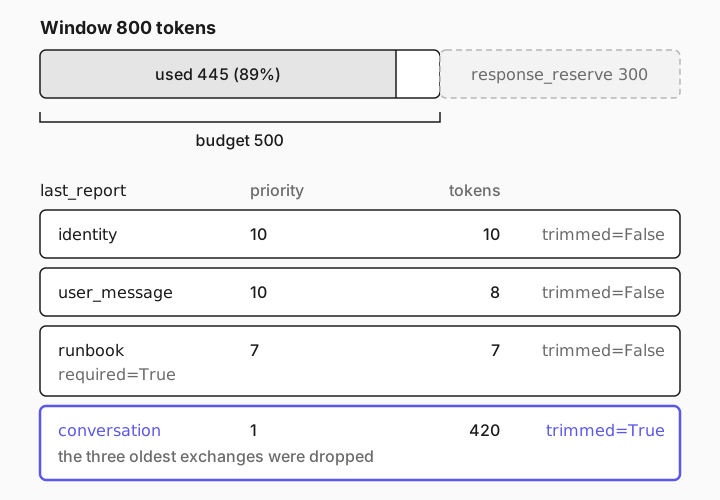
The ContextEngine solves a different problem: a chat whose history keeps growing. Before each call it counts the instructions, history, memory and question with tiktoken, and when they exceed the budget it drops the least important parts first, oldest conversation turns before anything else. This example uses a tiny window so trimming shows on a short history:
"""Budget the context an agent starts with: instructions, chat history and the new question."""

import asyncio

from langchain_core.callbacks import AsyncCallbackHandler
from promptise import ContextEngine, build_agent


class ShowPrompt(AsyncCallbackHandler):
    """Print every message the model receives on its first call."""

    def __init__(self):
        self.done = False

    async def on_chat_model_start(self, serialized, messages, **kwargs):
        if not self.done:
            self.done = True
            for m in messages[0]:
                print(f"  {m.type:<6} {str(m.content)[:60]}")


# Six earlier turns of a chat about the incident.
history = []
for service in ["auth", "billing", "gateway", "inventory", "notifications", "orders"]:
    history.append({"role": "user", "content": f"Summarize the {service} log."})
    history.append(
        {"role": "assistant", "content": f"The {service} log has 140 INFO lines. " + "Nothing unusual. " * 40}
    )


async def main() -> None:
    default = ContextEngine(model="openai:gpt-5-mini")
    print(f"default for gpt-5-mini: window {default.window:,}, budget {default.budget:,}")

    # A deliberately tiny window, so trimming happens on a short example.
    engine = ContextEngine(model="openai:gpt-5-mini", model_context_window=800, response_reserve=300)
    engine.add_layer("runbook", priority=7, required=True, content="Incident commander: Priya Raman.")

    agent = await build_agent(
        model="openai:gpt-5-mini",
        servers={},
        instructions="You are an SRE assistant. Be brief.",
        context_engine=engine,
    )
    try:
        print("the model sees:")
        result = await agent.ainvoke(
            {"messages": history + [{"role": "user", "content": "Which services have we covered so far?"}]},
            config={"callbacks": [ShowPrompt()]},
        )
        report = engine.last_report
        print(f"budget {report.budget}, used {report.total_tokens} ({report.utilization:.0%}), trimmed {report.trimmed_layers}")
        for layer in report.layers:
            print(f"  {layer['name']:<13} priority {layer['priority']:>2}  {layer['tokens']:>4} tokens  trimmed={layer['trimmed']}")
        print(">>>", result["messages"][-1].content)
    finally:
        await agent.shutdown()


asyncio.run(main())default for gpt-5-mini: window 400,000, budget 272,000
[promptise] No tools discovered from MCP servers; agent will run without tools.
the model sees:
system Incident commander: Priya Raman.
system You are an SRE assistant. Be brief.
human Summarize the inventory log.
ai The inventory log has 140 INFO lines. Nothing unusual. Nothi
human Summarize the notifications log.
ai The notifications log has 140 INFO lines. Nothing unusual. N
human Summarize the orders log.
ai The orders log has 140 INFO lines. Nothing unusual. Nothing
human Which services have we covered so far?
budget 500, used 445 (89%), trimmed ['conversation']
identity priority 10 10 tokens trimmed=False
user_message priority 10 8 tokens trimmed=False
runbook priority 7 7 tokens trimmed=False
conversation priority 1 420 tokens trimmed=True
>>> Covered so far:
- inventory service (log reviewed)
- notifications service (log reviewed)
- orders service (log reviewed)
Each log had 140 INFO lines and no anomalies reported.The budget is the window minus response_reserve, the three oldest exchanges were dropped as whole user and assistant pairs, the new question stayed, the runbook layer marked required=True reached the model, the instructions were sent once, and last_report says exactly what happened. The agent now believes only three services were covered, which is what trimming means: dropped turns are gone, not summarized. The first line shows the default for gpt-5-mini: a 400,000-token window, with the budget capped at the model's 272,000-token input limit.
For chats stored through a conversation store, there's a simpler cap: build_agent(conversation_max_messages=N) keeps only the newest N messages of each session when it saves them.
[08]
Practical rules for agent context
These held up across every run in this guide:
Measure before you tune. Count a tool result with ContextEngine.count_tokens and meter real runs. The numbers decide where the work is; here it was entirely in the tool results.
Return less from tools. Summarize, filter and count where the data lives, in code. Return the error lines, not the file. Add a drill-down tool with a limit for the cases where the model needs detail.
System prompt for what must always hold. Output format, who the report is for, hard rules, the facts the last step depends on. It's sent on every call, twelve times in the final.py run above, so keep it short. Since 1.3.0, system messages you pass in and the current question survive compaction too, but instructions are the place for anything the last step depends on.
Tools for everything large or occasional. Logs, runbooks, past incidents and documentation belong behind a search or lookup tool, the way RAG turns documents into a search tool. The model fetches the slice it needs, when it needs it.
Summaries are yours to write. Promptise doesn't ask a model to summarize the run: the ledger cuts long results to their first 2,000 characters, earlier chat turns become a short clipped note, and the ContextEngine drops whole turns. If a summary matters, produce it in the tool, as log_summary does.
Keep one long job per question. In a chat, a compacted turn sees the earlier conversation only as a note of its last six messages, cut to 400 characters each. Run long investigations as their own ainvoke call, and bring the result back into the chat afterwards.
[09]
Honest limits
These are true of Promptise Foundry 1.3.2, and worth knowing before a long run goes to production:
Compaction cuts long results. After six tool results, older results longer than 2,000 characters are cut to an excerpt, and the model has to call the tool again to see the rest. In this guide that made the default agent read whole log files again and again until it ran out of steps. Raise the limit with context_compaction=ContextCompaction(keep_result_chars=...) from promptise.engine, turn compaction off with context_compaction=False, or make the tools return less.
A run that runs out of steps raises an error. Since 1.3.2, when an iteration limit stops a tool loop before the model answered, ainvoke raises GraphIterationLimitError from promptise.engine, with the limit and the pending_tools whose results the model never saw. The default ReAct loop allows 15 model calls and the managed pattern 25. Catch it wherever a long run can reach the limit, as investigate.py does.
Repeated calls run the tool. That's right for a status or a health check, and wasted work for a file that doesn't change during the run. ContextCompaction(reuse_results=[...]) answers repeats of the tools you list from the earlier result once the loop compacts. It saves tool runs, not tokens, so it doesn't fix a loop like the one in step 3.
Earlier chat turns become a short note. With chat history in the input, as agent.chat() builds it, a compacted call sees the last six earlier messages, 400 characters each, and then the current question. Facts a long run needs from earlier turns belong in instructions or behind a tool.
Nothing is summarized by a model. Compaction and the ContextEngine are deterministic: they cut and drop, so what's cut is gone from that call. That costs no extra model calls, and it means the quality of what's kept depends on your tools.
The ContextEngine's default budget is large for big models. For gpt-5-mini it's 272,000 tokens, the model's input limit, so it only bounds a tool loop that gets very long. Pass model_context_window when you want it to budget for less.
[10]
Frequently asked questions
What is context engineering for AI agents?
Deciding what goes into the model's context on each step of an agent run: instructions, the task, history, tool results and retrieved data, and in what form. Prompt engineering is about the wording of one prompt; context engineering is about the whole working set as it changes over a long run. In practice most of it is tool design: what each tool returns, and how much.
What is context compaction?
Replacing a long transcript with a shorter view before the next model call. Promptise's default agent does it automatically after six tool results, by keeping the instructions and any system messages, the current question, the latest step and a ledger with one entry per earlier tool call, with long results cut to 2,000 characters. Other systems summarize the history with a model instead. Either way, check what the compacted view still contains, because that's all the model knows.
Does a bigger context window solve the problem?
Not on its own. The full-transcript run here peaked at 56,504 tokens, well inside gpt-5-mini's window, and answered correctly, but it sent 313,783 input tokens to do work that took about 16,000 with smaller tool results. Every token in the window is paid for on every call, and the growth doesn't stop at ten files.
How do I reduce the token usage of an AI agent?
Meter each model call first, then shrink the largest input. For agents that's almost always tool results: return summaries and counts instead of raw data, cap list sizes, and add a drill-down tool. Keep the system prompt short, since it's resent every call. Prompt caching lowers the price of repeated prefixes, but not the size of the context.
Should I summarize conversation history?
When a chat outgrows its budget, something has to give: either old turns are dropped, as the ContextEngine and conversation_max_messages do, or they're summarized. Promptise doesn't summarize history with a model; inside a long tool loop, earlier turns become a short note of the last six messages. If older turns matter, keep the facts they produced in a tool or in the instructions, rather than relying on the turns themselves.
[11]
Where to go next
Context Engine: layers, priorities, budgets and the assembly report.
Context Lifecycle Management: the full, scoped and ledger modes and the managed pattern.
Engine nodes: Context scope: every PromptNode option, including context_scope and auto_ledger_after.
Reasoning Patterns: the built-in agent patterns and when each one fits.
Context System for prompts: context providers that inject user, environment and error context into prompts.
Observability: record tokens and latency for every call in production.
How to Connect MCP Servers to Your AI Agent in Python: the agent and server basics this guide builds on.
OpenAPI to MCP: Turn Any REST API into an MCP Server: generated tools are a common source of oversized results, and a good place to apply these rules.