An AI agent that can refund money or send email will, sooner or later, do it when it shouldn't. A human in the loop fixes that: the agent still decides what to do, but a person approves or rejects each risky tool call before it runs. In this guide you'll build a support agent with a refund tool and an email tool, gate both behind approval, and watch a reviewer approve one refund and reject another. You'll also see what the agent does with a rejection, how to approve from your own UI or another system, and when the gate belongs on the MCP server instead of the agent. Every snippet was run against Promptise Foundry 1.3 with OpenAI's gpt-5-mini, and every output is what it printed.
How do you add a human in the loop to an AI agent?
You tell the agent which tools need a person's approval, and give it a function that asks one. With Promptise Foundry, that's the approval argument of build_agent:
import asyncio
import sys

from promptise import ApprovalPolicy, build_agent
from promptise.config import StdioServerSpec


async def approve(request):
    answer = input(f"Allow {request.tool_name} {request.arguments}? [y/N] ")
    return answer.strip().lower() == "y"


async def main():
    agent = await build_agent(
        model="openai:gpt-5-mini",
        servers={"support": StdioServerSpec(command=sys.executable, args=["support_server.py"])},
        approval=ApprovalPolicy(
            tools=["issue_refund", "send_*"],
            handler=approve,
            redact_sensitive=False,
        ),
    )
    try:
        result = await agent.ainvoke({"messages": [{"role": "user", "content": "Refund order A-1001 in full."}]})
        print(result["messages"][-1].content)
    finally:
        await agent.shutdown()


asyncio.run(main())Allow issue_refund {'order_id': 'A-1001', 'amount': 18.5, 'reason': 'Full refund requested by user'}? [y/N] y
Allow send_email {'to': 'dana@example.com', 'subject': 'Refund processed for order A-1001', 'body': "Hello Dana,\n\nWe have processed a full refund of $18.50 for your order A-1001 (Ceramic mug). …"}? [y/N] y
Done — I issued a full refund of $18.50 for order A-1001 and emailed dana@example.com to confirm. Refund ID: R-0001.Every call to issue_refund, or to any tool whose name starts with send_, now stops and waits for a yes. Everything else runs as before. The rest of this guide builds this out properly, one step at a time.
[02]
How it works
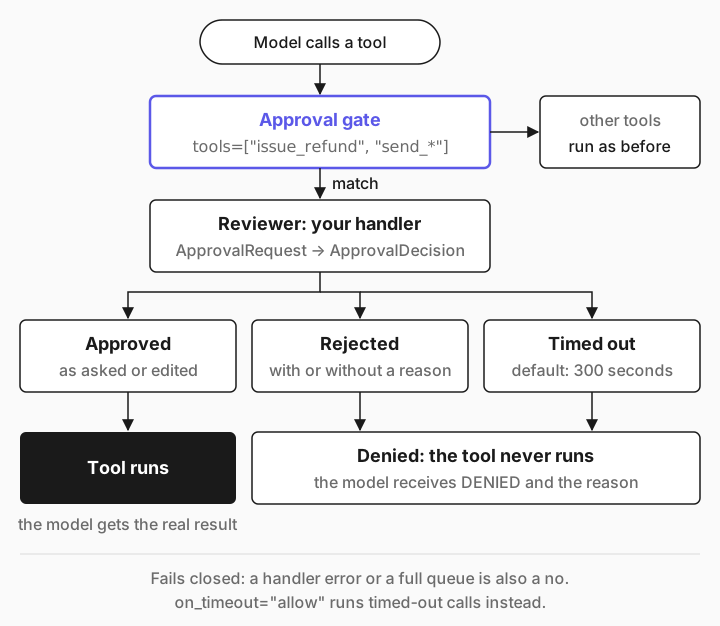
The policy wraps each matching tool before the model ever sees it. The wrapper keeps the tool's name, description and input schema, so the model doesn't know approval exists. It calls the tool as usual, and the wrapper decides whether the call really happens:
Rendering diagram…
A rejected call never reaches the tool. The model gets a short text result instead, and decides what to do next. Here's what it receives in each case, from Promptise's source and the runs below:
What happened | What the model receives |
|---|---|
Approved | The tool's real result |
Approved with edited arguments | [Approved with modified arguments] A reviewer changed …, then the result |
Rejected with a reason | DENIED: <your reason> |
Rejected without a reason |
|
No decision within timeout |
|
Your approval function raised an error |
|
The same user's call to this tool was rejected three times in 10 minutes | |
Approval fails closed: a timeout, a crash in your approval code, or a full queue all count as a no. You can flip the timeout case with on_timeout="allow", but only do that for tools you'd be happy to run unattended.
[03]
What you need
Python 3.10 or newer.
Promptise Foundry 1.3.1 or newer from PyPI. Nothing else: the webhook handler's HTTP client, httpx, comes with it.
An API key for a model provider. This guide uses OpenAI's gpt-5-mini; other providers work by changing the model string, as listed in Models & Providers.
pip install "promptise>=1.3.1"
export OPENAI_API_KEY="sk-..."[04]
Build a refund agent with human approval, step by step
The agent works a support queue. It can look up orders freely, but refunds and emails need a team lead's sign-off.
Give the agent its tools
The tools live in a small MCP server. Reading an order is harmless. Refunding money and emailing customers are not, and those are the two you'll gate.
from promptise.mcp.server import MCPServer

server = MCPServer("support")

# A stand-in for your order system and payment provider.
ORDERS = {
    "A-1001": {"customer": "dana@example.com", "item": "Ceramic mug", "total": 18.50, "status": "delivered"},
    "A-1002": {"customer": "lee@example.com", "item": "Standing desk", "total": 1240.00, "status": "in transit"},
}
REFUNDS: list[dict] = []


@server.tool()
async def get_order(order_id: str) -> dict:
    """Look up an order: customer email, item, total in USD and delivery status."""
    order = ORDERS.get(order_id.strip().upper())
    if order is None:
        return {"error": f"No order found with ID {order_id}."}
    return {"order_id": order_id.strip().upper(), **order}


@server.tool()
async def issue_refund(order_id: str, amount: float, reason: str) -> dict:
    """Refund money to the customer's original payment method.

    Args:
        order_id: The order to refund, for example "A-1001".
        amount: Amount in USD. Must not exceed the order total.
        reason: A short reason, recorded with the refund.
    """
    order = ORDERS.get(order_id.strip().upper())
    if order is None:
        return {"error": f"No order found with ID {order_id}."}
    if amount > order["total"]:
        return {"error": f"Refund {amount} is more than the order total {order['total']}."}
    refund = {"refund_id": f"R-{len(REFUNDS) + 1:04d}", "order_id": order_id, "amount": amount}
    REFUNDS.append(refund)
    return {**refund, "status": "refunded"}


@server.tool()
async def send_email(to: str, subject: str, body: str) -> dict:
    """Send an email to a customer."""
    return {"sent": True, "to": to, "subject": subject}


if __name__ == "__main__":
    server.run()
If MCP servers are new to you, How to Connect MCP Servers to Your AI Agent in Python explains this file line by line.
Choose which tools need approval
ApprovalPolicy(tools=...) takes tool names or glob patterns. "issue_refund" matches one tool, "send_*" matches every tool whose name starts with send_, and "*" would gate everything. The patterns are checked against the tool names the model sees, across all your servers.
        approval=ApprovalPolicy(
            tools=["issue_refund", "send_*"],
            handler=ask_in_terminal,
            timeout=600,
            redact_sensitive=False,
        ),
timeout=600 gives the reviewer ten minutes. The default is 300 seconds and the maximum is 24 hours. When it runs out, the call is denied.
redact_sensitive=False shows the reviewer the real arguments. It's on by default and runs the arguments through a pattern-based PII scanner before the reviewer sees them, which can hide the very detail you need to check. More on that in the honest limits below.
Approval is matched by name, not by what a tool does. Name your write tools clearly, and when you add one, add it to the policy.
Write the approver
The handler receives an ApprovalRequest and returns an ApprovalDecision. This one shows the call in the terminal and waits for an answer:
import asyncio
import json
import sys

from promptise import ApprovalDecision, ApprovalPolicy, CallerContext, build_agent
from promptise.config import StdioServerSpec

# The agent can ask for two approvals at the same moment. One prompt at a time.
one_at_a_time = asyncio.Lock()


async def ask_in_terminal(request):
    """Show the reviewer the exact call and wait for y or n."""
    async with one_at_a_time:
        print(f"\n=== Approval needed: {request.tool_name} (asked by {request.caller_user_id})")
        print(json.dumps(request.arguments, indent=2))
        answer = await asyncio.to_thread(input, "Approve? [y/N] ")
        if answer.strip().lower() == "y":
            return ApprovalDecision(approved=True, reviewer_id="support-lead")
        reason = await asyncio.to_thread(input, "Reason for the agent: ")
        return ApprovalDecision(approved=False, reviewer_id="support-lead", reason=reason or None)
Three details make this work in practice:
The lock. When the model asks for several tools in one step, Promptise runs them in parallel, so two approval requests can arrive at the same moment. Without the lock, two prompts would fight over one keyboard.
`asyncio.to_thread(input, ...)`. Plain input() would freeze the whole event loop while the reviewer thinks. In a thread, the agent's other work and the timeout keep running.
The reason. Whatever you type is sent back to the model as DENIED: <reason>. A good reason tells the agent what to do instead.
The request carries what the reviewer needs: tool_name, the arguments, a unique request_id, the timeout, caller_user_id, which is the user the agent is working for when you pass a CallerContext, and context_summary, the last three user and assistant messages of the conversation. agent_id is filled in when you give the agent an identity or build_agent(observer_agent_id=...).
Run it, approve one refund and reject the other
The rest of refund_agent.py builds the agent and gives it two tickets. The instructions ask it to finish one order before starting the next, for a reason you'll see in a moment:
async def main():
    agent = await build_agent(
        model="openai:gpt-5-mini",
        servers={
            "support": StdioServerSpec(command=sys.executable, args=["support_server.py"]),
        },
        instructions=(
            "You are a support assistant for an online shop. Use your tools. "
            "Handle one order at a time: look it up, refund it, and wait for the "
            "refund's result before you email the customer. If an action is denied, "
            "follow the reviewer's reason and don't retry it."
        ),
        approval=ApprovalPolicy(
            tools=["issue_refund", "send_*"],
            handler=ask_in_terminal,
            timeout=600,
            redact_sensitive=False,
        ),
        trace_tools=True,
    )
    try:
        result = await agent.ainvoke(
            {
                "messages": [
                    {
                        "role": "user",
                        "content": (
                            "Two tickets. Order A-1001: the mug arrived broken, refund it in full. "
                            "Order A-1002: the customer wants a full refund because the desk is late. "
                            "Handle both and email each customer what happened."
                        ),
                    }
                ]
            },
            caller=CallerContext(user_id="maya@shop.example"),
        )
        for message in result["messages"]:
            if getattr(message, "type", "") == "tool" and message.content.startswith("DENIED"):
                print("\nThe agent was told:", message.content)
        print("\n>>>", result["messages"][-1].content)
    finally:
        await agent.shutdown()


asyncio.run(main())python refund_agent.pyIn this run, the reviewer approved the mug refund and both emails, and rejected the desk refund with a reason:
→ Invoking tool: get_order with {'order_id': 'A-1001'}
✔ Tool result from get_order: {"order_id": "A-1001", "customer": "dana@example.com", "item": "Ceramic mug", "total": 18.5, "status": "delivered"}

=== Approval needed: issue_refund (asked by maya@shop.example)
{
  "order_id": "A-1001",
  "amount": 18.5,
  "reason": "Item arrived broken"
}
Approve? [y/N] y
→ Invoking tool: issue_refund with {'order_id': 'A-1001', 'amount': 18.5, 'reason': 'Item arrived broken'}
✔ Tool result from issue_refund: {"refund_id": "R-0001", "order_id": "A-1001", "amount": 18.5, "status": "refunded"}

=== Approval needed: send_email (asked by maya@shop.example)
{
  "to": "dana@example.com",
  "subject": "Refund for your order A-1001",
  "body": "Hi Dana,\n\nWe're sorry the Ceramic mug arrived broken. We have issued a full refund of $18.50 to your original payment method. …"
}
Approve? [y/N] y
→ Invoking tool: send_email with {'to': 'dana@example.com', …}
✔ Tool result from send_email: {"sent": true, "to": "dana@example.com", "subject": "Refund for your order A-1001"}
→ Invoking tool: get_order with {'order_id': 'A-1002'}
✔ Tool result from get_order: {"order_id": "A-1002", "customer": "lee@example.com", "item": "Standing desk", "total": 1240.0, "status": "in transit"}

=== Approval needed: issue_refund (asked by maya@shop.example)
{
  "order_id": "A-1002",
  "amount": 1240.0,
  "reason": "Late delivery - customer requested full refund"
}
Approve? [y/N] n
Reason for the agent: The desk is still in transit, so it is not refundable yet. Offer to cancel the order instead.

=== Approval needed: send_email (asked by maya@shop.example)
{
  "to": "lee@example.com",
  "subject": "Update on your refund request for order A-1002",
  "body": "Hi Lee,\n\nThanks for reaching out \u2014 I\u2019m sorry your Standing desk is late. I attempted to issue a full refund of $1,240.00, but we can\u2019t process refunds while an item is still in transit.\n\nI can offer to cancel the order now and try to stop the shipment. …"
}
Approve? [y/N] y
→ Invoking tool: send_email with {'to': 'lee@example.com', …}
✔ Tool result from send_email: {"sent": true, "to": "lee@example.com", "subject": "Update on your refund request for order A-1002"}

The agent was told: DENIED: The desk is still in transit, so it is not refundable yet. Offer to cancel the order instead.

>>> All done for both tickets — summary and next steps below.
…
- Refund attempt: denied. Reason: item is still in transit and not refundable yet; system suggests offering to cancel the order instead.
…
Read it from the top. The lookups ran without asking anyone. Each gated call stopped with its exact arguments on screen. The approved refund ran and returned R-0001. The rejected one never reached the payment tool: there's no → Invoking tool line for it, because trace_tools only prints calls that actually run. The agent read the reviewer's reason, didn't try again, and wrote Lee an email offering to cancel instead, which also needed a yes before it went out.
[05]
When the model asks for several calls at once
The instruction to finish one order at a time isn't decoration. The first version of this agent didn't have it, and the model asked for both refunds and both emails before any decision came back. Here's part of that run:
=== Approval needed: issue_refund (asked by maya@shop.example)
{
  "order_id": "A-1002",
  "amount": 1240.0,
  "reason": "Customer requested full refund due to late delivery"
}
Approve? [y/N] ✔ Tool result from issue_refund: {"refund_id": "R-0001", "order_id": "A-1001", "amount": 18.5, "status": "refunded"}
n
Reason for the agent: The desk is still in transit, so it is not refundable yet. Offer to cancel the order instead.
…
=== Approval needed: send_email (asked by maya@shop.example)
{
  "to": "lee@example.com",
  "subject": "Refund issued for order A-1002 (Standing desk)",
  "body": "Hi Lee,\n\nI\u2019m sorry your Standing desk is delayed. Per your request, I\u2019ve issued a full refund of $1,240.00 to your original payment method. …"
}
Approve? [y/N] ✔ Tool result from send_email: {"sent": true, "to": "dana@example.com", "subject": "Refund issued for order A-1001 (Ceramic mug)"}
y
The email to Lee was written before the model learned the refund was rejected, so it announced a refund that never happened. It was approved, and the agent later had to send Lee a correction. Each prompt shows one call on its own, so nothing on screen connects this email to the refund rejected a moment earlier.
Two things help. Tell the agent to wait for a write's result before acting on it, as the final version does. And show reviewers the calls in order, one at a time, so a rejection is fresh in their mind when the next call comes up: ApprovalPolicy(sequential=True) holds each gated call until the one before it is decided, instead of asking about them all at once. Instructions guide the model; they don't bind it. The approval gate is what actually stops a bad call.
[06]
Approve from your own UI with a queue
A terminal prompt is fine for a script. For a web app, a chat tool or an internal dashboard, use QueueApprovalHandler: the agent puts each request on a queue, your UI reads it, and a person's click becomes a decision.
approvals = QueueApprovalHandler()


async def review_desk():
    """Stands in for your web UI: show each pending call, then submit a decision."""
    while True:
        request = await approvals.request_queue.get()
        print(f"Pending {request.request_id[:8]}: {request.tool_name} {request.arguments}")
        if request.tool_name == "issue_refund" and request.arguments["amount"] > 9.25:
            # The reviewer wants half: the mug's handle was chipped, not broken.
            decision = ApprovalDecision(
                approved=False,
                reviewer_id="support-lead",
                reason="Only the handle is chipped. Refund 9.25 USD, half the order, and say so in the email.",
            )
        else:
            decision = ApprovalDecision(approved=True, reviewer_id="support-lead")
        approvals.submit_decision(request.request_id, decision)
In a real app, review_desk is your page: list what's on the queue, then call submit_decision(request_id, decision) when someone clicks. The agent gets the same handler as before, approval=ApprovalPolicy(tools=["issue_refund", "send_*"], handler=approvals, redact_sensitive=False), and the review loop runs as a task next to it. Here the reviewer turns down a full refund for the mug and asks for half:
→ Invoking tool: get_order with {'order_id': 'A-1001'}
✔ Tool result from get_order: {"order_id": "A-1001", "customer": "dana@example.com", "item": "Ceramic mug", "total": 18.5, "status": "delivered"}
Pending ecb62bd0: issue_refund {'order_id': 'A-1001', 'amount': 18.5, 'reason': 'Item arrived damaged'}
Pending 0f31041a: issue_refund {'order_id': 'A-1001', 'amount': 9.25, 'reason': 'Partial refund: handle chipped (half the order)'}
→ Invoking tool: issue_refund with {'order_id': 'A-1001', 'amount': 9.25, 'reason': 'Partial refund: handle chipped (half the order)'}
✔ Tool result from issue_refund: {"refund_id": "R-0001", "order_id": "A-1001", "amount": 9.25, "status": "refunded"}
Pending 3ff11f90: send_email {'to': 'dana@example.com', 'subject': 'Refund issued for your order A-1001', 'body': "Hi Dana,\n\nWe're sorry your Ceramic mug arrived with a chipped handle. We've issued a partial refund of $9.25 to your original payment method (half the order total) to cover this damage. …"}
…
>>> Done — I looked up order A-1001, issued a partial refund, and emailed the customer.
…
The agent asked again with the reviewer's amount, the reviewer approved it, and the email told Dana the truth.
What if the reviewer edits the arguments?
ApprovalDecision also has modified_arguments: approve, but run the call with different arguments. This is the same scenario with the reviewer approving the refund but changing the amount:
            decision = ApprovalDecision(
                approved=True,
                modified_arguments={"amount": 9.25},
                reviewer_id="support-lead",
)Pending 80bf08ff: issue_refund {'order_id': 'A-1001', 'amount': 18.5, 'reason': 'Item arrived damaged'}
→ Invoking tool: issue_refund with {'order_id': 'A-1001', 'amount': 9.25, 'reason': 'Item arrived damaged'}
✔ Tool result from issue_refund: {"refund_id": "R-0001", "order_id": "A-1001", "amount": 9.25, "status": "refunded"}
Pending 3c8fa71c: send_email {'to': 'dana@example.com', 'subject': 'Refund issued for Order A-1001', 'body': 'Hi Dana,\n\nI’m sorry your Ceramic mug arrived damaged. We’ve issued a refund of $9.25 to your original payment method for order A-1001 (refund ID R-0001). …'}
…
The model received:
[Approved with modified arguments] A reviewer changed amount: 18.5 -> 9.25. The tool ran with the modified arguments and the result below reflects them; treat the reviewer's values as final.
{"refund_id": "R-0001", "order_id": "A-1001", "amount": 9.25, "status": "refunded"}
>>> Done — I issued a refund and emailed the customer.
…The tool ran with 9.25, and the model is told so: the result starts with a note naming the field the reviewer changed, the old value and the new one. In this run the model took the reviewer's amount as final. It didn't ask for the other half, and its email told Dana about a 9.25 refund. modified_arguments is merged onto the original call, so you only list the fields you change; order_id and reason kept their values. Rejecting with a reason is still the clearer choice when you want the agent to do something different, such as tell the customer why. Editing is only supported on the agent side: a server-side gate rejects an edited call with APPROVAL_DENIED.
[07]
Send approvals to another system with a webhook
When approvals live somewhere else, such as a ticketing system or an approvals service your team already runs, WebhookApprovalHandler posts each request there and polls for the answer:
    handler = WebhookApprovalHandler(
        url="https://approvals.example.com/requests",
        secret=os.environ["APPROVAL_WEBHOOK_SECRET"],
        headers={"Authorization": f"Bearer {os.environ['APPROVAL_API_TOKEN']}"},
    )
The protocol, from the handler's source:
It sends POST to url with the request as JSON, plus X-Promptise-Request-Id and an X-Promptise-Signature header.
Then it sends GET to {url}/{request_id} every poll_interval seconds, 2 by default. Answer 202 while the decision is pending, and 200 with {"approved": false, "reason": "..."} or {"approved": true} once a person has decided.
If no decision arrives before the policy's timeout, the call is denied.
Your service should check the signature before showing anything to a reviewer. It's an HMAC-SHA256, keyed with your secret, over six fields of the request:
def verify_signature(body: dict, signature: str, secret: str) -> bool:
    """Check X-Promptise-Signature on an approval request your service received."""
    signed = {k: body[k] for k in ("request_id", "tool_name", "arguments", "agent_id", "caller_user_id", "timestamp")}
    payload = json.dumps(signed, sort_keys=True, default=str)
    expected = hmac.new(secret.encode(), payload.encode(), hashlib.sha256).hexdigest()
    return hmac.compare_digest(expected, signature)
Promptise ships the same check as verify_webhook_signature(body, signature, secret, max_age=300) in promptise.approval, which also rejects requests older than max_age seconds. Against a stand-in approval service that answered on its second poll, the round trip looked like this:
POST /requests signature ok: True
…
GET  /requests/<request_id> poll 1
GET  /requests/<request_id> poll 2
agent receives: DENIED: Wrong recipient.By default the webhook URL can't point at your own machine or a private network. The handler refuses localhost, loopback and private IP ranges when you create it, as protection against server-side request forgery:
http://127.0.0.1:8140/approvals -> URL 'http://127.0.0.1:8140/approvals' resolves to private/internal IP 127.0.0.1. Pass WebhookApprovalHandler(..., allow_private_networks=True) if your approval service runs on a private network.
http://10.0.0.5/approvals -> URL 'http://10.0.0.5/approvals' resolves to private/internal IP 10.0.0.5. Pass WebhookApprovalHandler(..., allow_private_networks=True) if your approval service runs on a private network.
When your approvals service runs on your internal network, pass allow_private_networks=True, as the message says. Without it, the host is also checked again before the POST and before every poll, so a DNS answer that changes later can't redirect the request to an internal address. The stand-in service above ran on 127.0.0.1 with allow_private_networks=True.
[08]
Agent-side or server-side approval?
Everything so far gates the call inside your agent. Promptise can also gate a tool inside the MCP server, where it holds for every client that connects: Claude Desktop, Cursor, someone else's agent, or yours.
from promptise.approval import ApprovalDecision
from promptise.mcp.server import ApprovalGateMiddleware, MCPServer

server = MCPServer("billing")


async def finance_policy(request):
    """Runs on the server for every gated call, whoever the client is."""
    print(f"Gate: {request.tool_name} {request.arguments} from {request.caller_user_id}")
    if request.arguments["amount"] <= 100:
        return ApprovalDecision(approved=True, reviewer_id="finance-policy")
    return ApprovalDecision(approved=False, reviewer_id="finance-policy", reason="Refunds over 100 USD need a finance lead.")


server.add_middleware(ApprovalGateMiddleware(finance_policy, timeout=300))


@server.tool(requires_approval=True)
async def issue_refund(order_id: str, amount: float) -> dict:
    """Refund money to the customer's original payment method."""
    return {"order_id": order_id, "amount": amount, "status": "refunded"}


if __name__ == "__main__":
    server.run()
The handler has exactly the same shape as on the agent side: an ApprovalRequest in, an ApprovalDecision out. Calling the tool twice through TestClient, then once on a server that declares requires_approval=True but forgot the gate:
Gate: issue_refund {'order_id': 'A-1001', 'amount': 18.5} from None
{"order_id": "A-1001", "amount": 18.5, "status": "refunded"}
Gate: issue_refund {'order_id': 'A-1001', 'amount': 1240.0} from None
{
  "error": {
    "code": "APPROVAL_DENIED",
    "message": "Approval denied for tool 'issue_refund': Refunds over 100 USD need a finance lead.",
    "retryable": false,
    …
RuntimeError Tool 'issue_refund' declares requires_approval=True but no ApprovalGateMiddleware is installed on the server.
The caller shows as None because this test server has no authentication. Put AuthMiddleware before the gate and the request carries the verified client, tenant and token subject. A server that declares approval without a gate refuses to run, so a missing gate can't slip through silently.
For a person rather than a policy, the server has two approvers. PendingApprover parks each call until someone with an approver role decides it through two tools it adds to the server, approvals_list and approvals_decide, and it won't let anyone approve their own call. ElicitationApprover asks the person behind the calling client to confirm, using MCP elicitation. OpenAPI to MCP shows both in a generated server, and Approval Gates covers every option.
How to choose:
| Agent-side | Server-side |
|---|---|---|
Declared with | build_agent(approval=ApprovalPolicy(...)) | @server.tool(requires_approval=True) and ApprovalGateMiddleware |
Applies to | This one agent | Every client of the server |
A rejection reaches the model as | DENIED: <reason> | An APPROVAL_DENIED error |
Edit the arguments | Yes, with modified_arguments | No, an edit counts as a rejection |
Best for | Tools you don't own, rules that differ per agent | Tools you own that must never run unapproved |
If you own the server, gate there: the rule then holds for clients you'll never see. Gate on the agent when the tool belongs to someone else, or when one agent needs a stricter rule than the server enforces for everyone. If you do both on the same tool, the person is asked twice.
[09]
Skip the obvious ones with AutoApprovalClassifier
Asking a person about every call wears them out, and tired reviewers click yes. AutoApprovalClassifier sits in front of your human handler and settles the clear cases with rules: deny rules first, then ask rules that always go to a person, then allow rules, then tools that look read-only, then an optional model check, and only then the person.
classifier = AutoApprovalClassifier(
    allow_rules=[ApprovalRule(tool="issue_refund", predicate=small_refund, reason="refund of 25 USD or less")],
    deny_rules=[ApprovalRule(tool="send_*", argument_contains="@competitor.example", reason="never email competitors")],
    fallback=CallbackApprovalHandler(ask_a_human),
)
policy = ApprovalPolicy(tools=["*"], handler=classifier, redact_sensitive=False)get_order approved=True layer=read_only read-only tool auto-allowed
issue_refund approved=True layer=allow_rule refund of 25 USD or less
(a human is asked about issue_refund {'order_id': 'A-1002', 'amount': 1240.0})
issue_refund approved=True layer=fallback
send_email approved=False layer=deny_rule never email competitorsOnly the 1,240 USD refund reached a person. The rules match the real arguments, even when redact_sensitive=True hides them from the reviewer. The read-only step trusts a tool's readOnlyHint annotation, or else a read-only name prefix such as get_, list_ or search_, and never auto-allows a name that contains a destructive verb such as delete or update. Check your tool names before you rely on it. Approval Classifier has the details, and a separate guide covers it in depth.
[10]
Honest limits
These are true of Promptise Foundry 1.3, and worth knowing before you ship:
Default redaction hides contact details from the reviewer. With redact_sensitive=True, each string argument passes through a pattern-based PII scanner first. Order IDs come through intact, but email addresses and phone numbers don't: the reviewer saw {'to': '[EMAIL]', 'subject': 'Refund for A-1001', 'body': "Hi Dana, call us on [PHONE] if the refund for A-1001 hasn't arrived in 5 days."}. Set redact_sensitive=False when your reviewers are allowed to see the data, or include_arguments=False when they shouldn't see arguments at all.
Three rejections stop the asking for a while. After a reviewer rejects the same tool three times for the same user and session within 10 minutes, the next call is denied without asking anyone: DENIED: This action was already denied 3 times in the last 10 minutes, so the reviewer was not asked again. Do not retry this tool. Other users are still asked, and an approval resets the count. Change it with max_retries_after_deny, deny_window and deny_scope.
The reviewer only sees what the request carries. That's the arguments, the caller and the last three messages. Pass a CallerContext so the reviewer knows whose request it is, and put the details a reviewer needs into the tool's arguments.
Pending approvals live in memory. If the process stops, waiting calls are gone, and the agent starts fresh. The server-side PendingApprover store is process-local too.
At most 10 approvals wait at once per agent, by default. Beyond max_pending, calls are denied straight away with
DENIED: Too many pending approval requests (max 10). Try again later.
[11]
Frequently asked questions
What does human in the loop mean for AI agents?
The agent proposes an action and a person approves or rejects it before it happens. In practice that means gating specific tool calls, such as refunds, emails or deletes, while reads run freely. The agent keeps its speed on the safe work, and a person stays accountable for the risky work.
Does the AI agent know its tool calls need approval?
No. The gated tool looks exactly the same to the model. It only learns about approval from the result: the real output when you approve, or DENIED: and your reason when you don't. That's why a clear rejection reason matters so much.
How do I add human in the loop to an MCP server?
Mark the tool with @server.tool(requires_approval=True) and add ApprovalGateMiddleware with an approver: PendingApprover for review by a second person, ElicitationApprover to ask the client's user, or your own function. The gate then holds for every MCP client. Approval Gates has the full setup.
What happens if nobody approves in time?
The call is denied when timeout runs out, 300 seconds by default, and the model receives DENIED: Approval timed out after 300.0s. You can set on_timeout="allow" to run the call instead, but keep that for low-risk tools.
Can I approve tool calls from Slack or a web app?
Yes. Use QueueApprovalHandler when the UI runs in the same Python process, WebhookApprovalHandler for an approvals API in another service, or write a small handler class with one request_approval method that posts to Slack and waits for the answer.
[12]
Where to go next
Human-in-the-Loop Approval: every ApprovalPolicy option and the three built-in handlers.
Approval Gates: server-side approval, PendingApprover and ElicitationApprover.
Approval Classifier: rules that decide the obvious cases for you.
Building Agents: the rest of build_agent.
OpenAPI to MCP: Turn Any REST API into an MCP Server: generate a server with approval on every write.
How to Connect MCP Servers to Your AI Agent in Python: the agent and server basics this guide builds on.