When an LLM "uses a tool", it doesn't run anything. It writes a structured request, a tool name plus JSON arguments, and your code decides whether and how to execute it. That one fact explains most of what goes right and wrong in agents. This essay explains how tool calling works, shows a real two-step exchange where the model asks to issue a refund, and gives the design rules that follow. It's for developers building assistants or agents with tools.
How does LLM tool calling work?
You send the model a list of tools, each with a name, a description and a JSON Schema for its arguments. When the model decides a tool would help, it replies with a tool call instead of text: get_order_status with {"order_id": "8812"}. Your code runs the function, sends the result back as a message, and the model continues, either with another call or a final answer. The model only ever sees the descriptions you wrote and the results you return.
Key takeaways:
The model proposes, your code disposes. Every tool call is a request. Execution, permissions and limits live in your code.
Descriptions are prompts. The model chooses tools and fills arguments from the names, descriptions and schemas you write.
Results are context. What you return is all the model knows about what happened. Make it short, clear and honest about errors.
Irreversible actions need a gate. The model will happily request a refund because a user asked. Your code should check policy or ask a human.
[02]
Why it works this way
Language models output text. Tool calling is a convention on top: models are fine-tuned on examples where the right next output is a structured call, so they learn when a call is appropriate and how to fill the arguments. Toolformer (Schick et al., 2023) showed a model could learn to insert API calls into text; ReAct (Yao et al., 2022) showed that alternating reasoning with actions and observations helps on multi-step tasks. Today's APIs (OpenAI function calling, Anthropic tool use) and the Model Context Protocol standardize the format, and constrained decoding can guarantee the arguments match your schema.
The orchestrator is your loop: call the model, execute what it asks, append the result, repeat until it answers or a limit hits. The model is the planner inside that loop, not the runtime.
[03]
Example: a refund on the user's say-so
Two tools, one of them irreversible. Run on gpt-5-mini; results vary by model.
tools = [
  {"type": "function", "function": {
    "name": "get_order_status",
    "description": "Look up the shipping status of an order by its ID.",
    "parameters": {"type": "object", "properties": {"order_id": {"type": "string"}},
                   "required": ["order_id"], "additionalProperties": False}}},
  {"type": "function", "function": {
    "name": "refund_order",
    "description": "Refund an order in full. Irreversible.",
    "parameters": {"type": "object",
                   "properties": {"order_id": {"type": "string"}, "reason": {"type": "string"}},
                   "required": ["order_id", "reason"], "additionalProperties": False}}},
]
# user: "Where is my order 8812? If it's lost, just refund it."
The first reply has no text, only a call:
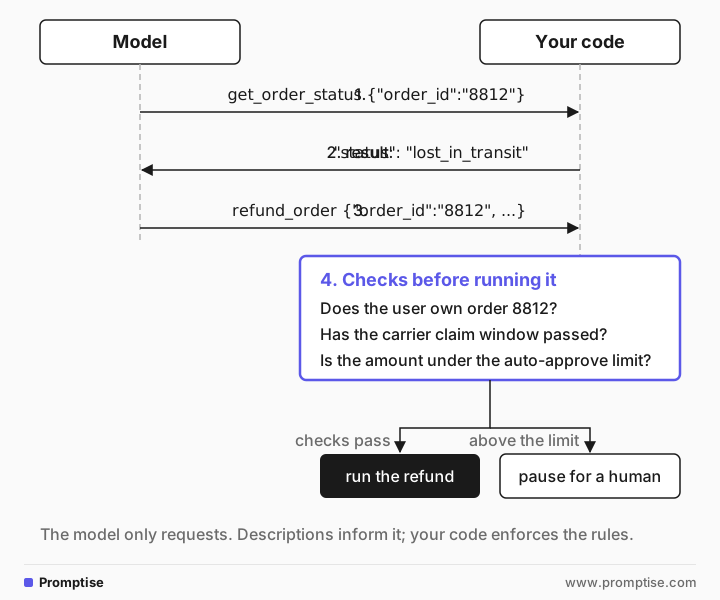
tool_calls: [get_order_status {"order_id":"8812"}]The code returns {"order_id": "8812", "status": "lost_in_transit", "carrier": "DHL", "last_scan": "2026-10-09"}. The second reply:
tool_calls: [refund_order {"order_id":"8812","reason":"Order marked lost in transit; customer requested refund"}]That's reasonable behavior, and it's still a request. Nothing has been refunded. Before running it, your code can check what the model can't: whether the user owns order 8812, whether the carrier claim window has passed, whether the amount is under the auto-approve limit. Above the limit, it can pause for a human. The description said "Irreversible", and the model called it anyway, because the user asked. Descriptions inform the model; they don't enforce anything.
[04]
What it changes in practice
Put every rule that matters in code. Ownership checks, amount limits, rate limits, allowed values. Validate arguments against the schema and against your business rules before executing. The model's judgment is a first filter, not the control.
Write tools for the model as a reader. Clear names, one job per tool, descriptions that say when to use it and when not, argument descriptions with formats ("ISO 8601 date"). Fewer, well-separated tools beat many overlapping ones.
Return results the model can act on. Short JSON with the fields it needs. Errors should say what went wrong and what to try ("order not found; ask the user to check the ID"), not a stack trace or an empty string.
Bound the loop. Cap the number of steps and the cost per task, and stop on repeated identical calls.
[05]
Frequently asked questions
Does the model execute the function?
No. It returns the function name and arguments. Your application executes it, or doesn't, and sends the result back. Hosted tools such as a provider's built-in web search are executed by the provider, but the same principle applies: the model only requests.
How does the model choose which tool to call?
From the conversation plus the tool names, descriptions and schemas. Vague or overlapping descriptions cause wrong choices. With many tools, selection gets worse; see too many MCP tools.
Can tool calls be trusted?
Treat them like input from a user: the arguments may be wrong, and a prompt injection in a tool result can steer the next call. Validate and authorize every call in code.
What's the difference between tool calling and MCP?
Tool calling is the model-level mechanism: the model emits a structured call. MCP is a protocol for exposing tools, resources and prompts from separate servers to any compatible client, so tools don't have to be hard-coded into each app. See what is MCP?
[06]
Next steps
Plan multi-step calls and validate them first: LLM tool call planning.
Write the loop yourself: ReAct agent from scratch.
Gate risky actions: human-in-the-loop approval for AI agents.
Patterns for coordinating agents: LLM agent orchestration patterns.
Why tool results are an attack surface: treat LLM output as untrusted.