"AI makes you more productive" is true in some studies and false in others, and the difference is not random. LLMs multiply output on tasks inside their capability frontier and can make you worse just outside it, and people are bad at telling which side they're on. This essay, part of the Mental Models learning path, summarizes three well-known field studies, explains the "jagged frontier", and shows how to use the model to multiply your judgment rather than replace it, with a real example.
Does AI actually make you more productive?
Often, but not always. In controlled studies, AI help raised output and quality substantially on tasks the model handles well, and lowered accuracy on tasks that looked similar but were beyond it. One study of experienced developers found they were slower with AI tools while believing they were faster. The model is a multiplier: it scales what you bring and what it can do, and multiplying by a weakness makes things worse. Measure on your own tasks, and keep the judgment steps for yourself.
Key takeaways:
The frontier is jagged. Neighboring tasks can fall on opposite sides of what the model does well.
Feeling faster is not evidence. Time the whole task, review and fixes included.
Delegate generation, keep judgment. Ask the model to attack your plan, not to write it for you.
[02]
What the studies show
Consultants. Navigating the Jagged Technological Frontier (Dell'Acqua et al., Harvard Business School Working Paper 24-013, 2023; summary by co-author Ethan Mollick) gave 758 Boston Consulting Group consultants realistic tasks with or without GPT-4. On tasks inside the frontier, AI users completed 12.2% more tasks, 25.1% faster, with more than 40% higher quality. On a task chosen to be just outside it, AI users were 19 percentage points less likely to reach the correct answer than those without AI. The task looked like the others; the model's confident, wrong analysis was the problem.
Customer support. Generative AI at Work (Brynjolfsson, Li and Raymond) studied 5,172 support agents given an AI assistant. Issues resolved per hour rose by 15% on average, with the largest gains for less experienced and lower-skilled agents. The assistant spread the practices of top performers to everyone else.
Experienced developers. METR's randomized trial (Becker et al., 2025) assigned 246 real tasks from 16 experienced open-source developers to allow or disallow AI tools. With AI allowed, tasks took 19% longer. Before the study the developers expected a 24% speedup, and afterwards they still believed AI had made them about 20% faster.
Tasks, tools and models differ, and newer models move the frontier. The shared pattern: gains where the model is strong and checking is cheap, losses where it is weak or checking costs more than doing.
[03]
Why it's true
An LLM produces the most plausible output for the prompt. Plausibility is cheap to produce and expensive to verify. On familiar, well-documented work, plausible is usually right, so the model saves real effort. On unusual problems, or in a codebase full of context the model lacks, plausible-but-wrong output must be found and fixed, and that time is easy to forget. Your goal, constraints and ability to spot a wrong answer are the other factor in the multiplication.
[04]
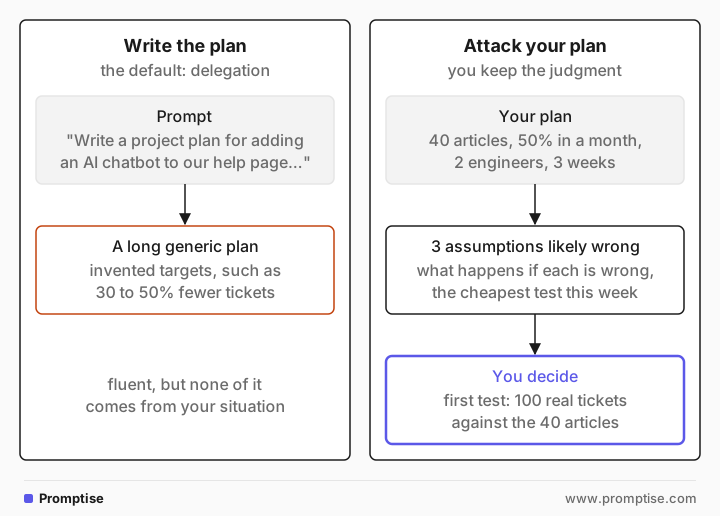
Example: write the plan or attack the plan
The default use, delegation:
Write a project plan for adding an AI chatbot to our help page to reduce support tickets.The model (gpt-5-mini) returned a long generic plan:
Project Plan: Add AI Chatbot to Help Page to Reduce Support Tickets

1. Executive summary
…
- Target outcome: 30–50% reduction in ticket volume from the help page within 6 months…
- Timeline: 12–14 weeks to launch a production-ready bot…
Fluent, but none of it comes from your situation; the targets are invented. Now bring your plan and ask the model to test it:
Here is my plan. Don't rewrite it. Find the three assumptions most likely to be wrong, and for each one say what would happen if it is wrong and the cheapest test I could run this week to check it. Be specific to this plan.

Plan: we will cut our support backlog by adding an AI chatbot to the help page. It answers from our 40 help articles. We expect it to deflect 50% of tickets within a month. Two engineers, three weeks.1) Assumption: The chatbot can reliably answer questions using only the 40 help articles.
…
- Cheapest test this week: … Collect 100 recent real user support tickets … For each, see whether an answer can be found in the 40 articles … Compute the proportion that would be fully answered.
2) Assumption: The chatbot will deflect 50% of tickets within a month.
…
- Cheapest test this week: Run a short A/B trial with a non-AI prototype: add a “Top answers” or “Suggested articles” widget …
3) Assumption: Two engineers, three weeks is sufficient …The second prompt keeps the decision with you and uses the model where it is strong: generating objections and tests fast. The first test alone shows whether 50% deflection is possible before anyone writes code. Results vary by model.
[05]
What it changes in practice
Map your own frontier. For a few weeks, note which AI-assisted tasks needed heavy correction. Those are outside the frontier for your work; do them yourself or ground the model with more context.
Measure end to end. Compare time to a finished, reviewed result, not time to a first draft. The METR result shows self-reports can point the wrong way.
Ask for critique, alternatives and tests. "Find the weakest assumption", "what would change your answer", "give me three ways this fails". These multiply your judgment instead of replacing it.
[06]
Frequently asked questions
What is the jagged technological frontier?
It is the term Dell'Acqua et al. used for the uneven boundary of AI capability: tasks of similar apparent difficulty can be easy or hard for the model. Inside the frontier AI help improves results; just outside it, people who rely on the model do worse than people working alone.
Does AI help beginners or experts more?
In the customer-support study the largest gains went to less experienced workers. In the developer study, experienced people working on code they knew well were slowed down. Benefit depends on how much the model knows that you don't, and how cheaply you can check it.
Why did developers feel faster but take longer?
The study doesn't settle the cause. Likely factors include time spent prompting, waiting and reviewing, and fixing code that looked right. A draft that appears instantly feels like progress.
[07]
Next steps
Why LLMs mirror you: get honest critique instead of agreement.
Prompts as code: specify tasks so the model's output is usable.
LLM as an alien colleague: working with a collaborator that thinks differently.
Iterative prompt refinement: diagnose where the model gets it wrong and fix it in the right place.
Mental Models: How to Think with LLMs: the full learning path.