Contents · 15 sections↓
- 01How do you revoke an AI agent's credentials?
- 02Why isn't stopping the agent enough?
- 03What credentials does an AI agent hold?
- 04Step 1: Stop the agent
- 05How do you stop a runaway AI process on Linux or Windows?
- 06Step 2: Revoke each credential at its source
- 07Step 3: Cut sessions and cached tokens
- 08Step 4: Verify that the old credentials fail
- 09Step 5: Audit what the agent did
- 10Run the whole runbook against a live agent
- 11Prepare before the incident
- 12Common problems and fixes
- 13Limitations
- 14FAQ
- 15Next steps
To revoke an AI agent's credentials, stop the agent first, then revoke every credential it holds at the system that issued it, end the sessions and tokens already handed out, check that the old credentials fail, and read what the agent did with them. Doing only one of these leaves a gap: a stopped agent's key still works for anyone who copied it, and a revoked key is replaced if the agent can fetch a new one. This guide is the incident runbook, with vendor steps from their own docs and a run on Promptise Foundry.
How do you revoke an AI agent's credentials?
Work in this order: stop the agent so it can't act or fetch new credentials, revoke each credential at its source (API keys, OAuth tokens, cloud roles, MCP server keys), cut the sessions and tokens already issued, verify that the old credentials are refused, then audit what the agent did. Revoke at the issuer, not in the agent: the agent's memory is not the only copy, and a credential is only dead when the system that checks it says no.
Stop, then revoke, then verify. Stopping first prevents the agent from refreshing a token you just revoked.
Revocation happens at the source. The identity provider, the cloud account, the API provider's console, the MCP server's key store.
Bearer tokens outlive revocation. A signed JWT stays valid until it expires unless the resource checks revocation; short lifetimes are your real revocation speed.
Verify with the old credential. "Revoked" means a request with it fails, not that a button was clicked.
Audit from records, not the agent's account. The journal, the provider's logs and the resource's audit trail say what happened.
[02]
Why isn't stopping the agent enough?
A kill switch stops future actions by the agent process. It does nothing about the credentials themselves. They may be in a log line, a trace, a config file, another process started with the same environment, or the hands of whoever prompt-injected the agent into printing them. And revoking alone isn't enough either: a running agent with a refresh token or access to a secret store can get a new credential seconds after you revoke the old one. That is why the order is fixed:
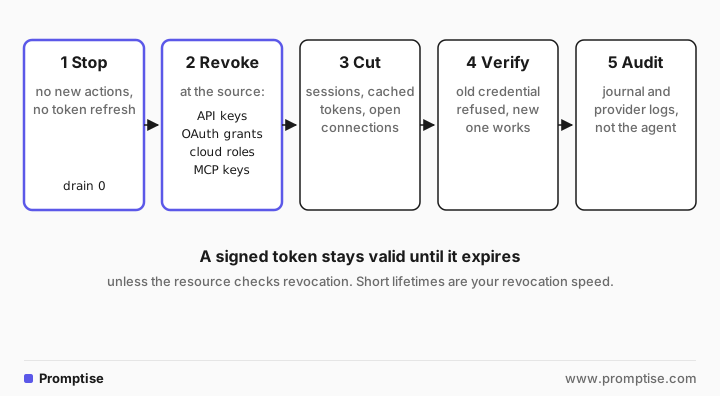
For the stopping part in detail (detect, downgrade, pause, stop), see AI Agent Kill Switch: Detect, Downgrade and Stop an Agent. This guide picks up where the agent is stopped and the credentials still work.
[03]
What credentials does an AI agent hold?
List them before you need to revoke them. A typical agent has several kinds:
Credential | Where it usually lives | Revoke at | Takes effect |
|---|---|---|---|
LLM provider API key | Agent environment, secret store | Provider console or admin API | Next request |
MCP server API key | Agent's server config | The MCP server's key store | Next request, if the server checks per request |
OAuth access and refresh tokens | Agent's token cache | The authorization server's revocation endpoint | Refresh token at once; access tokens at expiry or at once if introspected |
Cloud role credentials (AWS) | Instance metadata, role session | IAM: revoke role sessions, change the trust policy | Older sessions denied once the policy propagates |
Cloud identity (Entra service principal) | Managed identity, client secret, certificate | Entra: disable the service principal, remove secrets | No new tokens at once; issued tokens at expiry (or sooner with CAE on Microsoft Graph) |
Git hosting tokens | CI secrets, agent environment | GitHub settings or API | Next request |
Runtime-held secrets | The agent runtime's secret scope | The runtime API | At once, for the runtime's copy |
Anything a credential could reach is in scope for the audit. AI Agent Inventory: Find Every Agent and Stop Agent Sprawl helps you know which agents hold what before an incident.
[04]
Step 1: Stop the agent
Stop the process that runs the agent, with no grace period if the current run is the problem. In Promptise's Agent Runtime that is one call to the control API, POST /api/v1/processes/{name}/stop with {"drain_timeout": 0}, or on the command line:
promptise runtime stop --process crm-agent --drain-timeout 0A run in flight is cancelled and journaled as run_interrupted, queued events are set aside, MCP connections close, and the process's scoped secrets are zero-filled (revoke_on_stop is on by default). Without --drain-timeout, runs get the process's drain_timeout (5 seconds unless configured) to finish; --force kills the runtime if it doesn't stop within --timeout.
[05]
How do you stop a runaway AI process on Linux or Windows?
When the agent isn't under a runtime with a control API, stop it like any process. Ask it to shut down first, then force it:
# Linux and macOS
pgrep -f agent.py                  # find the process id
kill -TERM <pid>                   # graceful: the process can clean up
kill -KILL <pid>                   # forced, if it is still running
sudo systemctl stop agent.service # if it runs as a systemd unit# Windows
Get-Process python # find the process id
Stop-Process -Id <pid> # stop it
Stop-Process -Id <pid> -Force # no confirmation prompt, also for other users' processes
taskkill /pid <pid> /t /f # force, including the child processes it startedNotes from the docs: SIGKILL "cannot be caught, blocked, or ignored" (signal(7)), so the process gets no chance to flush or clean up; systemctl stop stops the whole unit (systemctl(1)); taskkill /t ends child processes too (taskkill); Stop-Process runs asynchronously, so wait or check HasExited (Stop-Process). Agents often start child processes (code sandboxes, browsers, MCP servers over stdio), so kill the tree, not just the parent. A Promptise runtime started with promptise runtime start shuts down gracefully on SIGTERM (docker stop sends it), draining runs first.
If the agent runs in a container or a managed platform, stop it there (docker stop, scale the deployment to zero, disable the function), or a supervisor will start it again.
[06]
Step 2: Revoke each credential at its source
Go through the inventory. For each credential, revoke it where it was issued and, when the agent still needs to work afterwards, issue a new one to the replacement only.
LLM provider API keys. Delete the key in the provider's console or admin API and create a new one for the replacement. Leaked LLM API Key? Rotate and Audit in 30 Minutes has the provider-by-provider steps and how to read their usage logs.
OAuth tokens. Revoke the refresh token at the authorization server. OAuth token revocation (RFC 7009) says that when a refresh token is revoked, the server "SHOULD also invalidate all access tokens based on the same authorization grant" if it supports that. Google, for example, takes POST https://oauth2.googleapis.com/revoke?token=..., and revoking an access token that has a refresh token revokes both (Google OAuth docs).
AWS. For IAM user access keys, deactivate with aws iam update-access-key --status Inactive, then delete with aws iam delete-access-key once nothing legitimate depends on them (AWS access keys). For roles, temporary credentials keep working until they expire, so use Revoke active sessions: IAM attaches an AWSRevokeOlderSessions policy that denies everything to sessions issued before that moment (and about 30 seconds after, for propagation). You can do the same with a deny policy on aws:TokenIssueTime. Sessions of service-linked roles can't be revoked this way (AWS revoke sessions). Remove the agent's principal from the role's trust policy so it can't assume the role again.
Microsoft Entra ID. Disable the agent's service principal (accountEnabled: false with a Graph PATCH on the service principal), which "prevents all tokens from being issued" for it (disable sign-in), and remove its client secrets (POST /applications/{id}/removePassword) and certificates. Tokens already issued stay valid until they expire. Continuous access evaluation for workload identities rejects them sooner after a disable or delete, but only for calls to Microsoft Graph, only for single-tenant service principals that request tokens with the cp1 capability, and not for managed identities (CAE for workload identities).
GitHub. Delete personal access tokens under Settings, Developer settings, Personal access tokens (GitHub docs). A GitHub App installation token can revoke itself with DELETE /installation/token (GitHub REST).
MCP server keys and tokens. Revoke them in the server's key store, and make sure the server checks that store on every request. The example below shows a server that does.
Workload identities (SPIFFE, managed identities). Delete the registration or disable the identity in its issuer. Credentials are short-lived, so they die within minutes. SPIFFE vs AWS IAM Roles vs Entra ID for AI Agents compares how each is revoked.
[07]
Step 3: Cut sessions and cached tokens
Revoking a key stops new uses of the key. Several things outlive it:
Signed tokens (JWTs). A server that verifies the signature and exp accepts the token until it expires, revoked or not. Either keep lifetimes short (minutes), or have the server check a revocation list or introspect the token on each call.
Server-side token caches. Servers that cache verified tokens for speed keep accepting them until the cache entry expires. Promptise's JWTAuth checks the signature and exp (its cache honors exp) and has no revocation list, so a revoked but unexpired token is accepted unless you add your own check.
Open sessions. An MCP session or a database connection opened with the old credential may stay authenticated. Restart the server or close the sessions.
Copies in other processes. Scripts, notebooks, CI jobs started with the same environment. Revocation at the source covers them; stopping the agent doesn't.
[08]
Step 4: Verify that the old credentials fail
Make a real request with each revoked credential and confirm the refusal. Then confirm the replacement works, so you know the refusal was the revocation and not an outage. Check the issuer's logs for any successful use of the old credential after the revocation time.
[09]
Step 5: Audit what the agent did
Read the records, not the agent's account: the runtime journal (tool calls with arguments, operator actions), the MCP servers' audit logs, the cloud's audit trail (AWS CloudTrail, Entra sign-in logs) and the LLM provider's usage log. Establish the window: from the first suspicious action to the revocation. Then decide what to undo. AI Agent Audit Logging: Tamper-Evident Logs in Python covers a log the agent can't rewrite.
[10]
Run the whole runbook against a live agent
The example runs a CRM agent on the Promptise Agent Runtime. Its MCP server authenticates with an API key whose store is checked on every request, so revoking a key takes effect on the next call without a restart. Keys are stored as hashes:
"""A CRM MCP server whose API keys can be revoked while it runs.

The key store is a JSON file read on every request: {key_hash: {"client": ..., "revoked": bool}}.
In production it is a database or your secret manager; the point is that the
server checks revocation per request, so a revoked key stops working at once.
"""
import hashlib
import hmac
import json
import os
from pathlib import Path

from promptise.mcp.server import AuthenticationError, AuthMiddleware, MCPServer, RequestContext

KEYS = Path(os.environ.get("CRM_KEY_STORE", "keys.json"))


def key_hash(key: str) -> str:
    return hashlib.sha256(key.encode()).hexdigest()  # store hashes, never keys


class RevocableKeyAuth:
    async def authenticate(self, ctx: RequestContext) -> str:
        presented = ctx.meta.get("x-api-key", "")
        store = json.loads(KEYS.read_text())
        for stored_hash, entry in store.items():
            if hmac.compare_digest(stored_hash, key_hash(presented)):
                if entry["revoked"]:
                    raise AuthenticationError("API key revoked")
                return entry["client"]
        raise AuthenticationError("Invalid API key")


server = MCPServer("crm", require_auth=True)
server.add_middleware(AuthMiddleware(RevocableKeyAuth()))


@server.tool(auth=True, read_only_hint=True)
async def list_contacts(ctx: RequestContext, company: str) -> list[dict]:
    """List the contacts at a company."""
    return [{"name": "Dana Ruiz", "company": company}, {"name": "Lee Park", "company": company}]


if __name__ == "__main__":
    server.run(transport="http", host="127.0.0.1", port=8710)
The incident script starts the server and the agent, lets the agent do one legitimate task, then runs the five steps through the control API and the key store:
"""Revoke a running agent's credentials: stop it, drop its secrets, revoke its MCP key, verify, audit."""
import asyncio
import hashlib
import json
import os
import secrets
import shutil
import subprocess
import sys
from pathlib import Path

import httpx
from dotenv import load_dotenv

from promptise.mcp.client import MCPClient
from promptise.runtime import (
    AgentRuntime, JournalConfig, OrchestrationAPI, OrchestrationClient, ProcessConfig,
    SecretScopeConfig, TriggerConfig,
)

load_dotenv()
HERE = Path(__file__).parent.resolve()
STORE = HERE / "keys.json"
CRM = "http://127.0.0.1:8710/mcp"
TOKEN = secrets.token_urlsafe(16)  # the control API's token


def store_key(key: str, client: str) -> None:
    store = json.loads(STORE.read_text()) if STORE.exists() else {}
    store[hashlib.sha256(key.encode()).hexdigest()] = {"client": client, "revoked": False}
    STORE.write_text(json.dumps(store))


def revoke_client_keys(client: str) -> int:
    store = json.loads(STORE.read_text())
    hits = [h for h, entry in store.items() if entry["client"] == client and not entry["revoked"]]
    for h in hits:
        store[h]["revoked"] = True
    STORE.write_text(json.dumps(store))
    return len(hits)


async def try_key(label: str, key: str) -> None:
    try:
        async with MCPClient(url=CRM, api_key=key) as crm:
            result = await crm.call_tool("list_contacts", {"company": "Acme"})
        text = result.content[0].text
        print(f"  {label}: {json.loads(text)['error']['message'] if result.is_error else 'works'}")
    except Exception as exc:  # noqa: BLE001
        print(f"  {label}: {type(exc).__name__}")


async def main() -> None:
    shutil.rmtree(HERE / ".promptise", ignore_errors=True)
    STORE.unlink(missing_ok=True)
    os.environ["CRM_API_KEY"] = key_v1 = "crm_" + secrets.token_urlsafe(24)
    store_key(key_v1, "crm-agent")
    server = subprocess.Popen([sys.executable, str(HERE / "crm_server.py")], cwd=HERE,
                              env={**os.environ, "CRM_KEY_STORE": str(STORE)},
                              stdout=subprocess.DEVNULL, stderr=subprocess.DEVNULL)
    await asyncio.sleep(3)

    runtime = AgentRuntime()
    await runtime.add_process("crm-agent", ProcessConfig(
        model="openai:gpt-5-mini",
        instructions="You answer questions about CRM contacts. Answer in one plain sentence.",
        servers={"crm": {"url": CRM, "transport": "http", "api_key": key_v1}},
        triggers=[TriggerConfig(type="webhook", webhook_path="/tasks", webhook_port=9094)],
        secrets=SecretScopeConfig(enabled=True, secrets={"crm_key": "${CRM_API_KEY}"}),
        journal=JournalConfig(level="full", path=str(HERE / ".promptise" / "journal")),
    ))
    await runtime.start_all()
    api = OrchestrationAPI(runtime, port=9111, auth_token=TOKEN)
    await api.start()

    async with OrchestrationClient("http://127.0.0.1:9111", token=TOKEN) as ops:
        async with httpx.AsyncClient() as http:
            await http.post("http://127.0.0.1:9094/tasks", json={"task": "Who are our contacts at Acme?"})
        while (await ops.get_process("crm-agent"))["invocation_count"] < 1:
            await asyncio.sleep(0.5)
        print("0. The agent is running and using its CRM key")
        print("  active secrets:", (await ops.get_process("crm-agent"))["active_secrets"])

        print("1. Stop the agent at once")
        print("  ", await ops.stop_process("crm-agent", drain_timeout=0))

        print("2. Revoke what the runtime holds")
        print("  ", await ops.revoke_secrets("crm-agent"))
        print("   crm_key active:", (await ops.list_secrets("crm-agent"))[0]["active"])

        print("3. Revoke the agent's key where it is checked: the MCP server")
        print("   keys revoked:", revoke_client_keys("crm-agent"))

        print("4. Verify")
        await try_key("old key", key_v1)
        key_v2 = "crm_" + secrets.token_urlsafe(24)
        store_key(key_v2, "crm-agent-v2")
        await try_key("new key", key_v2)

        print("5. Audit what the agent did and what was done to it")
        for entry in await ops.get_journal("crm-agent", limit=200):
            kind, data = entry["entry_type"], entry["data"]
            if kind == "tool_call":
                print(f"  tool_call: {data['tool']} {data['args']}")
            elif kind == "api_request":
                print(f"  api_request: {data['method']} {data['route']}")
            elif kind == "secret_access":
                print(f"  secret_access: {data['action']} {data['secret_name']}")

    await api.stop()
    await runtime.stop_all()
    server.terminate()


asyncio.run(main())
Output (one warning line from the runtime about the demo webhook having no HMAC secret is left out):
0. The agent is running and using its CRM key
  active secrets: 1
1. Stop the agent at once
   {'name': 'crm-agent', 'state': 'stopped', 'drain_timeout': 0.0, 'interrupted_runs': 0}
2. Revoke what the runtime holds
   {'name': 'crm-agent', 'secrets_revoked': True}
   crm_key active: False
3. Revoke the agent's key where it is checked: the MCP server
   keys revoked: 1
4. Verify
  old key: API key revoked
  new key: works
5. Audit what the agent did and what was done to it
  tool_call: list_contacts {'company': 'Acme'}
  secret_access: revoke_all *
  api_request: POST /api/v1/processes/{name}/stop
  api_request: DELETE /api/v1/processes/{name}/secrets
  secret_access: revoke_all *
What each step did:
Stop. stop_process(..., drain_timeout=0) answered once the process was stopped. No run was in flight, so interrupted_runs is 0.
Runtime secrets. The stop had already zero-filled the scope (the first secret_access: revoke_all in the journal); the explicit revoke_secrets call is what you use on a process you keep running or one with revoke_on_stop=False. crm_key active: False confirms it.
MCP key. The key store marked the agent's key revoked. Nothing was restarted.
Verify. A real call with the old key was refused with "API key revoked"; a new key issued for the replacement works.
Audit. The journal shows the one tool call the agent made with its arguments, the operator's stop and revoke requests, and the secret revocations.
Two things to know about the Promptise side. The runtime's secret scope holds copies for the agent; the key in the MCP server config is used by the process's MCP client and goes away with the stop, but neither stops anyone else using the key, which is why step 3 happens at the server. And the stock APIKeyAuth takes its keys when the server is built, so revoking a key there means redeploying without it; use a provider like the one above when you need revocation without a restart.
[11]
Prepare before the incident
One credential set per agent. Revoking a shared key takes down every agent that uses it; per-agent credentials let you cut one. AI Agent Secrets Management: Scoped, Expiring Credentials shows scoped, expiring secrets.
Short lifetimes. Prefer workload identity and tokens that expire in minutes over long-lived keys. Revocation speed is token lifetime.
Servers that check revocation. Per-request key lookup, token introspection or a deny list for the tokens that matter.
A written runbook with owners. Who can stop each agent, who can revoke each credential, where each log lives.
Rehearse. Revoke a staging agent's credentials end to end and time it.
[12]
Common problems and fixes
Symptom | Cause | Fix |
|---|---|---|
Agent works again minutes after revocation | It fetched a new credential (refresh token, secret store, instance role) | Stop it first; revoke the refresh grant and its access to the store |
Revoked JWT still accepted | Server checks only signature and exp | Short lifetimes; deny list or introspection for sensitive APIs |
Revoked MCP key still works | Server loaded keys at start | Check the key store per request, or redeploy without the key |
AWS role keeps working after the key was deleted | Role session credentials are separate from user keys | Revoke active sessions on the role; fix the trust policy |
Process comes back after kill | A supervisor (systemd, container orchestrator) restarts it | Stop it through the supervisor, or scale to zero |
Child processes keep running | Only the parent was killed | taskkill /t, systemctl stop, or kill the process group |
No record of what the agent did | Journal off or kept on the same host | Enable the journal; ship it off the host |
[13]
Limitations
Revocation can't undo actions. It stops future use. Emails sent, records changed and data copied need their own response.
Some tokens can't be revoked before they expire. Self-contained tokens without introspection, and Entra tokens outside CAE's scope, stay valid until exp.
Promptise doesn't revoke at your providers. It stops processes, drops the secrets it holds and checks keys on its MCP servers; keys at OpenAI, AWS, Entra or GitHub are revoked there.
Vendor details change. Follow the linked vendor pages for the current steps.
[14]
FAQ
How do I revoke an AI agent's credentials?
Stop the agent, then revoke each credential at the system that issued it: delete API keys in the provider console, revoke OAuth refresh tokens at the authorization server, revoke cloud role sessions and disable service principals, and revoke MCP server keys in the server's key store. Then confirm the old credentials are refused and audit what the agent did.
What is a runtime kill switch for AI agents?
A runtime kill switch stops an agent's process from outside the model, through the runtime's API or command line, so no prompt can override it. In Promptise it is POST /api/v1/processes/{name}/stop or promptise runtime stop, with a drain timeout of 0 to cancel the run in flight.
How do I stop a runaway AI process on Linux or Windows?
On Linux, send SIGTERM with kill -TERM <pid> and, if it doesn't exit, kill -KILL <pid>; use systemctl stop for a service. On Windows, use Stop-Process -Id <pid> -Force or taskkill /pid <pid> /t /f to end it and its child processes. Then revoke its credentials, because stopping a process doesn't invalidate them.
Does revoking an API key stop tokens that were already issued?
Not always. API keys checked on every request stop working at once. Signed access tokens (JWTs) stay valid until they expire unless the resource checks revocation. OAuth servers should invalidate access tokens when their refresh token is revoked, and cloud providers have their own session revocation.
Should I rotate or revoke an agent's credentials?
Revoke when the credential may be compromised or the agent misbehaved; then issue a new credential to the replacement. Rotate on a schedule when nothing is wrong. In an incident, never rotate in place for the same agent before you know how the old one leaked.
How do I find out what an agent did with its credentials?
Read the runtime journal for tool calls and arguments, the MCP servers' audit logs, your cloud's audit trail and the LLM provider's usage log, for the window from the first suspicious action to the revocation.
[15]
Next steps
AI Agent Kill Switch: Detect, Downgrade and Stop an Agent covers detection and containment before revocation.
AI Agent Control API: Manage Running Agents Over HTTP explains the API used here.
MCP Authentication in Python: API Keys, JWT and OAuth covers server-side keys and tokens.