Contents · 11 sections↓
- 01How do you inventory every AI agent you run?
- 02What is agent sprawl, and why is it happening now?
- 03What counts as an agent in your inventory?
- 04Where do AI agents leave traces?
- 05How to run a 30-day agent inventory
- 06The AI agent inventory template (copy this)
- 07What to do with what you find
- 08How to keep the inventory current
- 09Common mistakes
- 10FAQ
- 11Next steps
An AI agent inventory is one list of every AI agent your company runs: who owns it, what it can reach and what it is allowed to do. Most companies can't produce that list today, because agents now arrive from three directions at once: tools employees install, platforms business teams configure, and software your developers build. This guide explains agent sprawl in plain words, shows where agents leave traces, and gives you a 30-day plan and a template to copy.
How do you inventory every AI agent you run?
Collect evidence from the places agents can't avoid touching: your identity system, AI vendor bills and API keys, the admin consoles of agent platforms, your endpoint security tool, network traffic to AI services, and your code. Merge what you find into one list, find a named owner for each agent, then decide to keep, fix or retire it. Finally, make the list the gate: no entry, no credentials.
Key takeaways:
Don't start with a survey. People forget agents and don't know about others. Start from evidence, then ask.
Look in at least six places. No single tool sees all three kinds of agents.
Record what each agent can do, not only what it is. Credentials, data and actions matter more than the product name.
Every agent needs a named owner. An agent nobody claims gets paused.
An inventory decays in weeks. Tie it to how agents get credentials, or it will be out of date by next quarter.
[02]
What is agent sprawl, and why is it happening now?
An AI agent is software that uses an AI model to decide what to do next and then does it: it reads files, calls other systems, sends messages or changes records. A chat assistant answers; an agent acts, usually with real logins or keys. (For a fuller definition, see what is an AI agent.)
Agent sprawl is what happens when agents multiply faster than anyone tracks them. It looks like shadow IT, with one difference that matters: each agent holds credentials and can act on them while nobody is watching.
Agents arrive from three directions:
Kind of agent | Examples | Who usually starts it |
|---|---|---|
Agents people run on their own computers | Coding agents, desktop AI assistants, editor extensions | Individual employees |
Agents built inside a platform | Agents configured in business software or a cloud provider's agent service | Business teams, often without IT |
Agents your company builds and hosts | Custom agents your developers write and run on your servers | Engineering teams |
Two numbers from Gartner's CIO planning for 2027 article (August 31, 2026) show why this is a leadership problem. On average, 15.3% of technology solutions are already built outside central IT, and 80% of technology executives expect AI to increase the number of business-built solutions by 2030. Meanwhile, Gartner found that 73% of enterprises have no plans to set rules for who owns technology costs and solutions.
Security vendors are responding. In October 2026, Microsoft said its security tools now discover 60 types of local agents, and its support matrix lists them by name. That a vendor needs a list of 60 tools just for laptops tells you how wide the problem already is.
[03]
What counts as an agent in your inventory?
Use one simple test: does the software use an AI model to decide on actions, and does it hold credentials to carry them out? If yes, it goes in the inventory. If it only produces text that a person then reads and acts on, it belongs in your list of approved AI tools instead.
Include | Note, but track separately | Leave out |
|---|---|---|
A coding agent that edits files and runs commands on a laptop | A chat assistant with no connections to other systems | Spell-checkers and grammar tools |
An agent in a business platform that updates customer records | An AI feature inside software you already track, if it can't act | Classic automation with no AI model deciding anything |
A custom agent that reads a support inbox and sends replies | Pilots that are switched off but still hold API keys (track until the keys are revoked) | |
Any connection that gives an agent new tools, such as an MCP server (a standard way to plug tools into agents) | | |
When in doubt, include it. An entry you later remove costs a few minutes; an agent you never found can cost far more.
[04]
Where do AI agents leave traces?
Agents can hide from a survey, but they can't avoid leaving evidence. They need an identity to log in, a key to call an AI model, a device or server to run on and a network connection to reach other systems. Each of those leaves a record somewhere.
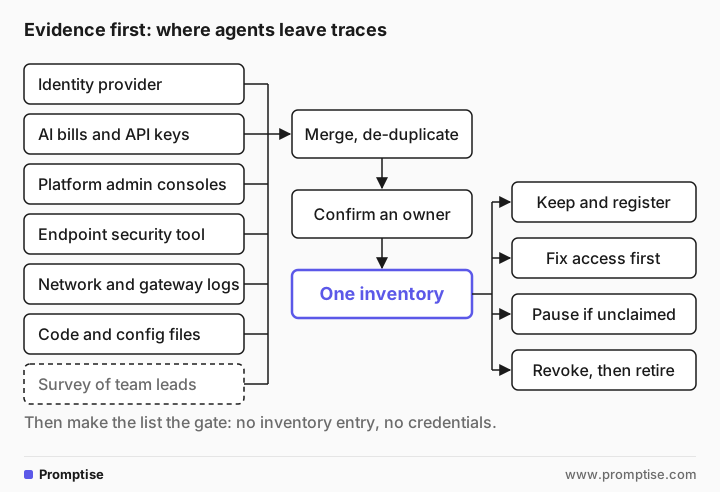
Source | What it finds | Who to ask |
|---|---|---|
Identity provider (the system that manages logins) | Service accounts, app registrations and permissions people granted to AI apps | Identity or IT team |
AI vendor bills and API keys | Every team or person paying for AI model access, including on corporate cards | Finance and procurement |
Agent platform admin consoles | Agents built inside business software and cloud agent services | Platform admins |
Endpoint security tool | Agents running on employee laptops and the tools they're connected to | Security team |
Network and gateway logs | Traffic to AI model services and tool servers from machines you didn't expect | Network or security team |
Code and config files | Agents your developers built, and the tools each one is connected to | Engineering leads |
A short survey | Context the evidence can't give: purpose, owner, business value | Every team lead |
A few practical notes on each source:
Bills are the fastest start. Ask finance for every payment to AI vendors in the last 12 months, including expense claims. Each one points to a team that may run agents.
Identity records show reach. An agent is only as dangerous as the access it holds. Your identity team can list the accounts and app permissions that AI tools use.
Platform consoles cover what laptops don't. Agents built in business software never touch an employee's computer, so endpoint tools miss them. Each platform's admin console usually lists them.
Endpoint tools cover what consoles don't. Coding agents and desktop assistants run under an employee's own login. Only a tool on the device sees them.
Code shows intent. Developers usually describe each agent in a configuration file. If your teams build with Promptise Foundry, each long-running agent is declared in a manifest file, and the runtime command line shows which ones are running, so those files are a ready-made source.
An example: what one vendor's discovery does and doesn't show
Discovery tools help, but read their documentation for limits before you treat their output as complete. Microsoft's is a useful example because its documentation is specific.
Microsoft Defender's local agent discovery lists agents on Windows and macOS devices, with the user and device for each, plus the tool connections they have configured. The documentation also states its limits: an agent appears only after Defender sees it active, so an installed but idle agent may be missing; it is not a complete software inventory; and macOS support is in preview.
For agents built on other vendors' platforms, Microsoft's Agent 365 connected platforms page lists connections to services from Amazon, Google, Salesforce, Databricks, Anthropic, Oracle and Snowflake that copy their agents into one registry. It also notes that syncing is manual today, and that an agent deleted at the source is not guaranteed to disappear from the registry.
Other security and platform vendors offer similar features. Whatever you use, ask the same questions: what does it miss, how often does it refresh and does it notice when an agent is gone?
[05]
How to run a 30-day agent inventory
You don't need a new tool to start. A shared spreadsheet and four weeks are enough for a first complete list.
Week 1: agree the scope and the team
Pick a sponsor (often the CIO or CISO) and one person who owns the inventory day to day. Agree on the "decides and acts with credentials" test above. Name one contact in identity, security, finance, engineering and each major business unit.
Week 2: collect the evidence
Ask each contact for their source from the table above, in whatever format they have. Don't clean anything yet. Send the short survey to team leads with three questions: which AI agents does your team use or run, what do they do and who looks after them?
Week 3: merge, de-duplicate and find owners
Put everything in one sheet. Expect the same agent to show up three times: as a bill, an account and a laptop entry. Merge those rows. Then contact a likely owner for each agent and ask them to confirm it in writing. Agents nobody claims within a week go on a pause list.
Week 4: decide, and make it stick
Review the list with the sponsor and decide each agent's fate using the triage table below. Then change the process so the list stays true: new agents get credentials only after an entry exists, and offboarding an employee includes their agents.
[06]
The AI agent inventory template (copy this)
One row per agent. Fields in brackets come from your own policies. If you already keep a detailed agent register, like the one in AI agent governance in practice, this inventory feeds it: the inventory finds the agents, the register governs them.
Agent name:           [what people call it]
Kind:                 laptop agent | platform agent | agent we build
Product or platform:  [vendor and product, or "in-house"]
Found through:        [bills | identity | platform console | endpoint | network | code | survey]
Business owner:       [named person, confirmed on date]
Technical owner:      [named person or team]
Purpose:              [one sentence]
Status:               sanctioned | unsanctioned | unknown
Acts or only reads:   reads only | drafts for a person | acts on its own
Credentials it uses:  [its own account | an employee's login | shared key | unknown]
Systems it can reach: [list]
Data it can reach:    [the classes from your data classification]
Tool connections:     [e.g. MCP servers, plug-ins]
Monthly cost:         [from bills, or "unknown"]
Last seen active:     [date]
Decision:             keep | fix | retire | paused (no owner)
Next review:          [date]
The field that surprises most teams is Credentials it uses. An agent running on an employee's own login can do anything that employee can, which is usually far more than the agent needs.
[07]
What to do with what you find
Sort every entry with two questions: does it have a confirmed owner, and can it act on its own?
Only reads or drafts | Acts on its own | |
|---|---|---|
Owner confirmed | Keep. Add to the register, review yearly. | Keep only if it has its own identity, limits and a log. Otherwise fix first. |
No owner | Pause, give the team two weeks to claim it, then retire. | Pause now. Revoke its credentials if nobody claims it within days. |
To retire an agent, revoke its keys and accounts first, then switch it off, then delete its stored data according to your retention rules. Switching it off without revoking access leaves a key that still works.
Some uses of AI are regulated in some places. Ask your legal and compliance team what applies to you before you decide what to keep.
[08]
How to keep the inventory current
A one-time inventory is out of date within weeks, because new agents are created by installing a tool or editing a file. Keep it alive with four habits:
Gate credentials on the list. No inventory entry, no new key, account or tool connection.
Re-run the evidence sources monthly. Bills and identity records are cheap to pull again.
Add agents to joiner and leaver processes. When someone leaves, their agents need a new owner or retirement.
Report one number to leadership. For example, "agents found this month that weren't on the list." If it doesn't fall over time, the gate isn't working.
[09]
Common mistakes
Mistake | Why it fails | Fix |
|---|---|---|
Inventory by survey only | People forget tools and don't know about others | Start from evidence, use the survey for context |
Trusting one discovery tool | Each tool sees one kind of agent | Combine at least the six sources above |
Listing products, not agents | "We use Product X" hides 40 different setups | One row per agent, with its own credentials and reach |
No owner field, or a team as owner | Nobody answers when something goes wrong | A named person, confirmed in writing |
Switching off without revoking | The agent's keys still work | Revoke access first, then switch off |
Treating it as a project | The list is stale by next quarter | Gate credentials on the list and re-run monthly |
Banning everything you find | Teams hide agents next time | Keep useful agents, fix their access, retire the rest |
[10]
FAQ
What is agent sprawl?
Agent sprawl is the uncontrolled growth of AI agents across a company: agents installed by employees, built in business platforms and written by developers, without one list of who owns them or what they can do. It matters because, unlike most software, agents hold credentials and act on their own.
How do I find out how many AI agents we have?
Collect evidence instead of asking around: payments to AI vendors, accounts and app permissions in your identity system, agent platform admin consoles, your endpoint security tool, network traffic to AI services and your code. Merge the results, remove duplicates and confirm an owner for each. A first complete pass usually takes about a month.
What should an AI agent inventory include?
At minimum: the agent's name, kind, owner, purpose, whether it acts or only reads, which credentials it uses, which systems and data it can reach, its tool connections, its cost, when it was last active and the decision to keep, fix or retire it.
Can a security tool find all our AI agents automatically?
Not on its own. Endpoint tools see agents on devices, platform consoles see agents built in that platform, and neither sees everything. Read each tool's documentation for its limits; Microsoft's, for example, notes that its discovery lists agents only after it sees them active.
Who should own the AI agent inventory?
One person should keep the list day to day, usually in IT, security or an AI team, with a senior sponsor such as the CIO or CISO. Each agent on it needs its own named business owner, who answers for what that agent does.
What is the difference between shadow AI and agent sprawl?
Shadow AI usually means employees using AI tools the company hasn't approved, mostly chat assistants. Agent sprawl is about agents, approved or not, that act with credentials. An approved agent with no owner and an employee's full login is part of agent sprawl even though it isn't shadow AI.
[11]
Next steps
Govern what you found: AI agent governance in practice.
Explain agents to your leadership team: AI agents explained for business leaders.
Check where you stand overall: the AI maturity model.
Give agents their own identity instead of employee logins: AI agent identity and authentication (for your developers).
Plan how agents fit together: enterprise AI agent architecture.