Contents · 16 sections↓
- 01How do you build a kill switch for an AI agent?
- 02What does "contain an agent" mean?
- 03When do you need a staged kill switch?
- 04What signals should trigger containment?
- 05What you need
- 06Step 1: Give the agent tools with clear risk levels
- 07Step 2: Set limits that detect bursts and pause the agent
- 08Step 3: Watch it contain a burst
- 09Step 4: Downgrade the agent over the runtime API
- 10Step 5: Stop the agent and read what happened
- 11Pause or stop: which one when?
- 12Running a kill switch in production
- 13Common problems and fixes
- 14Limitations
- 15FAQ
- 16Next steps
An AI agent kill switch is a control that stops an agent from acting, enforced outside the model so no prompt can talk it out of stopping. In practice one switch is not enough: you want to notice trouble early, take away the risky parts first, and stop everything only when you must. This guide explains how to contain a misbehaving agent step by step (detect, downgrade, pause, stop, revoke) and shows each step on a running agent through the Promptise Foundry runtime API, with real output.
How do you build a kill switch for an AI agent?
Put the switch in the runtime and in the credentials, never in the prompt. Watch signals that need no LLM, such as bursts of write actions, loops and error rates. When one fires, act in steps: refuse write tools while reads keep working, pause the agent so new work queues up, stop it to cancel what is running, and revoke its credentials at the source if it might still act. Each step should be callable by an operator over an API, and the first ones should also fire automatically.
Prompts are not controls. "Stop" in a chat is a message the model may follow. A kill switch must work even if the model ignores it.
Contain in steps. Downgrading to read-only often keeps an agent useful while you look, and costs less than stopping everything.
Detect without the model. Budgets and loop detection are pattern matching and counters: cheap, fast and not fooled by the agent's own explanations.
Know what each step does to work in flight. Pausing lets the current run finish; stopping cancels it; neither undoes what already happened.
Keep a record of what was refused, not only of what ran.
[02]
What does "contain an agent" mean?
Containment is everything between "the agent is fine" and "the agent is gone". It is a ladder: each step takes away more, and each step is a different control.
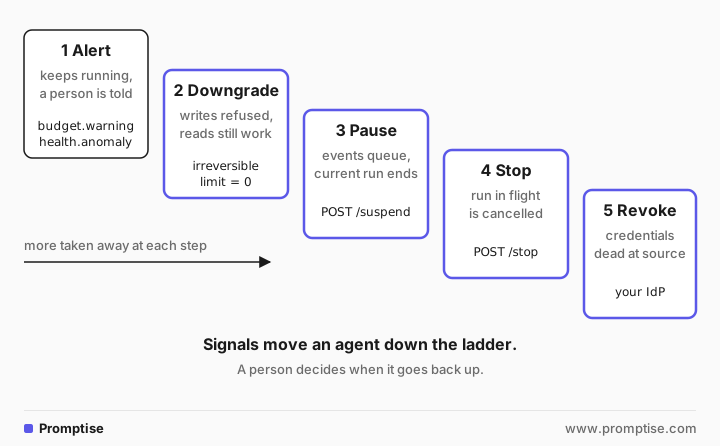
Alert. The agent keeps running and a person is told. Use it for early signals such as a budget at 80%.
Downgrade. The agent loses its most dangerous abilities, usually writes, while reads keep working. It can still answer questions, explain what it would do, or finish safe parts of a task.
Pause. The agent takes no new work. Events keep arriving and wait in its queue, so nothing is lost while a person looks.
Stop. The agent process ends, and a run in progress is cancelled.
Revoke. The credentials the agent's tools use are revoked where they were issued. This is the step that also covers copies you don't control: a token cached in another service, a script someone started with the agent's key.
Most incidents end at step 2 or 3. Step 5 is for when you no longer trust the agent's environment, for example after a credential leak.
[03]
When do you need a staged kill switch?
You need one for agents that act without a person approving each step: scheduled agents, event-driven agents, anything that writes, sends, pays or deletes. The more an agent runs unattended, the more the early steps matter, because nobody is watching when the trouble starts.
A chat assistant whose every action a user confirms needs less. Closing the chat is its kill switch. Even there, keep the last two steps ready for its credentials.
[04]
What signals should trigger containment?
Good signals are cheap to compute, hard for the agent to argue with and specific to your workload:
Signal | Example threshold | First step |
|---|---|---|
Burst of write actions | More than 3 irreversible calls in one run | Downgrade or pause |
Tool calls per run | More than 15 calls in one run | Pause |
Same call repeated | Same tool and arguments 3 times in a row | Pause |
Repeating sequence | A, B, A, B in the last 20 calls | Pause |
Error rate | Half of the last 10 runs failed | Alert, then pause |
Denied calls | Several approval or policy denials in one run | Alert |
Daily volume | Runs or tool calls per day above normal | Pause until a person resumes |
Out-of-scope access | A call to a resource the agent never uses | Downgrade and alert |
Set thresholds from what normal looks like for this agent. A triage agent that closes one or two tickets per event has a different normal from a cleanup job that closes hundreds.
[05]
What you need
Python 3.10 or later and Promptise Foundry 1.6.0.
An OpenAI API key for the demo agent.
About 20 minutes.
uv venv && uv pip install "promptise==1.6.0" httpx[06]
Step 1: Give the agent tools with clear risk levels
The example is a support triage agent. A sync job from an old helpdesk sends it lists of tickets marked resolved, and the agent closes them with a note to the customer. Its tools are an MCP server with a read tool and a write tool:
"""Helpdesk tools for the triage agent, as an MCP server (stdio). Tickets live in SQLite."""
import os
import sqlite3

from promptise.mcp.server import MCPServer, ToolError

DB = os.environ.get("TICKETS_DB", "tickets.db")
server = MCPServer(name="helpdesk", version="1.0.0")


def db() -> sqlite3.Connection:
    return sqlite3.connect(DB)


@server.tool(read_only_hint=True)
def list_open_tickets() -> list[dict]:
    """All open tickets with their ID, customer and subject."""
    with db() as conn:
        rows = conn.execute("SELECT id, customer, subject FROM tickets WHERE status = 'open'").fetchall()
    return [{"id": r[0], "customer": r[1], "subject": r[2]} for r in rows]


@server.tool(destructive_hint=True, idempotent_hint=True)
def close_ticket(ticket_id: str, note: str) -> str:
    """Close a ticket and send the customer the closing note."""
    with db() as conn:
        changed = conn.execute(
            "UPDATE tickets SET status = 'closed', note = ? WHERE id = ? AND status = 'open'",
            (note, ticket_id),
        ).rowcount
    if not changed:
        raise ToolError(f"No open ticket {ticket_id}.")
    return f"Closed {ticket_id}."


if __name__ == "__main__":
    server.run()
The annotations (read_only_hint, destructive_hint) document the risk for clients and reviewers. They don't enforce anything. Enforcement comes from the runtime configuration in the next step, which names close_ticket as irreversible.
[07]
Step 2: Set limits that detect bursts and pause the agent
The process configuration turns the runtime's governance on: a budget that counts irreversible actions, the health monitor for loops, a full journal and a hook that records refused calls. The whole demo is one script:
"""Contain a misbehaving agent step by step: detect a burst of writes, downgrade
the agent to read-only over the runtime API, then stop it."""
import asyncio
import shutil
import sqlite3
import sys
from pathlib import Path

import httpx

from promptise import CallbackSink, EventNotifier
from promptise.runtime import (
    AgentRuntime,
    BudgetConfig,
    HealthConfig,
    HookConfig,
    JournalConfig,
    OrchestrationAPI,
    OrchestrationClient,
    ProcessConfig,
    ToolCostAnnotation,
    TriggerConfig,
)

HERE = Path(__file__).parent.resolve()
DB = str(HERE / "tickets.db")
TOKEN = "demo-token"


def setup_tickets() -> None:
    with sqlite3.connect(DB) as conn:
        conn.executescript(
            "DROP TABLE IF EXISTS tickets;"
            "CREATE TABLE tickets (id TEXT, customer TEXT, subject TEXT, status TEXT, note TEXT);"
        )
        conn.executemany(
            "INSERT INTO tickets VALUES (?, ?, ?, 'open', '')",
            [(f"T-{i}", ["acme", "globex", "initech"][i % 3], f"Issue {i}") for i in range(1, 13)],
        )
    shutil.rmtree(HERE / ".promptise", ignore_errors=True)


def ticket_counts() -> dict:
    with sqlite3.connect(DB) as conn:
        return dict(conn.execute("SELECT status, COUNT(*) FROM tickets GROUP BY status").fetchall())


REFUSED_CALLS: list[str] = []


async def record_denial(ctx) -> None:
    """Refused calls never ran, so the journal has no tool_call for them: log them here."""
    REFUSED_CALLS.append(f"{ctx.data['tool_name']} ({ctx.data['reason']})")


def page(event) -> None:
    """Stands in for your pager or chat alert."""
    if event.event_type in ("budget.exceeded", "health.anomaly", "process.suspended"):
        print(f"  ALERT {event.event_type}: {event.data}")


CONFIG = ProcessConfig(
    model="openai:gpt-5-mini",
    instructions=(
        "You triage the support queue. Events from helpdesk-sync list tickets the old "
        "system marked resolved: close those tickets with a short note. Answer in one sentence."
    ),
    servers={
        "helpdesk": {
            "command": sys.executable,
            "args": [str(HERE / "ticket_tools.py")],
            "env": {"TICKETS_DB": DB},
        }
    },
    triggers=[TriggerConfig(type="webhook", webhook_path="/helpdesk", webhook_port=9091)],
    journal=JournalConfig(level="full", path=str(HERE / ".promptise" / "journal")),
    budget=BudgetConfig(
        enabled=True,
        max_irreversible_per_run=3,  # a burst of more than 3 closes is not normal here
        max_tool_calls_per_run=15,
        tool_costs={"close_ticket": ToolCostAnnotation(irreversible=True)},
        on_exceeded="pause",
    ),
    health=HealthConfig(enabled=True, on_anomaly="pause"),
    hooks=[HookConfig(event="permission_denied", callback=record_denial)],
)


async def send(payload: dict) -> None:
    async with httpx.AsyncClient() as http:
        await http.post("http://127.0.0.1:9091/helpdesk", json=payload)


async def wait_for(client: OrchestrationClient, state: str, runs: int) -> dict:
    while True:
        status = await client.get_process("triage")
        if status["state"] == state and status["invocation_count"] >= runs:
            return status
        await asyncio.sleep(0.5)


async def main() -> None:
    setup_tickets()
    notifier = EventNotifier(sinks=[CallbackSink(page)])
    runtime = AgentRuntime(event_notifier=notifier)
    await runtime.add_process("triage", CONFIG)
    await runtime.start_all()
    api = OrchestrationAPI(runtime, port=9100, auth_token=TOKEN)
    await api.start()

    async with OrchestrationClient("http://127.0.0.1:9100", token=TOKEN) as client:
        print("1. A buggy sync job marks every ticket resolved")
        await send({"source": "helpdesk-sync", "resolved": [f"T-{i}" for i in range(1, 13)]})
        status = await wait_for(client, "suspended", 1)
        print("  state:", status["state"], "| reason:", status["suspend_reason"])
        print("  tickets:", ticket_counts())

        print("\n2. Downgrade: no more writes, then let it run again")
        print("  ", await client.update_budget("triage", max_irreversible_per_run=0))
        print("  ", await client.resume_process("triage"))
        await send({"source": "helpdesk-sync", "resolved": ["T-11", "T-12"]})
        status = await wait_for(client, "suspended", 2)
        print("  state:", status["state"], "| reason:", status["suspend_reason"], "| tickets:", ticket_counts())

        print("\n3. Stop it and read what it did")
        print("  ", await client.stop_process("triage"))
        calls = await client.get_journal("triage", entry_type="tool_call", limit=50)
        print("  tool calls:", [f"{c['data']['tool']}({c['data']['args'].get('ticket_id', '')})" for c in calls])
        print(f"  refused calls ({len(REFUSED_CALLS)}):", REFUSED_CALLS[0] if REFUSED_CALLS else None)
        results = await client.get_journal("triage", entry_type="invocation_result")
        for r in results:
            print(f"  run {r['data']['invocation']} reply:", r["data"]["response"])

    await api.stop()
    await runtime.stop_all()
    await notifier.stop()


asyncio.run(main())
The settings that make up the kill switch:
`max_irreversible_per_run=3` with close_ticket marked irreversible=True. The fourth close in a run is refused before it runs, also when the model requests twelve calls at once: parallel calls are checked one by one.
`on_exceeded="pause"`. After a run with a violation, the process is suspended. It does not resume on its own.
`HealthConfig(on_anomaly="pause")` catches an agent that repeats the same call or loops, without any LLM call.
`JournalConfig(level="full")` records every tool call that ran, every state change and every operator action from the API.
The `permission_denied` hook records each refused call. A refused call never ran, so the journal has no tool_call entry for it.
The event notifier sends budget.exceeded, health.anomaly and process.suspended to a callback. In production that is a Slack or pager webhook.
[08]
Step 3: Watch it contain a burst
The script sends a buggy sync event that marks all twelve tickets resolved. Here is the run:
1. A buggy sync job marks every ticket resolved
  ALERT budget.exceeded: {'process_name': 'triage', 'limit_type': 'max_irreversible_per_run', 'current': 4, 'limit': 3}
  ALERT process.suspended: {'process_name': 'triage', 'process_id': 'cdca0223-49c0-4ca0-8eea-b2b4a602ec62', 'reason': 'budget'}
  state: suspended | reason: budget
  tickets: {'closed': 3, 'open': 9}

2. Downgrade: no more writes, then let it run again
   {'name': 'triage', 'budget_updated': True, 'effective_from': 'next_budget_check', 'live': True}
   {'name': 'triage', 'resumed': True, 'state': 'running'}
  ALERT budget.exceeded: {'process_name': 'triage', 'limit_type': 'max_irreversible_per_run', 'current': 1, 'limit': 0}
  ALERT process.suspended: {'process_name': 'triage', 'process_id': 'cdca0223-49c0-4ca0-8eea-b2b4a602ec62', 'reason': 'budget'}
  state: suspended | reason: budget | tickets: {'closed': 3, 'open': 9}

3. Stop it and read what it did
   {'name': 'triage', 'state': 'stopped'}
  tool calls: ['close_ticket(T-1)', 'close_ticket(T-2)', 'close_ticket(T-3)', 'list_open_tickets()']
  refused calls (11): close_ticket (budget limit max_irreversible_per_run reached (4 > 3))
  run 1 reply: Closed tickets T-1, T-2, and T-3 with the note "Closed: old system marked resolved; closing as resolved."; attempts to close T-4–T-12 failed due to the irreversible-call budget limit and need to be retried.
  run 2 reply: I couldn't close T-11 and T-12 because the system's irreversible-call budget was exhausted; please retry closing them.
In part 1, the agent asked to close all twelve tickets. Three closes ran; the other nine were refused by the budget before they ran. The process paused itself with reason: budget, the alert callback fired twice, and nine tickets stayed open. Nobody had to be watching.
The agent's reply asks for the refused closes to be "retried". That is the model doing its job: it reports what it couldn't do. It is also why the next step is a person's decision, not an automatic resume.
[09]
Step 4: Downgrade the agent over the runtime API
Part 2 of the output is the operator's response, through the Orchestration API's Python client:
update_budget("triage", max_irreversible_per_run=0) turns the agent read-only for irreversible tools. The change is live: it applies at the next tool call, also inside a run already in progress. The counters are kept.
resume_process("triage") lets the queued and new events run.
The next sync event asked the agent to close two more tickets. It listed the open tickets, tried to close two, and both closes were refused before they ran. The process paused again. The ticket counts didn't change.
That is the point of a downgrade: the agent keeps its reads, and any write attempt both fails and pauses it, so you learn about it at once. Other downgrade levers on the same API:
Lever | API | Effect |
|---|---|---|
No irreversible actions | PATCH /processes/{name}/budget with max_irreversible_per_run: 0 | Write tools refused before they run |
Fewer tool calls | PATCH .../budget with max_tool_calls_per_run | Shorter runs, earlier pause |
Stricter health checks | PATCH .../health with lower thresholds or on_anomaly: "pause" | Pause on smaller anomalies |
Cut an input | | That source can't wake the agent |
New instructions | PATCH .../instructions | Applies from the next run; a request to the model, not a control |
Revoke runtime secrets | DELETE .../secrets | Secrets held in the process's secret scope are zero-filled |
The budget levers are enforced by the runtime before each tool call. Instructions are not: the model reads them and may still try, which is why the downgrade in the demo uses the budget alone.
[10]
Step 5: Stop the agent and read what happened
Part 3 is the stop. stop_process("triage") moves the process to stopped. A run in flight would have been cancelled; queued events go to the dead-letter list. The same switch exists on the command line, promptise runtime stop triage, and for every process at once, POST /api/v1/runtime/stop-all.
Then the record. The journal lists the tool calls that ran: three closes in the first run and the ticket listing in the second. The hook's list has the eleven calls that were refused, nine in the first run and two in the second. Neither list alone tells the whole story, so keep both. The journal also has an api_request entry for each operator action (the budget change, the resume and the stop), so the containment itself is audited.
Two things a stop doesn't do:
It doesn't undo side effects. The three tickets closed in the first run stay closed, and their customers got the note. Reopening them is your job. The runtime's rewind restores the agent's own state and conversation, not the outside world. See rewind an AI agent.
It doesn't revoke credentials. The MCP server's API key, database password or OAuth token is still valid. If anything else could use them, revoke them where they were issued.
[11]
Pause or stop: which one when?
Pause (suspend) | Stop | |
|---|---|---|
Run in flight | Finishes | Cancelled |
New events | Wait in the queue, in order | Dead-lettered (kept in memory only) |
Agent and MCP connections | Kept | Closed |
Back to work | resume, events run in order | start, queued events are gone |
Use it when | You want to look before anything else happens | The current run is doing damage |
The trade-off is in the first row. A pause is gentle: nothing is lost, but the run that caused the alert finishes. A stop acts at once, but it can cut a run off between two related writes, so check for half-finished work afterwards. Tools with idempotency keys make a later re-run of that work safe.
[12]
Running a kill switch in production
Give the control API a token and keep it off the public internet. OrchestrationAPI requires a token on any non-loopback address. Anyone with it can stop, resume and reconfigure your agents. See AI agent control API.
Route alerts to people. Point escalation targets or event notifier webhooks at the channel your on-call reads. A process paused at 3 a.m. with nobody notified is an outage.
Decide in advance who may resume. Automatic signals should only move an agent down the ladder. Moving it back up is a person's decision, after they know why it was paused.
Revoke at the source. Issue each agent its own credentials, so revoking one agent's access doesn't take down others, and so the revocation happens in the system that issued them. AI agent identity covers per-agent credentials.
Rehearse. Run a drill: trigger a burst on a staging agent, check that it pauses, that the alert arrives, that the downgrade holds and that the stop works from the CLI. A kill switch you have never pulled is a guess.
Keep the record outside the agent. Ship the journal, the hook's denials and the API audit log to a store the agent can't write to. AI agent audit logging shows a tamper-evident log.
Know your limits' blind spots. The budget counts tool calls and abstract cost units, not LLM token spend. Set a spending limit with your model provider as well.
[13]
Common problems and fixes
Symptom | Cause | Fix |
|---|---|---|
The agent paused and nobody noticed | No escalation target or event sink | Send process.suspended and budget.exceeded to your on-call channel |
A write went through after the downgrade | The tool isn't in tool_costs with irreversible=True | Mark every write tool; keys must match the tool names the agent sees |
The downgrade "didn't work" in a running run | It did, from the next tool call; earlier calls already ran | Downgrade earlier, with a lower automatic threshold |
A paused agent did nothing after the daily reset | Budget pauses never resume by themselves | Resume it after a review |
The journal doesn't show the refused calls | Refused calls never ran, so no tool_call entry exists | Record them with a permission_denied hook |
Stopping lost queued events | Stop dead-letters them in memory | Pause instead when you want to keep the queue |
The agent still acted after the stop | Something else held its credentials | Revoke the credentials where they were issued |
[14]
Limitations
No single "read-only mode" switch. The downgrade in this guide is a budget limit on tools you marked irreversible. A write tool you forgot to mark is not covered.
Approval policies have no API route. The API patches budget, health and mission settings, triggers and instructions. Changing which tools need approval takes code on the host and a rebuild of the agent.
Containment stops future actions, not past ones. Side effects that already happened need their own cleanup.
Refused calls aren't journaled. Promptise records them through the permission_denied hook and events, not as journal entries.
Revocation lives outside the runtime. Promptise can drop the secrets it holds; tokens your identity provider issued must be revoked there.
[15]
FAQ
What is an AI agent kill switch?
An AI agent kill switch is a control that stops an agent from acting, enforced outside the model, so the agent can't argue with it or ignore it. In practice it is a set of steps: refuse risky tools, pause the agent, stop it, and revoke its credentials where they were issued.
How do I stop an AI agent immediately?
Stop its process through the runtime, which cancels the run in flight; in Promptise that is POST /api/v1/processes/{name}/stop or promptise runtime stop <name>. Then revoke the credentials its tools use, so nothing that still holds them can act. Telling the agent to stop in a chat is not enough.
How do I revoke an AI agent's write access automatically?
Mark write tools as irreversible and set a limit on them that a runtime enforces before each call. In Promptise, max_irreversible_per_run refuses the call that would exceed it and pauses the process; patching it to 0 over the API turns the agent read-only for those tools while reads keep working.
What is the difference between pausing and stopping an agent?
Pausing stops new work: events wait in the queue, and the current run finishes. Stopping ends the process and cancels the current run; queued events are set aside. Pause when you want to look first without losing anything; stop when the current run is doing damage.
How do I know when an AI agent is misbehaving?
Watch signals that don't depend on the model: bursts of write actions, tool calls per run, the same call repeated, repeating sequences, rising error rates and denied calls. Compare them with what is normal for that agent, and alert a person when they cross a threshold.
Does stopping an agent undo what it did?
No. Stopping prevents further actions; it doesn't reverse emails sent, records changed or payments made. Plan cleanup for each kind of side effect, keep a record of what ran, and use idempotent tools so interrupted work can be re-run safely.
[16]
Next steps
AI agent escalation shows how to page a person when limits hit.
Pause and resume an AI agent explains the lifecycle states behind the ladder.
AI agent tool failures covers agents that look for a way around a refusal.