Contents · 12 sections↓
- 01SPIFFE, AWS IAM roles or Entra ID: which should give an AI agent its identity?
- 02What is an SVID (and what does it mean for AI agents)?
- 03How does each one identify an agent?
- 04SPIFFE vs AWS IAM roles vs Entra ID compared
- 05How do SPIFFE, AWS and Entra work together?
- 06How do you give an AI agent its own identity?
- 07Where does Promptise fit?
- 08When should you choose each?
- 09Common problems and fixes
- 10Limitations
- 11FAQ
- 12Next steps
SPIFFE, AWS IAM roles and Microsoft Entra ID can each give an AI agent its own identity instead of a shared API key, but they solve different parts of the problem. SPIFFE is an open standard for workload identity across any platform, with short-lived credentials called SVIDs. AWS IAM roles are the identity AWS services understand. Entra ID is Microsoft's directory, now with agent identities. This guide compares them on primary sources, explains what an SVID is, shows how they federate, and runs one MCP server that trusts two of them.
SPIFFE, AWS IAM roles or Entra ID: which should give an AI agent its identity?
Use the identity the resources your agent calls already trust. An agent that runs on AWS and calls AWS services should use an IAM role. An agent that calls Microsoft 365 or Azure resources needs an Entra identity. When agents run across clouds, clusters and on-premises machines and call each other or your own services, SPIFFE gives them one identity scheme everywhere, and federation turns a SPIFFE identity into AWS or Entra access where needed. Many platforms end up with SPIFFE inside and cloud identities at the cloud's own APIs.
SPIFFE / SPIRE | AWS IAM role | Microsoft Entra ID | |
|---|---|---|---|
What it is | Open standard (CNCF) for workload identity | AWS identity with permissions, assumed for temporary credentials | Directory: service principals, managed identities, agent identities |
Identity looks like | spiffe://example.org/ns/agents/sa/billing | arn:aws:iam::123456789012:role/billing-agent | Object id of a service principal or agent identity |
Credential | X.509-SVID or JWT-SVID, short-lived | Temporary AWS credentials | OAuth access tokens |
Works best for | Many platforms, service-to-service calls | Calling AWS services | Calling Microsoft and Entra-protected resources |
An SVID is the credential, the SPIFFE ID is the name. The SVID proves the name and expires quickly; the name stays stable.
None of these decides what the agent may do in your app. They prove who is calling. Authorization stays at the resource.
They combine. SPIFFE federates into AWS (as an OIDC identity provider) and into Entra (as a federated credential); AWS can issue tokens for services outside AWS.
One identity per agent. Whatever you pick, give each agent its own identity so you can audit and revoke it alone.
[02]
What is an SVID (and what does it mean for AI agents)?
An SVID (SPIFFE Verifiable Identity Document) is the document a workload uses to prove its SPIFFE identity to a resource or caller. The SPIFFE concepts page defines three pieces:
SPIFFE ID: a name of the form spiffe://<trust domain>/<workload identifier>, for example spiffe://example.org/ns/agents/sa/billing-bot.
SVID: the credential that proves the ID, signed by an authority of that trust domain. It comes in two formats: an X.509-SVID (a certificate, used for mutual TLS) and a JWT-SVID (a signed JWT, used as a bearer token). SPIFFE advises X.509-SVIDs whenever possible because tokens can be replayed; JWT-SVIDs fit when a proxy or load balancer sits between caller and service, or when the receiver expects a JWT.
Workload API: a local endpoint (in SPIRE, the agent on each node) that hands a workload its SVIDs and trust bundles after checking what the workload is, so no secret has to be deployed with it.
For an AI agent, "SVID" simply means the agent's short-lived proof of identity. The agent fetches a JWT-SVID for the audience it is about to call (an MCP server, an internal API), presents it as a bearer token, and the server checks the signature against the trust domain's keys. When it expires, the agent fetches a new one. Nothing long-lived sits in the agent's environment for a prompt injection to leak. SPIFFE for AI Agents: Workload Identity Without API Keys builds this end to end with a local Workload API.
[03]
How does each one identify an agent?
SPIFFE and SPIRE
SPIRE, the reference implementation, runs a server per trust domain and an agent per node. The agent attests each workload (for example its Kubernetes namespace and service account) and issues the SVID registered for it. Trust domains can federate by exchanging trust bundles through a bundle endpoint, so workloads in one domain can verify SVIDs from another (SPIFFE federation). SPIFFE is vendor-neutral and works the same on any cloud, Kubernetes, VMs or bare metal. The cost is running SPIRE yourself (or a managed service built on it).
AWS IAM roles
An IAM role is "an IAM identity that you can create in your account that has specific permissions", with no long-term credentials of its own: assuming it gives temporary security credentials for a role session (IAM roles). Compute services (EC2, Lambda, ECS, EKS) deliver role credentials to workloads automatically. For workloads outside AWS, IAM Roles Anywhere exchanges X.509 certificates from your CA for temporary credentials, and roles can trust external OIDC providers. In the other direction, IAM outbound identity federation lets AWS workloads call STS GetWebIdentityToken for short-lived JWTs that services outside AWS verify; the token's sub is the ARN of the IAM principal. It must be enabled for the account, and those tokens can't be used to federate back into AWS.
Microsoft Entra ID
In Entra, workload identities are applications, service principals and managed identities; a managed identity is a service principal whose credentials Azure manages. Workloads outside Azure use workload identity federation to exchange an external token for an Entra token without a stored secret. For AI agents specifically, Microsoft Entra Agent ID adds agent identities created from agent identity blueprints, with sponsorship, lifecycle governance, Conditional Access and audit logs for agents. Microsoft states it works with agents built on non-Microsoft platforms through its SDK sidecar or workload identity federation. Extending Entra's security features to agents requires a Microsoft Agent 365 license, according to the same page.
[04]
SPIFFE vs AWS IAM roles vs Entra ID compared
SPIFFE / SPIRE | AWS IAM role | Microsoft Entra ID | Promptise Foundry | |
|---|---|---|---|---|
Role | Identity standard and issuer | Cloud identity and authorization | Directory, identity and governance | Consumes identities; verifies them on MCP servers |
Where it works | Anywhere SPIRE runs | AWS; outside via Roles Anywhere or OIDC | Azure, Microsoft 365, Entra-protected apps; outside via federation | Wherever the agent runs |
Credential lifetime | Short; SPIRE rotates SVIDs | Role sessions up to the role's maximum | Token lifetimes set by Entra | Reads exp, refreshes per audience |
Authorization | Not included; the resource decides | IAM policies on AWS resources | App roles, Conditional Access, Graph permissions | Guards on MCP tools (RequireClientId, HasRole) |
Agent-specific features | None; agents are workloads | None; agents are workloads | Agent ID: blueprints, sponsors, agent registry | Identity on traces, audit entries and cross-agent calls |
Revocation | Delete the registration; SVIDs expire | Revoke sessions, change trust policy | Disable or delete the identity | None of its own; revoke at the IdP |
Better choice when | Many platforms, service mesh, mTLS | Agent mainly calls AWS | Agent works in Microsoft 365 or needs Entra governance | You want one agent and server API over all of them |
Where each is weaker: SPIFFE has no directory, governance or user interface for agents, and SPIRE is infrastructure you operate. IAM roles stop being simple outside AWS. Entra's agent features are tied to Microsoft licensing and the Microsoft ecosystem. Promptise issues no identities at all.
[05]
How do SPIFFE, AWS and Entra work together?
Federation lets one identity system's credential be accepted by another, so an agent keeps one identity and gets access in several places:
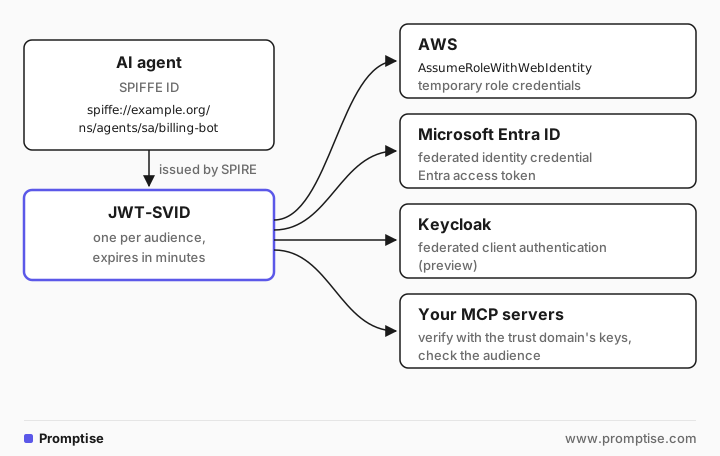
SPIFFE to AWS. SPIRE's OIDC Discovery Provider publishes the trust domain's keys; AWS trusts it as an OIDC identity provider, and a role's trust policy allows sts:AssumeRoleWithWebIdentity for one SPIFFE ID and audience (SPIFFE AWS federation tutorial).
SPIFFE to Entra. An Entra app registration or user-assigned managed identity gets a federated identity credential whose issuer is the OIDC discovery URL, subject is the SPIFFE ID and audience is api://AzureADTokenExchange. Entra accepts RS256-signed tokens, so SPIRE must be configured to sign JWT-SVIDs with an RSA key (Microsoft's SPIFFE/SPIRE tutorial).
SPIFFE to Keycloak ("SVID and KC"). Keycloak's federated client authentication lets a client authenticate with a JWT-SVID instead of a client secret, through a SPIFFE identity provider in the realm. It is a preview feature, and SPIFFE support stays in preview until the IETF draft it implements is final (Keycloak blog).
AWS to anything. GetWebIdentityToken gives an AWS-hosted agent a JWT any OIDC-aware service can verify.
Directly to your services. Your own MCP servers can verify JWT-SVIDs, Entra tokens and AWS tokens side by side, which is the example below.
[06]
How do you give an AI agent its own identity?
Regardless of the system:
Register one identity per agent, not per team or per model. A SPIFFE registration entry, an IAM role, an Entra agent identity.
Deliver credentials without secrets. Workload API socket, instance metadata, projected token file, or federation. No keys in environment variables or prompts.
Request a token per audience. A token for the billing server must not work at the CRM. Servers must check aud.
Authorize at the resource. Map the verified subject to what it may do: guards on MCP tools, IAM policies, app roles.
Record the verified subject in audit logs for every action.
Know how to revoke it. Delete or disable the identity in its issuer; short lifetimes make that take effect quickly. How to Revoke an AI Agent's Credentials: Incident Steps covers the incident side.
[07]
Where does Promptise fit?
Promptise is not an identity provider. It doesn't run SPIRE, create IAM roles or register Entra agents. It sits on both ends of a call:
On the agent, AgentIdentity takes the credential from the platform: from_spiffe() (Workload API socket or a spiffe-helper file), from_aws() (STS GetWebIdentityToken or an EKS projected token), from_entra() (managed identity or an AKS projected token), from_gcp(), from_oidc() for any OIDC issuer, or auto() to detect the platform. It caches one token per audience, refreshes before exp, and attaches the identity to traces.
On the MCP server, JwksAuth verifies tokens against an issuer's keys, requires an audience, and puts the verified subject on ctx.client, where guards and the audit log use it.
Moving an agent between platforms changes where its identity comes from, not its code. auto() reads the markers each platform sets in the environment (no network call) and picks the matching source:
"""The same agent code on three platforms: AgentIdentity.auto() picks the source.

Detection reads environment variables only; no cloud call is made here. Each
environment below is what that platform sets for a workload.
"""
import os

from promptise.identity import AgentIdentity

PLATFORMS = {
    "AKS pod with Entra workload identity": {
        "AZURE_FEDERATED_TOKEN_FILE": "/var/run/secrets/azure/tokens/azure-identity-token"},
    "Lambda function with an IAM role": {
        "AWS_LAMBDA_FUNCTION_NAME": "billing-agent", "AWS_REGION": "eu-west-1"},
    "Kubernetes pod with a SPIRE agent": {
        "SPIFFE_ENDPOINT_SOCKET": "unix:///run/spire/sockets/agent.sock"},
}
MARKERS = {name for env in PLATFORMS.values() for name in env}

for platform, env in PLATFORMS.items():
    for name in MARKERS:
        os.environ.pop(name, None)
    os.environ.update(env)
    identity = AgentIdentity.auto("billing-bot", owner="payments-team")
    print(f"{platform:38} -> {identity.credential_provider}")
Output:
AKS pod with Entra workload identity   -> entra-projected
Lambda function with an IAM role       -> aws-sts
Kubernetes pod with a SPIRE agent      -> spiffe-sdk
When markers for several platforms are present, Entra wins over AWS, AWS over Google Cloud, and Google Cloud over SPIFFE. Call the explicit factory when you want a specific source regardless of the environment.
The next example runs one MCP server that trusts two identity systems at once: a SPIFFE trust domain and a cloud identity provider whose tokens name an IAM role, the way AWS outbound federation tokens do. Both issuers are local stand-ins, so it runs offline:
"""Two local token issuers, for development only.

One stands in for SPIRE (JWT-SVIDs for the trust domain example.org, keys
served like SPIRE's OIDC Discovery Provider). The other stands in for a cloud
identity provider whose tokens name an IAM role, the way AWS STS
GetWebIdentityToken tokens do. Replace both with the real issuers.
"""
import json
import threading
import time
from http.server import BaseHTTPRequestHandler, ThreadingHTTPServer
from pathlib import Path

import jwt
from cryptography.hazmat.primitives.asymmetric import ec, rsa


class Issuer:
    def __init__(self, name: str, iss: str, port: int, algorithm: str):
        self.name, self.iss, self.port, self.algorithm = name, iss, port, algorithm
        self.key = (ec.generate_private_key(ec.SECP256R1()) if algorithm == "ES256"
                    else rsa.generate_private_key(public_exponent=65537, key_size=2048))
        algo = jwt.algorithms.ECAlgorithm if algorithm == "ES256" else jwt.algorithms.RSAAlgorithm
        jwk = json.loads(algo.to_jwk(self.key.public_key()))
        self.jwks = {"keys": [{**jwk, "kid": name, "use": "sig", "alg": algorithm}]}
        self.jwks_url = f"http://127.0.0.1:{port}/keys"

    def mint(self, sub: str, aud: str, path: str, ttl: int = 300) -> str:
        now = int(time.time())
        token = jwt.encode({"iss": self.iss, "sub": sub, "aud": aud, "iat": now, "exp": now + ttl},
                           self.key, algorithm=self.algorithm, headers={"kid": self.name})
        Path(path).parent.mkdir(parents=True, exist_ok=True)
        Path(path).write_text(token)  # like spiffe-helper or a projected token file
        return path

    def serve(self) -> None:
        body = json.dumps(self.jwks).encode()

        class Keys(BaseHTTPRequestHandler):
            def do_GET(self):
                self.send_response(200)
                self.send_header("content-type", "application/json")
                self.end_headers()
                self.wfile.write(body)

            def log_message(self, *args):
                pass

        server = ThreadingHTTPServer(("127.0.0.1", self.port), Keys)
        threading.Thread(target=server.serve_forever, daemon=True).start()


SPIRE = Issuer("spire", "https://oidc.example.org", 8901, "ES256")
CLOUD = Issuer("cloud", "https://sts.example.test", 8902, "RS256")
The server picks the verifier by the token's issuer and refuses issuers it doesn't trust. Each verifier pins the issuer and audience:
"""One MCP server that trusts two identity systems: a SPIFFE trust domain and a cloud IdP."""
import asyncio
import json

from promptise.identity import AgentIdentity
from promptise.mcp.server import (
    AuthenticationError, AuthMiddleware, JwksAuth, MCPServer, RequestContext, RequireClientId,
)
from promptise.mcp.server.testing import TestClient

import jwt

from stand_in_issuers import CLOUD, SPIRE, Issuer

AUDIENCE = "api://billing"


class TrustedIssuers:
    """Verify each token against the issuer it names, if that issuer is trusted."""

    def __init__(self, verifiers: dict[str, JwksAuth]):
        self.verifiers = verifiers

    async def authenticate(self, ctx: RequestContext) -> str:
        token = ctx.meta.get("authorization", "").removeprefix("Bearer ")
        try:
            iss = jwt.decode(token, options={"verify_signature": False}).get("iss")
        except jwt.PyJWTError:
            raise AuthenticationError("Malformed token")
        verifier = self.verifiers.get(iss)
        if verifier is None:
            raise AuthenticationError(f"Untrusted issuer {iss!r}")
        return await verifier.authenticate(ctx)  # signature, iss, aud and exp checked here


server = MCPServer("billing", require_auth=True)
server.add_middleware(AuthMiddleware(TrustedIssuers({
    issuer.iss: JwksAuth(jwks_url=issuer.jwks_url, audience=AUDIENCE, issuer=issuer.iss)
    for issuer in (SPIRE, CLOUD)
})))


@server.tool(auth=True, read_only_hint=True)
async def whoami(ctx: RequestContext) -> dict:
    """Who the server verified for this call."""
    return {"subject": ctx.client.client_id, "issuer": ctx.client.issuer}


@server.tool(auth=True, guards=[RequireClientId("spiffe://example.org/ns/agents/sa/billing-bot")])
async def issue_refund(ctx: RequestContext, invoice_id: str, amount: float) -> str:
    """Refund an invoice. Only the billing agent may call this."""
    return f"Refunded {amount:.2f} on {invoice_id}"


async def call(label: str, headers: dict, tool: str, args: dict) -> None:
    headers = {k.lower(): v for k, v in headers.items()}  # HTTP headers arrive lower-cased
    result = await TestClient(server, meta=headers).call_tool(tool, args)
    text = result[0].text
    try:
        data = json.loads(text)
        text = data["error"]["code"] + ": " + data["error"]["message"] if "error" in data else text
    except (ValueError, KeyError, TypeError):
        pass
    print(f"{label:34} {tool:13} {text}")


async def main():
    SPIRE.serve()
    CLOUD.serve()

    # Each agent gets its identity from its own platform; only the factory differs.
    billing = AgentIdentity.from_spiffe("billing-bot", token_file=SPIRE.mint(
        "spiffe://example.org/ns/agents/sa/billing-bot", AUDIENCE, "svids/billing.jwt"))
    reporting = AgentIdentity.from_oidc("reporting-bot", issuer=CLOUD.iss, token_file=CLOUD.mint(
        "arn:aws:iam::123456789012:role/reporting-agent", AUDIENCE, "tokens/reporting.jwt"))
    for identity in (billing, reporting):
        print(f"{identity.agent_id:13} {identity.credential_provider:28} {identity.subject()}")
    print()

    await call("billing-bot (SPIFFE)", billing.auth_header(AUDIENCE), "whoami", {})
    await call("reporting-bot (cloud role)", reporting.auth_header(AUDIENCE), "whoami", {})
    await call("billing-bot (SPIFFE)", billing.auth_header(AUDIENCE), "issue_refund",
               {"invoice_id": "INV-7", "amount": 40})
    await call("reporting-bot (cloud role)", reporting.auth_header(AUDIENCE), "issue_refund",
               {"invoice_id": "INV-7", "amount": 40})
    other_aud = SPIRE.mint("spiffe://example.org/ns/agents/sa/billing-bot", "api://crm", "svids/crm.jwt")
    await call("SVID minted for another service", {"authorization": "Bearer " + open(other_aud).read()},
               "whoami", {})
    rogue = Issuer("rogue", "https://rogue.example", 8903, "ES256")
    await call("unknown issuer", {"authorization": "Bearer " + open(rogue.mint(
        "spiffe://example.org/ns/agents/sa/billing-bot", AUDIENCE, "tokens/rogue.jwt")).read()},
        "whoami", {})


asyncio.run(main())
Output:
billing-bot   spiffe-file                  spiffe://example.org/ns/agents/sa/billing-bot
reporting-bot oidc:https://sts.example.test arn:aws:iam::123456789012:role/reporting-agent

billing-bot (SPIFFE)               whoami        {"subject": "spiffe://example.org/ns/agents/sa/billing-bot", "issuer": "https://oidc.example.org"}
reporting-bot (cloud role)         whoami        {"subject": "arn:aws:iam::123456789012:role/reporting-agent", "issuer": "https://sts.example.test"}
billing-bot (SPIFFE)               issue_refund  Refunded 40.00 on INV-7
reporting-bot (cloud role)         issue_refund  ACCESS_DENIED: Client 'arn:aws:iam::123456789012:role/reporting-agent' is not allowed to call this tool
SVID minted for another service    whoami        AUTHENTICATION_ERROR: Invalid JWT: Audience doesn't match
unknown issuer                     whoami        AUTHENTICATION_ERROR: Untrusted issuer 'https://rogue.example'
What it shows:
The two agents get their identities from different systems, and the only difference in agent code is the factory call. subject() reads the identity the issuer assigned: a SPIFFE ID for one, a role ARN for the other.
The server verified both and knows which system each caller came from (issuer).
Authorization is separate from authentication: the cloud-role agent is authenticated but refused by the guard on issue_refund, which allows only the billing agent's SPIFFE ID.
A valid SVID minted for another service (api://crm) is rejected for the wrong audience, and a token from an issuer the server doesn't trust is rejected before any signature check.
In production, replace the stand-ins: point the SPIFFE verifier at SPIRE's OIDC Discovery Provider (JwksAuth.from_discovery(issuer=...) reads the JWKS location from the issuer), and the cloud verifier at your account's AWS outbound issuer URL or your Entra tenant's issuer.
[08]
When should you choose each?
Choose AWS IAM roles when the agent runs on AWS and most of its tools are AWS services. Add outbound federation when it must call something outside AWS.
Choose Entra ID when the agent works in Microsoft 365, Azure or apps protected by Entra, or when you want Entra Agent ID's governance (sponsors, lifecycle, Conditional Access) for agents.
Choose SPIFFE when agents run on several platforms, call each other and your own services, or need mutual TLS, and you want one identity scheme you control.
Combine them when an agent lives in one world and calls another: SPIFFE inside, federated into AWS or Entra at their APIs.
Skip all three for now if you have one agent on one machine calling two APIs: scoped, expiring credentials from a secret store are simpler. AI Agent Secrets Management: Scoped, Expiring Credentials covers that.
[09]
Common problems and fixes
Symptom | Cause | Fix |
|---|---|---|
Entra rejects the JWT-SVID | SPIRE signs JWT-SVIDs with ES256 by default; Entra expects RS256 and "use": "sig" on keys | Configure an RSA JWT key in SPIRE; enable set_key_use on the OIDC Discovery Provider |
AWS AssumeRoleWithWebIdentity fails | Audience or sub in the trust policy doesn't match the SVID | Request the SVID for the audience the role trusts; match the exact SPIFFE ID |
Token accepted by the wrong server | Server doesn't check aud | Set an audience on every verifier; Promptise's JwksAuth requires one |
GetWebIdentityToken returns an error | Outbound federation not enabled, or missing sts:GetWebIdentityToken permission | Enable it for the account; grant the permission to the role |
Agent works in staging, fails in production | Different issuer URL per environment | Pin the issuer per environment and test both |
Revoked agent still gets in | Long token lifetime, cached token | Keep lifetimes short; revoke at the issuer and wait out exp |
[10]
Limitations
This comparison covers identity, not authorization. All three prove who the agent is; what it may do is decided by policies and guards at each resource.
Product details change. Entra Agent ID, AWS outbound federation and Keycloak's SPIFFE support are recent; check each vendor's current documentation before you design around a detail.
The example uses stand-in issuers. The verification code is what you run in production; the issuers are not.
Promptise covers agents and MCP servers. Identity for other services in your stack comes from your platform's own SDKs.
[11]
FAQ
What is an SVID in AI agents?
An SVID is a SPIFFE Verifiable Identity Document: a short-lived X.509 certificate or JWT that proves a workload's SPIFFE ID. For an AI agent, it is the credential the agent presents to tools and APIs instead of an API key, issued by SPIRE after it checks what the agent's process is.
Should I use SPIFFE IDs or AWS IAM roles for agents?
Use IAM roles when agents run on AWS and call AWS services. Use SPIFFE IDs when agents span several platforms or call your own services. They combine: AWS can trust SPIRE as an OIDC provider, so a role's trust policy can allow one SPIFFE ID to assume it.
What is the difference between SPIFFE and Entra ID?
SPIFFE is an open standard for workload identity with no directory or governance features; SPIRE issues and rotates the credentials. Entra ID is Microsoft's directory, with service principals, managed identities and agent identities, plus Conditional Access and governance. A SPIFFE workload can authenticate to Entra through workload identity federation.
Can I federate agent identity between SPIFFE and Keycloak?
Yes, as a preview. Keycloak's federated client authentication accepts JWT-SVIDs from a SPIFFE identity provider configured in the realm, so a client logs in with its SVID instead of a client secret. The SPIFFE part stays in preview until the IETF draft it implements is finalized.
How do you give an AI agent its own identity?
Register one identity per agent in an identity system (a SPIFFE registration, an IAM role, an Entra agent identity), deliver short-lived credentials without stored secrets, request tokens per audience, authorize at each resource and log the verified subject. Promptise's AgentIdentity reads the credential and JwksAuth verifies it on MCP servers.
Does Promptise replace SPIRE, IAM or Entra?
No. Promptise issues no identities and keeps no identity store. It consumes credentials from those systems on the agent side and verifies them on MCP servers, so you can switch or combine identity systems without changing agent or server logic.
[12]
Next steps
SPIFFE for AI Agents: Workload Identity Without API Keys sets up SPIFFE identity for an agent step by step.
AI Agent Identity: Authenticate Agents to MCP Servers covers verifiable agent identity with a local IdP.
On-Behalf-Of Auth for AI Agents: Act as Each User adds the user's identity next to the agent's.
MCP Authentication in Python: API Keys, JWT and OAuth covers the server side in detail.