Contents · 11 sections↓
- 01How do you run a coding agent in a dev container safely?
- 02What a dev container protects, and what it doesn't
- 03When to use a dev container for a coding agent (and when not)
- 04What you need
- 05Set up the agent dev container step by step
- 06How each coding agent fits in a dev container
- 07Running it day to day
- 08Common problems and fixes
- 09Limitations
- 10FAQ
- 11Next steps
Running a coding agent in a dev container keeps its commands off your laptop, but a container alone doesn't make it safe. Agents like Claude Code and Codex run shell commands, install packages and edit files, often with approvals turned off so they can work unattended. This guide shows how to run coding agents in a dev container safely: what the container does and doesn't protect, a devcontainer.json with an egress allowlist and read-only Git internals, a check script that proves each limit, and a real agent run inside it.
How do you run a coding agent in a dev container safely?
Put the agent in a dev container that runs as a non-root user without sudo, blocks all outbound traffic except the model API, mounts no host credentials, and keeps the files your host executes later (.git/hooks, .git/config, .devcontainer/) read-only. Then verify each limit from inside the container before you let the agent run without approvals. Both Anthropic and OpenAI document this pattern, and both say it only helps with repositories you trust.
Key takeaways:
A default dev container is not a sandbox. In our check, the stock Ubuntu dev container image allowed any website, passwordless sudo and writes to .git/hooks.
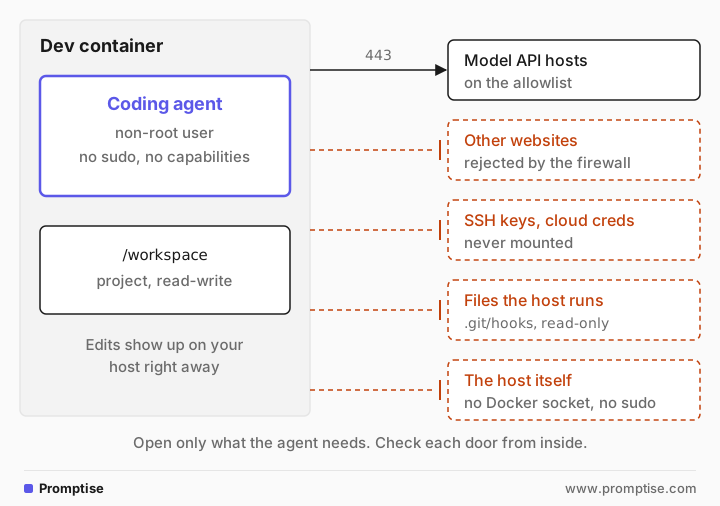
Close four doors: the network, your credentials, files the host runs later, and the host itself (Docker socket, sudo, capabilities).
Prove it. A short script run as the agent user shows what it can reach and change. Run it after every config change.
The workspace is still shared. Every edit lands on your host at once, so review the diff before you run, build or commit anything on the host.
Pin the agent CLIs. The Claude Code feature installs the latest release and auto-updates by default; install a fixed version instead.
[02]
What a dev container protects, and what it doesn't
A dev container is a Docker container described by a devcontainer.json file, from the open Dev Container specification. Editors such as VS Code, Cursor, JetBrains IDEs and GitHub Codespaces read the file, build the container, mount your project into it and run the terminal and tools inside. When the agent runs in that terminal, its shell commands run in the container, not on your machine.
That protects the rest of your disk: the agent sees only the folders you mount. It doesn't protect everything else, and the gaps are where real damage comes from. A coding agent has four ways out of a container:
The network. By default a container can reach the whole internet. An agent that reads a poisoned README or issue can be talked into sending your code or tokens somewhere. This is prompt injection, and an allowlist is the only reliable limit.
Credentials. Anything inside the container is readable by the agent: API keys in environment variables, a mounted ~/.ssh or ~/.aws, and the agent's own login. VS Code's Dev Containers extension also forwards your local SSH agent and Git credential helper into the container automatically, according to its documentation.
Files the host runs later. The project folder is a two-way bind mount. If the agent writes .git/hooks/pre-commit, that script runs on your host the next time you commit there. The same goes for .devcontainer/devcontainer.json, whose initializeCommand runs on the host machine at the next rebuild, as the specification says.
The host itself. A mounted Docker socket, --privileged, or passwordless sudo plus extra capabilities each give the agent a path to the host or to rewriting its own firewall.
Anthropic's own dev container page is direct about the limit: with --dangerously-skip-permissions, a dev container does not prevent a malicious project from exfiltrating anything accessible inside it, including the Claude Code credentials. OpenAI's Codex approvals and security page says dev containers "do not prevent every attack". Both recommend them for trusted repositories only.
[03]
When to use a dev container for a coding agent (and when not)
Use one when:
You want the agent to run without approval prompts (Claude Code's bypass mode, Codex's danger-full-access) on your own repositories.
Your team needs the same toolchain for people and agents, defined in the repository.
The agent's built-in sandbox can't run where you are. Codex's docs note its Linux sandbox may not work inside containers that block the namespace and seccomp operations it needs, and suggest configuring the container's isolation and running Codex with --sandbox danger-full-access inside it.
Use something stronger when:
You run code from repositories or pull requests you don't trust. A container shares the host kernel. Use a virtual machine, a microVM product such as Docker Sandboxes, or a gVisor runtime.
The agent needs production credentials. Don't give them to a coding agent at all; use short-lived, repository-scoped tokens.
And you may not need it when you keep approvals on and read each command. The agents' own sandboxes (Codex's default workspace-write mode with network off, Claude Code's Bash sandbox) already cover much of this for attended work.
[04]
What you need
Docker Desktop, or Docker Engine on Linux.
An editor with dev container support, or the Dev Containers CLI (
npm install -g @devcontainers/cli). This guide uses the CLI 0.89.0 so every step is a command you can script.A coding agent: the example installs Codex CLI 0.162.1 and Claude Code 2.1.296, both pinned. Use one or the other if you prefer.
A model API key with a spending limit, scoped to this use.
The project is a tiny Python package with a failing test, so you can watch the agent fix it:
project/
├── .devcontainer/
│   ├── devcontainer.json
│   ├── Dockerfile
│   ├── init-firewall.sh
│   └── allowed-domains.txt
├── checks.sh
└── src/
    ├── pricing.py
└── test_pricing.py[05]
Set up the agent dev container step by step
1. Write devcontainer.json
{
  "name": "agent-box",
  "build": {
    "dockerfile": "Dockerfile",
    "args": { "CODEX_VERSION": "0.162.1", "CLAUDE_CODE_VERSION": "2.1.296" }
  },
  // Keep the image's entrypoint: it installs the firewall as root, then idles.
  "overrideCommand": false,
  "runArgs": [
    "--cap-drop=ALL",
    "--cap-add=NET_ADMIN",
    "--cap-add=NET_RAW",
    "--security-opt=no-new-privileges",
    "--pids-limit=512",
    "--memory=4g"
  ],
  "remoteUser": "node",
  "workspaceMount": "source=${localWorkspaceFolder},target=/workspace,type=bind",
  "workspaceFolder": "/workspace",
  "mounts": [
    // Files the host runs later stay read-only for the agent.
    "source=${localWorkspaceFolder}/.devcontainer,target=/workspace/.devcontainer,type=bind,readonly",
    "source=${localWorkspaceFolder}/.git/hooks,target=/workspace/.git/hooks,type=bind,readonly",
    "source=${localWorkspaceFolder}/.git/config,target=/workspace/.git/config,type=bind,readonly",
    // Agent login and history survive rebuilds, one volume per project.
    "source=agent-home-${devcontainerId},target=/home/node/.agent-state,type=volume"
  ],
  "containerEnv": {
    "CODEX_HOME": "/home/node/.agent-state/codex",
    "CLAUDE_CONFIG_DIR": "/home/node/.agent-state/claude"
  },
  // Only for the demo run: a project-scoped key from the host environment.
  "remoteEnv": { "OPENAI_API_KEY": "${localEnv:AGENT_OPENAI_KEY}" },
  "postStartCommand": "mkdir -p $CODEX_HOME $CLAUDE_CONFIG_DIR"
}
What each part does:
`runArgs` drops every Linux capability, then adds back only NET_ADMIN and NET_RAW, which the firewall needs. no-new-privileges stops any setuid program from raising privileges. The PID and memory limits stop a runaway build or fork loop from taking the machine down.
`overrideCommand: false` keeps the image's entrypoint, which installs the firewall as root before anything else starts. Dev container tools otherwise replace the start command with a keep-alive loop.
`remoteUser: node` makes the terminal, the editor's tools and the agent run as an ordinary user.
The three read-only mounts cover the files your host executes later: .devcontainer/, .git/hooks and .git/config. Without the last one, the agent could set core.hooksPath to a folder it can write.
The named volume keeps the agents' login and history across rebuilds, one volume per project through ${devcontainerId}.
`remoteEnv` passes one API key from the host for this demo. In daily use, sign in inside the container instead, and never mount host credential files.
2. Build an image with no sudo and pinned agents
FROM node:22-bookworm-slim

# Tools the agent needs, plus what the firewall needs. No sudo.
RUN apt-get update && apt-get install -y --no-install-recommends \
      git ca-certificates curl python3 python3-pytest \
      iptables ipset dnsutils iproute2 \
    && apt-get purge -y --auto-remove sudo || true \
    && rm -rf /var/lib/apt/lists/*

# Pin the agent CLIs. Bump them on purpose, not on every rebuild.
ARG CODEX_VERSION
ARG CLAUDE_CODE_VERSION
RUN npm install -g @openai/codex@${CODEX_VERSION} @anthropic-ai/claude-code@${CLAUDE_CODE_VERSION} \
    && npm cache clean --force

COPY allowed-domains.txt /etc/agent-firewall/allowed-domains.txt
COPY init-firewall.sh /usr/local/sbin/init-firewall.sh
RUN chmod 0755 /usr/local/sbin/init-firewall.sh && chmod 0644 /etc/agent-firewall/allowed-domains.txt \
    && install -d -o node -g node /home/node/.agent-state

# PID 1 runs as root only to install the firewall; agents run as "node".
ENTRYPOINT ["/bin/sh", "-c", "/usr/local/sbin/init-firewall.sh && exec sleep infinity"]
The image has no sudo at all. Anthropic's reference container gives its user passwordless sudo for the firewall script only, which is fine; this version goes one step further, so there is nothing to misconfigure. Both agent CLIs are pinned through build arguments. The Claude Code Dev Container Feature always installs the latest release, and Claude Code updates itself by default, so the docs suggest installing a fixed version with npm and setting DISABLE_AUTOUPDATER=1 when you want reproducible builds. Picking versions that have been out for a week or two is a cheap defense against a bad release; the dependency cooldown guide explains why.
3. Add a default-deny egress firewall
#!/bin/sh
# Default-deny egress for the agent container. Runs once as root at start.
set -eu
RESOLVER=$(awk '/^nameserver/ {print $2; exit}' /etc/resolv.conf)

iptables -F OUTPUT
ipset destroy allowed 2>/dev/null || true
ipset create allowed hash:ip

grep -v '^#' /etc/agent-firewall/allowed-domains.txt | while read -r host; do
  [ -n "$host" ] || continue
  for ip in $(dig +short A "$host" | grep -E '^[0-9.]+$'); do
    ipset add allowed "$ip" -exist
  done
  echo "allow $host"
done

iptables -A OUTPUT -o lo -j ACCEPT
iptables -A OUTPUT -m state --state ESTABLISHED,RELATED -j ACCEPT
iptables -A OUTPUT -p udp -d "$RESOLVER" --dport 53 -j ACCEPT   # DNS: only the container's resolver
iptables -A OUTPUT -p tcp -m set --match-set allowed dst --dport 443 -j ACCEPT
iptables -A OUTPUT -j REJECT --reject-with icmp-admin-prohibited
iptables -P OUTPUT DROP
ip6tables -P OUTPUT DROP 2>/dev/null || true                   # no IPv6 way around it
echo "egress firewall ready: $(ipset list allowed | grep -c '^[0-9]') addresses"
The allowlist file holds one host per line:
# One host per line. Everything else is rejected.
api.openai.com
api.anthropic.com
The script resolves each host once, puts the addresses in an ipset, and allows only HTTPS to them. Everything else is rejected, so a blocked request fails at once instead of hanging. It is modeled on the init-firewall.sh in Anthropic's reference container, with three changes:
DNS goes only to the container's resolver. The reference allows UDP port 53 to any address.
No blanket SSH or host network. The reference allows outbound port 22 everywhere and the host's /24 network. Add them back only if your workflow needs them.
IPv6 is dropped, so it can't be used to get around IPv4 rules.
Which hosts you need depends on the agent. Codex with an API key needs api.openai.com. Claude Code with an API key needs api.anthropic.com; signing in with a Claude account also needs claude.ai and platform.claude.com, and installing plugins or npm packages needs registry.npmjs.org (Claude Code network requirements). Add package registries only if the agent should install dependencies, and know that each one is also a place to upload data.
4. Start it and prove the limits
Start the container with the CLI, or with Dev Containers: Reopen in Container in VS Code:
devcontainer up --workspace-folder projectThe entrypoint logs what it allowed:
allow api.openai.com
allow api.anthropic.com
egress firewall ready: 3 addresses
Now run the checks as the agent user. Each line tries one thing an agent might do:
#!/bin/sh
# Run inside the container as the agent user: what can it reach and change?
try() { printf '%-44s' "$1"; shift; if "$@" >/dev/null 2>&1; then echo "allowed"; else echo "blocked"; fi; }
echo "user: $(id -un) uid=$(id -u)  effective caps: $(awk '/CapEff/ {print $2}' /proc/self/status)"
try "HTTPS to api.openai.com"           curl -sS -m 5 -o /dev/null https://api.openai.com/v1/models
try "HTTPS to example.com"              curl -sS -m 5 -o /dev/null https://example.com
try "HTTPS to github.com"               curl -sS -m 5 -o /dev/null https://github.com
try "cloud metadata 169.254.169.254"    curl -sS -m 5 -o /dev/null http://169.254.169.254/
try "flush the firewall (iptables -F)"  iptables -F
try "become root (sudo)"                sudo -n true
try "write src/ (workspace)"            touch src/.probe
try "write .git/hooks/pre-commit"       touch .git/hooks/pre-commit
try "set core.hooksPath in .git/config" git config core.hooksPath /tmp/h
try "edit .devcontainer/devcontainer.json" touch .devcontainer/devcontainer.json
try "use the Docker socket"              test -S /var/run/docker.sock
try "use a forwarded SSH agent"          test -n "${SSH_AUTH_SOCK:-}"
try "read ~/.ssh or ~/.aws"              sh -c 'ls ~/.ssh ~/.aws'
rm -f src/.probedevcontainer exec --workspace-folder project ./checks.shuser: node uid=1000 effective caps: 0000000000000000
HTTPS to api.openai.com allowed
HTTPS to example.com blocked
HTTPS to github.com blocked
cloud metadata 169.254.169.254 blocked
flush the firewall (iptables -F) blocked
become root (sudo) blocked
write src/ (workspace) allowed
write .git/hooks/pre-commit blocked
set core.hooksPath in .git/config blocked
edit .devcontainer/devcontainer.json blocked
use the Docker socket blocked
use a forwarded SSH agent blocked
read ~/.ssh or ~/.aws blockedThe agent can reach the model API and write the project's source, and nothing else on the list. For comparison, here is the same script in a dev container built from mcr.microsoft.com/devcontainers/base:ubuntu with no other settings:
user: vscode uid=1000  effective caps: 0000000000000000
HTTPS to api.openai.com                     allowed
HTTPS to example.com                        allowed
HTTPS to github.com                         allowed
cloud metadata 169.254.169.254              blocked
become root (sudo)                          allowed
write src/ (workspace)                      allowed
write .git/hooks/pre-commit                 allowed
set core.hooksPath in .git/config           allowed
use the Docker socket                       blocked
use a forwarded SSH agent                   blocked
read ~/.ssh or ~/.aws                       blocked
The default container can reach any website, become root with sudo, and plant a Git hook that your host would run. The metadata address is blocked there only because a laptop has no cloud metadata service; on a cloud VM it would answer. The SSH agent line shows "blocked" in both because we started the containers with the CLI; when VS Code opens the container, it forwards your SSH agent, so run the checks from a VS Code terminal too.
5. Run the agent inside the container
With the limits proven, run the agent without approval prompts. For Codex, sign in once inside the container (codex login, or printenv OPENAI_API_KEY | codex login --with-api-key), then:
devcontainer exec --workspace-folder project \
  codex exec -m gpt-5-mini --sandbox danger-full-access \
  "The tests in src/ fail. Fix src/pricing.py so they pass, and run them with: cd src && python3 -m pytest -q. Then commit the fix with git."
Trimmed output from one run:
ERROR codex_models_manager::manager: failed to refresh available models: Connection failed: error sending request
OpenAI Codex v0.162.1
workdir: /workspace
model: gpt-5-mini
approval: never
sandbox: danger-full-access
...
exec
/bin/bash -lc 'cd src && python3 -m pytest -q' in /workspace
 exited 1 in 135ms:
E       assert -720.0 == 72.0
...
- Ran tests again: `cd src && python3 -m pytest -q` (2 passed)
- Staged and committed the change
tokens used
16,540
The agent found that percent was used as a fraction, fixed it, ran the tests and committed. The first line is the firewall at work. With debug logging (RUST_LOG=debug), a second run showed Codex trying chatgpt.com for its model list, ab.chatgpt.com for metrics and api.github.com for plugins. None of them is on the allowlist, and the task carried on without them. Debug logs like this are the quickest way to see what an agent tries to reach. Back on the host, the commit is already there:
$ git log --oneline
04ba106 Fix apply_discount: treat percent as percentage (divide by 100) and round to cents
6614b35 demo project

$ git show --stat --format="author: %an" HEAD
author: Repo Bot

 src/pricing.py | 3 ++-
 1 file changed, 2 insertions(+), 1 deletion(-)
$ tail -2 src/pricing.py
    # percent is given as a whole number (e.g. 10 for 10%), so divide by 100
    return round(price - price * (percent / 100), 2)
For Claude Code, the equivalent is claude -p "<task>" --dangerously-skip-permissions in the container. The CLI refuses that flag when run as root, which remoteUser already handles. Sign in with claude inside the container, or set ANTHROPIC_API_KEY in remoteEnv.
[06]
How each coding agent fits in a dev container
Agent | Its own sandbox | Inside a dev container |
|---|---|---|
Claude Code | Permission prompts, auto mode, and a Bash sandbox | Official Dev Container Feature and reference container with a firewall; bypass mode refuses root |
Codex CLI | read-only, workspace-write (network off by default), danger-full-access; bubblewrap on Linux | Docs suggest container isolation plus danger-full-access when its Linux sandbox can't run in the container |
Gemini CLI | Opt-in --sandbox with macOS Seatbelt profiles, Docker or Podman, gVisor | Its Docker sandbox is itself a container; a custom image goes in .gemini/sandbox.Dockerfile |
VS Code agents | Agent sessions in the Agents window | Since VS Code 1.138, chat.agentHost.devContainer.enabled runs a session in the folder's dev container; 1.139 added SSH, Tunnel and WSL hosts |
The VS Code feature runs the agent with the project's toolchain, according to the 1.138 release notes. The notes don't describe network limits, so the firewall and mounts in this guide still apply.
[07]
Running it day to day
Review before the host runs anything. The container limits what the agent can reach, not what it writes into your project. A changed Makefile, package.json script, test fixture or .vscode/tasks.json runs on your host when you use it there. Read the diff first; the AI code review checklist has what to look for.
Keep credentials narrow. Give the agent a model key with a spending limit and nothing else. If it must push, use a fine-grained token for one repository with a short expiry, not your SSH key. If a key does leak, follow the leaked API key guide.
Treat the agent's login as exposed. The agent's own credentials sit inside the container where the agent can read them. Prefer API keys you can rotate quickly.
Re-run the checks after any change to devcontainer.json, the Dockerfile or the allowlist, and after editor updates.
Restart to refresh the allowlist. Addresses are resolved at startup. Model APIs sit behind CDNs whose addresses change, so restart the container if connections start failing after a few days, or use a filtering proxy instead.
For several agents at once, give each its own container and its own Git worktree, as in parallel coding agents on one repo.
For agents you build yourself rather than off-the-shelf coding CLIs, the same ideas apply per tool call: run generated code in a throwaway sandbox and route the agent's own traffic through an egress allowlist.
[08]
Common problems and fixes
Symptom | Cause | Fix |
|---|---|---|
postStartCommand ... failed on a named volume | The volume was created root-owned | Create the mount directory in the Dockerfile, owned by the user ( |
The agent can't reach the model API | Host not on the allowlist, or its addresses changed since startup | Add the host to allowed-domains.txt and restart the container |
iptables: Permission denied at start | The container lacks NET_ADMIN, or the entrypoint isn't running as root | Keep --cap-add=NET_ADMIN and overrideCommand: false; don't end the Dockerfile with USER |
Claude Code rejects --dangerously-skip-permissions | It is running as root | Set remoteUser to a non-root user |
Codex fails to start its sandbox in the container | bubblewrap can't create namespaces in a restricted container | Use --sandbox danger-full-access inside the hardened container, as its docs suggest |
git commit in the container fails on config | .git/config is read-only | Pass identity with |
Package installs fail | The registry isn't allowed | Add it to the allowlist on purpose, or preinstall dependencies in the Dockerfile |
[09]
Limitations
A container shares the host kernel. A kernel or runtime bug can break out. On macOS and Windows, Docker Desktop adds a Linux VM between the container and your machine, but other containers in that VM are neighbors.
IP allowlists are coarse. An allowed address may serve other sites on the same CDN, and DNS queries through the resolver can still carry data out. A filtering proxy that checks hostnames, with no direct DNS, is tighter.
The model API is an open channel. The agent can still send your code to the model provider; that is how it works. Choose the provider and data settings with that in mind.
Read-only Git internals aren't complete. Other files the host executes, such as build scripts and editor tasks, stay writable because the agent needs to edit them. Review is the control there.
The demo passes an API key through `remoteEnv`. That is convenient for one run, but the key is visible to the agent. Use a key you can revoke.
[10]
FAQ
Is a dev container a sandbox for AI coding agents?
Partly. It isolates the agent's commands from the rest of your disk, but a default dev container still has open internet access, often passwordless sudo, and a writable project folder that includes Git hooks your host runs. It becomes a useful sandbox only after you add an egress allowlist, remove sudo, mount no credentials and make host-executed files read-only.
Can I run Claude Code with --dangerously-skip-permissions in a dev container?
Yes, and Anthropic documents it for dev containers that run as a non-root user. The flag removes your chance to review commands, so pair it with an egress firewall and use it only with repositories you trust. Anthropic's docs warn that a malicious project can still exfiltrate anything inside the container, including Claude Code's credentials.
How do I run OpenAI Codex CLI in a Docker or dev container?
Install the CLI in the image, sign in inside the container, and run codex exec or the interactive codex. If Codex's own Linux sandbox can't start in the container, its docs suggest configuring the container's isolation yourself and running with --sandbox danger-full-access inside it. Its default workspace-write mode keeps the network off unless you enable it.
Does VS Code forward my SSH keys and Git credentials into a dev container?
The Dev Containers extension forwards your local SSH agent if one is running, reuses your local Git credential helper, and copies your .gitconfig into the container, according to VS Code's documentation. Anything the agent can use in that terminal, it can use to push. Check with echo $SSH_AUTH_SOCK and ssh-add -l in a VS Code terminal inside the container.
Which domains does a coding agent need in its allowlist?
Only its model API, plus its sign-in hosts if you use account login. Codex with an API key needs api.openai.com; Claude Code with an API key needs api.anthropic.com, and account sign-in adds claude.ai and platform.claude.com. Add package registries or GitHub only if the agent must install packages or push, because each allowed host is also somewhere data can go.
Is a dev container enough for untrusted repositories?
No. Both Anthropic and OpenAI say to use dev containers with trusted repositories. For untrusted code, use a virtual machine, a microVM sandbox, or a gVisor runtime, and give the agent no credentials that matter.
[11]
Next steps
Run several agents on one repository without them overwriting each other: Parallel Coding Agents on One Repo.
Review what the agent wrote before it reaches your host's build: How to Review AI-Written Code.
Sandbox code that your own agent generates: AI Agent Code Execution Sandbox.
Control where every part of an agent system can connect: AI Agent Network Egress.
Keep agent credentials out of code and logs: AI Agent Secrets Management.
Ship agents in containers to production: Deploy an AI Agent with Docker.