Contents · 14 sections↓
- 01What should an agent do when a tool result is too large?
- 02Why large tool results bloat an agent's context
- 03The options, from best to last resort
- 04What you need
- 05Measure each tool design on one question
- 06Return an error instead of rows
- 07Cut with a marker when you can't change the tool
- 08What Promptise Foundry does with large results
- 09Repeated tool calls, iteration limits and "continue" prompts
- 10Running it in production
- 11Common problems and fixes
- 12Limitations
- 13FAQ
- 14Next steps
A tool result that is too large is the most common cause of context bloat in AI agents. One call that returns a whole table puts tens of thousands of tokens into the context, and in a ReAct loop every later step pays for it again. This guide shows the fixes that work (filter and page at the tool, return counts, return an error instead of rows, cut with a marker as a last resort) and measures what each design costs on one real question, using Promptise Foundry.
What should an agent do when a tool result is too large?
Fix it at the tool, not in the model. Give the tool filters and paging so the model asks for less, return only the fields the task needs, return counts and totals when the question is about counts and totals, and return a short error that says how to narrow the query when a request would match too much. Truncation is a last resort, and only with a marker that says the result is cut. A silently cut result looks complete, and the model either answers wrongly or calls the tool again and again.
Key takeaways:
Every step resends every result. In a tool loop, a 190,000-character result is paid for on every later model call, not once.
Answer the question at the tool. In the example below, a counts tool answers with 667 input tokens where returning every row took 70,608.
An error beats a dump. "75 orders match, more than 50. Add a filter or use order_stats" costs 217 characters and tells the model what to do next.
Silent truncation causes repeated calls. A result cut at 4,000 characters without a marker made the agent call the same tool 25 times, until the step limit, with no answer.
Compaction is not a fix for one huge result. Foundry's compaction trims *older* results after several tool calls; the latest result always goes to the model in full.
[02]
Why large tool results bloat an agent's context
An agent loop sends the model its whole transcript on every call: the question, every earlier tool call and every earlier result. A large result causes four problems:
Cost and latency. Input tokens are billed on every call. A table returned at step 1 is billed again at steps 2, 3 and 4.
Context limits. A big enough result fails the request outright with a context-length error, or crowds out the instructions and the question.
Worse answers. The model has to find three relevant rows among a thousand. More text means more chances to miss or misread one.
Repeated calls. When a result is cut without saying so, or is too noisy to use, the model often calls the same tool again, hoping for something better.
MCP doesn't solve this for you. Its built-in cursor pagination covers list requests such as tools/list and resources/list, not the output of a tool call, so paging a tool's result is the tool's own job.
[03]
The options, from best to last resort
Design | What the tool returns | Use it when |
|---|---|---|
Filter at the tool | Only matching rows | The model can say what it is looking for (customer, status, date) |
Page | limit rows from offset, plus total and has_more | Matches can still be many; the model may need more than one page |
Project fields | Only the fields the task needs | Rows are wide (emails, notes, metadata) |
Aggregate | Counts, sums, top N | The question is about numbers, not individual rows |
Error if too big | A short error with how to narrow | A request would match more than you want in context |
Reference | An id or resource link to fetch on demand | The data is a file, log or document the model may not need in full |
Truncate with a marker | The first N characters and a note that it is cut | Nothing else is possible (a third-party tool you can't change) |
Compaction | Older results trimmed by the framework | Long loops with many medium results, not one huge result |
The first five are changes to the tool. They work in every framework and every MCP client, because the model simply receives less.
[04]
What you need
Python 3.10 or newer and
uv pip install "promptise==1.7.0" python-dotenv.An OpenAI key in .env (OPENAI_API_KEY); the examples use gpt-5-mini.
orders.py: a fake order table of 1,200 rows (the same every run) and four ways to expose it as tools.
"""A fake order table (1,200 rows, the same every run) and four ways to expose it as tools."""
import json
import random

from promptise import ToolError, tool

rng = random.Random(7)
STATUSES = ["paid", "paid", "paid", "shipped", "refunded", "payment_failed"]
ROWS = [
    {
        "id": f"O-{10000 + i}",
        "customer": f"C-{rng.randint(1, 60):03d}",
        "status": rng.choice(STATUSES),
        "amount": round(rng.uniform(5, 400), 2),
        "created": f"2026-{rng.choice(['08', '09', '10'])}-{rng.randint(1, 28):02d}",
        "email": f"user{rng.randint(1, 999)}@example.com",
        "note": rng.choice(["", "gift wrap", "leave at door", "call before delivery"]),
    }
    for i in range(1200)
]


def _match(customer=None, status=None, month=None):
    return [r for r in ROWS
            if (customer is None or r["customer"] == customer)
            and (status is None or r["status"] == status)
            and (month is None or r["created"].startswith(month))]


# 1. The naive tool: every row, every field.
@tool
def list_orders() -> str:
    """List all orders."""
    return json.dumps(ROWS)


# 2. Filter at the tool, page the rows, return only the fields that matter.
@tool
def search_orders(customer: str | None = None, status: str | None = None,
                  month: str | None = None, limit: int = 20, offset: int = 0) -> str:
    """Find orders. Filter by customer (C-042), status (paid, shipped, refunded,
    payment_failed) and month (2026-10). Returns at most `limit` rows from `offset`,
    the total number of matches and whether there are more."""
    rows = _match(customer, status, month)
    page = [{k: r[k] for k in ("id", "status", "amount", "created")} for r in rows[offset:offset + limit]]
    return json.dumps({"total": len(rows), "offset": offset, "rows": page,
                       "has_more": offset + limit < len(rows)})


# 3. Answer the question at the tool: counts and sums, no rows.
@tool
def order_stats(customer: str | None = None, status: str | None = None, month: str | None = None) -> str:
    """Count orders and sum their amounts. Filters as in search_orders."""
    rows = _match(customer, status, month)
    return json.dumps({"count": len(rows), "total_amount": round(sum(r["amount"] for r in rows), 2)})


# 4. Refuse a result that is too big, with an error that says how to narrow it.
MAX_ROWS = 50


@tool
def find_orders(customer: str | None = None, status: str | None = None, month: str | None = None) -> str:
    """Find orders by customer, status and month. Fails if more than 50 orders match."""
    rows = _match(customer, status, month)
    if len(rows) > MAX_ROWS:
        raise ToolError(f"{len(rows)} orders match, more than {MAX_ROWS}. No rows returned. "
                        "Add a filter (customer, status, month) or use order_stats for counts and totals.")
    return json.dumps([{k: r[k] for k in ("id", "status", "amount", "created")} for r in rows])
search_orders filters, pages and projects. order_stats aggregates. find_orders refuses with an error when more than 50 rows match. ToolError sends that message back to the model as an error result, so the run goes on.
[05]
Measure each tool design on one question
The question is about one customer's failed payments in one month: three orders out of 1,200. The script asks it once per tool design and prints the tool calls, the largest result, the number of model calls and the input tokens from the provider's usage data:
"""Ask one question with four tool designs and measure what each costs in context."""
import asyncio
import json
import sys

from dotenv import load_dotenv
from promptise import build_agent, tool
from promptise.engine import GraphIterationLimitError

from capped import capped
from orders import _match, find_orders, list_orders, order_stats, search_orders

load_dotenv()
QUESTION = ("How many of customer C-042's orders failed payment in October 2026, "
            "and what is their total amount?")
truth = _match("C-042", "payment_failed", "2026-10")
print(f"correct answer: {len(truth)} orders, {sum(r['amount'] for r in truth):.2f}\n")


@tool
def list_orders_cut() -> str:
    """List all orders."""
    return list_orders.invoke({})[:4000]  # a blind cap: the first 4,000 characters, no marker


@tool
@capped
def list_orders_marked() -> str:
    """List all orders."""
    return list_orders.invoke({})  # the same cap, with a marker that says it is cut


DESIGNS = {
    "all rows": [list_orders],
    "all rows, cut at 4,000": [list_orders_cut],
    "all rows, cut with a marker": [list_orders_marked],
    "filter + page": [search_orders],
    "stats + error if too big": [order_stats, find_orders],
}


async def run(name, tools):
    agent = await build_agent(model="openai:gpt-5-mini", extra_tools=tools)
    print(f"== {name}")
    try:
        result = await agent.ainvoke({"messages": [{"role": "user", "content": QUESTION}]})
    except GraphIterationLimitError as exc:
        print(f"  no answer: stopped at the iteration limit ({exc.limit}) "
              f"after {exc.report.tool_calls} tool calls, {exc.report.total_tokens:,} tokens\n")
        return
    finally:
        await agent.shutdown()
    msgs = result["messages"]
    model_calls = [m for m in msgs if m.type == "ai"]
    results = [len(m.content) for m in msgs if m.type == "tool"]
    calls = [f"{c['name']}({json.dumps(c['args'])})" for m in model_calls for c in m.tool_calls]
    print(f"  tool calls: {', '.join(calls)}")
    print(f"  largest tool result: {max(results):,} characters")
    print(f"  model calls: {len(model_calls)}, input tokens: "
          f"{sum(m.usage_metadata['input_tokens'] for m in model_calls):,}")
    print(f"  answer: {msgs[-1].content.strip()}\n")


async def main():
    for name in sys.argv[1:] or DESIGNS:  # python compare.py ["design name" ...]
        await run(name, DESIGNS[name])


asyncio.run(main())correct answer: 3 orders, 764.02
== all rows
tool calls: list_orders({})
largest tool result: 189,407 characters
model calls: 2, input tokens: 70,608
answer: Customer C-042 had 3 orders with status payment_failed in October 2026:
[three order lines left out]
Total amount: $764.02.
== all rows, cut at 4,000
no answer: stopped at the iteration limit (25) after 25 tool calls, 92,252 tokens
== all rows, cut with a marker
tool calls: list_orders_marked({})
largest tool result: 4,130 characters
model calls: 2, input tokens: 1,947
answer: I can find that, but I need to query the orders list and filter to customer C-042, status "payment_failed", and created dates in October 2026. Do you confirm that by "failed payment" you mean orders with status exactly "payment_failed"? If yes, shall I run the query and compute the count and total now?
== filter + page
tool calls: search_orders({"customer": "C-042", "status": "payment_failed", "month": "2026-10", "limit": 100, "offset": 0})
largest tool result: 324 characters
model calls: 2, input tokens: 781
answer: Customer C-042 had 3 payment-failed orders in October 2026, totaling $764.02.
== stats + error if too big
tool calls: order_stats({"customer": "C-042", "status": "payment_failed", "month": "2026-10"})
largest tool result: 36 characters
model calls: 2, input tokens: 667
answer: Customer C-042 had 3 orders with payment_failed in October 2026, totaling $764.02.(The order lines of the first answer are left out of the output above.)
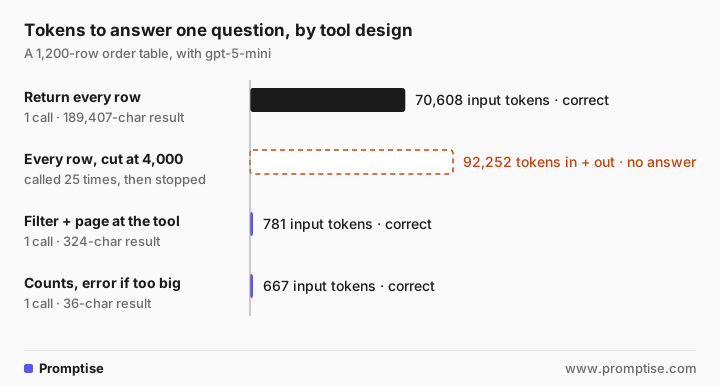
What each design shows:
All rows. The model found the three orders and the right total, at 70,608 input tokens for two model calls: the 189,407-character result went in on the second call. With a bigger table, a smaller model or a longer loop, this is where answers start to go wrong and requests start to fail.
All rows, cut at 4,000 characters. This is what a blind cap does, and it is the same slice ToolNode(max_result_chars=4000) makes. The cut result contained none of the three orders and didn't say it was cut. The agent called the tool again, and again, until the run stopped at the 25-step limit with no answer after 92,252 tokens. This is the classic "repeated tool calls until maximum iterations" failure, and truncation is its cause.
All rows, cut with a marker. The same 4,000 characters plus a line saying the result is cut and how to narrow it. The agent stopped after one call and said it needed a filtered query, instead of looping. It still couldn't answer, because this tool has no filters; the marker makes the failure visible, it doesn't fix it.
Filter and page. One call with the right filters, a 324-character result, 781 input tokens, the right answer.
Stats. One call, a 36-character result, 667 input tokens, the right answer.
The numbers will vary by model and run; the shape won't. A tool that does the filtering costs about a hundredth of one that returns everything.
[06]
Return an error instead of rows
Sometimes the model asks for too much on purpose: "which orders failed payment in October?" matches 75 rows. Returning all of them would work here, but the same tool on a real table could match 75,000. find_orders refuses anything over 50 with a ToolError:
"""A question that matches too many rows: the tool refuses with an error, not a dump."""
import asyncio

from dotenv import load_dotenv
from promptise import build_agent

from orders import find_orders, order_stats

load_dotenv()


async def main():
    agent = await build_agent(model="openai:gpt-5-mini", extra_tools=[order_stats, find_orders])
    try:
        result = await agent.ainvoke({"messages": [{"role": "user", "content":
                                     "Which orders failed payment in October 2026?"}]})
    finally:
        await agent.shutdown()
    for m in result["messages"]:
        for c in getattr(m, "tool_calls", None) or []:
            print(f"call: {c['name']}({c['args']})")
        if m.type == "tool":
            print(f"result ({len(m.content)} chars): {m.content[:160]}")
    print("answer:", result["messages"][-1].content)


asyncio.run(main())call: find_orders({'status': 'payment_failed', 'month': '2026-10'})
result (217 chars): {
"error": {
"code": "TOOL_ERROR",
"message": "75 orders match, more than 50. No rows returned. Add a filter (customer, status, month) or use order_st
call: order_stats({'status': 'payment_failed', 'month': '2026-10'})
result (39 chars): {"count": 75, "total_amount": 14847.06}
answer: I can’t return the full list as-is because the orders query is limited to 50 results, but I can give you summary info and options for how to proceed.
Summary (from the system):
- Orders with status = "payment_failed" in October 2026: 75
- Total amount for those orders: $14,847.06
How would you like to proceed? Options:
[five options left out](The script prints the first 160 characters of each result; the answer's list of options is left out.)
The agent read the error, switched to order_stats as the message suggested, and answered with the count and total instead of 75 rows. Then it offered ways to narrow the list. That is the behavior you want from "return an error without rows": the model learns the size of the result and how to ask better, at the cost of 217 characters.
Write the error so the model can act on it:
Say how much matched ("75 orders match"), so the model knows the scale.
Say that nothing was returned ("No rows returned"), so it doesn't answer from nothing.
Say exactly what to change: which filters exist, or which other tool gives the summary.
Don't make the limit a surprise. Mention it in the tool's description ("Fails if more than 50 orders match") so the model can plan for it.
[07]
Cut with a marker when you can't change the tool
When a tool belongs to someone else (a third-party MCP server, a vendor API), wrap it. If the result is longer than your limit, cut it and append a line the model can't miss:
"""A last-resort cap: cut a result, but say so and say how to get the rest."""
import functools

from orders import ROWS, json

LIMIT = 4000


def capped(fn, limit=LIMIT):
    @functools.wraps(fn)
    def wrapper(*args, **kwargs):
        text = fn(*args, **kwargs)
        if len(text) <= limit:
            return text
        return (text[:limit] + f"\n[TRUNCATED: showing {limit:,} of {len(text):,} characters. "
                "This is not the full result. Narrow the query with filters, or ask for a count.]")
    return wrapper


@capped
def export_orders() -> str:
    """Every order as JSON (too big for a model's context)."""
    return json.dumps(ROWS)


if __name__ == "__main__":
    out = export_orders()
    print(len(out), "characters returned")
print(out[-150:])4130 characters returned
ent_failed", "amount
[TRUNCATED: showing 4,000 of 189,407 characters. This is not the full result. Narrow the query with filters, or ask for a count.]The marker turns a silent failure into a visible one: the comparison above shows the agent stopping instead of looping. Pick the limit from the context budget you want per result, and offer a narrower tool alongside the wrapped one, so the model has somewhere to go when it sees the marker.
[08]
What Promptise Foundry does with large results
As of 1.7.0, Foundry is explicit about where results are cut, and by default the agent's own tool calls are not:
The default agent passes results through in full. build_agent's ReAct agent runs tool calls inside its reasoning node and gives the model each result as it is. The latest result is never cut, which is why the tool design matters.
`ToolNode(max_result_chars=4000)` cuts successful results to 4,000 characters, with no marker. It applies only to a ToolNode in a custom graph, the node for tool calls your code decides (with a tool_selector), not the calls the model makes in the default agent. If you use it, keep in mind that the cut is silent.
Context compaction trims older results. Compaction is on by default. Once a run has 6 tool results, the model sees the question and the latest exchange word for word, plus a ledger of earlier calls in which results over 2,000 characters are cut to an excerpt that says how much was cut and how to fetch the rest. max_tokens adds a token budget that shrinks the oldest entries until the view fits.
from promptise import build_agent
from promptise.engine import ContextCompaction

agent = await build_agent(
    model="openai:gpt-5-mini",
    extra_tools=[search_orders, order_stats, find_orders],
    context_compaction=ContextCompaction(
        after_tool_results=6,      # start trimming after this many results
        keep_result_chars=2000,    # older results longer than this become excerpts
        max_tokens=20_000,         # also keep the compacted view under this estimate
    ),
)
In the silent-cut run above, compaction is what kept the 25 calls small (under 3,700 tokens each on average, input and output). It bounded the cost of the loop; it couldn't stop it, because the problem was the result, not its age. How the ledger works, and when to summarize instead, is covered in Context Compaction for AI Agents: Trim vs Summarize.
[09]
Repeated tool calls, iteration limits and "continue" prompts
Three symptoms often show up together in long tool loops, and they usually share a cause:
The agent calls the same tool repeatedly. Check what that tool returned. A cut, empty or ambiguous result is the most common reason. Return complete results for a narrower query, or a clear error.
The run ends at the maximum iterations. In Foundry, max_agent_iterations (25 by default) caps model calls per run and raises GraphIterationLimitError when a run hits it mid-loop. Raising the limit only buys more repeated calls if the result is the problem.
A coding agent stops and asks whether to continue. In VS Code's chat, the chat.agent.maxRequests setting caps requests per turn; when it is reached, the agent asks "Continue to iterate?". Long tool loops with large results reach it sooner, because each step does less useful work.
Timeouts belong in the same list: a tool that returns a huge payload is often also slow. In Foundry, @tool(timeout=...) answers a call that runs too long with a TIMEOUT error that says the outcome is unknown, which the model can read and act on. For loops in general, see AI Agent Stuck in a Loop? How to Detect and Stop It.
[10]
Running it in production
Log result sizes per tool. Record characters or tokens for every tool result, with the tool name. The outliers are your bloat; AI Agent Observability: Trace Tool Calls, Tokens and Cost shows how to capture them.
Give each tool a size budget and test it. A unit test that calls the tool with broad arguments and asserts the result stays under its budget catches regressions before an agent does.
Default to small. Set limit defaults low (20 is common) and make the model ask for more.
Keep the tool count down too. Tool definitions also take context on every call. Too Many MCP Tools? LLM Tool Selection, Measured covers that side.
Watch cost per run, not per call. A large early result multiplies across the loop; AI Agent Cost Control: Budgets That Stop Runaway Spend puts a ceiling on it.
[11]
Common problems and fixes
Symptom | Cause | Fix |
|---|---|---|
Context length error after a tool call | One result larger than the context window | Filter, page or aggregate at the tool |
Same tool called until the iteration limit | Result cut without a marker, or unclear | Return a narrower complete result, or cut with a marker |
Agent answers confidently from partial data | Silent truncation | Never cut silently; say what was cut and how to get the rest |
Cost per run much higher than expected | An early large result resent on every step | Make the tool return less; let compaction trim older results |
Agent asks for everything every time | Tool has no filters, or they aren't described | Add filters and describe them in the tool's docstring |
Agent ignores the size limit and retries | Limit not mentioned in the description | State the limit in the description and in the error |
[12]
Limitations
Filtering needs the model to know what to ask for. For open-ended exploration, paging plus a summary tool works better than strict filters.
Aggregates hide detail. A count can't show which rows are wrong; keep a way to fetch rows when the task needs them.
The numbers here come from one model and one table. Other models handle large results better or worse; the ranking of the designs is what carries over.
Token counts are provider-reported input tokens for the successful runs; the stopped run reports the engine's total of input and output tokens.
[13]
FAQ
What counts as a "too large" tool result for an LLM agent?
Anything much larger than what the model needs for the next step. A practical line is a few thousand characters per result in a multi-step loop, because each result is resent on every later step. Measure your tools' real result sizes and set a budget per tool.
Should a tool return an error or truncated rows when the result is too big?
Return an error that says how many rows matched, that none were returned, and how to narrow the query or which summary tool to use. Truncated rows look like a complete answer to the model. If you must truncate, add a marker that says the result is cut.
Why does my AI agent keep calling the same tool until it hits the maximum iterations?
Usually because the tool's result didn't give it what it needed: it was cut, empty or ambiguous, so the model tries again. Raising the iteration limit doesn't help. Return a complete result for a narrower query, or a clear error with what to do next.
Does context compaction fix large tool results?
Not for one huge result. Compaction trims older results once a loop is long; the latest result reaches the model in full. It limits how much an early large result costs later in the run, but the first call that returns it still pays the full price.
How do I paginate an MCP tool's result?
Give the tool limit and offset (or a cursor) parameters and return the page with total and has_more. MCP's built-in pagination covers list requests like tools/list, not tool results, so the tool implements paging itself.
What is max_result_chars in Promptise Foundry?
A setting on ToolNode, the graph node for tool calls your code decides, that cuts successful results to 4,000 characters by default without a marker. The default agent doesn't use it for the model's own tool calls; those results go to the model in full.
[14]
Next steps
See where context bloat comes from in the loop itself: ReAct Agent Pattern: Tool Execution Loop Explained Simply.
Trim or summarize long transcripts: Context Compaction for AI Agents: Trim vs Summarize.
Budget the whole context window: Context Engineering for AI Agents: Context Window Management.
Stop loops before they burn the budget: AI Agent Stuck in a Loop? How to Detect and Stop It.
Write tool errors that keep agents safe: AI Agent Tool Failures: Stop Unsafe Workarounds.