Contents · 13 sections↓
- 01What is the ReAct agent pattern?
- 02How the ReAct loop works: thought, action, observation
- 03In the ReAct pattern, what does an agent do after it calls a tool?
- 04When does a ReAct loop stop?
- 05When to use ReAct (and when not to)
- 06What you need
- 07Implement ReAct the hard way: a loop by hand
- 08Implement ReAct the easy way with Promptise Foundry
- 09Where ReAct breaks: loops and context bloat
- 10Common problems and fixes
- 11Limitations
- 12FAQ
- 13Next steps
The ReAct agent pattern is the tool execution loop behind most AI agents today: the model thinks, calls a tool, reads the result and repeats until it can answer. This guide explains the pattern simply, shows what an agent does after it calls a tool, and builds the same small agent twice: the hard way, as a 35-line loop over a real model, and the easy way, with Promptise Foundry. It ends with where ReAct breaks, so you know what to watch for.
What is the ReAct agent pattern?
ReAct (reason plus act) is a loop. The model reads the conversation and either answers or asks for a tool call. Your code runs the tool and adds the result to the conversation, then calls the model again. The loop repeats until the model answers without asking for a tool, or until a limit stops it. That is the whole tool execution pattern: thought, action, observation, repeat.
Key takeaways:
The model never runs a tool. It returns a structured request (a tool name and JSON arguments). Your code, or your framework, runs it.
After a tool call, the result becomes an observation that is appended to the transcript, and the model is called again with everything so far.
The loop needs a stop condition besides "the model answered". A step limit, a budget or a timeout keeps a confused model from looping forever.
Every step resends the whole transcript. Context grows with each tool result, which is where cost and most ReAct failures come from.
Write the loop once by hand to understand it, then use a framework that handles errors, limits and context for you.
[02]
How the ReAct loop works: thought, action, observation
The pattern comes from the 2022 paper "ReAct: Synergizing Reasoning and Acting in Language Models" by Yao and colleagues. In the paper, the model wrote its steps as text: a Thought: line, an Action: line naming a tool, and the program filled in an Observation: line with the tool's output. Modern models do the same thing with native tool calling, so nobody has to parse text any more.
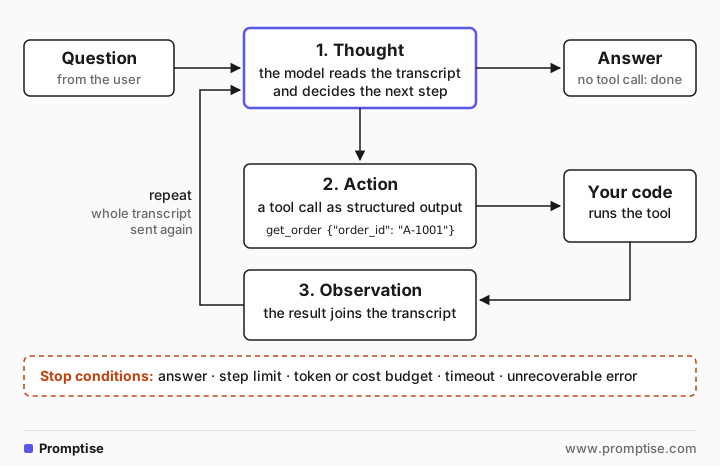
Each pass through the loop has three parts:
Thought. The model reads the transcript (the question, earlier tool calls and their results) and decides what to do next. With reasoning models the thought is internal; some models also write a short sentence before the call.
Action. The model returns a tool call as structured output, for example get_order with {"order_id": "A-1001"}. The API marks the reply as a tool call instead of a final answer.
Observation. Your code runs the tool and appends the result to the transcript as a tool message linked to the call's id. Then it calls the model again.
When the model replies without a tool call, that reply is the answer and the loop ends. The tool calling itself is explained in more depth in What Is Tool Calling? LLM Function Calling Explained, and the "model only asks, your code runs" split in How LLM Tool Calling Works: The Model Never Runs Tools.
[03]
In the ReAct pattern, what does an agent do after it calls a tool?
Strictly, the agent does nothing after it calls a tool: the model's turn ends with the request. What happens next is the loop's job:
Run the requested tool with the arguments the model gave.
Turn the outcome into a tool message: the result, or an error the model can read ("No order A-1009", "Unknown tool get_ordr").
Append it to the transcript, paired with the call's id.
Call the model again with the whole transcript.
The model then reads the observation and decides again: call another tool, retry with different arguments, or answer. If the tool failed, a good error message is what lets it recover, which is why tool errors should go back to the model as results instead of crashing the loop.
[04]
When does a ReAct loop stop?
A loop needs more than one way out:
Stop condition | What it catches | Typical setting |
|---|---|---|
The model answers without a tool call | The normal end | Always on |
Step limit (model calls per run) | A model that keeps calling tools | 10 to 25 steps |
Token or cost budget | A run whose context or spend grows too far | Per run and per day |
Timeout | Slow tools, hung calls | Seconds to minutes per run |
Unrecoverable error | Provider errors, broken tools | Fail the run, don't answer |
Frameworks name these differently. The OpenAI Agents SDK runner raises MaxTurnsExceeded past max_turns. LangGraph has a recursion limit. Promptise Foundry has max_agent_iterations (25 by default) and raises GraphIterationLimitError when a run hits it mid-loop.
Stopping is not the same as finishing the task. "The model stopped calling tools" only means the model thinks it is done. Checking that the work is actually done is a separate step; the companion guide Who Decides When an AI Agent Is Done? Checks and Judges covers it.
[05]
When to use ReAct (and when not to)
ReAct is the main agent execution pattern today because it is simple and adapts as it goes: each step can use what the last tool returned. The OpenAI Agents SDK runner, Anthropic's SDK tool runner and the default agent in most frameworks are all a loop of this shape.
Use ReAct when:
The next step depends on the last result (look up an order, then convert its currency).
The task takes a handful of tool calls, not hundreds.
You want the agent to recover from a failed call on its own.
Consider something else when:
The steps are known up front. A plan-and-execute agent writes a plan first and then runs it, with fewer model calls between steps. See Plan-and-Execute Agents in Python: Beyond the ReAct Loop.
The task needs dozens of similar calls. A code-action agent writes one program that makes all the calls, instead of one model turn per call. See Code-Action Agents in Python: One Program vs 37 Tool Calls.
Quality matters more than speed. Add a reflection or verification step, as compared in AI Agent Reasoning Patterns in Python: 9 Patterns Tested.
[06]
What you need
Python 3.10 or newer,
uv pip install "promptise==1.7.0" python-dotenv(the hand-written loop uses the openai package, which Promptise installs).An OpenAI key in a .env file (OPENAI_API_KEY). The examples use gpt-5-mini.
Two small tools both versions share, in shop.py: an order lookup and an exchange rate.
"""Two small tools the examples share: an order lookup and an exchange rate."""
ORDERS = {"A-1001": {"order_id": "A-1001", "status": "shipped", "total": 84.0, "currency": "EUR"}}
RATES = {("EUR", "USD"): 1.17, ("EUR", "GBP"): 0.87}


def get_order(order_id: str) -> dict:
    """Look up an order by its ID, for example "A-1001"."""
    return ORDERS.get(order_id, {"error": f"No order {order_id}"})


def get_exchange_rate(base: str, quote: str) -> dict:
    """Exchange rate from one currency to another, for example EUR to USD."""
    rate = RATES.get((base.upper(), quote.upper()))
    return {"base": base, "quote": quote, "rate": rate} if rate else {"error": "Unknown pair"}
The question needs both tools in order: the agent can't know which exchange rate to ask for until it has seen the order's currency.
[07]
Implement ReAct the hard way: a loop by hand
Here is the whole pattern with the OpenAI SDK and nothing else. The comments mark the thought, action and observation, and the two stop conditions:
"""A ReAct loop written by hand: the model picks a tool, we run it, we loop."""
import json

from dotenv import load_dotenv
from openai import OpenAI

from shop import get_exchange_rate, get_order

load_dotenv()
client = OpenAI()
TOOLS = {"get_order": get_order, "get_exchange_rate": get_exchange_rate}
SCHEMAS = [
    {"type": "function", "function": {"name": "get_order", "description": get_order.__doc__,
     "parameters": {"type": "object", "properties": {"order_id": {"type": "string"}}, "required": ["order_id"]}}},
    {"type": "function", "function": {"name": "get_exchange_rate", "description": get_exchange_rate.__doc__,
     "parameters": {"type": "object", "properties": {"base": {"type": "string"}, "quote": {"type": "string"}},
                    "required": ["base", "quote"]}}},
]
MAX_STEPS = 6  # stop condition 2: a hard cap, so a confused model can't loop forever

messages = [{"role": "user", "content": "What is the total of order A-1001 in US dollars?"}]
for step in range(1, MAX_STEPS + 1):
    reply = client.chat.completions.create(model="gpt-5-mini", messages=messages, tools=SCHEMAS)
    msg = reply.choices[0].message
    messages.append(msg)
    if not msg.tool_calls:  # stop condition 1: the model answers instead of calling a tool
        print(f"step {step}: answer -> {msg.content}")
        break
    for call in msg.tool_calls:  # action: a structured tool call, not free text
        args = json.loads(call.function.arguments)
        result = TOOLS[call.function.name](**args)  # your code runs the tool, not the model
        print(f"step {step}: {call.function.name}({args}) -> {result}")
        messages.append({"role": "tool", "tool_call_id": call.id, "content": json.dumps(result)})  # observation
else:
print(f"stopped after {MAX_STEPS} steps without an answer")step 1: get_order({'order_id': 'A-1001'}) -> {'order_id': 'A-1001', 'status': 'shipped', 'total': 84.0, 'currency': 'EUR'}
step 2: get_exchange_rate({'base': 'EUR', 'quote': 'USD'}) -> {'base': 'EUR', 'quote': 'USD', 'rate': 1.17}
step 3: answer -> Order A-1001 total is €84.00. Using EUR→USD rate 1.17, that equals $98.28 (84 × 1.17 = 98.28).Three model calls: the first asked for the order, the second, having seen EUR, asked for the EUR to USD rate, and the third answered. Notice what the loop does and doesn't do:
It owns the tool execution. The model returned names and arguments; TOOLS[name](**args) ran them.
It pairs every result with its call. The tool_call_id is how the model knows which observation answers which action. Providers reject a transcript where a tool result has no matching call.
It has a hard cap. MAX_STEPS ends the loop even if the model never stops calling tools.
It also has gaps that are fine for learning and not fine in production:
A tool that raises an exception crashes the loop instead of telling the model.
A misspelled tool name raises a KeyError; arguments that aren't valid JSON raise in json.loads.
Every step sends the full transcript, so a large tool result is paid for again on every later call.
There are no timeouts, no tracing and no budget beyond the step count.
Closing those gaps is most of the work in a real agent. The advanced build in ReAct Agent From Scratch in Python: The Reason-Act Loop goes further, including the text format from the paper.
[08]
Implement ReAct the easy way with Promptise Foundry
build_agent builds the same loop. You give it the model and the tools; it runs thought, action and observation until the model answers or max_agent_iterations is reached:
"""The same ReAct agent with Promptise Foundry: build_agent runs the loop."""
import asyncio

from dotenv import load_dotenv
from promptise import build_agent, tool

from shop import get_exchange_rate, get_order

load_dotenv()


async def main():
    agent = await build_agent(
        model="openai:gpt-5-mini",
        extra_tools=[tool(get_order), tool(get_exchange_rate)],
        max_agent_iterations=6,  # at most 6 model calls per run
    )
    try:
        result = await agent.ainvoke(
            {"messages": [{"role": "user", "content": "What is the total of order A-1001 in US dollars?"}]}
        )
    finally:
        await agent.shutdown()
    for m in result["messages"]:
        for call in getattr(m, "tool_calls", None) or []:
            print(f"action: {call['name']}({call['args']})")
        if m.type == "tool":
            print(f"observation: {m.content}")
    print("answer:", result["messages"][-1].content)


asyncio.run(main())action: get_order({'order_id': 'A-1001'})
observation: {"order_id": "A-1001", "status": "shipped", "total": 84.0, "currency": "EUR"}
action: get_exchange_rate({'base': 'EUR', 'quote': 'USD'})
observation: {"base": "EUR", "quote": "USD", "rate": 1.17}
answer: Order A-1001 total is 84.00 EUR. Converted to USD at rate 1.17, the total is 98.28 USD.Same two actions, same observations, same answer. The script only prints the transcript the agent returns. What the framework adds is everything the hand-written loop left out, as of Foundry 1.7.0:
Tool errors become observations. An exception, or a ToolError you raise with a helpful message, goes back to the model as an error result instead of ending the run.
Bad calls get hints. A call to a tool that doesn't exist gets an error that lists the agent's tools, closest names first. A call whose arguments aren't valid JSON gets an error result too, so the run continues instead of ending without an answer.
The context stays bounded. After 6 tool results, older results are cut to excerpts the model can fetch again (context compaction), while the question and the latest exchange stay word for word.
The limit is explicit. max_agent_iterations=6 allows at most 6 model calls. A run that hits the limit before the model has seen its last tool result raises GraphIterationLimitError instead of returning a tool result as if it were the answer.
tool(get_order) turns a plain function into a tool; its schema comes from the type hints and its description from the docstring. MCP servers plug into the same loop through servers=, with no change to the pattern.
[09]
Where ReAct breaks: loops and context bloat
Two things go wrong with ReAct agents more than anything else, and both are visible in this tiny example:
"""Two things to watch in a ReAct loop: the step limit and the growing context."""
import asyncio

from dotenv import load_dotenv
from promptise import build_agent, tool
from promptise.engine import GraphIterationLimitError

from shop import get_exchange_rate, get_order

load_dotenv()
QUESTION = {"messages": [{"role": "user", "content": "What is the total of order A-1001 in US dollars?"}]}


async def run(limit):
    agent = await build_agent(
        model="openai:gpt-5-mini",
        extra_tools=[tool(get_order), tool(get_exchange_rate)],
        max_agent_iterations=limit,
    )
    try:
        return await agent.ainvoke(QUESTION)
    finally:
        await agent.shutdown()


async def main():
    # 1. Too low a limit: the run stops before the model has seen its last tool result.
    try:
        await run(2)
    except GraphIterationLimitError as exc:
        print(f"limit {exc.limit}: stopped, tools never seen by the model: {exc.pending_tools}")

    # 2. Every step resends the whole transcript, so input tokens grow per call.
    result = await run(6)
    calls = [m for m in result["messages"] if m.type == "ai"]
    for i, m in enumerate(calls, 1):
        print(f"model call {i}: {m.usage_metadata['input_tokens']} input tokens")


asyncio.run(main())limit 2: stopped, tools never seen by the model: ['get_exchange_rate']
model call 1: 239 input tokens
model call 2: 302 input tokens
model call 3: 356 input tokensThe step limit cuts the run short. With a limit of 2, the model asked for the exchange rate on its second call and the run stopped before it could read the result. The error names the tool whose result the model never saw. Set the limit above what a normal task needs and treat hitting it as a failure to investigate, not an answer.
Input tokens grow with every step. 239, then 302, then 356 input tokens: each call carries the question, every earlier call and every earlier result. With small results that growth is harmless. With a tool that returns a whole table, every later step pays for that table again, and the model has more noise to read.
The common failure modes that follow from those two:
Repeated tool calls. The model calls the same tool again and again, often because a result was cut or unclear, until it hits the step limit. AI Agent Stuck in a Loop? How to Detect and Stop It covers detection and guards.
Context bloat. Large tool results fill the context window and raise cost on every later step. The fix is mostly in the tools; see Tool Result Too Large? Keep an AI Agent's Context Small.
Lost details after trimming. When the transcript is compacted, details can disappear. Context Compaction for AI Agents: Trim vs Summarize explains the trade-offs.
[10]
Common problems and fixes
Symptom | Cause | Fix |
|---|---|---|
Agent answers without calling any tool | Tool descriptions don't say when to use them | Describe what each tool returns and when to call it |
Same tool called over and over | Result was cut, unclear or an error without a hint | Return complete, clear results and errors that say what to do next |
Run ends with an iteration limit error | Limit too low for the task, or a loop | Raise the limit to fit the task; if it still hits, debug the loop |
Provider rejects the request after a tool call | A tool result without its matching call in the transcript | Keep each call and its result together when you trim history |
Cost grows fast on long runs | Every step resends large tool results | Make tools return less; let compaction trim older results |
Loop crashes on a bad tool name or arguments | Hand-written loop without error handling | Return errors as tool results, or use a framework that does |
[11]
Limitations
ReAct plans one step at a time. It can wander on tasks that need a plan, and it pays a model call for every step.
The model decides when it is done. Its final answer is a claim; it can stop early or report success that didn't happen.
The example is deliberately tiny. Two tools and three steps show the mechanics, not the behavior of a long run with large results.
Thoughts are often hidden. With reasoning models the "thought" is internal, so the transcript shows actions and observations, not the reasoning between them.
[12]
FAQ
What is a ReAct agent in simple terms?
A ReAct agent is a model in a loop with tools. Each turn, the model either answers or asks for a tool call. The program runs the tool, shows the model the result and asks again. It repeats until the model answers or a limit stops it.
In the ReAct pattern, what does an agent do after it calls a tool?
The model's turn ends with the tool call. The surrounding code runs the tool, appends the result (or the error) to the conversation as an observation linked to the call, and calls the model again with the whole conversation. The model reads the result and decides the next step.
Is ReAct the same as tool calling?
No. Tool calling is one model turn that returns a structured request for a function. ReAct is the loop around it: call the model, run the tools it asks for, feed back the results and repeat. Native tool calling is how modern ReAct agents express their actions.
What is the difference between ReAct and plan-and-execute?
ReAct decides one step at a time, using each result before choosing the next action. Plan-and-execute writes a plan of several steps first, then runs them, and replans only when needed. ReAct adapts better to surprises; plan-and-execute needs fewer model calls when the steps are predictable.
Why does a ReAct agent's context keep growing?
Every model call in the loop gets the full transcript: the question, every tool call and every tool result so far. Each step adds to it. Large tool results make it grow fastest, which is why tools should return only what the model needs and why frameworks compact older results.
How do I stop a ReAct agent from looping forever?
Give the loop a step limit, a budget and a timeout, and treat hitting any of them as a failure to look into. Then fix the cause: unclear tool results, errors without hints, or a limit set below what the task needs.
[13]
Next steps
Build the advanced version with the text format and a controller: ReAct Agent From Scratch in Python: The Reason-Act Loop.
Compare ReAct with plan-and-execute, reflection and debate on one task set: AI Agent Reasoning Patterns in Python: 9 Patterns Tested.
Keep tool results small before they bloat the loop: Tool Result Too Large? Keep an AI Agent's Context Small.
Catch loops early: AI Agent Stuck in a Loop? How to Detect and Stop It.
Decide when the agent's work is really finished: Who Decides When an AI Agent Is Done? Checks and Judges