Contents · 13 sections↓
- 01Context compaction for agents: should you trim or summarize?
- 02How the compaction strategies work
- 03Why agents forget file paths after compaction
- 04When to trim and when to summarize
- 05What you need
- 06Compare compaction strategies on one transcript
- 07Tune trimming in Promptise Foundry
- 08Add a summary without losing exact facts
- 09Running compaction in production
- 10Common problems and fixes
- 11Limitations
- 12FAQ
- 13Next steps
Context compaction is what an agent does when its transcript gets too long: it replaces the history with something shorter before the next model call. How it does that decides what the agent still knows afterwards. This deep-dive compares the strategies (dropping, trimming and summarizing), shows on one real transcript which facts each one keeps, and explains how to tune trimming and write summaries that don't lose file paths. For the wider topic of budgeting a context window, start with the context engineering guide.
Context compaction for agents: should you trim or summarize?
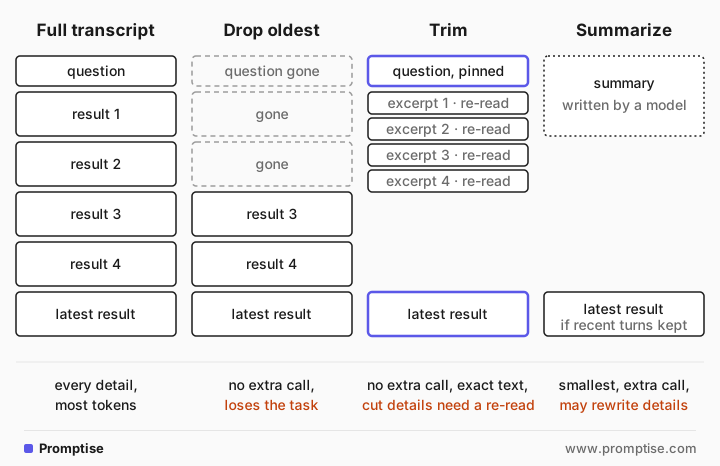
Trim by default and summarize on top when you must. Trimming cuts old tool results down to excerpts or references, keeps the question and the latest step word for word, and costs no extra model call; whatever it cuts, the agent can fetch again. Summarizing asks a model to rewrite the history into a short note. It compresses far more, but it costs a call and can quietly rewrite exact details such as line numbers. If you summarize, use a structured prompt that copies identifiers verbatim.
Key takeaways:
Compaction is a trade between tokens and fidelity. Every strategy throws something away; the question is whether the agent can notice and recover it.
Dropping the oldest messages is the worst default. It removes the task itself first.
Trimming fails loudly. A cut result says it was cut, so the agent can re-read it. The cost is extra tool calls.
Summarizing fails quietly. In one run of the example below, a generic summary moved the bug from line 62 to "Line 61".
The fix for summaries is the prompt. Ask for a handoff note with the task word for word and every path, line and code copied exactly.
[02]
How the compaction strategies work
Every agent loop sends the whole transcript to the model on each call. After a few file reads or API calls, most of that transcript is old tool output. Compaction strategies differ in what they do with it.
Strategy | What the model sees after | Extra model call | What it loses | Examples |
|---|---|---|---|---|
Drop oldest (sliding window) | The last N messages | No | The task and early findings, silently | Simple chat apps, "keep last 20 messages" |
Clear tool results | Old results replaced by a placeholder | No | Old results; the call record stays | Anthropic context editing, LangChain ClearToolUsesEdit |
Trim to excerpts (ledger) | Pinned question, latest step verbatim, older results as excerpts with a re-read hint | No | The cut part of long results, visibly | Promptise Foundry ContextCompaction |
Summarize | A model-written summary, often plus recent turns | Yes | Whatever the summarizer didn't think mattered | LangChain SummarizationMiddleware, Anthropic compaction, OpenAI compaction |
Hybrid | Trimmed loop plus a structured note | Sometimes | Least, if the note is written well | Your own code |
A few details from the vendors' documentation matter in practice:
Anthropic offers both. Context editing (clear_tool_uses_20250919) clears the oldest tool results server-side once input passes a trigger, 100,000 tokens by default, keeping the last 3 tool uses unless you change keep. Your client history stays unchanged. Separately, compaction replaces older turns with a summary Claude writes, and the docs suggest writing your own summarization prompt "when the default summary drops something a later turn needs". Clearing invalidates the prompt cache, which is why there is a clear_at_least setting.
OpenAI compaction (automatic with context_management and a compact_threshold, or the standalone /responses/compact endpoint) produces an encrypted compaction item that the docs describe as "opaque and not intended to be human-interpretable". You can't inspect what it kept.
LangChain has SummarizationMiddleware (it keeps the last 20 messages by default and summarizes the rest once a trigger you set is reached) and ContextEditingMiddleware with ClearToolUsesEdit (trigger 100,000 tokens, keep 3, placeholder [cleared]).
Promptise Foundry trims and never summarizes. After 6 tool results, the default agent sends the pinned system messages and question, a short note of earlier chat turns, the latest tool exchange verbatim, and a ledger with one entry per earlier call. Results over 2,000 characters are cut to an excerpt that says how much was cut and how to get the rest.
One structural rule applies to all of them: a tool result must stay paired with the assistant message that called it, or providers reject the request. Any compaction you write yourself has to drop or keep both together.
[03]
Why agents forget file paths after compaction
The complaint is common with coding agents: after an automatic compaction, the agent no longer knows which file it was editing, repeats an approach that already failed, or works from a slightly wrong line number. Three mechanisms cause it:
The summarizer guesses what will matter. It runs mid-task, before the agent knows which detail is the important one. A line number that looks incidental now may be the answer two steps later.
Summaries paraphrase. "Line 62: return round(amount, 1)" becomes "line 61 rounds to one decimal". The meaning survives, the identifier doesn't.
Failures get compressed away. "Tried X, got a permission error" becomes "worked on X", so the agent tries X again.
Trimming has the opposite problem. Exact text survives, but long results are cut, and the agent has to spend tool calls fetching them again. Which failure you prefer depends on whether re-fetching is cheap and safe.
[04]
When to trim and when to summarize
Trim when:
Tool results can be fetched again cheaply and give the same answer (files, database rows by id, documents).
Exact identifiers matter: paths, line numbers, ids, amounts.
You want compaction to be deterministic and testable.
Summarize when:
The history is mostly conversation, not tool output, and the gist is what matters.
Results can't be fetched again: a one-time API response, a user's answer, a stream that's gone.
The task will run for hours and even a trimmed ledger won't fit.
Use both when a long task must survive many compactions: trim inside the tool loop, and at a natural break write a structured handoff note that the next run starts from. That is the hybrid the last step builds.
[05]
What you need
Python 3.10 or newer and
uv pip install "promptise==1.6.0".An OpenAI key (gpt-5-mini); the summaries are the only extra calls.
The example's fake repository, repo.py: six files of a billing service with a rounding bug at src/billing/rounding.py line 62, an error code E-INV-4012 in logs/errors.log, and a config value half_up with ticket FIN-2291 in src/config/settings.py. The important lines sit past the first 2,000 characters of each file on purpose. It exposes three tools: list_files, read_file and grep.
[06]
Compare compaction strategies on one transcript
Record a real transcript
First run the investigation with compaction off, so you have the whole transcript to compact afterwards. investigate.py builds the agent like this and picks context_compaction from a mode on the command line; python investigate.py full passes False:
agent = await build_agent(
    model="openai:gpt-5-mini",
    extra_tools=[list_files, read_file, grep],
    instructions="You investigate bugs in this repository. Read files before you conclude.",
    context_compaction=SETTINGS[mode],
)
The agent listed the files, read five of them, ended with the log, and answered correctly. The script saves the messages to transcript.json.
Compact it four ways and check the facts
This script takes the transcript after the fifth tool result, the point where a long loop would typically compact and before the agent has read the log that points at line 62. It builds a sliding window, Foundry's trimmed view, a generic summary and a structured summary, then checks each for six facts the rest of the task needs:
"""Compact one saved transcript three ways and check what the model would still see."""

import asyncio
import json
import re

from promptise import resolve_model
from promptise.engine import ContextCompaction
from promptise.engine.compaction import build_compacted_view, estimate_tokens, normalize_messages, split_input

# Facts read so far that the rest of the task needs (the log, read next, points at line 62).
MUST_KEEP = {
    "question": r"off by a few cents",
    "bug line": r"round\(amount, 1\)",
    "its line number": r"\b62\b",
    "env default": r"half_even",
    "config value": r"half_up",
    "ticket": r"FIN-2291",
}

GENERIC = "Summarize the conversation so far so an assistant can continue the task.\n\n{transcript}"
STRUCTURED = """Write a handoff note so an assistant can continue this task without the transcript.
Use these headings: Task (the user's request, word for word), Facts found (every file path,
line number, error code, setting name and value, ticket id, copied exactly), Tried and ruled
out, Next step. Do not paraphrase identifiers.

{transcript}"""


def render(messages) -> str:
    out = []
    for m in messages:
        if m.type == "tool":
            out.append(f"TOOL RESULT:\n{m.content}")
        elif getattr(m, "tool_calls", None):
            out.append("ASSISTANT CALLS: " + json.dumps([{c["name"]: c["args"]} for c in m.tool_calls]))
        else:
            out.append(f"{m.type.upper()}: {m.content}")
    return "\n\n".join(out)


def report(name: str, text: str) -> None:
    kept = [k for k, v in MUST_KEEP.items() if re.search(v, text)]
    lost = [k for k in MUST_KEEP if k not in kept]
    print(f"{name:<22} {estimate_tokens(text):>6} tokens  lost: {', '.join(lost) or 'nothing'}")


async def main() -> None:
    messages = normalize_messages(json.load(open("transcript.json")))  # role dicts -> messages
    tool_results = [i for i, m in enumerate(messages) if m.type == "tool"]
    run = messages[: tool_results[4] + 1]  # after 5 tool results, before the log is read
    question, head = split_input(run)  # the user's question and everything up to it

    report("full transcript", render(run))
    report("last 6 messages", render(run[-6:]))

    view = build_compacted_view(run, question=question, head=head, settings=ContextCompaction())
    report("trim (Foundry ledger)", render(view))

    model = resolve_model("openai:gpt-5-mini")
    for name, prompt in (("generic summary", GENERIC), ("structured summary", STRUCTURED)):
        reply = await model.ainvoke(prompt.format(transcript=render(run)))
        report(name, reply.content)
        with open(f"{name.replace(' ', '_')}.txt", "w") as f:
            f.write(reply.content)

    ledger = next(m for m in view if m.type == "system" and "Facts already gathered" in m.content)
    start = ledger.content.index('read_file({"path": "src/billing/rounding.py"})')
    end = ledger.content.index("kept in full]", start) + len("kept in full]")
    entry = ledger.content[start:end]
    print("\nledger entry for rounding.py:", entry[:60], "...", entry[-330:])


asyncio.run(main())full transcript 6063 tokens lost: nothing
last 6 messages 4453 tokens lost: question
trim (Foundry ledger) 3229 tokens lost: bug line
generic summary 518 tokens lost: its line number
structured summary 1481 tokens lost: nothing
ledger entry for rounding.py: read_file({"path": "src/billing/rounding.py"}) = 1: import ... 55: return value if value is not None else 12
56:
57: def rounding_helper_13(value):
58: … [shortened: the first 2,000 of 6,867 characters are shown above. Only if you need the rest, call read_file once more with the same arguments (several in one step if you need them together); a result you fetch again is kept in full]How to read it:
The sliding window kept the last six messages and dropped the question, the one thing the agent can't do without.
Trimming halved the tokens and kept the question, the config value and the ticket, because the settings file was the latest exchange and stayed verbatim. It lost the bug line, which sits past the 2,000-character cut in rounding.py. The ledger entry ends with an explicit note saying so and how to get the rest.
The generic summary was the smallest and lost the line number: it put the bug under "Line: 61", the line of the function definition, not the line with the bug.
The structured summary kept all six facts, at roughly three times the size of the generic one.
Summaries are not deterministic, so this result moves between runs. In one earlier run of the same script both summaries kept all six facts; in another, the generic summary also merged two lines under "Line 61". Nothing in a summary signals that anything is wrong. The structured summary kept line 62 every time, because its prompt asks for line numbers copied exactly.
Write a summary prompt that keeps identifiers
The difference between the two prompts is the instruction, not the model. A generic prompt asks for a summary. A structured prompt asks for a handoff note with fixed sections:
Write a handoff note so an assistant can continue this task without the transcript.
Use these headings: Task (the user's request, word for word), Facts found (every file path,
line number, error code, setting name and value, ticket id, copied exactly), Tried and ruled
out, Next step. Do not paraphrase identifiers.
Each heading guards against one way summaries fail. "Task, word for word" keeps the goal. "Facts found, copied exactly" keeps identifiers. "Tried and ruled out" keeps failures, so the agent doesn't repeat them. "Next step" tells the next run where to start. Keep the note in a file you can read, rather than an opaque compaction item, so you can check it when something goes wrong.
[07]
Tune trimming in Promptise Foundry
Compaction is on by default in Foundry's ReAct agent. These are the settings, from promptise.engine.ContextCompaction:
Setting | Default | What it does |
|---|---|---|
after_tool_results | 6 | Compact once the run has this many tool results |
keep_result_chars | 2,000 | Older results longer than this become an excerpt with a re-read hint |
max_tokens | None | Also compact past this estimate, and shrink oldest entries to bare references until the view fits |
history_messages, history_chars | 6, 400 | Earlier chat turns kept in the history note, and their length |
reuse_results | False | Answer a repeated call from the earlier result, for tools listed |
build_agent(context_compaction=False) turns it off; an int sets after_tool_results. Here is the same investigation with the defaults and with tuned settings:
SETTINGS = {
    "full": False,  # never compact: the whole transcript on every call
    "default": None,  # compact after 6 tool results, cut older results to 2,000 characters
    "tuned": ContextCompaction(after_tool_results=6, keep_result_chars=8000, reuse_results=["read_file"]),
}
With the defaults:
9 tool calls:
  list_files({})
  read_file({"path": "src/billing/invoice.py"})
  read_file({"path": "src/billing/rounding.py"})
  read_file({"path": "src/billing/tax.py"})
  read_file({"path": "src/config/settings.py"})
  read_file({"path": "logs/errors.log"})
  read_file({"path": "src/billing/rounding.py"})
  grep({"pattern": "ROUND", "path": ""})
  read_file({"path": "logs/errors.log"})
With keep_result_chars=8000 and reuse_results=["read_file"]:
6 tool calls:
  list_files({})
  read_file({"path": "src/billing/invoice.py"})
  read_file({"path": "src/billing/rounding.py"})
  read_file({"path": "src/billing/tax.py"})
  read_file({"path": "src/config/settings.py"})
  read_file({"path": "logs/errors.log"})
Both runs found the bug. With the defaults, compaction started after the sixth result, the ledger cut rounding.py and then the log, and the agent read both again and added a grep: three extra tool calls, which is trimming's failure mode working as designed. The tuned run raised the cut above the size of these files and needed no re-reads. reuse_results would have answered a repeated read_file from the earlier result instead of running it; only use it for tools whose result can't change during a run, never for status checks.
Pick keep_result_chars from your tools' real result sizes. If most results fit under it, trimming costs nothing. If one tool returns huge results, make it return less (a grep or a range read) rather than raising the cut for everything.
[08]
Add a summary without losing exact facts
When a task outgrows one run, combine both strategies. Keep trimming inside the loop, and carry the structured note into a fresh run as a system message. Foundry pins system messages from the input, so the note survives every compaction in the new run:
"""Hybrid: continue the task in a fresh run from the structured handoff note."""

import asyncio

from promptise import build_agent
from repo import grep, list_files, read_file


async def main() -> None:
    note = open("structured_summary.txt").read()
    agent = await build_agent(
        model="openai:gpt-5-mini",
        extra_tools=[list_files, read_file, grep],
        instructions="You investigate bugs in this repository. Read files before you conclude.",
    )
    try:
        result = await agent.ainvoke({"messages": [
            {"role": "system", "content": f"Handoff note from earlier work (exact facts):\n{note}"},
            {"role": "user", "content": "Continue the task from the handoff note and give the final answer."},
        ]})
    finally:
        await agent.shutdown()
    calls = [f"{c['name']}({c['args']})" for m in result["messages"] for c in getattr(m, "tool_calls", None) or []]
    print("tool calls:", calls)
    print("answer:", result["messages"][-1].content)


asyncio.run(main())tool calls: ["read_file({'path': 'logs/errors.log'})"]
answer: Summary (root cause)
- Bug: rounding precision is wrong — invoices are being rounded to 1 decimal (10 cents) instead of 2 decimals (1 cent), causing totals to be off by a few cents.
- Exact location: src/billing/rounding.py line 62
- Current code: return round(amount, 1) # rounds to 10 cents, invoices need 2 decimals
- Invoice call site: src/billing/invoice.py lines 123–124
- def total(lines):
- return round_amount(sum(l.price for l in lines))
- Error code from logs: E-INV-4012
- Log line extracted (logs/errors.log line 41):
2026-10-21T09:41:07Z ERROR E-INV-4012 invoice total mismatch: expected 19.99 got 20.0 (src/billing/rounding.py:62) customer=C-5531
- Config setting involved: BILLING_ROUNDING_MODE
- src/config/settings.py line 103: BILLING_ROUNDING_MODE = 'half_up' # changed 2026-10-14, ticket FIN-2291
- Note: src/billing/rounding.py currently reads an env var MODE = os.environ.get('BILLING_ROUNDING_MODE', 'half_even') but round_amount ignores MODE and uses float round with 1 decimal precision.The note's "Next step" said to read the log. In this run the agent read only the log and answered with the right line, error code and setting, taking the file facts from the note. In an earlier run it went to the log first and then re-read the three files before answering. Both answers were right, but they differ in how much the agent trusted the note. If the final answer must be checked against the source, say so explicitly (for example "re-read every file the note cites before you answer") and check the tool calls in the result.
[09]
Running compaction in production
Log every compaction. Record when it happened, the token count before and after, and what was cut. When an agent goes wrong after a compaction, that log is the first thing to read.
Test it like any other transform. Keep a few real transcripts, run your compaction over them in CI, and assert that the facts the task needs are still visible, as compare.py does. Deterministic trimming makes this test stable; for summaries, run it more than once.
Mind the prompt cache. Rewriting the start of the context invalidates cached prefixes. Compact less often in bigger steps, as Anthropic's clear_at_least encourages, rather than a little on every call.
Keep long jobs out of chat. In a chat, Foundry shortens earlier turns to a note of the last 6 messages, 400 characters each. Run a long investigation as its own call and bring the result back.
Store facts outside the context. Anything that must survive every compaction (the task, decisions, failures) belongs in instructions, a pinned system message or a file the agent can read again.
[10]
Common problems and fixes
Symptom | Cause | Fix |
|---|---|---|
Agent asks what it was supposed to do | Sliding window dropped the question | Pin the question; never compact the first user message away |
Agent re-reads the same files again and again | Trim limit below typical result size | Raise keep_result_chars, make tools return less, or opt the tool into reuse_results |
Wrong line number or path after compaction | Summary paraphrased an identifier | Structured handoff prompt that copies identifiers exactly, or trim instead |
Agent repeats an approach that already failed | Failures compressed out of the summary | Add a "Tried and ruled out" section to the note |
Provider error about a tool result without a call | Compaction split a call from its result | Drop or keep tool calls and results together |
Costs rise after enabling compaction | Cache invalidated on every compaction | Compact in larger steps, less often |
[11]
Limitations
Foundry has no summarizing compaction. Its compaction is deterministic trimming. A summary step is your own code, as in compare.py and resume.py.
Trimming can't bring back what a tool can't return again. For one-shot results, store them yourself before they get cut.
Token counts here are estimates (four characters per token), the same estimate Foundry uses unless you pass count_tokens.
One small example. The repository is synthetic and the transcript short; real coding sessions compact far larger contexts, where both failure modes are more frequent.
[12]
FAQ
What is context compaction in AI agents?
Context compaction replaces an agent's long transcript with a shorter version before the next model call, so the run stays inside the context window and costs less. It can drop old messages, cut old tool results to excerpts, or replace history with a model-written summary.
Is it better to trim or summarize an agent's context?
Trim by default. Trimming keeps exact text, costs no model call and tells the agent what was cut, so it can fetch it again. Summarize when results can't be fetched again or the history is mostly conversation, and use a structured prompt so identifiers are copied exactly.
Why does my coding agent forget file paths after compaction?
The summary that replaced the history paraphrased or left out the path, usually because it was written before the agent knew the path mattered. Keep important facts in a pinned note or file, use a summary prompt that copies paths verbatim, or trim instead of summarizing.
Does context compaction lose information?
Yes, always. Trimming loses the cut parts of long results but marks them and lets the agent re-read them. Summarizing can lose or change any detail without saying so. Test compaction on real transcripts by checking that the facts your task needs are still visible afterwards.
When should compaction trigger?
When the transcript is large enough that its cost or the model's attention on old content becomes a problem, and before the hard context limit. Count-based triggers (after N tool results) suit tool-heavy loops; token-based triggers suit chats. Compacting in fewer, larger steps is kinder to prompt caching.
How do I turn off compaction in Promptise Foundry?
Pass context_compaction=False to build_agent. The model then sees the full transcript on every call. Pass an integer to change how many tool results trigger compaction, or a ContextCompaction object for every setting.
[13]
Next steps
Budget the whole context window, not just the tool loop: Context Engineering for AI Agents.
Cut what goes in before it needs compacting: Prompt Compression and Lost in the Middle.
Keep facts across sessions instead of in the transcript: AI Agent Memory in Python.
Catch the loops that bad compaction can cause: AI Agent Stuck in a Loop?
Carry state between runs of a long-lived agent: AI Agent State Between Runs.
Check compaction in CI with your other evals: AI Agent Evals in CI.