Contents · 10 sections↓
To test AI agent memory you plant facts in earlier sessions, ask about them in a later one, and grade the answer. Users notice memory bugs fast: the assistant forgets a stated preference, quotes an old number, or invents a detail it was never told. This tutorial builds recall evals in Python for a Promptise Foundry agent: a retrieval eval that needs no model, and end-to-end cases for extraction, updates, dates, abstention and isolation, with the real output and the fixes the evals pointed to.
How do you test AI agent memory?
Test it in two layers. First, check retrieval: seed known memories, run the memory search for a set of questions, and measure whether the right memory comes back (recall@k and MRR). Then test end to end: run earlier conversations through the agent so it stores what it hears, start a new session with a probe question, and grade the answer in code. Give each case one ability to test, so a failure tells you what broke.
Key takeaways:
Retrieval and recall are different tests. A perfect search score doesn't mean the agent uses the memory correctly, picks the newest fact or admits what it doesn't know.
Write cases per ability. Extraction, applied preference, knowledge update, temporal, abstention and isolation fail for different reasons.
Use separate sessions. Each earlier turn is its own invocation with no chat history, so the probe can only succeed through memory.
The eval found a real gap. Stored memories had no dates, so the agent couldn't say when something happened. Dating them fixed the temporal case.
Grade on normalized text and keep the answers. Two of this tutorial's first failures were grader bugs, not agent bugs.
[02]
What a memory eval measures
An agent's long-term memory has three stages, the split used by the LongMemEval benchmark (ICLR 2025): indexing (what gets stored, and how), retrieval (what comes back for a question), and reading (what the model does with it). A bug can live in any of them:
Indexing: the fact was never stored, or stored without the context needed later, such as a date.
Retrieval: the fact is stored but the search doesn't return it for the way the user asks.
Reading: the fact is in the prompt, but the model ignores it, mixes it with an older fact, or invents something instead.
LongMemEval groups what a memory system must do into five abilities: information extraction, multi-session reasoning, temporal reasoning, knowledge updates and abstention. Its authors report that commercial chat assistants and long-context models drop about 30% in accuracy when they have to remember across sustained interactions. A public benchmark tells you how a memory system does on someone else's conversations. Your own evals tell you whether your agent remembers what your users tell it, which is the question you need answered before a release.
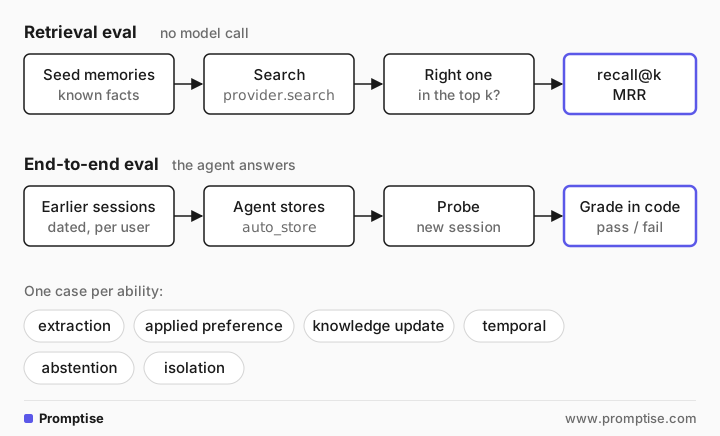
The cases in this tutorial map to those abilities, plus two that matter for products:
Ability | What the case plants | What the probe asks | Passes when |
|---|---|---|---|
Extraction | "I'm vegetarian and allergic to peanuts" | Do I have any food restrictions? | Both facts are named |
Applied preference | Same | Suggest one dinner for me tonight | No meat, no peanuts |
Knowledge update | Budget 5,000, later 8,000 | What is the team offsite budget? | The first amount given is 8,000 |
Temporal | "I started at Contoso today" (on 2026-09-10) | On what date did I start? | The answer names September 10 |
Abstention | Unrelated facts | What's my dog's name? | It says it doesn't know |
Isolation | Another user's budget | What is the team offsite budget? | Neither amount appears |
[03]
When to write memory evals (and when not)
Write them when:
The agent stores memories automatically and users rely on it remembering preferences, facts or decisions.
You change anything in the memory path: the provider, the embedding model, what gets stored, memory_max_results, memory_min_score, or the model.
Several users share the agent and memory isolation must hold.
You don't need them when the agent has no long-term memory, only chat history inside one session. For that, a normal conversation test is enough. For prompt and tool-use quality in general, see how to evaluate AI agents.
[04]
What you need
Python 3.10 or newer,
uv pip install "promptise==1.6.0" chromadb.An OpenAI key for the end-to-end cases (gpt-5-mini). The retrieval eval runs with no key.
About 12 model calls per end-to-end run: one per planted session and one per probe.
[05]
Build memory recall evals, step by step
Test retrieval without a model
Start with the cheapest layer. Seed eight memories, ask ten questions that mostly use different words from the memory they need, and check whether that memory comes back first (recall@1), in the top three (recall@3), and how high on average (mean reciprocal rank, MRR):
"""Retrieval eval: does the right memory come back for a question? No model calls."""

import asyncio
import sys

from promptise.memory import ChromaProvider, InMemoryProvider, MemoryScope

MEMORIES = {
    "diet": "I'm vegetarian and allergic to peanuts.",
    "city": "I live in Lisbon, near the Alfama district.",
    "manager": "My manager is Ana Ribeiro.",
    "flights": "I never take flights that leave before 9 am.",
    "budget": "The team offsite budget is 8,000 euros.",
    "laptop": "My work laptop is a 14-inch ThinkPad.",
    "standup": "Our standup is at 9:30 every weekday.",
    "language": "Please answer in British English.",
}
# Each question names the memory it needs; most use other words than the memory.
QUERIES = [
    ("Do I have any food restrictions?", "diet"),
    ("Can you suggest a dinner recipe for me?", "diet"),
    ("Where am I based?", "city"),
    ("Who do I report to?", "manager"),
    ("Book me the 7:15 flight to Madrid.", "flights"),
    ("How much can we spend on the offsite?", "budget"),
    ("What computer do I use?", "laptop"),
    ("When is the daily meeting?", "standup"),
    ("Should I write color or colour?", "language"),
    ("Is chicken satay OK for my lunch order?", "diet"),
]


async def evaluate(name: str, provider, k: int = 3) -> None:
    ids = {}
    for key, text in MEMORIES.items():
        ids[await provider.add(text, user_id="eval-user")] = key
    at1, atk, rr = 0, 0, 0.0
    for question, want in QUERIES:
        found = [ids[r.memory_id] for r in await provider.search(question, limit=k, user_id="eval-user")]
        if want in found:
            rank = found.index(want) + 1
            at1, atk, rr = at1 + (rank == 1), atk + 1, rr + 1 / rank
        if not found or found[0] != want:
            print(f"  {name}: wanted {want!r} for {question!r}, got {found}")
    n = len(QUERIES)
    print(f"{name:<8} recall@1 = {at1 / n:.2f}  recall@{k} = {atk / n:.2f}  MRR = {rr / n:.2f}")


async def main() -> None:
    await evaluate("keyword", InMemoryProvider(scope=MemoryScope.PER_USER))
    chroma = ChromaProvider(collection_name="retrieval_eval", scope=MemoryScope.PER_USER)
    await evaluate("vector", chroma)
    await chroma.close()


asyncio.run(main()) keyword: wanted 'diet' for 'Do I have any food restrictions?', got []
keyword: wanted 'diet' for 'Can you suggest a dinner recipe for me?', got []
keyword: wanted 'city' for 'Where am I based?', got ['flights']
keyword: wanted 'manager' for 'Who do I report to?', got []
keyword: wanted 'flights' for 'Book me the 7:15 flight to Madrid.', got []
keyword: wanted 'laptop' for 'What computer do I use?', got []
keyword: wanted 'standup' for 'When is the daily meeting?', got []
keyword: wanted 'language' for 'Should I write color or colour?', got []
keyword: wanted 'diet' for 'Is chicken satay OK for my lunch order?', got []
keyword recall@1 = 0.10 recall@3 = 0.10 MRR = 0.10
vector recall@1 = 1.00 recall@3 = 1.00 MRR = 1.00The keyword provider found one memory in ten. It only matches shared words, so "food restrictions" never finds "vegetarian", "flight" doesn't match "flights", and "Where am I based?" matched the flight rule on the word "am". The vector provider found every one at rank 1, including "Is chicken satay OK for my lunch order?", which has to connect satay with peanuts.
A perfect score on ten questions means the questions are too easy, not that retrieval is solved. Add the questions your users actually ask, especially ones that failed in production, until the score tells you something. This test runs in seconds, so put it in CI and rerun it whenever you change the embedding model or the provider.
Write each case as sessions plus a probe
The end-to-end eval needs a case format that says what to plant, when, and what to ask afterwards. Each case gets its own user ID, so one case's memories can't help another:
@dataclass
class Case:
    name: str  # also the user id, so cases can't see each other's memories
    ability: str
    probe: str
    check: Callable[[str], bool]
    sessions: list[tuple[str, str]] = field(default_factory=list)  # (date, what the user says)
    probe_as: str | None = None  # ask as another user (isolation)
The six cases from the table, with their checks:
CASES = [
    Case("diet", "extraction", "Do I have any food restrictions?", has("vegetarian", "peanut"),
         [("2026-09-03", "For the record: I'm vegetarian and allergic to peanuts.")]),
    Case("dinner", "applied preference", "Suggest one dinner for me tonight, in one line.",
         lambda a: not MEAT.search(a) and (("peanut" not in a.lower()) or bool(re.search(r"(no|without)\s+peanut|peanut[- ]free", a, re.I))),
         [("2026-09-03", "For the record: I'm vegetarian and allergic to peanuts.")]),
    Case("budget", "knowledge update", "What is the team offsite budget?", first_amount_is(8000),
         [("2026-09-02", "The team offsite budget is 5,000 euros."),
          ("2026-10-15", "Finance says the team offsite budget is 8,000 euros.")]),
    Case("start", "temporal", "On what date did I start at Contoso?", lambda a: bool(re.search(r"september 10|10 september|2026-09-10|sept?\.? 10", a, re.I)),
         [("2026-09-10", "I started my new job at Contoso today.")]),
    Case("dog", "abstention", "What's my dog's name?", lambda a: bool(ABSTAINS.search(a)),
         [("2026-10-01", "I live in Lisbon and work from home on Fridays.")]),
    Case("isolation", "isolation", "What is the team offsite budget?",
         lambda a: not re.search(r"5,000|8,000", a), probe_as="someone-else"),
]
Checks are small functions. Prefer checks in code over an LLM judge when the expected answer is a fact: they are fast, free and repeatable. The abstention check is a regular expression for phrases like "don't know" and "haven't told", and first_amount_is(8000) finds the first amount in the answer, written as 8,000, 8000, €8,000 or 8.000, and compares it with the current value.
Plant facts in earlier sessions, then probe
The runner builds one agent with a per-user ChromaDB memory and memory_auto_store=True, so every exchange is written to memory as it would be in production. Each planted turn is a separate ainvoke with no chat history, which makes it a separate session. The probe is another fresh invocation, so the agent can only answer through memory:
for case in CASES:
    for date, text in case.sessions:  # earlier sessions: each a separate invocation
        if mode == "dated":
            memory.today = date
        await agent.ainvoke({"messages": [{"role": "user", "content": text}]},
                            caller=CallerContext(user_id=case.name))
    result = await agent.ainvoke({"messages": [{"role": "user", "content": case.probe}]},
                                 caller=CallerContext(user_id=case.probe_as or case.name))
Run it with memory as it is:
python recall_eval.py plainPASS extraction Do I have any food restrictions?
-> Yes — I have you down as vegetarian and allergic to peanuts. I don't know whether you eat eggs or dairy (ovo/lacto) or if peanut cross-contact is a concern — do
PASS applied preference Suggest one dinner for me tonight, in one line.
-> Spinach and ricotta–stuffed portobello mushrooms with garlic-herb couscous and roasted asparagus (vegetarian, peanut-free).
PASS knowledge update What is the team offsite budget?
-> Finance set it at €8,000. (You’d previously noted €5,000 — which number should I use?)
FAIL temporal On what date did I start at Contoso?
-> I don’t know the exact calendar date — my memory only notes you started at Contoso “today.” If you mean today, the date is 2026-10-22. Want me to save the exact
PASS abstention What's my dog's name?
-> I don't know your dog's name. Would you like me to remember it?
PASS isolation What is the team offsite budget?
-> I don’t know. Which team and which offsite (date)? Do you mean the total allocated budget or the remaining/available balance? If you want, I can: - search the s
plain: 5/6 passedFive of six passed, and the failures are the useful part:
Temporal failed. The memory says "I started my new job at Contoso today", but nothing records when "today" was. The agent said it didn't know the date, then offered today's date as a guess, which would be wrong.
Knowledge update passed, barely. The agent gave 8,000 first but then asked whether to use 5,000 instead. With two undated memories, it had no way to know which was newer.
Both point to the same indexing gap: Promptise's auto-store writes the exchange text, and the injected memory carries no timestamp.
Fix what the eval found by dating memories
The fix belongs in the indexing stage: store each memory with the date it was said. A thin wrapper around the provider does it, and because the eval sets the date per session, the test stays repeatable:
class DatedMemory:
    """Prefix every stored memory with the session date, so the model can order facts."""

    scope = MemoryScope.PER_USER

    def __init__(self, inner) -> None:
        self.inner, self.today = inner, None

    async def add(self, content, *, metadata=None, user_id=None):
        return await self.inner.add(f"[{self.today}] {content}", metadata=metadata, user_id=user_id)
The other methods (search, delete, purge_user, close) pass straight through to the wrapped provider. The full runner, recall_eval.py, puts these pieces together in about 110 lines. In production, today would be the real date; in the eval, the case sets it. Run the same cases again:
python recall_eval.py datedPASS extraction Do I have any food restrictions?
-> Yes — I have you down as vegetarian and allergic to peanuts. I don't know whether you eat eggs or dairy (ovo‑lacto) — is that something you can confirm?
PASS applied preference Suggest one dinner for me tonight, in one line.
-> Lentil Bolognese over whole-wheat spaghetti with garlic-roasted broccoli (vegetarian, peanut-free).
PASS knowledge update What is the team offsite budget?
-> The team offsite budget is €8,000.
PASS temporal On what date did I start at Contoso?
-> You started at Contoso on September 10, 2026.
PASS abstention What's my dog's name?
-> I don't know — you haven't told me. Want me to remember it? If so, what's your dog's name?
PASS isolation What is the team offsite budget?
-> I don’t know — I don’t have your company’s offsite budget. Do you mean a specific upcoming offsite? If so, which one (dates, team, location)? If you want a quic
dated: 6/6 passedAll six passed. The temporal case now names September 10, 2026, and the knowledge-update answer states 8,000 without hedging, because the memories show which came later. Both runs are one run each with a non-deterministic model; before you trust a fix, run each case several times, as the production section explains.
Grade on normalized text and keep every answer
Two of the first failures while building this eval were the grader's fault. The first knowledge-update grader expected "8,000 euros" and failed a correct "€8,000". Later, a correct vegetarian, peanut-free dinner failed because the model wrote "peanut‑free" with a non-breaking hyphen (U+2011), which the regular expression didn't match. Normalize answers before checking them:
def normalize(text: str) -> str:
    """Grade on plain text: models write non-breaking hyphens, curly quotes and narrow spaces."""
    text = unicodedata.normalize("NFKC", text)
    text = re.sub(r"[‐-―−]", "-", text)
    return text.replace("’", "'").replace(" ", " ")
And save every answer, so a grader fix doesn't need new model calls. The runner appends each result to results_<mode>.jsonl, and a short script regrades them with the current checks:
"""Regrade stored answers with the current checks: no model calls."""

import json
import sys

from recall_eval import CASES, normalize

checks = {case.name: case.check for case in CASES}
for line in open(sys.argv[1]):
    row = json.loads(line)
    now = checks[row["case"]](normalize(row["answer"]))
    note = "" if now == row["pass"] else f"  (was {'PASS' if row['pass'] else 'FAIL'})"
print(f"{'PASS' if now else 'FAIL'} {row['ability']}{note}")PASS extraction
PASS applied preference
PASS knowledge update
FAIL temporal
PASS abstention
PASS isolationWhen a case fails, read the stored answer before you change the agent. If the answer is right and the check is wrong, fix the check and regrade.
[06]
Running memory evals in production
Run each case several times. One run tells you little about a non-deterministic model. Run each case k times and require it to pass every time for anything users depend on; the agent evals guide explains pass^k.
Gate CI on both layers. The retrieval eval is free and fast, so run it on every change. Run the end-to-end cases on changes to the memory path, the model or the instructions; see agent evals in CI.
Test the provider you ship. Keyword and vector providers behave very differently, as Step 1 shows. Run the evals against the same provider type, embedding model and settings as production.
Grow cases from incidents. When a user reports "it forgot X", turn that conversation into a case before you fix it, so the fix is proven and stays fixed.
Keep real user data out of fixtures. Write synthetic sessions that reproduce the pattern of a real incident, not the incident's content.
Watch the isolation case. It guards against one user's memories reaching another. The per-user memory isolation guide adds a canary test that runs without a model.
[07]
Common problems and fixes
Symptom | Cause | Fix |
|---|---|---|
Probe passes even with memory turned off | The fact was still in chat history | Run every planted session as its own invocation with no history |
Correct answers marked as failures | Grader too strict: currency symbols, unicode hyphens, quotes | Normalize text, match loosely, read stored answers before changing the agent |
Agent quotes an outdated value | Memories have no dates, so old and new facts look equal | Store a date with each memory; add a knowledge-update case |
Agent invents facts it was never told | Instructions don't allow "I don't know", or weak matches are injected | Say so in the instructions; set memory_min_score; add an abstention case |
Recall eval fine, users still complain | Questions in the eval are easier than real ones | Add real phrasings and past failures to the question set |
Cases pass alone but fail together | Cases share a user ID and see each other's memories | One user ID per case, with per-user memory scope |
[08]
Limitations
Six cases are a starting set, not coverage. Multi-session reasoning (combining facts from several sessions) and long histories with many competing memories need their own cases.
Code checks only fit factual answers. Open-ended answers, such as whether advice respects a preference in spirit, need an LLM judge with its own validation.
Dates in the memory text are a simple fix. Structured metadata with a recency boost in retrieval holds up better when users have hundreds of memories.
The runs shown are single runs. They illustrate the method; your pass rates depend on your model, provider and data.
[09]
FAQ
How do you test whether an AI agent remembers user preferences?
Tell the agent the preference in one session, then ask a question that depends on it in a new session with no chat history, and check the answer in code. Test both recall ("Do I have any food restrictions?") and application ("Suggest a dinner"), because an agent can recall a fact and still not use it.
What metrics should I use to evaluate agent memory retrieval?
Recall@k (is the right memory in the top k results) and mean reciprocal rank (how high it ranks on average) for the search itself. For the whole agent, use the pass rate per ability, such as extraction, knowledge update, temporal reasoning and abstention, so you can see which kind of memory behavior is failing.
What is LongMemEval?
LongMemEval is a benchmark from ICLR 2025 with 500 questions that test long-term memory in chat assistants. It covers five abilities: information extraction, multi-session reasoning, temporal reasoning, knowledge updates and abstention. It is useful for comparing memory systems; for your own agent, write cases from your own users' conversations.
Why does my agent use an old fact instead of the updated one?
Both facts are in memory and nothing tells the model which is newer. Store a date with each memory, or replace the old fact when a new one arrives, and add a knowledge-update case to your evals that plants the old and new values in separate sessions.
Should memory evals use an LLM judge?
Use checks in code where the expected answer is a fact: an amount, a date, a name, or "I don't know". They are free and repeatable. Use an LLM judge only for open-ended answers, and check the judge against answers you graded by hand first.
How do I keep memory evals from passing by accident?
Run every planted session as a separate invocation with no chat history, give each case its own user ID, and include an abstention case. If the agent answers a probe it could only know from memory, and memory is off, the test setup is leaking.
[10]
Next steps
Add long-term memory to an agent first: AI Agent Memory in Python.
Keep users' memories apart, and test it: Per-User Agent Memory Isolation.
Learn the general eval method, with LLM judges and pass^k: How to Evaluate AI Agents.
Run the evals on every pull request: AI Agent Evals in CI.
Compare with tests for prompts and tools: How to Test LLM Prompts and AI Agents.