Contents · 12 sections↓
- 01How do you stop agent memory leaking between users?
- 02How agent memory leaks between users
- 03How per-user scopes work
- 04When you need per-user memory (and when shared is fine)
- 05What you need
- 06Isolate memory per user, step by step
- 07What isn't automatic in Promptise Foundry
- 08Running shared memory in production
- 09Common problems and fixes
- 10Limitations
- 11FAQ
- 12Next steps
Per-user memory isolation is what stops a shared AI agent from telling one employee what another employee told it. When a single internal assistant serves HR, sales and engineering, long-term memory becomes a quiet leak path: a fact stored during one person's conversation can be recalled into someone else's. This guide shows how that leak happens, how per-user scopes and role-gated team notes prevent it, what is automatic in Promptise Foundry and what isn't, and how to prove isolation with a canary test.
How do you stop agent memory leaking between users?
Partition memory by a verified user identity and make every read and write carry it. Each user's memories live under their own key, so a search can only return entries that user wrote. Knowledge meant for a group goes in a separate, read-only store that application code writes and filters by the caller's roles. A request with no user identity gets no memory at all.
Key takeaways:
A shared memory pool plus automatic storing is a leak. Every exchange one person has becomes recall material for everyone else.
In Promptise Foundry the default memory scope is `SHARED`. Set scope=MemoryScope.PER_USER on the provider; it isn't on by default.
The key must come from the verified caller, not from a tool argument or the prompt. Foundry uses CallerContext.isolation_key, which is tenant::user when a tenant is set.
Privilege levels inside one company need their own rule. Per-user scope keeps people apart; it doesn't know that HR notes are for HR. That part is a small custom provider.
Test it with a canary. Plant a unique string as one user and try every way to reach it as another.
[02]
How agent memory leaks between users
Long-term memory for agents usually works the same way everywhere. After a conversation, some text is stored: the whole exchange, a summary, or extracted facts. Before the next request, the agent searches the store with the new question and puts the best matches into the prompt. The model then treats those matches as context it can use.
The leak comes from three ordinary design choices meeting:
One store for everyone. It's the simplest setup and the default in several libraries.
Automatic writes. The agent saves every exchange, so sensitive things land in memory without anyone deciding they should.
Similarity search. Retrieval returns whatever is closest to the question. It has no idea who wrote an entry or who should see it.
So when an HR manager tells the assistant "Priya's raise is approved, new salary 145,000", that sentence is stored. Later a salesperson asks "What do you know about Priya?", the search finds the HR exchange, and the model answers with the salary. No attack was needed. Here is that exact scenario, run with a shared store:
"""One shared assistant, two employees, auto-stored memory. Run with: shared | per_user."""

import asyncio
import logging
import sys

from promptise import CallerContext, build_agent
from promptise.memory import InMemoryProvider, MemoryScope


class OneLine(logging.Formatter):
    def formatException(self, ei):  # keep the exception type and message only
        return f"  {ei[0].__name__}: {ei[1]}"


handler = logging.StreamHandler(sys.stdout)
handler.setFormatter(OneLine("%(levelname)s %(name)s: %(message)s"))
logging.basicConfig(level=logging.WARNING, handlers=[handler])

DANA = CallerContext(user_id="dana", roles={"hr"})
SAM = CallerContext(user_id="sam", roles={"sales"})


async def say(agent, caller, text):
    result = await agent.ainvoke({"messages": [{"role": "user", "content": text}]}, caller=caller)
    who = caller.user_id if caller else "no caller"
    print(f"[{who}] {text}\n  -> {result['messages'][-1].content}")


async def main(scope: str) -> None:
    memory = InMemoryProvider(scope=MemoryScope(scope))
    agent = await build_agent(
        model="openai:gpt-5-mini",
        memory=memory,
        memory_auto_store=True,  # every exchange is written to memory
        instructions="You are Acme's internal assistant. Answer in one or two sentences.",
    )
    try:
        await say(agent, DANA, "Note for later: Priya Shah's raise is approved, new salary 145,000 from January.")
        question = "What do you know about Priya Shah?"
        found = await memory.search(question, user_id=SAM.isolation_key)
        print(f"memory search as sam: {len(found)} result(s)")
        await say(agent, SAM, question)
        if scope == "per_user":
            await say(agent, None, question)
    finally:
        await agent.shutdown()


if __name__ == "__main__":
asyncio.run(main(sys.argv[1]))python leak.py shared[dana] Note for later: Priya Shah's raise is approved, new salary 145,000 from January.
-> Noted: Priya Shah’s raise approved to $145,000 effective January. Would you like me to add this to payroll/HR records or set a reminder?
memory search as sam: 1 result(s)
[sam] What do you know about Priya Shah?
-> Priya Shah's raise was approved — her new salary will be $145,000 effective January. Would you like me to add this to payroll/HR records or set a reminder?Sam is in sales. The memory search as Sam found Dana's exchange, and the model repeated her salary note to him, even offering to update payroll. The same thing happens with a vector database, where "Priya" questions sit close to "Priya" memories in embedding space.
Prompt injection makes it worse. If users can write to memory that others read, one user can plant instructions that run in another user's session. LangChain's Deep Agents documentation warns about exactly this for agent-wide memory and recommends user scope by default, with shared memory kept read-only.
[03]
How per-user scopes work
A per-user scope adds an owner to every memory entry and a filter to every query. There are two ways to build it:
Approach | How it works | Trade-off |
|---|---|---|
Namespace or collection per user | Each user's memories live in a separate partition; a query can only touch one | Strongest isolation; more partitions to manage |
Owner tag plus filter | One store, each entry tagged with its owner, every query filtered by owner | Simple to run; correctness depends on the filter always being applied |
AWS's guide for LangGraph memory on DynamoDB recommends namespace scoping over metadata filters "for anything that determines correctness", and notes that filters applied after a top-N similarity search can return fewer results for quiet tenants. Mem0 scopes memories by user_id, and LangChain's Deep Agents scope them by namespace. Promptise Foundry's providers use the owner-tag approach, with the filter enforced inside the provider so callers can't forget it:
InMemoryProvider stores the owner with each entry and skips other owners' rows on search and delete.
ChromaProvider writes the owner into entry metadata and passes it as a where filter on every query.
Mem0Provider passes the owner as Mem0's own user_id.
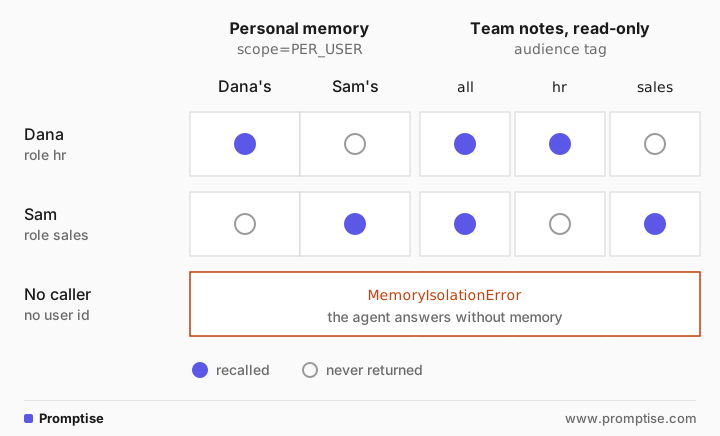
In all three, a per-user call without a user ID raises MemoryIsolationError instead of falling back to the whole store.
[04]
When you need per-user memory (and when shared is fine)
Use per-user scope when:
More than one person talks to the same agent, and memory can contain anything they say.
Users have different access in your company: HR, finance, legal, management.
You store memories automatically rather than curating them.
People may ask you to delete what the assistant knows about them.
A shared scope is reasonable when:
One person uses the agent, or the agent runs unattended with no users.
The store holds curated, non-sensitive knowledge that application code writes, such as product docs or office policies, and the agent never writes to it.
Shared and per-user aren't exclusive. The pattern later in this guide combines a per-user store for personal memory with a read-only store for team knowledge.
[05]
What you need
Python 3.10 or newer and
uv pip install "promptise==1.6.0"; add chromadb for the vector store example.An OpenAI key for the agent examples (gpt-5-mini). The canary test needs no model.
A way to know who is asking: your app's sign-in, with user ID, tenant and roles taken from a verified token.
[06]
Isolate memory per user, step by step
Turn on per-user scope
Run the same script with a per-user provider. The only change is the scope passed to the provider:
memory = InMemoryProvider(scope=MemoryScope.PER_USER)python leak.py per_user[dana] Note for later: Priya Shah's raise is approved, new salary 145,000 from January.
-> Got it — noted that Priya Shah’s raise to $145,000 is approved effective January. Would you like me to set a reminder, create an HR update, or confirm the exact date/year?
memory search as sam: 0 result(s)
[sam] What do you know about Priya Shah?
-> Which Priya Shah do you mean — a public figure or an Acme colleague? I can share publicly available info or look up an internal directory entry if you confirm, but I can’t disclose private personal data about a private individual.
WARNING promptise.agent: Memory search failed
MemoryIsolationError: InMemoryProvider.search requires a user_id when scope=PER_USER
WARNING promptise.memory: Memory auto-store failed
MemoryIsolationError: InMemoryProvider.add requires a user_id when scope=PER_USER
[no caller] What do you know about Priya Shah?
-> Do you mean a specific Priya Shah (for example an Acme employee) or someone else? If you tell me the department or location, I can look up her internal profile.The search as Sam returned nothing, so the model had nothing to repeat and treated Priya as an unknown name. The last call had no caller at all. Both the search and the automatic store raised MemoryIsolationError, the agent logged a warning, and it answered without memory. That is the safe failure: no identity, no recall, no write.
Pass a verified identity on every request
Scoping only works if the agent knows who is asking. In Foundry, you pass a CallerContext to ainvoke() or chat(), and the agent uses its isolation_key for both memory search and automatic storing:
caller = CallerContext(user_id=claims["sub"], tenant_id=claims["org"], roles=set(claims["roles"]))
result = await agent.ainvoke({"messages": messages}, caller=caller)
Build it from your verified session or token, never from something the user typed. When tenant_id is set, the key becomes acme::dana, so two companies that each have a user called dana never share memories. To carry the same user's identity to the tools the agent calls, add their token as bearer_token; on-behalf-of auth covers that side.
Use the same rule on a persistent store
InMemoryProvider is for tests. With ChromaDB, the scope argument is the same, and the owner becomes a metadata filter on the query:
"""The same per-user rule on a persistent vector store (ChromaDB)."""

import asyncio

from promptise.memory import ChromaProvider, MemoryScope


async def main() -> None:
    memory = ChromaProvider(collection_name="assistant_memory", persist_directory=".chroma",
                            scope=MemoryScope.PER_USER)
    await memory.add("Prefers summaries as three bullet points.", user_id="acme::dana")
    await memory.add("Works on the Northwind renewal.", user_id="acme::sam")
    for user in ("acme::dana", "acme::sam"):
        hits = await memory.search("How does this person like their summaries?", user_id=user)
        print(user, [(r.content, round(r.score, 2)) for r in hits])
    await memory.close()


asyncio.run(main())acme::dana [('Prefers summaries as three bullet points.', 0.54)]
acme::sam [('Works on the Northwind renewal.', 0.0)]Each user only gets their own entry back. Notice Sam's result: his only memory has nothing to do with summaries, and it still came back, with a score of 0.0. Vector search always returns the nearest entries, relevant or not, so set memory_min_score in build_agent to drop weak matches before they reach the prompt.
Add team knowledge gated by role
Per-user scope keeps people apart, but companies also have knowledge that belongs to a group: HR policies, sales pricing rules, on-call runbooks. Putting those in a shared store visible to everyone recreates the leak. Foundry has no built-in notion of role-gated memory, so this is a small provider of your own. build_agent accepts any object that implements the MemoryProvider protocol:
"""Personal memory per user, plus read-only team notes gated by the caller's roles."""

import asyncio

from promptise import CallerContext, build_agent, get_current_caller
from promptise.memory import InMemoryProvider, MemoryResult, MemoryScope


class RoleScopedMemory:
    """A MemoryProvider: the user's own memories plus the team notes their roles allow."""

    scope = MemoryScope.PER_USER

    def __init__(self, personal: InMemoryProvider, team: InMemoryProvider) -> None:
        assert personal.scope is MemoryScope.PER_USER
        self.personal, self.team = personal, team

    async def search(self, query, *, limit=5, user_id=None) -> list[MemoryResult]:
        caller = get_current_caller()
        allowed = {"all"} | (caller.roles if caller else set())
        mine = await self.personal.search(query, limit=limit, user_id=user_id)
        notes = [r for r in await self.team.search(query, limit=50)
                 if r.metadata.get("audience") in allowed]
        return sorted(mine + notes, key=lambda r: r.score, reverse=True)[:limit]

    async def add(self, content, *, metadata=None, user_id=None) -> str:
        # The agent only ever writes to the user's personal memory.
        return await self.personal.add(content, metadata=metadata, user_id=user_id)

    async def delete(self, memory_id, *, user_id=None) -> bool:
        return await self.personal.delete(memory_id, user_id=user_id)

    async def purge_user(self, user_id) -> int:
        return await self.personal.purge_user(user_id)

    async def close(self) -> None:
        await self.personal.close()
        await self.team.close()


async def load_team_notes() -> InMemoryProvider:
    """Written by application code from an approved source, never by the agent."""
    team = InMemoryProvider(scope=MemoryScope.SHARED)
    await team.add("Expense reports are due on the 5th of each month.", metadata={"audience": "all"})
    await team.add("The 2027 salary bands are in the HR drive, folder Comp/2027.", metadata={"audience": "hr"})
    await team.add("The Q4 discount ceiling is 15 percent without VP approval.", metadata={"audience": "sales"})
    return team


async def main() -> None:
    memory = RoleScopedMemory(InMemoryProvider(scope=MemoryScope.PER_USER), await load_team_notes())
    agent = await build_agent(
        model="openai:gpt-5-mini",
        memory=memory,
        instructions="You are Acme's internal assistant. Answer in one or two sentences from memory.",
    )
    dana = CallerContext(user_id="dana", roles={"hr"})    # roles come from the verified token
    sam = CallerContext(user_id="sam", roles={"sales"})
    question = "Where are the 2027 salary bands, and when are expense reports due?"
    try:
        for caller in (dana, sam):
            result = await agent.ainvoke({"messages": [{"role": "user", "content": question}]}, caller=caller)
            print(f"[{caller.user_id}] {result['messages'][-1].content}")
        hits = await memory.search(question, user_id="sam", limit=5)  # outside an invocation: no caller
        print("search with no caller:", [r.metadata["audience"] for r in hits])
    finally:
        await agent.shutdown()


if __name__ == "__main__":
asyncio.run(main())[dana] The 2027 salary bands are in the HR drive under Comp/2027, and expense reports are due on the 5th of each month.
[sam] I don't have the location of the 2027 salary bands in my memory—would you like me to look them up? Expense reports are due on the 5th of each month.
search with no caller: ['all']Dana, with the hr role, got the salary band location and the expense rule. Sam asked the same question and only got the note tagged all. Three rules keep this sound:
Team notes are read-only for the agent. add() only ever writes to the user's personal store; application code loads team notes from an approved source.
Roles come from the verified caller. The provider reads them with get_current_caller(), which only exists inside an invocation. Outside one, as the last line shows, it falls back to the all notes.
Personal memory still fails closed. With no caller, the personal search raises, so the whole search fails and the agent answers without memory.
For stricter separation, give each group its own collection instead of tagging entries, which is the namespace approach from the table above.
Prove isolation with a canary test
A canary test plants a unique string as one user and checks that no other identity can reach it. It needs no model, so it belongs in your test suite:
"""Canary test: plant a secret as one user, try every way to reach it as another."""

import asyncio

from promptise import CallerContext
from promptise.memory import InMemoryProvider, MemoryIsolationError, MemoryScope

CANARY = "canary-7f3a: Priya Shah salary 145000"


async def main() -> None:
    memory = InMemoryProvider(scope=MemoryScope.PER_USER)
    dana = CallerContext(user_id="dana", tenant_id="acme").isolation_key
    sam = CallerContext(user_id="sam", tenant_id="acme").isolation_key
    other_dana = CallerContext(user_id="dana", tenant_id="globex").isolation_key
    canary_id = await memory.add(CANARY, user_id=dana)

    for query in ("canary-7f3a", "Priya Shah", "salary", CANARY):
        assert await memory.search(query, user_id=sam) == [], query
        assert await memory.search(query, user_id=other_dana) == [], query
    print(f"search as {sam} and {other_dana}: nothing found for 4 queries")

    assert await memory.delete(canary_id, user_id=sam) is False
    print("delete as sam: refused")

    try:
        await memory.search("Priya Shah")
    except MemoryIsolationError as exc:
        print(f"search with no user: {type(exc).__name__}")

    assert [r.content for r in await memory.search("Priya Shah", user_id=dana)] == [CANARY]
    print(f"search as {dana}: finds her own entry")
    print(f"purge_user({dana!r}) removed {await memory.purge_user(dana)} entry")
    assert await memory.search("Priya Shah", user_id=dana) == []


asyncio.run(main())search as acme::sam and globex::dana: nothing found for 4 queries
delete as sam: refused
search with no user: MemoryIsolationError
search as acme::dana: finds her own entry
purge_user('acme::dana') removed 1 entryThe test covers a different user in the same tenant, the same user name in another tenant, deleting another user's entry, searching with no user, and deleting on request. Note that purge_user takes the isolation key, acme::dana, not the bare user ID: purging dana would remove nothing. Run the same test against your production provider type, not only the in-memory one, and see how to test AI agent memory for recall tests that check the right memories do come back.
[07]
What isn't automatic in Promptise Foundry
Some isolation surfaces are handled for you once a caller is passed, and some are not. Be clear about which is which:
Surface | Automatic? | What to do |
|---|---|---|
Memory scope | No: default is SHARED | Pass scope=MemoryScope.PER_USER to the provider |
Memory search and auto-store key | Yes, when a CallerContext is passed | Always pass the caller |
Your own provider.add() calls | No | Pass user_id=caller.isolation_key yourself |
Role or group gating inside a company | No | A custom provider, as above |
Conversation sessions | Yes: sessions record an owner and refuse other users | Pass the caller to chat() |
Semantic cache | Yes: default scope is per user | Leave it; shared requires an explicit acknowledgment |
Logs, traces, model provider retention | No | Redact and control them separately |
The sessions row matters because chat history is memory too. The AI agent memory guide shows a user being refused another user's session even with the exact session ID.
[08]
Running shared memory in production
Decide what gets stored. Automatic storing of whole exchanges is convenient and risky. For agents that see sensitive data, store facts your app extracts and checks, or let users save memories explicitly.
Keep sensitive data out of memory entirely when it isn't needed later. Redacting before storage is easier than isolating perfectly; see PII redaction.
Treat recalled memory as untrusted input. Foundry wraps injected memories in a fenced block and strips known role markers such as SYSTEM:, but the text of an injected instruction can survive. Shared notes should be written by code, not by users. The prompt injection guide covers the wider defense.
Handle deletion requests across every store: purge_user for memory, session deletion for conversations, and your logs.
Watch for the warning. A
Memory search failed ... MemoryIsolationErrorlog line means a request reached the agent without a caller. Alert on it; it usually points to a code path that forgot to pass the identity.
[09]
Common problems and fixes
Symptom | Cause | Fix |
|---|---|---|
One user's details show up in another's answer | Provider uses the default SHARED scope | Set scope=MemoryScope.PER_USER |
Memory never recalled, warning MemoryIsolationError in logs | No CallerContext passed on that code path | Pass caller= to every ainvoke(), chat() and astream() |
purge_user removes 0 entries | Called with the bare user ID while a tenant was set | Purge with caller.isolation_key (tenant::user) |
Irrelevant memories injected | Vector search returns the nearest entries even when they don't match | Set memory_min_score |
Team notes visible to the wrong group | Notes stored in a shared store without gating | Tag notes by audience and filter by verified roles, or use one collection per group |
Memories from before the change still leak | Old entries were stored without an owner | Re-create the store, or migrate entries with an owner tag |
[10]
Limitations
Owner tags are a filter, not separate storage. A bug in a custom provider, or direct access to the database, bypasses it. Namespaces or collections per user give structural separation.
The isolation is only as good as the identity. If your app builds the CallerContext from unverified input, scoping protects nothing.
Role-gated memory is your code. The example provider is a starting point; it doesn't handle role changes for memories already recalled into a running conversation.
Isolation doesn't stop a user's own memory being misused. Instructions planted in a user's memory still reach that user's sessions.
[11]
FAQ
Why does my AI agent remember things other users told it?
Its long-term memory is one shared store, and it searches that store with each new question. Anything another user said that is similar to the question can be recalled. Scope memory per user, so each search only returns the asking user's entries, and stop storing sensitive exchanges automatically.
What is per-user memory isolation in an AI agent?
Per-user memory isolation means every stored memory has an owner and every search is limited to the asking user's memories. It is enforced in the memory layer with a verified user ID, not in the prompt, so the model never sees other users' entries.
Should I use a namespace per user or a metadata filter?
Both work when applied consistently. A namespace or collection per user gives structural separation, so no query can cross users. A metadata filter on one store is simpler to operate but relies on the filter being applied on every read. Use separate namespaces when a mistake would be serious.
How do I share some memories with a team but not others?
Keep team knowledge in a separate store that application code writes, tag each entry with its audience, and filter it by the caller's verified roles at search time. Keep personal memory in a per-user store and let the agent write only there.
How do I test that agent memory doesn't leak between users?
Use a canary test. Store a unique string as one user, then search for it as a different user, as the same user name in another tenant, and with no user, and assert nothing comes back. Run it against the same provider type you use in production.
Does Promptise Foundry isolate memory per user by default?
No. Memory providers default to MemoryScope.SHARED. Set scope=MemoryScope.PER_USER and pass a CallerContext on every request; Foundry then keys memory search and automatic storing on the caller's isolation key. Conversation sessions and the semantic cache are per user by default.
[12]
Next steps
Add short-term and long-term memory from the start: AI Agent Memory in Python.
Check that the right memories come back, not just that the wrong ones don't: How to Test AI Agent Memory.
Make tools act as the same user: On-Behalf-Of Auth for AI Agents.
Separate whole customers, not just users: Multi-Tenant AI Agents.
Keep the cache per user too: LLM Semantic Cache and Model Fallback.