Contents · 15 sections↓
- 01What is vectorless RAG?
- 02How does tree search retrieval work?
- 03Is vector search dead?
- 04When should you use vectorless RAG, and when not?
- 05What you need
- 06Step 1: Build the tree index
- 07Step 2: Give the agent tools to navigate
- 08Step 3: Write the retrieval instructions
- 09Step 4: Compare with vector search on your own documents
- 10The complete example
- 11Running vectorless RAG in production
- 12Common problems and fixes
- 13Limitations
- 14FAQ
- 15Next steps
Vectorless RAG retrieves from a document without embeddings or a vector database: a language model reads the document's table of contents, opens the sections that fit the question and follows their cross-references, the way a person uses a manual. This guide explains how tree search works, where it beats vector search and where it doesn't, and builds a working tree search agent in Python with three small tools and real output.
What is vectorless RAG?
Vectorless RAG replaces the embed-and-rank step of retrieval with reasoning over the document's structure. You index each document as a tree of sections, each with a title and a short summary. At question time, a model reads the tree, chooses the sections that should hold the answer, reads them in full, and follows references to other sections until it has enough. Then it answers and cites the sections it read.
The index is a table of contents, not vectors. Building it needs the document's headings (or a model to find them) and, optionally, one summary per section.
Retrieval is a series of model decisions, so it costs model calls and seconds on every question, where a vector lookup costs almost nothing.
It suits long, structured documents such as manuals, filings, policies and specifications, where answers depend on context and cross-references.
It doesn't replace vector search for large collections of short, loosely related texts. Many systems use both.
It is easy to build yourself: an outline tool, a read-section tool and an agent loop. PageIndex is the best-known open-source implementation.
[02]
How does tree search retrieval work?
Classic RAG cuts a document into fixed-size chunks, embeds each one, and returns the chunks whose vectors sit closest to the question's vector. Tree search keeps the document whole and gives the model a map of it instead.
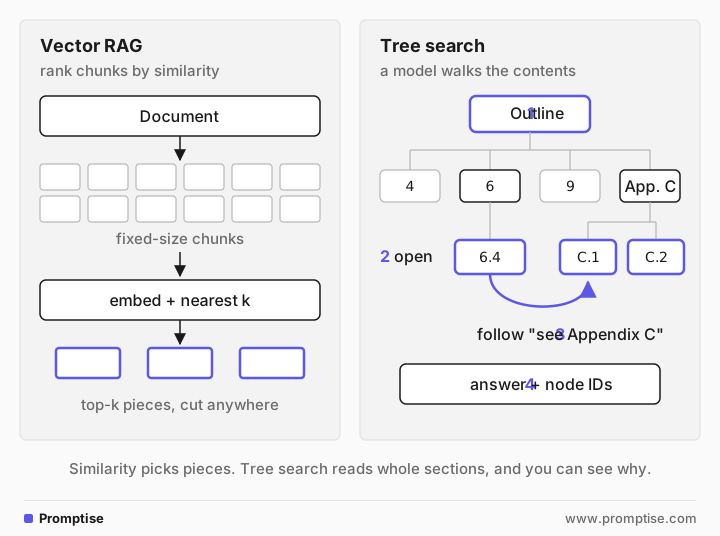
It runs in two phases:
Index. Parse the document into a tree. Each node gets an ID, a title, its position in the document (page range or character range) and its children. A model writes a one-sentence summary per node so the outline says what each section contains, not only what it is called.
Retrieve. The model reads the top of the tree, picks a branch, expands it, reads a section, decides whether it has what it needs, and either answers or goes elsewhere. When a section says "see Appendix C", the model can go there. Similarity search has no way to follow that link.
The PageIndex introduction describes the same loop: read the table of contents, pick a section, read it, check whether it is enough, repeat. Its argument is that similarity is not relevance. A chunk can be similar to the question and still be the wrong place to look, and the right section may use none of the question's words.
Two properties come with this design. First, retrieval is explainable: the trace shows which sections the model opened and why. Second, the model reads whole sections instead of pieces cut at an arbitrary character count, so a value stays next to the heading that says which model or case it applies to.
[03]
Is vector search dead?
No. The trend that made "vectorless RAG" a search term has two parts. PageIndex (MIT license) climbed GitHub's trending lists with "No Vector DB, No Chunking" in its README. And turbopuffer, a vector search company, published RIP, vector database on September 30, 2026. That post doesn't say vector search is over. It says turbopuffer is moving from a vector-first design to a search engine where nearest-neighbor search is one index among several, next to full-text search, filters and aggregations.
Agent memory systems point the same way. Hindsight, another trending repository, is sometimes grouped with vectorless retrieval, but its README says recall runs four strategies in parallel: vector similarity, BM25 keyword matching, graph links and time filtering. It combines vectors with other signals; it doesn't drop them.
The practical reading: embeddings are one retrieval signal, not the whole design. Structure, exact terms and model reasoning are others.
[04]
When should you use vectorless RAG, and when not?
Use tree search when:
Documents are long and structured: manuals, annual reports, regulatory filings, standards, policies, textbooks. They have headings, and those headings carry meaning.
Answers span sections: a fault code points to an operating section, which points to an appendix, which changes what a warranty clause means.
Context decides the answer: the same sentence pattern appears for two products, two years or two jurisdictions, and only the heading says which is which.
You need to show where an answer came from: node IDs and section paths are citations a reviewer can check.
Wrong answers are expensive enough that a few extra seconds and model calls per question are worth it.
Stay with vector or keyword search when:
You search thousands or millions of short documents (tickets, chat logs, product reviews) with no useful structure. Nothing to navigate, and too many items for a model to browse.
Latency matters: each tree step is a model call. A vector lookup takes milliseconds.
Queries are simple lookups where similarity already works. Test before you switch.
Documents have no reliable headings, such as scanned PDFs without OCR or transcripts. You would first have to build the structure.
A common combination: vector or keyword search picks the right documents from a large collection, and tree search finds the answer inside each one. PageIndex Cloud's "file system" layer does this at the document level as a hosted feature.
[05]
What you need
Python 3.10 or later and Promptise Foundry 1.6.0. Foundry's RAG module (promptise.rag) is built for chunk-embed-store pipelines; it has no tree index. Tree search here is three custom tools declared with @tool.
An OpenAI API key for the agent and the summaries (the examples use gpt-5-mini).
A long document with headings. The examples use a 3,000-word fictional heat pump manual, manual.md, with 49 sections, two models whose specifications differ, and cross-references between sections.
uv venv && uv pip install "promptise==1.6.0"
export OPENAI_API_KEY=...
The demo manual is short enough to fit in one prompt, which keeps the example cheap and readable. The same tools work unchanged on a document of several hundred pages, where reading everything is no longer an option.
[06]
Step 1: Build the tree index
The index is a nested list of nodes. For Markdown, the headings give you the tree directly. For PDFs, use the file's bookmarks if it has them (pypdf exposes them as reader.outline), or let a tool like PageIndex detect the table of contents and map sections to pages.
Each node needs a summary, and the order of summarization matters. A first version of this script summarized every node on its own, and the parent nodes, which have a title but no text, came back with invented contents: the summary of "1. Safety" mentioned grounding and lockout/tagout, which the manual never covers. The fix is to summarize bottom-up: leaves from their text, parents from their children's summaries.
"""Build a tree index (a table of contents with summaries) from a Markdown document.

python build_tree.py manual.md tree.json
"""
import asyncio
import json
import re
import sys

from promptise import resolve_model

HEADING = re.compile(r"^(#{1,6})\s+(.*)$")


def parse(markdown: str) -> dict:
    """Turn Markdown headings into nested nodes. Each node keeps its own text."""
    root = {"node_id": "root", "title": "Document", "level": 0, "text": "", "nodes": []}
    stack, count = [root], 0
    for line in markdown.splitlines():
        match = HEADING.match(line)
        if not match:
            stack[-1]["text"] += line + "\n"
            continue
        level = len(match.group(1))
        while stack[-1]["level"] >= level:
            stack.pop()
        node = {"node_id": f"{count:04d}", "title": match.group(2).strip(),
                "level": level, "text": "", "nodes": []}
        count += 1
        stack[-1]["nodes"].append(node)
        stack.append(node)
    if len(root["nodes"]) == 1 and root["nodes"][0]["level"] == 1:
        root = {**root["nodes"][0], "node_id": "root"}  # the H1 is the document
    return root


def walk(node: dict):
    yield node
    for child in node["nodes"]:
        yield from walk(child)


async def summarize(node: dict, model) -> None:
    """Summarize bottom-up: children first, then the parent from its own text plus
    the children's summaries. A summary written from a title alone invents content."""
    await asyncio.gather(*(summarize(child, model) for child in node["nodes"]))
    if node["node_id"] == "root":
        return
    parts = [node["text"].strip()] + [f"- {c['title']}: {c['summary']}" for c in node["nodes"]]
    prompt = ("In one sentence of at most 25 words, say what a reader finds in this section. "
              "Use only the text below. Name the codes and parameters it covers, "
              "not every value.\n\n"
              f"Title: {node['title']}\n\n" + "\n".join(p for p in parts if p)[:4000])
    reply = await model.ainvoke(prompt)
    node["summary"] = reply.content.strip()


async def main(src: str, dst: str) -> None:
    tree = parse(open(src).read())
    await summarize(tree, resolve_model("openai:gpt-5-mini", reasoning_effort="minimal"))
    with open(dst, "w") as f:
        json.dump(tree, f, indent=1)
    nodes = list(walk(tree))[1:]
    print(f"{len(nodes)} nodes, {max(n['level'] for n in nodes)} levels deep")
    for n in nodes[:2]:
        print(f"{n['node_id']} {n['title']}: {n['summary']}")


asyncio.run(main(*sys.argv[1:3]))
Run it once per document. It stores the tree, with each node's text, in tree.json:
49 nodes, 4 levels deep
0001 1. Safety: This section covers who may install/service the unit and safety rules for flammable refrigerant R290 and electrical precautions (isolator, capacitor discharge, DC bus).
0002 1.1 Who may install and service the unit: This section specifies who may install, commission, service, and open the refrigerant circuit (R290) and what tasks the homeowner may perform.
For this manual, indexing took 49 small gpt-5-mini calls and cost under one cent. The index only changes when the document does, so store it next to the file and rebuild it when the file's hash changes.
[07]
Step 2: Give the agent tools to navigate
Tree search needs two tools, plus an optional third:
get_outline shows the children of a node with their summaries, down to a chosen depth. For a large document the model starts at depth 1 and expands only the branches it needs, so it never has to read the whole outline.
read_section returns one section's full text and its path in the document, such as "6. Operation > 6.4 Low-ambient operation". The path keeps context that a chunk would lose.
find_text finds sections that contain an exact string. Model reasoning is good at "where would this be?" and poor at "where does code E14 appear?". A plain substring match answers the second question instantly.
PageIndex's agent integration uses the same shape: its tools include get_document_structure for the outline and get_page_content for page ranges.
"""Tree search tools: the agent reads the outline, opens nodes, and follows references."""
import json

from promptise import ToolError, tool

TREE = json.load(open("tree.json"))
NODES, PATHS = {}, {}


def _index(node: dict, path: list[str]) -> None:
    NODES[node["node_id"]] = node
    PATHS[node["node_id"]] = " > ".join(path)
    for child in node["nodes"]:
        _index(child, path + [child["title"]])


_index(TREE, [])


def _outline(node: dict, depth: int, indent: int = 0) -> list[str]:
    lines = []
    for child in node["nodes"]:
        more = f" [+{len(child['nodes'])} subsections]" if child["nodes"] and depth == 1 else ""
        lines.append(f"{'  ' * indent}{child['node_id']} {child['title']}: {child['summary']}{more}")
        if depth > 1:
            lines += _outline(child, depth - 1, indent + 1)
    return lines


@tool
def get_outline(node_id: str = "root", depth: int = 2) -> str:
    """Show the table of contents below a node, with a one-line summary per section.

    Start here. Call it with a node_id to expand a section that has subsections.

    Args:
        node_id: The node to expand, or "root" for the whole document.
        depth: How many levels to show (1 to 3).
    """
    if node_id not in NODES:
        raise ToolError(f"No node {node_id!r}. Use an ID from get_outline.")
    return "\n".join(_outline(NODES[node_id], max(1, min(depth, 3)))) or "No subsections."


@tool
def read_section(node_id: str) -> str:
    """Read the full text of one section, with its place in the document.

    Args:
        node_id: A node ID from get_outline, for example "0031".
    """
    node = NODES.get(node_id)
    if node is None:
        raise ToolError(f"No node {node_id!r}. Use an ID from get_outline.")
    text = node["text"].strip()[:6000] or "(No text of its own.)"
    children = "".join(f"\n- {c['node_id']} {c['title']}" for c in node["nodes"])
    return f"[{node_id}] {PATHS[node_id]}\n\n{text}" + (f"\n\nSubsections:{children}" if children else "")


@tool
def find_text(phrase: str) -> str:
    """Find sections that contain an exact phrase, such as a code, part number or parameter.

    Args:
        phrase: The exact text to look for, for example "E14" or "P31".
    """
    hits = [f"{nid} {PATHS[nid]}" for nid, n in NODES.items()
            if phrase.lower() in (n["title"] + " " + n["text"]).lower()]
    return "\n".join(hits[:15]) or f"No section contains {phrase!r}."
Call the tools directly, without a model, to see exactly what the agent will see. Here is part of get_outline(depth=1) and one exact search, printed by show_outline.py in the guide's folder:
0027 6. Operation: This section explains operation: heating curve (P10–P14), domestic hot water (P20, P21), defrost behavior, and low-ambient/compressor lockout (P31, E14). [+4 subsections]
0032 7. Maintenance: This section covers homeowner monthly checks, annual technician service tasks, and replacing fan motors (codes FM-70/FM-110 with isolation, grille, blade, plug, bolts, fitment steps). [+3 subsections]
0036 8. Troubleshooting: This section covers troubleshooting: reading the fault log (see Appendix A), checks for “unit does not start” (breaker/isolator, controller cable/E02, upright wait) and “low heating output” (heating curve 6.1, strainer, flow rate, E05, frequent defrosts). [+3 subsections]
0040 9. Warranty: This section covers warranty registration codes and parameters (serial number, commissioning date, installer certification number, 30‑day registration), warranty periods (parts, compressor, service condition), and exclusions including parameter P31 and CCK‑7. [+3 subsections]
... (12 top-level sections)

find_text('P31'):
0031 6. Operation > 6.4 Low-ambient operation
0043 9. Warranty > 9.3 What the warranty does not cover
0045 Appendix B. Parameter list
0048 Appendix C. Cold climate operation > C.2 Cold Climate Kit CCK-7
Each line is a node ID, the section title, the summary and the number of subsections. That outline is what replaces the vector index. Its quality decides retrieval quality: a summary that says "covers P31" is the reason the model opens that section.
[08]
Step 3: Write the retrieval instructions
The agent loop is a standard tool-calling agent. What makes it tree search is the instructions: start from the outline, expand before reading, follow cross-references, use exact search only for codes, and cite node IDs.
"""A vectorless RAG agent: it navigates the tree index instead of searching vectors."""
import asyncio

from promptise import build_agent
from tree_tools import find_text, get_outline, read_section

INSTRUCTIONS = """You answer questions about one long technical manual.
Retrieve by navigating its table of contents:
1. Call get_outline, pick the sections whose titles and summaries fit the question,
   and expand a section with get_outline(node_id) when you need its subsections.
2. Read those sections with read_section. Follow every cross-reference they make
   ("see 6.4", "Appendix C") by finding and reading that section too.
3. Use find_text only for exact codes, part numbers or parameters.
Answer only from what you read, and cite the node ID of every section you used."""

QUESTION = ("Our H7-XL shows E14 on very cold nights. What does it mean, and can we "
            "set P31 to 0 to keep the compressor running without losing the warranty?")


async def main() -> None:
    agent = await build_agent(
        model="openai:gpt-5-mini",
        instructions=INSTRUCTIONS,
        extra_tools=[get_outline, read_section, find_text],
    )
    try:
        result = await agent.ainvoke({"messages": [{"role": "user", "content": QUESTION}]})
    finally:
        await agent.shutdown()
    for message in result["messages"]:
        for call in getattr(message, "tool_calls", None) or []:
            print(f"-> {call['name']}({', '.join(f'{k}={v!r}' for k, v in call['args'].items())})")
    print("\n" + result["messages"][-1].content)


if __name__ == "__main__":
    asyncio.run(main())
The question needs four sections that use different words. Fault E14 is explained in 6.4, the lockout limit for the H7-XL is in Appendix C, the warranty exclusion for parameter P31 is in 9.3, and the exception for the Cold Climate Kit is in C.2. One real run:
-> get_outline(node_id='root', depth=2)
-> get_outline(node_id='0046', depth=2)
-> read_section(node_id='0031')
-> read_section(node_id='0046')
-> read_section(node_id='0048')
-> read_section(node_id='0047')

What E14 means
- E14 is a low-ambient compressor lockout: the controller stops the compressor when the outdoor temperature falls below the model’s lockout limit and (if fitted) switches to the backup heater. The compressor will restart automatically once the outdoor temperature has risen 3 °C above the lockout limit for 10 minutes. [0031]

Why your H7‑XL is showing E14
- Without the Cold Climate Kit the H7‑XL locks out at −25 °C, and shows E14 while the lockout is active. [0047]

Can you set P31 = 0 to keep the compressor running?
- Only if the Cold Climate Kit (CCK‑7) is fitted and registered. The CCK‑7 adds heaters and firmware that lower the lockout to −30 °C, and, once fitted and registered, P31 may be set to 0 where the backup heater cannot meet demand, “without affecting the compressor warranty.” Only a certified technician may fit the kit; after registration the controller sets P32 automatically and then P31 can be changed. [0048]
- The manual also warns that P31 controls the lockout and not to change it before reading section 9.3. [0031]

Bottom line / recommended action
- If you haven’t got a registered CCK‑7, do not set P31 = 0. If you need operation below −25 °C, have a certified technician fit and register the Cold Climate Kit (then you can set P31 = 0 without voiding the compressor warranty). [0048]
The model read the outline two levels deep, expanded Appendix C, read 6.4, then the Appendix C overview and its sections C.2 and C.1, and stopped after six tool calls. It never called find_text, because the summaries were enough to navigate. Every claim in the answer carries the node ID it came from, so a reviewer can check each one.
Notice what it skipped: 6.4 says "do not change it before you read section 9.3", and the model didn't open 9.3. The answer is still right, because C.2 restates the warranty rule, but on a document where only 9.3 held that rule, the answer would be incomplete. If cross-references must be followed, check it in code: compare the references in the sections the agent read with the node IDs it opened, and send it back for the missing ones.
[09]
Step 4: Compare with vector search on your own documents
Before you replace anything, run the same question through your current retrieval. Here is the classic pipeline with Foundry's RAG module: 500-character chunks, OpenAI embeddings and the in-memory store.
"""For contrast: the same question through classic chunk-and-embed retrieval."""
import asyncio

from openai import AsyncOpenAI
from promptise.rag import (Document, Embedder, InMemoryVectorStore, RAGPipeline,
                           RecursiveTextChunker)

from agent import QUESTION


class OpenAIEmbedder(Embedder):
    def __init__(self) -> None:
        self.client = AsyncOpenAI()

    async def embed(self, texts: list[str]) -> list[list[float]]:
        reply = await self.client.embeddings.create(model="text-embedding-3-small", input=texts)
        return [item.embedding for item in reply.data]


async def main() -> None:
    pipeline = RAGPipeline(
        chunker=RecursiveTextChunker(chunk_size=500, overlap=50),
        embedder=OpenAIEmbedder(),
        store=InMemoryVectorStore(),
    )
    report = await pipeline.index([Document(id="manual", text=open("manual.md").read())])
    print(f"{report.chunks_stored} chunks indexed")
    for hit in await pipeline.retrieve(QUESTION, limit=4):
        print(f"\n[{hit.score:.2f}] {' '.join(hit.text.split())[:150]}...")


asyncio.run(main())43 chunks indexed
[0.82] C. Cold climate operation ### C.1 Lockout limits Without the Cold Climate Kit, the H7 locks out its compressor at an outdoor temperature of -20 °C and...
[0.81] log. ### 9.3 What the warranty does not cover The warranty does not cover damage caused by installation that does not follow this manual, by missing a...
[0.80] the controller then sets P32 automatically. With the kit installed and registered, P31 may be set to 0 where the backup heater cannot cover the heat d...
[0.80] are normal. ### 6.4 Low-ambient operation Below a certain outdoor temperature the compressor cannot run within its safe envelope. The controller then ...On this small, clearly worded manual, the top four chunks came from 6.4, 9.3, C.1 and C.2: the sections the question needs, including 9.3, which the agent skipped. That is a fair result, and it is the main point of this step: on short documents with matching vocabulary, vector search does fine, at a fraction of the cost and latency.
Look closely at the chunks anyway. One starts with "log. ### 9.3" and another with "the controller then sets P32", mid-section. The chunk boundaries fell wherever the character count ran out, so a chunk can carry a value without the heading that says which model it applies to. The H7 and H7-XL clearance sections in this manual use the same sentence pattern with different numbers. If a boundary falls after the heading, a chunk that holds only "Leave at least 400 mm behind the unit" doesn't say which unit it is about. These failures grow with document length, with repeated patterns and with the number of cross-references. Build a set of 20 to 50 real questions with known answers and section IDs, and compare both approaches on that, not on a single example. How to evaluate AI agents covers building that set.
[10]
The complete example
The four files above are the complete example: build_tree.py builds the index, tree_tools.py declares the tools, agent.py runs the agent and vector_baseline.py runs the comparison. They are in the runs/vectorless-rag-tree-search folder of this guide, with the manual and the outputs. To use your own document:
python build_tree.py your-manual.md tree.json
python agent.py
Should you build this yourself or use PageIndex? The tools above are enough for Markdown, HTML and any document whose headings you can parse. The hard part of tree search on real files is the index: finding the table of contents in a PDF, mapping sections to pages, and handling scans, tables and images. That is where PageIndex does the most work for you. Its open-source SDK builds trees for text-based PDFs locally, and its hosted service adds OCR and image understanding. Its agent tools follow the same outline-then-read pattern, so the retrieval instructions in Step 3 carry over.
For several documents, add a first level to the tree with one node per document and its summary, or pick the documents with keyword or vector search and run tree search inside each one.
[11]
Running vectorless RAG in production
Cost per question. Each step is a model call, and the outline is in the prompt on every step. Keep summaries to one sentence, start at depth 1 on large trees, and cache the outline prefix where your provider supports prompt caching. AI agent cost tracking shows how to measure tokens per run.
Latency. Expect several seconds per question. If users need sub-second answers, use tree search for a "deep answer" path and vector or keyword search for instant results.
Model choice. Navigation is the hard part, so the chat model matters more than the index model. PageIndex's README recommends a basic model for indexing and the best model you can afford for searching. Test smaller models on your question set before you rely on them.
Keep the index in sync. Store the document hash with the tree and rebuild when it changes. A stale summary sends the model to the wrong section.
Cap the walk. Set a limit on tool calls (max_agent_iterations in build_agent) so a confused model can't read the whole document one section at a time.
Treat section text as untrusted. Retrieved text can contain instructions aimed at the model, whether it arrives by tree search or by vectors. RAG security covers defenses.
Check access. The tools here read one document that every caller may see. If documents differ per user, filter which trees a caller can open before the model sees any outline.
Log the path. The sequence of node IDs is your retrieval trace. Store it with the answer, so a wrong answer can be traced to a wrong turn or to a wrong summary.
[12]
Common problems and fixes
Symptom | Cause | Fix |
|---|---|---|
Parent summaries mention things the document never says | Parents were summarized from their titles alone | Summarize bottom-up from the children's summaries |
The model reads section after section and never answers | No stopping rule, or the outline is too vague to choose | Tell it to stop when the sections it read answer the question; cap tool calls |
The model misses a section with an exact code | Summaries don't list every code | Add an exact-match tool like find_text |
The outline alone fills much of the context | Whole tree sent at depth 3 on a large document | Start at depth 1 and expand branches on demand |
Answers cite node IDs that don't exist | The model made them up | Validate cited IDs against the tree before you show the answer |
Retrieval works on Markdown but not on PDFs | The PDF has no bookmarks, or the text is scanned | Run OCR first, then detect headings or use a tool that builds the tree |
Good answers on old questions, wrong on new versions | Tree built from an earlier version of the document | Rebuild the tree when the document hash changes |
[13]
Limitations
It needs structure. Documents without meaningful headings give the model nothing to navigate. Generated structure is possible, but it's an extra model step that can be wrong.
It's slower and costs more per question than vector search. The savings come from not sending whole documents and from fewer wrong answers, and only where those happen.
The model can take a wrong turn. If a summary is misleading, the model may never open the right section. Exact search and good summaries reduce this; they don't remove it.
It doesn't scale to large collections by itself. Browsing thousands of document summaries is slow. Narrow the collection first.
Published accuracy numbers are the authors' own. PageIndex reports 98.7% accuracy on FinanceBench. That figure comes from the project itself; run your own question set before you rely on any number.
[14]
FAQ
What is vectorless RAG?
Vectorless RAG is retrieval-augmented generation without embeddings or a vector database. The document is indexed as a tree of sections with summaries, and a language model navigates that tree to find the sections that answer a question, then reads them in full and answers with citations.
How does PageIndex work?
PageIndex builds a hierarchical tree index of a document, with node IDs, titles, page ranges and optional summaries, then lets a model search that tree with reasoning instead of similarity. It runs locally on text-based PDFs with your own model API key, or as a hosted service that adds OCR, storage and an MCP server.
Is vectorless RAG better than vector search?
Not in general. Tree search tends to do better on long, structured documents where answers span sections or depend on context. Vector search is faster, cheaper per question and better for large collections of short, unstructured texts. Compare both on your own questions.
Can I do RAG without a vector database?
Yes. Besides tree search, you can use keyword search such as BM25, SQL over structured data, or pass short documents to the model in full. Tree search is the option for long documents that are too big to send whole.
Does vectorless RAG cost more?
Per question, usually yes, because each step of the walk is a model call with the outline in the prompt. Indexing is cheap: summarizing the 49 sections of the manual in this guide cost under one cent with gpt-5-mini.
Can I build tree search RAG with Promptise Foundry?
Yes, as custom tools. Foundry's built-in RAG module is a chunk, embed and store pipeline with no tree index, so you declare an outline tool and a read-section tool with @tool and pass them to build_agent, as this guide does.
[15]
Next steps
Agentic RAG in Python gives an agent a vector search tool, the approach this guide contrasts with.
What is agentic RAG? explains why retrieval works better as a tool the agent calls.
Long-context prompting covers when to send a whole document instead.
Context engineering for AI agents covers keeping retrieved text from crowding the context window.
Source provenance for research agents builds on the node-ID citations used here.
The Foundry RAG documentation and tools documentation cover the building blocks.