Contents · 9 sections↓
The AI productivity paradox is the gap between what employees report and what companies see: people say AI saves them hours every week, yet few organizations can point to better results. This guide explains, with dated figures from the original surveys and studies, where the saved time actually goes, when AI time savings do turn into results, and what leaders can change so that they do.
Why does AI save time but not improve results?
Because a saved hour is not a produced result. Time saved by AI is spread across many small moments, partly spent checking and fixing AI output, often moved to other tasks or filled with new work, and rarely redirected on purpose. Results improve when a team redesigns a whole workflow around AI, decides in advance what the saved time is for, and measures output instead of hours.
Key takeaways:
The gap is real and measured. In one 2026 survey, workers estimated about 11 hours saved a week, but only 13% said their organization was performing significantly better.
Checking and fixing eat part of the gain. Most AI users have redone AI-assisted work in the past month.
Saved time is mostly reallocated, not freed. In a large Danish study, 80% of users who saved time moved it to other job tasks.
Nobody tells people what to do with the time. In one 2026 survey, two-thirds said they got little or no guidance.
Redesigned workflows show results. Measured gains come from specific workflows where output is counted, not from general use.
[02]
What is the AI productivity paradox?
The term borrows from the 1980s, when economist Robert Solow observed that computers were everywhere except in the productivity figures. The AI version shows up in almost every large 2026 survey: individuals report strong time savings, while business results lag.
Source | Who and when | What people report | What the business sees |
|---|---|---|---|
6,000 full-time digital workers, US, UK, Australia; Dec 2025 to Jan 2026 | Roughly 11 hours saved a week | 13% say their organization is performing significantly better | |
3,200 AI users at $100M+ revenue companies; Nov 2025 | 85% save one to seven hours a week | 14% consistently get clear, positive net outcomes | |
7,845 US employees who use AI; Jan to Mar 2026 | 63% say AI helps them work faster | Only 28% of all employees use AI weekly | |
Nearly 6,000 executives, US, UK, Germany, Australia; Nov 2025 to Jan 2026 | Executives expect a 1.4% productivity gain over three years | 89% report no impact on labor productivity so far | |
25,000 workers in 11 exposed occupations, Denmark; surveys 2023 and 2024 | Average time savings of 2.8% of work hours | No measurable effect on earnings or recorded hours |
These are mostly self-reported figures, and each survey asked different people different questions, so don't add them up. Together they point one way: individual time savings are common, organizational results are not.
[03]
Where does the saved time go?
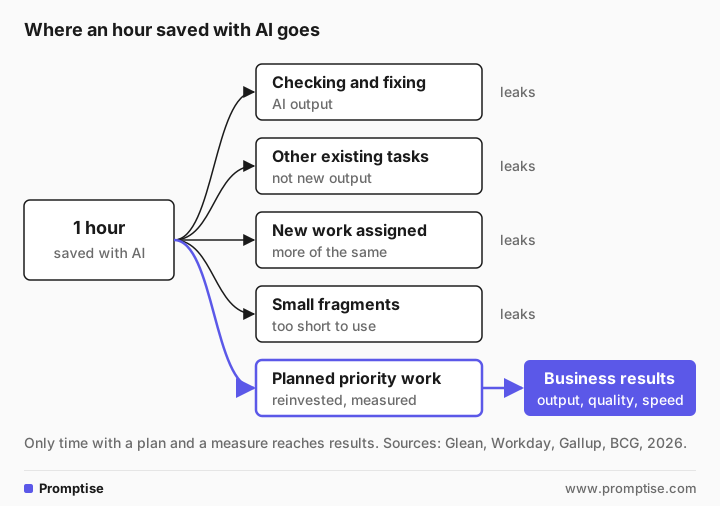
1. Checking and fixing AI output
AI output has to be read, checked and often corrected. Glean found that 77% of workers had corrected or redone AI-assisted work in the past month, and that workers spend an average of 6.4 hours a week on this kind of supervision, which the report calls "botsitting." Workday's research headline puts it this way: "Nearly 40% of AI Time Savings Are Lost to Fixing Low-Quality Output." The guide on botsitting covers how teams cut this time.
2. Moved to other tasks, not freed
When people save time, they usually spend it on other work they already had. In Humlum and Vestergaard's Danish study, "the vast majority (80%)" of users reallocated saved time to other job tasks, and fewer than 10% used it for breaks. That is not wasted, but it means the saved time doesn't show up as more of the thing AI sped up.
3. More work arrives
Saved time attracts new work. Gallup found that 31% of AI users say their employer has asked them to take on more responsibilities because of AI, rising to 37% among those who say AI makes them faster. Workday reports that many companies "simply increase workload" (32%) instead of investing the savings in people. More work done can be a gain, but only if it is the right work.
4. No plan for the time
In BCG's 2026 survey of 11,749 workers, 66% said they "get limited or no guidance on what to do with that time," and more than half don't redirect it into strategic work (BCG, June 3, 2026). Without a plan, saved time follows the path of least resistance: more email, more meetings, more of the same.
5. Fragments too small to use
AI often saves minutes, not hours: two minutes on a reply, five on a summary. Spread across a day, those minutes are real but rarely add up to a block of time anyone can use for something new.
A sixth trap: feeling faster is not being faster
People are not good at judging their own speed with AI. In a 2025 study by METR, 16 experienced open-source developers expected AI to speed them up by 24% and believed afterwards it had sped them up by 20%, yet they took 19% longer to complete their tasks with AI. METR says the result is a snapshot of early-2025 tools in one setting, and later data look different. The lesson for leaders is about measurement, not about AI: self-reported time savings are a weak basis for decisions.
[04]
When do AI time savings turn into results?
Gains show up when output is measured in a defined workflow. In the best-known field study, a customer support team given an AI assistant resolved 14% more issues per hour on average, and 34% more for novice and less-skilled agents (Brynjolfsson, Li and Raymond, NBER). The measure was issues resolved, not hours saved.
Redesign matters more than the tool. In BCG's survey, respondents at companies pursuing workflow redesign were 24 percentage points more likely to see measurable business improvement. The pattern across sources is the same: results come from changing how a whole piece of work is done, not from adding AI to each person's day and hoping it adds up.
[05]
How to turn saved hours into results
Pick one workflow, not one tool. For example, "answering supplier questions" or "monthly reporting", from request to finished result.
Measure output before you start. Cases closed per week, days to close the books, errors found later. Hours saved is not the measure.
Redesign the workflow end to end. Decide which steps AI does, which a person checks, and which steps disappear. Look for the bottleneck: if AI speeds up drafting but approval still takes three days, nothing changes.
Count checking time honestly. Include time spent reviewing and fixing AI output in the new process, and work to reduce it.
Decide in advance what the time is for. A named priority, such as a backlog, a customer project or training. Tell people.
Measure again after 60 to 90 days. Compare output, quality and cycle time with the baseline.
Scale what works, stop what doesn't. Move to the next workflow only when the first one shows results.
For building the business case and the numbers, see how to measure the ROI of AI.
[06]
Is AI paying off for us? A quick check
Answer yes or no for one team:
We measured the output of this workflow before AI.
We can show the same output measure after AI.
We know how much time goes into checking and fixing AI output.
People know what the saved time is meant for.
Someone owns the workflow and its results, not just the tool.
The slowest step in the workflow has also changed.
We compared self-reported time savings with measured output.
Fewer than four yes answers usually means the time savings are real for people but invisible to the business.
[07]
Common mistakes
Mistake | Why it fails | Fix |
|---|---|---|
Reporting hours saved as the result | Hours saved don't equal output or revenue | Measure output, quality and cycle time |
Rolling out a tool and waiting | Savings scatter across many small moments | Redesign one workflow at a time |
Ignoring checking time | Fixing AI output can eat much of the gain | Count it and reduce it |
No plan for freed time | It fills with more of the same work | Name the priority it goes to |
Speeding up one step only | The bottleneck moves, throughput stays the same | Fix the slowest step too |
Trusting self-reports alone | People misjudge their own speed with AI | Compare with measured results |
[08]
FAQ
What is the AI productivity paradox?
It is the gap between the time individuals say AI saves them and the lack of visible improvement in company results. Large 2026 surveys show it clearly: most AI users report time savings, while few organizations report significantly better performance.
Does AI actually increase productivity?
In specific, measured workflows, yes. A well-known study of a customer support team found 14% more issues resolved per hour, with larger gains for less-experienced staff. Across whole economies and companies, measured effects so far are small, which is the paradox this guide explains.
Why don't AI time savings show up in business results?
Because saved time leaks: into checking and fixing AI output, into other existing tasks, into new work, and into small fragments that are hard to use. Without a redesigned workflow and a plan for the time, the savings don't reach output.
How should we measure AI productivity?
Measure the output of a specific workflow before and after AI: work completed, quality, errors and cycle time. Include time spent checking AI output. Use self-reported hours saved only as a signal, not as the result.
Is the AI productivity paradox new?
No. A similar gap appeared with computers in the 1980s, when results took years to show because companies had to reorganize work around the new tools. The same pattern appears now: the gains come with changes to how work is done.
Should we invest less in AI because of the paradox?
Not necessarily. The evidence says to invest differently: in redesigning specific workflows, training people to check and use AI output well, and measuring results, rather than only buying more licenses.
[09]
Next steps
Cut the time spent fixing AI work: botsitting and how to check AI answers.
Build the numbers: how to measure the ROI of AI.
Pick the workflow to redesign first: how to choose AI use cases.
Plan the rollout: how to roll out AI to your team and the AI maturity model.
Go deeper on the evidence: does AI boost productivity?.