Contents · 11 sections↓
- 01Does the harness matter for coding agents?
- 02What an agent harness changes
- 03What public comparisons have found
- 04When to run your own harness comparison (and when not)
- 05What you need
- 06Run a fair harness comparison step by step
- 07One illustrative run
- 08Common pitfalls in harness comparisons
- 09Limitations
- 10FAQ
- 11Next steps
Does the harness matter, or only the model? The harness is everything around the model in a coding agent: the system prompt, the tools, how edits are applied, how context is managed, when it stops. Claude Code, Codex CLI, OpenCode, Aider, mini-SWE-agent and agents you build yourself all wrap the same models differently. This guide explains what public comparisons have found, and how to test one model across several harnesses fairly on your own tasks, with a metering proxy, hidden tests and repeated trials. One small run of the method is included as an illustration.
Does the harness matter for coding agents?
Yes, but mostly for cost and speed, and less for success than people expect. The largest public comparisons found that, with the same model, switching harnesses moved success rates by a few points while cost per task varied by up to about five times. Some models even did best outside their vendor's own harness. Those results come from public benchmarks, so the only way to know for your codebase is to run the same model through each harness on your own tasks, with the same settings, and compare success, consistency and cost per solved task.
Key takeaways:
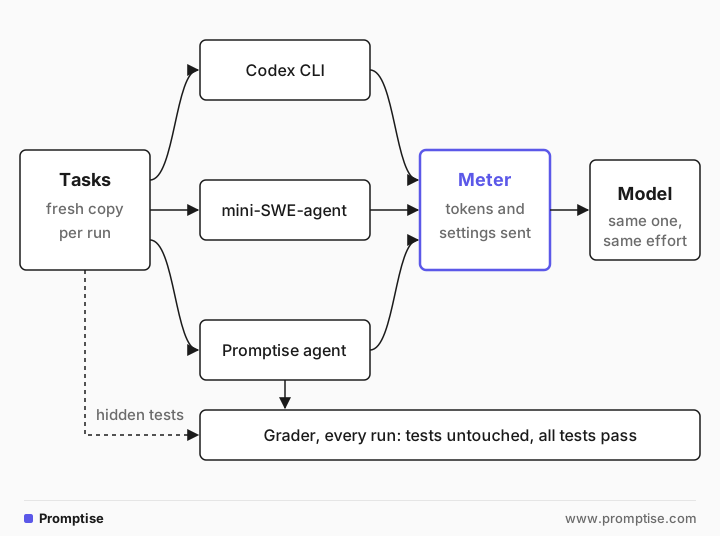
Hold the model and its settings fixed. Same model, same reasoning effort, same timeout, same fresh copy of the repository. Check what each harness actually sends; defaults differ.
Meter tokens in one place. Put a proxy in front of the model API. Harnesses count tokens differently; in our run, Codex's own "tokens used" counted only uncached input plus output.
Grade outcomes with tests the agent can't see. Run visible plus hidden tests after each run, and fail any run that edited the tests.
Repeat each task. Report pass rate and pass^k (all k trials succeed), not one lucky run.
Compare cost per solved task. A cheaper harness that fails more often isn't cheaper.
[02]
What an agent harness changes
An agent harness is the loop and tooling around the model. Holding the model fixed, these are the parts that differ between harnesses, and each can change results:
System prompt and instructions. Size, rules, examples. Codex sent about 12,300 input tokens on its first request in our run; mini-SWE-agent sent about 950.
Tools. One bash tool (mini-SWE-agent), a few file and shell tools, or a large set with patch editing, planning and search. Every tool definition is sent with every request.
Edit format. Whole-file writes, search-and-replace blocks, unified diffs or a patch tool. Models are often tuned for their vendor's format.
Context management. What is kept, summarized or dropped as the conversation grows, and how much is cached between requests.
Defaults. Reasoning effort, temperature, turn limits, retries, timeouts. A harness may not even know a model: Codex warned that it had no metadata for gpt-5-mini and fell back to defaults.
Sandbox and permissions. Whether commands run freely, need approval, or are blocked, and whether the network is on.
Stopping rules. When the agent decides it's done, and whether it runs the tests first.
That is why "Claude Code vs Codex" questions are really two questions: which model, and which harness for that model.
[03]
What public comparisons have found
Several projects have compared harnesses with the model held fixed. Read their dates and setups before you generalize:
Source | What it holds fixed | What it varies | Date |
|---|---|---|---|
HarnessTax (UC Berkeley and Arena) | Model, 30 sampled tasks per benchmark, 3 attempts each | Claude Code, Codex CLI, Pi across 7 models, on SWE-bench Lite and Terminal-Bench 2.0 | September 2026 |
Tasks, at least 5 runs per model and agent | 6 agents, including Claude Code, Codex CLI, Gemini CLI, OpenHands, mini-SWE-agent and Terminus 2 | January 2026 | |
The harness: mini-SWE-agent with one config | The model | Ongoing | |
The harness (aider) and 225 exercises | The model and edit format | Last updated November 2025 |
HarnessTax reports that "harness choice has little effect on task success rate" on the two benchmarks it tested, that the same model reached similar success at up to five times the cost, that a minimal open-source harness (Pi) was competitive, and that models sometimes did better outside their vendor's harness. The Terminal-Bench team built Terminus 2, a harness with a single terminal tool, specifically as a neutral testbed for comparing models, because many harnesses are engineered around particular models.
Two cautions apply to every board. Public benchmarks may have leaked into training data, and small differences may be noise: Anthropic measured a 6-point swing on Terminal-Bench 2.0 from resource settings alone and wrote that "leaderboard differences below 3 percentage points deserve skepticism" until configurations are documented and matched (Quantifying infrastructure noise, February 2026).
[04]
When to run your own harness comparison (and when not)
Run one when:
You are standardizing a team on one coding agent, or moving from one to another.
You pay for usage at scale and a 2x cost difference matters.
Your codebase is unusual: a language, framework or monorepo layout that public benchmarks don't cover.
You are building your own harness and need to know whether it holds up against off-the-shelf ones.
Skip it when:
You have fewer than ten tasks you can grade automatically. The result will be noise.
The harnesses you'd compare can't use the same model. Claude Code's docs say Anthropic doesn't support routing it to non-Claude models, so comparing it with a harness on a different model compares models, not harnesses.
What you actually care about is the interactive experience (review flow, editor integration), which this method doesn't measure.
[05]
What you need
10 to 30 tasks from your own work, each with a starting commit, a short task description, and tests that decide success. Real bugs and small features from your history are ideal.
The harnesses, pinned. The example uses Codex CLI 0.162.1, mini-SWE-agent 2.4.6, and a minimal coding agent built with Promptise Foundry 1.6.0.
One model all of them can use. The example uses gpt-5-mini with reasoning effort medium.
Python 3.11+ with starlette, uvicorn and httpx for the metering proxy.
The full code is in the runs/test-model-across-agent-harnesses folder: proxy.py, run_matrix.py, promptise_agent.py, report.py and four small tasks.
[06]
Run a fair harness comparison step by step
1. Build tasks with hidden tests
Each task folder holds the starting repository, the task text, and hidden tests the agent never sees:
tasks/intervals/
├── task.md            # what the agent is told
├── repo/              # starting code and visible tests
│   ├── src/intervals.py
│   └── tests/test_intervals.py
└── hidden/
    └── test_hidden_intervals.py   # edge cases, copied in only for grading
Visible tests tell the agent what "done" looks like. Hidden tests check the edge cases a good fix should also handle (unsorted input, contained intervals, empty input), so an agent that special-cases the visible tests fails. Write the task text the way you'd write a ticket. Don't tune it for one harness.
2. Put one meter in front of the model
Every harness gets its own base URL on a small proxy, with the run ID in the path. The proxy forwards to the real API and logs, per request, the model, the reasoning effort and number of tools the harness sent, and the token usage from the response:
"""A metering proxy for the OpenAI API: every harness talks to the model through it.

Base URL per run: http://127.0.0.1:8765/r/<run-id>/v1  -> https://api.openai.com/v1
For each request it logs the run id, the parameters that affect quality and cost
(model, reasoning effort, number of tools) and the token usage from the response,
streaming or not, to usage.jsonl. One meter for every harness, so the numbers compare.
"""
import json
import os
import time

import httpx
from starlette.applications import Starlette
from starlette.requests import Request
from starlette.responses import StreamingResponse
from starlette.routing import Route

UPSTREAM = "https://api.openai.com"
LEDGER = os.environ.get("USAGE_LEDGER", "usage.jsonl")
client = httpx.AsyncClient(timeout=httpx.Timeout(300.0))


def find_usage(obj):
    """Return the usage dict in a response object or stream event, if any."""
    if isinstance(obj, dict):
        if isinstance(obj.get("usage"), dict):
            return obj["usage"]
        if isinstance(obj.get("response"), dict):
            return find_usage(obj["response"])
    return None


def tokens(usage):
    cached = (usage.get("input_tokens_details") or usage.get("prompt_tokens_details") or {}).get("cached_tokens", 0)
    out_details = usage.get("output_tokens_details") or usage.get("completion_tokens_details") or {}
    return {
        "input": usage.get("input_tokens", usage.get("prompt_tokens", 0)),
        "cached": cached or 0,
        "output": usage.get("output_tokens", usage.get("completion_tokens", 0)),
        "reasoning": out_details.get("reasoning_tokens", 0) or 0,
    }


def log(run_id, rest, status, started, sent, buf):
    usage = None
    text = buf.decode("utf-8", "replace")
    candidates = [text] + [line[5:].strip() for line in text.splitlines() if line.startswith("data:")]
    for c in candidates:
        try:
            usage = find_usage(json.loads(c)) or usage
        except ValueError:
            continue
    record = {
        "run": run_id, "path": rest, "status": status, "seconds": round(time.time() - started, 2),
        "model": sent.get("model"),
        "effort": (sent.get("reasoning") or {}).get("effort", sent.get("reasoning_effort")),
        "tools": len(sent.get("tools") or []),
        **(tokens(usage) if usage else {"input": 0, "cached": 0, "output": 0, "reasoning": 0}),
    }
    with open(LEDGER, "a") as f:
        f.write(json.dumps(record) + "\n")


async def forward(request: Request):
    run_id, rest = request.path_params["run"], request.path_params["rest"]
    body = await request.body()
    try:
        sent = json.loads(body) if body else {}
    except ValueError:
        sent = {}
    headers = {k: v for k, v in request.headers.items() if k.lower() not in ("host", "content-length", "accept-encoding")}
    headers["accept-encoding"] = "identity"  # plain bytes, so the usage can be read
    upstream = client.build_request(request.method, f"{UPSTREAM}/v1/{rest}", headers=headers, content=body,
                                    params=request.query_params)
    resp = await client.send(upstream, stream=True)
    started = time.time()

    async def relay():
        buf = b""
        try:
            async for chunk in resp.aiter_raw():
                buf += chunk
                yield chunk
        finally:
            # Log even when the client hangs up as soon as it has the final event.
            log(run_id, rest, resp.status_code, started, sent, buf)
            await resp.aclose()

    out_headers = {k: v for k, v in resp.headers.items()
                   if k.lower() not in ("content-length", "content-encoding", "transfer-encoding", "connection")}
    return StreamingResponse(relay(), status_code=resp.status_code, headers=out_headers)


app = Starlette(routes=[Route("/r/{run}/v1/{rest:path}", forward, methods=["GET", "POST"])])

if __name__ == "__main__":
    import uvicorn
    uvicorn.run(app, host="127.0.0.1", port=8765, log_level="warning")
Two details took a failed first run to find. The proxy asks the upstream API for uncompressed responses, otherwise it can't read the usage. And it logs in a finally block, because Codex closes the connection as soon as it has the final event of a streamed response; logging only at the end of the stream lost most of Codex's requests. Codex also tried a WebSocket transport first and fell back to HTTP after several retries, which added seconds to every run, so the runner gives it an HTTP-only provider.
Pointing each harness at the meter takes one setting each:
base = f"http://127.0.0.1:8765/r/{run_id}/v1"
env = {**os.environ, "OPENAI_BASE_URL": base, "OPENAI_API_BASE": base}

codex = [CODEX, "exec", "-m", "gpt-5-mini", "-c", 'model_reasoning_effort="medium"',
         "-c", f'model_providers.meter={{name="meter", base_url="{base}", env_key="OPENAI_API_KEY", '
               'wire_api="responses", supports_websockets=false}',
         "-c", 'model_provider="meter"', "--sandbox", "workspace-write", "--skip-git-repo-check",
         "-C", str(workdir), prompt]
mini = [MINI, "-m", "openai/gpt-5-mini", "-c", "mini.yaml",
        "-c", "model.model_kwargs.reasoning_effort=medium",
        "-t", prompt, "-y", "--exit-immediately", "-l", "1.0"]
promptise = [PYTHON, "promptise_agent.py", str(workdir), prompt]
mini-SWE-agent goes through LiteLLM, and the Promptise agent uses Model("openai:gpt-5-mini", ...), whose OpenAI provider reads OPENAI_BASE_URL; both pick up the meter's address from the environment.
3. Pin everything else
Fairness is mostly about the things you don't notice. For every run:
A fresh copy of the repository, with its own git init. Anthropic's evals guide notes that leftover state, even git history from earlier trials, can skew results.
The same model and reasoning effort, set explicitly. The meter's log confirms what each harness actually sent; here all three sent medium.
The same timeout (600 seconds) and the same task text.
Pinned harness versions. Coding CLIs ship often; Codex released several versions in October 2026 alone.
The same sandbox stance. Codex ran in its workspace-write sandbox; the others ran plain shell commands in the copy. If one harness can reach the network and another can't, say so in the report.
4. Grade the outcome, not the path
After the harness exits, the runner checks the result the same way for every harness: were the visible tests left untouched, and do the visible plus hidden tests pass?
# Grade the result, not the path: visible tests untouched, then visible + hidden tests.
tampered = git("diff", "--quiet", "HEAD", "--", "tests").returncode != 0
for f in (HERE / "tasks" / task / "hidden").iterdir():
    shutil.copy(f, workdir / "tests" / f.name)
graded = subprocess.run([PY, "-m", "pytest", "-q", "-p", "no:cacheprovider"], cwd=workdir,
                        capture_output=True, text=True, timeout=120)
passed = graded.returncode == 0 and not tampered
A run that edits the tests fails even if they pass. Agents do weaken tests to get to green; the AI code review checklist covers what that looks like in practice.
5. Repeat and report
Run each task several times per harness, three at a time in parallel, then summarize per harness: pass rate, how many tasks passed in every trial (pass^k), median time, tokens, and cost per run and per solved task, priced from the meter's counts. The AI agent evaluation guide explains pass^k in more detail.
python proxy.py &                     # the meter, on port 8765
python run_matrix.py --trials 3       # 3 harnesses x 4 tasks x 3 trials
python report.py
Where Promptise Foundry fits
The third harness is a minimal coding agent built with Promptise Foundry: four tools (list, read, write, run a command), a short instruction, and an iteration limit:
"""A minimal coding harness built with Promptise Foundry: four tools and a loop.

usage: python promptise_agent.py <workdir> <task text>
"""
import asyncio
import subprocess
import sys
from pathlib import Path

from promptise import Model, ToolError, build_agent, tool

ROOT = Path(sys.argv[1]).resolve()


def inside(path: str) -> Path:
    p = (ROOT / path).resolve()
    if not p.is_relative_to(ROOT):
        raise ToolError(f"{path} is outside the project")
    return p


@tool
def list_files() -> list[str]:
    """List the project's files, relative to the project root."""
    return sorted(str(p.relative_to(ROOT)) for p in ROOT.rglob("*")
                  if p.is_file() and ".git" not in p.parts and "__pycache__" not in p.parts)


@tool
def read_file(path: str) -> str:
    """Read a text file.

    Args:
        path: Path relative to the project root.
    """
    return inside(path).read_text()


@tool
def write_file(path: str, content: str) -> str:
    """Create or overwrite a text file with the full new content.

    Args:
        path: Path relative to the project root.
        content: The complete file content.
    """
    target = inside(path)
    target.parent.mkdir(parents=True, exist_ok=True)
    target.write_text(content)
    return f"wrote {len(content)} characters to {path}"


@tool
def run(command: str) -> str:
    """Run a shell command in the project root and return its output (60 s limit).

    Args:
        command: For example "python -m pytest -q".
    """
    try:
        done = subprocess.run(command, shell=True, cwd=ROOT, capture_output=True, text=True, timeout=60)
    except subprocess.TimeoutExpired:
        raise ToolError("command timed out after 60 s")
    return f"exit code {done.returncode}\n{(done.stdout + done.stderr)[-4000:]}"


async def main() -> None:
    model = Model("openai:gpt-5-mini", extra={"reasoning_effort": "medium"})  # base URL from OPENAI_BASE_URL
    agent = await build_agent(
        model=model,
        extra_tools=[list_files, read_file, write_file, run],
        instructions="You are a coding agent working in a Python project. Use the tools to inspect "
                     "the code, make the change, and run the tests before you finish.",
        max_agent_iterations=40,
    )
    result = await agent.ainvoke({"messages": [{"role": "user", "content": sys.argv[2]}]})
    print(result["messages"][-1].content)
    await agent.shutdown()


asyncio.run(main())
It is here for two reasons. It shows how little a working harness needs, which is the same point HarnessTax made with Pi. And if you build agents for your own product, it lets you test your harness against off-the-shelf ones on the same tasks. It is not a replacement for Codex or Claude Code in daily coding work: it has no patch tool, no context compaction tuned for long coding sessions, no editor integration, and as written it runs commands without a sandbox (Foundry's Docker sandbox would have to be added). Those harnesses are the better choice for interactive development.
[07]
One illustrative run
Here is the report from one run of the method: four small Python tasks (a slug function, a duration parser, interval merging, environment config), three trials each, three harnesses, gpt-5-mini at medium effort.
harness    runs  passed  pass^3 tampered median s requests input tok cached output tok  $ / run $ / solved
codex        12  12/12    4/4          0       34      7.9    107371    89%       1577   0.0084     0.0084
mini         12  12/12    4/4          0       37      9.3     20349    70%       1909   0.0057     0.0057
promptise    12  12/12    4/4          0       18      6.6      4499     0%        873   0.0029     0.0029

per task (passed / trials):
harness      duration  envconfig  intervals    slugify
codex             3/3        3/3        3/3        3/3
mini              3/3        3/3        3/3        3/3
promptise         3/3        3/3        3/3        3/3

reasoning effort each harness actually sent: {'codex': ['medium'], 'mini': ['medium'], 'promptise': ['medium']}
What this run shows, and what it doesn't:
Every harness solved every task, every time. The tasks were too easy to separate the harnesses on success. That is the most common outcome of a first attempt, and the fix is harder tasks from your own backlog, not more trials of easy ones.
Cost differed even with identical success. Codex sent about 107,000 input tokens per run, most of them cached; mini-SWE-agent about 20,000; the Promptise agent about 4,500, with none cached, because its prompts were short and OpenAI's prompt caching only applies above a minimum length (1,024 tokens for its newest models). Per run, that came to $0.0084, $0.0057 and $0.0029, a spread of almost three times. The direction matches the public findings: same success, different cost.
The meter mattered. Codex printed "tokens used" figures that matched the meter's uncached input plus output exactly, so they leave out cached input. Comparing harnesses by their own counters would have understated Codex's input volume about tenfold.
Twelve runs per harness are not a benchmark. With these tasks, the numbers say nothing about which harness is better at hard problems. Treat them as an example of the report, not a ranking.
[08]
Common pitfalls in harness comparisons
Pitfall | Why it misleads | Fix |
|---|---|---|
Using each harness's default model | You compare models, not harnesses | Set the same model explicitly in every harness |
Trusting default reasoning effort | Harnesses send different defaults, or none | Set it explicitly; check the meter's log of what was sent |
Reading token counts from each tool | Counters differ (cached input, reasoning tokens) | Meter all traffic at one proxy |
One trial per task | Agent runs vary; one run can be lucky | 3 to 5 trials; report pass^k |
Grading with the tests the agent saw | Agents can special-case or edit visible tests | Hidden tests plus a tampering check |
Reusing a working copy between runs | Leftover files and git history leak answers | Fresh copy and fresh git init per run |
Tasks that every harness solves | No signal on success at all | Use harder tasks from your own backlog |
Comparing different resource limits | CPU, memory and timeouts change scores | Same machine, same limits, same timeout |
[09]
Limitations
Your tasks decide the result. A harness that wins on small Python fixes may lose on a large monorepo refactor. Choose tasks that look like your work.
The method measures autonomous runs. Interactive use, with a person steering and approving, can favor different harnesses.
Not every harness can use every model. Claude Code supports only Claude models; comparing it fairly means using a Claude model in every harness you test.
Harnesses change weekly. Pin versions, record them in the report, and re-run after upgrades.
The proxy sees traffic, not intent. It can't tell you why a harness made a request, only what it sent and what it cost. Read transcripts of failed runs as well.
[10]
FAQ
Does the agent harness matter as much as the model?
Usually less for success and more for cost. Public comparisons with the model held fixed found success rates within a few points across harnesses, while cost per task varied by up to about five times. Results on your own codebase can differ, so test on your own tasks before you decide.
Can I run Claude Code with a non-Anthropic model to compare harnesses?
Claude Code's documentation says Anthropic doesn't support routing it to non-Claude models through any gateway. To compare Claude Code with another harness fairly, use the same Claude model in both, for example with OpenCode or mini-SWE-agent, which accept many providers.
How many tasks and trials do I need for a fair comparison?
Enough that the differences you care about are larger than the noise. As a starting point, 20 to 30 tasks from your own work with 3 to 5 trials each. Report pass^k as well as the pass rate, and be skeptical of differences of a few points.
How do I measure token cost fairly across coding agents?
Route every harness through one metering proxy that logs the usage the model API returns, including cached input, and price all runs from that log. Don't rely on each tool's own counter, because they count differently; in our run, Codex's "tokens used" left out cached input.
What is the cheapest harness for coding agents?
It depends on the model and your tasks. Harnesses with large system prompts and many tools send more tokens per request, but prompt caching reduces what that costs, and a harness that solves a task in fewer turns can be cheaper overall. Compare cost per solved task on your own work.
Where does Promptise Foundry fit in a harness comparison?
Foundry lets you build your own agent harness in a few dozen lines and test it against off-the-shelf coding agents with the same model and tasks. For day-to-day coding, Codex, Claude Code and similar tools offer patch editing, long-session context handling and editor integration that a minimal Foundry agent doesn't.
[11]
Next steps
Understand the parts of a harness and build one: What Is an Agent Harness?
Choose the model before you compare harnesses: Best LLM for AI Agents.
Learn pass^k, LLM judges and eval design: How to Evaluate AI Agents.
Run the comparison on every change in CI: AI Agent Evals in CI.
Track what each agent run costs: AI Agent Cost Tracking.
Isolate each harness while it runs: Run Coding Agents in Dev Containers Safely.
Review what the winning harness writes: How to Review AI-Written Code.