Contents · 11 sections↓
- 01What breaks when small local models call tools?
- 02Where a local model's tool call can break
- 03What the benchmarks say about small models
- 04When a small local model is the right choice (and when not)
- 05What you need
- 06Failure modes and fixes
- 07Running small models for tool calling in production
- 08Common problems and fixes
- 09Limitations
- 10FAQ
- 11Next steps
Small local models can call tools, but they break in ways hosted models rarely do: the call shows up as text, an argument has the wrong type, the model calls a tool that doesn't exist, or it repeats the same call until the loop gives up. This guide maps what breaks when small local models do tool calling, which layer each failure comes from (model, chat template, server parser, context window or agent loop), and the fix for each. A runnable replay, built on Promptise Foundry's scripted test model, shows how an agent loop handles every failure, without needing a GPU.
What breaks when small local models call tools?
Five things, in rough order of how often they bite. The model or its chat template doesn't support tools, so you get prose or a "does not support tools" error. The server's parser misses the call, so it arrives as plain text. The arguments are wrong or missing. The model calls tools it shouldn't, or tools that don't exist. And in longer runs it loses the question or loops, because the context is too short or because most small general-purpose models are much weaker at multi-turn tool use than at single calls. Most of these are fixed in configuration and in your agent loop, not by switching to a bigger model.
Key takeaways:
Single calls are easy, conversations are hard. On the Berkeley Function Calling Leaderboard, Qwen3-8B scores 87.6% on single-call tests but 41.8% on multi-turn ones; Llama-3.2-3B drops from 82.7% to 4.0%. Models fine-tuned for function calling hold up better: xLAM-2-8b-fc-r reaches 70.0% on multi-turn.
Many failures are not the model's fault. A missing template, a parser bug in one server version, or a 4k-token default context produce the same symptoms as a weak model.
Validate and answer back. An agent loop that answers bad arguments, unparseable JSON and invented tool names with a clear error lets a small model correct itself on the next turn.
Catch text tool calls. When a parser misses a call, the agent silently treats it as the final answer. Detect it, or recover it on the client.
Fewer tools, simpler schemas. Flat arguments, enums instead of free text, and only the tools the task needs.
This guide assumes you already run a local model. For choosing one and setting up Ollama, LM Studio, vLLM or llama.cpp, see the best local LLM for AI agents and Ollama AI agents with MCP.
[02]
Where a local model's tool call can break
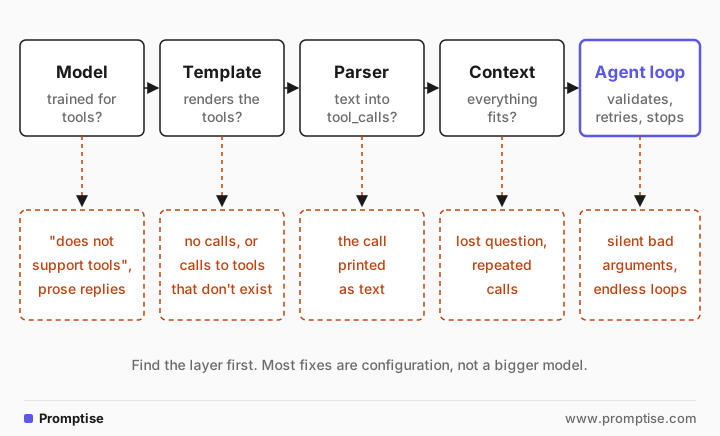
With a local model you run every layer yourself, and each one can fail on its own:
The model must be trained to emit tool calls (Ollama tags such models "tools").
The chat template turns your tool definitions into text the model reads. Without a tool section, the model never sees them.
The server's parser turns the model's own call format (JSON in tags, a Python-like call, special tokens) into structured tool_calls. If it can't, you get the text.
The context window must hold the system prompt, tools, history and results, or the server drops messages.
Your agent loop validates arguments, runs the tool, sends results back and decides when to stop.
[03]
What the benchmarks say about small models
The Berkeley Function Calling Leaderboard (BFCL V4, last updated 2026-04-12) tests the same skills separately. Its published data shows where small models hold up and where they don't:
Model (function-calling mode) | Single calls (non-live AST) | Multi-turn | Irrelevance detection |
|---|---|---|---|
Qwen3-8B | 87.58% | 41.75% | 79.07% |
Qwen3-4B-Instruct-2507 | 87.88% | 22.12% | 84.93% |
Qwen3-1.7B | 82.92% | 11.00% | 76.54% |
Llama-3.2-3B-Instruct | 82.67% | 4.00% | 52.06% |
Granite-3.2-8B-Instruct | 79.77% | 7.38% | 80.53% |
xLAM-2-8b-fc-r (fine-tuned for function calling) | 84.58% | 70.00% | 63.28% |
xLAM-2-3b-fc-r (fine-tuned for function calling) | 82.96% | 58.38% | 63.45% |
Three patterns stand out:
Single calls work for most small models. One or two independent calls per request is within reach.
Multi-turn use collapses for general-purpose small models. Carrying state across turns and reacting to tool results is exactly what an agent loop needs. Function-calling fine-tunes like xLAM-2 keep much more of it, but call a tool when none fits more often.
Some models call tools when they shouldn't. Llama-3.2-3B answers directly when no tool fits only about half the time.
These are BFCL's tasks, not yours, and newer small models aren't on the April leaderboard. Use the numbers to know where to look, then test on your own tools.
A note on this month's "small" models
DeepSeek-V4.1-Flash (October 2026) is not small: its model card lists 552B backbone parameters, and Ollama offers it only with :cloud tags that run on Ollama's servers. It also ships no Jinja chat template, which is a template risk for servers that rely on one.
LFM2.5-24B-A2B from Liquid AI is a real on-device option: 24B parameters with about 2B active per token, on Ollama as lfm2.5:24b. Its model card says it writes Pythonic tool calls by default, such as [get_candidate_status(candidate_id="12345")] between special tokens, so a server or client that expects JSON will miss them. The recovery code below handles both formats.
[04]
When a small local model is the right choice (and when not)
A small local model fits when:
Data must not leave your machine or network.
The agent makes few, simple calls per request: classify and route, extract and store, look one thing up.
You call it at high volume, and you can accept a fallback when it fails.
Prefer a larger or hosted model when:
The task needs many dependent calls in one conversation, the multi-turn case above.
Wrong arguments are expensive: payments, deletions, messages sent to people.
You offer the model dozens of tools at once.
Many teams mix both, with a fallback to a hosted model when the local one fails; the best local LLM guide shows it with Promptise Foundry.
[05]
What you need
A local model server: Ollama, LM Studio, vLLM or llama.cpp.
Python 3.10+ and
uv pip install "promptise==1.7.0"for the replay and recovery code. It uses promptise.testing, new in 1.7.0.
We didn't have a local model server on the machine used for this guide, so the failure modes are described from each project's documentation and issue tracker, with links. The code runs without a model: Foundry's ScriptedModel plays the model and sends the kinds of replies small models produce, including malformed ones, so you can see exactly what the agent loop does with each. The tools are real; only the model's turns are scripted.
[06]
Failure modes and fixes
1. "does not support tools" or prose replies (model and template)
With Ollama, a model without tool support fails with does not support tools, often a GGUF file imported from Hugging Face. In an Ollama issue from January 2026, the maintainers' fix is a Modelfile with FROM and a TEMPLATE translated from the model's Jinja template.
llama.cpp fails more quietly: with a template it doesn't recognize, it falls back to a generic format and logs Chat format: Generic, which its function calling docs say may be less efficient. Pass --chat-template-file with the model's real template.
Before debugging prompts, check ollama show <model> for capabilities and llama.cpp's /props for the template.
2. The tool call arrives as text (parser)
The model produced a call, but the server didn't parse it, so your code receives something like this as the answer:
<tool_call>
{"name": "get_order", "arguments": {"order_id": "A-1001", "quantity": 2}}
</tool_call>
Parser bugs in specific server versions cause this as well as unsupported formats. One Ollama issue from March 2026 reports qwen3.5:9b printing tool calls instead of executing them on 0.17.6 and 0.17.7, with users pinning 0.17.5 until a fix. vLLM needs --enable-auto-tool-choice and the right --tool-call-parser per model family (vLLM docs).
The dangerous part is what the agent does next. Here is the replay of that reply through a Promptise agent, alongside the other failures in this guide. Each scenario is a short script of model turns: ToolCall is a proper call, Malformed.tool_call_as_text writes the call into the text, and Malformed.unparseable_arguments sends arguments that aren't valid JSON. Where a real model would correct itself, the script's next turn is the corrected call:
"""Replay typical small-model tool-calling failures through a Promptise agent.

No local model needed: promptise.testing.ScriptedModel plays the model, with the
kinds of replies small models produce (documented in Ollama, vLLM and llama.cpp
issues and docs), so you can see exactly what the agent loop does with each.
"""
import asyncio

from promptise import build_agent, tool
from promptise.engine import GraphExecutionError
from promptise.testing import Malformed, ScriptedModel, ToolCall


@tool
def get_order(order_id: str, quantity: int) -> dict:
    """Look up an order line.

    Args:
        order_id: The order ID, for example "A-1001".
        quantity: How many units to check.
    """
    return {"order_id": order_id, "quantity": quantity, "in_stock": True}


@tool
def cancel_order(order_id: str) -> str:
    """Cancel an order."""
    return f"Cancelled {order_id}."


GOOD = ToolCall("get_order", {"order_id": "A-1001", "quantity": 2})
DONE = "A-1001: 2 units in stock."
SCENARIOS = {
    "number sent as a string": [ToolCall("get_order", {"order_id": "A-1001", "quantity": "2"}), DONE],
    "required argument missing": [ToolCall("get_order", {"order_id": "A-1001"}), GOOD, DONE],
    "tool name misspelled": [ToolCall("get_ordr", {"order_id": "A-1001", "quantity": 2}), GOOD, DONE],
    "arguments not valid JSON": [Malformed.unparseable_arguments("get_order", "{'order_id': 'A-1001', 'quantity': 2}"),
                                 GOOD, DONE],
    "tool call written as text": [Malformed.tool_call_as_text(
        "get_order", {"order_id": "A-1001", "quantity": 2}, style="tagged")],
    "same call repeated forever": [GOOD],
}


async def run(name: str, replies: list) -> None:
    repeat = name == "same call repeated forever"
    model = ScriptedModel(replies, on_exhausted="repeat_last" if repeat else "raise")
    agent = await build_agent(model=model, extra_tools=[get_order, cancel_order], max_agent_iterations=6)
    print(f"--- {name}")
    try:
        result = await agent.ainvoke({"messages": [{"role": "user", "content": "Check order A-1001, 2 units."}]})
        for m in result["messages"]:
            if m.type == "tool":
                print(f"tool result ({m.status}): {m.content}")
        print(f"model calls: {len(model.calls)}; final reply: {result['messages'][-1].content!r}")
    except GraphExecutionError as exc:
        print(f"model calls: {len(model.calls)}; raised {type(exc).__name__}: {exc}")
    finally:
        await agent.shutdown()


async def main() -> None:
    for name, replies in SCENARIOS.items():
        await run(name, replies)


if __name__ == "__main__":
asyncio.run(main())--- number sent as a string
tool result (success): {"order_id": "A-1001", "quantity": 2, "in_stock": true}
model calls: 2; final reply: 'A-1001: 2 units in stock.'
--- required argument missing
tool result (error): Invalid arguments for tool 'get_order':
- quantity: Field required
Correct the arguments and call the tool again.
tool result (success): {"order_id": "A-1001", "quantity": 2, "in_stock": true}
model calls: 3; final reply: 'A-1001: 2 units in stock.'
--- tool name misspelled
tool result (error): Error: Unknown tool 'get_ordr'. Did you mean 'get_order'? Call one of the available tools: get_order, cancel_order.
tool result (success): {"order_id": "A-1001", "quantity": 2, "in_stock": true}
model calls: 3; final reply: 'A-1001: 2 units in stock.'
--- arguments not valid JSON
tool result (error): Error: The arguments for 'get_order' were not valid JSON (Expecting property name enclosed in double quotes at line 1 column 2). Call the tool again with a JSON object that matches its parameters: order_id (required), quantity (required).
tool result (success): {"order_id": "A-1001", "quantity": 2, "in_stock": true}
model calls: 3; final reply: 'A-1001: 2 units in stock.'
--- tool call written as text
model calls: 1; final reply: '<tool_call>\n{"name": "get_order", "arguments": {"order_id": "A-1001", "quantity": 2}}\n</tool_call>'
--- same call repeated forever
model calls: 6; raised GraphIterationLimitError: Graph 'react' failed at node 'reason': the run reached the engine's max_iterations (6) before the model gave an answer; the run stopped after a call to get_order whose result the model never sawThe "tool call written as text" scenario shows it: one model call, no tool ran, and the raw tag became the final reply. Nothing raised an error, because to the agent loop a reply with no tool calls is a finished answer. The loop can't safely guess otherwise, since a model may legitimately answer with JSON, so this one stays your job. Two fixes:
Fix the server. Use and pin a version and parser that handle the model's format, with a smoke test after upgrades, as in the best local LLM guide.
Recover on the client. Check the final answer for a tool call written as text. If you find one for a tool that is safe to run outside the loop, such as a read-only lookup, run it, send the result back, and ask again. Anything else is an error, not an answer:
"""Recover tool calls that a small model wrote as text instead of as structured calls.

Handles the formats seen in local-model output:
  <tool_call>{"name": ..., "arguments": {...}}</tool_call>     (Hermes / Qwen style)
  {"name": ..., "arguments": {...}}, bare or in a ```json block
  <|tool_call_start|>[fn(a="x", b=2)]<|tool_call_end|>          (Pythonic, e.g. LFM2.5)
Only tools you offered and marked safe to run outside the loop are run.
"""
import ast
import json
import re

TAGGED = re.compile(r"<tool_call>\s*(\{.*?\})\s*</tool_call>", re.S)
FENCED = re.compile(r"```(?:json)?\s*(\{.*?\})\s*```", re.S)
PYTHONIC = re.compile(r"<\|tool_call_start\|>\s*(\[.*?\])\s*<\|tool_call_end\|>", re.S)
MARKERS = ("<tool_call>", "<|tool_call_start|>", '"arguments"')


def parse_text_tool_calls(text: str) -> list[dict]:
    """Return the tool calls written in a reply's text, as {"name": ..., "args": {...}}."""
    found = []
    blobs = TAGGED.findall(text) or FENCED.findall(text) or ([text.strip()] if text.strip().startswith("{") else [])
    for blob in blobs:
        try:
            data = json.loads(blob)
            args = data.get("arguments", data.get("parameters", {}))
            found.append({"name": data["name"], "args": json.loads(args) if isinstance(args, str) else args})
        except (ValueError, KeyError, TypeError):
            continue
    for blob in PYTHONIC.findall(text):
        for call in ast.parse(blob, mode="eval").body.elts:
            found.append({"name": call.func.id,
                          "args": {kw.arg: ast.literal_eval(kw.value) for kw in call.keywords}})
    return found


async def ask(agent, question: str, safe_tools: list, max_recoveries: int = 2) -> str:
    """Ask the agent; if it answers with a tool call written as text, run that call and ask again."""
    tools = {t.name: t for t in safe_tools}
    messages = [{"role": "user", "content": question}]
    for _ in range(max_recoveries + 1):
        result = await agent.ainvoke({"messages": messages})
        answer = result["messages"][-1].content
        calls = parse_text_tool_calls(answer)
        if not calls:
            if any(m in answer for m in MARKERS):
                raise RuntimeError(f"unreadable tool call in the answer: {answer[:80]!r}")
            return answer
        unknown = [c["name"] for c in calls if c["name"] not in tools]
        if unknown:
            raise RuntimeError(f"text tool call to {unknown}, which can't be run outside the agent loop")
        lines = []
        for c in calls:
            output = await tools[c["name"]].ainvoke(c["args"])   # the @tool still validates the arguments
            text = output if isinstance(output, str) else json.dumps(output)
            lines.append(f"{c['name']}({json.dumps(c['args'])}) returned {text}")
        messages += [{"role": "assistant", "content": answer},
                     {"role": "user", "content": "You wrote a tool call as text instead of calling the tool, "
                                                 "so it was run for you:\n" + "\n".join(lines) +
                                                 "\nUse this result to answer the question."}]
raise RuntimeError("the model kept writing tool calls as text")--- Hermes/Qwen tags
sent back: get_order({"order_id": "A-1001", "quantity": 2}) returned {"order_id": "A-1001", "quantity": 2, "in_stock": true}
answer: 'A-1001: 2 units in stock.'
--- JSON in a code block
sent back: get_order({"order_id": "A-1001", "quantity": 2}) returned {"order_id": "A-1001", "quantity": 2, "in_stock": true}
answer: 'A-1001: 2 units in stock.'
--- Pythonic (LFM2.5)
sent back: get_order({"order_id": "A-1001", "quantity": 2}) returned {"order_id": "A-1001", "quantity": 2, "in_stock": true}
answer: 'A-1001: 2 units in stock.'
--- a tool that isn't safe to run here
not recovered: text tool call to ['cancel_order'], which can't be run outside the agent loopAll three formats were recovered: the tool ran, the model got the result as a follow-up message, and its next turn answered. The cancel_order call wasn't run, because a tool run this way skips anything the agent loop adds around a call, such as approvals; only list read-only tools in safe_tools. ask() works with any agent, including one built with model="ollama:qwen3.5:9b"; we tested it only with the scripted replies shown here.
3. Wrong types, missing arguments and broken JSON (model)
Small models follow schemas less reliably: a number arrives as a string, a required field is missing, an array comes back serialized as a string (the vLLM docs list that one as a known issue for Llama 3 models), or the arguments aren't JSON at all, such as a Python dict with single quotes. The replay shows what a validating agent loop can do:
`"2"` for an integer was coerced to 2 and the call succeeded, because Promptise validates arguments against the tool's schema with Pydantic's lenient conversion.
A missing `quantity` didn't reach the tool. The model got back Invalid arguments for tool 'get_order': - quantity: Field required. Correct the arguments and call the tool again. That message is what gives a small model a chance to fix the call on the next turn, and in the replay the next turn did.
Arguments that aren't valid JSON didn't end the run either. The model got back an error naming the parse problem and the tool's parameters,
order_id (required), quantity (required), and called again. Foundry 1.7.0 added this; earlier versions ended the run silently.
Make the schema easy to get right: few, flat arguments, enums instead of free text that must match a list, and a one-line description with an example for each argument. Compare two definitions of the same tool, and the argument schemas the model receives for them:
from typing import Literal

from promptise import tool


@tool
def search_orders(filters: dict) -> list[dict]:
    """Search orders. filters may contain status, customer and date range."""
    return []


@tool
def list_orders(status: Literal["open", "paid", "overdue"], customer_id: str | None = None) -> list[dict]:
    """List orders with one status, optionally for one customer.

    Args:
        status: Order status to list.
        customer_id: Customer ID such as "C-1042". Leave empty for all customers.
    """
    return []


if __name__ == "__main__":
    import json
    for t in (search_orders, list_orders):
print(t.name, json.dumps(t.tool_call_schema.model_json_schema()["properties"]))search_orders {"filters": {"additionalProperties": true, "title": "Filters", "type": "object"}}
list_orders {"status": {"description": "Order status to list.", "enum": ["open", "paid", "overdue"], "title": "Status", "type": "string"}, "customer_id": {"anyOf": [{"type": "string"}, {"type": "null"}], "default": null, "description": "Customer ID such as \"C-1042\". Leave empty for all customers.", "title": "Customer Id"}}The first leaves the model to guess the keys, their spelling and the date format. The second gives it a closed list and one described optional field, and validation can reject anything else with a clear message. Validate on the server side too; an MCP server can't assume the client checked anything.
4. Calls to tools that don't exist, or calls that aren't needed (model)
Small models invent plausible tool names, and some call a tool when they should answer directly. In the replay, the misspelled get_ordr came back as Error: Unknown tool 'get_ordr'. Did you mean 'get_order'? Call one of the available tools: get_order, cancel_order., and the next turn used the right name. Foundry 1.7.0 suggests a name only when it looks like a misspelling, and lists the available tools either way; older versions named only the unknown tool.
What reduces both problems:
Offer fewer tools. Load rarely used ones only for the steps that need them; the too many MCP tools guide covers selection.
Force the choice where the server supports it. vLLM supports tool_choice set to required or to a named tool, using structured outputs to guarantee a parsable call (its docs note that guarantees validity, not quality). llama.cpp constrains output with grammars once a call starts. Ollama's OpenAI-compatible API doesn't support tool_choice, according to its compatibility docs.
Use structured output for extraction. If the step is "fill in these fields", ask for JSON with a schema (Ollama's format parameter) instead.
5. The model forgets the question (context)
Ollama sets the default context by available VRAM: 4k tokens below 24 GiB, 32k from 24 to 48 GiB, and 256k at 48 GiB or more, and its context length docs recommend at least 64,000 tokens for agents and coding tools. A 4k context fills with the system prompt, a dozen tool definitions and a few tool results. When it overflows, older messages go, and with them the user's question, so the model answers from the last tool result or repeats calls. Set OLLAMA_CONTEXT_LENGTH or num_ctx; the Ollama guide shows both with Promptise.
6. The same call, over and over (model and loop)
A small model that doesn't understand a tool result often calls the same tool again with the same arguments. Without a limit, it runs until the request times out. In the replay, the script repeats the same call forever (on_exhausted="repeat_last"), and Promptise's iteration limit (max_agent_iterations=6) stopped the run after six model calls with a GraphIterationLimitError that says the model never saw the last result. Since 1.7.0, max_agent_iterations alone sets that limit; earlier versions also capped the default loop at 15. Catch that error and fall back, or answer with what you have. A guard that rejects an identical repeated call ("you already called this; use the result above") also helps.
7. Streaming and history (client)
If you stream responses and build the conversation yourself, accumulate the partial fields. Ollama's streaming docs say this matters most for tool calling, because the thinking, the tool call and its result must all go back in the next request. Drop one and the model sees an unanswered question and calls the tool again.
[07]
Running small models for tool calling in production
Test the combination, not the model, and pin it. The same weights behave differently across server versions, quantizations and templates. Pin the server version and model tag, and run a few tool-calling cases (a single call, a missing argument, an irrelevant question, a three-step task) after every upgrade; AI agent evals in CI shows how. Script the same cases with ScriptedModel to test your own loop and tools without a model.
Count text tool calls. Log every final reply that contains a tool-call marker. A rising count is usually a parser or template regression, not the model getting worse.
Keep a fallback. Route to a hosted model after a validation failure or an iteration-limit error, and decide in advance which data the fallback may see.
Watch arguments before risky actions. Small models get arguments wrong more often. Put human approval in front of tools that pay, delete or send.
[08]
Common problems and fixes
Symptom | Layer | Fix |
|---|---|---|
| Model or template | Use a tools-tagged model, or add a TEMPLATE in a Modelfile |
Chat format: Generic in llama.cpp logs | Template | Pass --chat-template-file with the model's own template |
Final answer contains <tool_call> or [fn(...)] | Parser | Fix the server version or parser; recover on the client; count these |
Tool calls worked, then stopped after an upgrade | Parser regression | Pin the previous version; re-run your tool-calling tests |
Field required, wrong types or arguments that aren't JSON | Model | Flatter schemas, enums, examples in descriptions; return the errors to the model |
Unknown tool | Model | Fewer tools; return the valid names with the error (Foundry 1.7.0 does); tool_choice where supported |
Tool called for small talk | Model | Fewer tools; tell it when not to use tools; test irrelevant questions |
Model repeats calls, forgets the question | Context | Raise num_ctx or OLLAMA_CONTEXT_LENGTH to 32k to 64k |
Run never ends | Loop | Set an iteration limit and handle the error; reject identical repeated calls |
Tool result ignored in the next turn | Client | Send the tool call and its result back in the history |
[09]
Limitations
No local model ran for this guide. The failure modes come from the cited docs and issues; the replay reproduces the replies, not the models. Your model and server versions may behave differently.
Benchmarks are a guide, not a forecast. BFCL's tasks differ from yours, and the newest small models aren't on the April 2026 leaderboard.
Client-side recovery is a patch. It knows only the formats it parses. Fix the server when you can.
Validation catches shape, not meaning. A well-formed call with the wrong order ID passes every check.
[10]
FAQ
Why does my local model print the tool call instead of running it?
The server's parser didn't recognize the model's tool-call format, so the call stayed in the text. Check that the server supports the model's format (the right vLLM --tool-call-parser, a recognized llama.cpp template, a current Ollama version) and look for known regressions. As a stopgap, parse the text on the client and run only read-only tools you offered.
Which small models are good at tool calling?
On the Berkeley Function Calling Leaderboard, small Qwen3 models do well on single calls, while models fine-tuned for function calling, such as xLAM-2-8b-fc-r, hold up much better on multi-turn tasks than general-purpose models of the same size. Test candidates on your own tools with your own server, because templates and parsers change results as much as the weights do.
Does Ollama support tool_choice?
Not on its OpenAI-compatible API, according to Ollama's compatibility documentation: tools is supported, tool_choice is not. vLLM supports required and named tool choice, and llama.cpp can constrain tool-call output with grammars.
How do I stop a small model from calling the same tool in a loop?
Set an iteration limit in your agent loop and handle the error it raises, reject an identical repeated call with a message that points the model at the earlier result, and make sure the tool result is actually in the history. A context window that is too short is a common hidden cause.
Is DeepSeek V4.1 Flash a local model?
No. Its model card lists 552B backbone parameters, and Ollama offers it only through cloud tags that run on Ollama's servers. Despite the name, it is not a model you can run on a laptop.
Can Promptise Foundry use a small local model for tools?
Yes. Pass an Ollama model to build_agent, for example "ollama:qwen3.5:9b", and add your MCP servers or @tool functions. Foundry validates each call's arguments and answers bad arguments, unparseable JSON and unknown tool names with errors the model can act on, and max_agent_iterations stops loops. It doesn't recover tool calls the server left as text, because the loop can't tell those from a real answer; use a check like ask() in this guide for that. To test all of this without a model, use promptise.testing.ScriptedModel.
[11]
Next steps
Choose and set up the model: Best Local LLM for AI Agents.
Connect it to MCP tools with Promptise: Ollama AI Agent with MCP.
Learn how tool calls work under the hood: What Is Tool Calling?
Keep the tool list small enough for a small model: Too Many MCP Tools.
Compare the same model in different agent loops: Test One Model Across Agent Harnesses.