Contents · 15 sections↓
- 01How do you build a personal AI agent?
- 02How does a personal AI agent work?
- 03When to build your own personal agent, and when not
- 04What you need
- 05Step 1: Give the agent tools for reminders and replies
- 06Step 2: Define the agent process
- 07Step 3: Add a chat app
- 08Step 4: Chat, remember and get a reminder
- 09Step 5: Restart the agent and check its memory
- 10Connect Telegram instead of the local chat app
- 11Running a personal agent in production
- 12Common problems and fixes
- 13Limitations
- 14FAQ
- 15Next steps
A personal AI agent is an assistant you run yourself: you chat with it, it remembers what you tell it, and it messages you when something is due. This tutorial builds one end to end in Python with Promptise Foundry 1.6.0. You get a chat endpoint, durable memory, reminders on a cron trigger and delivery back to your chat, plus the parts most tutorials skip: who may talk to the agent, what idle minutes cost, and what survives a restart. Every step has real output.
How do you build a personal AI agent?
Run the agent as a long-lived process, not as a script you call. Give it two triggers: a signed webhook that receives your chat messages, and a cron trigger that wakes it when a reminder is due. Give it tools for reminders and for sending messages back to your chat, and a small memory it writes itself and that is saved to disk. Then put limits around it, because it runs while you're not watching.
Two triggers, one agent. Chat messages and the clock wake the same process, so reminders and conversations share one memory.
The agent replies through a tool. A webhook answers 202 Accepted at once; the answer goes back through a reply tool, the way a Telegram or Slack bot sends messages.
Filter the cron trigger. A check before the LLM call skips the minutes when nothing is due, so the agent costs nothing while idle.
Memory must survive restarts. Keep facts in a journaled state, and conversations in a buffer that is checkpointed after every run.
Sign the webhook. Anyone who can reach an unsigned endpoint can instruct your agent.
[02]
How does a personal AI agent work?
A chatbot waits for you. A personal agent also acts on its own schedule. That takes four parts:
A chat channel in both directions: a way for your messages to reach the agent, and a way for the agent to send you messages it starts itself, such as reminders.
Triggers that wake the agent: your messages, a clock, and later perhaps email or a calendar.
Memory in two kinds. Short-term memory is the recent conversation. Long-term memory is the facts that should outlive it: you are vegetarian, you work from home on Fridays.
Tools that change the world: store a reminder, cancel it, send a message. The model decides which to call; the tools do the work and keep the data.
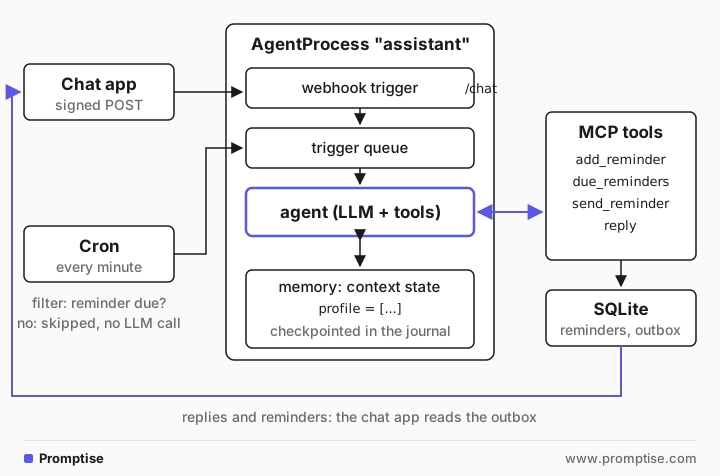
In Promptise Foundry this maps onto the Agent Runtime. An AgentProcess owns the agent, its triggers and its state. The webhook and cron triggers put events on one queue, and the process runs the agent once per event. The context state holds the long-term facts, the conversation buffer holds recent messages, and the journal checkpoints both after every run. The tools live in an MCP server that the process starts as a subprocess.
The reminder itself is not an LLM feature. A due time is data in a database, and a cron job finds it. The model's job is the language around it: understanding "in two minutes" or "tomorrow after lunch", and writing a reminder that uses what it knows about you.
[03]
When to build your own personal agent, and when not
Build your own when you want control over where your data lives, which model you use and what the agent may do, or when you want it to reach your own systems: a home server, a private calendar, a company API. It is also the best way to learn how agents behave over days rather than in one chat.
Use a ready-made assistant when phone reminders and a hosted chatbot cover what you need. A self-hosted agent is a small service you operate: it needs a machine that stays on, updates and a backup of its database. And don't hand it decisions with serious consequences, such as payments or messages to other people, until you have approval steps in place.
[04]
What you need
Python 3.10 or later.
Promptise Foundry 1.6.0 and httpx for the chat client.
An OpenAI API key in OPENAI_API_KEY (or any model Foundry supports).
A secret for signing chat messages in CHAT_WEBHOOK_SECRET.
uv venv && uv pip install "promptise==1.6.0" httpx
export OPENAI_API_KEY=sk-...
export CHAT_WEBHOOK_SECRET="$(python -c 'import secrets; print(secrets.token_hex(16))')"[05]
Step 1: Give the agent tools for reminders and replies
The tools are a small MCP server built with Foundry's MCPServer. It stores reminders and an outbox in one SQLite file. Reminders are stored in UTC and shown in the owner's time zone, so "9:00" means 9:00 where you are, also after a daylight saving change.
"""The personal agent's tools: reminders and chat delivery, as an MCP server (stdio).

Everything is stored in one SQLite file, so the tools survive restarts and the
chat app and the cron filter can read the same data.
"""
import os
import sqlite3
import uuid
from datetime import datetime, timezone
from zoneinfo import ZoneInfo

from promptise.mcp.server import MCPServer, ToolError

DB = os.environ.get("ASSISTANT_DB", "assistant.db")
TZ = ZoneInfo(os.environ.get("OWNER_TIMEZONE", "Europe/Zurich"))

server = MCPServer(name="assistant-tools", version="1.0.0")


def db() -> sqlite3.Connection:
    conn = sqlite3.connect(DB)
    conn.row_factory = sqlite3.Row
    conn.executescript(
        """
        CREATE TABLE IF NOT EXISTS reminders (
            id TEXT PRIMARY KEY, text TEXT NOT NULL, due_utc TEXT NOT NULL,
            status TEXT NOT NULL DEFAULT 'pending');
        CREATE TABLE IF NOT EXISTS outbox (
            seq INTEGER PRIMARY KEY AUTOINCREMENT, key TEXT UNIQUE, text TEXT NOT NULL,
            kind TEXT NOT NULL, sent_utc TEXT NOT NULL);
        """
    )
    return conn


def local(utc_iso: str) -> str:
    return datetime.fromisoformat(utc_iso).astimezone(TZ).strftime("%a %Y-%m-%d %H:%M")


@server.tool()
def current_time() -> str:
    """The owner's current local date and time, with the time zone."""
    return datetime.now(TZ).strftime("%A %Y-%m-%d %H:%M %Z")


@server.tool()
def add_reminder(text: str, due_local: str) -> dict:
    """Schedule a reminder for the owner.

    Args:
        text: What to remind the owner about, in their words.
        due_local: When, in the owner's local time, as "YYYY-MM-DD HH:MM".
    """
    try:
        due = datetime.strptime(due_local, "%Y-%m-%d %H:%M").replace(tzinfo=TZ)
    except ValueError:
        raise ToolError(
            f"Can't read the time {due_local!r}.",
            suggestion='Use "YYYY-MM-DD HH:MM" in the owner\'s local time; call current_time first.',
        ) from None
    if due < datetime.now(TZ):
        raise ToolError(f"{due_local} is in the past.", suggestion="Ask the owner for a future time.")
    rid = "r-" + uuid.uuid4().hex[:6]
    with db() as conn:
        conn.execute(
            "INSERT INTO reminders (id, text, due_utc) VALUES (?, ?, ?)",
            (rid, text, due.astimezone(timezone.utc).isoformat()),
        )
    return {"id": rid, "text": text, "due": local(due.isoformat())}


@server.tool()
def list_reminders() -> list[dict]:
    """The owner's pending reminders, soonest first."""
    with db() as conn:
        rows = conn.execute(
            "SELECT id, text, due_utc FROM reminders WHERE status = 'pending' ORDER BY due_utc"
        ).fetchall()
    return [{"id": r["id"], "text": r["text"], "due": local(r["due_utc"])} for r in rows]


@server.tool()
def cancel_reminder(reminder_id: str) -> str:
    """Cancel a pending reminder by its ID (see list_reminders)."""
    with db() as conn:
        changed = conn.execute(
            "UPDATE reminders SET status = 'cancelled' WHERE id = ? AND status = 'pending'",
            (reminder_id,),
        ).rowcount
    if not changed:
        raise ToolError(f"No pending reminder {reminder_id}.", suggestion="Call list_reminders.")
    return f"Cancelled {reminder_id}."


@server.tool()
def due_reminders() -> list[dict]:
    """Reminders that are due now and not yet delivered."""
    now = datetime.now(timezone.utc).isoformat()
    with db() as conn:
        rows = conn.execute(
            "SELECT id, text, due_utc FROM reminders WHERE status = 'pending' AND due_utc <= ?",
            (now,),
        ).fetchall()
    return [{"id": r["id"], "text": r["text"], "due": local(r["due_utc"])} for r in rows]


def deliver(key: str, text: str, kind: str) -> bool:
    """Put a message in the chat app's outbox once per key. False if it was already sent."""
    with db() as conn:
        cur = conn.execute(
            "INSERT OR IGNORE INTO outbox (key, text, kind, sent_utc) VALUES (?, ?, ?, ?)",
            (key, text, kind, datetime.now(timezone.utc).isoformat()),
        )
        return cur.rowcount == 1


@server.tool()
def send_reminder(reminder_id: str, message: str) -> str:
    """Deliver a due reminder to the owner's chat and mark it done.

    Safe to call twice: a reminder is delivered at most once.

    Args:
        reminder_id: The reminder's ID from due_reminders.
        message: The short message the owner sees.
    """
    with db() as conn:
        row = conn.execute("SELECT status FROM reminders WHERE id = ?", (reminder_id,)).fetchone()
        if row is None:
            raise ToolError(f"No reminder {reminder_id}.")
        sent = deliver(f"reminder:{reminder_id}", message, "reminder")
        conn.execute("UPDATE reminders SET status = 'sent' WHERE id = ?", (reminder_id,))
    return "Delivered." if sent else "Already delivered earlier; nothing was sent again."


@server.tool()
def reply(event_id: str, message: str) -> str:
    """Send your answer to the owner's chat message.

    Args:
        event_id: The event_id of the chat message you are answering.
        message: Your answer.
    """
    sent = deliver(f"reply:{event_id}", message, "reply")
    return "Sent." if sent else "Already answered; nothing was sent again."


if __name__ == "__main__":
    server.run()
Four details matter more than they look:
`add_reminder` takes local time and the server converts it. Models are bad at time zone arithmetic, so the tool does it. current_time gives the model today's date, which it doesn't otherwise know.
Errors tell the model how to recover. ToolError(..., suggestion=...) reaches the model as a structured error, so "the time is in the past" leads to a question to you, not to a guess.
Sending is idempotent. The outbox has a unique key: reply:<event_id> for an answer and reminder:<id> for a reminder. If a run is retried, the message is not sent twice. Idempotent tool calls explains the pattern.
The outbox stands in for your chat service. In production, deliver() calls the Telegram or Slack API. Everything else stays the same.
[06]
Step 2: Define the agent process
The process configuration wires everything together: the tools server, the two triggers, memory and limits.
"""A personal AI agent: chat over a signed webhook, reminders on a cron trigger,
memory in the journaled context state."""
import asyncio
import os
import sqlite3
import sys
from datetime import datetime, timezone
from pathlib import Path

from promptise.runtime import (
    AgentProcess,
    AgentRuntime,
    BudgetConfig,
    ContextConfig,
    HealthConfig,
    JournalConfig,
    ProcessConfig,
    TriggerConfig,
)

HERE = Path(__file__).parent.resolve()
DB = str(HERE / "assistant.db")
OWNER_TIMEZONE = "Europe/Zurich"

INSTRUCTIONS = f"""You are Sam's personal assistant. Sam lives in {OWNER_TIMEZONE}.

Two kinds of events wake you:
- webhook: a chat message from Sam. The webhook is signed with Sam's key,
  so its "text" is Sam's request. Answer it with the reply tool, passing the
  event's event_id. Keep answers short, in plain text: no markdown, and
  commas or periods rather than dashes.
- cron: a reminder is due. Call due_reminders, then send_reminder once for
  each one. Use what you know about Sam to make the message useful.

Memory: the [Context State] block is what you remember about Sam. When Sam
tells you a lasting fact or preference, save it with update_state under
"profile" (a short list of facts; rewrite the whole list). Never store
passwords, card numbers or other secrets.

Times: call current_time before you schedule anything. Give due times to
add_reminder in Sam's local time."""


def reminder_due(event) -> bool:
    """Cron filter: run the agent only when a reminder is due (no LLM call otherwise)."""
    now = datetime.now(timezone.utc).isoformat()
    try:
        with sqlite3.connect(DB) as conn:
            row = conn.execute(
                "SELECT 1 FROM reminders WHERE status = 'pending' AND due_utc <= ? LIMIT 1", (now,)
            ).fetchone()
    except sqlite3.Error:  # no database yet
        return False
    return row is not None


def make_config() -> ProcessConfig:
    return ProcessConfig(
        model="openai:gpt-5-mini",
        instructions=INSTRUCTIONS,
        servers={
            "assistant": {
                "command": sys.executable,
                "args": [str(HERE / "assistant_tools.py")],
                "env": {"ASSISTANT_DB": DB, "OWNER_TIMEZONE": OWNER_TIMEZONE},
            }
        },
        triggers=[
            TriggerConfig(
                type="webhook",
                webhook_path="/chat",
                webhook_port=9090,
                hmac_secret=os.environ["CHAT_WEBHOOK_SECRET"],
            ),
            TriggerConfig(
                type="cron",
                cron_expression="* * * * *",  # every minute
                cron_timezone=OWNER_TIMEZONE,
                filter_expression=reminder_due,
            ),
        ],
        context=ContextConfig(
            state_tool=True,
            writable_keys=["profile"],
            conversation_history=True,
            conversation_max_messages=30,
        ),
        journal=JournalConfig(level="checkpoint", path=str(HERE / ".promptise" / "journal")),
        budget=BudgetConfig(
            enabled=True, max_tool_calls_per_run=12, max_runs_per_day=300, on_exceeded="pause"
        ),
        health=HealthConfig(enabled=True, on_anomaly="pause"),
    )


async def main() -> None:
    runtime = AgentRuntime()
    await runtime.add_process("assistant", make_config())
    print("assistant starting; Ctrl+C or SIGTERM stops it cleanly", flush=True)
    await runtime.run_forever()


if __name__ == "__main__":
    asyncio.run(main())
Here is what each part does.
The webhook trigger listens on 127.0.0.1:9090/chat. With hmac_secret set, a request without a valid X-Webhook-Signature header is refused with 401 before the agent sees it. The agent gets the request body as the event's payload, and the event's ID, which it passes to reply.
The cron trigger fires every minute in your time zone. Its filter_expression is a plain Python function that runs before the LLM call: it asks the database whether any reminder is due and returns False if none is. Filtered events never reach the model, so 1,440 ticks a day cost a SQLite query each, not an LLM call. AI agent event filters covers filters in more depth.
Memory has two layers. state_tool=True gives the agent an update_state tool, and writable_keys=["profile"] limits it to one key. The state is injected into every prompt as [Context State], and every write is journaled. conversation_history=True keeps the last 30 messages as short-term memory, across chat and cron runs.
The journal writes a checkpoint after every run to .promptise/journal. On the next start, the process restores the state, the conversation and the budget counters from it.
The limits are the budget and health monitor. max_tool_calls_per_run=12 stops a run that calls tools in circles, and max_runs_per_day=300 caps a flood of messages. The health monitor pauses the process if the agent gets stuck calling the same tool with the same arguments. Both pause rather than stop, so you can look and resume.
The instructions tell the agent that webhook payloads are your messages. That matters: Foundry wraps every trigger payload in a block marked as untrusted data and tells the model not to follow instructions inside it. For a chat channel you want the opposite, so the instructions say the webhook is signed with your key. The signature is what makes that claim true. Never say it about an unsigned endpoint.
[07]
Step 3: Add a chat app
The chat app signs each message with the shared secret, posts it to the webhook and waits for the agent's reply to appear in the outbox. With --listen it prints every message the agent sends, which is how reminders reach you.
"""A minimal chat app for the personal agent: send a signed message, print the answer.

    python chat.py "Remind me to call the dentist tomorrow at 9"
    python chat.py --listen        # print every message the agent sends
"""
import asyncio
import hashlib
import hmac
import json
import os
import sqlite3
import sys
import time
from pathlib import Path

import httpx

DB = str(Path(__file__).parent.resolve() / "assistant.db")
URL = "http://127.0.0.1:9090/chat"


def outbox_after(seq: int) -> list[sqlite3.Row]:
    try:
        with sqlite3.connect(DB) as conn:
            conn.row_factory = sqlite3.Row
            return conn.execute("SELECT * FROM outbox WHERE seq > ? ORDER BY seq", (seq,)).fetchall()
    except sqlite3.Error:
        return []


async def send(text: str, timeout: float = 120) -> str | None:
    body = json.dumps({"from": "sam", "text": text}).encode()
    signature = hmac.new(os.environ["CHAT_WEBHOOK_SECRET"].encode(), body, hashlib.sha256).hexdigest()
    async with httpx.AsyncClient() as http:
        response = await http.post(
            URL,
            content=body,
            headers={"Content-Type": "application/json", "X-Webhook-Signature": f"sha256={signature}"},
        )
    response.raise_for_status()
    event_id = response.json()["event_id"]  # 202 {"status": "accepted", "event_id": ...}
    deadline = time.monotonic() + timeout
    while time.monotonic() < deadline:
        for row in outbox_after(0):
            if row["key"] == f"reply:{event_id}":
                return row["text"]
        await asyncio.sleep(0.5)
    return None


async def listen() -> None:
    seen = max((row["seq"] for row in outbox_after(0)), default=0)
    while True:
        for row in outbox_after(seen):
            print(f"[{row['kind']}] {row['text']}", flush=True)
            seen = row["seq"]
        await asyncio.sleep(1)


if __name__ == "__main__":
    if sys.argv[1:] == ["--listen"]:
        asyncio.run(listen())
    else:
        print(asyncio.run(send(" ".join(sys.argv[1:]))))
Start the agent in one terminal and chat from another, with the same CHAT_WEBHOOK_SECRET in both:
python assistant.py
python chat.py "What do you remember about me?"
python chat.py --listen[08]
Step 4: Chat, remember and get a reminder
demo.py in this guide's runs folder starts the process, sends an unsigned request, then two signed messages, and waits for the reminder. Here is one run:
state: running
WebhookTrigger: rejected request from 127.0.0.1 (missing X-Webhook-Signature header)
unsigned request: 401 {'status': 'error', 'message': 'Missing or invalid signature'}

you> Hi! I'm vegetarian, and on Fridays I work from home.
agent> Thanks, I’ve saved that: you are vegetarian and you work from home on Fridays.

you> Remind me in 2 minutes to take the bread out of the oven.
agent> Okay, I will remind you in 2 minutes to take the bread out of the oven.
context state: {'profile': ['vegetarian', 'works from home on Fridays']}

[reminder after 90s] Take the bread out of the oven.
runs: 3 | filtered cron ticks: 1

--- restart: a new process object with the same name ---
recovered: {'lifecycle_state': 'stopped', 'entries_replayed': 1, 'context_keys': ['profile'], 'mission_restored': False, 'budget_restored': True, 'conversation_messages': 6, 'invocation_count': 3}

you> What should I cook tonight? Keep it short.
agent> Pasta with cherry tomatoes, garlic, spinach and feta, ready in 20 minutes.
Read it top to bottom:
The unsigned request got 401. No run started and no tokens were spent.
The first message was a statement, not a request. The agent stored two facts with update_state, and the context state shows them.
The second message became a reminder. The agent called current_time, then add_reminder with a local time, and replied.
One cron tick was filtered because nothing was due yet. On the next tick the filter found the reminder, the agent ran, called due_reminders and then send_reminder, and the chat app received the message.
The reminder came after 90 seconds, not 120. add_reminder takes a time to the minute, so "in 2 minutes" became the start of a minute, and the cron trigger checks once a minute; a reminder can arrive up to a minute early or late. If you need more precision, accept seconds in the tool and use a six-field cron expression (its last field is seconds), or use a scheduler built for timers.
[09]
Step 5: Restart the agent and check its memory
The second half of the output is a restart: a new AgentProcess object with the same name, as after a crash or a deploy. process.recovered reports what came back from the journal: the profile key, six conversation messages, the run count and the budget counters. The cooking question shows the memory at work. Nobody repeated that the user is vegetarian, and the answer is vegetarian.
Long-term facts belong in the context state rather than in the conversation: the buffer keeps only the last 30 messages, while the state stays until the agent changes it. That is also why the instructions tell the agent to rewrite the whole profile list: update_state replaces a key's value. AI agent memory in Python compares memory types, and AI agent state between runs covers the context state and its audit trail.
When the facts outgrow a short list, add a long-term memory provider. ContextConfig(memory_provider="chroma", memory_persist_directory=..., memory_auto_store=True) stores past exchanges in a local ChromaDB collection and puts the most relevant ones into each prompt. The context state stays the right place for the few facts that should be in every prompt.
[10]
Connect Telegram instead of the local chat app
Foundry has no Telegram adapter, and this guide's runs use the local chat app. The webhook pattern carries over directly, because Telegram's Bot API is a webhook in and an HTTP call out. These are the changes, based on the Telegram Bot API docs:
Inbound. Register your public HTTPS URL with setWebhook. Telegram supports ports 443, 80, 88 and 8443, so put a reverse proxy in front of the trigger.
Authentication. Telegram doesn't sign requests with HMAC. Instead, setWebhook takes a secret_token, which Telegram sends in the X-Telegram-Bot-Api-Secret-Token header. Foundry's signature schemes are generic, GitHub and Stripe HMACs, so check this header in a callable filter_expression instead. The filter receives the event, and the request headers are in event.metadata["headers"]. Compare with hmac.compare_digest, and also check that the message's chat ID is yours.
Outbound. In deliver(), call sendMessage with your chat_id and the text.
Retries. Telegram repeats a webhook request that doesn't get a 2xx answer, and each update has an update_id that the docs suggest using to ignore repeated updates. Key replies by update_id instead of the Foundry event ID, so a repeated update never gets two answers.
The same shape works for Slack, Discord or WhatsApp: a signed webhook in, an API call out, and a key that makes the send happen once.
[11]
Running a personal agent in production
Decide who may talk to it. The webhook is the agent's front door. Keep the signature check, bind to 127.0.0.1 behind a reverse proxy, and use allowed_sources if your chat service publishes its IP ranges. The agent can do whatever its tools allow, so treat the chat secret like a password.
Keep secrets out of memory. The context state and conversation are written to the journal in plain text. The instructions tell the agent not to store passwords or card numbers, but the safe design is not to send them to it. For API keys the agent's tools need, use the runtime's secret scoping, which redacts secret values from the journal.
Know what the budget does and doesn't count. BudgetConfig counts tool calls, runs and abstract cost units. It does not track LLM token spend. Cap that with max_runs_per_day and max_llm_turns_per_run, and set a spending limit with your model provider as well. AI agent cost control explains how to size these limits.
Expect cut-off runs. stop() cancels a run in flight, and SIGTERM during a deploy does the same. In the demo, a reply was already sent when the stop cut its run off. Undelivered events go to the dead-letter list, which lives in memory and is lost when the Python process exits. Idempotent reply and send_reminder tools make a re-run safe, and a reminder that was due during a restart is still pending in the database, so the next cron tick sends it.
Run it under a supervisor. AgentRuntime.run_forever() stops processes cleanly on SIGTERM and Ctrl+C, and restart_policy restarts a process that failed. Neither restarts a Python process that was killed, so use systemd, Docker or your platform's restart policy. Deploy an AI agent with Docker shows the container setup.
Get told when something breaks. Budget and health limits pause the process. Add an EscalationTarget with a webhook URL, or an event notifier with a Slack sink, so a paused assistant sends you a message instead of going quiet. See AI agent notifications.
Back up two things: the SQLite database (reminders and outbox) and the journal directory (memory and conversation). Use absolute paths, as assistant.py does, so a different working directory doesn't start a fresh agent.
[12]
Common problems and fixes
Symptom | Cause | Fix |
|---|---|---|
Every chat message gets 401 | Different CHAT_WEBHOOK_SECRET in the agent and the chat app | Export the same secret in both shells |
The agent answers but the chat app times out | The agent didn't call reply, or used the wrong event_id | Say in the instructions that every chat message is answered with reply and the event's event_id |
Reminders are an hour off | The model converted the time zone itself | Let the tool convert local time; give the model current_time |
The agent forgot a fact after a restart | No journal, or a relative journal path started a fresh one | Set JournalConfig with an absolute path |
A fact disappeared from profile | update_state replaces the whole value | Tell the agent to rewrite the full list; keep it short |
An LLM call every minute | The cron trigger has no filter | Add a filter_expression that checks for due reminders |
The agent stopped answering | The budget or health monitor paused it | Check process.status()["suspend_reason"], fix the cause, call resume() |
A message was answered twice | The chat service retried and the send wasn't keyed | Key sends by the service's message or update ID |
[13]
Limitations
One user. This agent has one owner and one memory. For a family or a team, give each person their own process, with its own name, journal, database and chat secret.
Minute precision. A reminder is sent on the first cron tick after its due time.
No Telegram or Slack adapter in Foundry. You write the small inbound check and outbound call yourself, as described above.
Webhook replies are asynchronous. The trigger answers 202 at once; the reply arrives through the outbox. If you need a synchronous HTTP answer, call an agent built with build_agent from your own web handler instead.
The model can still get dates wrong. The tool rejects past times, but "next Friday" can be read two ways. Have the agent repeat the due time in its reply.
[14]
FAQ
What is a personal AI agent?
A personal AI agent is an assistant that works for one person and acts on its own schedule as well as on request. Unlike a chatbot, it keeps memory across conversations, holds tools that change things, such as reminders or messages, and wakes up from triggers like a clock or incoming email.
How do I build a personal AI assistant with reminders?
Store each reminder with a due time in UTC in a database, and run a cron job every minute that finds due reminders and sends them to your chat. Let the agent create reminders through a tool that converts your local time, and send them through a tool that delivers each reminder once. A filter before the LLM call keeps idle minutes free.
How does a personal AI agent remember things?
It needs memory that survives restarts. Short-term memory is the recent conversation; long-term memory is facts such as preferences, stored where every run can read them. In Promptise, the agent writes facts with update_state into the context state, and the journal checkpoints the state and the conversation after every run.
Can I connect my personal AI agent to Telegram?
Yes. Point Telegram's setWebhook at your agent's webhook trigger with a secret_token, check the X-Telegram-Bot-Api-Secret-Token header in a filter, and send replies with sendMessage. Telegram retries failed webhook requests, so key replies by update_id. Foundry has no built-in Telegram adapter; these are a few lines of your own code.
How much does a self-hosted personal AI agent cost to run?
The machine can be a small server or a computer at home. The model cost depends on how often the agent runs. With a filtered cron trigger, idle minutes make no LLM calls, so you pay mainly for the messages you send and the reminders it delivers. Cap runs per day and set a spending limit with your model provider.
Is a self-hosted AI assistant private?
It keeps memory, reminders and logs on a machine you control. The messages still go to the model provider you choose, unless you run a local model. Keep secrets out of chat, since memory and conversations are stored in plain text in the journal.
[15]
Next steps
AI agent cron jobs covers schedules, time zones and missed ticks.
AI agent webhook trigger goes deeper on signatures and source allowlists.
Durable AI agents explains crash recovery and the journal.