Contents · 10 sections↓
- 01How do you run parallel coding agents on one repo without conflicts?
- 02How Git worktrees isolate coding agents
- 03When parallel coding agents help (and when not)
- 04What you need
- 05Run parallel coding agents step by step
- 06Running parallel agents day to day
- 07Common problems and fixes
- 08Limitations
- 09FAQ
- 10Next steps
Running parallel coding agents on one repo is now routine: one agent builds a feature while another fixes a bug and a third writes tests. Without a plan, they overwrite each other's files, fight over ports, and leave you a pile of merge conflicts. This guide shows how to run several coding agents on one repository without conflicts: a Git worktree per agent, task scopes you can check, what worktrees don't isolate, and a merge routine that keeps main green. Every step comes with scripts and real output.
How do you run parallel coding agents on one repo without conflicts?
Give each agent its own Git worktree on its own branch, a task with a clear file scope, and its own runtime resources such as a port, a database file and a virtualenv. When an agent finishes, check that it stayed in scope, rebase its branch on the latest main, run the tests, and merge one branch at a time. Resolve lockfile conflicts by regenerating the lockfile, not by editing it by hand.
Key takeaways:
One worktree, one branch, one agent. Git refuses to check out the same branch in two worktrees, so agents can't edit each other's files by accident.
Worktrees don't isolate everything. Branches, the stash, hooks and config live in the shared .git directory. In the demo, one agent's stash showed up in the other agent's worktree.
Split work by files, not by feature names. Two agents that both touch __init__.py or add dependencies will conflict, however different their tasks sound.
Merge in a queue. Rebase, test, fast-forward, one branch at a time. Conflicts get solved in the agent's worktree, never on main.
Regenerate lockfiles. Take main's uv.lock or package-lock.json and re-run the package manager's add command for the branch's dependency.
[02]
How Git worktrees isolate coding agents
A Git worktree is an extra working directory attached to the same repository. The Git documentation says a linked worktree shares everything with the main one except per-worktree files such as HEAD and the index. Each worktree has its own checked-out files and its own branch; the history, the object store and almost every ref are shared.
That split is what parallel agents need. Each agent edits a real checkout with all the project's files, runs the tests there, and commits to its own branch. The commits are immediately visible to every other worktree, because the object store is shared, but files in one worktree don't change when another agent edits its copy.
The tools have adopted this. Claude Code has a --worktree flag that creates a worktree under .claude/worktrees/<name>/ on a branch named worktree-<name>, and subagents can run in their own worktrees with isolation: worktree (Claude Code worktrees docs). The Codex app creates a worktree per thread and runs a setup script in it (Codex local environments). Any other agent works too: create the worktree with git worktree add, then start the agent in that folder.
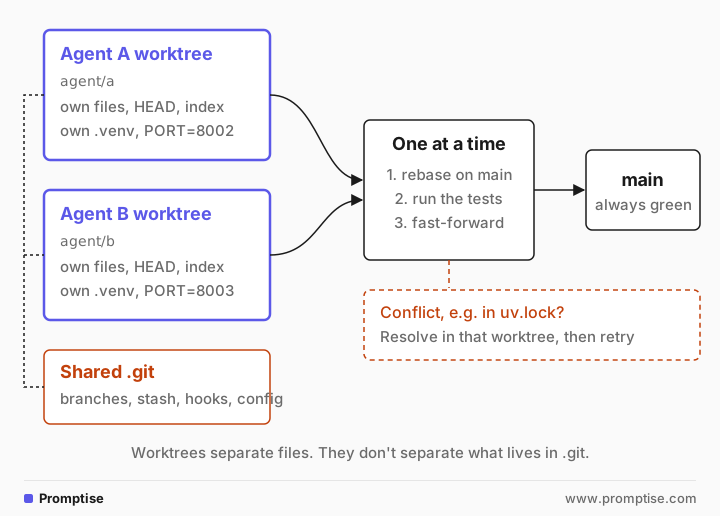
What worktrees don't isolate
Files are separate. These are not:
Refs. Branches, tags and the stash are shared. Git's docs list the exceptions (refs/bisect, refs/worktree, refs/rewritten); everything else under refs/ is common.
Hooks and config. The repository's .git/hooks and config apply to every worktree, unless you enable per-worktree config with extensions.worktreeConfig.
Runtime resources. Two dev servers on port 8000, two test runs against the same database, two docker compose projects with the same name: the worktree knows nothing about these.
Untracked files. A new worktree is a fresh checkout. .env, local certificates and the virtualenv aren't there until you create them.
Meaning. Two branches can each pass their tests and still break when combined. Only testing the merged result catches that.
[03]
When parallel coding agents help (and when not)
Parallel agents pay off when:
The tasks are independent: separate modules, separate bugs, tests for code that won't change.
Each task is small enough to review in one sitting.
Your test suite is fast and trusted, because it is what lets you merge without reading every line twice.
They cost more than they save when:
The tasks touch the same files or the same interfaces. Run them one after another, or give one agent both.
The change is a migration that renames things across the codebase. One agent, one branch, then parallel work on top.
You can't review the output as fast as it arrives. The bottleneck moves to you, and unreviewed branches pile up. The AI code review checklist helps keep reviews short.
[04]
What you need
Git 2.31 or newer, for --path-format=absolute in the scripts (the demo used 2.50.1).
A coding agent that works in a directory: Claude Code, Codex, Gemini CLI, Aider or your own. They differ in their agent harness, but all of them read and write files in their working folder, which is all a worktree needs.
The example project uses Python and uv 0.11; the same steps apply to npm, pnpm or Cargo with their own lockfiles.
The demo runs three small scripts. In the demo, the two "agents" are scripted edits, so every run gives the same result; a coding agent would make the same Git calls. The full driver is demo.sh in the runs folder.
[05]
Run parallel coding agents step by step
1. Give each agent a worktree, a branch and its own resources
This helper creates the worktree next to the main checkout, locks it so cleanup can't remove it while the agent works, copies the .env file, assigns a port and a database file, and installs dependencies into the worktree's own virtualenv:
#!/usr/bin/env bash
# Usage: new-agent.sh <name> [base]   (run from the main checkout)
# One agent = one branch + one worktree + its own port, env file and virtualenv.
set -euo pipefail
name=$1; base=${2:-main}
root=$(dirname "$(git rev-parse --path-format=absolute --git-common-dir)")   # the main checkout
dir="$(dirname "$root")/$(basename "$root")-$name"
branch="agent/$name"

git worktree add --quiet -b "$branch" "$dir" "$base"
git worktree lock --reason "agent $name running" "$dir"

# A port per worktree, so dev servers and test databases don't collide.
n=$(git worktree list | wc -l | tr -d ' ')
port=$((8000 + n))
cp "$root/.env" "$dir/.env" 2>/dev/null || true
printf 'PORT=%s\nDATABASE_URL=sqlite:///./agent-%s.db\n' "$port" "$name" >> "$dir/.env"

# Each worktree gets its own .venv; uv's cache makes this fast.
(cd "$dir" && uv sync --quiet)
echo "$name: $dir on $branch, PORT=$port"$ ./new-agent.sh a
a: ~/code/shop-a on agent/a, PORT=8002
$ ./new-agent.sh b
b: ~/code/shop-b on agent/b, PORT=8003
$ git worktree list
~/code/shop 5ac87e0 [main]
~/code/shop-a 5ac87e0 [agent/a] locked
~/code/shop-b 5ac87e0 [agent/b] lockedEach agent now has a separate folder on its own branch, marked locked until it's done. Start the agent in its folder: cd ../shop-a && claude, codex, or whatever you use. With Claude Code you can let it create the worktree instead (claude --worktree a) and copy .env with a .worktreeinclude file; you still need to hand out ports yourself.
The port and database lines matter more than they look. Agents run the app and the tests on their own, and two test runs writing to one SQLite file or one Postgres database produce failures that look like bugs in the code.
2. See what the worktrees still share
Three quick checks show where the isolation ends:
$ git worktree add ../shop-c agent/a
Preparing worktree (checking out 'agent/a')
fatal: 'agent/a' is already used by worktree at '~/code/shop-a'

$ git stash push -u -m "agent a: wip"
Saved working directory and index state On agent/a: agent a: wip

$ git stash list
stash@{0}: On agent/a: agent a: wip

$ git commit -q --allow-empty -m probe
pre-commit hook ran in ~/code/shop-b
Git refuses a second checkout of `agent/a`. That is the guarantee that matters: an agent can't start working on another agent's branch by mistake.
Agent A's stash is visible in agent B's worktree. If agent B ran git stash pop, it would apply agent A's half-done work to its own branch. Tell agents not to use the stash, or to commit work in progress to their own branch instead.
A hook installed once runs in every worktree. A pre-commit hook in the main repository ran when the second worktree committed. That's useful for shared checks, and a reason to be careful about what an agent may write to .git. The dev containers guide shows how to make hooks read-only for an agent.
3. Give each agent a scope, and check it
Most conflicts come from overlapping files, so make the scope part of the task: "Add format_count in src/shop/format.py, export it from src/shop/__init__.py, add tests in tests/. Don't edit anything else." Agents drift anyway; they fix a typo in the README or reformat a file they read. A short script catches that before merge:
#!/usr/bin/env bash
# Usage: check-scope.sh <branch> <allowed-glob>...
# Fails if the branch changed files outside the paths its agent was given.
set -euo pipefail
branch=$1; shift
bad=0
for f in $(git diff --name-only "main...$branch"); do
  ok=0
  for g in "$@"; do [[ $f == $g ]] && ok=1; done
  if [[ $ok == 0 ]]; then echo "out of scope: $f"; bad=1; fi
done
[[ $bad == 0 ]] && echo "$branch: all changes in scope"
exit $bad$ ./check-scope.sh agent/a src/shop/* tests/* pyproject.toml uv.lock
agent/a: all changes in scope
$ ./check-scope.sh agent/b src/shop/* tests/* pyproject.toml uv.lock
out of scope: README.md
$ git commit -q --amend --no-editAgent B edited README.md, which wasn't in its scope. Here the edit was dropped with git checkout main -- README.md and an amended commit. Whether to drop or accept an out-of-scope change is your call, but it should be a decision, not a surprise in the merge.
Scopes also tell you which tasks can run in parallel at all. If two tasks need the same file, either accept a conflict you'll resolve later, or run them in sequence.
4. Merge one branch at a time
The merge routine rebases the agent's branch on the latest main inside its own worktree, runs the tests there, and only then moves main forward with a fast-forward merge:
#!/usr/bin/env bash
# Usage: finish-agent.sh <name>   Merge one agent's branch, one at a time, tests first.
set -euo pipefail
name=$1; branch="agent/$name"
root=$(dirname "$(git rev-parse --path-format=absolute --git-common-dir)")   # the main checkout
dir="$(dirname "$root")/$(basename "$root")-$name"

git -C "$dir" rebase --quiet main          # replay the agent's work on the latest main
(cd "$dir" && uv run --quiet pytest -q)    # tests must pass on the rebased branch
git merge --quiet --ff-only "$branch"      # main only ever moves forward
git worktree unlock "$dir"
git worktree remove "$dir"
git branch --quiet -d "$branch"
echo "merged $branch"$ ./finish-agent.sh a
.. [100%]
2 passed in 0.01s
merged agent/a
$ ./finish-agent.sh b
Auto-merging pyproject.toml
CONFLICT (content): Merge conflict in pyproject.toml
Auto-merging src/shop/__init__.py
CONFLICT (content): Merge conflict in src/shop/__init__.py
Auto-merging uv.lock
CONFLICT (content): Merge conflict in uv.lock
error: could not apply 525cab2... agent b: product_slug
Could not apply 525cab2... # agent b: product_slug
$ git status --short
UU pyproject.toml
UU src/shop/__init__.py
A src/shop/slugs.py
A tests/test_slugs.py
UU uv.lockAgent A merged cleanly. Agent B's rebase stopped with three conflicts, even though the two tasks had nothing to do with each other: both agents added a dependency, so both changed pyproject.toml and uv.lock, and both added an export to __init__.py. This is the normal case, not bad luck. Shared registration points (export lists, route tables, dependency manifests, migration folders) are where parallel agents collide.
Because the rebase happens in the agent's worktree, main never sees the conflict. It stays at agent A's tested commit until agent B's branch is fixed.
5. Resolve lockfile conflicts by regenerating
Never merge a lockfile by hand. Take main's version, which already contains agent A's dependency, and re-run the command that added agent B's dependency. The package manager then writes a lockfile that contains both:
$ git checkout --ours pyproject.toml uv.lock
Updated 2 paths from the index

$ uv add --quiet python-slugify

$ env GIT_EDITOR=true git rebase --continue
[detached HEAD e3e2344] agent b: product_slug
 5 files changed, 39 insertions(+), 2 deletions(-)
 create mode 100644 src/shop/slugs.py
 create mode 100644 tests/test_slugs.py

$ git diff --stat HEAD~1 -- pyproject.toml uv.lock
 pyproject.toml |  1 +
 uv.lock        | 27 ++++++++++++++++++++++++++-
 2 files changed, 27 insertions(+), 1 deletion(-)

$ ./finish-agent.sh b
...                                                                      [100%]
3 passed in 0.03s
merged agent/b

$ git log --oneline
e3e2344 agent b: product_slug
fec3a38 agent a: format_count
5ac87e0 shop: initial

$ git worktree list
~/code/shop  e3e2344 [main]
During a rebase, --ours means the branch you are rebasing onto, so git checkout --ours pyproject.toml uv.lock takes main's files. uv add python-slugify puts agent B's dependency back and updates the lock. The export list in __init__.py was merged by keeping both names, which a coding agent can also do if you ask it to resolve the conflict and run the tests. The final finish-agent.sh b rebased again, ran all three tests and merged. Both worktrees are gone and main has a straight history.
The same move works for other ecosystems: npm install <pkg> after taking main's package-lock.json, pnpm add, cargo add, or poetry add. For generated files you can't regenerate, such as numbered database migrations, assign them to one agent or renumber them at merge time.
[06]
Running parallel agents day to day
Keep tasks small. Branches that live for an hour rebase cleanly; branches that live for a week don't. Anthropic's engineering team went further on its own monorepo and dropped a global lock on its merge queue, relying on post-merge testing and letting Claude fix conflicts as they come (Redesigning source control at Anthropic, October 2026). For most teams, a queue with tests before merge is the safer default.
Put shared instructions in the repository. An AGENTS.md or CLAUDE.md file is checked out in every worktree, so every agent reads the same rules. A section like this covers the problems in this guide:
## Working in parallel
- You work in your own git worktree on your own branch. Stay in this folder.
- Only edit the files named in your task. Ask before touching anything else.
- Don't use `git stash`; it is shared with other agents. Commit work in progress instead.
- Never edit uv.lock by hand. Change dependencies only with `uv add` or `uv remove`.
- Use the PORT and DATABASE_URL from .env. Never use the defaults.
- Before you finish, run `uv run pytest -q` and commit. Don't merge into main.
Watch disk and memory. Each worktree has its own dependencies and build output. uv and pnpm share a cache, so installs are fast; node_modules folders and Rust target/ directories are not small.
Clean up. git worktree list shows what's still open, git worktree remove deletes a clean one, and git worktree prune forgets folders you deleted by hand. Claude Code keeps worktrees that have changes and asks before removing them.
Isolate the agents, not just the files. If agents run without approvals, put each in its own container too; see run coding agents in dev containers safely.
Track cost per agent. Parallel agents multiply token spend. Tag each run with its task so you know which ones paid off; the cost tracking guide shows one way for agents you build.
[07]
Common problems and fixes
Symptom | Cause | Fix |
|---|---|---|
| The branch is checked out in another worktree | Give each agent its own branch; create it with -b |
Tests fail with "address already in use" or a locked database | Two worktrees share a port or database | Assign PORT and DATABASE_URL per worktree, as new-agent.sh does |
An agent applies someone else's changes after git stash pop | The stash is shared across worktrees | Commit work in progress to the agent's branch instead of stashing |
Conflicts in uv.lock, package-lock.json or pnpm-lock.yaml | Two branches changed dependencies | Take main's lockfile and re-run the add command for this branch |
Both branches pass, main fails after merging both | A semantic conflict: each change is fine alone | Rebase and test each branch on the latest main before it merges |
git worktree remove refuses | The worktree is locked or has untracked files | git worktree unlock, then commit or delete the files; --force discards them |
New worktree is missing .env or certificates | Untracked files aren't checked out | Copy them in the setup script, or list them in Claude Code's .worktreeinclude |
[08]
Limitations
The demo agents are scripted. Real agents make the same Git calls but are less predictable about scope. The scope check exists for that reason.
Rebasing rewrites the agent's branch. That's fine for branches only one agent uses. If people also work on the branch, merge instead of rebasing.
A file scope can't capture every dependency. Changing a function's behavior in one file can break callers in another. Tests on the merged result are the backstop.
Worktrees share one machine. CPU, memory and disk are shared; running eight agents that each build and test at once can be slower than running four.
This guide covers Git. Other version control systems need their own way to create separate checkouts; Claude Code supports that through WorktreeCreate hooks.
[09]
FAQ
What is a git worktree for AI coding agents?
A Git worktree is a second working directory attached to the same repository, checked out on its own branch. Giving each coding agent its own worktree lets several agents edit, build and test the same project at the same time without overwriting each other's files, while their commits land in one shared history.
Can multiple Claude Code sessions work on the same repo?
Yes. Start each session with claude --worktree <name>, which creates a separate worktree and branch under .claude/worktrees/, or create worktrees yourself with git worktree add and start Claude in each. Subagents can also get their own worktrees with isolation: worktree in their definition.
How do I avoid merge conflicts between parallel coding agents?
Give each agent a task with a clear file scope, avoid running two tasks that touch the same file, and merge branches one at a time after rebasing on the latest main and running the tests. Expect conflicts in shared registration points such as dependency manifests and export lists, and resolve them in the agent's worktree.
How do I fix a uv.lock or package-lock.json conflict?
Don't edit the lockfile by hand. Take the version from the branch you are merging into (during a rebase, git checkout --ours uv.lock), then re-run the command that added this branch's dependency, such as uv add or npm install <package>. The tool writes a lockfile that contains both sets of changes.
Do git worktrees share hooks, config and the stash?
Yes. Hooks, the repository config and all refs, including branches and the stash, live in the shared .git directory and apply to every worktree. Only per-worktree files such as HEAD and the index are separate, plus config set with git config --worktree once extensions.worktreeConfig is enabled.
How many coding agents can run in parallel on one repo?
As many as you can review and your machine can run. The limit is usually review time, then CPU and memory when every agent builds and tests at once. Start with two or three agents on clearly separate tasks and add more only if their branches merge cleanly.
[10]
Next steps
Keep each agent inside a sandbox while it works: Run Coding Agents in Dev Containers Safely.
Review the branches agents hand you: How to Review AI-Written Code.
Compare agent tools fairly before you standardize on one: Test One Model Across Agent Harnesses.
Coordinate agents you build yourself: Run Multiple AI Agents and Multi-Agent Systems in Python.
Keep new dependencies from a bad release out of every worktree: uv Dependency Cooldowns.