Program-of-thought prompting has the model write code and lets an interpreter compute the answer. The prompt is the easy part. The hard part is running code a model wrote without exposing your server, and knowing when the result is wrong. This guide is for Python developers who want to compute answers this way in production. You'll build a small runner that generates code, runs it in a locked-down Docker container, checks it with a second generation, and learn when a hosted code tool is the better choice.
How do you run model-written code safely to compute an answer?
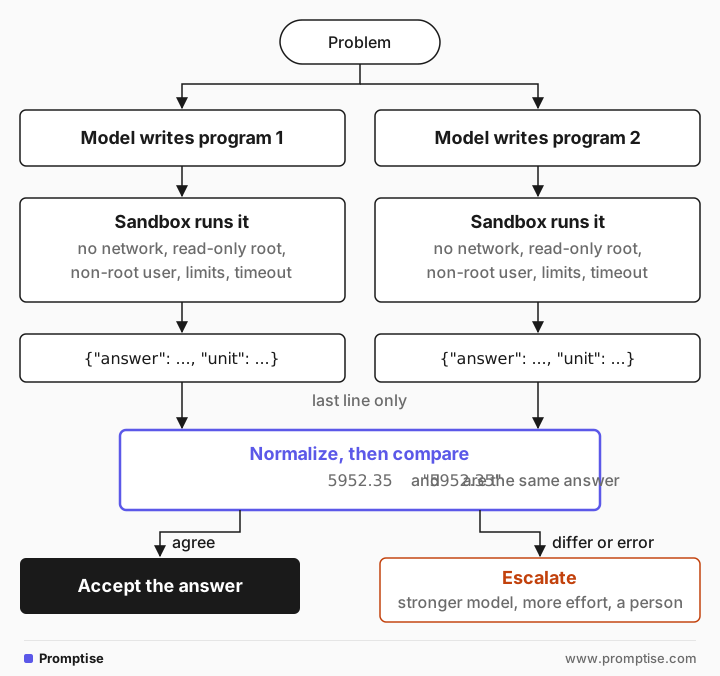
Ask the model for a program with a strict output contract (one JSON line), run it in an isolated sandbox with no network, a read-only filesystem, a non-root user and CPU, memory and time limits, then parse only the last line. Generate the program twice and accept the answer only if both runs agree. If you don't want to operate a sandbox, use a provider's hosted code-execution tool instead.
Key takeaways:
Generated code is untrusted input. Never exec() it in your application process.
A container is a sandbox only with the right flags: no network, read-only root, dropped capabilities, resource limits.
Kill the container on timeout. Killing the docker client process leaves the container running.
Compare two generations. Disagreement is a cheap signal that the setup is wrong.
Normalize before comparing. 5952.35 and "5952.35" are the same answer.
[02]
How compute offload works
The model reads the problem and writes the computation. The interpreter does the arithmetic exactly. Your code owns everything around it: the contract, the sandbox, the comparison and what happens on failure. For the background on why this beats asking for the number directly, see what PAL and Program-of-Thought are.
[03]
When to run code yourself (and when to use a tool)
Option | Use it when | Trade-off |
|---|---|---|
Your own sandbox (this guide) | You need a fixed pipeline, your own libraries, data that can't leave your infrastructure, or any model provider | You operate and secure it |
Provider code tool, such as OpenAI's code interpreter or Anthropic's code execution tool | Occasional computation inside a chat or agent; you're fine with the provider's container and pricing | Less control over libraries, limits and data location; tied to one provider |
A narrow tool (calculator, date function) | The computations are few and known in advance | Safest and simplest, but only covers what you built |
No code at all | The task is reading or judgment, or one simple operation | Arithmetic errors on long calculations |
If the model only needs to multiply a few numbers, a calculator tool that parses arithmetic is enough. Arbitrary code is worth it when the logic varies: loops, dates, conditions, tables.
[04]
Step 1: Write a prompt with an output contract
The contract tells your code where the answer is. The rules also steer the program toward things the sandbox allows.
PROMPT = """Write a Python 3 program that solves the problem below.
Rules:
- Use only the standard library. No file, network or subprocess access.
- Use decimal.Decimal for money and round to cents only at the end.
- Name each quantity from the problem, and comment each step.
- The last line must print one JSON object: {{"answer": <value>, "unit": "<unit>"}}
Return only the code, no Markdown fences.

Problem: {problem}"""


def generate_code(problem: str) -> str:
    response = client.chat.completions.create(
        model="gpt-5-mini",
        reasoning_effort="minimal",
        messages=[{"role": "user", "content": PROMPT.format(problem=problem)}],
    )
    return response.choices[0].message.content
The "no file, network or subprocess" rule is a request, not a control. The sandbox in step 2 enforces it. Decimal matters for money: floats accumulate rounding errors in cents over many steps.
[05]
Step 2: Run the code in a locked-down container
def run_sandboxed(code: str, timeout: int = 20) -> dict:
    name = f"pot-{uuid.uuid4().hex[:12]}"
    cmd = [
        "docker", "run", "--rm", "-i", "--name", name,
        "--network", "none",                       # no internet, no internal services
        "--memory", "256m", "--cpus", "1", "--pids-limit", "64",
        "--read-only", "--tmpfs", "/tmp:size=16m",  # nothing persists
        "--cap-drop", "ALL", "--security-opt", "no-new-privileges",
        "--user", "65534:65534",                    # run as nobody
        "python:3.11-slim", "python", "-I", "-",
    ]
    try:
        proc = subprocess.run(cmd, input=code, capture_output=True, text=True, timeout=timeout)
    except subprocess.TimeoutExpired:
        # The timeout kills the docker client, not the container. Kill it too.
        subprocess.run(["docker", "kill", name], capture_output=True)
        return {"error": "timeout"}
    if proc.returncode != 0:
        return {"error": proc.stderr.strip().splitlines()[-1][:300]}
    try:
        return json.loads(proc.stdout.strip().splitlines()[-1])
    except (json.JSONDecodeError, IndexError):
        return {"error": "last line is not JSON", "stdout": proc.stdout[-300:]}
Each flag closes a door:
--network none: the code can't call out, exfiltrate data or reach your internal services.
--read-only plus a small tmpfs: it can't modify the image or leave files behind.
--cap-drop ALL, no-new-privileges, --user 65534: it runs as an unprivileged user with no extra kernel capabilities.
--memory, --cpus, --pids-limit: a runaway loop or fork bomb can't starve the host.
python -I: isolated mode ignores environment variables and the user site directory.
The program goes in through stdin, so nothing is mounted from your host. Don't pass secrets as environment variables; the code can read them.
The timeout comment is there for a reason. subprocess.run(..., timeout=5) returns after five seconds, but docker ps still shows the infinite-loop container running: the timeout stops the client process only. Naming the container and calling docker kill fixes it.
Test the sandbox with code that misbehaves:
print(run_sandboxed('import urllib.request\nurllib.request.urlopen("https://example.com", timeout=5)'))
print(run_sandboxed('open("/etc/passwd", "a").write("x")'))
print(run_sandboxed("while True: pass", timeout=5)){'error': 'urllib.error.URLError: <urlopen error [Errno -3] Temporary failure in name resolution>'}
{'error': "PermissionError: [Errno 13] Permission denied: '/etc/passwd'"}
{'error': 'timeout'}Containers share the host kernel. For code from the public internet or high-value hosts, add a stronger boundary such as gVisor (--runtime runsc) or a microVM. Docker's security overview explains what the defaults do and don't cover.
[06]
Step 3: Generate twice and compare
A program can run cleanly and still be wrong: a misread condition, an off-by-one month. Two independent generations that agree are a useful signal; two that disagree tell you the setup is ambiguous or wrong. When they disagree, don't guess.
def normalize(value) -> str:
    """Treat 5952.35 and "5952.35" as the same answer."""
    try:
        return str(Decimal(str(value)).quantize(Decimal("0.01")))
    except InvalidOperation:
        return str(value).strip().lower()


def solve(problem: str, tries: int = 2) -> dict:
    runs = [run_sandboxed(generate_code(problem)) for _ in range(tries)]
    if any("answer" not in r for r in runs):
        return {"status": "error", "runs": runs}
    if len({normalize(r["answer"]) for r in runs}) == 1:
        return {"status": "ok", **runs[0]}
    return {"status": "disagree", "runs": runs}
Without the normalize step, the two programs below are reported as a disagreement: one printed 5952.35 as a number, the other "5952.35" as a string. Both were right.
{'status': 'disagree_or_error', 'runs': [{'answer': 5952.35, 'unit': 'dollars'}, {'answer': '5952.35', 'unit': 'dollars'}]}For higher stakes, sample three programs and take the majority, as in the self-consistency extension of Program of Thoughts (Chen et al., 2022). On disagreement, escalate: a stronger model, more reasoning effort, or a person.
[07]
Step 4: Run it on a real problem
print(solve(
    "A savings account starts at $2,500. Each month it earns 0.35% interest on the balance, "
    "then the owner deposits $180. After the 3rd, 9th and 15th deposit the owner also "
    "withdraws $400. What is the balance after 24 months, to the cent?"
)){'status': 'ok', 'answer': '5952.35', 'unit': 'dollars'}That is correct. Asked the same question directly at minimal reasoning, the model answered 11611.38. One of the generated programs (trimmed):
initial_balance = Decimal('2500')            # starting balance in dollars
monthly_interest_rate = Decimal('0.35') / Decimal('100')  # monthly interest rate as decimal (0.35%)
…
for month in range(1, months_total + 1):
    interest = balance * monthly_interest_rate
    balance += interest  # add interest to balance
    deposit_number = month  # deposit count equals month number
    balance += regular_deposit
    if deposit_number in withdrawal_after_deposit_numbers:
        balance -= special_withdrawal
…
print(json.dumps(output))
You can audit the setup in a few lines: interest before the deposit, withdrawals after deposits 3, 9 and 15. That's the other benefit of code: the reasoning is inspectable.
[08]
Running it in production
Keep sandboxes warm
Starting a container per question adds startup latency to every answer. For high volume, keep a pool of pre-started sandboxes and reset them between jobs, or use a managed sandbox service.
Log the program, not only the answer
Store the generated code, the sandbox result and the status. When a user disputes a number, the program shows exactly what was computed.
Use a framework sandbox if you already run agents
If your agent framework provides a sandbox, use it rather than building one. In Promptise Foundry, for example, build_agent(..., sandbox=True) runs agent code in a Docker container with the network off and as an unprivileged user by default, and refuses to start if Docker isn't available rather than running unsandboxed.
[09]
Common mistakes
Mistake | Why it fails | Fix |
|---|---|---|
exec() in your app process | The code can read env vars, files and the network | Run in a separate container or VM |
Default docker run | Network on, writable root, root user | Add the flags from step 2 |
Timeout on subprocess.run only | The container keeps running | Name the container and docker kill it |
Secrets in the sandbox environment | Generated code can print them | Pass only the problem through stdin |
Comparing raw JSON values | Types differ between runs | Normalize, for example to Decimal |
Answer parsed from anywhere in stdout | Debug prints break parsing | Contract: the last line is one JSON object |
[10]
Frequently asked questions
Is a Docker container enough isolation for LLM-generated code?
For code that only you trigger, with the flags above, it's a reasonable baseline. Containers share the host kernel, so for untrusted users or sensitive hosts add gVisor or a microVM, and keep the sandbox host away from production secrets.
Should I use a hosted code interpreter instead?
If you already use one provider and the computation is occasional, yes: it's less to operate. Run your own sandbox when you need your own libraries, data that must stay on your infrastructure, or a provider-neutral pipeline.
Why not restrict imports with an AST check instead of a sandbox?
Import filters are easy to bypass in Python (through __builtins__, getattr chains and similar). They're useful to reject obviously wrong code early, but they are not a security boundary.
How many generations should I compare?
Two catches many setup errors cheaply. Three lets you take a majority vote. Measure on your own questions before adding more.
What if the model imports a library the sandbox doesn't have?
The run fails with ModuleNotFoundError, which your runner returns as an error. List the available libraries in the prompt, and build the sandbox image with them preinstalled.
[11]
Next steps
The concept behind this guide: what PAL and Program-of-Thought prompting are.
Sandboxing for agents that write code, with escape attempts: AI agent code execution sandbox.
Agents that act through code: code-action agents in Python.
Voting over several answers: self-consistency and least-to-most.
Checking outputs before you use them: LLM output validation.