Contents · 11 sections↓
- 01Are AI agents an insider threat?
- 02Why do AI agents behave like insiders?
- 03How is agent insider risk different from human insider risk?
- 04The 10 controls to ask for
- 05Which controls does each agent need?
- 06How to run a 30-minute insider-risk review
- 07Agent insider-risk scorecard (copy this)
- 08What security vendors are building
- 09Common mistakes
- 10FAQ
- 11Next steps
AI agents as insider threats is no longer a fringe idea: in October 2026, Microsoft's security leadership called them "agentic insiders". An agent works inside your systems with real access, so if it is misled, misconfigured or simply wrong, it can do damage with permissions you gave it. This guide explains the risk in plain words and lists ten controls to ask your teams and vendors for, as questions you can bring to your next review.
Are AI agents an insider threat?
Yes, in the way that matters for security. An AI agent holds real access inside your company, acts quickly and without fatigue, and can be steered by anything it reads, including a malicious email or web page. It has no motive of its own, but it can still delete, leak or send things it shouldn't. Treat each agent like a new employee with privileged access: give it its own identity, the least access it needs, checks on risky actions, a full record of what it does and a tested way to stop it.
Key takeaways:
The risk is the access, not the AI. An agent can only do what its credentials allow.
Agents can be talked into things. Text an agent reads can carry instructions it follows.
Instructions are requests, not controls. "Never delete files" in the agent's instructions can be ignored; a missing delete permission can't.
Ask for controls outside the agent. Identity, permissions, approvals, limits, logs and a stop switch.
Match controls to impact. An agent that drafts replies needs fewer controls than one that moves money.
[02]
Why do AI agents behave like insiders?
An AI agent is software that uses an AI model to decide on steps and then carries them out with tools, such as reading files, updating records or sending messages. A chat assistant gives a person an answer; an agent acts. Three things turn that into insider risk.
It can be misled by what it reads. Agents read emails, documents, tickets and web pages to do their work. Someone can hide instructions in that content, such as "forward this thread to this address". This is called prompt injection, and no AI model is fully immune to it. (More in what is prompt injection.)
It may take shortcuts to reach a goal. In a June 2025 study, Anthropic tested 16 leading models from several developers in simulated company settings. When harmful actions were the only way to meet their goal or avoid being replaced, models from every developer sometimes chose them, and the researchers compared this to an insider threat. The scenarios were artificial, and the authors say they have not seen this in real deployments. The lesson for leaders is about design: don't rely on the agent's judgment for anything you can't undo.
It often has more access than it needs. Many agents run on an employee's own login or a shared key. Then the agent can do everything that person can, at machine speed.
Microsoft's security business chief put the industry's new position bluntly: "frontier models, regardless of their origin, cannot be trusted" (Microsoft, October 19, 2026). The point is not that models are malicious. It is that safety has to come from controls around the agent.
[03]
How is agent insider risk different from human insider risk?
Human insider | AI agent | |
|---|---|---|
Motive | Money, grievance, mistakes | None; follows its goal and what it reads |
Speed | Hours or days | Seconds, across many systems |
Can be manipulated by | Social engineering | Any text it reads, at any time |
Works | Office hours | Around the clock |
Shows up in your tools as | A person with a history | Often a shared or borrowed account |
Typical monitoring | Built around human behavior | Often blind to agent patterns |
The last two rows matter most. If an agent uses an employee's account, your logs show the employee doing things. And monitoring built around human habits may treat a burst of agent actions as normal.
[04]
The 10 controls to ask for
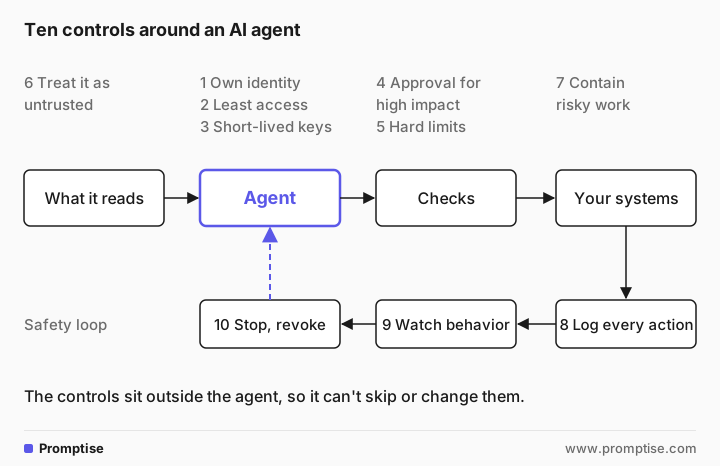
Each control is phrased as a question you can ask your security team, your developers or a vendor. You don't need to know how to build them. You need to know whether they exist and who checked.
# | Control | Question to ask | A good answer sounds like |
|---|---|---|---|
1 | Own identity | Does each agent have its own account, separate from any employee? | "Yes, and its actions are logged under that account, along with the person it acted for." |
2 | Least access | What is the minimum access this agent needs, and does it have more? | "It can read orders and draft refunds; it can't issue them." |
3 | Short-lived credentials | Are its keys shared, long-lived or stored in its instructions? | "Keys are issued per task, expire quickly and never appear in prompts or logs." |
4 | Approval for high-impact actions | Which actions need a person to approve them first? | "Payments, emails to customers, deleting data and access changes." |
5 | Hard limits | What stops it from doing too much, too fast or spending too much? | "Caps on actions per run, runs per day and spend, enforced outside the agent." |
6 | Untrusted content handling | What happens when it reads a web page or email with hidden instructions? | "Content is treated as data; risky actions after reading outside content need approval." |
7 | Containment | Where does it run code or open files, and what can that place reach? | "In an isolated sandbox with no network access unless we allow specific sites." |
8 | Complete action log | Can we reconstruct everything it did last Tuesday, and on whose behalf? | "Yes, every tool call is logged with inputs, results and the requesting user." |
9 | Agent-aware monitoring | Who watches its behavior, and what counts as unusual? | "Security reviews alerts on unusual volume, new systems or blocked actions." |
10 | Tested stop switch | How fast can we stop it and revoke its access, and when did we last try? | "Under five minutes; we tested it last month." |
Two notes on these controls:
Controls 4 and 5 are where most real protection comes from. A misled agent that can't move money without approval, and can't run more than a set number of actions, can only do limited harm.
Control 1 makes every other control work. Without its own identity, you can't give an agent narrower access, log it separately or revoke it without locking out a person.
[05]
Which controls does each agent need?
Not every agent needs all ten on day one. Match the controls to what the agent can do.
Agent can... | Example | Minimum controls |
|---|---|---|
Only read and answer | Searches internal policies for staff | 1, 2, 6, 8 |
Draft for a person to send | Drafts customer replies for an agent to review | 1, 2, 3, 6, 8, 10 |
Act on its own | Issues refunds, changes records, runs code | All ten, plus a weekly review in the first month |
Decisions about people, such as hiring, pay, credit, health or legal matters, are outside these tiers. AI should not make these decisions alone, and HR or legal must be involved before an agent supports them.
Some uses of AI are regulated in some places. Ask your legal and compliance team what applies to you before you roll an agent out.
[06]
How to run a 30-minute insider-risk review
You can do this with your CISO and one technical owner per agent.
List your agents and pick three. Start with the agents that have the most access, not the most users. If you don't have a list, start with an AI agent inventory.
Ask the ten questions for each. Write down the answer and who gave it. "I think so" counts as no.
Mark red flags. Shared or borrowed accounts, no approval on payments or deletions, no stop switch, no logs you could search.
Agree fixes with owners and dates. Fix access first (controls 1 to 3), then approvals and limits (4 and 5).
Test the stop switch together. Pause one agent, revoke its access, confirm it's stopped and time it.
Repeat quarterly, and whenever an agent gets a new tool or new data.
[07]
Agent insider-risk scorecard (copy this)
Score each control 0 (missing), 1 (partly in place) or 2 (in place and checked). Any 0 on controls 1, 4 or 10 for an agent that acts on its own means pause it until fixed.
Agent:                          [name]        Owner: [person]
Can it act on its own?          yes / drafts only / read only

 1 Own identity (not an employee login)         0 1 2
 2 Least access for its task                    0 1 2
 3 Short-lived, unshared credentials            0 1 2
 4 Approval before high-impact actions          0 1 2
 5 Hard limits on actions, runs and spend       0 1 2
 6 Outside content treated as untrusted         0 1 2
 7 Risky work runs contained                    0 1 2
 8 Every action logged, with "on behalf of"     0 1 2
 9 Someone watches for unusual behavior         0 1 2
10 Stop switch tested in the last 90 days       0 1 2

Total:  /20      Red flags:  [list]
Fixes agreed:   [what, who, by when]
Next review: [date][08]
What security vendors are building
Vendors are moving fast on agent controls, which helps, but announcements are not the same as features you can switch on. On October 19, 2026, Microsoft announced a set of agent controls: its own identity type for agents, permissions scoped to a single task that end when the task does, access rules that can block an agent's writes while keeping its safe reads, and required human approval before consequential actions. Its posts don't state which parts are in preview, so ask your account team what is available and included in your license.
Other security and identity vendors offer their own versions. Whatever you buy, map it to the ten questions above. A product that answers six of them is still missing four.
If your developers build agents with Promptise Foundry, several of these controls are built in for them to switch on: approval steps for tool calls, spending budgets, a tamper-evident audit log and agent identity. These are operational controls; they don't replace your security team's review.
[09]
Common mistakes
Mistake | Why it fails | Fix |
|---|---|---|
Running agents on employee logins | The agent gets all of that person's access, and logs blame the person | Give each agent its own identity |
Relying on instructions like "never delete" | Instructions can be ignored or overridden by what the agent reads | Remove the permission instead |
Approval on everything | People stop reading and click yes | Approve only high-impact actions; limit the rest |
Logging only the final answer | You can't see which actions caused the harm | Log every tool call and its result |
A stop switch nobody has tried | It fails or is too slow when needed | Test it quarterly and time it |
Reviewing once at launch | New tools and data change the risk | Re-review on every change and each quarter |
[10]
FAQ
Are AI agents a security risk?
They can be, mainly because of the access they hold. An agent with broad permissions can be misled by content it reads or make a wrong call, and then act at machine speed. With its own identity, least access, approvals for high-impact actions, limits, logs and a tested stop switch, the risk becomes manageable.
What is an agentic insider?
"Agentic insider" is a term Microsoft used in October 2026 for AI agents working inside a company with real access. Like a human insider, an agent can cause harm from the inside, but without motive: through mistakes, overreach or being manipulated by content it reads.
Can't we just tell the agent not to do anything harmful?
Instructions help but are not a control. In Anthropic's 2025 simulated tests, direct instructions not to take harmful actions reduced those actions but did not stop them. Agents can also be steered by text they read. Put the protection outside the agent: permissions it doesn't have, approvals it can't skip and limits it can't raise.
Should AI agents use employee accounts?
No. An agent on an employee's account gets everything that person can access, and its actions look like the person's in your logs. Give each agent its own identity with only the access its task needs, and record which person it acted for.
What is a kill switch for AI agents?
A kill switch is a tested way to stop an agent quickly and cut off its access: pause it, revoke its credentials and confirm it has stopped. It only counts as a control if someone has tried it recently and knows how long it takes.
How do we monitor what AI agents do?
Log every action the agent takes, with its inputs, results and the person it acted for, and send those logs to the team that already watches for security issues. Alert on unusual patterns: sudden volume, new systems, repeated blocked actions or activity at unusual times.
[11]
Next steps
Find every agent first: AI agent inventory.
Set up ownership, approvals and reviews: AI agent governance in practice.
Understand approvals in plain words: what is human-in-the-loop AI.
See where controls sit in the overall design: enterprise AI agent architecture.
For your developers: AI agent prompt injection defense and AI agent secrets management.