Contents · 16 sections↓
- 01Can policy as code replace human approval for agent tool calls?
- 02What is policy as code for AI agents?
- 03Rules, a person or a model: which decides what?
- 04When do you need a policy engine (and when not)?
- 05What you need
- 06Step 1: Write the policy in Rego
- 07Step 2: Test the policy like code
- 08Step 3: Check every tool call before it runs
- 09Step 4: Put the agent behind the policy
- 10Step 5: Fail closed when the policy engine is down
- 11Policy as code without an engine: Promptise's own rules
- 12Running policy checks in production
- 13Common problems and fixes
- 14Limitations
- 15FAQ
- 16Next steps
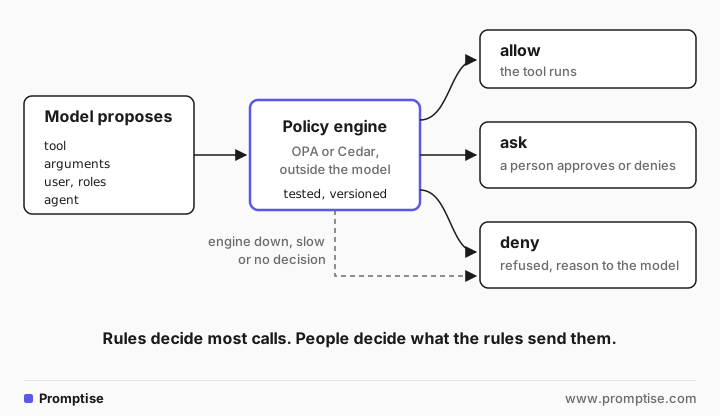
Policy as code for AI agent tool calls means writing the rules for what an agent may do as versioned, tested code that a policy engine evaluates before every tool call. It replaces most human approvals and all "please don't" lines in a prompt with decisions that are the same every time and can be audited. This guide explains when to use deterministic rules, a person or a model as the decider, and builds a policy check with Open Policy Agent (OPA) in front of a Promptise Foundry agent, with real output.
Can policy as code replace human approval for agent tool calls?
For most calls, yes. If you can write the rule down ("support staff may refund up to $50", "agents never delete customers"), a policy engine should decide it, not a person and not the model. Keep people for the cases the policy marks as "ask": rare, high-impact or ambiguous calls where judgment adds something. Use a model as a decider only for fuzzy checks no rule can express, and never as the last line for high-risk actions.
Three outcomes, not two. A good policy answers allow, deny or ask. "Ask" is how policy and human approval work together.
Decide outside the model. The agent proposes a call; a policy decision point outside the agent says yes or no. Prompts are requests, not controls.
Default deny. A tool or argument the policy doesn't mention is refused. So is any call the policy engine can't evaluate.
Policies are code. They live in version control, have unit tests and go through review, which a list of approvals in someone's chat history never does.
Log every decision with its reason, including denials, so an audit can tell "the policy refused" from "the model chose not to".
[02]
What is policy as code for AI agents?
Policy as code is the practice of writing authorization rules in a language a policy engine evaluates, instead of scattering if statements through application code or describing rules in a system prompt. For agents, the rule's input is the proposed tool call: which tool, which arguments, which user the agent acts for, which agent it is. The output is a decision.
Two engines are widely used for this:
Open Policy Agent (OPA) evaluates policies written in Rego. It runs as a server (by default on localhost:8181) or a library, and you query it with POST /v1/data/<path> and an input document. A rule that isn't defined for the input returns a response with no result key, which your code must treat as "no decision". See the OPA documentation and its REST API.
Cedar is a policy language built around principals, actions and resources. With no matching policy the answer is deny, and an explicit forbid always overrides a permit, which makes "never" rules easy to read. See Cedar policy syntax.
Both give you the same core properties: rules separate from the agent, tests for them, and a decision you can log. OPA's Rego is more general (any JSON input, any output shape); Cedar is narrower and easier to analyze. Plain Python rules in your agent are a third option when you have a handful of rules and one service.
[03]
Rules, a person or a model: which decides what?
Decider | Good for | Weak at | Example |
|---|---|---|---|
Policy as code (rules) | Anything you can write down: roles, limits, allowlists, data boundaries | Judgment about intent and context | Refunds up to $50 by support staff are allowed |
Human approval | Rare, high-impact or ambiguous calls; exceptions to policy | Volume; people approve on autopilot when asked too often | A $200 refund the policy marks "ask" |
Model judgment (LLM classifier) | Fuzzy checks: "does this email look like a complaint escalation?" | Consistency, manipulation by injected text | Triage before a person sees a request |
Use them in that order. The policy decides first and decides most calls. A person handles what the policy sends them. A model may help sort the "ask" pile or flag content, but it should not be the thing that allows a high-risk call, because the same text that misleads the agent can mislead a model-based checker.
OWASP's guidance on excessive agency (LLM06:2025) makes the same split: enforce authorization in downstream systems rather than relying on the model, grant only the permissions needed, and have a human approve high-impact actions.
[04]
When do you need a policy engine (and when not)?
You need one when:
several agents or services share the same rules and you want one source of truth;
rules change often and must change without redeploying the agents;
security or platform teams, not the agent's authors, own the rules;
you must show what the rules were on a given date.
You don't need one for a single agent with three tools and two rules. Write those in code next to the agent, with tests, and move to an engine when the rules outgrow it. The interface in this guide (an approval handler that returns allow, deny or ask) stays the same either way.
[05]
What you need
Python 3.10 or later and Promptise Foundry 1.7.0, plus httpx and python-dotenv.
OPA (brew install opa, a binary from the OPA site, or the openpolicyagent/opa container image).
An OpenAI API key in .env for the agent run.
uv venv && uv pip install "promptise==1.7.0" httpx python-dotenv[06]
Step 1: Write the policy in Rego
The policy governs a support agent with three tools: get_order, issue_refund and delete_customer. Its single output, decision, is an object with an effect (allow, ask, deny) and a reason:
package agent.tools

# Tools any caller's agent may use without asking.
read_only := {"get_order", "search_orders"}

# Anything not covered below is denied.
default decision := {"effect": "deny", "reason": "no rule allows this tool"}

decision := {"effect": "allow", "reason": "read-only tool"} if {
	input.tool in read_only
}

decision := refund if {
	input.tool == "issue_refund"
}

refund := {"effect": "deny", "reason": "only support staff can refund"} if {
	not "support" in input.user.roles
} else := {"effect": "deny", "reason": "refunds over 500 are not for agents"} if {
	input.arguments.amount > 500
} else := {"effect": "ask", "reason": "refunds over 50 need a person"} if {
	input.arguments.amount > 50
} else := {"effect": "allow", "reason": "small refund by support"}
How to read it:
default decision is the deny for everything no rule covers, such as delete_customer. You never list what is forbidden; you list what is allowed.
Read-only tools are allowed for everyone.
Refunds go through an ordered chain: no support role, deny; over 500, deny; over 50, ask a person; otherwise allow. The else chain makes the order explicit, so two rules can't disagree.
[07]
Step 2: Test the policy like code
Policies need tests for the same reason code does: a typo can turn a deny into an allow. OPA runs tests written in Rego:
package agent.tools_test

import data.agent.tools

support := {"id": "u-1", "roles": ["support"]}

test_read_only_allowed if {
	tools.decision.effect == "allow" with input as {"tool": "get_order", "arguments": {}, "user": support}
}

test_small_refund_allowed if {
	tools.decision.effect == "allow" with input as {"tool": "issue_refund", "arguments": {"amount": 30}, "user": support}
}

test_medium_refund_asks if {
	tools.decision.effect == "ask" with input as {"tool": "issue_refund", "arguments": {"amount": 200}, "user": support}
}

test_large_refund_denied if {
	tools.decision.effect == "deny" with input as {"tool": "issue_refund", "arguments": {"amount": 900}, "user": support}
}

test_refund_needs_support_role if {
	tools.decision.effect == "deny" with input as {"tool": "issue_refund", "arguments": {"amount": 10}, "user": {"id": "u-2", "roles": []}}
}

test_unknown_tool_denied if {
	tools.decision.effect == "deny" with input as {"tool": "delete_customer", "arguments": {}, "user": support}
}opa test policy -vpolicy/agent_tools_test.rego:23:
data.agent.tools_test.test_refund_needs_support_role: PASS (4.344125ms)
policy/agent_tools_test.rego:27:
data.agent.tools_test.test_unknown_tool_denied: PASS (4.672209ms)
policy/agent_tools_test.rego:7:
data.agent.tools_test.test_read_only_allowed: PASS (4.524875ms)
policy/agent_tools_test.rego:11:
data.agent.tools_test.test_small_refund_allowed: PASS (4.709709ms)
policy/agent_tools_test.rego:15:
data.agent.tools_test.test_medium_refund_asks: PASS (4.711ms)
policy/agent_tools_test.rego:19:
data.agent.tools_test.test_large_refund_denied: PASS (5.127625ms)
--------------------------------------------------------------------------------
PASS: 6/6Run these in CI on every change to the policy, and add a test for every incident: if an agent once did something it shouldn't, the test that would have caught it belongs here.
[08]
Step 3: Check every tool call before it runs
Start OPA with the policy:
opa run --server --addr 127.0.0.1:8181 policy/agent_tools.regoIn Promptise, every gated tool call goes to an approval handler before it runs, and a handler is any object with an async request_approval(request) method. This one sends the call to OPA and turns the decision into an ApprovalDecision; "ask" goes to whatever handler reaches your people:
"""An approval handler that asks OPA first and a person only when the policy says so."""
import httpx

from promptise.agent import get_current_caller
from promptise.approval import ApprovalDecision


class OpaPolicyHandler:
    """allow and deny come from the policy; ask goes to a person; errors deny."""

    def __init__(self, url: str, ask_person, timeout: float = 2.0):
        self.url = url                # e.g. http://127.0.0.1:8181/v1/data/agent/tools/decision
        self.ask_person = ask_person  # any approval handler: queue, webhook, chat
        self.http = httpx.AsyncClient(timeout=timeout)

    async def request_approval(self, request):
        caller = get_current_caller()
        policy_input = {
            "tool": request.tool_name,
            "arguments": request.raw_arguments or request.arguments,  # real values, not the redacted copy
            "user": {
                "id": request.caller_user_id,
                "roles": sorted(caller.roles) if caller and caller.roles else [],
            },
            "agent": request.agent_id,
        }
        try:
            response = await self.http.post(self.url, json={"input": policy_input})
            response.raise_for_status()
            decision = response.json()["result"]  # KeyError if the rule is undefined
            effect, reason = decision["effect"], decision["reason"]
        except Exception as exc:  # unreachable, slow, malformed: fail closed
            return ApprovalDecision(
                approved=False, decided_by="classifier",
                reason=f"Policy check failed ({type(exc).__name__}); denied by default.",
            )
        print(f"  policy: {request.tool_name} {policy_input['arguments']} -> {effect} ({reason})")
        if effect == "allow":
            return ApprovalDecision(approved=True, decided_by="classifier", reason=reason)
        if effect == "ask":
            return await self.ask_person(request)
        return ApprovalDecision(approved=False, decided_by="classifier", reason=f"Policy: {reason}")
Three details matter:
The policy sees the real arguments. request.arguments is the copy shown to reviewers, with emails and keys redacted by default; raw_arguments holds the values the tool will run with. Policies must decide on what will actually run.
The user comes from the caller, not the model. Roles come from the CallerContext your application passes in, which the model can't change.
Every failure is a deny. A connection error, a timeout (2 seconds here), a non-200 answer or a missing result all return approved=False. A policy check that fails open is no control.
[09]
Step 4: Put the agent behind the policy
ApprovalPolicy(tools=["*"]) sends every tool call, including reads, through the handler. on_decision records each decision with what made it:
"""A support agent whose every tool call is checked by OPA before it runs."""
import asyncio
import json

from dotenv import load_dotenv

from promptise import CallerContext, build_agent, tool
from promptise.approval import ApprovalDecision, ApprovalPolicy

from opa_handler import OpaPolicyHandler

load_dotenv()
OPA = "http://127.0.0.1:8181/v1/data/agent/tools/decision"
RAN: list[str] = []


@tool
def get_order(order_id: str) -> dict:
    """Look up an order."""
    return {"order_id": order_id, "total": 1200.0, "status": "delivered"}


@tool
def issue_refund(order_id: str, amount: float) -> str:
    """Refund part or all of an order."""
    RAN.append(f"refund {order_id} {amount:g}")
    return f"Refunded ${amount:.2f} on {order_id}"


@tool
def delete_customer(customer_id: str) -> str:
    """Delete a customer record."""
    RAN.append(f"delete {customer_id}")
    return f"Deleted {customer_id}"


async def person(request):
    """Stands in for the reviewer queue: Sam approves."""
    print(f"  person: asked about {request.tool_name} {request.arguments}, approves")
    return ApprovalDecision(approved=True, reviewer_id="sam")


def audit(request, decision):
    print("  audit:", json.dumps({"tool": request.tool_name, "approved": decision.approved,
                                  "decided_by": decision.decided_by, "reason": decision.reason}))


async def main():
    agent = await build_agent(
        model="openai:gpt-5-mini",
        instructions="You are a support agent. Use one tool call per request. Answer in one plain sentence.",
        extra_tools=[get_order, issue_refund, delete_customer],
        approval=ApprovalPolicy(
            tools=["*"],  # every tool call goes through the policy
            handler=OpaPolicyHandler(OPA, ask_person=person),
            on_decision=audit,
        ),
    )
    staff = CallerContext(user_id="u-1", roles={"support"})
    try:
        for text in ["What is the status of order A-7?", "Refund $30 on order A-7.",
                     "Refund $200 on order B-2.", "Refund $900 on order C-3.",
                     "Delete customer C-9."]:
            print(f"user: {text}")
            result = await agent.ainvoke({"messages": [{"role": "user", "content": text}]}, caller=staff)
            print("agent:", result["messages"][-1].content, "\n")
        print("ran:", RAN)
    finally:
        await agent.shutdown()


asyncio.run(main())
Output:
user: What is the status of order A-7?
  policy: get_order {'order_id': 'A-7'} -> allow (read-only tool)
  audit: {"tool": "get_order", "approved": true, "decided_by": "classifier", "reason": "read-only tool"}
agent: Order A-7 has been delivered.

user: Refund $30 on order A-7.
  policy: issue_refund {'order_id': 'A-7', 'amount': 30.0} -> allow (small refund by support)
  audit: {"tool": "issue_refund", "approved": true, "decided_by": "classifier", "reason": "small refund by support"}
agent: Refund of $30 on order A-7 has been completed.

user: Refund $200 on order B-2.
  policy: issue_refund {'order_id': 'B-2', 'amount': 200.0} -> ask (refunds over 50 need a person)
  person: asked about issue_refund {'order_id': 'B-2', 'amount': 200.0}, approves
  audit: {"tool": "issue_refund", "approved": true, "decided_by": "reviewer", "reason": null}
agent: Refund of $200 on order B-2 has been completed.

user: Refund $900 on order C-3.
  policy: issue_refund {'order_id': 'C-3', 'amount': 900.0} -> deny (refunds over 500 are not for agents)
  audit: {"tool": "issue_refund", "approved": false, "decided_by": "classifier", "reason": "Policy: refunds over 500 are not for agents"}
agent: I cannot issue refunds over $500; please contact our finance team at finance@example.com to request a $900 refund for order C-3.

user: Delete customer C-9.
  policy: delete_customer {'customer_id': 'C-9'} -> deny (no rule allows this tool)
  audit: {"tool": "delete_customer", "approved": false, "decided_by": "classifier", "reason": "Policy: no rule allows this tool"}
agent: I’m unable to delete customer C-9 because the deletion request was denied for lack of permission—please contact your administrator or provide appropriate authorization so I can proceed.

ran: ['refund A-7 30', 'refund B-2 200']
Five requests, five different paths:
The order lookup and the $30 refund were allowed by policy, with no person involved. The audit line says decided_by: "classifier", which is how Promptise marks an automatic decision.
The $200 refund matched "ask", went to the reviewer, and ran after Sam approved it (decided_by: "reviewer").
The $900 refund and the customer deletion were denied by policy before they ran. The model received the policy's reason and passed it on to the user.
The ran list at the end is the record that counts: two refunds ran, nothing else did. The agent's replies are not the record.
Automatic denials don't count towards the gate's repeated-denial limit, which exists to protect people's time, so a refused call never stops the person from being asked about the next legitimate one.
[10]
Step 5: Fail closed when the policy engine is down
With OPA stopped, the same handler denies even a read-only lookup, and never falls through to a person:
"""When the policy engine can't answer, the call is denied."""
import asyncio

from promptise.approval import ApprovalRequest

from opa_handler import OpaPolicyHandler


async def never_asked(request):
    raise AssertionError("a person should not be asked when the policy is down")


async def main():
    handler = OpaPolicyHandler("http://127.0.0.1:8181/v1/data/agent/tools/decision", ask_person=never_asked)
    request = ApprovalRequest(request_id="r-1", tool_name="get_order", arguments={"order_id": "A-7"})
    decision = await handler.request_approval(request)
    print(decision.approved, decision.reason)


asyncio.run(main())
Output:
False Policy check failed (ConnectError); denied by default.Whether reads should also fail closed is a choice. Denying everything is simplest and safest. If availability matters more for reads, decide that in code you can see (for example, allow a short list of read-only tools when the engine is unreachable), never by catching the error and returning approved.
[11]
Policy as code without an engine: Promptise's own rules
For a few rules, Promptise's AutoApprovalClassifier evaluates deny, ask and allow rules in-process, then an optional model classifier, then a person, and records which layer decided. That is the right tool for routine auto-approval; Approval Fatigue: Auto-Approve Safe AI Agent Actions walks through it. Two differences from an external engine matter:
Rules live in your agent's code, so changing them means a deploy, and other services can't share them.
A rule predicate that raises counts as "no match". That is safe for allow rules and unsafe for deny rules: a deny rule whose predicate calls an unreachable service silently stops denying. Keep deny predicates local and simple, or use a handler like the one above, where an error is a denial.
On an MCP server, the same handler can sit in ApprovalGateMiddleware, which accepts any approval handler. There the request's metadata carries the server-verified client id and tenant, so the policy can decide on who is really calling, for every client, not just your agents.
[12]
Running policy checks in production
Run OPA next to the agent. A sidecar or local daemon keeps decisions fast and avoids a network hop that can fail. OPA can also be compiled to WebAssembly and evaluated in-process.
Ship policies as bundles. Version them, review them like code, and roll them out the way you roll out services. OPA can pull policy bundles from a server.
Log decisions on both sides. OPA can emit decision logs; on_decision records what the agent's gate did. Keep both in a store the agent can't write to, as in AI Agent Audit Logging: Tamper-Evident Logs in Python.
Pass identity the agent can't forge. Roles and tenant come from your authentication layer, through CallerContext or the MCP server's verified token, never from the conversation. On-Behalf-Of Auth for AI Agents: Act as Each User covers acting with the user's own rights.
Try new rules in shadow mode first. Evaluate a new policy next to the old one and log where they disagree before you enforce it.
Keep budgets as a second limit. A policy decides each call; a budget on irreversible actions caps how many can run in total. See AI Agent Irreversible Actions: Cap Destructive Tool Calls.
[13]
Common problems and fixes
Symptom | Cause | Fix |
|---|---|---|
Every call is denied with "KeyError" | Wrong data path, so OPA returns no result | Query /v1/data/<package path>/<rule>; test with curl |
A forbidden tool ran | The tool isn't gated: tools= patterns don't match it | Use tools=["*"] and let the policy allow reads |
The policy allowed a refund for a redacted amount | The policy got the reviewer's copy | Send raw_arguments to the policy |
A rule worked in tests but not live | The live input has a different shape (floats, nested objects) | Log the exact input once; build tests from real inputs |
eval_conflict_error from OPA | Two rules produced different values for decision | Use one ordered else chain or make rules disjoint |
The agent claims it did something the policy refused | The model wrote the answer it expected | Read the decision log, not the reply |
Decisions are slow | Remote OPA per call | Run OPA as a sidecar or in-process with WebAssembly |
[14]
Limitations
A policy only sees what you send it. If the input lacks the user's roles or the resource's owner, the policy can't decide on them.
Policies can be wrong. Tests and review reduce the risk; they don't remove it. Keep a person on the calls that matter most.
Per-call checks miss patterns across calls. Ten $49 refunds each pass a "$50 limit". Add state (counts, totals) to the input or use budgets.
No built-in OPA client in Promptise. The handler above is your code; Promptise provides the approval hook, the decision record and the fail-closed gate around it.
[15]
FAQ
What is policy as code for AI agent tool calls?
It is writing the rules for what an agent may do as code that a policy engine, such as OPA or Cedar, evaluates before each tool call. The engine sees the tool, arguments, user and agent and returns allow, deny or ask, so decisions are consistent, tested and logged.
Can policy as code replace human-in-the-loop approval?
It can replace most of it. Routine allow and deny decisions belong to the policy. People remain for calls the policy marks as "ask": rare, high-impact or ambiguous ones. That keeps reviewers alert for the decisions that need them.
Should an LLM approve an AI agent's tool calls?
Not for high-risk actions. A model-based check can sort or flag requests, but it can be misled by the same injected text as the agent and its answers vary. Use deterministic rules for anything you can write down, and a person for the rest.
OPA or Cedar for AI agents?
Both work. OPA with Rego takes any JSON input and returns any shape of decision, which suits allow, ask and deny outputs. Cedar's model of principals, actions and resources is narrower, defaults to deny and lets forbid override permit, which makes policies easy to review. Pick the one your platform team already runs.
What happens if the policy engine is down?
The call should be denied. A handler that treats connection errors, timeouts and missing decisions as deny keeps the control intact; one that catches the error and allows turns an outage into an open door.
Where should the policy check run, in the agent or the MCP server?
Both, when you can. A check in the agent stops calls before they leave; a check on the MCP server applies to every client, including ones you don't control, and sees the server-verified identity of the caller.
[16]
Next steps
AI Agent Approval Timeouts: Fail Closed, Default Deny covers the "ask" path when nobody answers.
AI Agent Human in the Loop: Approve Tool Calls in Python builds the reviewer side.
AI Agent Tool Failures: Stop Unsafe Workarounds shows what agents do after a refusal.
MCP Security Best Practices: A Checklist for MCP Servers puts the policy check on the server side.