Contents · 10 sections↓
- 01What is the difference between MCP tools, resources and prompts?
- 02Who controls tools, resources and prompts
- 03What you need
- 04Build a handbook server with all three, step by step
- 05Does a Promptise agent use MCP resources and prompts?
- 06Reuse prompts you already have with include_prompts
- 07Connect it to Claude Desktop
- 08Honest limits
- 09Frequently asked questions
- 10Where to go next
Most MCP servers only offer tools, but the protocol has two more building blocks: resources and prompts. Picking the wrong one is easy, and it matters, because each is controlled by someone different: tools by the model, resources by the application, prompts by the user. In this guide you'll learn when to use an MCP tool vs a resource vs a prompt, then build a small team handbook server in Python with one of each, plus a resource template, and use every part from a client and from an agent. Every snippet was run, the agents with gpt-5-mini, and every output is what it printed.
What is the difference between MCP tools, resources and prompts?
A tool is a function the model decides to call, like searching or creating a ticket. A resource is read-only data at a URI, like docs://pages/refunds, that the application chooses to put in front of the model. A prompt is a ready-made message with arguments that the user picks, often as a slash command. With Promptise Foundry, each one is a decorator on your server:
from promptise.mcp.server import MCPServer

server = MCPServer("handbook")

PAGES = {"refunds": "Full refund within 30 days of delivery."}


@server.tool()
async def search_docs(query: str) -> list[str]:
    """Find handbook pages that mention the query."""
    return [slug for slug, text in PAGES.items() if query.lower() in text.lower()]


@server.resource("docs://index")
async def index() -> str:
    """The slug of every handbook page, one per line."""
    return "\n".join(PAGES)


@server.resource_template("docs://pages/{slug}", mime_type="text/markdown")
async def page(slug: str) -> str:
    """One handbook page."""
    return PAGES[slug]


@server.prompt()
async def answer_customer(question: str) -> str:
    """Draft a reply to a customer from the handbook."""
    return f"Answer this customer from the handbook: {question}"


if __name__ == "__main__":
    server.run()
Calling each of the four from a client prints:
tool: ["refunds"]
resource: refunds
template: Full refund within 30 days of delivery.
prompt: Answer this customer from the handbook: Can I return my mug?
The rule of thumb: if the model should decide when to use it, make it a tool. If it's data the application or user wants in context, make it a resource. If it's a starting message a person chooses, make it a prompt.
[02]
Who controls tools, resources and prompts
The MCP specification sorts the three by who is in control. That one idea answers most design questions:
Rendering diagram…
Tools | Resources | Prompts | |
|---|---|---|---|
Who decides when it's used | The model | The application | The user |
What it is | A function with typed arguments | Read-only data at a URI | A message template with arguments |
MCP methods | tools/list, tools/call | resources/list, resources/templates/list, resources/read | prompts/list, prompts/get |
Typical client UI | Called mid-conversation | Attached as context, picked from a list | Slash commands, menu entries |
In Promptise | @server.tool() | @server.resource(), @server.resource_template() | @server.prompt(), include_prompts() |
Used by build_agent on its own | Yes | With expose_resources=True | With expose_prompts=True |
The spec is deliberate about the middle column. Resources are "application-driven": the host app decides how they reach the model. Prompts are "user-controlled", meant to be picked by a person. Tools are the only one of the three the model calls by itself. The last row of the table matters for your own agents, and the agent section below shows it in a real run.
[03]
What you need
Python 3.10 or newer.
Promptise Foundry from PyPI. For the tests, also pytest and pytest-asyncio.
An API key for a model provider, for the agent section only. This guide uses OpenAI's gpt-5-mini; other providers work by changing the model string, as listed in Models & Providers.
pip install "promptise>=1.9.0" pytest pytest-asyncio
export OPENAI_API_KEY="sk-..."[04]
Build a handbook server with all three, step by step
The server holds a support team's handbook: a refund policy, shipping times and an escalation runbook. The model can search it, the application can load pages into context, and an agent can start from a ready-made prompt. The complete file is at the end of this section.
Start with a tool
A tool is for anything the model should decide to do on its own. Searching is a good fit: the model knows best when it needs to look something up, and what words to try.
server = MCPServer(
    "handbook",
    version="1.0.0",
    instructions="The team handbook: policies and runbooks for the support team.",
)# A tool: the model decides when to call it.
@server.tool(read_only_hint=True)
async def search_docs(query: str) -> list[dict]:
"""Search the team handbook and return matching page slugs and titles.
Args:
query: One or two words to look for, for example "refund".
"""
words = query.lower()
return [
{"slug": slug, "title": page["title"]}
for slug, page in PAGES.items()
if words in page["title"].lower() or words in page["body"].lower()
]The tool returns slugs and titles, not page text. That's on purpose for now, and you'll see what it costs an agent later on.
Add a static resource
A resource is data with an address. @server.resource(uri) registers one fixed URI. The handler's docstring summary becomes the description, the function name becomes the resource name, and mime_type tells clients what kind of content to expect. Without it, Promptise goes by the return annotation: application/json for a dict, a list or a pydantic model, application/octet-stream for bytes, and text/plain otherwise.
# A static resource: one fixed URI the application can read.
@server.resource("docs://index", mime_type="application/json")
async def docs_index() -> str:
"""Every page in the handbook, with its URI and title."""
return json.dumps(
[{"uri": f"docs://pages/{slug}", "title": page["title"]} for slug, page in PAGES.items()]
)Returning the string from json.dumps works, and so does returning the list itself: Promptise sends dicts, lists and pydantic models as JSON and bytes as a base64 blob, each with the MIME type you declared.
Add a resource template
A template is one handler for a whole family of URIs. Each {name} placeholder in the URI becomes an argument of your function:
# A resource template: one handler for a whole family of URIs.
@server.resource_template("docs://pages/{slug}", mime_type="text/markdown")
async def docs_page(slug: str) -> str:
"""One handbook page as Markdown."""
page = PAGES.get(slug)
if page is None:
raise ToolError(f"There is no handbook page '{slug}'.")
return page["body"]Templates are listed separately from static resources, so a client can discover docs://pages/{slug} and fill in the slug itself. Two details are worth knowing: a placeholder matches one path segment, so {slug} never contains a / (write {slug*} to take the rest of the URI, slashes included), and the value is converted to your parameter's type hint, so {n} with n: int arrives as 3, not "3". If the page doesn't exist, raise an error with a clear message; the client receives it as an MCP error, as Step 5 shows.
Add a prompt
A prompt is a message template that a person picks. The function's arguments become the prompt's arguments, and the Args: section of the docstring describes each one, the same way it does for tools. A parameter with a default is optional.
# A prompt: a ready-made message the user picks, filled in with arguments.
@server.prompt()
async def answer_customer(question: str, tone: str = "friendly") -> str:
"""Draft a reply to a customer, grounded in the handbook.
Args:
question: The customer's question, pasted as is.
tone: How the reply should sound, for example "friendly" or "formal".
"""
return (
f"You are a support agent. Write a {tone} reply to this customer question:\n\n"
f"{question}\n\n"
"Base every promise on the team handbook. Search it with the search_docs tool, "
"and quote the policy you relied on. If the handbook doesn't cover it, say so."
)When the handler returns a string, Promptise sends it as a single message with the user role. A good prompt encodes how your team wants a job done, here: search first, quote the policy, admit gaps. Users get that know-how by picking the prompt, without writing it themselves.
Use every part from a client
MCPClient connects to any MCP server and covers all three: list_tools() and call_tool() for tools, list_resources(), list_resource_templates() and read_resource() for resources, and list_prompts() and get_prompt() for prompts:
import asyncio
import sys
from promptise import MCPClient
async def main():
async with MCPClient(transport="stdio", command=sys.executable, args=["docs_server.py"]) as client:
print("== Tools")
for tool in await client.list_tools():
print(f"{tool.name}: {tool.description}")
print("\n== Resources")
for res in await client.list_resources():
print(f"{res.uri} {res.mime_type} {res.description}")
print("\n== Resource templates")
for tmpl in await client.list_resource_templates():
print(f"{tmpl.uri_template} {tmpl.mime_type} {tmpl.description}")
print("\n== Read docs://index")
index = await client.read_resource("docs://index")
print(index.contents[0].text)
print("\n== Read docs://pages/refunds")
page = await client.read_resource("docs://pages/refunds")
print(page.contents[0].text)
print("== Prompts")
for prompt in await client.list_prompts():
print(f"{prompt.name}: {prompt.description}")
for arg in prompt.arguments:
print(f" {arg.name} (required={arg.required}): {arg.description}")
print("\n== Get prompt answer_customer")
result = await client.get_prompt(
"answer_customer",
{"question": "My mug arrived broken 3 weeks ago. Can I get my money back?"},
)
for message in result.messages:
print(f"[{message.role}]\n{message.content.text}")
asyncio.run(main())python explore.py== Tools
search_docs: Search the team handbook and return matching page slugs and titles.
== Resources
docs://index application/json Every page in the handbook, with its URI and title.
docs://manifest application/json Server manifest — all tools, resources, and prompts.
== Resource templates
docs://pages/{slug} text/markdown One handbook page as Markdown.
== Read docs://index
[{"uri": "docs://pages/refunds", "title": "Refund policy"}, {"uri": "docs://pages/shipping", "title": "Shipping times"}, {"uri": "docs://pages/escalation", "title": "Escalation runbook"}]
== Read docs://pages/refunds
# Refund policy
- Full refund within 30 days of delivery, no questions asked.
- After 30 days, offer store credit instead.
- Refunds over 500 USD need a team lead's approval.
== Prompts
answer_customer: Draft a reply to a customer, grounded in the handbook.
question (required=True): The customer's question, pasted as is.
tone (required=False): How the reply should sound, for example "friendly" or "formal".
== Get prompt answer_customer
[user]
You are a support agent. Write a friendly reply to this customer question:
My mug arrived broken 3 weeks ago. Can I get my money back?
Base every promise on the team handbook. Search it with the search_docs tool, and quote the policy you relied on. If the handbook doesn't cover it, say so.Three things to notice:
There's a resource you didn't write. docs://manifest is added by Promptise and describes every tool, resource, template and prompt on the server as JSON. It's handy for documentation and debugging. Turn it off with MCPServer(..., auto_manifest=False).
The prompt's arguments carry your docstring. A client can show "How the reply should sound" next to the tone field, and knows question is required.
tonefell back to its default. The prompt came back as one user message, ready to send to a model.
Errors come back as MCP errors with your message, which MCPClient raises as MCPClientError. A missing page and a URI with an extra path segment look like this:
== Missing page
MCPClientError Failed to read resource 'docs://pages/holidays': There is no handbook page 'holidays'.
== Slash in a template parameter
MCPClientError Failed to read resource 'docs://pages/refunds/old': Resource not found: docs://pages/refunds/oldHere's part of the manifest:
"resource_templates": [
{
"uri_template": "docs://pages/{slug}",
"name": "docs_page",
"description": "One handbook page as Markdown.",
"mime_type": "text/markdown"
}
],
"prompts": [
{
"name": "answer_customer",
"description": "Draft a reply to a customer, grounded in the handbook.",
…Test resources and prompts without starting anything
TestClient runs the server in memory, with read_resource, list_resources, list_resource_templates, list_prompts and get_prompt next to the tool methods. read_resource returns the text directly:
import json
import pytest
from promptise.mcp.server import TestClient
from docs_server import server
client = TestClient(server)
async def test_index_lists_every_page():
index = json.loads(await client.read_resource("docs://index"))
assert [page["uri"] for page in index] == [
"docs://pages/refunds",
"docs://pages/shipping",
"docs://pages/escalation",
]
async def test_template_reads_one_page():
page = await client.read_resource("docs://pages/shipping")
assert page.startswith("# Shipping times")
async def test_unknown_page_raises():
with pytest.raises(Exception, match="no handbook page 'holidays'"):
await client.read_resource("docs://pages/holidays")
async def test_prompt_arguments_are_documented():
(prompt,) = await client.list_prompts()
args = {arg.name: arg for arg in prompt.arguments}
assert args["question"].required and not args["tone"].required
assert args["tone"].description.startswith("How the reply should sound")
async def test_prompt_fills_in_the_question():
result = await client.get_prompt("answer_customer", {"question": "Where is my order?", "tone": "formal"})
text = result.messages[0].content.text
assert result.messages[0].role == "user"
assert "Write a formal reply" in text and "Where is my order?" in textpytest -o asyncio_mode=auto test_docs_server.py…
test_docs_server.py ..... [100%]
============================== 5 passed in 0.72s ===============================The first test parses the index with json.loads, so a resource that stops returning valid JSON fails here and not in production.
The complete server
import json
from promptise.mcp.server import MCPServer, ToolError
server = MCPServer(
"handbook",
version="1.0.0",
instructions="The team handbook: policies and runbooks for the support team.",
)
# A stand-in for your docs folder, wiki or CMS.
PAGES = {
"refunds": {
"title": "Refund policy",
"body": (
"# Refund policy\n\n"
"- Full refund within 30 days of delivery, no questions asked.\n"
"- After 30 days, offer store credit instead.\n"
"- Refunds over 500 USD need a team lead's approval.\n"
),
},
"shipping": {
"title": "Shipping times",
"body": (
"# Shipping times\n\n"
"- Domestic orders arrive in 2 to 4 business days.\n"
"- International orders arrive in 7 to 14 business days.\n"
"- An order counts as late 5 business days after its estimated date.\n"
),
},
"escalation": {
"title": "Escalation runbook",
"body": (
"# Escalation runbook\n\n"
"1. Legal threats or press enquiries go straight to the support lead.\n"
"2. Outages: post in #incidents and link the status page.\n"
"3. Everything else: reply within one business day.\n"
),
},
}
# A tool: the model decides when to call it.
@server.tool(read_only_hint=True)
async def search_docs(query: str) -> list[dict]:
    """Search the team handbook and return matching page slugs and titles.

    Args:
        query: One or two words to look for, for example "refund".
    """
    words = query.lower()
    return [
        {"slug": slug, "title": page["title"]}
        for slug, page in PAGES.items()
        if words in page["title"].lower() or words in page["body"].lower()
    ]
# A static resource: one fixed URI the application can read.
@server.resource("docs://index", mime_type="application/json")
async def docs_index() -> str:
    """Every page in the handbook, with its URI and title."""
    return json.dumps(
        [{"uri": f"docs://pages/{slug}", "title": page["title"]} for slug, page in PAGES.items()]
    )
# A resource template: one handler for a whole family of URIs.
@server.resource_template("docs://pages/{slug}", mime_type="text/markdown")
async def docs_page(slug: str) -> str:
    """One handbook page as Markdown."""
    page = PAGES.get(slug)
    if page is None:
        raise ToolError(f"There is no handbook page '{slug}'.")
    return page["body"]
# A prompt: a ready-made message the user picks, filled in with arguments.
@server.prompt()
async def answer_customer(question: str, tone: str = "friendly") -> str:
    """Draft a reply to a customer, grounded in the handbook.

    Args:
        question: The customer's question, pasted as is.
        tone: How the reply should sound, for example "friendly" or "formal".
    """
    return (
        f"You are a support agent. Write a {tone} reply to this customer question:\n\n"
        f"{question}\n\n"
        "Base every promise on the team handbook. Search it with the search_docs tool, "
        "and quote the policy you relied on. If the handbook doesn't cover it, say so."
    )
if __name__ == "__main__":
server.run()[05]
Does a Promptise agent use MCP resources and prompts?
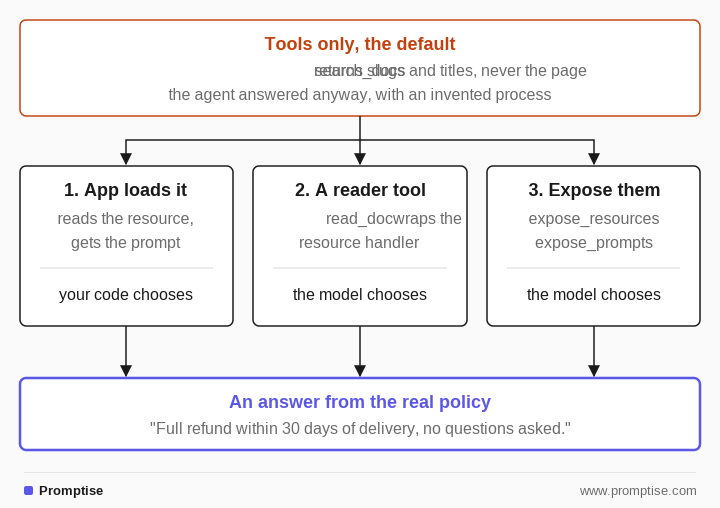
Not by default. An agent from build_agent uses the tools of its MCP servers, and only the tools, unless you ask for more. That matches the spec: resources belong to the application and prompts to the user, so your code decides what to load.
Here is what that means in practice. This agent is connected to the handbook server and gets the customer's question directly:
import asyncio
import sys

from promptise import build_agent
from promptise.config import StdioServerSpec

QUESTION = "My mug arrived broken 3 weeks ago. Can I get my money back?"


async def main():
    agent = await build_agent(
        model="openai:gpt-5-mini",
        servers={"handbook": StdioServerSpec(command=sys.executable, args=["docs_server.py"])},
        instructions="You are a support agent. Answer from the team handbook.",
        trace_tools=True,
    )
    try:
        print("Tools the agent sees:", agent.tool_names)
        result = await agent.ainvoke({"messages": [{"role": "user", "content": QUESTION}]})
        print(">>>", result["messages"][-1].content)
    finally:
        await agent.shutdown()


asyncio.run(main())Tools the agent sees: ['search_docs']
→ Invoking tool: search_docs with {'query': 'returns'}
→ Invoking tool: search_docs with {'query': 'damaged'}
✔ Tool result from search_docs: []
✔ Tool result from search_docs: []
>>> Sorry about the broken mug — that’s frustrating. I don’t see the returns/damaged-item policy in our handbook right now, so I can’t confirm eligibility without checking your order. I can open a damage/refund claim for you; to do that I’ll need a few things:
Please reply with:
- Order number (or the email used for the order)
- Photo of the broken mug
- Photo of the packaging and the shipping label (if available)
- Whether you want a refund or a replacement
What I’ll do next:
- Verify your order and when it was delivered
- Check the applicable returns/damage policy and determine eligibility
- Reply with the outcome and next steps within 48 hours (or sooner)
If the claim is accepted, we’ll either issue a refund to the original payment method or send a replacement. If it turns out the usual reporting window has passed, I’ll escalate to see what we can do.The agent sees one tool, not the resource or the prompt. It searched for "returns" and "damaged" at once, found nothing, and answered anyway. The claim, the photos and the "48 hours" are all invented, and it told the customer the handbook has no policy, when the refund page says "no questions asked". Even a search that hits, like "refund" in the runs below, returns only a slug and a title, and this agent has no way to read the page behind it. This is the failure to design against: the knowledge is on the server, and the agent can't reach it.
There are three fixes, and which one is right depends on who should be in control.
Fix 1: Your application reads the resource and the prompt
When you know what context a task needs, load it yourself. Your code plays the part of the MCP host: it reads the resource and gets the prompt the user picked, then hands both to the agent.
import asyncio
import sys

from promptise import MCPClient, build_agent
from promptise.config import StdioServerSpec

SERVER = [sys.executable, "docs_server.py"]
QUESTION = "My mug arrived broken 3 weeks ago. Can I get my money back?"


async def main():
    # Your application does what a desktop client would: it reads the
    # resource it wants in context, and renders the prompt the user picked.
    async with MCPClient(transport="stdio", command=SERVER[0], args=SERVER[1:]) as client:
        page = await client.read_resource("docs://pages/refunds")
        policy = page.contents[0].text
        prompt = await client.get_prompt("answer_customer", {"question": QUESTION})

    agent = await build_agent(
        model="openai:gpt-5-mini",
        servers={"handbook": StdioServerSpec(command=SERVER[0], args=SERVER[1:])},
        instructions=(
            "You are a support agent. Answer from the team handbook.\n\n"
            f"This handbook page is already loaded for you:\n\n{policy}"
        ),
        trace_tools=True,
    )
    try:
        messages = [{"role": m.role, "content": m.content.text} for m in prompt.messages]
        result = await agent.ainvoke({"messages": messages})
        print(">>>", result["messages"][-1].content)
    finally:
        await agent.shutdown()


asyncio.run(main())→ Invoking tool: search_docs with {'query': 'refund'}
✔ Tool result from search_docs: [{"slug": "refunds", "title": "Refund policy"}]
>>> Hi — sorry your mug arrived broken. Good news: you're within our refund window.
Per our refund policy: "Full refund within 30 days of delivery, no questions asked." Since 3 weeks (21 days) is under 30 days, you are eligible for a full refund. (For reference, the policy also notes: "After 30 days, offer store credit instead." and "Refunds over 500 USD need a team lead's approval.")
The handbook doesn't specify the exact steps or timeline to submit a refund request, so please reply with your order number (or the email used for the order) and I will start the refund process for you right away. If you prefer, tell me whether you'd like the refund to the original payment method.Now the answer quotes the real policy. Two inputs made the difference. The page went into the instructions as context, which is the job resources are designed for. And the prompt's messages became the conversation, so the agent followed your team's way of answering: it searched first, quoted the policy, and said what the handbook doesn't cover. Each MCP prompt message has a role and text content, just like a chat message, which is why one list comprehension is enough to convert them.
Fix 2: Give the model a tool that reads pages
When the model should decide what to read, which is the usual case for an open-ended assistant, expose the same content as a tool too. You don't need to duplicate any logic: the decorators return your function unchanged, so a tool can call the resource handler.
from docs_server import docs_page, server


# The same handler, offered to the model as a tool.
@server.tool(read_only_hint=True)
async def read_doc(slug: str) -> str:
    """Read one handbook page as Markdown. Find the slug with search_docs first.

    Args:
        slug: The page slug from search_docs, for example "refunds".
    """
    return await docs_page(slug)


if __name__ == "__main__":
    server.run()
Point the first agent at this file instead, with no other change:
servers={"handbook": StdioServerSpec(command=sys.executable, args=["docs_server_with_reader.py"])},Tools the agent sees: ['search_docs', 'read_doc']
→ Invoking tool: search_docs with {'query': 'refund'}
✔ Tool result from search_docs: [{"slug": "refunds", "title": "Refund policy"}]
→ Invoking tool: read_doc with {'slug': 'refunds'}
✔ Tool result from read_doc: # Refund policy
- Full refund within 30 days of delivery, no questions asked.
- After 30 days, offer store credit instead.
- Refunds over 500 USD need a team lead's approval.
>>> Yes — that falls within our 30-day window. Our policy: full refund within 30 days of delivery, no questions asked.
Please reply with your order number (and delivery date if you have it) and I’ll start the refund. Note: after 30 days we only offer store credit, and refunds over $500 require a team lead’s approval.The model searched, read the page it found, and answered from it. Keeping the resource as well costs nothing: clients like desktop apps can still offer docs://pages/{slug} to their users as something to attach.
Fix 3: Let the agent read resources and prompts
When the model should choose, but you'd rather not write a tool per resource, let the agent see what the server publishes. expose_resources=True gives it list_resources and read_resource tools, and expose_prompts=True a get_prompt tool. Their descriptions list every resource, template and prompt on the connected servers:
import asyncio
import sys

from promptise import build_agent
from promptise.config import StdioServerSpec

QUESTION = "My mug arrived broken 3 weeks ago. Can I get my money back?"


async def main():
    agent = await build_agent(
        model="openai:gpt-5-mini",
        servers={"handbook": StdioServerSpec(command=sys.executable, args=["docs_server.py"])},
        instructions="You are a support agent. Answer from the team handbook.",
        expose_resources=True,
        expose_prompts=True,
        trace_tools=True,
    )
    try:
        print("Tools the agent sees:", agent.tool_names)
        result = await agent.ainvoke({"messages": [{"role": "user", "content": QUESTION}]})
        print(">>>", result["messages"][-1].content)
    finally:
        await agent.shutdown()


asyncio.run(main())Tools the agent sees: ['search_docs', 'list_resources', 'read_resource', 'get_prompt']
→ Invoking tool: search_docs with {'query': 'refund'}
✔ Tool result from search_docs: [{"slug": "refunds", "title": "Refund policy"}]
→ Invoking tool: read_resource with {'uri': 'docs://pages/refunds', 'server': None}
✔ Tool result from read_resource: # Refund policy
- Full refund within 30 days of delivery, no questions asked.
- After 30 days, offer store credit instead.
- Refunds over 500 USD need a team lead's approval.
>>> Yes — since the mug was delivered 3 weeks (21 days) ago, that's within our 30-day window, so you're eligible for a full refund.
What I need to do this for you:
- Order number (or the email used for the order)
- Confirm you want the refund back to your original payment method (or tell me if you prefer store credit or an exchange)
A quick note: refunds over $500 require a team lead's approval (unlikely for a mug, but I’ll let you know if that’s ever relevant).
Once you send the order info I’ll start the refund and confirm when it’s been processed. Would you like a refund, a replacement, or store credit?The agent reads the page through the server's own resource, so your resource handler is the only code involved. On the server, those reads pass the same authentication, roles and middleware as tool calls, and like MCP tool calls they carry the invoking caller's bearer token, so a role-guarded resource is checked against the user, not the agent.
[06]
Reuse prompts you already have with include_prompts
If you write prompts with Promptise's @prompt decorator, server.include_prompts() publishes them as MCP prompts without rewriting them. It accepts single prompts, a PromptSuite or a PromptRegistry. The docstring is the template, and its {placeholders} are the arguments:
from promptise.prompts import prompt


@prompt(model="openai:gpt-5-mini")
async def summarize_ticket(ticket: str, max_words: int = 50) -> str:
"""Summarize this support ticket in at most {max_words} words. Say what went wrong and what the customer wants: {ticket}"""import asyncio
from promptise.mcp.server import MCPServer, TestClient
from shared_prompts import summarize_ticket
server = MCPServer("handbook")
server.include_prompts(summarize_ticket)
async def main():
client = TestClient(server)
for p in await client.list_prompts():
print(p.name, "|", p.description)
for arg in p.arguments:
print(f" {arg.name} (required={arg.required}): {arg.description}")
result = await client.get_prompt(
"summarize_ticket", {"ticket": "Hi, my mug arrived broken. I'd like a refund.", "max_words": "20"}
)
print(result.messages[0].content.text)
asyncio.run(main())summarize_ticket | Summarize this support ticket in at most {max_words} words. Say what went wrong and what the customer wants: {ticket} [model: openai:gpt-5-mini]
ticket (required=True): Fills {ticket} in the prompt (str).
max_words (required=False): Fills {max_words} in the prompt (int, default 50).
Summarize this support ticket in at most 20 words. Say what went wrong and what the customer wants: Hi, my mug arrived broken. I'd like a refund.Getting the prompt renders the template; it doesn't call the model. Two details show in the output. The description is the template's first line plus the model name; pass @prompt(description="...") to give people picking the prompt something shorter. Each argument's description names its placeholder, type and default. Note also that max_words was sent as the string "20": MCP prompt arguments are always strings, and Promptise converts them to the parameter's type before rendering.
[07]
Connect it to Claude Desktop
The server speaks stdio by default, so a desktop client can start it directly. For Claude Desktop, add it to claude_desktop_config.json with absolute paths:
{
  "mcpServers": {
    "handbook": {
      "command": "/absolute/path/to/venv/bin/python",
      "args": ["/absolute/path/to/docs_server.py"]
    }
  }
}
We didn't test this in Claude Desktop for this guide. We did start the server exactly as that config describes, from a different working folder, and listed what it offers:
tools: ['search_docs']
resources: ['docs://index', 'docs://manifest']
templates: ['docs://pages/{slug}']
prompts: ['answer_customer']
How a client presents resources and prompts is up to the client. The spec gives slash commands for prompts and a resource picker as examples, but doesn't require either.
[08]
Honest limits
These are real in Promptise Foundry 1.10.0, found in its source and confirmed by running it:
Agents use only tools unless you opt in. build_agent reads resources and gets prompts only with expose_resources=True and expose_prompts=True. Otherwise load them yourself as in Fix 1, or add a tool as in Fix 2.
No resource subscriptions. The server advertises subscribe=False, so a client can't ask to hear when one resource changes; it has to read it again. It does advertise listChanged, and server.notify_resources_changed() (and the same for tools and prompts) tells connected clients to list again.
One segment per placeholder. {slug} never matches a /. Use {slug*} when a template should take the rest of the URI.
Prompt arguments travel as strings. MCP sends every prompt argument as a string. Promptise converts it to your parameter's type before the handler runs, and a value that doesn't fit is a validation error.
Resources and prompts are protected like tools, so plan for it. require_auth, roles=, guards, rate limits and middleware apply to resource reads and prompt requests too. A client without a valid key gets an MCP error instead of the data, and middleware can tell the three apart with ctx.request_type.
[09]
Frequently asked questions
When should I use an MCP resource instead of a tool?
Use a resource when the application or user decides what goes into context, like attaching a file, a policy page or a database schema. Use a tool when the model should decide on its own, including when it should decide what to read. If you need both, expose the same handler both ways, as Fix 2 does.
What is an MCP resource template?
A URI pattern with placeholders, like docs://pages/{slug}, served by one handler. Clients discover templates with resources/templates/list and read concrete URIs such as docs://pages/refunds. In Promptise you register one with @server.resource_template(), and each placeholder becomes an argument of your function, converted to its type hint.
Does my AI agent use MCP resources and prompts automatically?
Not by default with Promptise's build_agent, which uses tools only. Pass expose_resources=True and expose_prompts=True to give the agent tools that read resources and get prompts. Desktop clients decide for themselves how they offer resources and prompts. In your own code, you can also read the resource or get the prompt with an MCP client and pass the result to the agent, as shown above.
Are MCP prompts the same as a system prompt?
No. An MCP prompt is a template a server offers and a user picks; it returns messages, usually with the user role. Your agent's system prompt is set by your application, in Promptise with instructions=. You can still use a prompt's text as instructions if that suits your app. System prompt vs user prompt explains what goes where.
How do I test MCP resources and prompts in Python?
Use Promptise's TestClient, which runs the server in memory. It has read_resource, list_resources, list_resource_templates, list_prompts and get_prompt, so the tests run with pytest and need no network or subprocess.
[10]
Where to go next
Server Fundamentals: tools, resources, templates, prompts and the server options.
MCP Server API reference: every decorator and TestClient method.
MCP Client: MCPClient, its session and multi-server connections.
Testing: more on TestClient, and Testing MCP Servers in Python for pytest patterns.
Prompt Engineering: the @prompt decorator behind include_prompts.
MCP server specification: the official definitions of tools, resources and prompts.
What Is MCP (Model Context Protocol)?: the protocol itself, if it's new to you.
How to Connect MCP Servers to Your AI Agent in Python: the agent side, from stdio to HTTP.
OpenAPI to MCP: Turn Any REST API into an MCP Server: generate tools from an API you already have.