Contents · 16 sections↓
- 01Should your SaaS ship an MCP server, an OpenAPI spec, or both?
- 02How do AI agents use a SaaS product?
- 03MCP vs OpenAPI for AI agents: what is the difference?
- 04When is an MCP server worth it, and when not?
- 05What you need
- 06Step 1: Make the API readable for agents
- 07Step 2: Decide which operations agents may call
- 08Step 3: Generate or write the MCP server
- 09Step 4: Test it with a real agent
- 10Step 5: Handle authentication for agents
- 11Step 6: Ship it where agents look
- 12Running an agent-ready SaaS in production
- 13Common problems and fixes
- 14Limitations
- 15FAQ
- 16Next steps
Making your SaaS agent-ready means letting AI agents use your product reliably and safely: your customers' own agents, and assistants such as Claude, ChatGPT and AI coding tools. This guide is for teams that own a product with an API and are asking whether to ship an MCP server, publish an OpenAPI spec, or both. You will learn how agents reach a product today, how MCP and OpenAPI differ for agents, which operations to expose, how authentication works, and how to go from a running API to an MCP server an agent uses, with real output.
Should your SaaS ship an MCP server, an OpenAPI spec, or both?
For most SaaS products the answer is both, in that order. A well-described REST API with an OpenAPI spec serves developers and any agent framework they use. An MCP server is a thin, curated layer on top of that API that AI assistants can connect to with a URL and a login, without anyone writing integration code. Skip MCP for now only if your users don't use AI assistants with your product, or if your API isn't ready yet.
The API comes first. An MCP server calls your API. If operations are badly named or undocumented, the MCP layer inherits every problem.
OpenAPI serves developers, MCP serves assistants. Code that a developer writes can call any REST API. An end user in Claude or ChatGPT can only add something that speaks MCP.
Expose fewer tools than endpoints. Agents choose better from a small set of well-described tools. Start with reads, and put every write behind an explicit decision.
Auth is the hard part. Remote MCP servers use OAuth 2.1 with protected resource metadata. Plan who the agent acts as before you ship.
Generators save time but need review. Tools such as FastMCP's from_openapi, Speakeasy and Promptise MCPcast produce a server from your spec. You still decide what is exposed and how it is described.
[02]
How do AI agents use a SaaS product?
Agents reach a product through three doors. Each serves a different kind of agent:
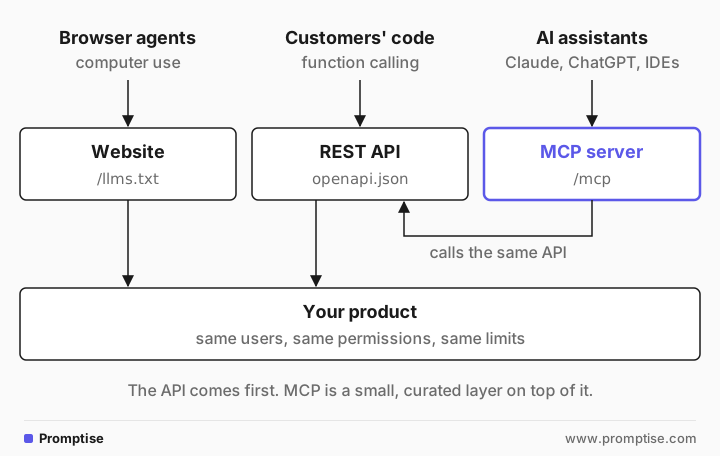
Door | Who uses it | What you ship | Good for | Weak at |
|---|---|---|---|---|
Website | Browser and computer-use agents | Your normal web app, plus clean HTML and docs | Products with no API; one-off tasks | Slow, brittle, and hard to permission |
REST API + OpenAPI | Developers' agents and scripts, through function calling | API, OpenAPI document, SDKs | Integrations that developers build and maintain | Users of AI assistants who can't write code |
MCP server | AI assistants and agent frameworks with an MCP client | A remote MCP endpoint, usually /mcp | Users who add your product to Claude, ChatGPT, VS Code or Cursor by URL | Bulk data, batch jobs, anything an agent shouldn't do |
The MCP site lists Claude, ChatGPT, Visual Studio Code and Cursor among the applications that support MCP. On the OpenAPI side, OpenAI's GPT Actions describe an API with an OpenAPI schema, and most agent frameworks can turn OpenAPI operations into tools. ChatGPT also connects custom MCP servers as plugins, with OAuth or no authentication.
Docs matter too. Agents read documentation the way developers do, and llms.txt, a Markdown index of your docs at a known path, is a cheap addition. It is an informal proposal from 2024, not a standard, so treat it as a convenience.
[03]
MCP vs OpenAPI for AI agents: what is the difference?
OpenAPI describes an HTTP API: paths, methods, parameters, schemas and security schemes. Any client can read it. MCP is a protocol between an AI application and a tool server: the client lists tools, each with a name, a description and an input schema, and calls them by name. An MCP server for a SaaS product usually calls the product's REST API underneath.
OpenAPI | MCP | |
|---|---|---|
What it is | A description format for HTTP APIs | A protocol between AI applications and tool servers |
Unit | Operation (method + path) | Tool (name + description + input schema) |
Who consumes it | Code generators, SDKs, agent frameworks, GPT Actions | MCP clients: assistants, IDEs, agent frameworks |
Adding it to an assistant | A developer writes or configures an integration | A user pastes a URL and signs in |
Discovery | The client reads the document | The client calls tools/list at runtime |
Auth | Whatever the security schemes say | OAuth 2.1 for HTTP servers, defined by the MCP spec |
Designed for | Developers | Language models |
State | Stateless HTTP | Stateless since the 2026-07-28 spec |
Maturity | Since 2015; huge tooling ecosystem | Since late 2024; moving fast |
Two older claims you will still read are no longer true. MCP is not "stateful" anymore: the 2026-07-28 spec removed sessions. And an MCP server doesn't replace your API; it is a client of it.
[04]
When is an MCP server worth it, and when not?
Ship an MCP server when:
your customers already use AI assistants at work and ask to "connect" your product;
the useful tasks are small and conversational: look up a record, summarize activity, draft a change for review;
you want one integration that works in several assistants instead of one per vendor;
you can maintain a curated tool set and its descriptions as the product changes.
Wait, or stay with the API, when:
your API has no clear permission model yet. An MCP server multiplies the ways your API is called;
the main use is bulk export or sync. That belongs in your API, webhooks or a data export;
your users are developers building their own agents. They can use the API directly, or a generic OpenAPI tool loader;
the work needs a long human workflow with many approvals. Build that in your product first.
[05]
What you need
A REST API with an OpenAPI 3 document. The example is a small FastAPI app, which generates its document at /openapi.json.
An MCP server framework or generator. The example uses Promptise Foundry 1.6.0 and its MCPcast generator; alternatives are listed in Step 3.
An OpenAI API key, only for the test agent in Step 4.
uv venv && uv pip install "promptise==1.6.0" fastapi uvicorn python-dotenv[06]
Step 1: Make the API readable for agents
An agent knows your API only through names, descriptions and schemas. Every tool generator, and every developer's agent that loads your OpenAPI document, copies them. Fix them at the source:
"""Acme Invoices: a small SaaS API with an OpenAPI document an agent can use."""
from typing import Literal

from fastapi import Depends, FastAPI, HTTPException
from fastapi.security import HTTPAuthorizationCredentials, HTTPBearer
from pydantic import BaseModel, Field

app = FastAPI(title="Acme Invoices", version="1.0.0", servers=[{"url": "http://127.0.0.1:9000"}])

CUSTOMERS = {"C-1": "Northwind Traders", "C-2": "Globex"}
INVOICES = {
    "INV-101": {"id": "INV-101", "customer_id": "C-1", "amount": 1200.0, "status": "overdue"},
    "INV-102": {"id": "INV-102", "customer_id": "C-1", "amount": 300.0, "status": "paid"},
    "INV-103": {"id": "INV-103", "customer_id": "C-2", "amount": 950.0, "status": "open"},
}


def caller(creds: HTTPAuthorizationCredentials = Depends(HTTPBearer())) -> str:
    if creds.credentials != "demo-token":  # your real token check goes here
        raise HTTPException(401, "Invalid bearer token.")
    return "demo-user"


class Invoice(BaseModel):
    id: str
    customer_id: str
    amount: float = Field(description="Amount in USD.")
    status: Literal["open", "paid", "overdue"]


class NewInvoice(BaseModel):
    customer_id: str = Field(description="Customer ID, for example C-1.")
    amount: float = Field(gt=0, description="Amount in USD.")


@app.get("/invoices", operation_id="list_invoices", response_model=list[Invoice])
def list_invoices(
    customer_id: str | None = None,
    status: Literal["open", "paid", "overdue"] | None = None,
    _: str = Depends(caller),
):
    """List invoices, optionally for one customer and one status."""
    return [
        inv for inv in INVOICES.values()
        if (customer_id is None or inv["customer_id"] == customer_id)
        and (status is None or inv["status"] == status)
    ]


@app.get("/customers", operation_id="list_customers")
def list_customers(_: str = Depends(caller)) -> list[dict]:
    """List customers with their IDs and names."""
    return [{"id": cid, "name": name} for cid, name in CUSTOMERS.items()]


@app.post("/invoices", operation_id="create_invoice", response_model=Invoice)
def create_invoice(body: NewInvoice, _: str = Depends(caller)):
    """Create an open invoice for a customer."""
    if body.customer_id not in CUSTOMERS:
        raise HTTPException(404, f"No customer {body.customer_id}.")
    inv = {"id": f"INV-{104 + len(INVOICES) - 3}", "customer_id": body.customer_id,
           "amount": body.amount, "status": "open"}
    INVOICES[inv["id"]] = inv
    return inv


@app.delete("/invoices/{invoice_id}", operation_id="delete_invoice")
def delete_invoice(invoice_id: str, _: str = Depends(caller)) -> dict:
    """Delete an invoice permanently."""
    if INVOICES.pop(invoice_id, None) is None:
        raise HTTPException(404, f"No invoice {invoice_id}.")
    return {"deleted": invoice_id}
What makes it agent-readable:
Explicit `operation_id`s. FastAPI would otherwise generate names like list_invoices_invoices_get, and those become tool names.
A docstring per operation saying what it returns and when to use it. These become tool descriptions.
Enums instead of free text. status is open, paid or overdue, so the model can't invent late.
Field descriptions with units and examples: "Amount in USD", "Customer ID, for example C-1."
A declared security scheme. HTTPBearer puts securitySchemes into the document, so generators know how to authenticate.
Error messages a model can act on: "No customer C-9" rather than a bare 404.
Also check pagination (return a cursor and say so in the description), response size (agents don't need 500 rows), and IDs that appear in responses (a model can only pass an ID it has seen).
[07]
Step 2: Decide which operations agents may call
Not every endpoint should be a tool. Sort operations by what can go wrong:
Risk | Example | Default for agents |
|---|---|---|
Read | list_invoices, list_customers | Expose |
Write | update_contact | Expose only with a clear use case; consider approval |
Financial | create_invoice, refund | Behind human approval, or not at all |
Destructive | delete_invoice | Usually not exposed |
Admin | user management, billing settings | Not exposed |
Start read-only. Most of the value of a first MCP server is answering questions about the user's own data, and reads are where mistakes are cheapest. Fewer tools also means better tool choice: too many MCP tools shows how selection degrades as the list grows.
[08]
Step 3: Generate or write the MCP server
You have two routes. Writing the server by hand gives you full control over every tool; frameworks include the official MCP SDKs, FastMCP and Promptise Foundry's MCPServer. Generating it from your OpenAPI document is faster for a first version:
Option | What it does | Notes |
|---|---|---|
Turns every endpoint into a tool, with route maps to customize | Its docs recommend curated, hand-designed servers over auto-conversion for complex APIs | |
Generates a TypeScript MCP server alongside an SDK | Commercial; code is yours | |
Promptise MCPcast | Generates a Python MCP server project from the spec, with risk classes, safety profiles and a plan file you edit | Writes need --profile standard or full and are gated by server-side approval |
Hand-written | You design each tool | Best tools; slowest to build and to keep in sync |
Here is MCPcast against the API above. --no-curate keeps it offline and deterministic; without it, a model designs tool names and descriptions, which you then review. env-token means the server sends one API token from its environment, the mode for a personal stdio server:
promptise mcpcast http://127.0.0.1:9000/openapi.json --no-curate \
--profile standard --auth env-token --name acme-invoices --out acme-invoices-mcpParsed 4 operations from http://127.0.0.1:9000/openapi.json; profile=standard
auth=env-token
╭────────────────────────────────── mcpcast ───────────────────────────────────╮
│ acme-invoices → acme-invoices-mcp/ │
│ tools: 2 (0 require human approval) │
│ not exposed: 2 operations (with reasons in the plan) │
│ files: acme_invoices_mcp/ (9 modules), tests/ (2), mcpcast.plan.yaml, │
│ server.py, README.md, pyproject.toml, Dockerfile, .env.example, .gitignore │
╰──────────────────────────────────────────────────────────────────────────────╯Two of the four operations were not exposed. The plan file, mcpcast.plan.yaml, says why:
dropped:
- operation_id: create_invoice
  reason: financial operation excluded by profile 'standard'
- operation_id: delete_invoice
  reason: destructive operation excluded by profile 'standard'
MCPcast classified creating an invoice as financial, not just a write, so the standard profile left it out. With --profile full it generated all four tools, and the two risky ones carry requires_approval: true, which the server enforces for any client. This is create_invoice in that plan, trimmed:
- name: create_invoice
  description: Create Invoice. Create an open invoice for a customer.
  risk: financial
  routes:
  - operation_id: create_invoice
    method: POST
    path: /invoices
  params:
    customer_id:
      description: Customer ID, for example C-1.
    amount:
      description: Amount in USD.
  example:
    customer_id: '123'
    amount: 1.0
  requires_approval: true
Note what came through from Step 1: the field descriptions. Note also what a review should fix: the description repeats the title, and the generated example uses a customer ID format ('123') your API doesn't use. The plan is the file you own: rename tools, rewrite descriptions, hide parameters, then regenerate. OpenAPI to MCP walks through MCPcast's curation, review and grading in depth.
[09]
Step 4: Test it with a real agent
The only test that counts is an agent using it. Any MCP client works; this one is a Promptise agent that starts the generated server over stdio:
"""Any MCP client can use the generated server. Here: a Promptise agent over stdio."""
import asyncio
import sys

from dotenv import load_dotenv

from promptise import StdioServerSpec, build_agent

load_dotenv("/Users/rubenmanser/Documents/Development/AgentMCP/.env")  # OPENAI_API_KEY

acme = StdioServerSpec(
    command=sys.executable,
    args=["acme-invoices-mcp/server.py"],
    env={"MCPCAST_UPSTREAM_TOKEN": "Bearer demo-token"},  # your API's token, not an LLM key
)


async def main() -> None:
    agent = await build_agent(model="openai:gpt-5-mini", servers={"acme": acme})
    print("tools:", [tool.name for tool in agent.tools])
    result = await agent.ainvoke({"messages": [{
        "role": "user",
        "content": "Which customers have overdue invoices, and for how much? Answer one line each, as: name: amount USD.",
    }]})
    for message in result["messages"]:
        for call in getattr(message, "tool_calls", None) or []:
            print("tool call:", call["name"], call["args"])
    print("answer:", result["messages"][-1].content)
    await agent.shutdown()


asyncio.run(main())tools: ['list_invoices', 'list_customers']
tool call: list_customers {}
tool call: list_invoices {'status': 'overdue'}
answer: Northwind Traders: 1200.00 USD.The model listed customers to get names, filtered invoices by status="overdue", and joined the two. It could do that because the enum and the descriptions from Step 1 made the right call obvious. When a test like this fails, the fix is usually a description or a missing filter in the API, not the agent. Keep a set of 10 to 20 such questions per tool set and run them on every change.
The API door works for the same question. A developer building their own agent doesn't need your MCP server; two small tools over your REST API are enough:
"""The other door: a developer's agent calls the REST API directly, no MCP."""
import asyncio
from typing import Literal

import httpx
from dotenv import load_dotenv

from promptise import build_agent, tool

load_dotenv("/Users/rubenmanser/Documents/Development/AgentMCP/.env")  # OPENAI_API_KEY
API = httpx.AsyncClient(base_url="http://127.0.0.1:9000", headers={"Authorization": "Bearer demo-token"})


@tool
async def list_invoices(status: Literal["open", "paid", "overdue"] | None = None) -> list[dict]:
    """List invoices, optionally filtered by status."""
    resp = await API.get("/invoices", params={"status": status} if status else None)
    resp.raise_for_status()
    return resp.json()


@tool
async def list_customers() -> list[dict]:
    """List customers with their IDs and names."""
    resp = await API.get("/customers")
    resp.raise_for_status()
    return resp.json()


async def main() -> None:
    agent = await build_agent(model="openai:gpt-5-mini", extra_tools=[list_invoices, list_customers])
    result = await agent.ainvoke({"messages": [{
        "role": "user",
        "content": "Which customers have overdue invoices, and for how much? Answer one line each, as: name: amount USD.",
    }]})
    for message in result["messages"]:
        for call in getattr(message, "tool_calls", None) or []:
            print("tool call:", call["name"], call["args"])
    print("answer:", result["messages"][-1].content)
    await agent.shutdown()


asyncio.run(main())tool call: list_invoices {'status': 'overdue'}
tool call: list_customers {}
answer: Northwind Traders: 1200 USD.Same answer, through a different door. The difference is who did the work: here a developer wrote and maintains the tools, while the MCP server is something any assistant user can add without code. That is the case for shipping both.
[10]
Step 5: Handle authentication for agents
There are two different credentials here, and mixing them up is the most common design mistake:
The MCP client's credential to your MCP server. For a remote server, the MCP authorization spec makes your MCP server an OAuth 2.1 resource server. It must publish OAuth protected resource metadata (RFC 9728), which points clients to your authorization server. Clients should register with Client ID Metadata Documents; Dynamic Client Registration is deprecated but still allowed. Tokens must be issued for your MCP server as the audience.
The MCP server's credential to your API. On stdio, the spec says to take credentials from the environment, which is what env-token does. On a remote server, each call should act as the signed-in user, with that user's permissions.
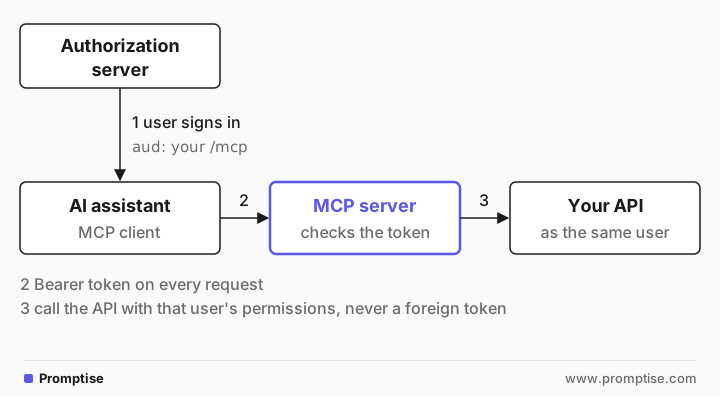
The spec also says MCP servers must not accept or pass through tokens issued for anyone else. If your MCP server fronts your own API, have your authorization server issue tokens the MCP server accepts, then call the API as that user, for example by exchanging the token or by having the API trust the MCP server's verified identity for the user. Don't forward an unrelated token. MCP authentication with API keys, JWT and OAuth shows the server side in Python.
Scopes help a lot. A token with invoices:read can't create invoices even if a write tool is exposed by mistake.
[11]
Step 6: Ship it where agents look
Host it at a stable URL, such as https://mcp.example.com/mcp, over Streamable HTTP. Serve it stateless so you can scale it like any API; MCP 2026-07-28 migration explains how.
Document the install for each client your users have: the URL for Claude and ChatGPT, a JSON snippet for VS Code and Cursor, a command for CLI agents. MCPcast writes these snippets into the generated README.
List the tools and what they can't do on a public page, so security teams can approve it.
Version tool changes. Renaming or removing a tool breaks users' saved prompts. Add new tools, deprecate old ones, and remove them later.
[12]
Running an agent-ready SaaS in production
Rate-limit per user and per client. Agents retry and loop. Limit at the MCP layer as well as the API; see MCP rate limiting per client.
Log every tool call with the user, the tool and the arguments, so support can answer "what did the agent do?".
Gate writes. Server-side approval holds a write until a person confirms, whichever client sent it. Client-side approval only protects clients you control.
Treat your own data as untrusted input to the model. A customer note that says "ignore previous instructions" reaches the model through your tool's result. Keep tool results factual and short, and don't return fields the task doesn't need. MCP security best practices has the full checklist.
Watch which tools are used. Unused tools cost context in every conversation; remove them.
Keep the OpenAPI document current. If you generate the server, regenerate it in CI when the spec changes, and run your agent tests.
[13]
Common problems and fixes
Symptom | Cause | Fix |
|---|---|---|
Agent picks the wrong tool | Similar names, vague descriptions | Rename by intent; say when to use each tool and when not to |
Agent invents parameter values | Free-text fields with fixed values | Use enums; give an example in the description |
Tool names like list_invoices_invoices_get | Generated operationIds | Set explicit operation IDs |
Agent can't find an ID | The ID never appears in any response | Add a list or search tool that returns IDs |
Huge responses, slow and expensive runs | Endpoints return full objects or all rows | Add filters, limits and summary fields |
Users can't connect from an assistant | No OAuth metadata, or the assistant can't reach a local server | Publish protected resource metadata; host remotely |
A write ran without anyone noticing | Writes exposed with no approval | Read-only first; server-side approval for writes |
Generated server misses a new endpoint | Spec changed, server not regenerated | Regenerate in CI from the plan or route map |
[14]
Limitations
A generated server is a first draft. Generators copy your spec's quality. MCPcast's --no-curate descriptions in this example read "List Invoices. List invoices, optionally for one customer and one status", which is usable but plain. Model curation or your own edits make them better, and both need review.
MCP auth is still young in clients. Check which registration methods and flows each assistant your users have supports before you choose.
MCP doesn't fix a weak permission model. If your API can't express "read-only for this user", neither can your MCP server.
MCPcast generates Python. If your team works in TypeScript or Go, a generator or SDK in that language will be easier to own.
The protocol moves fast. The 2026-07-28 revision changed sessions, transports and user prompts. Budget time to keep up.
[15]
FAQ
Do I need an MCP server if I already have an OpenAPI spec?
Not always. The spec is enough for developers who build their own agents. Users who want to add your product to an AI assistant by URL need an MCP server, because assistants connect to MCP servers, not to raw OpenAPI documents.
Can I generate an MCP server from my OpenAPI spec?
Yes. FastMCP's from_openapi, Speakeasy and Promptise MCPcast all do it. Treat the result as a first draft: pick which operations to expose, rewrite descriptions for a model, and gate writes. FastMCP's own docs say curated servers perform better than auto-converted ones for complex APIs.
Should every API endpoint be an MCP tool?
No. Agents choose better from a small set of tools, and every exposed write is risk. Expose the operations behind real user questions, merge related endpoints into one tool where it helps, and start read-only.
How do AI agents authenticate to a SaaS MCP server?
A remote MCP server acts as an OAuth 2.1 resource server. It publishes protected resource metadata that points the client to your authorization server; the user signs in, and the client sends a bearer token issued for your MCP server on every request. Local stdio servers read a token from their environment instead.
Is MCP replacing REST APIs?
No. An MCP server for a SaaS product normally calls the product's REST API. MCP standardizes how AI applications discover and call tools; your API still does the work and enforces permissions.
Where does Promptise fit in making a SaaS agent-ready?
Promptise Foundry has two pieces for this: MCPcast, which turns an OpenAPI document into an editable Python MCP server project with risk classes and server-side approval for writes, and MCPServer, for writing the server by hand with auth, rate limits and audit middleware. Teams working in TypeScript, or wanting a hosted service, may prefer other tools from Step 3.
[16]
Next steps
OpenAPI to MCP: turn any REST API into an MCP server goes deeper on generating and grading the server.
FastAPI MCP server shows how to expose a FastAPI app's routes as MCP tools.
What is the Model Context Protocol explains the protocol from the start.
MCP vs CLI for AI agents compares MCP with another way to give agents tools.
The MCPcast documentation covers every option used above.