Contents · 14 sections↓
- 01What does "tool parameters array type must have items" mean?
- 02Where the error comes from
- 03Does JSON Schema require items for arrays?
- 04Which clients and providers reject arrays without items
- 05How an array without items gets into a tool schema
- 06What you need
- 07Reproduce the error without VS Code
- 08What each SDK generates for list and list[str]
- 09Fix the schema
- 10Test every tool schema in CI
- 11Common problems and fixes
- 12Limitations
- 13FAQ
- 14Next steps
"Failed to validate tool ...: Error: tool parameters array type must have items. Please open an issue for the MCP server or extension which provides this tool" comes from VS Code's chat, before any model sees your request, so it appears with every model, including OpenRouter ones. It means one of the tool's parameters is declared as an array without saying what the array contains. This guide explains where the check lives, which clients and providers are strict about arrays, how the bad schema gets generated, and how to fix and test it in FastMCP, the official MCP SDKs and Promptise Foundry.
What does "tool parameters array type must have items" mean?
A tool's input schema has a parameter with "type": "array" and no "items" keyword. VS Code's chat checks every tool's schema before it sends a request and throws this error for any array without items, so the whole request fails, whatever model you picked. The fix is in the tool: declare what the array holds, for example "items": {"type": "string"}. In Python that means typing the parameter as list[str] instead of list; in TypeScript, z.array(z.string()).
Key takeaways:
It is a client-side check. The message is thrown by VS Code's tool schema normalizer, not by OpenRouter, OpenAI or Anthropic.
JSON Schema itself doesn't require `items`. {"type": "array"} is a valid schema that accepts any array; strict clients and providers add the requirement.
`items: {}` is only half a fix. It passes VS Code, but OpenAI's strict mode rejects it because the items schema has no type.
Typed lists fix it everywhere. list[str], list[int] or a list of a Pydantic model gives every array a typed items schema in every SDK tested here.
Test schemas in CI. A short checker run against your server catches the problem before a user's editor does.
[02]
Where the error comes from
The check is in VS Code's Copilot chat extension, in toolSchemaNormalizer.ts. Before a chat request with tools goes out, VS Code validates each tool's parameters against JSON Schema draft 7 and then walks every node of the schema. The relevant rule is one line: if a node has type: "array" and no items, throw "tool parameters array type must have items". The caller wraps it as "Failed to validate tool <name>: Error: ... Please open an issue for the MCP server or extension which provides this tool".
Because the check runs for every model family, the same tool fails with Copilot's own models, with Claude or Gemini, and with an OpenRouter model added to VS Code. That is why people search for it together with "openrouter": the model provider is in the setup, but it never sees the request. The rule tests !items, so in JavaScript an empty object {} counts as present and passes.
The same requirement shows up in other clients and libraries. The GitLab MCP server fixed its create_issue tool, whose assignee_ids array had no items, after this exact error in Copilot chat. The MCP PHP SDK changed its schema generator to always emit items (items: {} for untyped arrays) and cites the same error.
[03]
Does JSON Schema require items for arrays?
No. In JSON Schema, a keyword that is missing doesn't constrain anything, so {"type": "array"} means "an array of anything". The MCP specification only says a tool's inputSchema must be a valid JSON Schema object (2020-12 unless $schema says otherwise), so a server that omits items is following the spec. The problem is that several consumers are stricter than the spec, and a tool has to work with the strictest one its users run.
[04]
Which clients and providers reject arrays without items
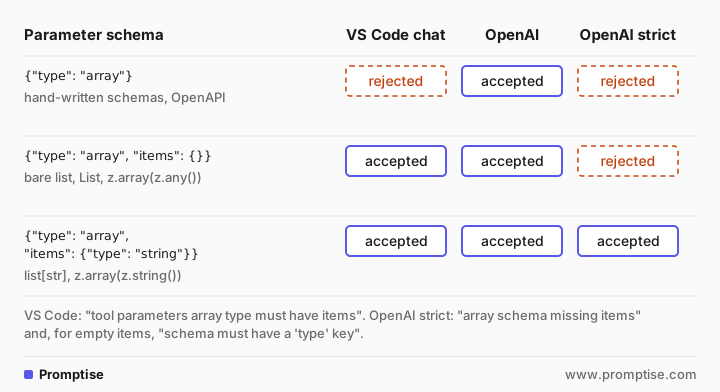
The OpenAI behavior was checked with real requests to the Responses API (gpt-5-mini): openai_check.py sends the same tag_issues tool with three versions of its ids parameter, once with strict: false and once with strict: true, and prints what the API says:
strict=False  no items       accepted
strict=False  items: {}      accepted
strict=False  items: string  accepted
strict=True   no items       rejected: Invalid schema for function 'tag_issues': In context=('properties', 'ids'), array schema missing items.
strict=True   items: {}      rejected: Invalid schema for function 'tag_issues': In context=('properties', 'ids', 'items'), schema must have a 'type' key.
strict=True   items: string  accepted
Client or provider | Array without items | | Source |
|---|---|---|---|
VS Code chat (any model, including OpenRouter) | Rejected before sending | Accepted | VS Code source, toolSchemaNormalizer.ts |
OpenAI, strict: false | Accepted | Accepted | Request above |
OpenAI, strict: true | Rejected: "array schema missing items" | Rejected: "schema must have a 'type' key" | Request above |
Anthropic | Not documented as required | Not documented | input_schema is a JSON Schema object; strict tool use lists array as supported |
Gemini | items is listed as optional | Not documented | Schema (OpenAPI 3.0 subset) and parametersJsonSchema in the API reference |
OpenRouter | Not documented | Not documented | Docs say tool definitions follow OpenAI's format and are validated, without listing rules |
Only the OpenAI rows were tested here; the Anthropic, Gemini and OpenRouter rows are what their documentation says, and their behavior can depend on the model behind them. A tool with typed items passes all of them, which is the point: don't design for the most lenient consumer.
[05]
How an array without items gets into a tool schema
Four sources cover most cases:
Hand-written schemas. A server that builds inputSchema as a dict or JSON file and writes {"type": "array", "description": "user IDs"}. The GitLab example above is this case.
OpenAPI conversion. OpenAPI 3.1 schemas are JSON Schema, so an array field without items is valid there, and a converter that copies the schema copies the gap.
Untyped lists in code. ids: list in Python, or z.array(z.any()) in TypeScript, produces items: {}. That passes VS Code but fails OpenAI's strict mode.
Older SDK versions. Schema generators that dropped items for untyped or nullable arrays, as the MCP PHP SDK did before its fix.
[06]
What you need
Python 3.10 or newer and
uv pip install "promptise==1.7.0" pytest pytest-asyncio. The FastMCP and official-SDK comparison used fastmcp 4.1.3 and mcp 2.3.0 in a separate environment.Node.js for the two .mjs files: the TypeScript SDK comparison (@modelcontextprotocol/sdk 1.32.1, zod 4.6.7) and the reproduction of VS Code's rule.
An OpenAI key only for openai_check.py.
[07]
Reproduce the error without VS Code
schema_check.py walks a schema the way VS Code does and also reports the stricter OpenAI case. It returns one problem per array node:
"""Find array schemas that strict clients reject.

check(schema) returns one problem per array node:
- "missing items": VS Code's rule ("tool parameters array type must have items"),
  and OpenAI strict mode ("array schema missing items").
- "items has no type": `items: {}` passes VS Code but OpenAI strict mode
  rejects it ("schema must have a 'type' key").
"""

CHILD_LISTS = ("anyOf", "oneOf", "allOf", "prefixItems")
CHILD_MAPS = ("properties", "$defs", "definitions", "patternProperties")


def check(schema, path="$"):
    problems = []
    if not isinstance(schema, dict):
        return problems
    types = schema.get("type")
    is_array = types == "array" or (isinstance(types, list) and "array" in types)
    if is_array:
        items = schema.get("items")
        if not items:  # absent, None or {} are all falsy in Python
            problems.append((path, "missing items" if items is None else "items has no type"))
        elif isinstance(items, dict) and not any(k in items for k in ("type", "$ref", "anyOf", "oneOf", "enum")):
            problems.append((path, "items has no type"))
    for key in CHILD_MAPS:
        for name, child in (schema.get(key) or {}).items():
            problems += check(child, f"{path}.{key}.{name}")
    for key in CHILD_LISTS:
        for i, child in enumerate(schema.get(key) or []):
            problems += check(child, f"{path}.{key}[{i}]")
    for key in ("items", "additionalProperties", "not", "if", "then", "else", "contains"):
        if isinstance(schema.get(key), dict):
            problems += check(schema[key], f"{path}.{key}")
    return problems
Next, an MCP server built from a small OpenAPI 3.1 spec whose ids field is an array without items. Promptise's OpenAPIProvider turns each operation into a tool, and it copies the field's schema as the spec has it:
"""An OpenAPI operation with an array field that has no items, turned into an MCP tool."""
import asyncio
import json

from promptise.mcp.server import MCPServer, OpenAPIProvider
from promptise.mcp.server.testing import TestClient

from schema_check import check

SPEC = {
    "openapi": "3.1.0",
    "info": {"title": "Issues", "version": "1"},
    "servers": [{"url": "https://api.example.com"}],
    "paths": {
        "/issues/labels": {
            "post": {
                "operationId": "add_labels",
                "summary": "Add labels to issues",
                "requestBody": {
                    "required": True,
                    "content": {
                        "application/json": {
                            "schema": {
                                "type": "object",
                                "properties": {
                                    "ids": {"type": "array"},  # no items: valid OpenAPI 3.1
                                    "label": {"type": "string"},
                                },
                                "required": ["ids", "label"],
                            }
                        }
                    }
                },
            }
        }
    },
}


async def main():
    server = MCPServer(name="issues-api")
    OpenAPIProvider(SPEC).register(server)
    for t in await TestClient(server).list_tools():
        print(t.name, json.dumps(t.input_schema["properties"]["ids"]))
        print("  ->", check(t.input_schema) or "ok")


if __name__ == "__main__":
asyncio.run(main())add_labels {"type": "array"}
-> [('$.properties.ids', 'missing items')]To see the exact message, dump_tools.py writes the server's tools in the OpenAI function format VS Code checks, and vscode_rule.mjs walks each schema with VS Code's array rule (n.type === "array" && !n.items throws) and prints the message the way VS Code wraps it (node vscode_rule.mjs tools.json):
ok: close_issues
Failed to validate tool add_labels: Error: tool parameters array type must have items. Please open an issue for the MCP server or extension which provides this tool
That is the error from the search box, word for word, from a reimplementation of the one rule rather than from VS Code itself. In VS Code the tool name carries a prefix for the server (mcp_<server>_<tool>).
[08]
What each SDK generates for list and list[str]
The same two tools, one with an untyped list and one with list[str], in Promptise Foundry (an MCP server tool and a local @tool):
"""The input schemas Promptise generates for list parameters, and what a strict client says."""
import asyncio
import json
from typing import List, Optional

from promptise import tool
from promptise.mcp.server import MCPServer
from promptise.mcp.server.testing import TestClient

from schema_check import check

server = MCPServer(name="issues")


@server.tool()
async def label_bare(ids: list, label: str) -> str:
    """Add a label to issues (untyped list)."""
    return "ok"


@server.tool()
async def label_typed(ids: list[str], label: str) -> str:
    """Add a label to issues (list[str])."""
    return "ok"


@server.tool()
async def label_optional(label: str, ids: Optional[List] = None) -> str:
    """Add a label to issues (Optional[List])."""
    return "ok"


@tool
def local_bare(ids: list) -> str:
    """Local tool with an untyped list."""
    return "ok"


@tool
def local_typed(ids: list[str]) -> str:
    """Local tool with list[str]."""
    return "ok"


def show(name, schema):
    ids = schema["properties"]["ids"]
    problems = check(schema)
    verdict = "; ".join(f"{p}: {msg}" for p, msg in problems) or "ok"
    print(f"{name:15} ids = {json.dumps(ids)}")
    print(f"{'':15} -> {verdict}")


async def main():
    print("Promptise MCP server (@server.tool)")
    for t in await TestClient(server).list_tools():
        show(t.name, t.input_schema)
    print("Promptise local tools (@tool)")
    for t in (local_bare, local_typed):
        show(t.name, t.args_schema.model_json_schema())


asyncio.run(main())Promptise MCP server (@server.tool)
label_bare ids = {"items": {}, "title": "Ids", "type": "array"}
-> $.properties.ids: items has no type
label_typed ids = {"items": {"type": "string"}, "title": "Ids", "type": "array"}
-> ok
label_optional ids = {"anyOf": [{"items": {}, "type": "array"}, {"type": "null"}], "default": null, "title": "Ids"}
-> $.properties.ids.anyOf[0]: items has no type
Promptise local tools (@tool)
local_bare ids = {"items": {}, "title": "Ids", "type": "array"}
-> $.properties.ids: items has no type
local_typed ids = {"items": {"type": "string"}, "title": "Ids", "type": "array"}
-> okIn the official MCP Python SDK (MCPServer, the 2.x name of its FastMCP class) and in FastMCP, with sdk_schemas.py:
Official MCP SDK (MCPServer)
  label_bare   ids = {"items": {}, "title": "Ids", "type": "array"}  -> [('$.properties.ids', 'items has no type')]
  label_typed  ids = {"items": {"type": "string"}, "title": "Ids", "type": "array"}  -> ok
FastMCP
  label_bare   ids = {"items": {}, "type": "array"}  -> [('$.properties.ids', 'items has no type')]
  label_typed  ids = {"items": {"type": "string"}, "type": "array"}  -> ok
And in the MCP TypeScript SDK with zod, with ts_schemas.mjs:
label_any    ids = {"type":"array","items":{}}
label_typed  ids = {"type":"array","items":{"type":"string"}}
The pattern is the same everywhere. Code-first SDKs never emit an array without items: an untyped list becomes items: {}, which VS Code accepts and OpenAI's strict mode doesn't. A typed list becomes items with a type, which everyone accepts. So if you see the VS Code error on a server built with one of these SDKs, look for a hand-written or converted schema, not a decorated function.
[09]
Fix the schema
Python: type every list
Give every list parameter its element type, in Promptise, FastMCP and the official SDK alike:
from typing import Annotated
from pydantic import BaseModel, Field


class LineItem(BaseModel):
    sku: str
    quantity: int


@server.tool()
async def label_issues(
    ids: list[int],                                  # items: {"type": "integer"}
    tags: Annotated[list[str], Field(max_length=10)],  # items: {"type": "string"}, maxItems: 10
    labels: list[str] | None = None,                 # anyOf: typed array or null
    lines: list[LineItem] | None = None,             # items: the LineItem object schema
) -> str:
    """Add labels to issues."""
    return "ok"
On a Promptise server this produces typed items for all four parameters, with LineItem inlined as an object schema. list[str] | None keeps the typed items inside the anyOf. Avoid bare list, List and list[Any]: they all produce items: {}.
TypeScript: type every z.array
inputSchema: { ids: z.array(z.number().int()), labels: z.array(z.string()).optional() }z.array(z.any()) and z.array(z.unknown()) produce items: {}.
Hand-written and OpenAPI schemas: add items
For a schema you write yourself, add items with the real element type. For an OpenAPI spec, fix the spec if it is yours. If it isn't, patch the loaded spec before conversion, so the fix survives regeneration:
"""The same server with the fix: the spec's array gets an items schema before conversion."""
import copy

from promptise.mcp.server import MCPServer, OpenAPIProvider

from openapi_schemas import SPEC

spec = copy.deepcopy(SPEC)
body = spec["paths"]["/issues/labels"]["post"]["requestBody"]["content"]["application/json"]["schema"]
body["properties"]["ids"]["items"] = {"type": "integer"}  # the real element type: issue ids

server = MCPServer(name="issues")


@server.tool()
async def close_issues(ids: list[int], reason: str) -> str:
    """Close issues by id."""
    return f"closed {len(ids)}"


OpenAPIProvider(spec).register(server)

if __name__ == "__main__":
    server.run()
Use the real element type, not a guess. {"type": "string"} for numeric ids would make the model send strings, and the API would reject them.
When you can't change the server
If the server belongs to someone else, open an issue with the tool name and the schema path; the error message asks for exactly that. Meanwhile, the error only stops clients that check, such as VS Code. A Promptise agent connecting to the same server rebuilds each tool's schema from its own model of the parameters, so the array arrives at the model as items: {}, which OpenAI accepts without strict mode:
add_labels ids = {"items": {}, "type": "array"} required = ['ids', 'label']That makes the agent work, not VS Code; VS Code reads the server's schema directly.
[10]
Test every tool schema in CI
Two checks catch the problem early. The first connects to any MCP server over stdio, whatever language it is written in, and checks every tool:
"""Connect to any MCP server over stdio and check every tool's input schema.

Usage: python check_server.py python issues_server.py
Exits with status 1 if a tool has an array schema that strict clients reject.
"""
import asyncio
import json
import sys

from promptise import MCPClient

from schema_check import check


async def main(command, args):
    async with MCPClient(transport="stdio", command=command, args=args) as client:
        tools = await client.list_tools()
    failed = 0
    for t in tools:
        schema = t.inputSchema if hasattr(t, "inputSchema") else t.input_schema
        problems = check(schema)
        failed += bool(problems)
        print(f"{'FAIL' if problems else 'ok  '}  {t.name}")
        for path, msg in problems:
            print(f"      {path}: {msg}")
    print(f"{len(tools)} tools, {failed} with array schemas strict clients reject")
    return 1 if failed else 0


if __name__ == "__main__":
    sys.exit(asyncio.run(main(sys.argv[1], sys.argv[2:])))
Against the broken server (python check_server.py python issues_server.py):
ok    close_issues
FAIL  add_labels
      $.properties.ids: missing items
2 tools, 1 with array schemas strict clients reject
Against the fixed one:
ok    close_issues
ok    add_labels
2 tools, 0 with array schemas strict clients reject
It exits with status 1 when a tool fails, so it can gate a pipeline. The second check is a unit test for a Promptise server, using TestClient so no transport is started:
"""Fail the build when a tool's schema has an array strict clients reject."""
import pytest
from promptise.mcp.server.testing import TestClient

from fixed_server import server
from schema_check import check


@pytest.mark.asyncio
async def test_every_array_has_typed_items():
    tools = await TestClient(server).list_tools()
    problems = {t.name: check(t.input_schema) for t in tools}
assert not any(problems.values()), problems. [100%]
1 passed in 0.68sFor more on testing servers this way, see Testing MCP Servers in Python: pytest Without a Live Server.
[11]
Common problems and fixes
Symptom | Cause | Fix |
|---|---|---|
VS Code: "tool parameters array type must have items" | An array parameter without items | Add items with the element type |
Same error with every model in VS Code | The check runs in VS Code before any request | Fix the server; switching models doesn't help |
OpenAI strict mode: "array schema missing items" | Same gap, in a strict tool | Add items with a type |
OpenAI strict mode: "schema must have a 'type' key" at items | Untyped list (items: {}) | Use list[str], list[int] or a model |
Error only for tools generated from OpenAPI | The spec's array has no items | Fix or patch the spec before conversion |
Fixed the code, error persists | Client cached the old tool list | Restart the server and reload the client's tools |
[12]
Limitations
Provider behavior changes. The OpenAI results are from requests made with gpt-5-mini in October 2026. Re-run openai_check.py against your own models.
Anthropic, Gemini and OpenRouter weren't called here. Their rows come from their documentation, which doesn't describe this case in detail.
The VS Code rule is reimplemented, not run. vscode_rule.mjs copies the one array rule from VS Code's source; VS Code also applies other normalizations (for example for Gemini nullable types and GPT-4 keywords).
`schema_check.py` covers arrays only. Strict modes have more rules (OpenAI strict also needs every property in required and additionalProperties: false).
[13]
FAQ
Is "tool parameters array type must have items" an OpenRouter error?
No. VS Code's chat throws it while validating tool schemas, before the request goes to any provider. It shows up with OpenRouter models because they are one of the models people use in VS Code. Fix the tool's schema and it goes away for every model.
Which MCP server should I report the error to?
The one that provides the tool named in the message. VS Code names it as mcp_<server>_<tool>. Include the parameter name and the schema; the maintainer needs to add an items schema with the element type.
Is an array without items valid JSON Schema?
Yes. JSON Schema treats a missing keyword as no constraint, so {"type": "array"} accepts any array, and the MCP specification accepts any valid JSON Schema. Some clients and providers are stricter than the spec, which is why tools should declare items anyway.
Does items: {} fix the error?
It fixes VS Code's check, which only tests that items is present. OpenAI's strict mode still rejects it because the items schema has no type. Declare the element type ({"type": "string"} or a full object schema) to satisfy both.
How do I fix it in FastMCP or the official MCP Python SDK?
Type the parameter: ids: list[str] instead of ids: list. Both SDKs build the schema from the type hints with Pydantic, and a typed list gives items with a type. Check hand-written schemas and OpenAPI-generated tools separately.
How do I check all my MCP tools for this?
List the server's tools with an MCP client and walk each inputSchema for array nodes without typed items, as check_server.py does. Run it in CI so a new tool with an untyped list fails the build instead of a user's editor.
[14]
Next steps
Build a server that passes strict clients from the start: Build a Production MCP Server in Python (Step by Step).
Generate tools from an API spec, and review what they inherit: OpenAPI to MCP: Turn Any REST API into an MCP Server.
Test servers without a live transport: Testing MCP Servers in Python: pytest Without a Live Server.
Use OpenRouter models with MCP tools outside the editor: OpenRouter AI Agent with MCP: Many Models in Promptise.
Learn what the model does with a tool schema: What Is Tool Calling? LLM Function Calling Explained.
Get schema-valid JSON from models in general: Structured Outputs: Get Reliable JSON from an LLM.