Contents · 15 sections↓
- 01How do you build a scheduled AI agent that sends push notifications?
- 02How a scheduled agent with notifications works
- 03When to use a scheduled agent (and when not)
- 04ntfy or Pushover: which push service?
- 05What you need
- 06Step 1: Detect change without an LLM
- 07Step 2: Write the push senders
- 08Step 3: Put the agent in a cron process
- 09Step 4: Run it and read what arrived
- 10Prompt design for scheduled runs
- 11Running a scheduled agent in production
- 12Common problems and fixes
- 13Limitations
- 14FAQ
- 15Next steps
A scheduled AI agent with push notifications runs on a cron schedule, uses tool calling to check something and summarize it, and sends the result to your phone through ntfy or Pushover. The hard parts are not the cron line or the HTTP call: they are not paying for runs where nothing happened, not pushing the same news twice, and keeping each run cheap and isolated. This guide covers those design rules and builds a release-alert agent on the Promptise Foundry runtime, with real runs.
How do you build a scheduled AI agent that sends push notifications?
Put the agent in a process with a cron trigger, give it a tool that sends a push (an HTTP POST to ntfy or Pushover), and enforce the rules in code rather than in the prompt. A cheap check before each run decides whether anything changed, so most ticks never call the model. The notify tool sends only when there is something new and records it as sent only after the push succeeded. Each run starts with a fresh context, under a budget that caps tool calls and allows one push.
Check before you think. Detecting change is plain code: compare versions, hashes or timestamps. Only call the LLM when there is something to summarize.
The send rule lives in the tool. "Only notify when something changed" is enforced by notify_phone, not by an instruction the model may skip.
One push per run, at most. A budget refuses a second irreversible call before it runs.
Fresh context every run. Scheduled runs shouldn't carry yesterday's conversation. State that must persist goes in a file or database you control.
Keep it model-agnostic. The trigger, the change check and the push don't depend on the model; swapping models changes one line.
[02]
How a scheduled agent with notifications works
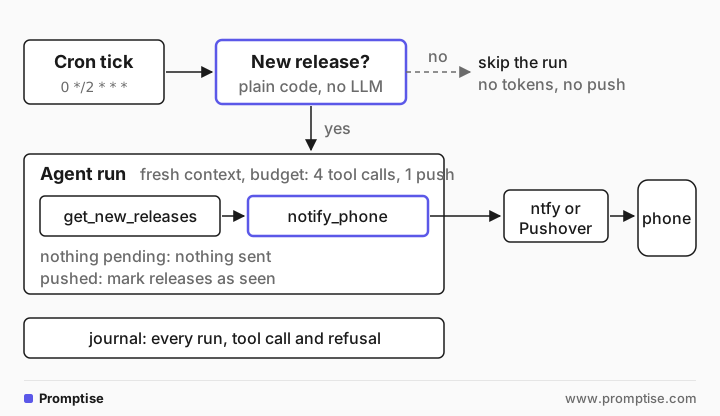
Four parts, each with one job:
The schedule wakes the process: a cron expression and a time zone.
The filter runs on every tick, before any model call. It returns true only when there is something new. Most ticks stop here, which is where the cost control comes from.
The agent reads what changed and turns it into a short message. This is the part an LLM is good at: release notes, a diff, a status page or an inbox are long, and a phone notification has room for two or three lines.
The notify tool sends the message and updates the "already sent" state. Because the state changes only after a successful send, a failed push is retried on the next tick instead of being lost.
This is the same architecture whether the event source is a cron schedule, a webhook or a file drop: a trigger, a cheap filter, an agent and side-effecting tools. Event-Driven AI Agents: Webhook, Cron and File Triggers compares the trigger types.
[03]
When to use a scheduled agent (and when not)
Use one when the work is "check periodically, then explain": new releases, overnight error spikes, a competitor's pricing page, a weekly report, a long-running job's status. The LLM earns its place when the input is unstructured and the output must be short.
Don't use one when:
A plain script is enough. If the notification is "the build failed", a cron job with curl to ntfy is simpler and free. Add an LLM only for summarizing or judging.
You need it the moment it happens. Polling every two hours means up to two hours of delay. If the source can call you, use a webhook trigger instead.
Every tick needs action. Then the filter skips nothing and you pay for every run; check that the value is worth it.
[04]
ntfy or Pushover: which push service?
Both deliver to iOS and Android apps over a simple HTTP API.
ntfy | Pushover | |
|---|---|---|
Send | POST https://ntfy.sh/<topic>, message as the body, options as headers (Title, Priority, Tags, Click) | POST https://api.pushover.net/1/messages.json with token, user, message (form or JSON) |
Account | None needed on the public server; the topic name acts as the password | Account and an application token |
Cost | Free on ntfy.sh, up to 250 messages a day; paid plans for more and reserved topics; open source and self-hostable | 30-day trial, then $4.99 one-time per platform; 10,000 messages a month per account |
Privacy | Anyone who knows the topic can read it; use access tokens or self-host for anything private | Messages go only to your devices |
Limits | 4,096 bytes per message; a request bucket of 60, refilled one per 5 seconds | 1,024 characters per message, 250 per title; 429 when the monthly quota is used |
Extras | Click URL, tags, priorities, actions, read messages back over HTTP | Priorities up to emergency (repeats until acknowledged), receipts, sounds |
ntfy is the quicker start and the better choice if you will self-host. Pushover suits personal alerts you want private without running a server, and has emergency notifications that repeat until acknowledged. The examples below send through ntfy; the Pushover sender is shown too, but isn't run here.
[05]
What you need
Python 3.10 or newer and Promptise Foundry 1.7.0:
uv pip install "promptise==1.7.0" python-dotenv.An OpenAI API key. Any tool-calling model works.
The ntfy app on your phone, subscribed to a topic only you know. Generate one:
python -c "import secrets; print('alerts-' + secrets.token_hex(8))", and put it in your environment as NTFY_TOPIC. The demo below uses a throwaway topic made this way.Optional, for Pushover: an application token and your user key as PUSHOVER_APP_TOKEN and PUSHOVER_USER_KEY.
[06]
Step 1: Detect change without an LLM
The example agent watches GitHub releases of three projects and tells you what changed. The watcher is plain Python. poll() asks GitHub's API for each project's latest release and keeps the ones not seen before; mark_seen() persists what was notified:
"""Detect new GitHub releases without an LLM. State survives restarts in a JSON file."""
import json
import urllib.request
from pathlib import Path

REPOS = ["openai/openai-agents-python", "microsoft/agent-framework", "pydantic/pydantic-ai"]


class ReleaseWatcher:
    def __init__(self, state_file: str = "seen.json") -> None:
        self.state_file = Path(state_file)
        self.seen: dict[str, str] = json.loads(self.state_file.read_text()) if self.state_file.exists() else {}
        self.pending: list[dict] = []  # new releases found by the last poll, not yet notified
        self.polls = 0

    def latest(self, repo: str) -> dict:
        req = urllib.request.Request(f"https://api.github.com/repos/{repo}/releases/latest",
                                     headers={"Accept": "application/vnd.github+json", "User-Agent": "release-watcher"})
        with urllib.request.urlopen(req, timeout=5) as resp:
            data = json.load(resp)
        return {"repo": repo, "tag": data["tag_name"], "url": data["html_url"],
                "notes": (data.get("body") or "")[:1500]}

    def poll(self, event=None) -> bool:
        """Cron filter: True only when a release is new. Runs before any LLM call."""
        self.polls += 1
        found = [r for r in map(self.latest, REPOS) if self.seen.get(r["repo"]) != r["tag"]]
        self.pending = found
        return bool(found)

    def mark_seen(self, releases: list[dict]) -> None:
        self.seen.update({r["repo"]: r["tag"] for r in releases})
        self.state_file.write_text(json.dumps(self.seen, indent=2))
poll() has the signature of a trigger filter, so the runtime can call it on every tick. It is synchronous by design (filters run before the event is queued) and uses a 5-second timeout, so a slow API can't hold up the schedule for long. Unauthenticated GitHub API calls are limited to 60 an hour, which is plenty for three projects every two hours.
[07]
Step 2: Write the push senders
ntfy takes the message as the request body and options as headers. Pushover takes one JSON or form body:
"""Push a notification to a phone: ntfy (used in the demo) or Pushover."""
import json
import os
import urllib.request


def send_ntfy(topic: str, title: str, message: str, click: str | None = None, priority: int = 3) -> str:
    """POST to ntfy. On ntfy.sh the topic name is the only secret: make it long and random."""
    headers = {"Title": title, "Priority": str(priority), "Tags": "package"}
    if click:
        headers["Click"] = click
    if token := os.environ.get("NTFY_TOKEN"):  # for protected topics or a self-hosted server
        headers["Authorization"] = f"Bearer {token}"
    req = urllib.request.Request(f"https://ntfy.sh/{topic}", data=message.encode(), headers=headers, method="POST")
    with urllib.request.urlopen(req, timeout=10) as resp:
        return json.load(resp)["id"]


def send_pushover(title: str, message: str, url: str | None = None, priority: int = 0) -> str:
    """POST to the Pushover Message API (https://pushover.net/api). Not run in this guide."""
    fields = {"token": os.environ["PUSHOVER_APP_TOKEN"], "user": os.environ["PUSHOVER_USER_KEY"],
              "title": title[:250], "message": message[:1024], "priority": priority}
    if url:
        fields["url"] = url
    req = urllib.request.Request("https://api.pushover.net/1/messages.json",
                                 data=json.dumps(fields).encode(),
                                 headers={"Content-Type": "application/json"}, method="POST")
    with urllib.request.urlopen(req, timeout=10) as resp:  # 4xx raises: bad input, don't retry as is
        return json.load(resp)["request"]
Both raise on an HTTP error, so a failed push surfaces as a tool error instead of a silent success. Two details from the services' docs: Pushover answers 4xx for invalid input, which you shouldn't retry unchanged, and 429 once the monthly quota is used; ntfy answers 429 when you exceed its request rate. NTFY_TOKEN is only needed for a protected topic or your own server.
[08]
Step 3: Put the agent in a cron process
The process ties it together: two tools, the cron trigger with the watcher as its filter, a fresh context for every run, a budget and a journal:
"""A scheduled agent that pushes a short summary of new releases to your phone."""
import asyncio
import os
import signal

from dotenv import load_dotenv

from promptise import tool
from promptise.runtime import (
    AgentProcess,
    BudgetConfig,
    ContextConfig,
    JournalConfig,
    ProcessConfig,
    ToolCostAnnotation,
    TriggerConfig,
)
from notify import send_ntfy
from watcher import ReleaseWatcher

load_dotenv()  # OPENAI_API_KEY, NTFY_TOPIC
TOPIC = os.environ["NTFY_TOPIC"]
SCHEDULE = os.environ.get("SCHEDULE", "0 */2 * * *")  # every two hours
watcher = ReleaseWatcher("seen.json")

INSTRUCTIONS = """\
You write release alerts for a developer's phone.
1. Call get_new_releases once.
2. Write one notification. Title: "New releases" plus the project names.
   Message: one line per release with project, version and the most useful change
   in plain words. At most 400 characters in total. No markdown.
3. Call notify_phone once. Then reply with one short line saying what you sent.
"""


@tool
async def get_new_releases() -> list[dict]:
    """New releases found by this run's check: repo, tag, url and the start of the release notes."""
    return watcher.pending


@tool
async def notify_phone(title: str, message: str) -> str:
    """Send one push notification to the owner's phone.

    Args:
        title: Short title, at most 60 characters.
        message: The text of the notification, at most 400 characters.
    """
    releases = watcher.pending
    if not releases:  # the rule is in code: nothing new, nothing sent
        return "Nothing new since the last notification, so nothing was sent."
    click = releases[0]["url"] if len(releases) == 1 else None
    message_id = send_ntfy(TOPIC, title[:60], message[:400], click=click)
    watcher.mark_seen(releases)  # only after the push succeeded
    watcher.pending = []
    return f"Sent, ntfy message id {message_id}."


def build_process(schedule: str = SCHEDULE) -> AgentProcess:
    config = ProcessConfig(
        model="openai:gpt-5-mini",
        instructions=INSTRUCTIONS,
        extra_tools=[get_new_releases, notify_phone],
        triggers=[TriggerConfig(
            type="cron",
            cron_expression=schedule,
            cron_timezone="Europe/Zurich",
            filter_expression=watcher.poll,  # no new release: no run, no LLM call
        )],
        context=ContextConfig(conversation_history=False),  # every run starts clean
        concurrency=1,
        budget=BudgetConfig(
            enabled=True,
            max_tool_calls_per_run=4,
            max_irreversible_per_run=1,  # at most one push per run
            max_runs_per_day=24,
            tool_costs={"notify_phone": ToolCostAnnotation(irreversible=True)},
            on_exceeded="pause",
        ),
        journal=JournalConfig(level="full", path=".promptise/journal"),
        max_invocation_time=120,
    )
    return AgentProcess(name="release-alerts", config=config)


async def main() -> None:
    process = build_process()
    await process.start()
    print(f"release alerts running: {SCHEDULE}", flush=True)
    stop = asyncio.Event()
    for sig in (signal.SIGINT, signal.SIGTERM):
        asyncio.get_running_loop().add_signal_handler(sig, stop.set)
    await stop.wait()
    await process.stop(drain_timeout=30)


if __name__ == "__main__":
    asyncio.run(main())
The settings that make it safe to leave running:
`filter_expression=watcher.poll`. A tick with no new release is dropped before it reaches the agent: no model call, no tokens.
`notify_phone` enforces the send rule. With nothing pending it sends nothing and says so. After a successful push it marks the releases as seen and clears the pending list, so a second call in the same run can't push the same news again.
`max_irreversible_per_run=1` with notify_phone marked irreversible. If the model tries a second push, the runtime refuses it before it runs and pauses the process (on_exceeded="pause").
`max_tool_calls_per_run=4` and `max_runs_per_day=24` cap a confused model and a misconfigured schedule.
`ContextConfig(conversation_history=False)`. Each run sees only the instructions and the trigger event. Yesterday's alert can't leak into today's, and the prompt doesn't grow.
`JournalConfig(level="full")` records each run's tool calls, results and any refusals, so you can answer "why did my phone buzz at 2 a.m.?"
`extra_tools` (new in 1.7.0) gives a runtime process plain Python tools without an MCP server.
main() runs it on the real schedule and stops gracefully on Ctrl+C or SIGTERM, giving a run in flight up to 30 seconds to finish.
[09]
Step 4: Run it and read what arrived
The demo runs the process on a one-minute schedule for three ticks, using the throwaway ntfy topic. It starts with state that marks the current Agent Framework release as already seen, so the first tick finds the other two projects' releases as new. Afterwards it reads the topic back from ntfy, which shows exactly what the phone received, and prints the journal:
"""Run the agent on a one-minute schedule for three ticks, then read back what arrived."""
import asyncio
import json
import shutil
import urllib.request

import release_agent
from promptise.runtime.journal import FileJournal

shutil.rmtree(".promptise", ignore_errors=True)
# Start state: the current Agent Framework release was already seen, the others weren't.
latest_af = release_agent.watcher.latest("microsoft/agent-framework")["tag"]
release_agent.watcher.seen = {"microsoft/agent-framework": latest_af}


async def main() -> None:
    process = release_agent.build_process("* * * * *")  # every minute, for the demo only
    await process.start()
    while release_agent.watcher.polls < 3:
        await asyncio.sleep(1)
    while process.status()["queue_size"] or process.status().get("active_invocations"):
        await asyncio.sleep(1)
    await asyncio.sleep(2)
    await process.stop(drain_timeout=30)

    s = process.status()
    print(f"ticks checked: {release_agent.watcher.polls} | agent runs: {s['invocation_count']} "
          f"| skipped before the LLM: {s['filtered_count']}")
    print("seen.json:", json.dumps(release_agent.watcher.seen))

    with urllib.request.urlopen(f"https://ntfy.sh/{release_agent.TOPIC}/json?poll=1&since=10m") as r:
        for line in r.read().decode().splitlines():
            m = json.loads(line)
            body = m["message"].replace("\n", "\n  ")
            print(f"\nOn the phone:\n  {m['title']}\n  {body}")

    print("\nJournal:")
    for e in await FileJournal(".promptise/journal").read(process.name):
        if e.entry_type in ("trigger_event", "tool_call", "tool_denied", "invocation_result"):
            detail = e.data.get("tool") or (f"{e.data['duration_ms'] / 1000:.1f} s" if "duration_ms" in e.data
                                             else e.data.get("trigger_type"))
            print(f"  {e.entry_type:<18} {detail}")


asyncio.run(main())ticks checked: 3 | agent runs: 1 | skipped before the LLM: 2
seen.json: {"microsoft/agent-framework": "python-1.23.0", "openai/openai-agents-python": "v0.24.0", "pydantic/pydantic-ai": "v2.60.0"}
On the phone:
New releases: openai-agents-python, pydantic-ai
openai/openai-agents-python v0.24.0 - exposes MCP annotations on converted tools and adds run-wide tool exception formatting.
pydantic/pydantic-ai v2.60.0 - adds clearer model error types (e.g., ModelRateLimitError) and improves model selection context.
Journal:
trigger_event cron
tool_call get_new_releases
tool_call notify_phone
invocation_result 24.4 sThree ticks fired, one minute apart. On the first, the watcher found new releases of the OpenAI Agents SDK and Pydantic AI, so the agent ran: it read the releases, wrote two lines and pushed them. On the second and third ticks nothing had changed, and the filter dropped them before the agent started: no model call, no tokens, no push. The state file now records all three projects as seen, so a restart won't send the same alert again.
The journal shows the one run in full: the cron event, both tool calls and the result. Ticks the filter dropped don't reach the journal; the process counts them in filtered_count. The notification itself follows the instructions: a title, one line per release, plain text.
[10]
Prompt design for scheduled runs
A scheduled run has no user in the loop to ask a follow-up question, so the instructions must be complete:
Number the steps and name the tools. "Call get_new_releases once. Write one notification. Call notify_phone once." leaves little room for detours.
State the output limits. Phone notifications truncate. Give a character budget and a shape ("one line per release").
Say what not to do. "No markdown" matters: most push apps render plain text, and ntfy shows Markdown only where you enable it.
Keep the event data out of the instructions. The runtime delivers the cron payload as a separate message, marked as data. For sources you don't control, such as release notes written by others, that framing matters: text inside them shouldn't be able to change what the agent does. The tools enforce the important rules anyway.
Don't rely on the prompt for anything that must hold. Deduplication, one push per run and quiet hours are code.
[11]
Running a scheduled agent in production
Run it under a supervisor. systemd, a container with a restart policy, or promptise runtime start with a manifest. The process must survive reboots; the state file must survive the process.
Plan for missed ticks. If the machine was down at 08:00, the cron trigger doesn't replay it. For a release watcher that is fine (the next tick catches up, because state is "last seen", not "last tick"). AI Agent Cron Jobs: Run an Agent on a Schedule covers catch-up and overlapping runs.
Retry the push, not the run. If ntfy or Pushover is down, the tool fails, nothing is marked as seen, and the next tick tries again. Don't add retries that could send twice; Idempotent Tool Calls: Make AI Agent Retries Safe explains why.
Keep secrets out of the topic and the message. On public ntfy, anyone with the topic name reads every message. Never put credentials, personal data or internal URLs in a notification; use an access token or self-host for anything private.
Watch the budget, not just the bill. Set max_runs_per_day and a spending limit with your model provider. The runtime's budget counts tool calls and runs, not tokens. AI Agent Cost Control: Budgets That Stop Runaway Spend shows the other limits.
Know when it stops. A paused process sends nothing, including alerts about itself. Route the runtime's own events (budget exceeded, process paused) to a second channel; AI Agent Notifications: Webhook and Slack Alerts in Python shows how.
[12]
Common problems and fixes
Symptom | Cause | Fix |
|---|---|---|
The same alert arrives every tick | State not saved, or saved before the push and reset on failure | Mark as seen only after a successful push; check the state file is writable and persistent |
No alert, but the agent ran | The model skipped notify_phone, or the push failed | Read the journal: a tool_call without a result means the send failed; tighten the instructions |
Two pushes in one run | No per-run limit | max_irreversible_per_run=1 with the tool marked irreversible |
Every tick costs tokens | Change detection inside the agent | Move it into the trigger filter |
The filter skips every tick, also with news | It raised an error (a filter error counts as "no match") | Check the runtime's warnings; handle API errors and timeouts in poll() |
ntfy answers 429 | Request or daily limit on ntfy.sh | Send fewer messages, batch them, or self-host |
Pushover answers 429 | Monthly quota of the account used up | Wait for the monthly reset, or send less often |
Alert names a sub-package, not the project | In a monorepo, the "latest" release can belong to any package in it | Filter tags by prefix (for example python-) or list releases and pick the right one |
Notification text is cut off | Message longer than the app shows | Limit length in the instructions and truncate in the tool |
[13]
Limitations
Polling has latency. A two-hour schedule means up to two hours before you hear about a change.
The filter runs in the event loop. Keep it fast, with short timeouts; a slow filter delays every trigger of that process.
State is a local file here. For more than one machine, use a database, or two processes will each notify.
Public ntfy topics are not private. Fine for release notes, wrong for anything personal.
The summary is only as good as the source. If release notes are empty or vague, so is the alert.
[14]
FAQ
How do I schedule an AI agent with cron?
Run the agent inside a long-lived process with a cron trigger, such as Promptise's TriggerConfig(type="cron", cron_expression="0 */2 * * *", cron_timezone=...), or call a script from system cron. A runtime trigger adds filters, budgets, a journal and graceful stops; plain cron is simpler but leaves those to you.
How do I send a push notification from an AI agent?
Give the agent a tool that makes an HTTP request to a push service. For ntfy, POST the message to https://ntfy.sh/<your-topic> with a Title header; for Pushover, POST token, user and message to https://api.pushover.net/1/messages.json. Enforce when and how often it may send inside the tool, not in the prompt.
How do I keep a scheduled LLM agent's costs down?
Decide in plain code whether a run is needed, before the model is called, so quiet ticks cost nothing. Start every run with a fresh context so prompts don't grow, cap tool calls and runs per day, choose a small model for summarizing, and set a spending limit with your provider.
Should a scheduled agent remember previous runs?
Usually not as conversation. Carry forward only the state you need, such as "last release seen", in a file or database, and start each run with a clean context. That keeps prompts small, makes runs reproducible and stops one run's mistake from steering the next.
Is ntfy secure enough for agent notifications?
On the public ntfy.sh server, a topic is protected only by its name: anyone who knows it can read and publish. Use a long random topic for low-risk alerts. For anything sensitive, use ntfy access tokens on protected topics, self-host ntfy, or use Pushover.
Does this design depend on the model provider?
No. The schedule, the filter, the state and the push are plain code; the model only writes the summary. Changing model="openai:gpt-5-mini" to another provider's model is the only change, as long as it supports tool calling.
[15]
Next steps
AI Agent Cron Jobs: Run an Agent on a Schedule for previews, overlaps and missed ticks.
AI Agent Event Filters: Skip Runs Before the LLM for more filter patterns.
AI Agent State Between Runs: Context, Keys and Audit for what a run should remember.
Build a Personal AI Agent: Memory, Reminders, Chat for a fuller assistant on the same runtime.
Reference: cron triggers in the Promptise docs.